WordPress File Permissions: A Critical Pillar of Website Security and Operational Integrity

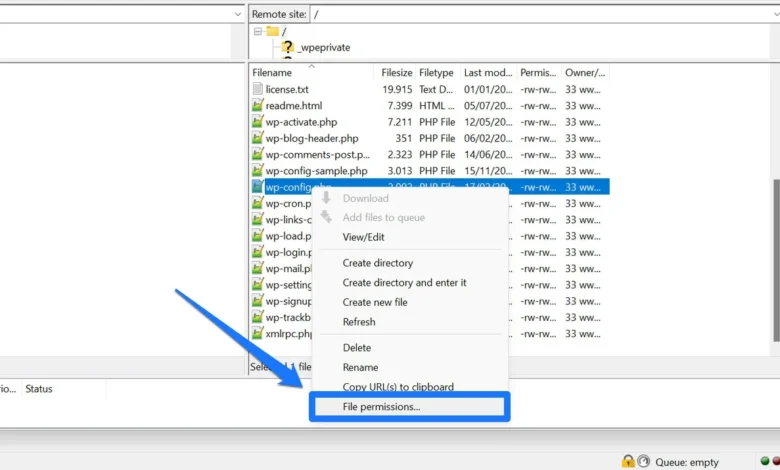
The digital landscape is fraught with threats, making robust website security an absolute imperative for any online presence. Among the foundational elements often overlooked yet critically important are WordPress file permissions. These granular settings dictate who can read, write, or execute specific files and directories on a server, acting as the first line of defense against unauthorized access and malicious activity. Understanding and correctly configuring these permissions is not merely a technical detail; it is a fundamental aspect of maintaining a secure, functional, and reliable WordPress website.

When left unaddressed or improperly configured, file permissions can open doors to devastating security breaches, lead to site functionality errors, or even render a website completely inaccessible. Whether a website owner is grappling with a "permission denied" error, concerned about potential vulnerabilities, or simply seeking to fortify their site’s defenses, a comprehensive grasp of WordPress file permissions is indispensable. This guide delves into the intricate world of file permissions, outlining their mechanics, best practices, and the vital role they play in the broader ecosystem of website security.
The Foundation of Control: Understanding File Permission Levels

At its core, the concept of file permissions in WordPress is derived from Unix-like operating systems, which power the majority of web servers globally. These permissions are assigned to every file and directory, determining the level of access for different categories of users. A quick primer on these basics is essential before delving into WordPress-specific configurations. The evolution of computing, from multi-user mainframe systems to modern web servers, necessitated a robust access control mechanism to prevent unauthorized interference and ensure system stability. File permissions emerged as a standard solution, providing a hierarchical structure for managing access rights.
Types of File Permissions
There are three primary types of permissions, each represented by a specific action:

- Read (r): This permission allows a user or process to view the contents of a file or list the contents of a directory. For website visitors, ‘read’ access to public files (like HTML, CSS, JavaScript, and images) is fundamental for the site to display correctly. Without it, browsers cannot render the page.
- Write (w): This permission grants the ability to modify, edit, or delete a file. For directories, it means a user can create, delete, or rename files within that directory. In a WordPress context, the web server needs write access to certain directories to upload media, install plugins/themes, update core files, or create cache files.
- Execute (x): This permission allows a user to run a file as a program or script. For directories, it permits a user to access the directory and its subdirectories. In web environments, execute permissions are crucial for server-side scripts (like PHP files that power WordPress) to function.
Permission Groups
Permissions are not applied universally but are instead categorized for different groups of users. This segmentation ensures that varying levels of trust and necessity are reflected in access rights:
- User (u) / Owner: This refers to the specific user account that owns the file or directory. In a WordPress hosting environment, the owner is typically the user account associated with your website installation, often the web server process itself (e.g.,
www-datafor Apache,nginxfor NGINX, or a specific cPanel user). This owner usually requires the highest level of access to ensure the site’s core functionality. - Group (g): Files and directories can also belong to a specific group. Any user who is a member of this group will have the permissions assigned to the group. This is useful in shared hosting environments or for development teams where multiple users need shared access to certain resources.
- Others (o) / Public: This category encompasses all other users on the server who are not the owner and are not part of the assigned group. For public-facing web content, ‘Others’ often need read and sometimes execute access to display the website, but write access is almost universally undesirable for security reasons.
Symbolic and Numeric Notation: The Language of Permissions
File permissions are commonly expressed in two formats: symbolic and numeric (or octal) notation. Understanding both is key to interpreting and setting permissions effectively.
-
Symbolic Notation: This uses the letters
r,w,xfor read, write, and execute, respectively, and a dash (-) to denote the absence of a permission. These are arranged in three sets of three, corresponding to User, Group, and Others. For example,rwxr-xr--signifies:- User:
rwx(read, write, execute) - Group:
r-x(read, execute, no write) - Others:
r--(read, no write, no execute)
- User:
-
Numeric (Octal) Notation: This method assigns a numerical value to each permission:
- Read (
r): 4 - Write (
w): 2 - Execute (
x): 1 - No permission (
-): 0
- Read (
These values are summed for each group (User, Group, Others) to form a three-digit number. Using the rwxr-xr-- example:
- User: 4 (r) + 2 (w) + 1 (x) = 7
- Group: 4 (r) + 0 (-) + 1 (x) = 5
- Others: 4 (r) + 0 (-) + 0 (-) = 4
- Thus, the numeric notation is 754.
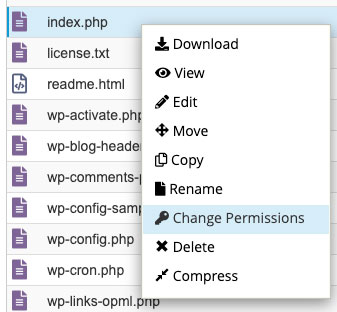
This numeric system is widely used and is often what you’ll encounter when setting permissions via FTP clients, cPanel, or command-line interfaces.
WordPress Specifics: Tailoring Permissions for a Dynamic Environment
While the underlying Unix principles apply, WordPress, as a dynamic content management system, has specific requirements for file and directory permissions to function correctly and securely. The web server process (e.g., Apache or NGINX) is typically the "user" that WordPress runs as, and it requires appropriate access to various files and folders. The WordPress Foundation, through its Developer Handbook and security guidelines, provides the authoritative recommendations for these settings.
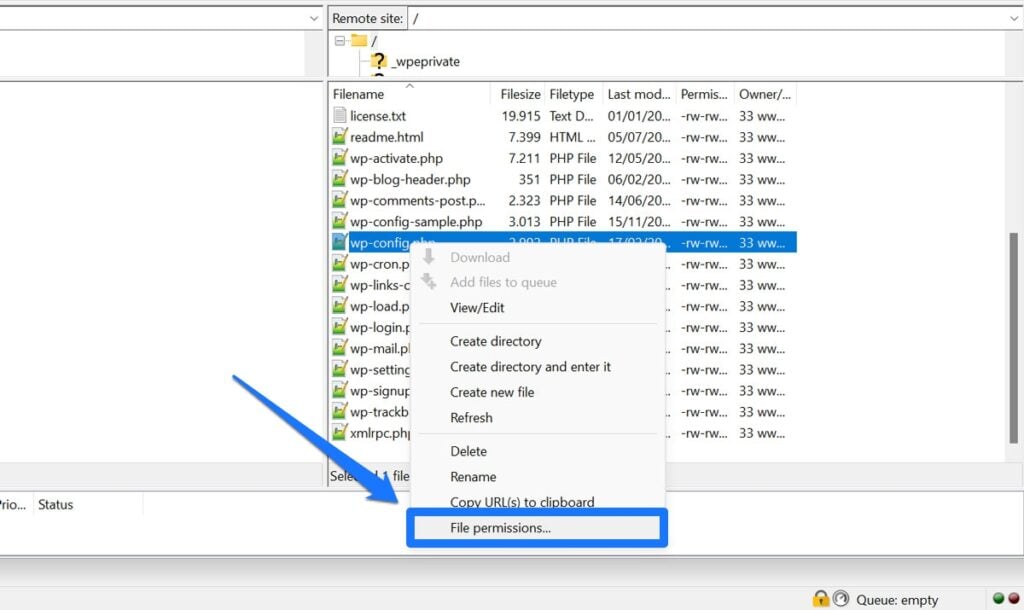
- Files (e.g.,
.php,.html,.css): Generally, files should have 644 permissions. This allows the owner (web server) to read and write, while the group and others can only read. This prevents unauthorized modification of critical code and content. A notable exception iswp-config.php, which contains sensitive database credentials. For enhanced security, it is often recommended to setwp-config.phpto 400 or 440, meaning only the owner (and potentially the owner’s group) can read it, severely restricting access. - Directories (Folders): Most directories should be set to 755. This grants the owner (web server) full read, write, and execute permissions, allowing WordPress to create, delete, and manage files within these folders. The group and others can read and execute (traverse) the directories but cannot write new files or delete existing ones.
wp-contentDirectory: This folder is unique as it houses themes, plugins, and media uploads. While its base permission should typically be 755, certain subdirectories within it, such aswp-content/uploads, may occasionally require slightly more permissive settings (e.g., 775 in some specific, isolated cases) for specific functions like image processing or third-party plugin integrations. However, caution is paramount, and 755 is generally the safer default.
The Dangers of Incorrect File Permissions: A Dual Threat
Misconfigured file permissions pose a significant risk to any WordPress website, manifesting as either security vulnerabilities or operational failures. Cybersecurity reports consistently highlight misconfigurations as a leading cause of data breaches. For instance, a 2023 report by Sucuri, a prominent website security company, indicated that a significant portion of compromised sites had vulnerabilities stemming from configuration issues, including improper file permissions. This trend is not new; the Open Web Application Security Project (OWASP) has consistently listed "Security Misconfiguration" among its top 10 web application security risks for years.
Security Vulnerabilities: The