Leveraging AI Coding Agents for WordPress Management: The Indispensable Role of Developer-Friendly Hosting

The landscape of WordPress site management is undergoing a significant transformation, with artificial intelligence emerging as a pivotal force. While much of the public discourse around AI and WordPress centers on automated website builders that promise to construct entire sites from a simple prompt, a more nuanced and arguably more impactful application is gaining traction among developers and site administrators: the use of AI coding agents to actively operate and maintain existing WordPress installations. This advanced methodology, which involves AI systems directly interacting with server environments via command-line interfaces, presents a compelling alternative to traditional manual management, but its efficacy is intrinsically tied to the capabilities of the underlying hosting infrastructure.
The Evolving Landscape of AI in WordPress Development
The integration of AI into web development tools has progressed rapidly, moving beyond mere content generation to active system interaction. This evolution necessitates a clear distinction between the two primary categories of AI-driven WordPress solutions currently available.
From Builders to Agents: A Paradigm Shift
AI website builders, such as ZipWP, 10Web, and Elementor AI, represent the initial wave of AI integration. These tools are designed for the rapid creation of new websites. Users typically provide a brief description of their business or project, and the AI generates a complete site structure, content, and design layout. They are invaluable for individuals or small businesses seeking to establish an online presence quickly without delving into coding or intricate design processes. Their strength lies in their ability to accelerate the initial setup phase, democratizing website creation for non-technical users.
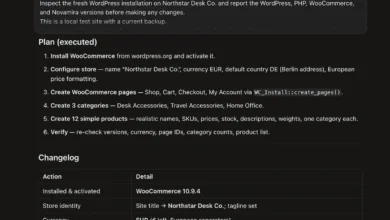
In contrast, AI coding agents, exemplified by tools like Claude Code, OpenAI’s Codex, and Cursor, address a fundamentally different challenge: the ongoing operation, maintenance, and modification of existing WordPress sites. These agents do not construct a site from scratch; instead, they function as an extension of a developer’s toolkit, executing commands, editing files, querying databases, and configuring plugins directly within a live or staging environment. This distinction is crucial: builders are for getting a site up, while agents are for running and changing a site that already exists. For professionals who regularly manage, troubleshoot, or optimize multiple WordPress installations, AI coding agents offer a level of control and efficiency previously unattainable without extensive manual input.
The Mechanics of AI Coding Agents
The operational backbone of an AI coding agent interacting with a WordPress site relies heavily on established developer protocols and tools. Primarily, these agents connect to the hosting server via Secure Shell (SSH), a cryptographic network protocol that allows secure remote command-line access. Once connected, their primary interface for manipulating WordPress is the WordPress Command Line Interface (WP-CLI).

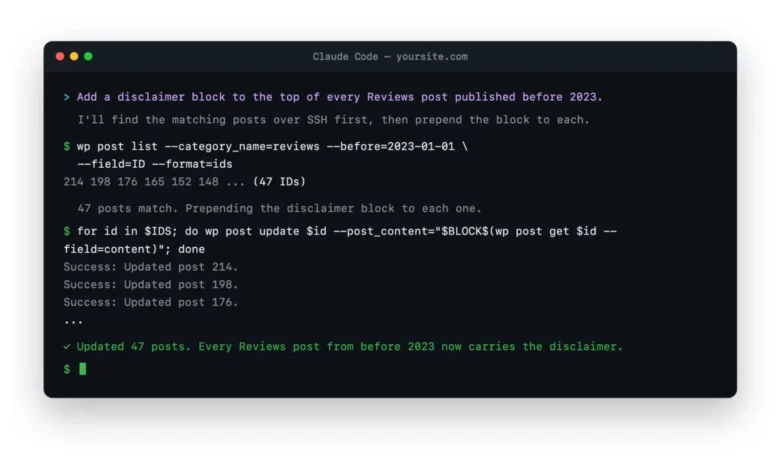
WP-CLI is an indispensable tool for experienced WordPress developers, enabling them to perform virtually any administrative task or site modification directly from the command line, bypassing the graphical user interface of the wp-admin dashboard. This includes installing and updating plugins and themes, managing users, modifying database entries, performing content migrations, and even debugging critical errors. The AI agent interprets natural language requests from the user, translates them into appropriate WP-CLI commands, executes these commands, and then processes the output to confirm successful execution or to identify and rectify any errors. This iterative process allows the agent to perform complex sequences of operations with speed and precision, mimicking the actions of a seasoned developer but at an accelerated pace.
Transformative Applications: Real-World Scenarios
The practical applications of AI coding agents in WordPress management are extensive and can significantly streamline workflows for developers, agencies, and site owners alike. Consider scenarios where manual intervention is typically time-consuming and prone to human error:
- Bulk Content Editing: Imagine needing to update a specific disclaimer across 200 review posts or modify a category tag for a large subset of articles. Manually navigating through the WordPress dashboard for each post would be an arduous task. An AI agent, however, can be instructed to identify posts matching specific criteria and apply the desired changes in a matter of minutes, ensuring consistency and accuracy.
- Cross-Site Plugin Configuration: For agencies managing multiple client sites, reconfiguring a specific plugin across several installations can be a repetitive chore. An AI agent can be deployed to connect to each site, access the plugin’s settings via WP-CLI, and apply the standardized configurations, saving hours of manual labor.
- Rapid Debugging and Error Resolution: A common challenge in WordPress is the dreaded "white screen of death" or other fatal errors. Traditionally, this involves accessing server logs, identifying the offending plugin or theme, and then manually deactivating it. An AI agent can be prompted to read error logs, pinpoint the source of a fatal error (e.g., a specific plugin conflict), and then use WP-CLI to deactivate the problematic component, restoring site functionality almost instantly.
- Content Migration and Database Operations: Migrating content between sites, performing complex search-and-replace operations within the database, or even optimizing database tables can be delicate tasks. AI agents can execute these operations with precision, reducing the risk of data corruption often associated with manual database manipulation, especially when integrated with robust staging and backup systems.
- Performance Optimization: Tasks like clearing caches, optimizing images (if integrated with external tools), or adjusting server-side configurations can also be orchestrated by an AI agent, contributing to improved site performance.
These examples highlight how AI coding agents transform tedious, repetitive, or complex tasks into simple, prompt-driven operations. The agent’s ability to operate at scale, without fatigue or oversight, translates directly into significant efficiency gains and reduced operational costs for site maintenance.
The Hosting Imperative: Why Infrastructure is Key
The seamless operation of AI coding agents is profoundly dependent on the hosting environment. A host that restricts access to developer tools effectively neuters the capabilities of an AI agent, making the workflow cumbersome or even impossible. Conversely, a developer-friendly host empowers these agents to perform their functions effortlessly. The critical features that define a suitable hosting environment include:
- SSH Access: This is non-negotiable. Without SSH, the AI agent cannot establish a secure command-line connection to the server, rendering it unable to execute any commands or interact with the file system. Many budget or entry-level shared hosting providers often restrict or completely disable SSH access, making them unsuitable for this workflow.
- Pre-installed WP-CLI: While WP-CLI can theoretically be installed manually, having it pre-installed and readily available is a significant advantage. It ensures consistency, saves setup time, and confirms that the host is built with command-line operations in mind.
- Robust Staging Environments: An isolated staging environment is crucial for testing changes before deploying them to a live production site. AI agents, being powerful, can make changes rapidly. A one-click staging environment allows developers to experiment, debug, and verify the agent’s actions without risking the stability of the live site.
- Git Integration: Version control systems like Git are fundamental for modern development workflows. Hosts that offer integrated Git repositories allow for seamless deployment of code changes, tracking modifications, and easy rollbacks, providing an additional layer of safety and control when working with AI agents.
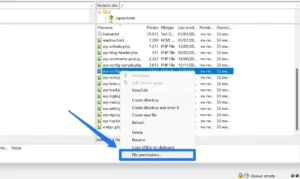
- Flexible File System Permissions: The AI agent needs appropriate permissions to read, write, and modify files within the WordPress installation directory. Overly restrictive file system permissions, often implemented by budget hosts for "security" reasons, can hinder the agent’s ability to perform necessary operations.
- Adequate Server Resources: While AI agents are efficient, complex operations on large sites still require sufficient CPU and memory resources to execute commands quickly. A host with underpowered servers can lead to slow response times or command failures.
- Reliable Backup Systems: Automated, easily restorable backups are an essential safety net. Even with careful planning, unexpected issues can arise. A host offering robust backup solutions ensures that any unintended consequences of an AI agent’s actions can be quickly reversed, minimizing downtime and data loss.
A hosting provider that prioritizes these developer-centric features transforms AI agentic editing from a potential struggle into a calm, productive, and reliable workflow. Conversely, a host that neglects these aspects will force users to spend more time fighting the environment than leveraging the AI for productive work.
Selecting the Right Foundation: Developer-Friendly Hosts
For those looking to integrate AI coding agents into their WordPress management strategy, selecting the right hosting provider is paramount. Based on their strong support for developer tools and robust environments, several hosts stand out:

- Kinsta: Renowned for its premium managed WordPress hosting, Kinsta offers out-of-the-box SSH access and pre-installed WP-CLI. Its one-click staging environments and integrated Git support create a highly consistent and predictable environment where AI agents can operate effectively. While not the cheapest option, its polished tooling and reliable performance justify the investment for serious sites and demanding workflows.
- WP Engine: A long-standing favorite among agencies and development teams, WP Engine provides a mature ecosystem for WordPress professionals. Its comprehensive developer tooling, including robust staging, Git integration, and readily available SSH/WP-CLI, makes it an ideal home for AI coding agents. The platform is designed to scale cleanly, making it suitable for managing numerous sites.
- Servebolt: Often lauded as a "developer’s developer host," Servebolt emphasizes raw performance and a streamlined, command-line-friendly stack. WP Mayor itself runs on Servebolt, highlighting its commitment to speed and unencumbered developer access. SSH and WP-CLI are first-class citizens, ensuring that AI agents have the necessary freedom and power to execute commands efficiently.
- Cloudways: Offering managed cloud servers at a competitive price point, Cloudways provides full SSH access and pre-installed WP-CLI. It strikes a balance between flexibility and control, allowing users to choose from various cloud providers (AWS, Google Cloud, DigitalOcean, etc.) while benefiting from managed services. Its slightly less polished Git integration compared to dedicated managed hosts is a minor trade-off for its flexibility and cost-effectiveness.
- Rocket.net: This provider focuses on delivering exceptional speed within a managed WordPress environment. Crucially, Rocket.net maintains full SSH and WP-CLI access, ensuring that developers are not locked out of critical tools. It represents a strong middle ground for those seeking high performance coupled with a user-friendly managed experience that supports advanced AI workflows.
These hosts are distinguished by their commitment to providing environments that empower developers, making them ideal candidates for leveraging the full potential of AI coding agents.
Implementing AI Agents: A Step-by-Step Guide and Best Practices
Getting started with an AI coding agent is more accessible than it might appear, even for those not intimately familiar with sysadmin tasks. The initial setup involves a few critical steps:
- Select an AI Coding Agent: Choose a suitable agent like Claude Code, OpenAI’s Codex, or Cursor, depending on your preferred interface and capabilities.
- Ensure Host Compatibility: Verify that your chosen WordPress host provides SSH access and ideally has WP-CLI pre-installed.
- Obtain SSH Credentials: Retrieve your SSH username, password, and host address from your hosting provider’s control panel. Many hosts also support SSH keys for enhanced security, which is generally recommended.
- Test SSH and WP-CLI Access: Before connecting an AI agent, manually connect to your server via SSH using a terminal and run
wp --infoto confirm that WP-CLI is available and functioning correctly. This quick check verifies the readiness of your environment. - Connect the AI Agent: Follow the agent’s documentation to establish a connection using your SSH credentials. Most agents will have a straightforward process for this.
- Start with a Staging Environment: Always begin testing and executing commands with your AI agent on a staging copy of your WordPress site. This isolates any potential issues from your live production site.
Crucial Guardrails for Safe Operation:
While AI agents are powerful, they are tools that require responsible use. Implementing robust guardrails is paramount to prevent unintended consequences:
- Prioritize Staging: Never execute potentially destructive or large-scale commands directly on a live production site. Always perform initial runs and testing on a staging environment.
- Maintain Fresh Backups: Before undertaking any significant changes, ensure you have a recent, restorable backup of your site. Most managed hosts offer automated daily backups, but a manual backup prior to major operations adds an extra layer of security.
- Exercise Caution with Destructive Commands: Commands involving database modifications, content deletion, or global search-and-replace operations should always be approached with extreme caution. Utilize dry-run options where available (e.g.,
wp search-replace --dry-run) to preview changes before committing them. - Supervise the Agent: Treat the AI agent like a highly capable but unsupervised junior developer. Monitor its actions, review its outputs, and be prepared to intervene or reverse changes if necessary. The agent is fast, which means mistakes can also propagate quickly.
- Understand the Basics: While you don’t need to be a coding expert, a foundational understanding of what WP-CLI and SSH accomplish will make you a more confident and effective operator, enabling you to better prompt the agent and interpret its actions.
By adhering to these best practices, the inherent risks associated with automated site management can be effectively mitigated, transforming the AI agent into a powerful and reliable partner.
Strategic Advantages and Current Limitations
The adoption of AI coding agents marks a significant leap in WordPress management, offering distinct advantages while also presenting specific limitations.
Where AI Coding Agents Shine:

- Unparalleled Speed and Efficiency: Agents perform repetitive and complex tasks in minutes that would take a human developer hours, dramatically accelerating workflows.
- Enhanced Accuracy: By executing precise commands, AI agents eliminate human error often associated with manual data entry or repetitive clicking, leading to more consistent and reliable outcomes.
- Scalability for Repetitive Tasks: Managing hundreds of posts, thousands of user accounts, or numerous plugin configurations across multiple sites becomes a scalable operation, freeing human developers from monotonous work.
- 24/7 Availability: AI agents can operate around the clock, performing maintenance tasks during off-peak hours without human supervision, optimizing resource utilization and minimizing disruption.
- Democratization of Advanced Tasks: Individuals with limited coding knowledge can leverage AI agents to perform advanced command-line operations by simply describing their intent in natural language.
Where AI Coding Agents Struggle:
- Lack of Creative Intuition: AI agents are programmatic; they excel at execution but lack the creative flair for design, layout, or user experience. They cannot assess if a design "feels cluttered" or if content effectively resonates with an audience.
- Complex Problem-Solving Requiring Human Judgment: While agents can debug common errors, they struggle with highly ambiguous problems, situations requiring abstract reasoning, or ethical considerations that demand human judgment.
- Dependency on Clear Instructions: The effectiveness of an agent is directly proportional to the clarity and specificity of the user’s prompts. Vague instructions can lead to unintended or incorrect actions.
- No "Emotional Intelligence": Agents cannot understand the nuances of client communication, stakeholder feedback, or the subjective aspects of project management.
- Security Vulnerabilities (if misused): An improperly secured agent or one given overly broad permissions could potentially introduce security risks, emphasizing the need for strict guardrails and secure connections.
In essence, AI coding agents are invaluable for the operational and technical aspects of running and maintaining existing WordPress sites, particularly for tasks that are repetitive, data-intensive, or command-line oriented. For greenfield design, strategic planning, and tasks requiring creative human intuition, AI website builders or human designers remain the superior choice. Both tools occupy distinct, yet complementary, niches in the evolving WordPress ecosystem.
The Future of WordPress Management
The integration of AI coding agents signals a transformative period for WordPress development and management. This shift is poised to redefine the roles of web professionals, allowing them to focus on higher-level strategic thinking, creative problem-solving, and client relations, while delegating routine or complex technical execution to AI. The demand for developer-friendly hosting will only intensify as these AI workflows become standard practice.
This evolution implies that future WordPress professionals will need to cultivate skills in prompt engineering, understanding the underlying mechanisms of AI agents, and implementing robust safety protocols. The emphasis will shift from manual execution to intelligent orchestration, fostering greater efficiency, faster deployment cycles, and potentially lowering the barrier to entry for advanced site management. As AI technologies continue to mature, the capabilities of these coding agents will expand, potentially incorporating more sophisticated debugging, predictive maintenance, and autonomous optimization features.
Conclusion
While AI website builders have garnered significant attention for simplifying site creation, the true operational revolution for existing WordPress sites lies in the strategic deployment of AI coding agents. These intelligent systems offer unparalleled efficiency in managing, maintaining, and modifying installations by leveraging developer tools like SSH and WP-CLI. However, their efficacy is inextricably linked to the quality and features of the hosting environment. For any individual or organization serious about optimizing their WordPress workflow, investing in a developer-friendly host that provides robust SSH access, pre-installed WP-CLI, staging environments, and strong backup protocols is no longer a luxury but a fundamental necessity. This approach transforms AI from a novelty into an indispensable component of modern WordPress management, ushering in an era of unprecedented productivity and control.