When a critical web page experiences a sudden drop in search engine rankings, loses out to a competitor, or fails to convert incoming visitors, digital marketers and site owners need immediate answers. Traditional comprehensive site audits often require significant time and heavy server crawls, which can delay urgent troubleshooting. However, page-level diagnostic tools have evolved to streamline this initial investigative phase. In this report, we examine how technical SEO professionals utilize the free SEOquake Chrome extension developed by Semrush to rapidly triage, analyze, and diagnose webpage performance issues in under three minutes without ever leaving the browser interface.

Understanding the SEOquake Tool and Its Capabilities

SEOquake is a widely adopted browser extension designed to evaluate technical signals, on-page search engine optimization (SEO) parameters, linking strategies, and core Semrush performance metrics for any given URL. Once installed, users simply navigate to a target webpage and activate the browser icon to initiate research. The extension delivers results through two primary interface elements: a Quick View pop-up designed for rapid triage, and a comprehensive full-report panel for deeper investigation.

Throughout these reports, data points are systematically color-coded to allow analysts to quickly differentiate between healthy metrics, warning signs, and critical errors. This visual hierarchy enables teams to prioritize technical and content-based fixes efficiently. Green indicators generally signify properly configured elements, orange flags point toward potential optimization opportunities or minor warnings, and red highlights alert users to critical errors that may directly harm search visibility or indexing eligibility.

Minute One: Rapid Triage Using the Quick View Pop-Up

The triage phase constitutes the first 60 seconds of a rapid page audit. The primary objective during this initial window is to answer a fundamental question: Is there an obvious, critical failure impacting the page’s ability to rank or convert? The SEOquake Quick View pop-up contains five distinct tabs, with technical specialists primarily focusing on Page Info, Audit, and Content to establish an immediate baseline assessment.

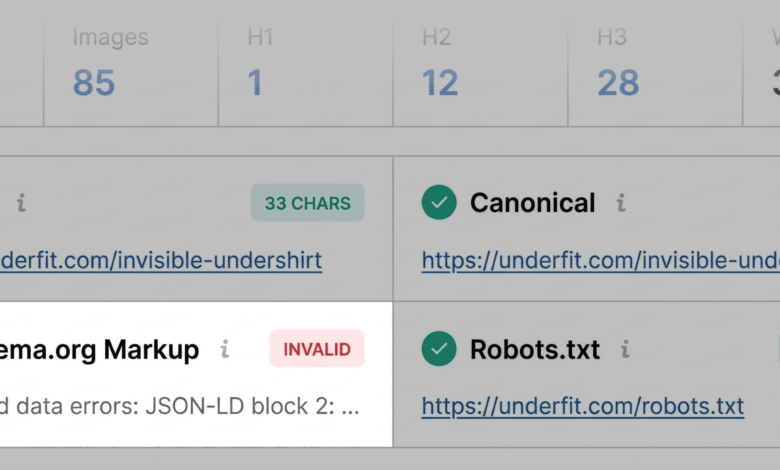
The Page Info tab delivers a concise overview of core SEO elements, including the title tag, meta description, canonical URL, and HTTP status codes. During a live test of an e-commerce product page for the brand UnderFit, the extension immediately highlighted a critical vulnerability: the Schema.org structured data was flagged in red due to JSON-LD parsing errors. For online retailers, invalid product schema carries significant consequences, potentially rendering the page ineligible for rich snippets in search results—such as live pricing, stock availability, and customer review stars—which directly influence click-through rates. Additional minor flags identified during this phase included title tags and meta descriptions slightly outside standard length parameters, though these were categorized as secondary optimization tasks rather than immediate traffic blockers.

Transitioning to the Audit tab, the extension scans for foundational technical health metrics, including mobile responsiveness, HTTPS security, and robots.txt directives. While no critical technical emergencies were detected on the test page, orange warnings prompted a closer evaluation of internal routing and international targeting parameters like hreflang implementation.

Finally, the Content tab evaluates textual structure and heading hierarchies. An analysis of the UnderFit product page revealed a suboptimal heading distribution, where the primary H1 tag appeared deep within the body copy rather than near the top, and subsequent heading levels skipped sequentially (such as jumping directly from an H1 to an H4). Furthermore, an inventory of the page’s visual assets indicated that 36 images lacked alternative text (alt text). Because alternative text is essential for web accessibility and helps search engines comprehend visual content, this finding was logged for further examination.

Minutes Two and Three: Deep-Dive Diagnostics Using the Full Report

Armed with preliminary data from the triage phase, analysts transition into the diagnostic phase during the second and third minutes of the audit by accessing the Full Report panel. This interface expands upon the initial findings across six specialized sections, allowing specialists to uncover the root causes of flagged issues and determine whether remediation requires page-level edits or site-wide infrastructure updates.

Within the Full Audit panel, users can jump directly to specific compliance categories. Investigating the XML sitemap warning identified during triage, the full audit confirmed that while a sitemap existed at the root domain, it lacked prominent internal linking structures. Testing the previously flagged schema markup via integrated developer tools confirmed three distinct validation errors, validating the initial triage alert and providing developers with exact debugging parameters.

The Keyword Density panel offers further insight into topic coverage and keyword distribution. By reviewing the keyword cloud and multi-word phrase tables, content strategists can verify whether a page adequately targets its primary search terms without crossing into keyword stuffing. On the UnderFit product page, primary terms such as "undershirt," "fabric," and "v-neck" dominated the density metrics, confirming strong topical relevance. While minor anomalous terms occasionally appeared due to interactive user interface widgets and script labels, the overall thematic alignment remained strong.

Evaluating Link Health and External Resources

Broken or uninformative hyperlinks can degrade user experience and disrupt search engine crawl paths. The Links panel provides a granular breakdown of internal and external connections, tracking response codes, anchor text, and dofollow/nofollow attributes. The audit of the test page revealed a mix of internal links alongside a larger volume of external JavaScript-driven connections flagged as broken. Specialists utilize this data to export link inventories as CSV files, verifying whether dynamic scripts are functioning correctly or if outdated external links require removal.

Strategic Decision-Making: Page-Level Fixes Versus Site-Wide Audits

The final stage of a rapid three-minute audit involves contextualizing page performance using integrated domain intelligence. Through the Semrush panel within SEOquake, auditors access vital metrics such as domain authority, organic keyword footprint, and estimated traffic volume.

Industry analysts emphasize that a poorly performing page situated on a robust, high-authority domain typically indicates an isolated content or on-page optimization issue. Conversely, widespread technical anomalies—such as broken XML sitemaps, recursive redirect chains, or site-wide template errors in JSON-LD markup—cannot be resolved at the single-page level. When these broader infrastructure issues are identified, digital marketing teams must escalate the diagnostic process by initiating a comprehensive site crawl using dedicated platforms like Semrush Site Audit.

Broader Implications for Digital Marketing and SEO Workflows

The adoption of rapid diagnostic workflows reflects a broader shift in digital marketing toward efficiency and agility. As search engine algorithms become increasingly complex and dependent on real-time user signals, search engine optimization professionals must balance deep technical analysis with rapid response times. Tools that condense multi-step auditing procedures into a unified browser interface allow agencies and in-house teams to triage client assets instantly, minimize downtime during algorithm updates, and maintain high standards of technical hygiene across thousands of enterprise URLs.