Bridging the Gap Between Social Media Metrics and Real Business Outcomes Using Google Analytics 4

As digital marketing budgets face unprecedented scrutiny, marketing executives are increasingly forced to justify every dollar spent on social media campaigns. While native platform analytics offer a localized view of how a brand performs on individual channels—tracking metrics such as impressions, likes, shares, and follower growth—they often fail to capture the complete customer journey. Once a user clicks a link and transitions from a social network to a brand’s website, native platform metrics stop tracking. This fundamental visibility gap leaves many organizations struggling to connect top-of-funnel social media efforts with bottom-line business outcomes like website traffic, lead generation, and ultimate conversions.
According to the 2025 Impact of Social Media Marketing report, only 44% of marketing leaders rate their social teams as true experts in measuring actual business impact. This statistical disconnect persists despite social media serving as a primary driver of web traffic globally. Current benchmarks indicate that social media accounts for approximately 10.12% of total global web traffic, a figure that surges significantly to 15.23% in socially mature and highly digitized markets such as the United States. To reconcile these numbers and secure vital executive buy-in, brands are increasingly turning to advanced digital analytics platforms, most notably Google Analytics 4 (GA4), to capture a comprehensive picture of how social initiatives influence broader enterprise objectives.
The Evolution of Social Media Measurement and the Need for GA4 Integration
Historically, social media marketing was evaluated largely on vanity metrics—aggregate counts of engagement that sounded impressive during internal reviews but offered little proof of tangible financial return. However, the maturation of digital marketing has shifted the industry standard toward rigorous accountability. Recent data from the 2025 Sprout Social Index underscores this shift, revealing that 65% of marketing leaders identify the alignment of social metrics with overarching organizational goals as the single most critical factor in securing executive budget approval and sustained social investment.
Google Analytics 4 addresses this challenge by serving as a centralized hub that aggregates, sorts, and contextualizes user behavior originating from social networks. Rather than viewing social performance in isolation, GA4 correlates incoming traffic with on-site user behavior, allowing data analysts and marketing managers to trace a visitor’s path from an organic Facebook post or a paid Instagram advertisement all the way through to a completed purchase or a software subscription signup.
Furthermore, GA4 provides critical clarity regarding audience composition. By tracking the demographics, geographic locations, and language preferences of visitors arriving via social channels, organizations can empirically verify whether their creative output is successfully attracting their intended buyer personas. This alignment between audience targeting and actual site engagement helps organizations refine their messaging strategies, optimize resource allocation, and eliminate wasteful spending on underperforming campaigns.
Differentiating Between Organic and Paid Social Traffic Within GA4
A foundational step in analyzing social media performance within GA4 involves understanding how the platform automatically categorizes incoming visitor streams. GA4 splits social traffic into two distinct classifications: Organic Social and Paid Social. Each category relies on specific tracking logic to ensure accurate attribution.
Organic Social encompasses traffic generated when users visit a website or mobile application via non-ad links posted on social media platforms. GA4 recognizes this traffic when the traffic source matches a pre-determined regular expression (regex) list of established social networks, or when the traffic medium is explicitly designated as variations of social terminology, such as "social," "social-network," "social-media," "sm," or "social media." A typical source/medium pairing for this channel might appear as "instagram / social."
Conversely, Paid Social tracks traffic originating from sponsored advertisements and paid promotional links deployed across social media channels. For traffic to be classified under Paid Social, the source must match the recognized social network regex list, and the medium must simultaneously match specific paid campaign indicators, such as patterns incorporating "cp," "ppc," "retargeting," or "paid." An example of this classification in reports would be "facebook / paid."

Enhancing Attribution Accuracy Through UTM Parameters
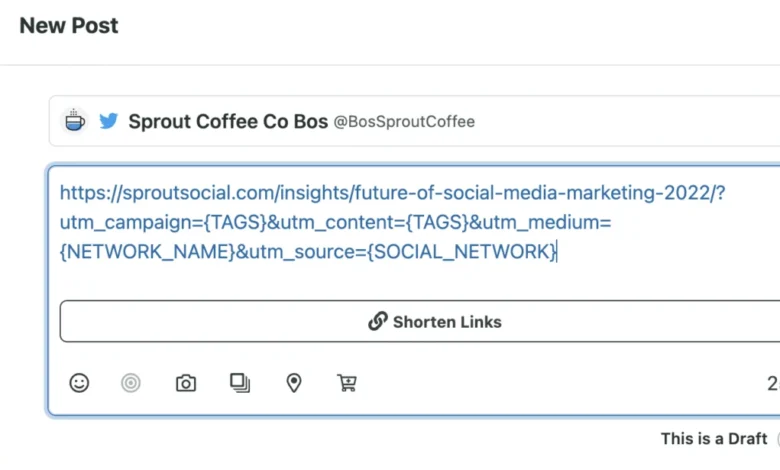
While GA4’s automated categorization provides a strong baseline for performance analysis, sophisticated marketing operations rely heavily on custom UTM (Urchin Tracking Module) parameters to achieve granular visibility. UTM parameters are simple snippets of text appended to destination URLs, allowing marketers to tag specific links and precisely attribute traffic to individual campaigns, specific ad variations, or exact posting schedules.
A standard UTM-tagged URL incorporates multiple parameters, including the traffic source (e.g., utm_source=facebook), the marketing medium (e.g., utm_medium=social), and the campaign identifier (e.g., utm_campaign=spring_launch). For example, a promotional link for a seasonal product release might be structured as follows:
Despite their utility in proving return on investment (ROI), manual UTM tracking introduces significant operational friction. Maintaining spreadsheets to track hundreds of unique links across multiple platforms, campaigns, and team members frequently leads to naming inconsistencies, broken tracking codes, and administrative fatigue—particularly for lean marketing teams and solo operators. To streamline this workflow, modern marketing platforms increasingly integrate URL shorteners and UTM builders directly into their publishing suites. For instance, tools like Sprout Social incorporate direct integrations with services like Bitly, enabling users to automatically generate and shorten UTM-tagged links with a single click during the post-creation process, thereby eliminating manual spreadsheet management and preserving data integrity.
Core Social Media Metrics and Analytics to Track in GA4
To transition social reporting from surface-level metrics to actionable business intelligence, marketing teams must monitor specific data points within GA4 that highlight audience behavior and web engagement. The primary metrics essential for evaluating social media performance include:
-
Audience Demographics: Tracking the geographic location, age distribution, and language preferences of visitors arriving via social channels. This data confirms whether social content successfully reaches and resonates with the organization’s targeted buyer personas.
-
Session Source/Medium: Identifying the exact social network or specific campaign driving visitor volume. This metric isolates top-performing channels, enabling teams to allocate budget and creative resources effectively.
-
Sessions and Engaged Sessions: Measuring visits that last longer than 10 seconds, feature a conversion event, or include page views across two or more pages. This metric effectively filters out accidental clicks and misdirected traffic to highlight genuine user interest.
-
Average Engagement Time: Calculating the average duration a user actively spends viewing content on the website. This metric evaluates whether the destination landing page successfully fulfills the promise established by the initial social media post.

Measuring Conversions and Establishing Social Media ROI
Ultimately, the true value of social media marketing is measured by its ability to drive conversions—whether those actions involve completing an e-commerce purchase, subscribing to a newsletter, downloading a whitepaper, or submitting a sales demo request. GA4 measures these critical business milestones through the use of key events (formerly referred to as conversions).
Within the GA4 framework, a key event represents any user interaction on a website or app that holds specific value for the enterprise. While distinct from conversions—which are specifically shared with advertising networks like Google Ads for automated bidding optimization—key events serve as the primary yardstick for evaluating organic and paid social ROI. GA4 automatically tracks several standard user interactions, such as viewing a product, reading an article, or adding an item to a virtual shopping cart. However, organizations can also manually configure custom key events to match their unique conversion funnels.
For example, tracking user registrations or demo signups originating from social channels involves a straightforward two-step configuration process within GA4:
First, administrators must ensure that the recommended event name for registrations, specifically "sign_up," is actively firing and flowing into the GA4 property from the website’s codebase.
Second, once the event has registered initial data collection, administrators navigate to the Admin section, select the "Key events" menu, and designate the target event as a key event. For newly created events that have not yet populated in the recent events list, analysts can manually add the event name via the administrative interface to immediately begin tracking social media conversions without delay.
Implications and Broader Business Impact
The integration of social media analytics with comprehensive enterprise platforms like Google Analytics 4 marks a fundamental maturation in digital marketing strategy. By moving past vanity metrics and tying social engagement directly to website traffic, user behavior, and downstream conversions, marketing leaders can construct transparent, data-backed reports that articulate the true financial value of social media.
This analytical rigor not only optimizes day-to-day campaign execution by identifying top-performing platforms and messaging strategies, but it also solves the perennial challenge of resource allocation. As organizations continue to navigate economic uncertainties, marketing teams equipped with granular ROI data and streamlined tracking workflows will be uniquely positioned to secure executive confidence, protect marketing budgets, and drive sustainable business growth.
Related posts: