A Comprehensive Guide to WordPress In-Editor Notes: Streamlining Content Collaboration and Design Review

The evolution of content management systems over the past two decades has continually trended toward consolidation, aiming to reduce the number of third-party platforms required to build, review, and publish digital assets. For years, publishing teams, agencies, and enterprise organizations operating within the WordPress ecosystem faced a fragmented review cycle. To refine copy, adjust layout components, or approve visual hierarchies, stakeholders routinely relied on an array of external solutions—ranging from Google Docs and Figma to lengthy, easily fragmented email threads and external project management tools. While functional, this dispersed methodology introduced friction, forcing users to constantly copy and paste text, reconcile conflicting feedback across multiple applications, and frequently lose crucial contextual information tied directly to the website’s front-end presentation.
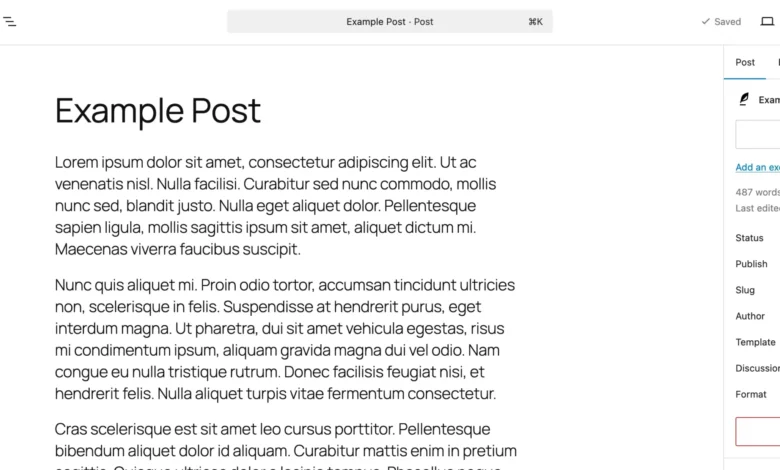
The implementation of native, in-editor feedback notes marks a structural shift in how teams interact within the Gutenberg block editor. By integrating comment threads directly into the WordPress core architecture, developers and content creators can now attach specific commentary, revision requests, and design critiques to individual blocks. Whether addressing a paragraph of body copy, a high-resolution hero image, or a complex structural heading, feedback now lives precisely where the content resides. This comprehensive guide examines the technical mechanics of WordPress Notes, deployment strategies for custom post types, methods for administration, and the broader implications of native collaboration tools on enterprise publishing workflows.

Background and Context of Native In-Editor Collaboration
The introduction of the block editor, codenamed Gutenberg, fundamentally transformed WordPress from a traditional blogging platform into a versatile page builder. However, despite rapid advancements in site-building capabilities, real-time or asynchronous collaborative reviewing remained a notable gap in the software’s native feature set. Third-party plugins attempted to bridge this divide, but adoption varied, and security or compatibility concerns often discouraged enterprise deployment.
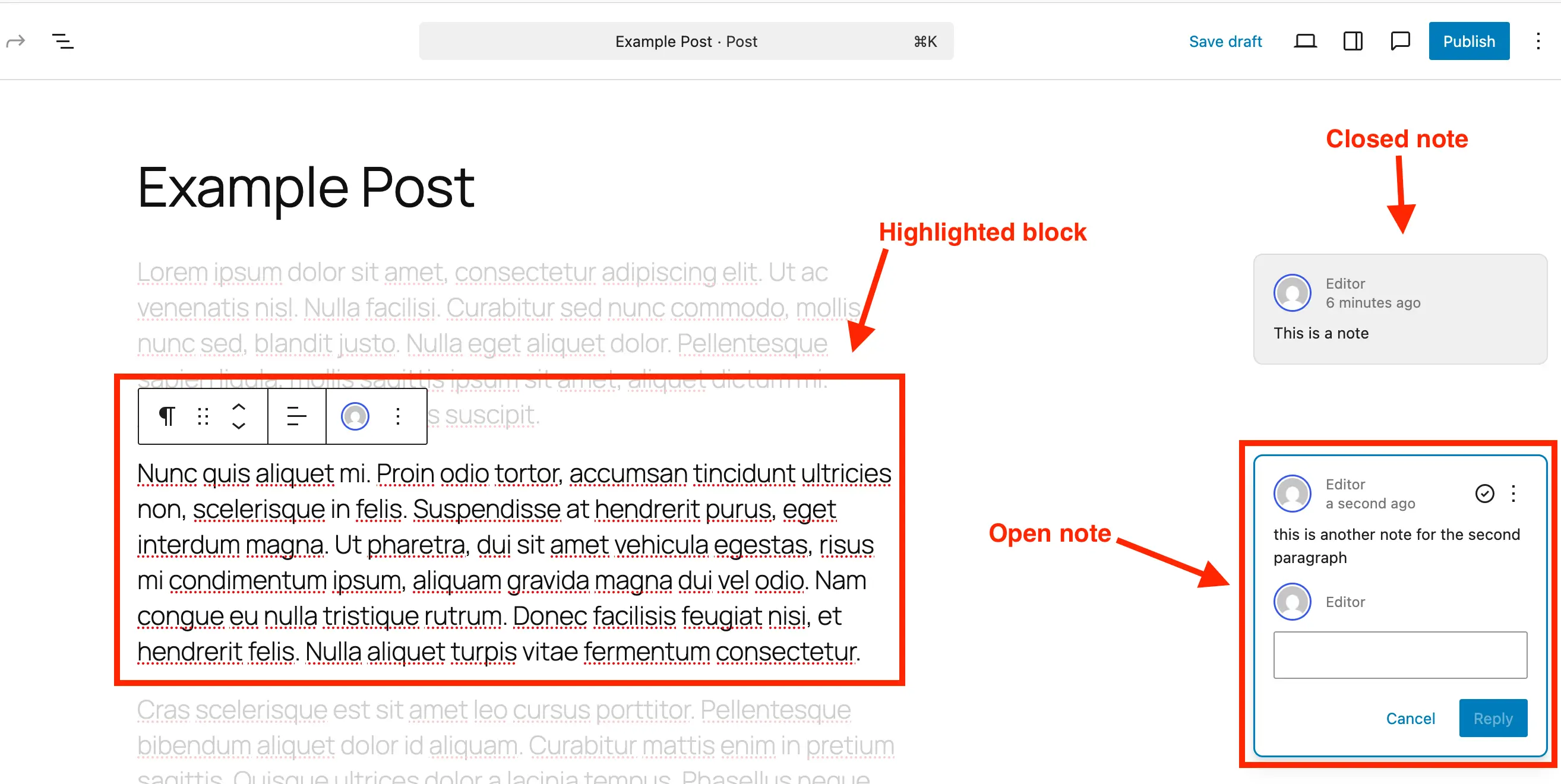
Recognizing the shift toward distributed workforces and multi-tiered publishing teams involving content writers, managing editors, client stakeholders, and quality assurance testers, core contributors prioritized workflow efficiency. The resulting Notes feature bridges the gap between production and review. By embedding contextual commentary into the application layer of the block editor, WordPress eliminates the cognitive overhead associated with context switching. Users no longer need to reference an external spreadsheet row to understand which paragraph a reviewer meant when suggesting a rewrite; clicking the note instantly highlights the target block while dimming the surrounding layout, establishing an immediate, undeniable point of reference.

Anatomy and Functionality of WordPress Notes
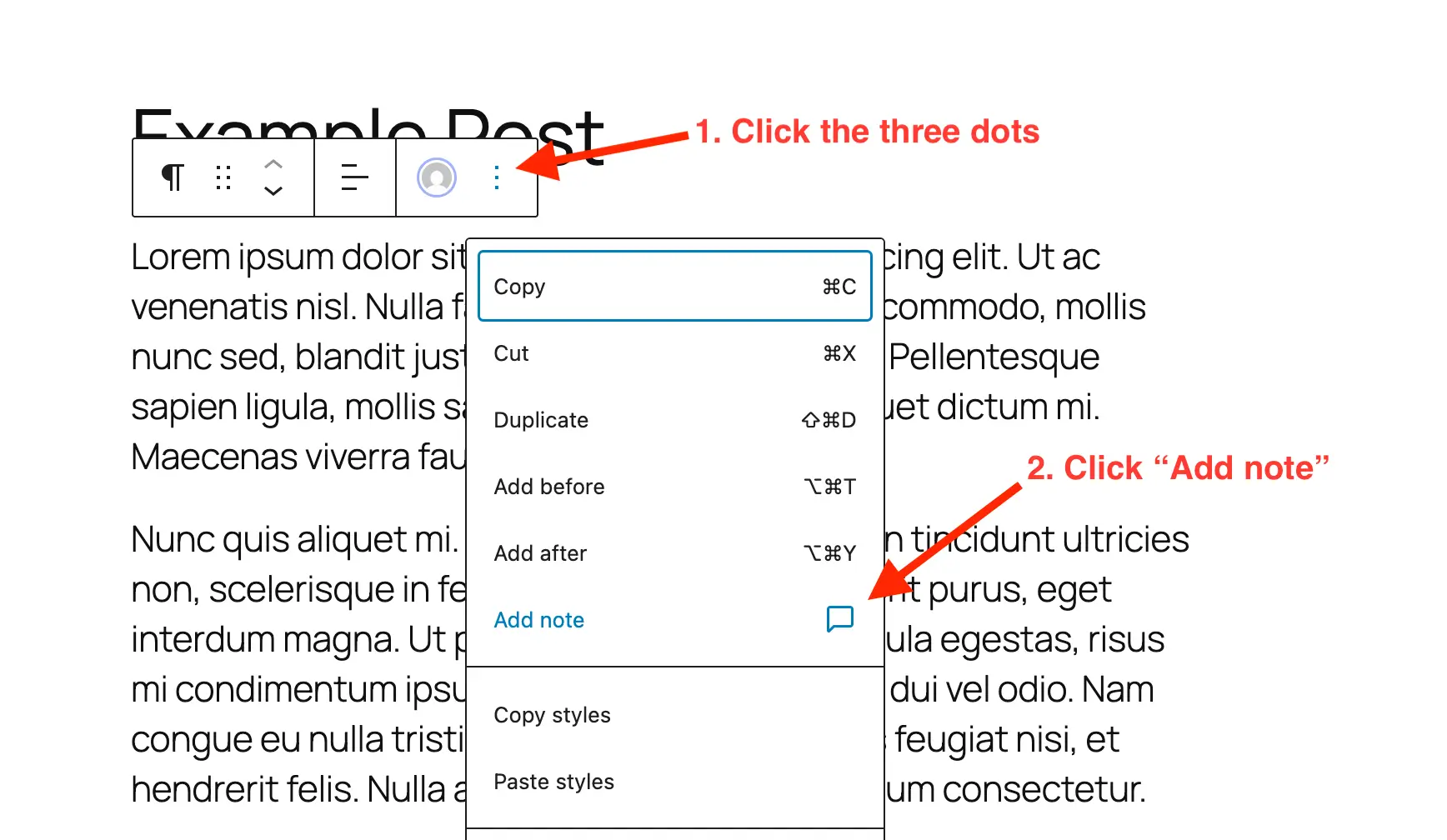
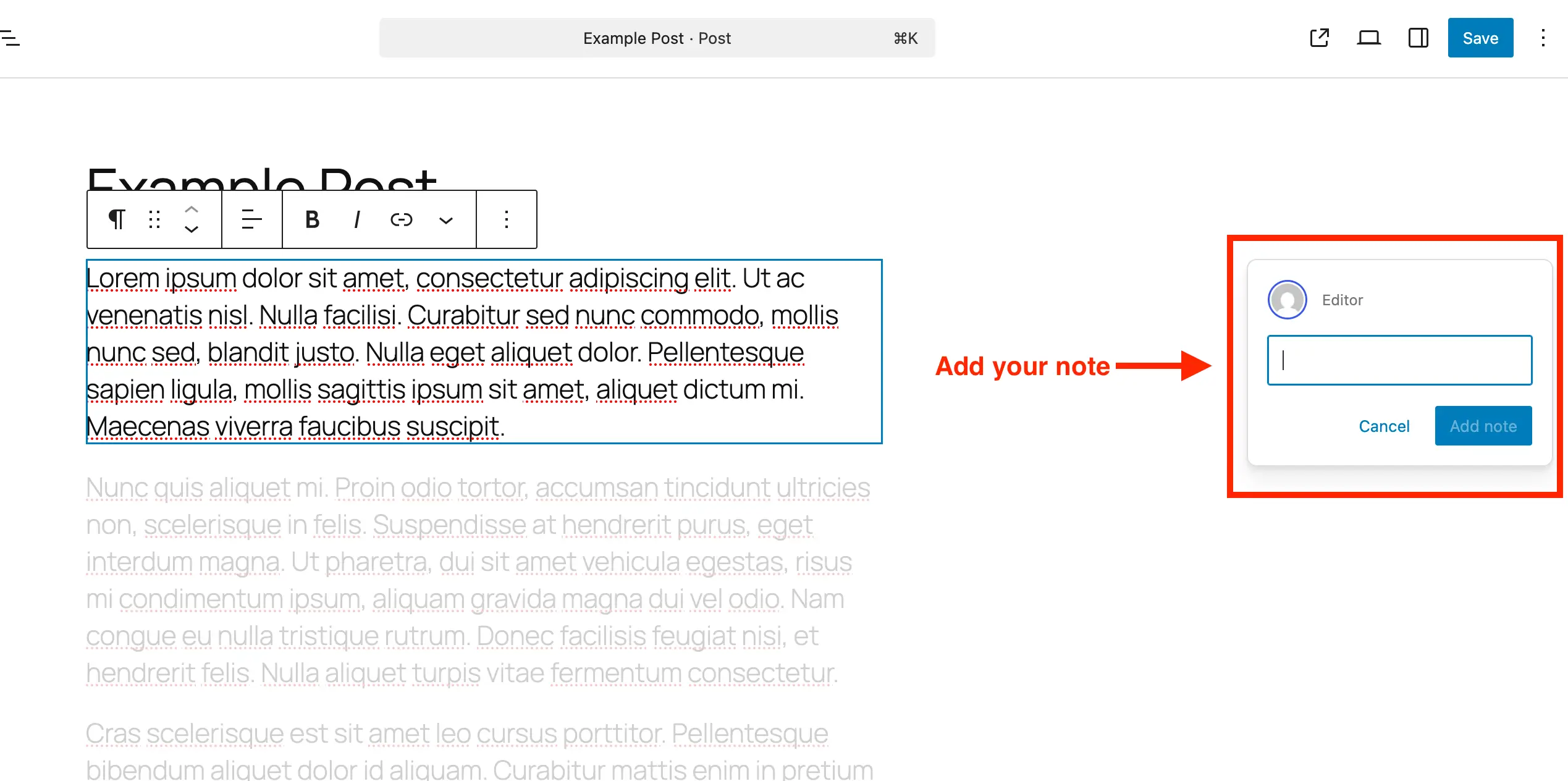
At its core, the Notes feature functions similarly to collaborative commenting systems found in modern word processors or design suites, yet it is uniquely tailored to the modular nature of the block editor. When a user navigates to a post or page, they can target any block—paragraphs, galleries, tables, or custom widgets—and invoke the commenting interface through the block’s contextual options menu.
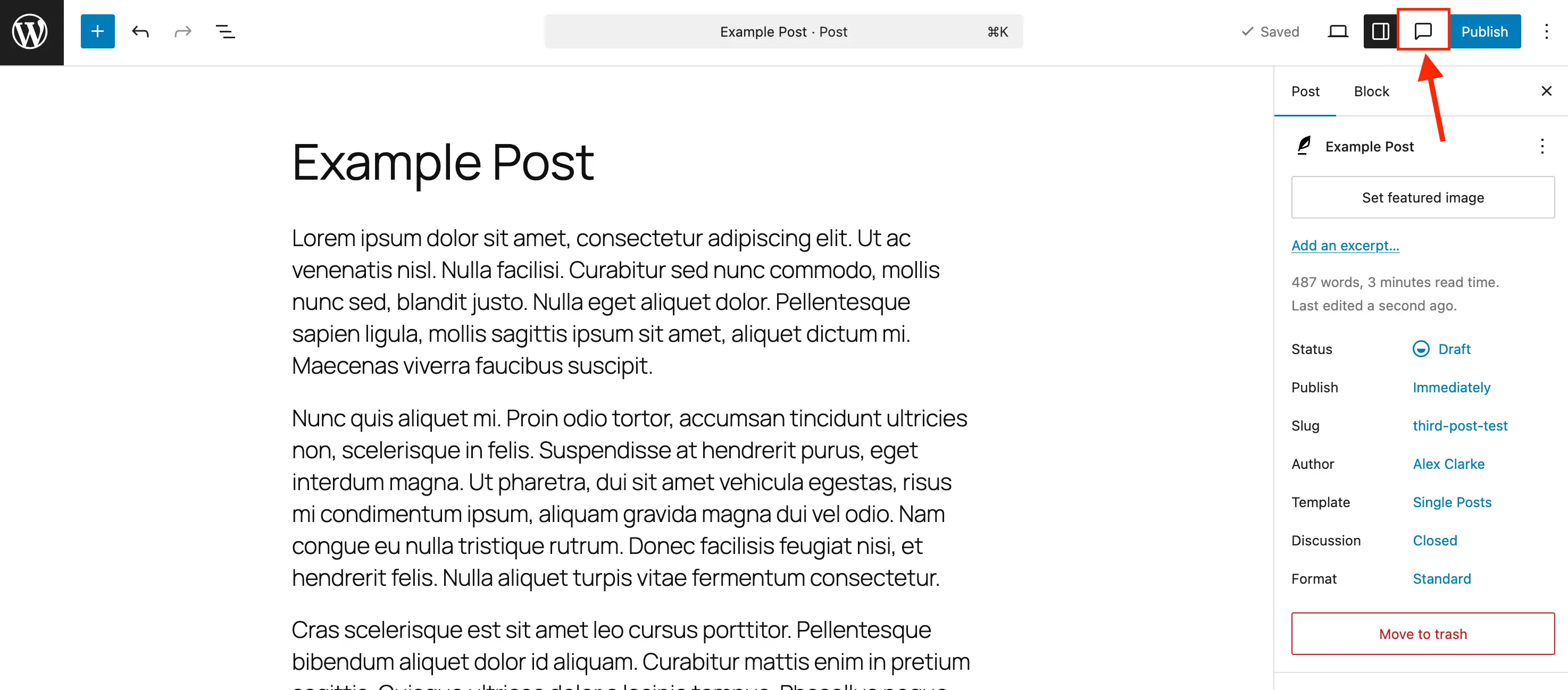
Once initiated, the note interface appears in a dedicated side panel or adjacent to the active block. Each entry records the author’s identity, the timestamp of creation, and a threaded reply section that permits multi-party discussions about a single line of text or design modification. From a visual standpoint, the user experience is engineered to minimize distraction. Selecting a specific note triggers a focus mode: the targeted block remains brightly illuminated, while the rest of the document fades into the background. This targeted isolation ensures that editors can address granular changes without losing sight of the broader document structure.
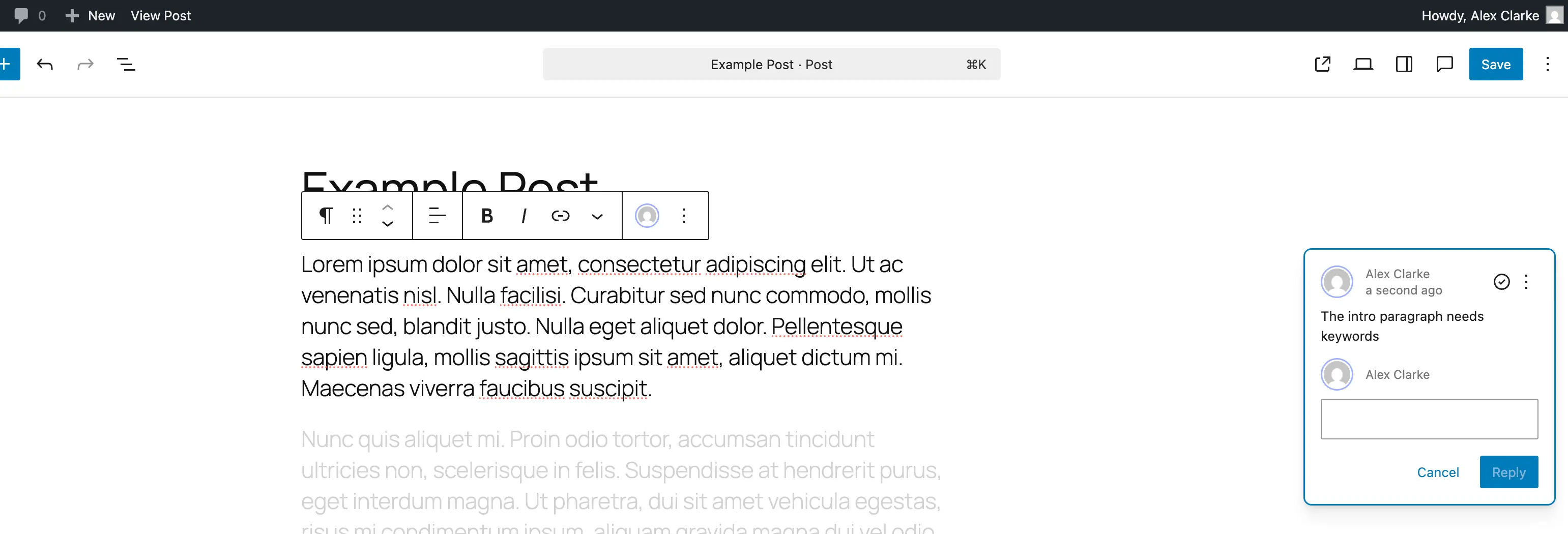
Managing feedback requires a straightforward administrative lifecycle. Once a requested change has been made, users can mark the feedback as resolved using the designated check icon. Resolved items are safely archived within the Notes panel, remaining visible for historical tracking unless explicitly deleted. For administrators concerned about database bloat—particularly on high-volume enterprise sites managing tens of thousands of dynamic pages—individual notes can be permanently deleted or toggled back to an active state if subsequent revisions require further discussion.
Step-by-Step Implementation and Administration
For standard WordPress installations, Notes are enabled by default across core post and page types. However, organizations utilizing custom post types (CPTs)—such as portfolios, products, real estate listings, or internal knowledge bases—must explicitly declare support for the feature to leverage in-editor collaboration fully.
To enable Notes on newly registered custom post types, developers can integrate the parameter directly into the registration arguments. By defining the editor support array to include specific configurations, the system recognizes the post type as compatible with the collaborative framework:
register_post_type( ‘book’, [
‘label’ => ‘Books’,
‘public’ => true,
‘show_in_rest’ => true,
‘supports’ => [
‘title’,
‘editor’ => [ ‘notes’ => true ],
‘author’,
],
] );
For pre-existing custom post types where developers wish to retroactively introduce the collaborative framework without disrupting current editor parameters, a programmatic hook can be deployed via the functions.php file or a site-specific functionality plugin. This approach safely merges the notes argument into existing support arrays:
add_action( ‘init’, function()
$post_types = [ ‘MY_POST_TYPE_1’, ‘MY_POST_TYPE_2’ ];
foreach ( $post_types as $post_type )
$supports = get_all_post_type_supports( $post_type );
$editor_supports = array( ‘notes’ => true );
if ( is_array( $supports[‘editor’] ) && isset( $supports[‘editor’][0] ) && is_array( $supports[‘editor’][0] ) )
$editor_supports = array_merge( $editor_supports, $supports[‘editor’][0] );
add_post_type_support( $post_type, ‘editor’, $editor_supports );
);
Conversely, organizations operating in highly automated publishing environments or those seeking to minimize interface clutter for specific user roles may choose to disable Notes. Because WordPress does not feature a universal global toggle to disable the functionality site-wide, developers can filter post type arguments to strip editor notes support from designated post types, such as standard posts or pages:
add_filter( ‘register_post_type_args’, function( $args, $post_type )
$post_types = [ ‘post’, ‘page’ ];
if ( in_array( $post_type, $post_types, true ) && isset( $args[‘supports’][‘editor’][‘notes’] ) )
unset( $args[‘supports’][‘editor’][‘notes’] );
return $args;
, 10, 2 );
Industry Implications and Workflow Analysis
The integration of native in-editor notes carries significant operational implications for digital agencies, publishing houses, and enterprise marketing departments. Industry analysts point out that tool consolidation directly correlates with reduced project delivery timelines. When clients and stakeholders can review layouts and copy inside the staging or production environment rather than reviewing static PDFs or disconnected mockups, the margin for misinterpretation narrows considerably.
Furthermore, keeping editorial discussions within the WordPress database enhances data privacy and compliance. Relying on third-party SaaS review tools often means sensitive draft copy, unreleased product details, or proprietary corporate strategies are transmitted across external servers. By handling collaboration entirely within the self-hosted or managed WordPress environment, organizations retain total sovereignty over their editorial data pipeline.
Fact-based analysis suggests that while native notes significantly optimize internal review cycles, organizations must establish clear operational protocols regarding when notes should be purged. Failure to delete resolved comments across a massive database containing millions of post revisions can lead to unnecessary table bloat, marginally impacting query performance during backend editing sessions. Consequently, standard operating procedures should mandate routine database housekeeping following the final publication of major content assets.
Conclusion
The arrival of native block-level notes within WordPress represents a mature step forward for a platform powering over forty percent of the web. By bridging the traditional divide between content creation and editorial collaboration, the feature addresses a long-standing workflow bottleneck. As publishing teams continue to embrace decentralized, fast-paced digital production, tools that foster contextual clarity, data security, and operational efficiency directly within the primary editor interface will remain foundational to modern web architecture.