Understanding the Layered Architecture of WordPress Automation: WP-CLI, REST API, and the Emerging Abilities API

For developers and system administrators working with WordPress, the landscape of automation tools can often appear complex, presenting a perceived dilemma between powerful interfaces like WP-CLI, the ubiquitous REST API, and the recently introduced Abilities API. This perception often leads to a misguided approach of viewing these tools as competing entities, where choosing one means neglecting another. In reality, a more accurate and productive mental model posits these interfaces as distinct, yet complementary layers within the WordPress ecosystem, each designed to address specific needs and interact with different types of callers. Recognizing their unique positions and functionalities is key to harnessing their full potential for efficient, secure, and intelligent WordPress management.
The Evolution of WordPress Interfaces: A Chronological Overview
WordPress, initially conceived as a simple blogging platform in 2003, has undergone a profound transformation into a robust, versatile content management system (CMS) powering over 40% of the internet. This evolution necessitated increasingly sophisticated methods of interaction beyond the traditional browser-based wp-admin dashboard. The development of its core interfaces reflects this journey, adapting to changing technological demands from server-side scripting to distributed web services and, more recently, artificial intelligence integration.
WP-CLI: The Command Line Powerhouse
WP-CLI, or WordPress Command Line Interface, emerged in the early 2010s as a critical tool for developers and system administrators. Before WP-CLI gained widespread adoption, many server-side operations on WordPress sites required manual navigation through the admin panel or complex, custom PHP scripts. Its formal integration and robust community support solidified its role as the de facto standard for command-line interaction with WordPress installations. WP-CLI operates directly on the server, executing PHP code against the WordPress core files and database. This direct access bypasses HTTP requests, authentication tokens, and browser overhead, making it exceptionally fast and efficient for a specific class of tasks.
The typical callers for WP-CLI are developers, automated scripts (such as cron jobs), or agents with secure shell (SSH) access to the server. Its strength lies in handling bulk operations, site migrations, database search-and-replace functions, plugin and theme management, cache flushing, and deployment processes. For instance, migrating thousands of posts, updating a domain across an entire database, or scripting a multi-site deployment are tasks where WP-CLI demonstrates unparalleled speed and reliability. Its extensive command set, which includes functionalities like wp post create, wp plugin update, wp search-replace, and wp db export, underscores its utility in a modern DevOps workflow, facilitating continuous integration and continuous deployment (CI/CD) practices for WordPress projects. This direct, low-level access, while powerful, inherently requires shell access, making it unsuitable for interaction by external services, browsers, or mobile applications. Its adoption by hosting providers and its role in streamlining developer workflows highlight its significance in the operational efficiency of WordPress sites.
The REST API: Connecting WordPress to the Global Web

The WordPress REST API represents a pivotal moment in the platform’s history, fundamentally changing how it interacts with the broader web. Discussions for a robust API began much earlier, but its phased integration into WordPress core, culminating in its inclusion in WordPress 4.7 in December 2016, marked a strategic shift. The REST API transformed WordPress from primarily a monolithic application into a versatile data source accessible via standard HTTP requests. It exposes content, users, taxonomies, settings, and other resources as JSON data through endpoints typically found under /wp-json/wp/v2/.
This interface allows any HTTP client – be it a web browser, a mobile application, or an external service – to read and write content to a WordPress site from anywhere on the internet. Authentication mechanisms, including application passwords, cookies, nonces, and OAuth, provide secure access control. The advent of the REST API directly fueled the "headless WordPress" movement, where WordPress serves as the backend content repository while a separate frontend application (built with technologies like React, Next.js, Astro, or Vue.js) handles the user interface. This decoupling offers immense flexibility, performance benefits for the frontend, and the ability to leverage modern JavaScript frameworks. Beyond headless architectures, the REST API is crucial for third-party integrations, allowing WordPress to sync data with CRM systems, e-commerce platforms, marketing automation tools, and other digital services. It has democratized access to WordPress content, enabling developers to build highly customized, distributed applications that leverage WordPress’s robust content management capabilities without being constrained by its traditional theme layer.
However, the REST API, by design, focuses on exposing resources. It describes what your data is – a post, a user, a comment – and how to interact with these data entities. It is up to the calling client to understand which endpoints exist, how to structure requests, and what sequence of calls might be needed to achieve a specific action. For human developers consulting documentation, this model is straightforward. But for autonomous agents, particularly those powered by artificial intelligence, this resource-centric approach can present a significant challenge, requiring complex logic to infer intent and sequence actions safely and effectively.
The Abilities API: A Capability Layer for AI Agents
Addressing the limitations of resource-centric APIs for the burgeoning field of artificial intelligence, the Abilities API represents the newest frontier in WordPress’s interface evolution. Introduced into WordPress core with version 6.9 (as referenced in the original context, indicating a recent or upcoming strategic integration), and available via a plugin for earlier versions, the Abilities API provides a crucial layer of abstraction tailored specifically for AI agents. Its primary goal is to enable AI agents to understand what actions they are allowed to perform on a WordPress site in a safe, described, and predictable manner.
Unlike the REST API, which exposes raw data resources, the Abilities API allows plugins and themes to register named capabilities or "abilities." Each ability is a discrete, described action, characterized by a stable ID, a human-readable label, a detailed description, defined input and output schemas (typically JSON Schema), and a robust permission check. This structured definition provides a clear contract for AI agents, outlining precisely what an action entails, what data it requires, what results it yields, and under what conditions it can be executed.
Developers register these abilities using hooks like wp_abilities_api_categories_init for categorizing actions and wp_abilities_api_init for defining the abilities themselves. For example, registering an ability like my-plugin/publish-draft would clearly define the process of publishing an existing draft post by ID, complete with its input requirements, expected output, and a permission_callback to ensure authorized execution. When meta.show_in_rest is set to true, these abilities become discoverable via a REST endpoint (e.g., wp-json/wp-abilities/v1/abilities), allowing external AI clients to query and understand the site’s operational capabilities. Internally, the @wordpress/abilities JavaScript package facilitates their consumption.
The fundamental distinction is critical: the REST API describes what your data is, while the Abilities API describes what an agent is allowed to do with it. This capability-based model is essential for the safe and effective deployment of AI agents in content management. It eliminates the need for agents to reverse-engineer endpoint logic or make assumptions about permissible actions. Instead, an ability explicitly states, "This is a specific thing you can do; here are its prerequisites, and here are the rules for who can perform it." This explicit contract is invaluable for building trustworthy, multi-agent systems on WordPress, where different AI components need a shared, unambiguous vocabulary of actions to collaborate effectively. The introduction of the Abilities API signals WordPress’s proactive stance in integrating with the rapidly advancing field of artificial intelligence, ensuring its relevance and adaptability in an increasingly automated digital landscape.

How the Three Interfaces Intersect and Complement Each Other
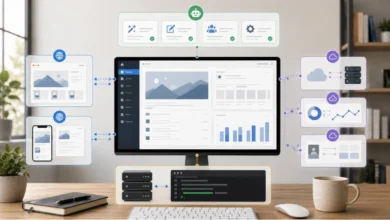
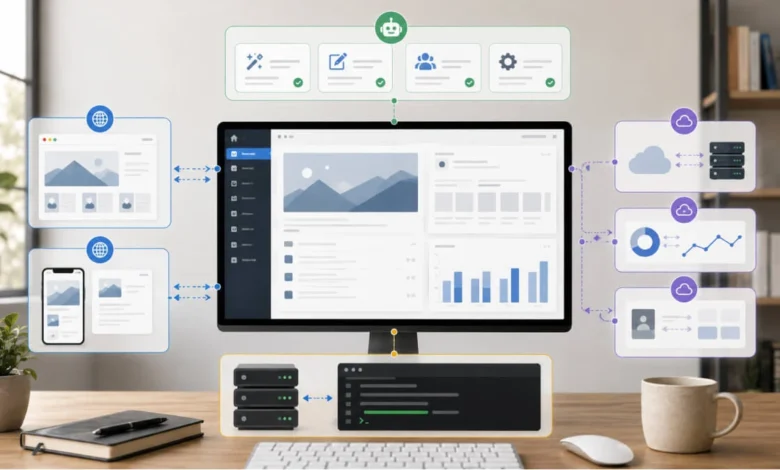
The power of WordPress’s automation ecosystem truly emerges when WP-CLI, the REST API, and the Abilities API are understood as layers that build upon one another, rather than isolated tools. They form a cohesive stack, all ultimately interacting with the same WordPress core, its functions, and its database.
The Abilities API frequently leverages the REST API for its external exposure, meaning an AI agent might discover and invoke an ability through a REST endpoint. In turn, the REST API operates on the same underlying PHP and WordPress architecture that WP-CLI directly manipulates. This layered synergy allows for a highly flexible and powerful development paradigm.
The core question for developers, therefore, shifts from "which one is best?" to "how far from the site does my caller live, and how much explicit instruction does it need?" The closer and more trusted the caller, the lower down the stack one can go for maximum efficiency. Conversely, the more autonomous, remote, or complex the caller, the higher up the stack – towards more descriptive and guarded interfaces – the interaction should be.
A Strategic Decision Guide for Everyday Work
- For direct server interaction and maximum speed: Reach for WP-CLI. This is ideal for bulk data operations, site migrations, server-side maintenance scripts, and command-line deployments where shell access is available and efficiency is paramount. A developer or an internal script running on the same server is the archetypal WP-CLI caller.
- For remote data access and external integration: Utilize the REST API. This is the go-to for powering headless frontends, mobile applications, third-party service integrations, and any scenario where an off-server client needs to read or write WordPress content over HTTP. It facilitates broad interoperability and decoupling.
- For secure, described actions by AI agents: Employ the Abilities API. This is specifically designed for AI agents and other autonomous systems that require a clear, permission-checked, and schema-defined set of actions. It ensures agents operate safely and predictably within defined boundaries, preventing unintended consequences from misinterpreting raw data structures.
Most sophisticated WordPress projects today do not rely on a single interface but strategically integrate all three. This multi-layered approach ensures that each task is handled by the most appropriate tool, optimizing for performance, security, and developer experience across the entire operational spectrum.
Illustrative Comprehensive Setup: A Modern Publishing Platform
Consider a contemporary online publishing platform, aiming for high performance, extensive automation, and smart content management:

-
WP-CLI for Core Operations and DevOps: The platform’s DevOps team heavily relies on WP-CLI. Nightly cron jobs execute
wp db exportfor backups,wp plugin update --allfor routine maintenance (in staging environments), andwp cache flushafter significant content updates. During new site launches or large content imports from syndicated feeds,wp post createandwp media importcommands are scripted for efficient bulk processing. Furthermore, an internal AI assistant, granted restricted shell access, might leverage WP-CLI commands to run diagnostic checks or optimize database tables based on performance metrics. -
REST API for Dynamic Frontends and External Integrations: The public-facing website is a headless application built with Next.js, pulling all article content, author profiles, and category listings via the WordPress REST API. This ensures lightning-fast page loads and a highly customized user experience, detached from WordPress’s traditional theme layer. A dedicated mobile application for journalists to submit breaking news stories and manage their drafts also communicates with WordPress exclusively through the REST API. Additionally, the platform integrates with an external customer relationship management (CRM) system and an email marketing service, both synchronizing subscriber data and content updates using REST API endpoints.
-
Abilities API for Intelligent Content Management and Automation: To enhance content velocity and quality, the platform deploys several AI agents. An "SEO Optimization Agent" utilizes an ability called
generate-seo-meta(registered by an SEO plugin) to automatically create meta descriptions and keywords for new articles based on their content, ensuring they adhere to predefined schema and permissions. Another agent, the "Content Scheduler," uses aschedule-post-for-peak-timeability to intelligently determine and set optimal publication times based on audience engagement data. A "Comment Moderation Agent" employs amoderate-commentability, designed with specific input schemas for comment IDs and moderation actions (approve, trash, spam), to assist human moderators by flagging or approving comments based on content analysis. These agents interact with WordPress through the Abilities API, benefiting from its explicit descriptions, input/output schemas, and robust permission checks, ensuring their actions are safe, predictable, and aligned with editorial policies without exposing raw, potentially dangerous, resource manipulation capabilities.
In this sophisticated setup, each interface plays a distinct and crucial role. WP-CLI handles the heavy lifting on the server, ensuring operational efficiency. The REST API powers the distributed web and mobile experiences, enabling global reach and flexibility. The Abilities API provides a secure and intelligent layer for AI-driven automation, extending the platform’s capabilities without compromising control or safety. Trying to force any one of these tools to perform the functions best suited for another would lead to inefficiencies, security vulnerabilities, or overly complex implementations.
Conclusion: Picking the Layer, Not the Winner
The evolving landscape of WordPress automation tools, encompassing WP-CLI, the REST API, and the Abilities API, reflects the platform’s commitment to adaptability and versatility. These are not rival technologies but rather distinct layers within a comprehensive stack, each meticulously designed to cater to different interaction paradigms and caller requirements. From the swift, server-side commands of WP-CLI to the global reach of the REST API and the intelligent, described actions of the Abilities API for AI agents, WordPress offers a rich toolkit for developers.
The strategic imperative for any WordPress developer or architect is to move beyond the question of "which one is superior?" and instead focus on "which layer best serves the current task and the nature of the caller?" By adopting this layered perspective, decisions become clearer, implementations more efficient, and WordPress installations more robust, secure, and future-proof in an increasingly interconnected and AI-driven digital world. The ongoing development of these interfaces underscores WordPress’s enduring relevance as a dynamic and extensible platform, capable of meeting the complex demands of modern web development and beyond.