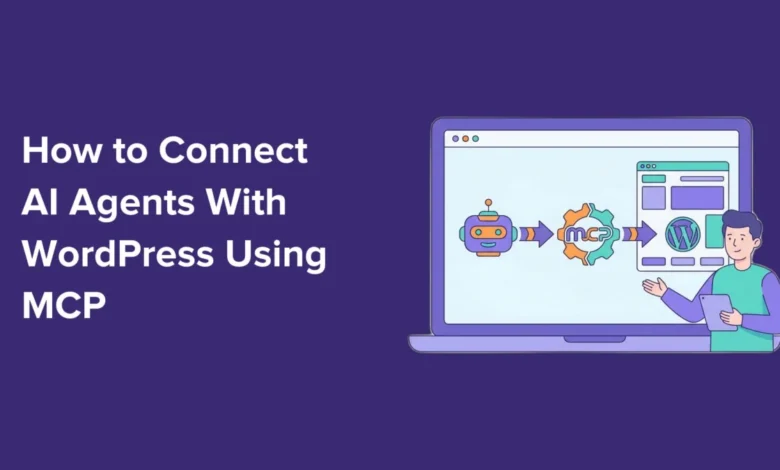
The burgeoning landscape of artificial intelligence is revolutionizing digital workflows, and a pivotal development is the newfound ability to seamlessly integrate powerful AI agents with WordPress websites through the Model Context Protocol (MCP), a standard facilitated by platforms like WPVibe. This integration ushers in an era of unprecedented productivity, allowing website administrators and content creators to delegate complex, repetitive, and time-consuming tasks to AI assistants such as Claude Code, Cowork, and ChatGPT using simple conversational prompts. The result is a dramatically streamlined website management experience, promising significant efficiency gains across various operational fronts, from content generation and media handling to e-commerce administration and search engine optimization.
The Model Context Protocol: A Universal Language for AI-WordPress Integration
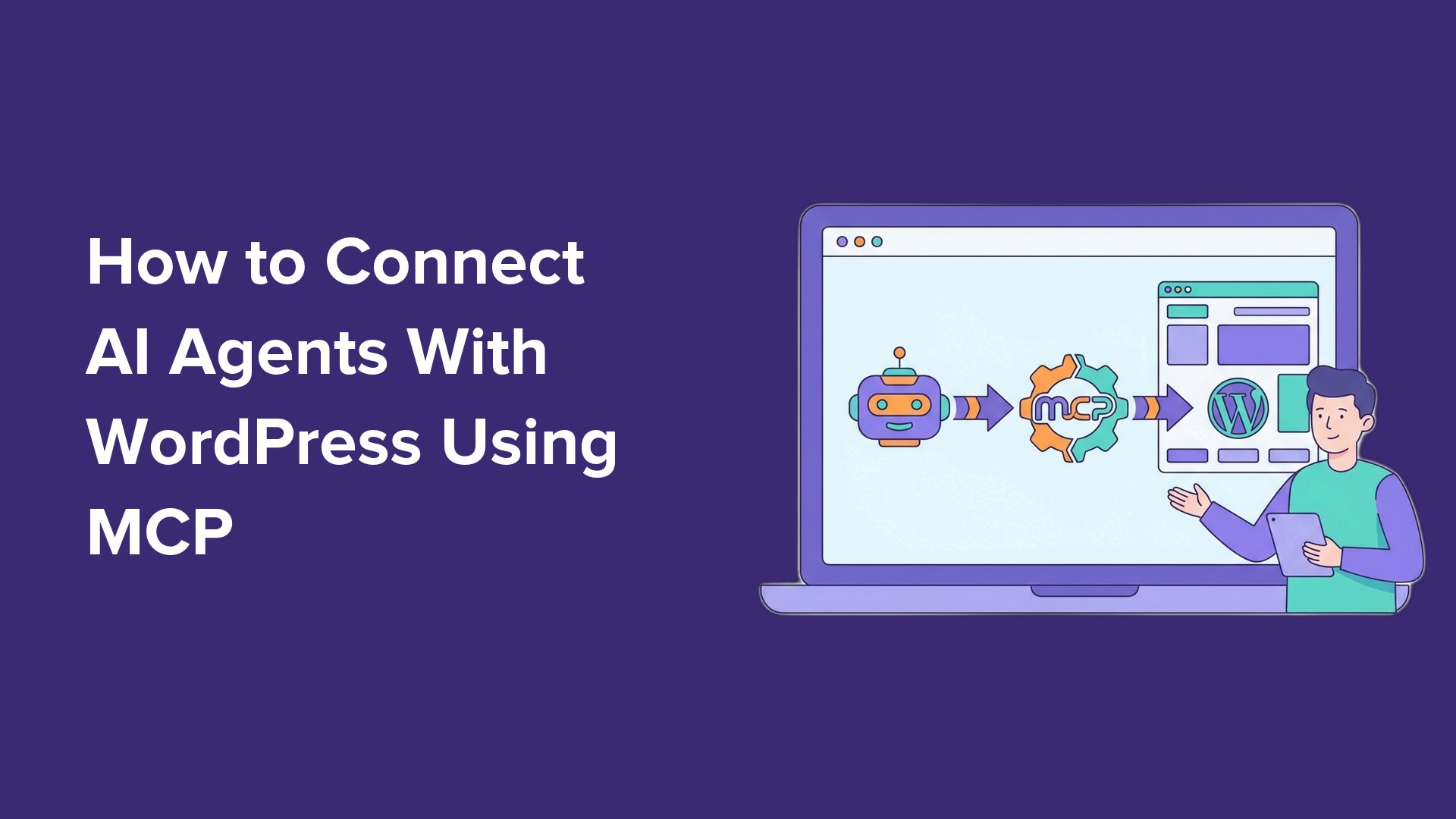
At the heart of this transformative capability lies the Model Context Protocol (MCP), an open standard designed to enable AI assistants to connect and interact with external tools and services. Conceptually, MCP acts as a universal adapter, eliminating the need for individual AI tools to develop custom integrations for every service they wish to interact with. Instead, by adhering to this common language, any AI tool and service supporting MCP can communicate and collaborate effectively.
For WordPress, the adoption of MCP represents a strategic evolution, leveraging the platform’s existing robust architecture. The connection between AI assistants and WordPress via MCP utilizes the WordPress REST API, a built-in interface that allows external applications to interact with WordPress data. This means that no additional complex infrastructure or bespoke installations are required on the WordPress site itself to establish the fundamental connection. With a WordPress MCP in place, AI assistants gain the contextual awareness to understand a website’s capabilities and execute a wide array of tasks from plain-text prompts. This standardized approach significantly lowers the barrier to entry for AI integration, making advanced functionalities accessible to a broader user base.
The timeline of this integration highlights its growing importance. While the WordPress REST API has been a cornerstone for external interactions for years, the formalization and widespread adoption of protocols like MCP are relatively recent. The forthcoming WordPress 6.9 update further solidifies this direction with the introduction of the new Abilities API. This API empowers plugins to register their own specific actions, or "abilities," which AI agents can then discover and utilize, dramatically expanding the scope of automated tasks beyond core WordPress functionalities. This forward-looking development underscores WordPress’s commitment to embracing AI and maintaining its position as a leading, adaptable content management system.
WPVibe.ai: Bridging AI and WordPress for Enhanced Productivity
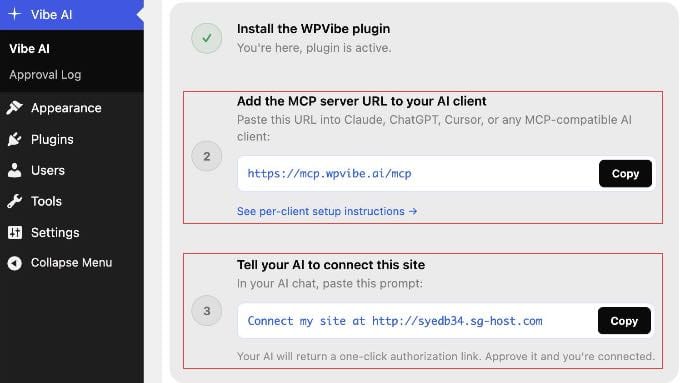
Facilitating this integration for self-hosted WordPress users is WPVibe.ai, a platform that simplifies the setup and management of MCP connections. WPVibe serves as a crucial intermediary, offering a free, hosted server solution that eliminates the need for users to configure complex infrastructure on their own. This ease of implementation is a significant factor in democratizing AI integration, making it accessible even to those without deep technical expertise. WPVibe’s architecture ensures compatibility with major AI tools through a single, straightforward setup process, streamlining what could otherwise be a fragmented and challenging endeavor.
WPVibe’s commitment to accessibility is evident in its freemium model. The core functionalities discussed, including the ability to connect AI assistants and perform a wide range of WordPress tasks, are available on its free plan. This allows individuals and small businesses to experiment with and benefit from AI integration without upfront investment in proprietary AI keys or advanced services. For users requiring higher daily usage limits or priority support, a paid Pro plan is available, but it focuses on scaling rather than locking essential features behind a paywall. This approach aligns with the open-source ethos of WordPress, promoting innovation and broad adoption.
Connecting AI Agents: A New Era of Unified Web Management
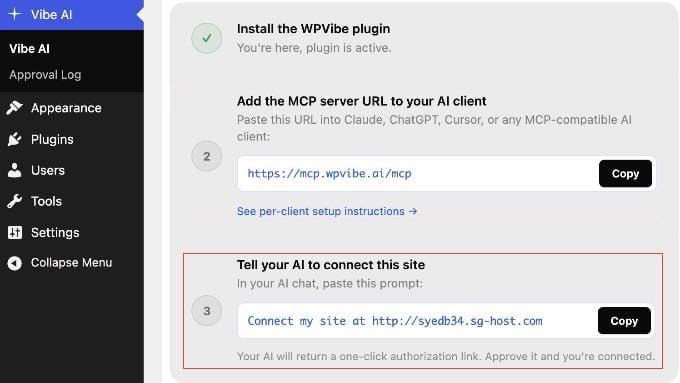
The process of connecting AI tools to WordPress via WPVibe is designed for simplicity, often taking mere minutes. Once the free WPVibe plugin is installed and activated on a self-hosted WordPress site, it provides a unique MCP server URL (e.g., https://mcp.wpvibe.ai/mcp). This URL then acts as the conduit for various AI platforms to establish their connection.
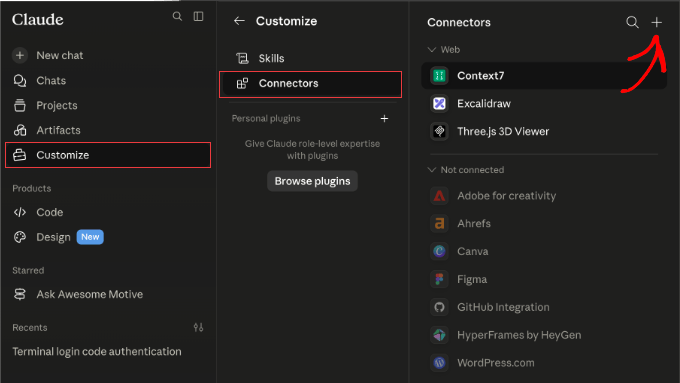
- Claude Integration: For users of Claude.ai (web, desktop, code, mobile apps), the connection is streamlined. Administrators or owners of Team/Enterprise workspaces can add the WPVibe URL as a global connector, which then automatically syncs across all associated Claude clients. Individual users can authenticate once the connector is established. This centralized management simplifies deployment in organizational settings.
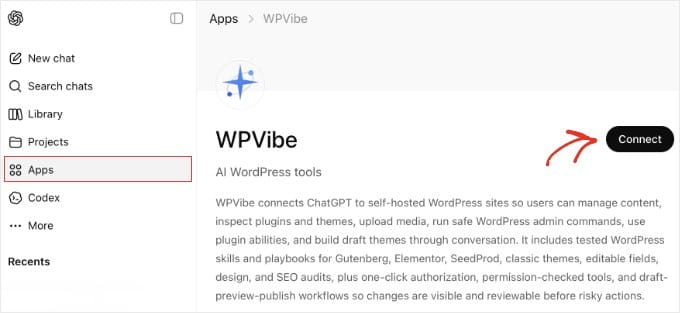
- ChatGPT Marketplace: WPVibe’s direct availability in the ChatGPT App Marketplace offers an even more direct route for both free and paid ChatGPT users. By searching for WPVibe in the marketplace and clicking "Connect," users can link their WPVibe account, and ChatGPT automatically prefixes messages with "@WPVibe" when interacting with the WordPress site. This native integration reflects the growing demand for direct AI-CMS interaction.
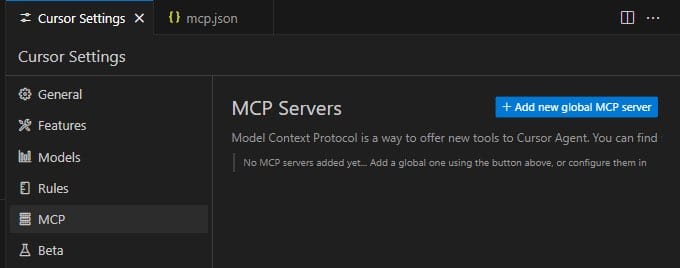
- Cursor and Windsurf Configuration: For developer-centric AI environments like Cursor and Windsurf, the connection involves adding the WPVibe MCP server URL to a JSON configuration file. While slightly more technical, this method provides flexibility for developers accustomed to code-based configurations. It’s crucial to note specific syntax differences, such as Windsurf using
serverUrlinstead ofurl, highlighting the meticulous details that ensure successful integration.
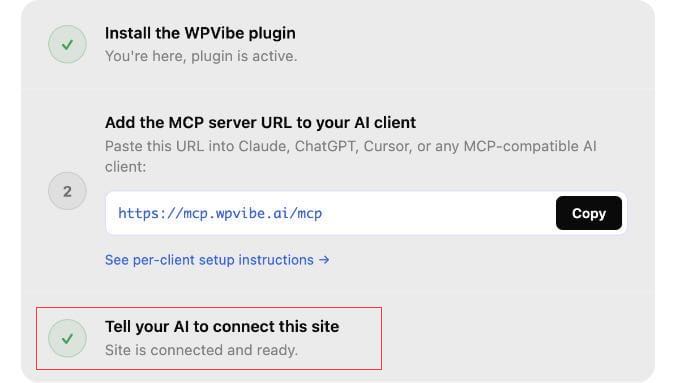
Following the AI client setup, the final authorization step involves a secure, one-click process. From the WordPress dashboard, a pre-filled prompt containing the site’s URL is copied into the AI chat. The AI assistant then communicates with WPVibe, which generates a unique authorization link. Clicking this link securely approves the connection, with WordPress and WPVibe managing credentials in the background using application passwords, eliminating the need for users to expose their main login details. This robust authorization mechanism underscores the emphasis on security in this new paradigm of AI-driven website management.
Transformative Capabilities: Real-World Applications and Efficiency Gains
Once connected, the AI agent gains the ability to perform a multitude of tasks, fundamentally altering traditional WordPress workflows. The immediate impact is a significant reduction in manual effort and time spent on routine administrative and content management duties.
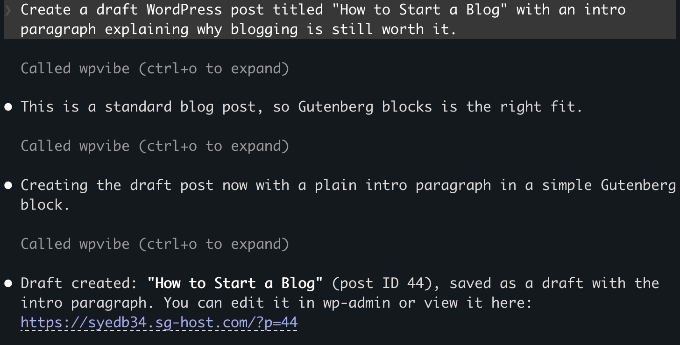
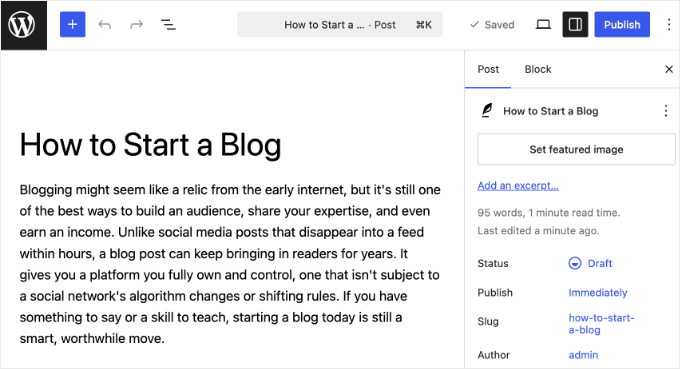
- Automated Content Creation and Drafting: AI assistants can instantly draft blog posts, articles, or pages based on simple prompts. For instance, instructing the AI to "Create a draft WordPress post titled ‘How to Start a Blog’ with an intro paragraph explaining why blogging is still worth it" will result in a new draft post within WordPress. This capability dramatically accelerates the content creation pipeline, allowing content strategists to focus on refinement and overarching strategy rather than initial ideation and drafting. Crucially, nothing is published without human review, ensuring quality control.
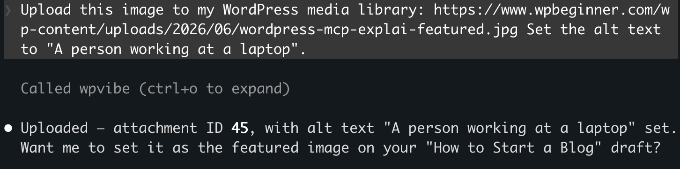
- Streamlined Media Management: Uploading images to the WordPress media library, complete with alt text, becomes a conversational task. A prompt like "Upload this image to my WordPress media library: [public image URL]. Set the alt text to ‘A person working at a laptop’" will securely fetch the image, validate its source, and add it to the library with the specified metadata. This eliminates several manual steps, especially useful for content creators dealing with large volumes of visual assets.
- E-commerce Management with WooCommerce: The integration extends powerfully to e-commerce platforms. With WooCommerce 10.9 and later natively supporting MCP, AI agents can manage product listings and order processes. Commands such as "Draft a new product called ‘Summer T-Shirt’ with a short description and a price of $29.95" enable instant product creation. Beyond this, AI can query order statuses, update order details, and add notes, transforming routine store administration into a chat-based interaction. This capability is particularly beneficial for small to medium-sized businesses looking to optimize their online store operations and customer service.
- AI-Powered SEO Optimization with AIOSEO: For websites utilizing robust SEO plugins like All in One SEO (AIOSEO), AI integration opens new avenues for optimization. AI can be prompted to "Find all posts missing meta descriptions and write and apply them in one go." The AI then autonomously scans posts, generates contextually relevant meta descriptions, and applies them through AIOSEO, ensuring better search engine visibility and compliance with SEO best practices. This automation of often tedious SEO tasks frees up valuable time for more strategic keyword research and content planning.
- Landing Page and Maintenance Mode Management with SeedProd: Plugins like SeedProd, which manage coming soon pages, maintenance modes, and custom landing pages, can also be controlled via AI. Simple commands like "Check if maintenance mode is currently active" or "Enable the coming soon page" allow for swift site status adjustments without navigating the WordPress admin interface. This offers convenience and rapid response capabilities for site administrators.
- Form Building with WPForms: Creating contact forms or other data collection forms is simplified through AI integration with WPForms. A prompt such as "Create a contact form with name, email, and a message field" will instruct WPForms to generate the basic form structure within the WordPress dashboard, ready for further configuration and embedding. This accelerates the process of setting up essential communication channels on a website.
These examples highlight a shift from traditional, click-intensive administrative tasks to an intuitive, conversational interface. The "Abilities API" introduced in WordPress 6.9 is crucial here, allowing plugins to register specific functionalities that AI can discover. This means that as more plugins adopt this standard, the scope of AI-driven automation within WordPress will continue to expand organically. Users can even query their AI with "What can you do on my WordPress site?" to receive an up-to-date list of available abilities based on their installed plugins.
Security and User Control: Addressing Key Concerns
The prospect of AI agents managing a website naturally raises security questions. WPVibe and WordPress address these concerns through several integrated security measures. The connection between the AI client and WordPress is managed by WordPress’s built-in application passwords feature. This system generates a unique, revocable password for each external tool, ensuring that the AI only gains the permissions associated with the specific WordPress user account it’s connected to.
A best practice strongly recommended by experts is to connect the AI with a dedicated user account assigned a limited role, such as "Editor," rather than an "Administrator" login. This principle of least privilege ensures that the AI can only perform actions commensurate with its assigned role, mitigating potential risks. For instance, an Editor-role AI can create and manage posts but cannot install plugins or modify core settings.
WPVibe enhances this security framework by encrypting application passwords before storage, using a separate encryption key for each connected site. All communications between the AI client, WPVibe, and the WordPress site are also fully encrypted, safeguarding credentials from exposure. Importantly, WPVibe does not store the content of user conversations, maintaining privacy by keeping chat data within the respective AI client. On the WordPress side, new content created by AI is typically saved as a draft, requiring human approval before publication, and deletions are moved to the trash rather than being permanently removed, providing an additional layer of safety. Users retain full control, with the ability to revoke AI access at any time by deleting the corresponding application password from their WordPress user profile.
Industry Context and Broader Implications
The integration of AI agents with WordPress via MCP signifies a major inflection point in web development and content management. Amidst the global AI market’s projected growth, which some analysts predict could exceed several hundred billion dollars by the end of the decade, the accessibility of AI-powered automation for the world’s most popular CMS is a significant development. WordPress, powering over 40% of all websites, has consistently evolved to meet technological demands, and its embrace of AI through open standards like MCP reinforces its adaptability and future-readiness.
This move has profound implications:
- Democratization of Advanced Management: Complex website tasks, once requiring specialized technical skills or significant manual effort, are now accessible through intuitive conversational interfaces. This empowers small business owners, bloggers, and non-technical users to manage their sites more effectively, reducing reliance on developers for routine tasks.
- Enhanced Productivity and Cost Efficiency: Businesses can anticipate substantial savings in time and operational costs. Automating content drafting, media uploads, basic e-commerce operations, and SEO adjustments frees human resources to focus on higher-value strategic activities, innovation, and creative endeavors.
- Catalyst for Plugin Innovation: The Abilities API in WordPress 6.9 is expected to spur a new wave of plugin development. Developers will be incentivized to create plugins that expose their functionalities as AI "abilities," leading to a richer ecosystem of AI-compatible tools.
- Strategic Positioning for WordPress: By adopting open standards for AI integration, WordPress maintains its competitive edge against proprietary platforms, offering users the flexibility and extensibility that define its ecosystem.
- Evolution of Digital Roles: The rise of AI agents will likely redefine roles within digital teams, shifting focus from execution to strategic oversight, AI prompt engineering, and quality assurance.
Troubleshooting and Future Outlook
While the setup process is streamlined, occasional connection issues can arise. Common troubleshooting steps include verifying the WPVibe plugin’s activation, ensuring the WordPress site is publicly accessible, confirming the correct MCP server URL is entered into the AI client, checking for conflicting plugins, and reviewing the WordPress server’s PHP version. These checks ensure that the foundational technical requirements are met for a stable connection.
Looking ahead, the synergy between AI and WordPress is poised for continuous expansion. As AI models become more sophisticated and the MCP standard gains wider adoption, the capabilities of AI agents within WordPress will undoubtedly grow. We can anticipate more nuanced content generation, advanced site analytics, proactive security monitoring, personalized user experiences driven by AI, and even more seamless integrations with external marketing and business tools. This evolution promises to make WordPress an even more powerful and intelligent platform for managing digital presence in the AI era.