Building a Robust WooCommerce B2B Store with B2BKing: A Comprehensive Guide for Wholesale Operations

The digital transformation of commerce has profoundly reshaped how businesses operate, with Business-to-Business (B2B) transactions increasingly migrating to online platforms. While WooCommerce offers a robust foundation for e-commerce, its native functionality is primarily geared towards Business-to-Consumer (B2C) retail. Wholesale operations, by their very nature, demand a distinct set of requirements that extend far beyond standard retail capabilities, including granular access controls, intricate pricing structures, specialized payment options, and streamlined bulk ordering processes. Without dedicated tooling, managing a B2B store on WooCommerce can quickly become a manual, error-prone, and inefficient endeavor, often leading to compromises like exposed pricing or cumbersome account management. This is precisely where a specialized WooCommerce B2B plugin like B2BKing emerges as an indispensable solution, providing the necessary infrastructure to transform a standard WooCommerce installation into a fully functional and optimized wholesale portal.
The Evolving Landscape of B2B E-commerce
The global B2B e-commerce market is experiencing exponential growth, projected to reach trillions of dollars in the coming years. This surge is driven by several factors: the widespread adoption of digital tools across industries, the demand for convenience and self-service among business buyers, and the operational efficiencies offered by online sales channels. According to industry reports, B2B buyers increasingly prefer digital channels for research and purchasing, with many expecting a B2C-like purchasing experience in terms of ease of use, albeit with B2B-specific functionalities. Companies that fail to adapt risk falling behind competitors who leverage sophisticated online platforms to serve their trade customers more effectively.

WooCommerce, as the most popular e-commerce platform globally, powers millions of online stores. Its flexibility and extensive ecosystem of plugins make it a natural choice for many businesses. However, its core design, optimized for individual customer purchases, struggles to natively address the complexities of wholesale. Key challenges for B2B operations include:
- Account Approval Workflows: The necessity to vet and approve trade accounts before granting access to pricing or specific product catalogs.
- Tiered and Group-Based Pricing: Offering different pricing tiers based on customer groups, volume, or specific contracts.
- VAT/Tax Exemption Management: Handling complex tax regulations, including VAT validation and exemption for registered businesses.
- Custom Payment & Shipping Methods: Providing invoice terms, purchase orders, or specific freight options unavailable to retail customers.
- Bulk Ordering Efficiency: Enabling buyers to quickly order dozens or hundreds of SKUs in a single session, often through dedicated forms.
- Hidden Pricing: Concealing wholesale prices from the general public or unapproved guests.
Without a dedicated solution, businesses are often left managing access manually, exposing sensitive pricing information, or resorting to cumbersome offline processes that negate the benefits of an online store.
B2BKing Pro: Bridging the Gap for Wholesale Excellence
B2BKing Pro specifically addresses these inherent limitations by adding a comprehensive suite of B2B functionalities to WooCommerce. It fundamentally transforms the platform, equipping it with the necessary infrastructure for sophisticated wholesale operations. The plugin operates in two distinct modes: B2B Shop, designed for businesses exclusively selling to other businesses, and B2B and B2C Hybrid, catering to stores that serve both wholesale and retail customers from a single installation. This flexibility ensures that businesses can tailor their storefronts to their exact operational model. At its core, B2BKing’s architecture revolves around customer groups, which serve as the central control mechanism for pricing, payment options, tax exemptions, and product visibility, ensuring a highly segmented and personalized buying experience.

Consider an example of an office supplies wholesaler selling paper, printer cartridges, pens, notebooks, and desk accessories to trade buyers. This wholesaler typically deals with two primary customer groups: Retailers, independent shops purchasing for resale, who usually pay by card, and Distributors, larger volume buyers operating on 30-day invoice terms who qualify for lower, negotiated prices. Both groups require manual approval before gaining access to the catalog and pricing, ensuring that public visitors cannot view wholesale rates. This scenario highlights the practical need for B2BKing’s advanced features.
Before embarking on the setup process, it’s essential to have a fully functional WooCommerce store with products already loaded. While the pricing configuration for extensive catalogs might seem daunting, B2BKing includes a bulk import/export option, significantly streamlining the process for businesses with hundreds or thousands of SKUs. The following seven steps outline a strategic implementation plan for building a robust WooCommerce wholesale store using B2BKing Pro.
Strategic Implementation: A Seven-Step Blueprint
The journey to a fully optimized WooCommerce B2B store involves a structured approach, ensuring that each critical wholesale requirement is met systematically. Many of these steps are quick to execute, laying the groundwork for a highly efficient operation.

1. Defining Your Shop’s Operational Mode
The initial decision within B2BKing is to select the shop mode, which dictates how the store behaves for every visitor. This fundamental choice influences the overall user experience and access pathways. Navigate to B2BKing > Settings > Main Settings and locate the plugin status selector.
- B2B Shop: This mode is ideal for businesses exclusively serving wholesale customers. It effectively removes all retail-centric paths and public pricing, presenting a storefront solely designed for business buyers. Unregistered visitors will typically encounter a login/registration prompt before accessing any product details or prices.
- B2B and B2C Hybrid: For companies with a dual customer base, this mode allows both wholesale and retail operations to coexist on the same platform. B2C customers will experience the standard retail journey, while B2B customers will be directed through the specialized wholesale functionality, ensuring a seamless experience for both segments without cross-contamination of features or pricing.
Directly beneath the mode selector, a series of toggles control the elements appearing in customers’ My Account panel. Activating features like the bulk order form and purchase lists here ensures their availability for B2B customers, with subsequent configuration steps detailing their specific setup. This initial setting establishes the foundational behavior of your entire B2B operation.
2. Architecting Customer Groups for Tailored Experiences
Customer groups are the cornerstone of B2BKing’s segmentation capabilities, allowing for highly customized experiences based on buyer type. Establishing these groups early is crucial as they pre-exist before configuring pricing, payment methods, or product visibility rules. Proceed to B2BKing > Groups > Business (B2B) Groups to create your distinct segments, such as "Retailers" and "Distributors" in our office supplies example.
Upon opening each group’s settings, you’ll find granular controls for available shipping and payment methods. For instance, "Distributors" might have an invoice payment gateway enabled and card payment options disabled, reflecting their account terms. Conversely, "Retailers" might be restricted to standard card payments. This ensures that each group is presented only with relevant transaction options, aligning with their established buying arrangements. It is critical to note that each customer belongs to only one group. This singular assignment prevents conflicts that could arise from overlapping group-level settings, particularly concerning payment and shipping. For more nuanced, tiered pricing within a group, dynamic rules provide the necessary flexibility without requiring an explosion of separate groups for every pricing band. This robust segmentation capability is a key differentiator for managing complex B2B relationships.

3. Safeguarding Pricing and Product Visibility
A fundamental requirement for most wholesale operations is the ability to restrict pricing visibility from unregistered or unapproved visitors. Trade pricing is often confidential and should not be publicly accessible, while the product catalog itself can serve as an effective lead generation tool. These critical access control settings are located within B2BKing > Settings > Access Restriction.
Here, selecting Hide prices ensures that the product catalog remains visible to unregistered visitors, allowing them to browse products, but all pricing information is concealed until they log in with an approved account. This strategy allows prospects to understand your product range and quality without revealing sensitive pricing details prematurely, encouraging registration. B2BKing also offers alternative access restriction settings for different scenarios:
- Hide shop entirely: Makes the entire store inaccessible to guests, requiring login to view any content.
- Hide products (show prices): Conceals product listings but allows prices to be seen (less common for B2B).
- Show prices (no restrictions): Standard WooCommerce behavior, where everything is public.
For situations where only specific categories or products need hidden pricing, B2BKing’s Dynamic Rules (discussed later) offer a more granular approach, allowing for targeted price concealment without affecting the rest of the catalog. This layered approach to access control is vital for maintaining competitive advantage and protecting business-sensitive information.
4. Streamlining Trade Registration and Account Approval
The registration process is where B2BKing truly differentiates wholesale buyers from the general public. It involves connecting each customer role to its designated group, ensuring that new accounts are correctly categorized and managed. Within Settings > Registration, enable the Enable drop-down and fields option to activate the User Type selector on the My Account page, allowing prospective buyers to self-identify their business type.

Next, navigate to the Registration Roles page. Create specific roles for "Retailer" and "Distributor," and crucially, set both to manual approval. This ensures that every new trade application is reviewed and verified by an administrator before access is granted, maintaining the integrity of your wholesale accounts. Each role is then linked to its corresponding customer group (e.g., "Retailer" role to "Retailers" group, "Distributor" role to "Distributors" group) via the Automatic Approval to Group drop-down menu. This automation means that once an application is manually approved, B2BKing automatically places the customer into the correct group, instantly applying their specific pricing, payment methods, and visibility rules.
The B2BKing > Registration Fields screen provides extensive customization for the signup process. Here, you can add mandatory fields such as "Company Name" and "VAT Number" for both roles, which are essential for business verification and tax compliance. B2BKing supports a wide array of field types, allowing for the collection of trade certificates, company registration documents, or any other necessary information, eliminating the need for custom development. Furthermore, B2BKing integrates with WooCommerce’s email settings to send automated alerts at each approval stage, keeping both the applicant and administrators informed throughout the process, enhancing transparency and user experience.
5. Implementing Granular Wholesale Pricing Strategies
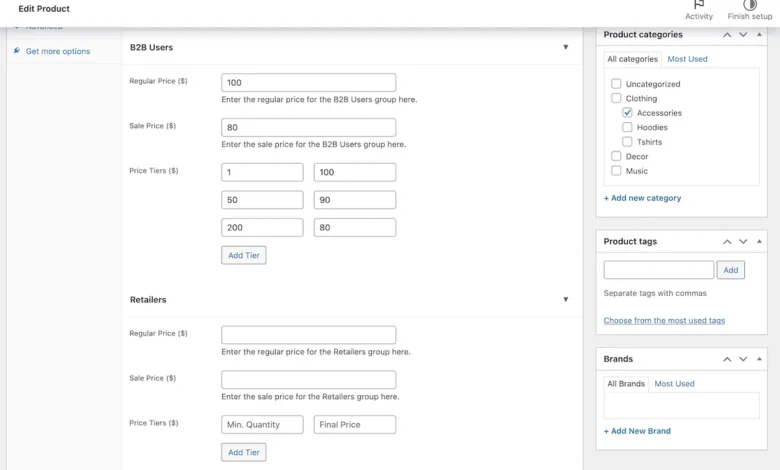
Effective pricing is paramount in B2B commerce, often involving complex structures that differ significantly from retail models. B2BKing integrates group-specific pricing fields directly into each product’s edit screen, ensuring that every customer group sees only the rates applicable to their account. Open any product in WooCommerce and navigate to the Product Data section. Under the General tab, you will find dedicated pricing fields for each customer group.
For the office supplies example, you would enter the standard wholesale price for "Retailers" and a comparatively lower price for "Distributors," reflecting their volume purchasing power or negotiated terms. Beyond static group pricing, B2BKing also supports tiered pricing, a critical feature for incentivizing larger orders. In the same section, you can define quantity thresholds and a corresponding price per unit for each level. For instance, a ream of paper might be priced at $5 for orders up to 50 units, $4.50 for 51 to 200 units, and $4 for quantities exceeding 200. To enhance transparency for buyers, ticking Show Tiered Pricing Table within the Product Data > B2BKing panel automatically generates a detailed pricing breakdown on the product page, allowing buyers to visualize potential savings before committing to an order.

For businesses where managing final prices is less intuitive than applying discounts, B2BKing offers a percentage input option on the B2BKing > Settings > Tiered Pricing screen. This allows administrators to set percentage-based discounts for different tiers or groups, simplifying price management. For larger catalogs, B2BKing provides a powerful bulk management tool: the B2BKing > Tools page allows you to export product data into a spreadsheet, add group and tiered pricing across all rows, and then re-import the updated file. This feature is invaluable for streamlining the pricing setup for hundreds or thousands of products, significantly reducing manual effort and potential errors.
6. Enhancing Order Efficiency with the Bulk Order Form
For established B2B customers who frequently reorder from a known catalog, a bulk order form dramatically streamlines the purchasing process. Instead of navigating through individual product pages, buyers can quickly input quantities for multiple products and add them to their cart in a single session. This feature, when enabled in the main settings, appears by default in a B2B customer’s My Account panel.
Beyond its default placement, the bulk order form can be embedded on any page using shortcodes, offering flexibility in its presentation. B2BKing provides three distinct themes for the form, two of which support additional parameters for granular control over its display. For example, you could configure the form to display only products from a specific category (e.g., "Printer Cartridges") or to prioritize your most frequently ordered products at the top of the list. This customization ensures that the bulk order form is not just functional but also highly optimized for the specific needs and buying patterns of your key customers, leading to improved order accuracy and faster checkout times. Implementing this form significantly enhances the customer experience, reducing friction for repeat purchases and boosting overall efficiency.
7. Automating Business Logic with Dynamic Rules
Dynamic rules are one of B2BKing’s most powerful features, enabling businesses to apply sophisticated pricing, discounts, and order conditions that go beyond standard settings. Each rule is defined by a type, a target (which can be a specific group, an individual user, or all users), optional conditions (such as minimum quantities or order values), and an action that triggers when those conditions are met. These rules provide an unparalleled level of automation for complex B2B scenarios.

To set up these rules, navigate to B2BKing > Dynamic Rules. For our office supplies store, two exemplary rules highlight their utility:
- Free Shipping for Distributors: Create a rule of type "Free Shipping" targeted specifically at the "Distributors" group. You could add a condition, such as "Minimum Order Value of $500," meaning Distributors receive free shipping only on orders exceeding this threshold. This incentivizes larger orders and rewards high-volume buyers.
- Discount for Retailers: Establish a rule of type "Discount" targeting the "Retailers" group. This could apply a "5% discount on all orders" or be conditioned on a "Minimum Order Quantity of 100 units" for specific products, encouraging larger purchases from this segment.
B2BKing offers a vast array of rule types, including minimum and maximum order quantities, fixed prices for individual accounts, required purchase multiples (e.g., "must buy in cases of 12"), tax exemptions, and additional tax fees. This robust rules engine allows businesses to automate virtually any pricing or order logic, reducing manual oversight, eliminating errors, and ensuring compliance with complex business agreements. The flexibility of dynamic rules is a critical component for scaling a B2B operation without increasing administrative burden.
Beyond the Initial Setup: Advanced B2BKing Features and Broader Implications
With the core setup complete, your WooCommerce B2B store, powered by B2BKing, will now effectively manage guest access controls, streamline trade registration with VAT validation, implement group-based and tiered pricing, facilitate bulk ordering, and automate shipping and discount rules. Each buyer group benefits from tailored pricing and payment options, while new registrations undergo a controlled approval process before catalog access.

However, B2BKing’s capabilities extend further, offering advanced features that are crucial for optimizing long-term B2B relationships:
- Subaccounts: For large organizations with multiple buyers, subaccounts are invaluable. A distribution company, for instance, might have several purchasing managers who need individual logins under a single master company account. Subaccounts allow for centralized billing and reporting while providing distinct user access and ordering capabilities, reflecting real-world corporate structures.
- Purchase Lists: This feature allows regular buyers to create and save order templates for frequently purchased items. Instead of rebuilding orders from scratch, they can simply load a predefined purchase list, adjust quantities, and quickly checkout. This significantly cuts friction on repeat orders, saving time for both the buyer and the seller.
The implications of implementing such a comprehensive B2B solution are profound. Businesses gain operational efficiency by automating manual tasks, reducing administrative overhead, and minimizing errors associated with offline order processing. Customer satisfaction improves due to a personalized, efficient, and transparent buying experience that caters to their specific needs. Scalability is enhanced, allowing businesses to expand their customer base and product catalog without overwhelming their existing infrastructure. Furthermore, the detailed data collected through an optimized B2B platform provides valuable insights into buyer behavior, purchasing patterns, and sales trends, empowering informed decision-making and strategic growth. In an increasingly competitive digital landscape, a robust WooCommerce B2B store built with B2BKing is not just a convenience; it is a strategic imperative for long-term success.