WordPress Revolutionizes Content Collaboration with Integrated ‘Notes’ Feature, Streamlining Editorial Workflows for Millions

The landscape of digital content creation has long presented a unique set of challenges for teams operating within the WordPress ecosystem. Historically, giving feedback on content and design within WordPress has been a fragmented and often cumbersome process. Content creators, editors, and designers frequently resorted to a patchwork of external tools such as Google Docs for text revisions, Figma or InVision for design annotations, and endless email threads or Slack messages for consolidating feedback. This multi-tool approach, while functional, invariably led to inefficiencies: teams juggled multiple platforms, content was copied and pasted back and forth, and crucial contextual information was often lost in translation. The result was a slower, more complex content pipeline, marked by version control issues, context switching, and duplicated efforts, ultimately hindering efficient content delivery.
This longstanding challenge is now being decisively addressed with the introduction of WordPress Notes, a powerful, built-in feature designed to centralize and simplify feedback directly within the editor. Instead of relying on disparate screenshots or lengthy comment threads, users can now attach specific feedback to any block—be it a paragraph, an image, a heading, or a layout element—precisely where it resides within the content. This pivotal development, officially rolling out around April 7, 2026, marks a significant step forward in WordPress’s evolution, positioning it as an even more robust and collaborative content management system. The feature aims to eliminate the friction points in the editorial workflow, enabling teams to review, discuss, and finalize content with unprecedented fluidity.

The Genesis of In-Editor Collaboration: A Response to Evolving Needs
The journey toward integrated feedback mechanisms within WordPress is a natural progression of the platform’s continuous refinement, particularly following the advent of the Block Editor, commonly known as Gutenberg. Since its initial integration, Gutenberg has steadily transformed the content creation experience, moving beyond a simple text editor to a powerful, block-based system that offers granular control over design and layout. However, while content creation became more intuitive, the collaborative aspect of review and iteration remained largely external.
The need for an integrated solution became increasingly apparent as WordPress solidified its position as the backbone for a vast array of websites, from individual blogs to sprawling enterprise platforms and sophisticated media outlets. WordPress currently powers over 43% of all websites on the internet, a staggering figure that translates to hundreds of millions of sites, many of which are managed by diverse teams. A 2023 study by HubSpot underscored the criticality of content creation and marketing, with 60% of marketers reporting that they create at least one piece of content daily. This high volume of content demands equally efficient workflows. Industry analyses have repeatedly highlighted that frequent context switching between applications can reduce productivity by up to 40%, emphasizing the urgent need for consolidated, in-platform tools.

WordPress Notes directly addresses these productivity drains by bringing the entire feedback loop inside the editor. This feature is not merely an add-on; it represents a philosophical shift towards empowering users with professional-grade collaboration tools natively, aligning with WordPress’s broader mission to democratize publishing by making sophisticated functionalities accessible to all. The development likely stems from years of observing common user pain points and a commitment to refining the editorial experience in response to the demands of modern digital publishing.
Understanding WordPress Notes: Core Functionality and Workflow
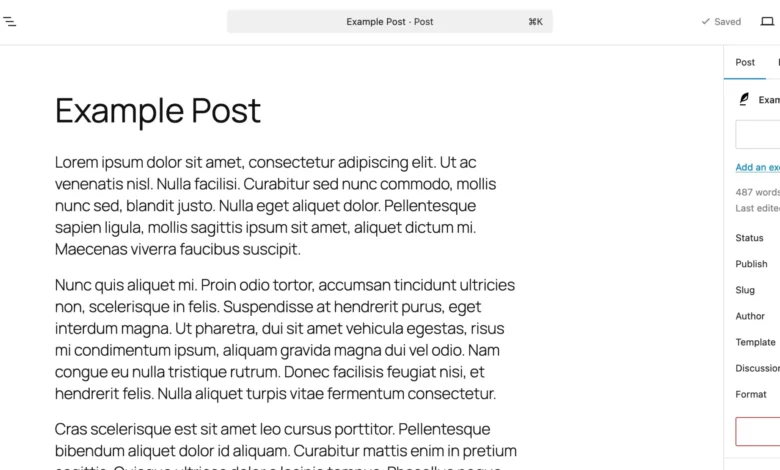
At its heart, WordPress Notes provides a streamlined mechanism for attaching contextual comments directly to individual blocks within the Gutenberg editor. Each note is intrinsically linked to a specific content element—a paragraph, an image, a heading, or any other block—ensuring that feedback is always precise and actionable.
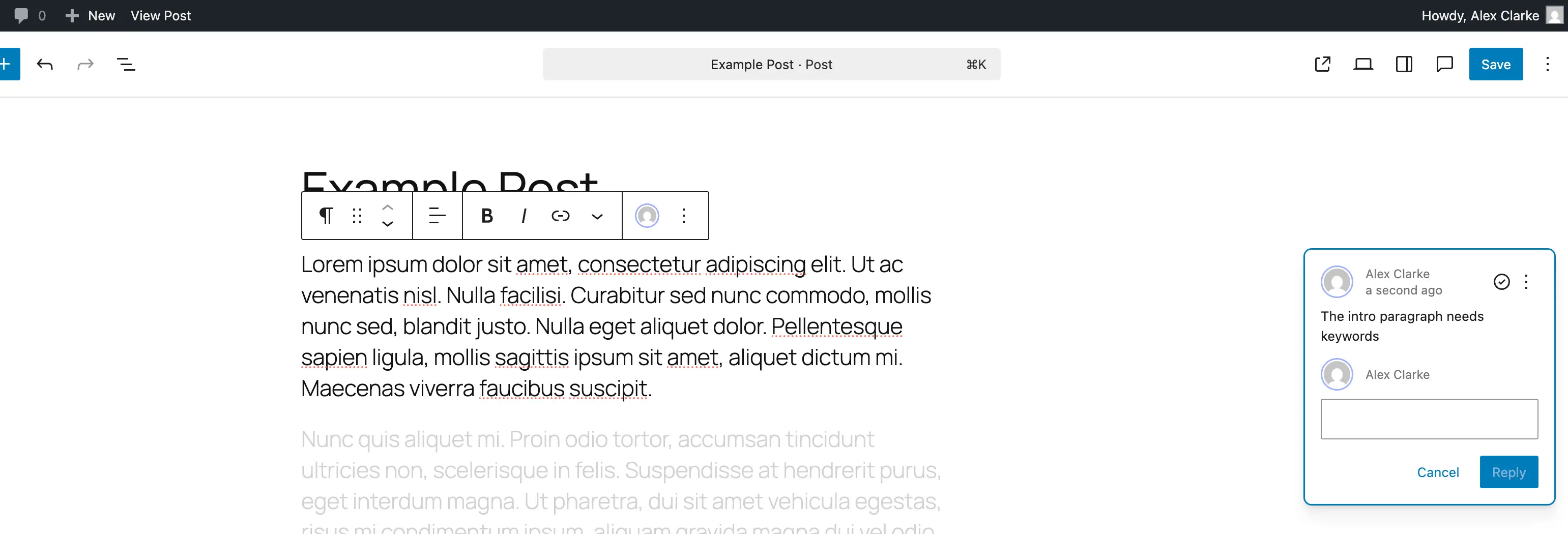
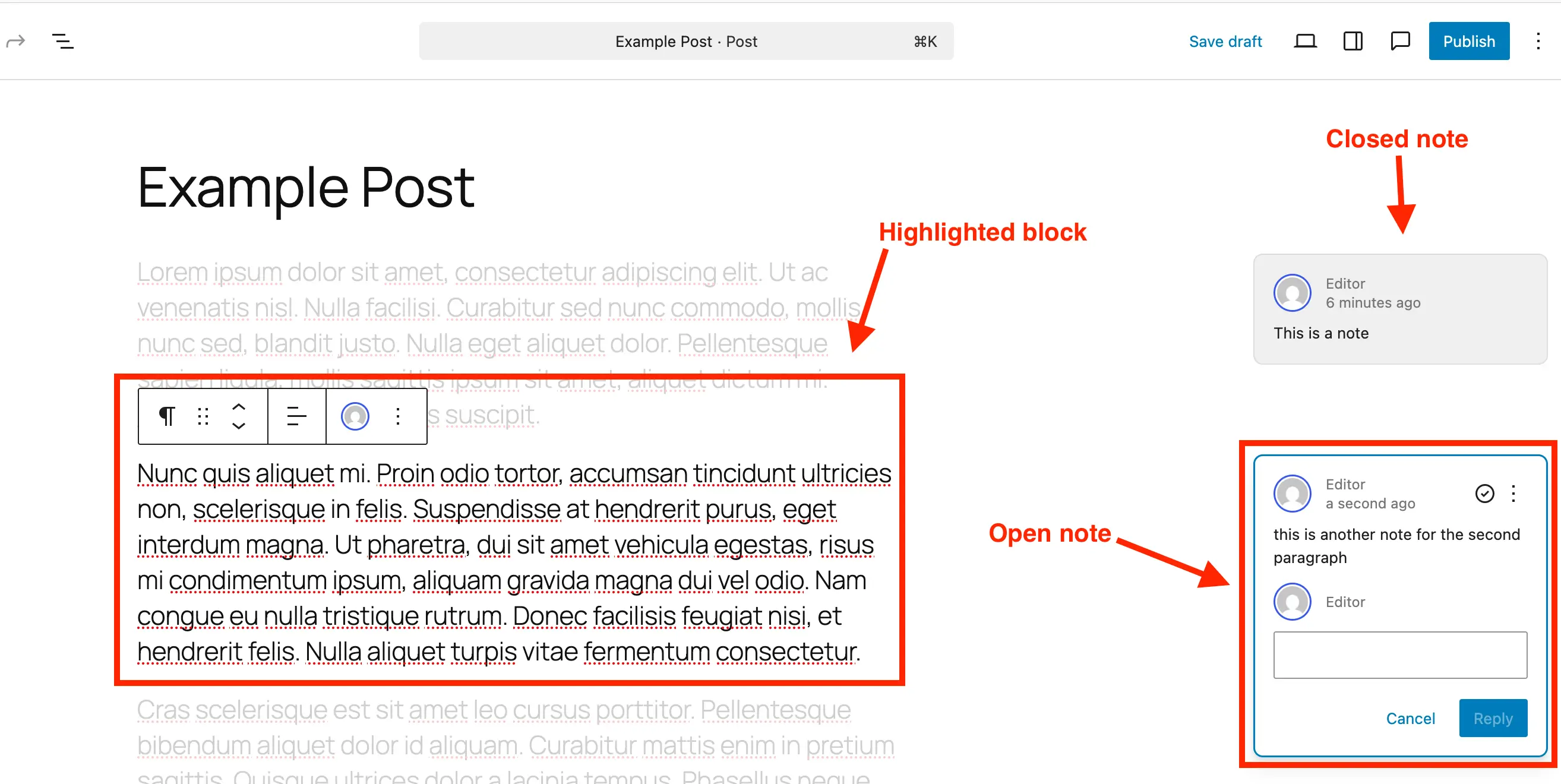
Visually, a note typically appears on the right-hand side of the editor, reminiscent of familiar comment bubbles found in document collaboration tools. These notes clearly display the author and date, along with the immediate option to reply. A key aspect of the user experience is its focus-enhancing design: clicking on a note automatically highlights its associated block while subtly fading out the surrounding content. This visual emphasis ensures that reviewers and editors can concentrate on the specific feedback without distractions, facilitating a more focused and efficient discussion. This direct, in-context feedback loop significantly reduces the need for external tools, screenshots, or lengthy email explanations, thereby making collaboration with team members or clients demonstrably smoother.
Adding Notes: A Step-by-Step Guide to In-Editor Feedback
The process of adding a note in WordPress is designed to be intuitive, ensuring that feedback can be lodged without disrupting the creative flow.
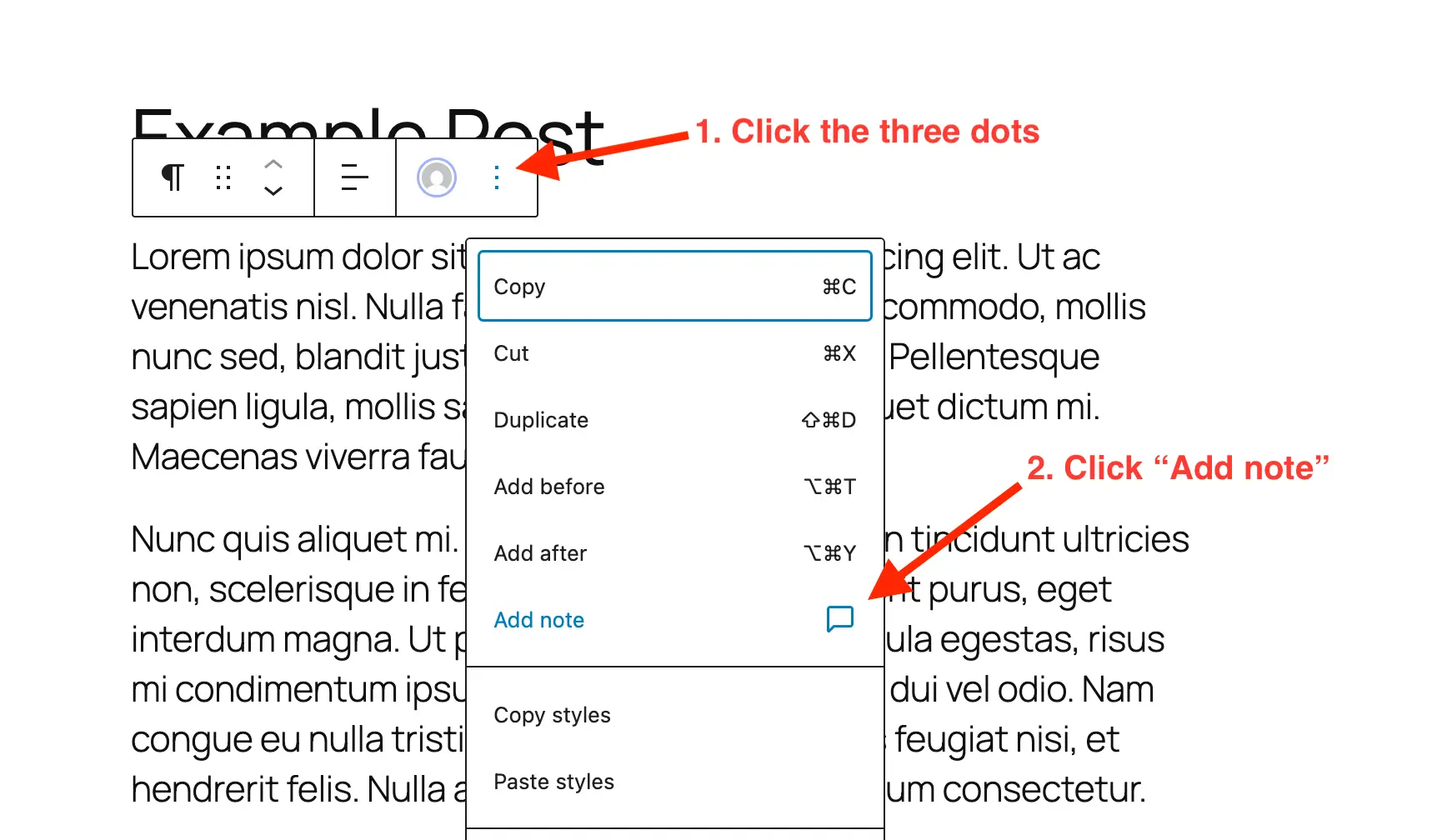
- Open the Post or Page: The first step involves navigating to the specific post or page slated for review within the WordPress block editor.
- Select the Block: Users then simply click on the paragraph, heading, image, or any other block to which they wish to attach feedback. This block-centric approach is fundamental to the contextual nature of Notes.
- Add a Note: Once a block is selected, users access the block options, typically represented by a three-dot menu. From this menu, selecting "Add Note" will trigger the appearance of a dedicated panel.
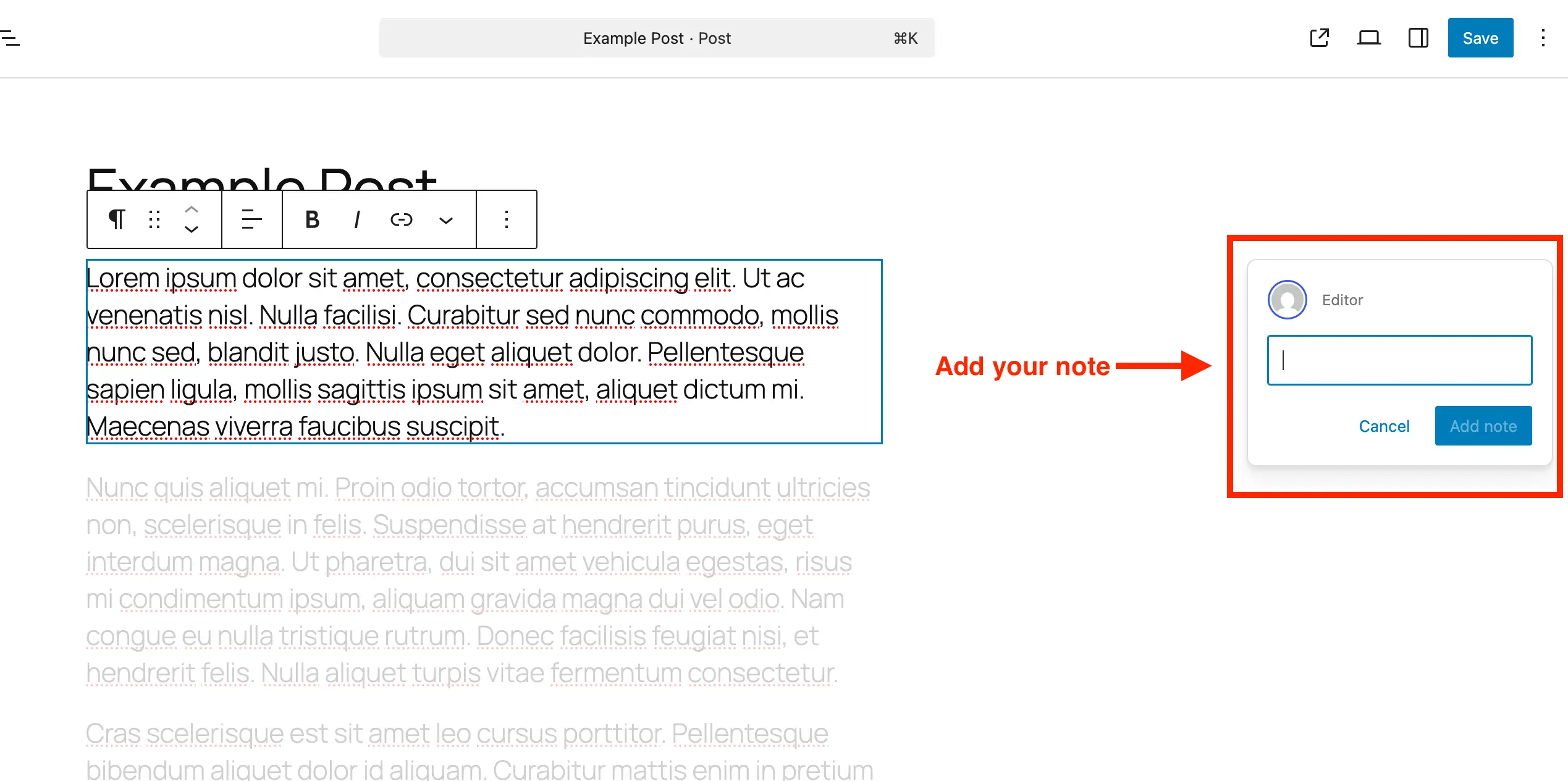
- Write and Submit Feedback: A text input box will appear on the right-hand side of the editor. While initially appearing as a single line, this input field expands automatically as the user types, accommodating longer feedback and allowing for line breaks. Once the comment is entered, submitting it attaches the note directly to the selected block.
This simple, integrated process ensures that all feedback, from minor copy edits to significant design suggestions, is anchored directly to the content element in question.
Managing and Reviewing Notes: Ensuring a Cohesive Workflow
Once notes have been added, the system provides equally straightforward mechanisms for reviewing, managing, and resolving them. This ensures that discussions remain organized and feedback loops are completed efficiently.
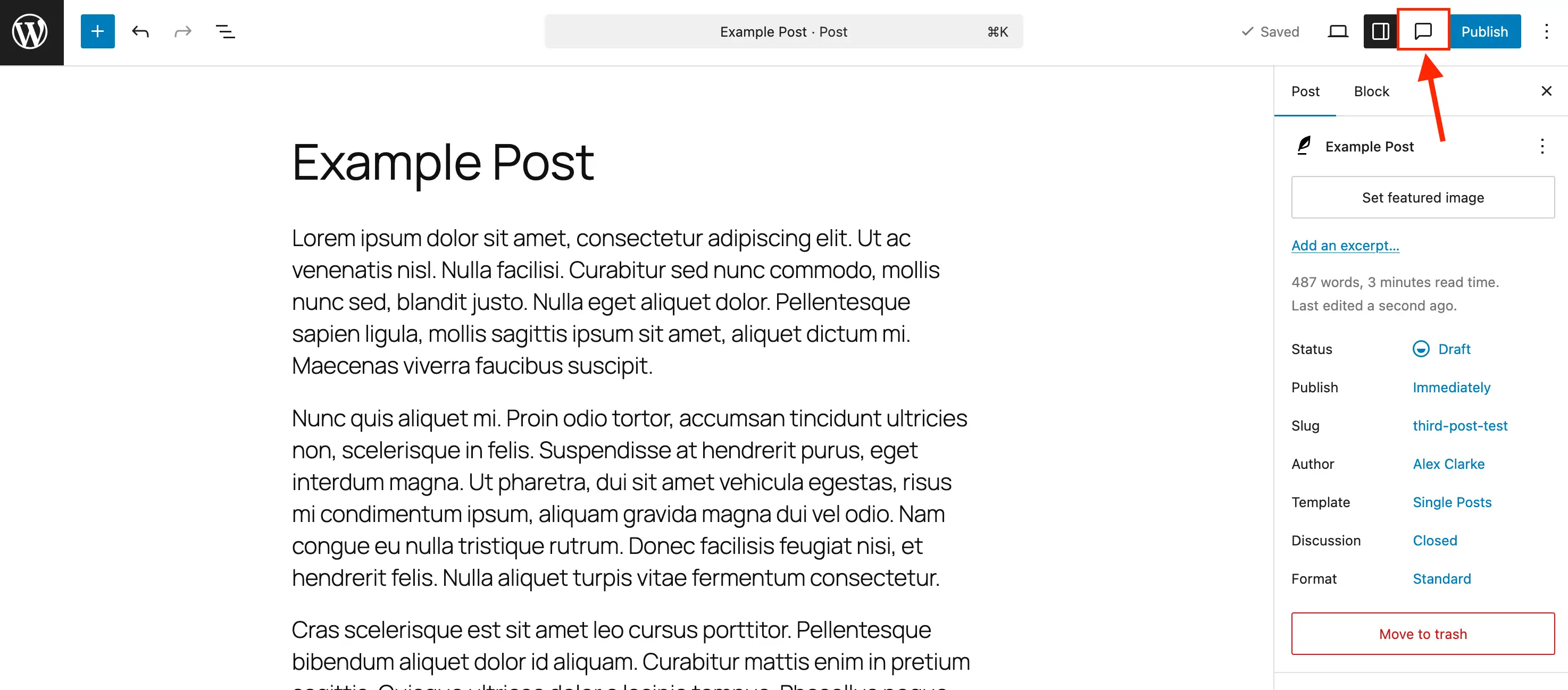
- Accessing the Notes Panel: Upon opening a post with existing notes, users can toggle the Notes sidebar panel. While notes may appear alongside their respective blocks when other sidebars are closed, activating the dedicated Notes icon (often resembling a comment bubble) in the editor toolbar is recommended for comprehensive management. This sidebar consolidates all notes in a stacked view, providing a centralized hub for review.
- Focusing on Specific Feedback: Within the Notes panel or sidebar, clicking on a particular note will immediately highlight its corresponding block in the main editor area. The rest of the content will subtly fade, directing the user’s attention to the specific context of the feedback. Alternatively, clicking directly on any block in the editor will activate any attached notes in the sidebar, allowing for immediate interaction.
- Replying to Notes: Collaborative discussions are fostered through the ability to reply directly to any note. A reply field within each note allows users to type and submit their responses, keeping all conversation threads neatly organized and tied to the original feedback.
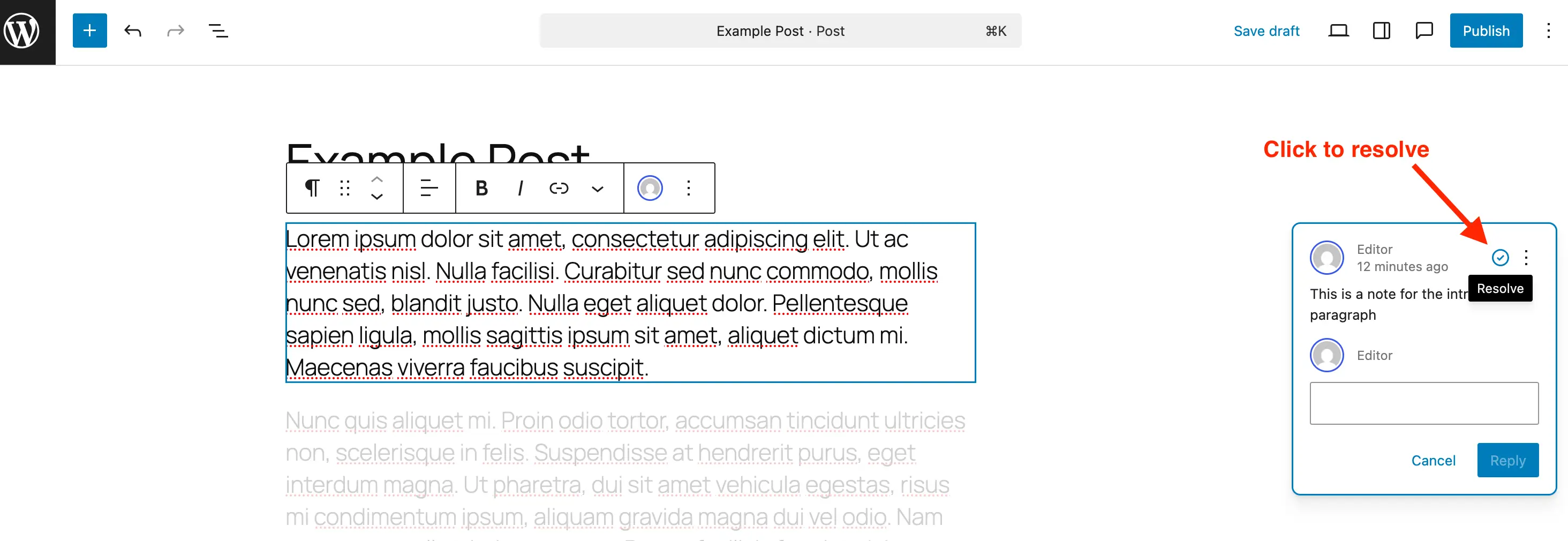
- Resolving Notes: Once feedback has been addressed and implemented, a note can be marked as complete by clicking the "Resolve" icon (typically a checkmark). Resolved notes will no longer appear on the right-hand side when other sidebar panels are closed, reducing visual clutter. However, they remain visible within the main Notes panel, allowing for a comprehensive overview of both open and completed tasks.
- Deleting Notes: For feedback that is no longer relevant or required, notes can be permanently removed from the post. This is achieved by accessing the three-dot menu on the note and selecting "Delete." It is generally recommended to delete resolved notes once they are no longer needed to maintain a streamlined database, especially for very large sites with extensive content.
- Reopening Notes: Should further discussion or action be required on a previously resolved note, it can be easily reopened via its three-dot menu, reactivating the feedback loop.
Technical Implementation: Enabling and Disabling Notes for Custom Post Types
While WordPress Notes are enabled by default for standard posts and pages, flexibility is built into the system for developers and site administrators.
Enabling Notes for Custom Post Types: To extend the functionality of Notes to custom post types, it must be explicitly added as part of the block editor support.
- Via Plugin: For those utilizing plugins like "Post Types Unlimited," enabling Notes is as simple as checking a box within the "Supports" settings.
- Manual Registration: When manually registering a new custom post type, developers need to include
"notes" => truewithin the editor parameter under thesupportsargument. An example code snippet demonstrates this:register_post_type( 'book', [ 'label' => 'Books', 'public' => true, 'show_in_rest' => true, 'supports' => [ 'title', 'editor' => [ 'notes' => true ], // Crucial addition for Notes support 'author', ], ] ); - Existing Custom Post Types: For custom post types already in existence, Notes support can be merged into the existing editor supports to preserve other features. A provided PHP snippet allows administrators to specify an array of custom post types for which Notes should be enabled:
/**
 * Enable editor notes for custom post types.
 */
add_action( 'init', function()
    $post_types = [ 'MY_POST_TYPE_1', 'MY_POST_TYPE_2' ]; // Modify this array
    foreach ( $post_types as $post_type )
        $supports = get_all_post_type_supports( $post_type );
        $editor_supports = array( 'notes' => true );
        if ( is_array( $supports['editor'] ) && isset( $supports['editor'][0] ) && is_array( $supports['editor'][0] ) )
            $editor_supports = array_merge( $editor_supports, $supports['editor'][0] );

        add_post_type_support( $post_type, 'editor', $editor_supports );

 );
Users simply modify the
$post_typesarray to include the desired custom post types.
Disabling Notes: For scenarios where Notes are not desired on specific post types, the feature can be disabled to reduce visual clutter. While there isn’t a global off switch, Notes can be removed from particular post types. A snippet allows for this targeted disabling:
/**
 * Disable Notes via post type args filter.
 */
add_filter( 'register_post_type_args', function( $args, $post_type )
    $post_types = [ 'post', 'page' ]; // Modify this array to target specific post types
    if ( in_array( $post_type, $post_types, true ) && isset( $args['supports']['editor']['notes'] ) )
        unset( $args['supports']['editor']['notes'] );

    return $args;
, 10, 2 );
This snippet can be edited to remove ‘post’ or ‘page’ from the $post_types array if Notes are to remain enabled for either.
Strategic Advantages and Broader Implications
The integration of Notes into WordPress is more than just a new feature; it’s a strategic enhancement that profoundly impacts content workflows across various stakeholders. By centralizing feedback, Notes fundamentally transforms how content teams, agencies, designers, and clients interact with and refine digital assets.
- Enhanced Efficiency for Content Teams: For editorial teams, Notes translates into significantly faster publishing cycles. The immediate, block-specific feedback reduces ambiguity and eliminates the need for time-consuming external communication, allowing editors to provide clear instructions and writers to make precise revisions without leaving the WordPress environment. This leads to improved content accuracy and consistency, as every piece of feedback is directly tied to its context.
- Bridging the Gap for Designers: Designers can now provide contextual visual feedback directly on design elements within the editor. This fosters a closer collaboration between design and content implementation, ensuring that visual and textual elements are perfectly aligned with the overall creative vision.
- Streamlined Client Review: For web agencies and freelancers, Notes offers a professional and transparent review process for clients. Clients can leave feedback directly on drafts, reducing back-and-forth emails and mitigating misinterpretations. This clarity often leads to fewer revisions and a more satisfying client experience.
- Elevating WordPress’s Ecosystem: This feature reinforces WordPress’s commitment to evolving as a comprehensive, enterprise-ready CMS. By integrating robust collaboration tools natively, WordPress strengthens its competitive edge against other SaaS content management solutions that often highlight their built-in team functionalities. It solidifies the Block Editor’s vision beyond mere content creation, extending it into a full-fledged content collaboration platform.
"This integrated Notes feature is a game-changer for agencies and content teams," stated a representative from a leading web development agency. "It eliminates the constant back-and-forth between different applications and brings all editorial discussions directly into the content itself. This will undoubtedly speed up our publishing cycles and improve the quality of our client deliverables." A WordPress core contributor echoed this sentiment, remarking, "Our goal has always been to democratize publishing. By integrating robust collaboration tools like Notes directly into the editor, we’re making professional-grade content creation accessible and efficient for everyone, from individual bloggers to large editorial desks."
Future Outlook
The introduction of WordPress Notes is likely just the beginning of a more deeply integrated collaborative future for the platform. The groundwork laid by this feature opens doors for potential future enhancements, such as advanced notification systems, more granular user permissions for notes, integration with project management plugins, and perhaps even AI-assisted feedback suggestions. As digital content strategies continue to evolve and teams become increasingly distributed, the demand for sophisticated, in-platform collaboration tools will only grow. WordPress Notes positions the platform strongly to meet these evolving needs, ensuring its continued relevance and dominance in the digital publishing sphere.
By incorporating Notes into the editing process, WordPress empowers users to simplify communication, significantly improve productivity, and ensure that every piece of content and design element benefits from clear, actionable feedback. Whether collaborating with a large team or meticulously reviewing one’s own work, Notes makes the entire content and design review process smoother, more focused, and ultimately, more efficient, marking a new era for collaborative content management within the world’s most popular CMS.