The distinction between infrastructure capability and process efficacy is a primary criterion by which enterprise teams evaluate hosting platforms. A platform that fails to adequately support a structured change process inevitably forces development and operations teams to construct their own ad-hoc controls. This often manifests as manual pre-update backups shared informally, unverified approval steps, and reactive post-deployment firefighting that consistently diverts engineers from strategic project work, leading to recurring operational inefficiencies and potential downtime.
The Enterprise Imperative: Navigating the Complexities of Change Risk
The scope of modifications required by an enterprise WordPress environment throughout its operational lifespan is far more extensive and intricate than it might initially appear. Beyond the obvious, such as core WordPress updates, theme customizations, and plugin installations, changes can encompass database schema alterations, custom code deployments, content migrations, third-party API integrations, and even server-level configurations. For enterprises leveraging WordPress for mission-critical applications—be it a customer portal, a compliance-critical content workflow, or a high-revenue e-commerce platform—each change carries significant risk. These modifications frequently interact with numerous, often undocumented, dependencies across the system. When failures occur, the root cause is typically traced back to deployments executed without a reliable testing and validation path, rather than inherent infrastructure shortcomings.
According to industry reports, the average cost of IT downtime can range from thousands to hundreds of thousands of dollars per hour, depending on the scale and nature of the business. For a large enterprise, even a brief outage on a high-traffic e-commerce site or a customer-facing application can translate into substantial financial losses, reputational damage, and erosion of customer trust. This makes deployment predictability and rapid recovery paramount concerns for IT leadership and business stakeholders alike. A hosting provider that lacks formalized staging environments, clear rollback paths, or granular access controls effectively shifts the burden of building these crucial safeguards onto the enterprise’s internal teams, diverting valuable resources and increasing operational overhead. The central questions therefore become: can deployments be consistently predicted, and can recovery from unforeseen issues be achieved swiftly and efficiently?

Kinsta’s Integrated Framework for Controlled Enterprise Deployments
Recognizing these critical enterprise needs, platforms like Kinsta have developed comprehensive toolsets designed to embed a disciplined change process as the default mode of operation, rather than an burdensome overhead. Kinsta’s MyKinsta dashboard provides a suite of features including robust staging environments, selective push capabilities, multi-layered backup systems, and sophisticated role-based access controls, all engineered to streamline and secure the deployment lifecycle. This integrated approach aligns with modern DevOps principles, promoting continuous integration and continuous delivery (CI/CD) practices tailored for WordPress.
Staging Environments: A Secure Foundation for Development and Testing
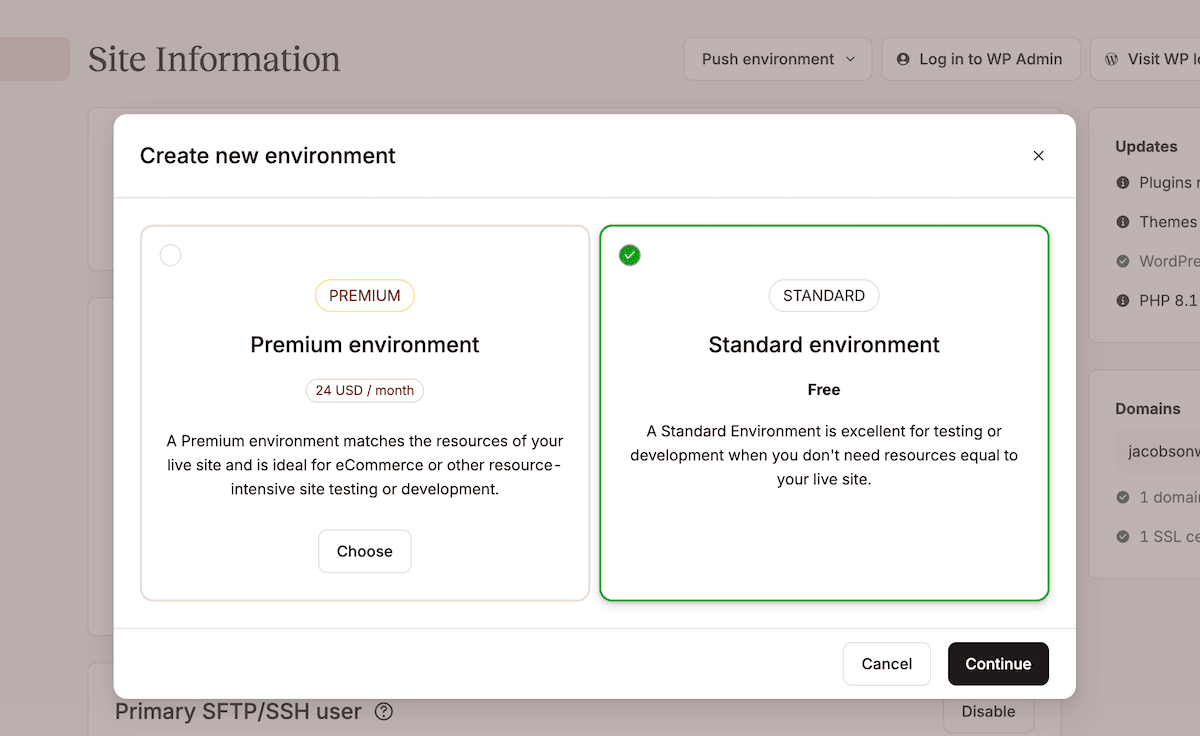
Every Kinsta hosting plan includes at least one free, containerized standard staging environment per site. This isolated replica of the live site serves as a crucial sandbox for development, testing, and stakeholder review without impacting the production environment. Creating a staging environment is a straightforward process within MyKinsta: users navigate to their Sites list, select the desired site, click the environment selector (e.g., "Live"), and choose Create new environment. Options typically include cloning the existing live environment, installing a fresh WordPress instance, or setting up an empty environment for bespoke configurations.
For enterprises with more complex requirements, Kinsta offers a premium staging add-on, providing up to five additional premium staging environments per site. This capability is invaluable for organizations running parallel development streams, needing to validate resource-intensive functionality, or requiring staging conditions that precisely mirror production specifications. The distinction between standard and premium environments often lies in dedicated resources and advanced configurations, allowing teams to perform rigorous performance testing, security audits, and comprehensive user acceptance testing (UAT) in an environment that accurately reflects the production experience.
A typical enterprise staging workflow for, say, a plugin or theme update, would involve deploying the update to staging, thoroughly verifying every integration point and custom functionality it might affect, gathering formal sign-off from relevant stakeholders (e.g., marketing, legal, product teams), and only then preparing for a push to production. The inherent separation of staging and production environments makes this enforcement simple and highly effective. Kinsta customer Itineris, a digital agency specializing in enterprise solutions, highlights the transformative impact of these capabilities: "Staging environments, automated backups, and a robust infrastructure were essential for streamlining our workflows and enhancing site performance." This attests to the fundamental role staging plays in mitigating risk and fostering agile development cycles.
Precision Deployment: The Power of Selective Pushes
While staging environments effectively mitigate risks during the testing phase, the act of pushing an entire staging environment to production can introduce a different set of challenges. A wholesale replacement of files and database tables can inadvertently deploy changes not intended for the current release, such as test content, experimental features, or debugging configurations.
Kinsta addresses this by offering a selective push feature, providing granular control over precisely what is moved from staging to production. Within MyKinsta, users select their staging environment, click Push environment, and choose a specific deployment scope. Options typically include pushing only files, only the database, or both. Furthermore, intuitive drop-down menus allow for even finer refinement, enabling users to select specific files, folders, or even individual database tables for deployment. This level of control is critical for maintaining the integrity of the production environment and minimizing the "blast radius" of any potential issues.
A key safety mechanism integrated into this process is Kinsta’s automatic system-generated backup of the production environment immediately before any push to live. This pre-deployment snapshot captures the site’s state just prior to the changes, making it an instant restore point. Should an unexpected outcome arise from the deployment, a full rollback is a single, swift operation within MyKinsta, eliminating the need for time-consuming manual reconstructions from older backups. This significantly reduces Recovery Time Objective (RTO) and instills confidence in deployment processes.
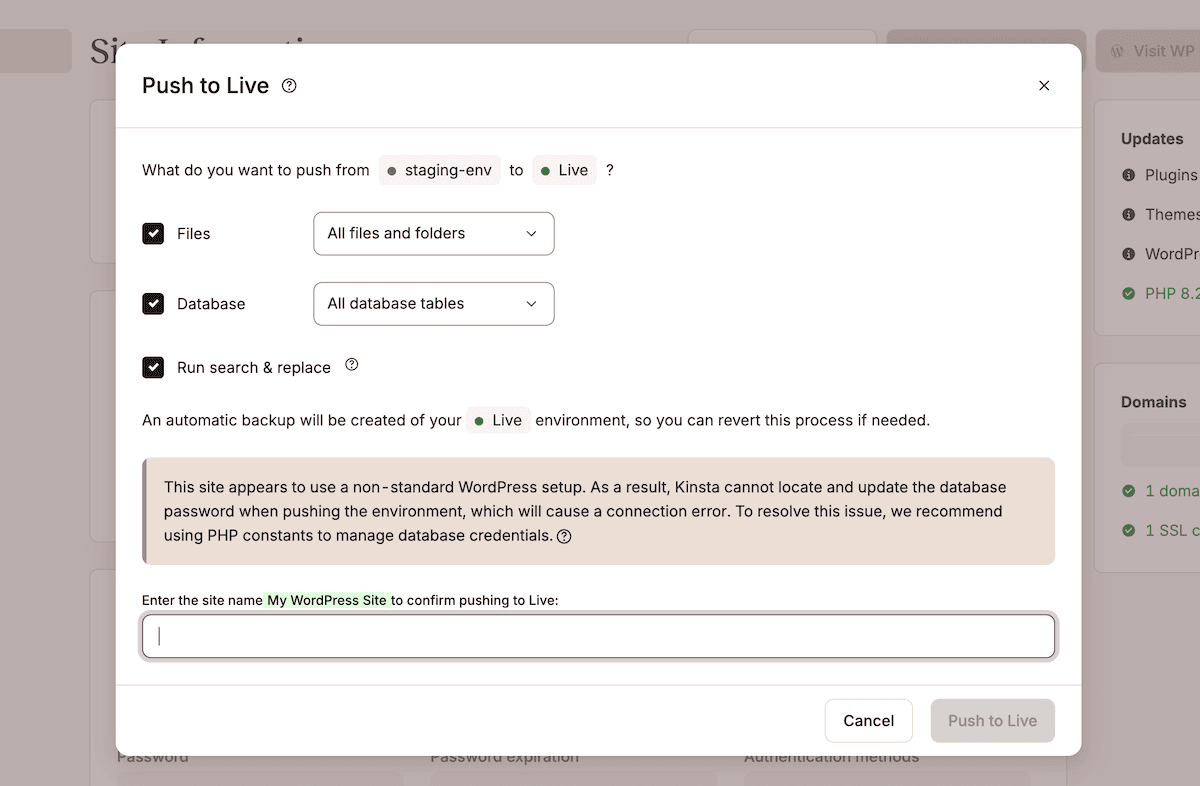
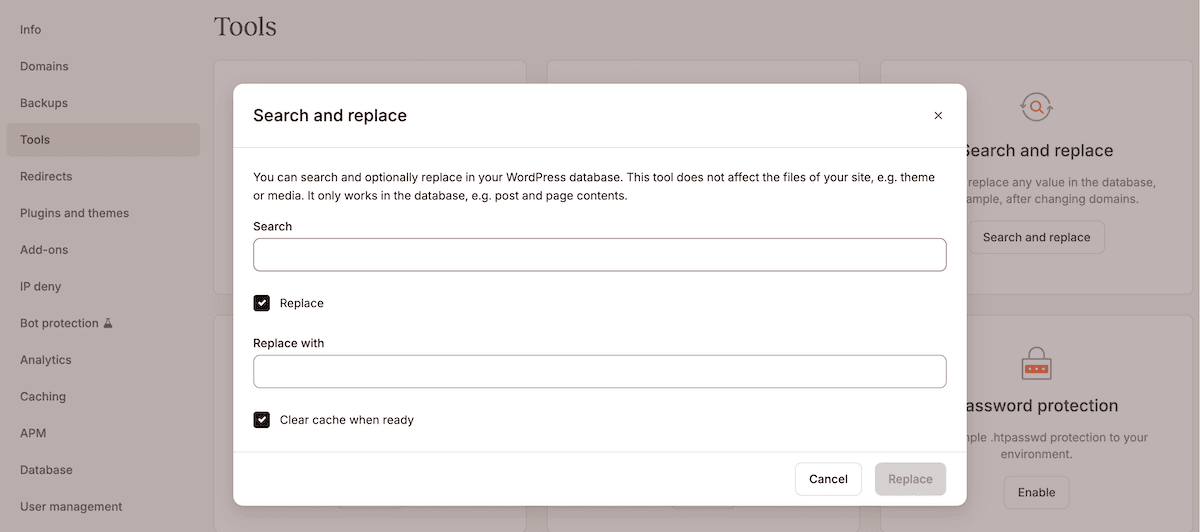
An often-overlooked but crucial step in deployments involving URL structure changes or domain swaps is updating database references. Kinsta’s integrated search and replace tool simplifies this. While the "Run search and replace" option within the Push to Live dialog primarily targets the database, a dedicated search and replace tool is available under the Tools screen for a site. Here, users can input the staging URL in the Search field and the production URL in the Replace with field. Upon execution, MyKinsta automatically creates another system-generated backup before carrying out the search and replace operation, ensuring an additional layer of safety. This combination of selective pushes, pre-push backups, and a dedicated search and replace utility transforms staging into a robust process with enforced checkpoints at every critical juncture.
Multi-Layered Backups: The Ultimate Recovery Mechanism
Even with the most rigorous staging and selective push workflows, some changes can still lead to unpredictable failures. For instance, a third-party API might behave differently when interacting with live production credentials compared to its behavior in a staging environment. In such scenarios, a comprehensive backup strategy becomes the ultimate safety net.
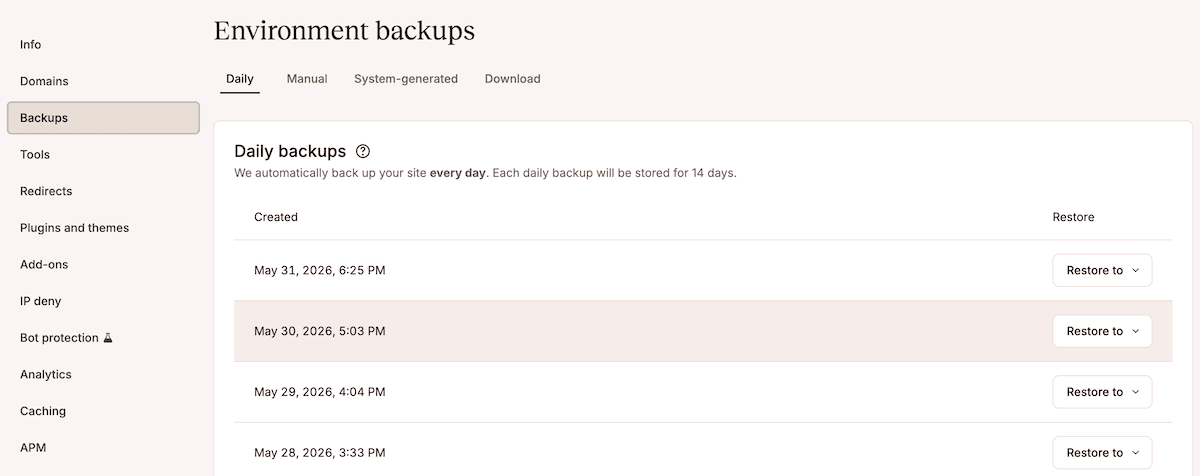
Kinsta’s approach to backups is multi-layered, covering every stage of the deployment cycle and beyond. Within the MyKinsta Backups screen, users can access four distinct types:
- Daily Backups: Automatically created once every 24 hours, providing a consistent baseline for recovery.
- Hourly Backups: An optional add-on for high-transaction sites requiring more frequent data capture, significantly reducing potential data loss (Recovery Point Objective – RPO).
- Manual Backups: On-demand backups that can be initiated by users before significant changes or experimental updates.
- System-Generated Backups: Automatically created by Kinsta before critical operations like pushing staging to live or initiating a restore, offering immediate revert points.
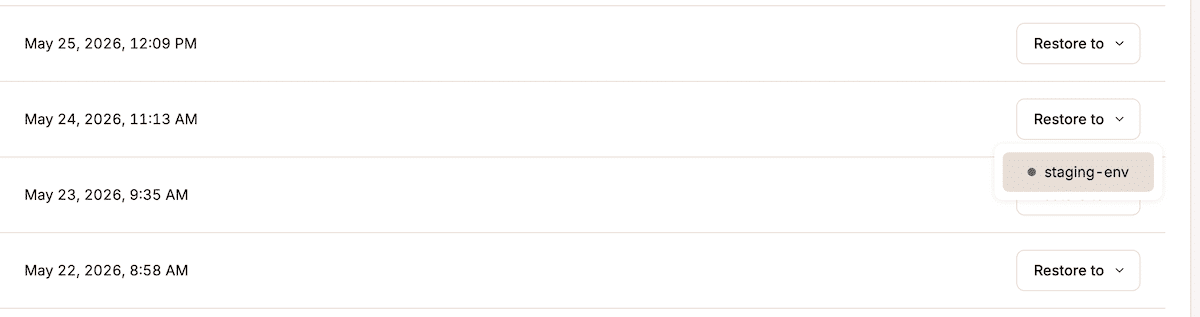
The process of reverting to a specific backup is streamlined: users simply click the Restore to button for a chosen backup and select the target environment (live or staging). Upon completion of the restore, MyKinsta automatically generates a new system backup, capturing the state immediately prior to the restoration. This ensures that even the act of restoring is itself protected by a rollback point.
This comprehensive backup system dramatically reduces scheduled maintenance windows and formal rollbacks into a single, executable workflow within MyKinsta. Konica Minolta, for example, successfully replatformed its marketing site to WordPress on Kinsta within three months, citing deployment reliability as a cornerstone of the project: "Our biggest concern was downtime and losing performance during the migration, but Kinsta’s team handled everything smoothly with zero disruptions." This experience underscores how robust backup and recovery mechanisms instill confidence and enable ambitious digital transformation projects.
Enforcing Governance: Role-Based Access Controls and Centralized SSO
Enterprise deployment workflows inherently involve multiple stakeholders, each with distinct responsibilities at various stages of the change process. Developers require full access to staging environments for building and testing, while QA engineers need to validate those changes. Project managers often need visibility into the staging environment’s status without the capability to push changes to production, and client-side reviewers might need to approve a staging state before deployment.
Kinsta’s robust access model and user management system are designed to enforce these distinctions effectively. The platform allows for the definition and enforcement of several roles, with three being particularly relevant for enterprise change management:
- Company Admin: Possesses full administrative privileges across all sites and company settings, ideal for IT managers or lead DevOps personnel.
- Company Developer: Granted access to development environments and often specific tools, enabling them to build and test without direct access to production deployment mechanisms.
- Company User: Typically has read-only or limited access, suitable for stakeholders who need to review content or site status without making changes.
Inviting a user is straightforward via the Company settings > Users page, allowing administrators to specify email addresses and grant either company-level or granular site-level access. This adheres to the principle of least privilege, ensuring that users only have the permissions necessary for their specific roles, minimizing the risk of accidental or unauthorized changes.
For enterprises managing access across numerous tools from a central identity provider (IdP), Kinsta provides crucial support for SAML Single Sign-On (SSO). This enables seamless and secure authentication with any IdP that utilizes the SAML standard, including widely adopted solutions like Microsoft Entra ID (formerly Azure AD), Okta, and Google Workspace. To enable this, administrators navigate to Company settings > Single sign-on within MyKinsta and activate the feature. The configuration involves setting up the SAML application in the IdP using connection details provided by MyKinsta, then completing the setup back in MyKinsta with the IdP’s SSO URL, Entity ID, and public certificate.
Once active, users authenticate through their organization’s IdP using existing company credentials, centralizing identity management. Enabling mandatory SSO prevents users from bypassing the IdP with a direct login, significantly enhancing security. A key benefit is streamlined user lifecycle management: when an employee leaves the organization, revoking their access in the IdP simultaneously removes their access from MyKinsta, mirroring the process for all other tools in the enterprise stack. Furthermore, Two-Factor Authentication (2FA) is a default requirement for all accounts not covered by SAML SSO, with Company Owners able to view each user’s 2FA method for compliance and auditing purposes from the Company settings > Users > 2FA screen, reinforcing a strong security posture.
Broader Implications: Scaling WordPress with Confidence
For enterprise organizations, the hosting platform transcends its role as mere infrastructure; it becomes the foundational layer that dictates how safely and efficiently a WordPress environment can evolve. The true differentiator among managed hosting tiers lies in whether a team can confidently deploy a WordPress update, knowing a reliable recovery path is immediately available if something goes awry. Kinsta’s comprehensive suite of tools—its intelligent staging environments, granular selective push capabilities, resilient multi-layered backup system, and robust role-based access controls coupled with SAML SSO—empowers enterprise teams to implement and maintain a disciplined change workflow without the prohibitive cost and complexity of building and maintaining these controls themselves.
This integrated approach yields significant benefits across the organization:
- Enhanced Operational Efficiency: By automating many aspects of the deployment process and providing clear pathways, engineering teams spend less time on manual tasks and reactive troubleshooting, freeing them to focus on innovation and strategic projects.
- Profound Risk Mitigation: The systematic testing, controlled deployment, and rapid recovery mechanisms drastically reduce the likelihood and impact of site-breaking errors, safeguarding revenue streams and brand reputation.
- Improved Security Posture: Timely updates, controlled access, and robust authentication methods (2FA, SSO) reduce vulnerabilities and enhance overall security.
- Scalability and Agility: A predictable and reliable change management process enables enterprises to scale their WordPress initiatives, accommodate larger teams, and embrace agile development methodologies with confidence, fostering quicker iteration and time-to-market for new features.
- Regulatory Compliance: For industries with stringent regulatory requirements, the auditability and control offered by these features are invaluable for demonstrating compliance with internal and external governance standards.
Ultimately, Kinsta provides the foundational infrastructure and tools for enterprises to transform their WordPress change management from a potential liability into a strategic asset. By embracing these capabilities, organizations can ensure their critical WordPress sites not only perform at peak speed but also maintain unwavering reliability and security in an ever-evolving digital landscape. Enterprises seeking to elevate their digital operations and solidify their WordPress reliability are encouraged to explore Kinsta’s enterprise WordPress hosting options to assess how these features can redefine their change management processes.