How to Clean Up Your WordPress Dashboard by Removing Yoast SEO Upsells and Promotional Noise

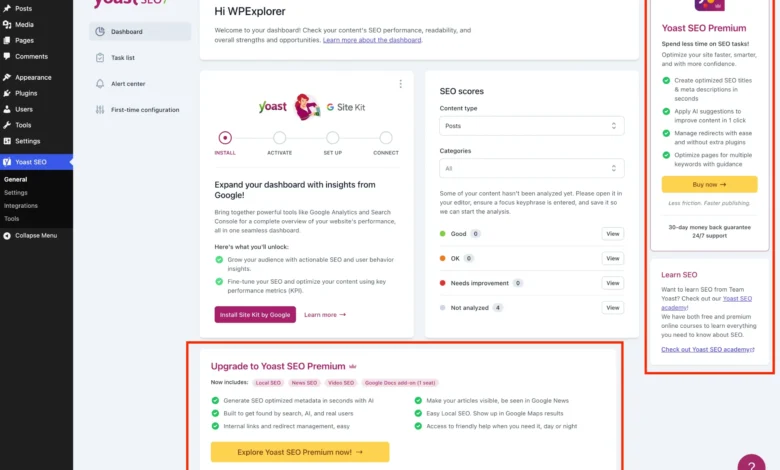
As WordPress continues to power over 43 percent of all websites on the global internet, the ecosystem of plugins built to support it has grown increasingly competitive. Among these, Yoast SEO remains one of the most downloaded and widely utilized optimization utilities in history. Offering a robust suite of tools even in its complimentary tier, the plugin allows administrators to manage XML sitemaps, fine-tune readability analyses, and adjust metadata effortlessly. However, the widespread adoption of the free version has brought to light a persistent user experience concern: the proliferation of marketing noise, upgrade banners, and promotional widgets embedded within the administrative dashboard.
For solo bloggers, enterprise developers managing dozens of client portals, and agency teams striving to maintain a pristine, distraction-free environment, navigating the WordPress admin backend can become an exercise in filtering out promotional clutter. While purchasing the official Yoast SEO Premium license represents the most direct, fully supported method to unlock advanced features—such as automated redirect managers, AI-driven title generators, and multiple focus keywords—budget constraints or specific project scopes often dictate the retention of the free edition. Consequently, a rising demand has emerged within the developer community for programmatic solutions to streamline the administrative interface without compromising core optimization functionality.
Background Context of Freemium Software Monetization in WordPress
The inclusion of promotional elements within free open-source software is a standard monetization model known across the technology sector as the "freemium" approach. Plugin developers rely on free distributions to establish massive user bases, leveraging their platforms as direct marketing channels to upsell premium tiers. In the context of WordPress, where administration panels are shared among content creators, editors, and external clients, aggressive upselling can degrade the perceived professionalism of the backend interface.
Historically, developers utilized simple CSS display rules or basic action hooks to suppress unwanted dashboard notifications. However, modern iterations of plugins like Yoast SEO render many of their promotional elements—such as upgrade banners, sticky sidebars, and feature comparison cards—as dynamic JavaScript components. This architectural shift means that traditional PHP-based removal techniques are frequently insufficient, requiring a sophisticated combination of backend hook filtering, asset dequeuing, and targeted inline styling to achieve a completely clean administrative workspace.

Setting Up the Custom PHP Implementation Framework
To achieve a systematic cleanup of administrative interfaces, developers typically encapsulate custom modifications within a structured PHP class. This methodology prevents function name collisions, ensures clean code organization, and simplifies deployment across multiple sites. The foundational structure requires verifying both the presence of the active Yoast SEO core plugin and the absence of the premium version to prevent redundant execution loops.
if ( ! class_exists( 'WPEX_Remove_Yoast_SEO_Upsells' ) )
    class WPEX_Remove_Yoast_SEO_Upsells
        public function __construct()
            if ( ! defined( 'WPSEO_VERSION' )

    new WPEX_Remove_Yoast_SEO_Upsells;
This initialization block can be safely appended to a custom child theme’s functions.php file, integrated via a dedicated third-party code snippets manager, or deployed as a Must-Use (MU) plugin for site-wide network enforcement. By checking for the WPSEO_VERSION constant, the script guarantees that execution halts safely if the core plugin is deactivated or removed entirely.
Eliminating Redundant Submenu Pages and Premium Teasers
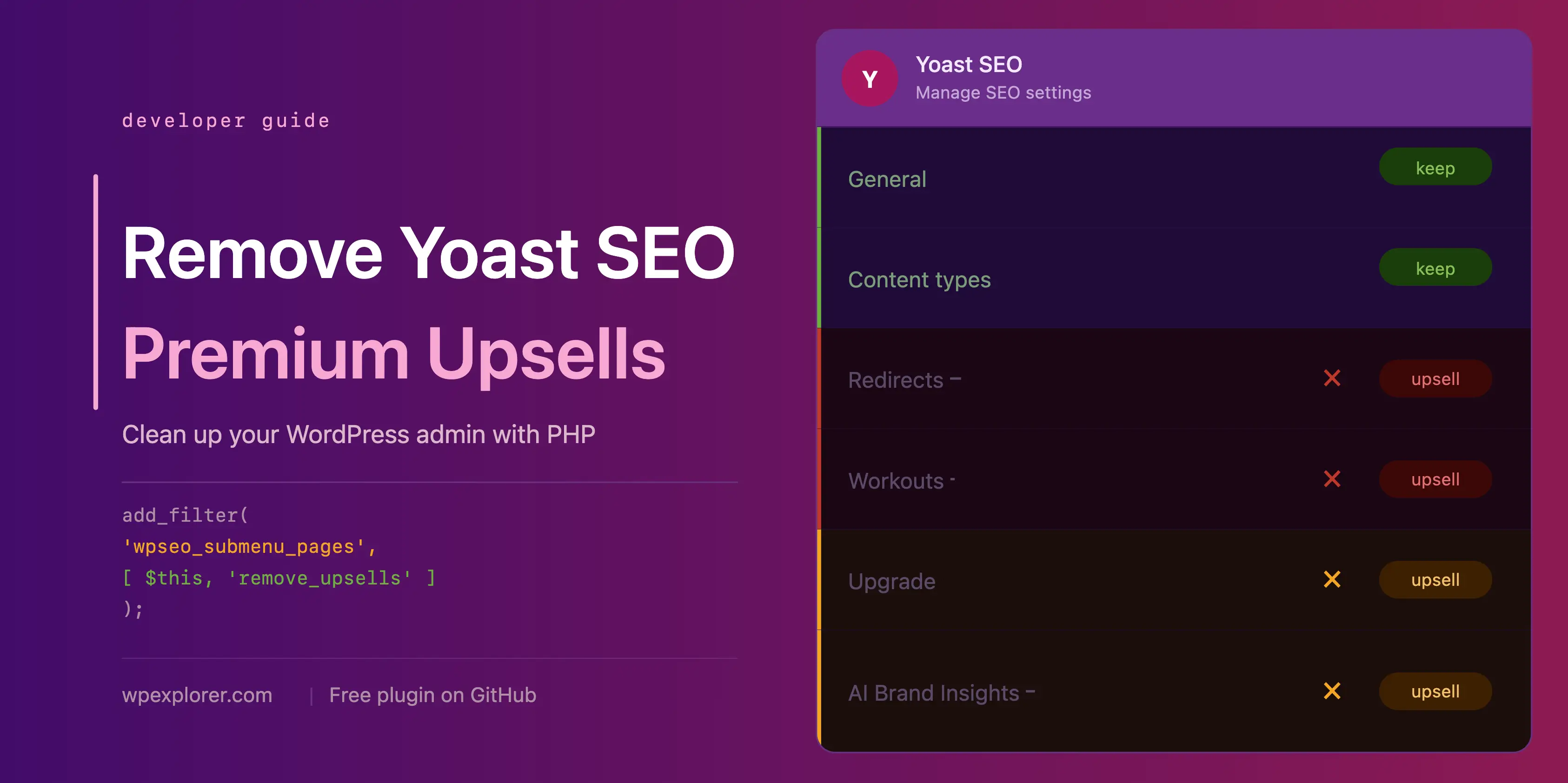
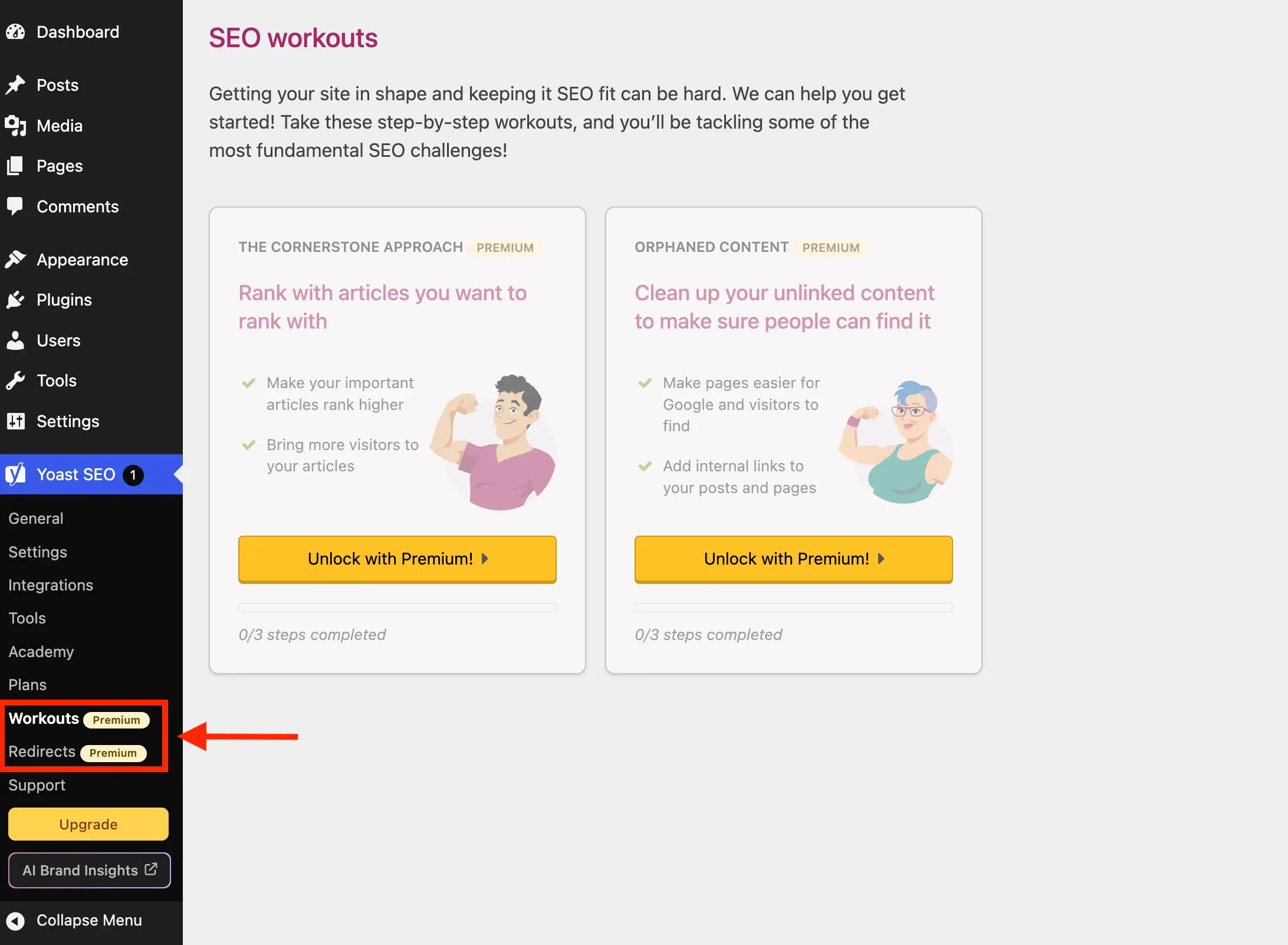
The Yoast SEO administration menu often populates the dashboard sidebar with pages designed exclusively to promote paid additions, such as the Redirect manager, Workouts module, Academy links, and Support portals. In a standard free installation, clicking these items merely redirects the user to a paywall or an external sales funnel.
To remove these navigational distractions, developers can hook into the wpseo_submenu_pages and wpseo_network_submenu_pages filters. By evaluating the submenu array at maximum priority (PHP_INT_MAX), scripts can successfully intercept the registration queue after Yoast has completed its internal setup routines.

public function remove_premium_admin_pages( array $pages ): array
    $pages_to_remove = [
        'wpseo_upgrade_sidebar',
        'wpseo_licenses',
        'wpseo_page_academy',
        'wpseo_page_support',
        'wpseo_redirects',
        'wpseo_workouts',
    ];
    return array_filter( $pages, function( $page ) use ( $pages_to_remove )
        if ( isset( $page[2] ) && str_contains( $page[2], 'yoast-premium-badge' ) )
            return false;

        if ( isset( $page[4] ) && in_array( $page[4], $pages_to_remove, true ) )
            return false;

        return true;
     );
This dual-layer verification checks both for automated premium badge markers injected into the menu titles and for explicitly defined slugs associated with sales pages, licenses, and training academies.
Targeting Toolbar Shortcuts and Dashboard Resource Overhead
Beyond the sidebar menu, promotional buttons frequently occupy prime real estate within the WordPress admin bar and the main dashboard overview panels. For instance, the upgrade prompt and AI Brand Insights buttons rendered in the top administrative toolbar can be cleanly dismantled using the admin_bar_menu action hook combined with the native remove_node method:

public function remove_admin_bar_links( WP_Admin_Bar $wp_admin_bar ): void
    $wp_admin_bar->remove_node( 'wpseo-get-premium' );
    $wp_admin_bar->remove_node( 'wpseo_brand_insights' );
Simultaneously, the Yoast SEO dashboard widget traditionally introduces performance overhead by initiating un-cached HTTP requests to external RSS feeds (yoast.com/feed/widget/) upon every administrative login. These requests transmit server environment data, including PHP and WordPress version numbers, to external servers. Disabling this widget via meta box removal and asset dequeuing enhances both privacy and dashboard load speeds:
public function remove_dashboard_widget(): void
    remove_meta_box( 'wpseo-dashboard-overview', 'dashboard', 'normal' );


public function remove_dashboard_widget_assets(): void
    $current_screen = get_current_screen();
    if ( ! ( $current_screen instanceof WP_Screen && $current_screen->id === 'dashboard' ) )
        return;

    wp_dequeue_script( 'yoast-seo-dashboard-widget' );
    wp_dequeue_style( 'yoast-seo-wp-dashboard' );
    wp_dequeue_style( 'yoast-seo-monorepo' );
Neutralizing JavaScript-Rendered Banners and Locked Fields
Because many modern promotional banners, sticky sidebars, and integration upsell cards are injected dynamically via JavaScript frameworks within the settings and post editor screens, standard backend filtering is insufficient. To address these elements, administrators must employ precisely scoped CSS rules delivered via inline administrative styles.

public function remove_upsells_from_admin_pages(): void
    $current_screen = get_current_screen();
    if ( ! ( $current_screen instanceof WP_Screen && str_contains( $current_screen->id, 'wpseo_' ) ) )
        return;

    $css = '
        #yoast-seo-general .yst-@container > div:last-child:has([data-action=load-nfd-ctb]),
        #yoast-seo-general .yst-min-w-[16rem]:has(>.yst-sticky),
        #yoast-seo-settings main + div:has([data-action=load-nfd-ctb]),
        #yoast-seo-settings .yst-root div[class*=yst-fixed],
        #yoast-seo-settings main section .yst-feature-upsell,
        #wpseo-integrations .yst-root section > .yst-grid > div:has([data-action=load-nfd-ctb]),
        .seo_page_wpseo_tools .wpseo_content_cell .yoast_premium_upsell  display: none !important;
    ';
    wp_register_style( 'wpex-remove-yoast-upsells', false );
    wp_enqueue_style( 'wpex-remove-yoast-upsells' );
    wp_add_inline_style( 'wpex-remove-yoast-upsells', $css );
By restricting these CSS rules strictly to screens prefixed with wpseo_, developers ensure that styles do not leak into other areas of the WordPress dashboard, maintaining layout integrity across third-party plugins and core components.
Implications and Maintenance Considerations for Developers
Implementing custom code to modify third-party plugin interfaces carries inherent operational considerations. Major software updates released by plugin vendors frequently alter class names, Document Object Model (DOM) structures, or routing slugs. Consequently, developers who choose to suppress promotional elements programmatically must establish a routine of staging updates before pushing them to live production environments.

For agencies managing large portfolios of client sites, manual snippet management can become cumbersome. To address this, open-source packagers frequently consolidate these utility methods into standalone, downloadable plugins available via repositories like GitHub. While such tools offer rapid deployment, administrators must remain vigilant about tracking upstream changes made by core plugin maintainers.
Ultimately, balancing the legitimate monetization efforts of software creators with the administrative efficiency required by professional web managers remains an ongoing challenge in the WordPress ecosystem. Whether achieved through commercial upgrades, custom PHP class injections, or structured CSS modifications, optimizing the backend interface ensures that content teams can focus entirely on publishing quality material without unnecessary visual distractions.