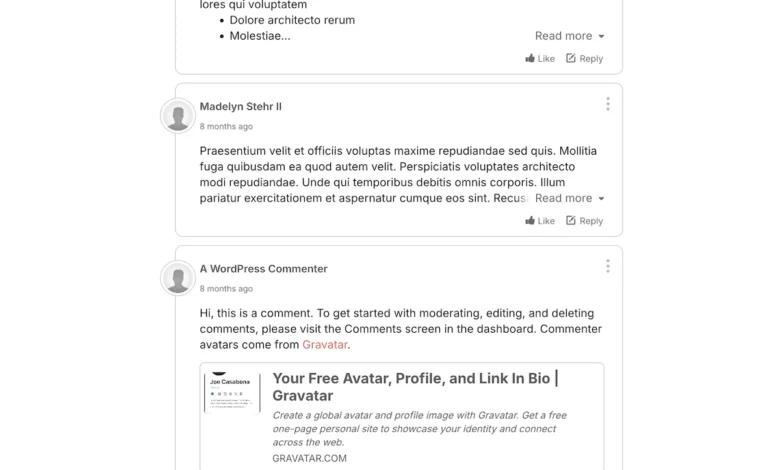
The digital landscape for content creators is shifting as website administrators increasingly prioritize data sovereignty, community engagement, and AI-driven moderation. For years, Disqus served as the default external commenting solution for the WordPress ecosystem, effectively solving the issue of native comment limitations. However, as web development standards evolve, many site owners are discovering that the closed-ecosystem nature of Disqus creates significant hurdles for database ownership and granular moderation. Consequently, the transition to platforms like GraphComment—which offers native WordPress database synchronization and advanced AI-powered filtering—has become a priority for publishers seeking greater control over their user-generated content.

The migration process is fundamentally driven by the need to reconcile two different data storage philosophies. While Disqus operates primarily as a third-party service that stores comments on its own servers, GraphComment provides a more integrated approach, ensuring that every comment submitted is mirrored within the user’s local WordPress database. This shift not only protects against potential service outages on the provider side but also ensures that publishers maintain a permanent, accessible archive of their audience interactions.
The Chronology of Platform Transition
The migration from a legacy system like Disqus to a modern alternative typically follows a structured technical lifecycle. This transition generally requires no more than 30 to 60 minutes of active maintenance, provided the administrator follows a rigorous set of steps.

- Data Extraction: The initial phase involves the exportation of the comment corpus. Within the Disqus administrative interface, users must access the "Tools" menu to trigger an XML-based export. Historically, this process has been noted for occasional latency, with files sometimes taking several hours to generate, requiring patience from the site administrator.
- Environment Preparation: Before integrating a new service, it is standard industry practice to perform a full backup of the WordPress environment. Removing the legacy Disqus plugin should only occur once the export file is confirmed and secured.
- Synchronization and Import: Upon installing the GraphComment plugin, the site owner links their specific domain to the platform. The platform’s import wizard facilitates the upload of the previously exported XML file. During this stage, the software maps existing comment threads, author identities, and time-stamps to ensure the continuity of the community conversation.
- Validation and Quality Assurance: Once the import is complete, the final phase involves manual verification. Administrators check the front-end display to ensure threads are correctly nested and that comment counts remain accurate. If any discrepancies arise, the platform’s interface allows for manual URL mapping to align historical comments with existing page structures.
Data Ownership and Technical Implications
A primary driver behind this migration trend is the difference in how these services handle data synchronization. Disqus, in its standard configuration, does not automatically push comments back to the WordPress database. This creates a "vendor lock-in" scenario where a site owner’s historical community data is effectively held hostage by the third-party provider.
In contrast, GraphComment implements a bidirectional sync. By utilizing either WP-Cron schedules or real-time webhooks, the system ensures that every comment posted on the live site is simultaneously written to the WordPress database. This offers two distinct advantages: it creates an immediate, local backup for the site owner, and it allows for third-party SEO plugins or site-search tools to index comments alongside the main body content of the article.

The Rise of AI-Assisted Moderation
The modern editorial environment requires more than just a comment box; it requires an automated gatekeeper. As traffic scales, manual moderation becomes increasingly untenable. GraphComment has positioned its offering by integrating artificial intelligence that evaluates comments based on contextual understanding rather than simple keyword blacklisting.
By analyzing the subject matter of the article, the AI assigns a risk profile to incoming comments. This technology provides administrators with specific reasoning for why a comment was flagged, allowing for faster human review. In an era where online toxicity can negatively impact a brand’s reputation, this automated layer provides a necessary buffer, ensuring that the community remains constructive without requiring constant, round-the-clock manual oversight from human editors.

Broader Industry Impact and Market Shift
The pivot away from legacy commenting services reflects a larger trend in web development known as "de-platforming the provider." Just as many developers have moved toward headless CMS structures and self-hosted analytics, the move toward integrated commenting tools signals a desire for complete data independence.
Market analysis suggests that while Disqus retains a high market share due to its early entry into the space, its growth has plateaued in the face of competitors that offer more flexible, transparent, and privacy-focused features. For publishers, the cost-benefit analysis has shifted; the slight inconvenience of a one-time migration is now outweighed by the long-term benefits of owning their audience data and having access to advanced, AI-driven tools that reduce administrative overhead.

Expert Recommendations for a Successful Migration
For organizations managing large-scale archives, the recommendation remains consistent: utilize a staging environment. Testing the migration process on a replica of the production site allows administrators to identify potential issues with permalink structures or author associations without affecting the live user experience.
Once the migration is successful, administrators should prioritize the activation of the "Sync and Backup" features within the plugin settings. Establishing a robust webhook-based sync ensures that the local database remains the single source of truth. As the digital environment becomes more complex, the ability to manage, moderate, and own community feedback remains a critical pillar of effective digital publishing. The transition from legacy providers to modern, integrated solutions is not merely a technical update; it is an essential strategic move toward protecting the integrity and longevity of a website’s community assets.