Discovering an unexpected decline in website traffic can be one of the most unsettling experiences for any online business owner or content creator. The immediate reaction often oscillates between panic, self-blame, and suspicion of punitive action from search engines. This guide delves into the multifaceted reasons behind sudden traffic drops on WordPress sites and outlines a systematic, proven approach to diagnose and rectify these critical issues, restoring a healthy flow of visitors. Drawing on extensive experience managing high-traffic web properties since 2009, including insights from industry leaders like WPBeginner, this analysis covers everything from subtle technical misconfigurations to major algorithmic shifts and malicious attacks.
The Initial Shock: Confirming the Decline and Verifying Data Accuracy
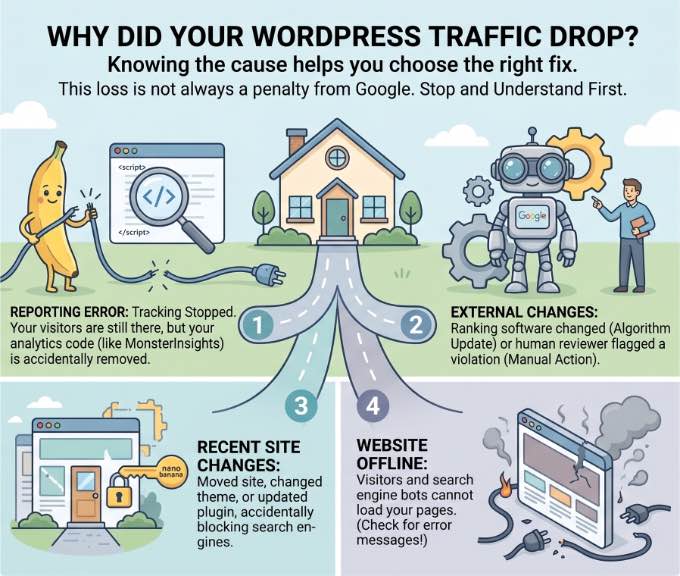
The first step in addressing a perceived traffic drop is to ascertain its authenticity. What appears as a sudden plunge in analytics might, in fact, be a normal seasonal fluctuation or, more critically, an issue with the data tracking itself. Before initiating any drastic changes to a website’s structure or SEO strategy, it is imperative to confirm that the reported decline is accurate and not a phantom problem.
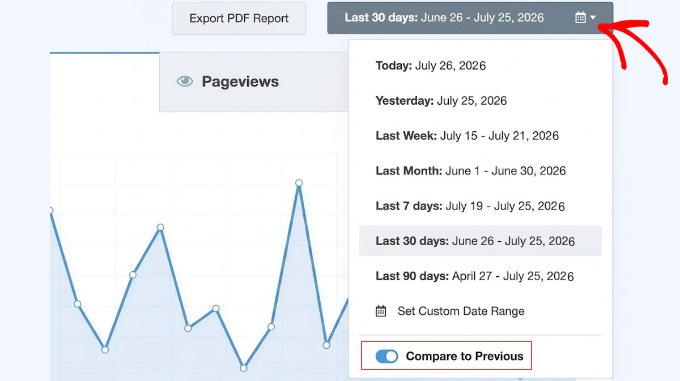
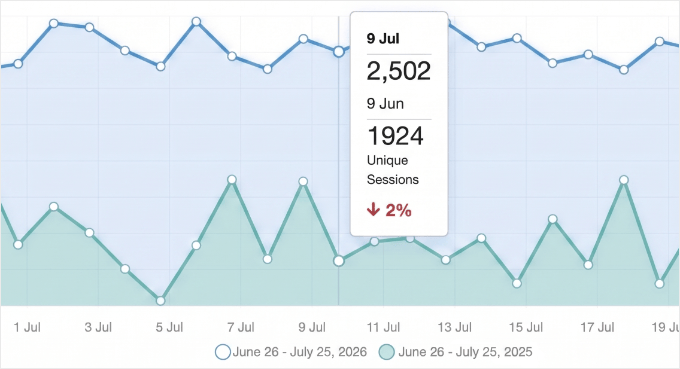
Modern analytics platforms, such as Google Analytics integrated via plugins like MonsterInsights for WordPress, provide sophisticated tools for historical data comparison. A critical first check involves comparing current traffic figures with those from the corresponding period in the previous year. Many businesses experience predictable seasonal dips or surges; an e-commerce site selling winter apparel, for instance, naturally sees lower traffic in summer months. If current trends align with historical seasonality, the decline may simply be a normal business cycle, alleviating the need for urgent intervention.
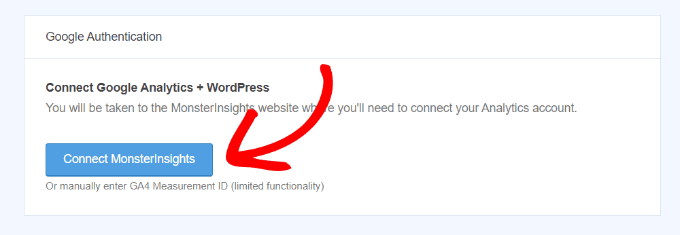
However, if traffic registers an instantaneous drop to near zero, or significantly below seasonal norms, the most probable culprit is a breakdown in the analytics tracking mechanism. A lost connection between the WordPress site and its Google Analytics property is a common occurrence, particularly after major site updates or administrative changes. In such cases, visitors continue to access the site, but their activity is simply not recorded, creating a false impression of a traffic collapse. Re-authenticating the Google Analytics connection through the respective plugin’s settings usually resolves this, bringing a swift, albeit artificial, recovery to reported traffic figures. An important expert tip often overlooked is to double-check this connection after any significant WordPress updates, and to be aware that a sudden halving of traffic could indicate the correction of a "double tracking" error, where both Google’s Enhanced Measurement and a plugin were simultaneously logging data, artificially inflating previous numbers.
External Forces: Navigating Google’s Penalties and Algorithmic Shifts
Once internal data accuracy is verified, attention must turn to external factors, primarily the influence of Google, the dominant force in global search. Google employs two main mechanisms that can severely impact website visibility: manual actions and automated algorithm updates.
Google Manual Actions: Direct Intervention
A Google Manual Action signifies a direct intervention by a human reviewer from Google’s Webspam team. These penalties are imposed when a website is found to be in violation of Google’s Webmaster Quality Guidelines, often involving manipulative SEO practices. Common reasons include "thin content" (pages with little unique value), "unnatural links" (schemes to artificially boost ranking through paid or irrelevant links), or "user-generated spam."
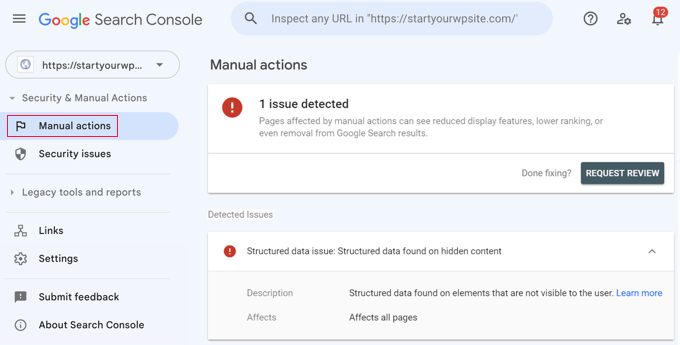
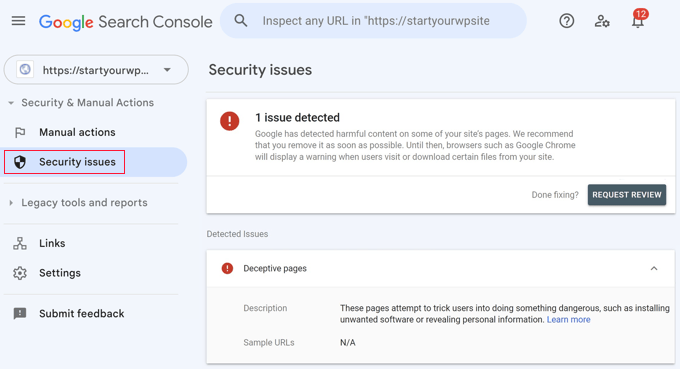
To diagnose a manual action, site owners must utilize Google Search Console, a vital tool for any WordPress site. Within the "Security & Manual Actions" section, the "Manual actions" report will explicitly state if a penalty has been applied, detailing the specific transgression. Similarly, the "Security issues" tab will alert site owners to malware or hacking incidents that Google has detected, which frequently lead to immediate traffic drops and prominent "Deceptive Site Ahead" warnings in search results. Recovery from a manual action is a structured process: the identified issues must be meticulously rectified, followed by a "Request Review" submission through Search Console, providing a clear audit trail of the corrective measures taken. The transparency and thoroughness of this submission are crucial for successful reconsideration.
Google Algorithm Updates: The Ever-Evolving Landscape
Unlike manual actions, Google algorithm updates are automated, continuous adjustments to Google’s ranking systems designed to improve the quality and relevance of search results. These updates, particularly the "core updates," can cause significant, widespread shifts in search rankings and traffic overnight. Historically, Google has rolled out thousands of minor updates annually, with several major core updates that garner industry-wide attention.
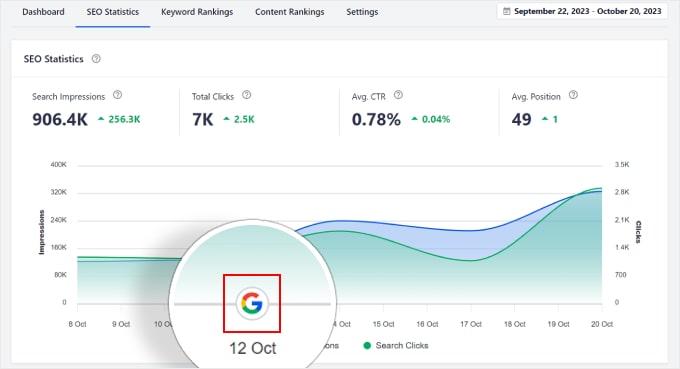
Identifying if a traffic drop coincides with an algorithmic update is streamlined with advanced SEO tools like All in One SEO (AIOSEO). Its Search Statistics feature overlays Google update markers directly onto traffic reports, allowing site owners to visually correlate a traffic dip with a specific update date. Clicking these markers often reveals a summary of the update’s focus, such as improvements to E-E-A-T (Expertise, Experience, Authoritativeness, Trustworthiness) signals, content helpfulness, or spam detection. For instance, the infamous "Panda" and "Penguin" updates targeted content quality and link spam, respectively, causing widespread reverberations across the web.
Recovery from an algorithmic penalty differs significantly from manual actions; there is no "reconsideration request." Instead, site owners must interpret the nature of the update and proactively enhance their content and site quality in alignment with Google’s stated objectives. This often involves extensive content rewrites to improve depth, accuracy, and user value, or disavowing toxic backlinks. The process is iterative, requiring continuous improvement and patience as Google’s algorithms re-evaluate the site over weeks or months. Furthermore, with the rise of AI-driven search overviews, optimizing content for concise, authoritative answers is becoming an increasingly important consideration for maintaining visibility.
Internal Site Dynamics: Technical Glitches and Self-Inflicted Wounds
Beyond Google’s direct influence, many traffic drops stem from technical errors or unintended consequences of recent site changes. These "self-inflicted wounds" are particularly common after major events like WordPress site migrations, theme changes, or plugin updates. The prudent practice of testing all major changes on a staging site before deployment cannot be overstressed, as it provides a critical sandbox to catch issues before they impact live traffic.
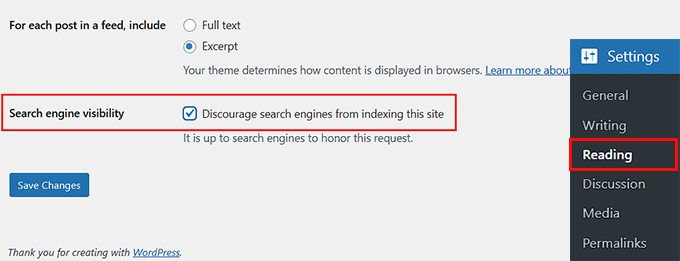
Search Engine Visibility Settings: A surprisingly common cause is a simple misconfiguration of the "Search engine visibility" setting in WordPress. This checkbox, found under "Settings > Reading," allows site owners or developers to "Discourage search engines from indexing this site." While useful during development, leaving it checked on a live site acts as a global "noindex" command, effectively vanishing the site from search results. Unchecking this box immediately is paramount, though it can take several days for Google to recrawl and re-index the site. Similar issues can arise from leaving a site in "Maintenance Mode" indefinitely or accidentally applying "noindex" tags to critical pages via an SEO plugin.
Security Plugin Misconfigurations: Aggressive security plugins, designed to block malicious bots and hacking attempts, can sometimes be overzealous. If misconfigured, these plugins might inadvertently block legitimate search engine crawlers, such as Googlebot, mistaking them for threats. Starting with recommended default settings and carefully monitoring crawl reports can prevent such accidental blockages.
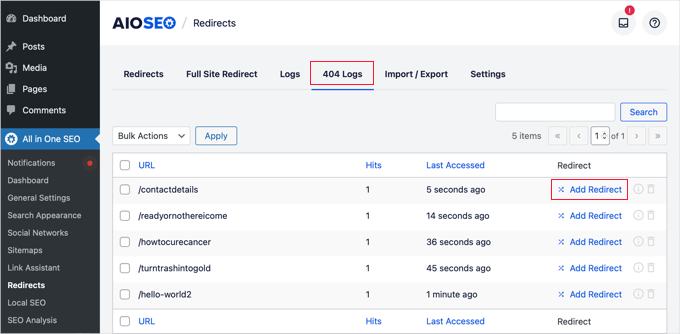
404 Errors, Permalinks, and Deleted Content: The structural integrity of a website’s URLs is fundamental to search engine visibility. Changing permalink structures without implementing proper 301 redirects, or deleting valuable content without redirection, inevitably leads to a surge in 404 "Page Not Found" errors. Google cannot index pages it cannot find, leading to a direct loss of traffic. Tools like AIOSEO’s Redirection Manager can log 404 errors, highlighting broken links that need to be redirected to relevant live pages or the homepage, preserving SEO value. Data consistently shows that sites with high volumes of 404 errors experience degraded user experience and search engine performance.
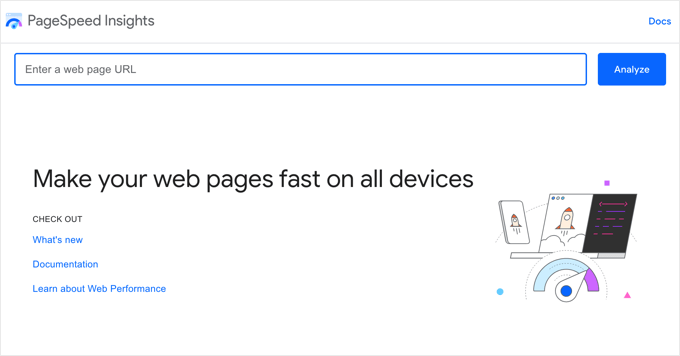
Website Speed and Core Web Vitals: Site speed is no longer just a user experience factor; it’s a critical ranking signal. Google’s Core Web Vitals initiative explicitly rewards fast, stable, and visually consistent websites. A recent theme change or a resource-intensive plugin could drastically slow down a WordPress site, leading to a decline in rankings. Tools like Google PageSpeed Insights offer free diagnostics, providing actionable recommendations to optimize images, leverage caching plugins, and enhance overall site performance. Studies indicate that even a one-second delay in page load time can reduce conversions by 7% and page views by 11%.
Indexing and Crawl Efficiency: Guiding the Bots
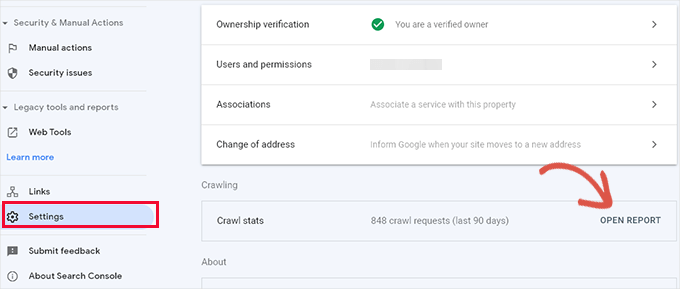
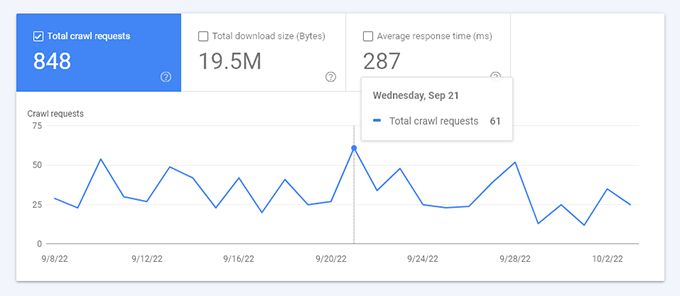
Even if a site is technically sound and free of penalties, Google might still struggle to understand and index its most valuable content efficiently. This often points to a "Crawl Budget" problem. Google Search Console’s "Crawl stats" report provides insights into how Googlebot interacts with a site. A report showing Google spending significant time crawling 404 errors, deprecated RSS feeds, or irrelevant author archives rather than core content indicates an inefficient use of its crawl budget.
WordPress, by default, generates numerous low-value URLs (e.g., category tags, author pages, attachment pages) that, if left unmanaged, can dilute the crawl budget. For larger sites, this becomes a critical issue, as Google has a finite amount of resources to dedicate to crawling any given domain. Solutions like AIOSEO’s Crawl Cleanup feature allow site owners to strategically "noindex" or block specific low-value URLs, directing Googlebot’s attention to the most important content, thereby improving indexation and ranking potential.
The Malicious Threat: Malware and Hacked Content
In scenarios where all other diagnostic avenues yield no answers, a site compromise might be the underlying cause. Hackers frequently exploit WordPress vulnerabilities to inject "SEO Spam"—hidden links, foreign characters, or pharmaceutical keywords—into legitimate content or even create entirely new, spammy pages. Google’s algorithms are adept at detecting such malicious content and will swiftly penalize affected sites, often leading to a precipitous traffic drop.
A quick manual check involves a Google search query: site:yourdomain.com. Anomalous results, such as unfamiliar titles or descriptions in different languages, are red flags. For a deeper, more thorough scan, professional security tools like Sucuri are indispensable. These services can detect hidden malware, malicious redirects (especially those that only trigger for specific user agents or geographic locations), and compromised files that evade manual detection. Beyond external scans, it is crucial to check the WordPress user list for unauthorized administrative accounts.
The cleanup process for a hacked site is intensive and carries inherent risks. It typically involves scanning and cleaning core WordPress files, themes, and plugins; cleaning the database of injected spam; and resetting all user passwords. A complete backup of the website before undertaking any cleanup is a non-negotiable safety measure, providing a rollback point if complications arise. Simply deleting visible spam text is insufficient; the root cause of the injection must be addressed to prevent recurrence.
The Path to Recovery: Monitoring and Proactive Health
Once the root cause of a traffic drop has been identified and addressed, the final, crucial phase is diligent monitoring. It is essential to manage expectations; traffic rarely rebounds instantly. Depending on the severity of the issue and Google’s recrawling schedule, recovery can take days, weeks, or even months.
Tools like MonsterInsights’ Site Notes feature provide invaluable assistance during this recovery period. By adding timestamped notes directly onto analytics reports—marking the date when a specific fix was implemented—site owners can create a clear chronological record. This allows for precise correlation between corrective actions and subsequent traffic trends, confirming the efficacy of the fixes. Observing an upward trend in traffic, even a gradual one, provides tangible evidence that the site is on the path to recovery.
Frequently Asked Questions and Broader Implications:
- Recovery Timeline: The duration of recovery is directly proportional to the problem’s nature. Simple technical errors might see traffic return in days, while major algorithm penalties or extensive malware cleanups could require months of sustained effort and content improvement.
- Theme/Plugin Impact: Yes, changing themes or updating plugins can cause traffic drops if they introduce performance issues, break mobile responsiveness, alter heading structures, or create conflicts. Proactive testing on staging environments and diligent use of site notes are crucial.
- Backlink Loss: Backlinks remain a cornerstone of SEO. A significant loss of high-authority backlinks, or the penalization of linking sites, can directly diminish a page’s ranking power and, consequently, its traffic. Regular monitoring of backlink profiles is recommended.
- Rankings vs. Traffic Discrepancy: If rankings hold steady but traffic drops, it often indicates a shift in user behavior or search demand. Seasonal trends, the emergence of new information sources (like AI overviews), or a general decline in public interest for a specific topic can all contribute. Tools like Google Trends can help gauge changes in search interest.
Moving Forward: Sustaining WordPress Traffic Health
Navigating a traffic crisis is a challenging but ultimately educational experience. The lessons learned underscore the importance of proactive website maintenance, continuous SEO vigilance, and a systematic approach to problem-solving. Beyond immediate recovery, sustained traffic health hinges on several ongoing practices: regular backups, consistent content audits, monitoring of Core Web Vitals, a robust security posture, and staying informed about Google’s evolving search guidelines. By integrating these practices into routine website management, WordPress site owners can build a resilient online presence, less susceptible to unforeseen traffic fluctuations, and primed for long-term growth.