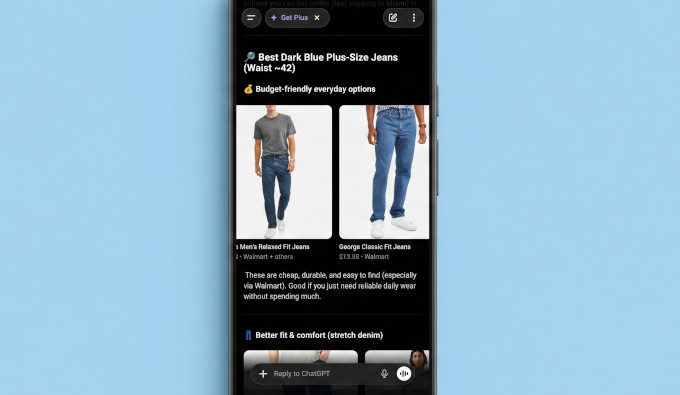
The landscape of e-commerce is undergoing a significant transformation with OpenAI’s integration of direct product shopping capabilities into ChatGPT, marking a pivotal shift towards "agentic commerce." This innovative feature allows users to discover and browse products from registered merchants directly within the conversational interface, responding to natural language queries such as "I need a blue yoga mat under $40" with real-time product listings, complete with pricing and stock availability. This development opens an entirely new sales channel for online businesses, particularly those operating on the popular WooCommerce platform, which powers a substantial portion of the internet’s e-commerce stores. While many WooCommerce store owners recognize the immense potential of this new avenue, understanding the precise steps to get their products listed and visible within ChatGPT remains a challenge. This comprehensive guide aims to demystify the process, providing a detailed, step-by-step roadmap for WooCommerce merchants to successfully register with OpenAI, prepare their product data, generate a compliant product feed, and submit it for approval, thereby unlocking a powerful new channel for customer acquisition and sales growth.
The Dawn of Agentic Commerce: ChatGPT’s Leap into Retail
OpenAI’s venture into agentic commerce, often referred to as ChatGPT Shopping, represents a significant evolution in how artificial intelligence interacts with the retail sector. Launched in late 2025 with an initial focus on U.S. merchants and a planned global expansion, this initiative moves beyond traditional AI applications like customer service chatbots or personalized recommendations. Instead, it empowers ChatGPT to act as a direct shopping assistant, capable of understanding complex user needs and presenting relevant products dynamically. This capability is built upon the Agentic Commerce Protocol (ACP), a proprietary system designed to seamlessly connect merchant inventories with ChatGPT’s AI core.
The user experience is intuitive and conversational. A customer might initiate a chat with ChatGPT, expressing a need for a specific item, perhaps a "lightweight camping tent for two under $200." ChatGPT, leveraging the ACP, processes this request, queries its database of registered merchant product feeds, and returns a curated list of suitable options. Each product listing includes essential details like price, availability, and a direct link to the merchant’s WooCommerce store to complete the purchase. This direct click-through model ensures that while discovery happens on ChatGPT, the transaction, branding, and customer relationship management remain firmly with the individual merchant.
Industry analysts view this as a strategic move by OpenAI to expand the utility and commercial viability of its advanced AI models. By enabling direct commerce, OpenAI not only enhances the user experience by simplifying product discovery but also creates a valuable ecosystem for businesses to reach consumers at the point of intent. This integration represents a blurring of lines between AI assistants and transactional platforms, setting a precedent for future developments in conversational commerce. For WooCommerce, a platform renowned for its flexibility and extensive market penetration, integrating with ChatGPT offers a compelling opportunity to tap into a rapidly evolving consumer interaction paradigm.
Strategic Advantages: Why WooCommerce Merchants Should Embrace ChatGPT Shopping
The decision to integrate a WooCommerce store with ChatGPT’s shopping capabilities extends beyond merely adding another sales channel; it represents a strategic embrace of future retail trends. Several compelling benefits underscore the importance of early adoption for merchants:
- Expanded Reach and New Customer Acquisition: ChatGPT boasts a massive global user base. By listing products, WooCommerce stores gain direct exposure to millions of potential customers actively engaging with an AI for information and, increasingly, for shopping. This opens up a demographic that might not typically discover products through conventional search engines or existing marketplaces.
- Enhanced Product Discovery through AI: Unlike traditional search, ChatGPT can interpret nuanced, conversational queries, potentially surfacing products that might be overlooked by keyword-based searches. This "agentic" discovery means products are presented in highly relevant contexts, often anticipating user needs based on the flow of conversation. For niche or unique products, this can be a game-changer.
- Streamlined Buyer Journey: The ability for users to discover products and assess options directly within their chat interface reduces friction in the buying process. Customers receive instant, personalized recommendations, making the journey from inquiry to purchase more efficient and engaging.
- Leveraging Existing WooCommerce Infrastructure: Merchants do not need to rebuild their e-commerce operations. ChatGPT commerce acts as a front-end discovery layer, with all orders, inventory management, and customer service continuing to be handled by the existing WooCommerce store. This preserves merchant control over the entire sales funnel and customer experience.
- Competitive Edge for Early Adopters: As a relatively new channel, early integration provides a significant first-mover advantage. Merchants who list their products now can establish presence and optimize their feeds before the platform becomes saturated, potentially capturing a larger share of early AI-driven sales.
- Data-Driven Insights: The integration of tracking mechanisms, such as UTM parameters, allows merchants to analyze the performance of their ChatGPT listings within Google Analytics. This provides invaluable data on user behavior, popular queries, and conversion rates originating from the AI platform, enabling continuous optimization of product offerings and marketing strategies.
Prerequisites for Seamless Integration
Before embarking on the technical steps to list products on ChatGPT, WooCommerce store owners must ensure they meet a few fundamental requirements:
- An Active WooCommerce Store: A fully functional and operational WooCommerce store with products ready for sale is essential.
- Established Product Catalog: Products should be well-described, categorized, and have high-quality images.
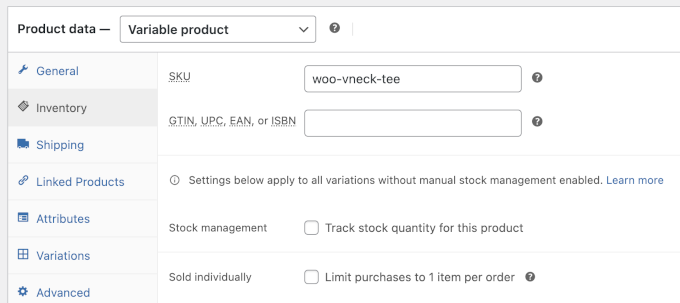
- Unique Product Identifiers (GTINs or MPNs): This is a critical and often misunderstood requirement. Each product must have a globally recognized identifier (GTIN like UPC, EAN, ISBN) or a manufacturer part number (MPN). These identifiers are crucial for the AI to accurately identify and differentiate products across various merchants and ensure data integrity.
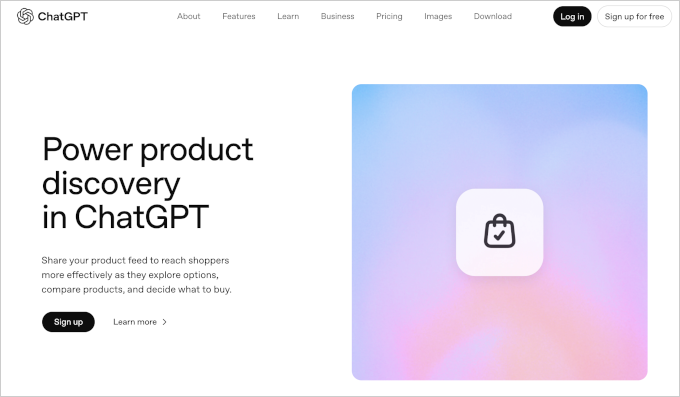
- Merchant Account with OpenAI: The foundational step is to apply and be approved as an OpenAI merchant.
- Product Feed Generation Tool: A specialized plugin capable of generating product feeds compliant with OpenAI’s commerce specifications is necessary.
A Step-by-Step Guide to Listing Your WooCommerce Products on ChatGPT
The process of getting your WooCommerce products listed on ChatGPT is systematic, involving registration, data preparation, feed generation, and submission.
Step 1: Register as an OpenAI Merchant
The initial gateway to ChatGPT commerce is through an official application to become an OpenAI merchant. This formal registration process is critical for establishing your business’s legitimacy and intent to participate in the program.
- Application Process: Navigate to the designated OpenAI merchant portal (e.g., chatgpt.com/merchants). The application typically requires detailed business information, including legal name, address, contact details, tax identification, and banking information. You will also need to specify your operational region (currently U.S., with global expansion underway) and the types of products you intend to sell.
- Policy Agreement: A key part of the application involves agreeing to OpenAI’s merchant policies, terms of service, and any commerce-specific guidelines. These policies cover aspects like product eligibility, customer service standards, data privacy, and ethical AI use.
- Review and Confirmation: Upon submission, you will receive a confirmation email. OpenAI’s team then reviews applications, a process that, based on merchant reports, can span from a few days to several weeks due to the program’s novelty and high interest. There is no publicly published official timeline, emphasizing the importance of applying early to join the queue.
- The Crucial First Move: Applying early is paramount. As the program expands, early applicants are generally prioritized for access and onboarding, securing a foundational position in this nascent sales channel.
Step 2: Add GTIN or MPN Identifiers to Your WooCommerce Products
This step is often the most confusing for merchants but is absolutely vital for AI-driven product matching. OpenAI requires each product in your feed to possess a unique, standardized identifier.
- Understanding Identifiers:
- GTIN (Global Trade Item Number): A globally unique identifier for trade items, commonly manifested as UPC (Universal Product Code) in North America, EAN (European Article Number) or IAN (International Article Number) in Europe, and ISBN (International Standard Book Number) for books. These are assigned by GS1, a global standards organization.
- MPN (Manufacturer Part Number): A unique identifier assigned by the manufacturer to a product. If you manufacture your own products or resell items without a readily available GTIN, an MPN can serve this purpose.
- Implementation in WooCommerce:
- Product Edit Screen: For individual products, navigate to Products » All Products in your WordPress admin, select a product, and scroll to the ‘Product data’ section. While WooCommerce natively includes an ‘SKU’ field, specialized fields for GTIN, EAN, UPC, and ISBN are typically provided by e-commerce plugins or themes. If not, the SKU field can be repurposed for an MPN if carefully managed to ensure uniqueness.
- Bulk Updating via CSV: For stores with extensive catalogs, manual updates are impractical. Export your WooCommerce product data as a CSV file (WooCommerce » Products » Export). Open this file in a spreadsheet editor (e.g., Microsoft Excel, Google Sheets), add the GTINs or MPNs in a dedicated column, and then re-import the updated CSV file back into WooCommerce. This method allows for efficient mass data entry.
- Finding GTINs or MPNs:
- Reselling Brands: GTINs are usually found on product packaging, supplier invoices, manufacturer’s product sheets, or the manufacturer’s official website.
- Private Label/Own Brand: If you manufacture your own products, you can assign your own MPNs. Ensure these are consistent, unique, and follow a clear internal numbering scheme (e.g., YOURSTORE-ITEM-001).
- Handmade/Unique Items: For bespoke or one-of-a-kind products, a structured MPN can be created, such as
YOURBRAND-UNIQUE-001, incrementing for each item. - Digital Products/Services: OpenAI’s requirements for non-physical products may evolve. Merchants should consult the latest OpenAI merchant specifications, as support for these categories might have distinct identification rules or may still be in development.
Step 3: Install a ChatGPT Product Feed Plugin
To translate your WooCommerce product data into a format that OpenAI’s Agentic Commerce Protocol can understand, a dedicated product feed plugin is indispensable. These plugins bridge the gap between your store’s database and external commerce platforms.
- Plugin Selection: The "Product Feed Pro by AdTribes" plugin is highly recommended for its robust capabilities and specific support for OpenAI/ChatGPT, alongside other major platforms like Google Shopping and TikTok. Its comprehensive feature set ensures compliance with various platform specifications.
- Installation and Activation: Install the plugin via the WordPress plugin repository (Plugins » Add New) or by uploading the plugin file. After installation, activate it.
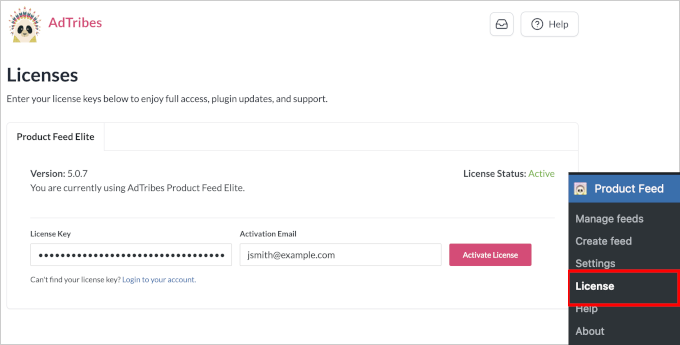
- License Activation: Crucially, activate your plugin license by navigating to Product Feed » License and entering the key obtained from your AdTribes account dashboard. This step unlocks the plugin’s full functionality and ensures access to updates and support.
Step 4: Configure and Generate Your Product Feed
With the plugin installed and licensed, the next step involves configuring the feed to meet OpenAI’s exact requirements.
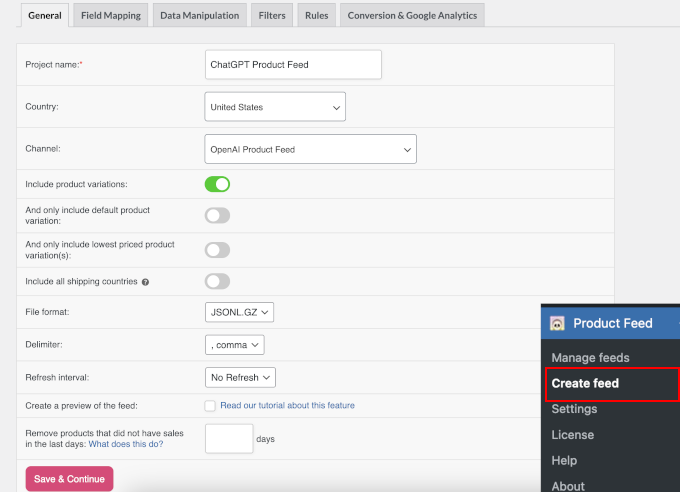
- Feed Creation: Go to Product Feed » Create Feed in your WordPress admin.
- Name and Country: Assign a descriptive name to your feed (e.g., "ChatGPT Product Feed") and select your operating country.
- Channel Selection: From the ‘Channels’ option, select ‘OpenAI Product Feed’. This instructs the plugin to apply OpenAI’s specific schema and attribute requirements.
- File Format: OpenAI’s preferred format for product feeds is JSONL (JSON Lines). Select this option to ensure optimal compatibility and parsing by ChatGPT’s systems.
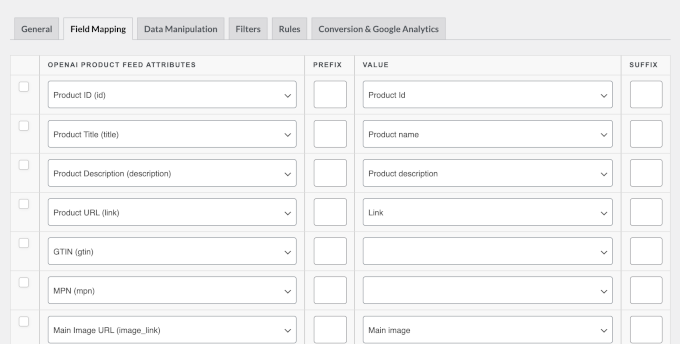
- Field Mapping: This is a critical configuration step where you map your WooCommerce product attributes to OpenAI’s required attributes.
- Pre-filled Attributes: The AdTribes plugin will pre-fill most common OpenAI attributes (e.g.,
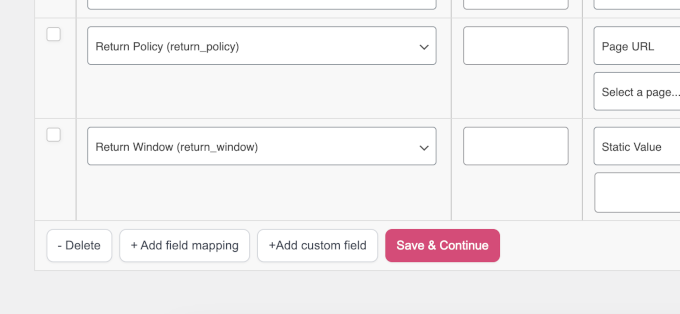
product_id,title,description,price,image_link,availability) with their corresponding WooCommerce fields. - Review and Customization: Carefully review these mappings. Ensure that attributes like GTIN/MPN are correctly mapped. If you use custom fields for product data not automatically recognized, use the ‘+Add custom field’ button to map them manually. Accuracy in mapping ensures that ChatGPT accurately understands and displays your product information.
- Pre-filled Attributes: The AdTribes plugin will pre-fill most common OpenAI attributes (e.g.,
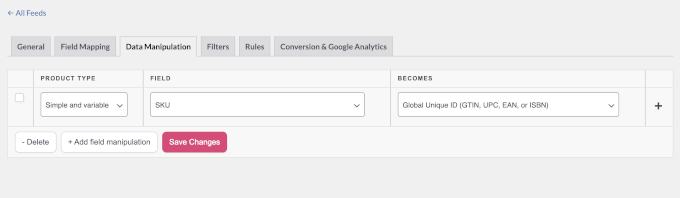
- Data Manipulation (Optional): The ‘Data Manipulation’ tab allows for advanced adjustments, such as modifying field values or combining attributes. For most basic setups, this can be skipped.
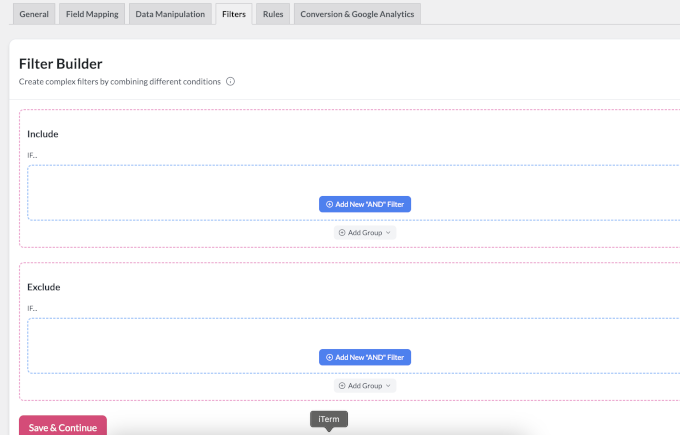
- Filters and Rules (Optional): The ‘Filters and Rules’ settings enable you to define which products are included in the feed based on criteria like stock status, category, or price. This is useful for excluding certain products or promoting specific lines.
- UTM Tracking for Analytics: Enable UTM tracking within the feed settings. This is crucial for performance measurement. By appending unique UTM parameters (e.g.,
utm_source=chatgpt,utm_medium=ai_commerce,utm_campaign=product_feed) to your product URLs, you can track clicks, traffic, and conversions originating from ChatGPT directly within Google Analytics. Tools like MonsterInsights simplify Google Analytics integration and e-commerce tracking for WordPress. - Generate Feed: After all configurations are complete, click the ‘Generate Product Feed’ button. The plugin will compile your WooCommerce product data into a JSONL file compliant with OpenAI’s specifications, accessible via a unique URL.
Step 5: Submit Your Product Feed to OpenAI
Once your merchant application is approved and your product feed is generated, the final step is to submit the feed to OpenAI for validation and integration.
- Retrieve Feed URL: Go to Product Feed » Manage Feeds in your WordPress admin. Locate your newly generated ChatGPT product feed and copy its URL. This URL is the direct link to your live product data.
- Submission via Merchant Portal: OpenAI will provide specific instructions via email, guiding you to their merchant portal where you will submit this feed URL.
- Automated Validation: OpenAI’s systems will then initiate an automated validation process against their commerce specifications. This typically takes 24 to 48 hours. The validator checks for correct formatting, mandatory fields, and data integrity.
- Addressing Validation Failures: It is common for initial submissions to fail validation due to missing fields, incorrect data types, or formatting errors. The merchant portal will provide detailed error reports, indicating precisely which fields or products require attention.
- Common Issues:
- Missing
product_id,title,description,price,image_link, oravailability. - Incorrect GTIN/MPN format or duplication.
- Invalid URL structures for product pages or images.
- Price formatting errors (e.g., missing currency).
- Missing
- Rectification and Resubmission: Address all flagged issues within your WooCommerce product data or the product feed plugin settings. Regenerate the feed and resubmit the updated URL to OpenAI. This iterative process continues until the feed passes validation.
- Common Issues:
- Product Listing: Once your feed successfully passes validation, your products will begin appearing in ChatGPT’s shopping results for relevant user queries. Users will be directed to your WooCommerce store to complete their purchases, allowing you to leverage your existing checkout experience and potentially offer upsells or cross-sells to increase average order value.
Broader Implications and Future Outlook
OpenAI’s foray into agentic commerce is more than just a new feature; it signals a significant shift in the digital retail landscape. It challenges traditional e-commerce models by placing AI at the forefront of the discovery phase, potentially redefining how consumers interact with brands and products.
- Evolving Consumer Behavior: As AI assistants become more sophisticated and ubiquitous, consumers may increasingly rely on them for purchasing decisions, moving away from direct website visits or traditional search engine queries for initial product exploration.
- Competitive Landscape: This move intensifies competition among AI platforms, search engines, and existing e-commerce marketplaces like Amazon or eBay. The battle for the "first click" in the shopping journey is now extending to conversational AI.
- AI Ethics and Trust: The success of agentic commerce hinges on trust. OpenAI and participating merchants must ensure transparency, accuracy, and fairness in product recommendations. Ethical considerations around data privacy, potential biases in algorithms, and merchant vetting will be paramount for long-term adoption.
- Technological Advancement: Expect continuous innovation in the Agentic Commerce Protocol, with AI potentially gaining deeper contextual understanding, handling more complex multi-item queries, and offering increasingly personalized recommendations based on past interactions and preferences.
- Global Market Expansion: The planned global rollout will unlock immense opportunities for WooCommerce merchants worldwide, but it will also introduce complexities related to international shipping, currency conversion, and diverse consumer behaviors.
The integration of WooCommerce stores with ChatGPT’s shopping features represents a frontier in digital commerce. By diligently following the outlined steps—from merchant registration and data preparation to feed generation and submission—WooCommerce store owners can position themselves at the forefront of this exciting new era, leveraging artificial intelligence to connect with customers in innovative and highly effective ways. The early investment in understanding and implementing these processes will undoubtedly yield significant returns as AI continues to reshape the future of retail.