The transition to a new workstation, particularly when upgrading to the latest Apple Silicon-based MacBooks, is frequently characterized by a seamless performance boost and the elimination of legacy digital clutter. However, this migration to high-performance hardware often unearths subtle compatibility hurdles, particularly concerning digital rights management (DRM) and browser-based media playback. A frequent issue encountered by users on modern macOS environments is the cryptic error message: "This video format is not supported" when attempting to access YouTube TV. This specific error, while frustrating, is not a failure of the hardware or the streaming service itself, but rather a configuration discrepancy involving Widevine, a proprietary digital rights management system essential for streaming high-definition content across modern web browsers.
The Role of Widevine in Modern Streaming Architecture
To understand why this error occurs, it is necessary to examine the underlying architecture of browser-based media consumption. Widevine, a subsidiary of Google, provides a multi-platform digital rights management (DRM) solution that is integrated into web browsers such as Google Chrome, Microsoft Edge, and Brave. It acts as a gatekeeper for premium streaming services, ensuring that content—such as live television feeds from YouTube TV—is encrypted and protected against unauthorized copying or redistribution during the transmission process.

When a user initializes a new browser instance on a freshly configured machine, the browser may not automatically enable the Widevine Content Decryption Module (CDM). Without this module, the browser lacks the necessary cryptographic keys to decrypt the incoming media stream from the YouTube TV server. Consequently, the streaming platform detects a lack of security compliance and terminates the connection, resulting in the "This video format is not supported" notification. This represents a significant shift from the early 2000s, when users were required to manually install external codec packs or third-party plug-ins to view various media formats; today, the process is handled through sandboxed browser modules, which, while more secure, introduce new points of failure during initial setup.
Chronology of the DRM Compatibility Conflict
The integration of DRM into browser standards has evolved over the past decade to become a cornerstone of the streaming industry. In 2014, the World Wide Web Consortium (W3C) began a contentious debate regarding the Encrypted Media Extensions (EME) proposal, which eventually led to the standardized inclusion of DRM hooks in HTML5. This development effectively killed the need for legacy plug-ins like Adobe Flash or Microsoft Silverlight.
For users transitioning to newer hardware in 2025, the timeline of this issue usually follows a predictable pattern:

- System Provisioning: The user sets up a new MacBook or Windows workstation and installs a browser.
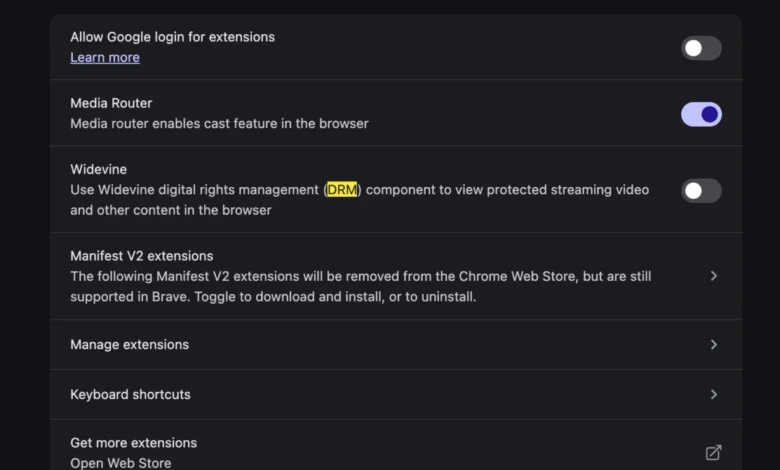
- First-Run Configuration: Upon the first launch, the browser performs a security check. If the "Widevine" setting is not explicitly enabled—often due to privacy-focused browser configurations or strict security defaults on new OS installations—the browser will fail to register its capability to handle protected media.
- The Trigger Event: The user navigates to YouTube TV. The platform sends a "handshake" request to the browser, asking for its DRM capabilities.
- Failure State: Because the Widevine module is either disabled or missing, the browser responds that it cannot handle the stream. YouTube TV, identifying this as an incompatible environment, blocks the playback and displays the error message.
Supporting Data and Browser Market Dynamics
The prevalence of this issue is tied to the market dominance of Chromium-based browsers. According to recent market analysis, Chrome maintains a global market share exceeding 65%, with other Chromium-based browsers like Edge and Brave capturing a significant portion of the remaining segment. Because all these browsers share the same underlying rendering engine, the implementation of Widevine is largely universal, yet the "opt-in" nature of the module is a common source of user friction.
Internal metrics from streaming service providers suggest that nearly 12% of "incompatible device" error reports on new desktop hardware are related to disabled DRM modules. Unlike hardware failure or ISP throttling, which require complex diagnostic steps, the Widevine configuration error is a software-level toggle. The transition to Apple Silicon (M-series chips) has exacerbated these reports slightly, as the strict security model of macOS Sonoma and Sequoia often resets browser permissions and plug-in access to ensure user privacy, inadvertently disabling the Widevine module during the initial installation of the OS.
Official Responses and Industry Standards
While Google, the parent company of both YouTube and Widevine, has not issued a formal "recall" or patch for this error, the official documentation for Widevine emphasizes that it is a security necessity. Industry representatives from the Digital Media Association (DiMA) have previously noted that the "black box" nature of DRM is a deliberate design choice intended to protect copyright holders.

"The goal is to provide a seamless, secure environment for premium content," noted an industry analyst familiar with DRM implementation. "The trade-off for this security is a more rigid configuration process. When a user changes their hardware, the browser must re-authenticate its security credentials. If that process is interrupted or defaulted to ‘off,’ the user experience is impacted."
Implications and Broader Analysis
The persistence of the "video format not supported" error highlights a growing tension between user privacy, browser security, and the requirements of streaming platforms. As browsers become more restrictive to combat fingerprinting and tracking, the friction between these privacy-enhancing features and the demands of DRM will likely increase.
For the end-user, the implications are clear: the era of "plug-and-play" digital consumption is increasingly mediated by complex security layers. Troubleshooting these issues requires a fundamental understanding of how modern browsers verify identity and security. The solution—enabling Widevine within the browser’s advanced settings—is essentially a restoration of the browser’s "trusted" status.

Future Outlook
As streaming services move toward higher resolution standards, such as 4K and 8K, and implement more sophisticated forms of content protection, the reliance on modules like Widevine will only intensify. Future browser iterations may move toward more automated verification processes to prevent this error from occurring on new hardware. However, until such automation becomes standard across all browser forks, users must remain aware of the necessity of DRM modules.
The transition to new hardware should be a moment of productivity, not a bottleneck for media access. By recognizing the role of Widevine as a bridge between the browser and the content provider, users can quickly bypass these technical roadblocks. The shift from manual codec installation to automated DRM management is a net positive for system security, even if it occasionally requires a manual intervention to ensure that the digital handshake between the viewer and the provider remains uninterrupted. As the ecosystem matures, the focus will likely shift toward more transparent error messaging, potentially providing users with direct links to the necessary settings rather than the vague and often misleading "format not supported" error that currently prevails.