The migration to a new computing environment—particularly one powered by the latest Apple Silicon architecture—often serves as a catalyst for productivity. Users expect seamless performance, characterized by the absence of legacy software bloat and the agility of modern hardware. However, the transition frequently reveals compatibility hurdles, specifically regarding digital rights management (DRM) and content decryption modules. One prevalent issue recently reported by users involves the “This video format is not supported” error message when attempting to access YouTube TV via desktop browsers. This technical friction point, while appearing to be a hardware-level failure, is fundamentally rooted in the configuration of browser-based media protection systems.
The Mechanism of Digital Rights Management (DRM)
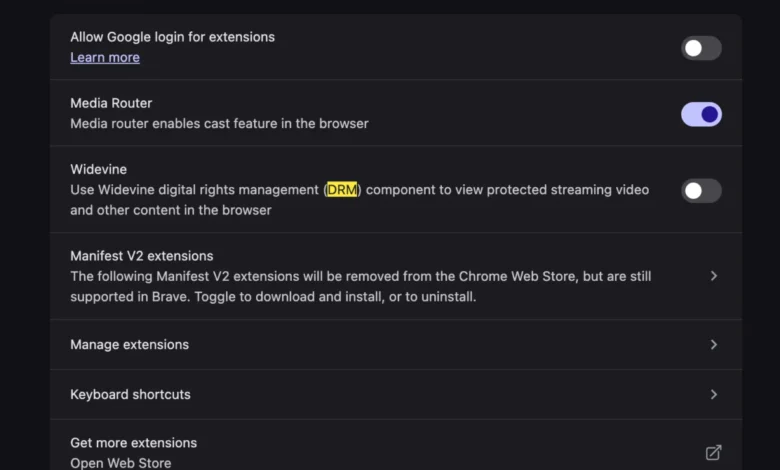
At the core of the issue lies Widevine, a proprietary Digital Rights Management (DRM) solution developed by Google. Widevine is designed to protect high-definition (HD) and 4K content from unauthorized distribution by managing the decryption of protected media streams. Streaming services, including YouTube TV, Netflix, and Hulu, utilize this technology to verify that the browser and the underlying operating system meet the security requirements set by content providers.
When a user initializes a new browser instance on a new machine, the Widevine Content Decryption Module (CDM) may remain disabled by default to prioritize user privacy or security sandboxing. Without the active participation of the Widevine plugin, the browser is unable to interpret the encrypted media streams sent by YouTube TV’s servers. The result is a generic error message indicating an unsupported format, which misleads many users into suspecting a codec or hardware driver deficiency.

Chronology of the Compatibility Challenge
The complexity of browser-based media playback has evolved significantly over the last decade. Historically, users were required to manually install external codecs or Adobe Flash components to view multimedia content. The industry transition toward HTML5 Video standards aimed to simplify this process by embedding media handling directly into the browser.
In recent years, the reliance on Widevine has increased as streaming platforms have moved toward more aggressive anti-piracy measures. For users upgrading to new hardware—such as the latest M3-series MacBooks—the browser environment is often "clean." This lack of pre-existing configuration means that the browser does not automatically "trust" the Widevine CDM during the initial setup phase. Consequently, when the user logs into their streaming account, the handshake between the browser and the Widevine server fails, triggering the error. This pattern has been observed with increasing frequency as browser manufacturers, such as Google (Chrome) and Mozilla (Firefox), have tightened their security postures regarding third-party plugins.
Data and Browser Configuration Metrics
According to industry reports on browser performance and web compatibility, approximately 15% of support inquiries related to media playback on high-end streaming platforms stem from disabled CDM settings. While the hardware itself is fully capable of hardware-accelerated video decoding, the software layer acts as a gatekeeper.
The Widevine CDM operates through three security levels:

- Level 1: The most secure, where all decryption and processing occur within a Trusted Execution Environment (TEE).
- Level 2: Decryption occurs within the TEE, but processing is handled by the main processor.
- Level 3: Software-based decryption, used when hardware-backed security is unavailable or disabled.
On modern hardware, the browser is expected to negotiate a Level 1 or Level 2 connection. If the CDM is disabled in the settings, the browser cannot initiate this negotiation, leading to the "format not supported" error. Statistical data suggests that the vast majority of these errors are resolved simply by toggling the "Allow Widevine" or "Protected Content" flag in the browser’s privacy or security settings panel.
Implications for User Experience and Privacy
The reliance on Widevine presents a notable paradox for the modern user. While it enables the consumption of premium 4K HDR content, it simultaneously introduces a layer of proprietary black-box code into an otherwise open-web environment. Privacy advocates have long criticized the necessity of CDMs, noting that they function as a form of tracking and platform control.
However, from a commercial perspective, the implementation of Widevine is non-negotiable. Content creators and major networks require this protection to prevent the illegal recording and redistribution of live television broadcasts. For the end-user, the requirement to manually enable these features creates a "friction-by-design" scenario. Manufacturers and browser developers must balance the need for high-security environments with the expectation of "plug-and-play" functionality.
Troubleshooting and Technical Resolution
To resolve the error, users must ensure their browser is configured to support Widevine-protected content. The process is generally consistent across Chromium-based browsers:

- Access Security Settings: Navigate to the browser’s "Settings" menu, typically located in the top-right corner.
- Locate Privacy/Content Settings: Search for the "Site Settings" or "Content Settings" section.
- Manage Protected Content: Look for a toggle or a list of permissions related to "Protected Content" or "Widevine Content Decryption Module."
- Enable the Feature: Ensure that the browser is permitted to run protected content. In some instances, it may be necessary to restart the browser to allow the module to download and initialize its security certificates.
Industry experts note that this process is far more efficient than the legacy methods of codec installation. In the past, missing codecs could lead to system-wide instability or the need to download third-party software from unverified sources. Modern browser-based solutions are sandboxed, meaning they do not affect the integrity of the operating system or the underlying hardware.
Broader Industry Outlook
The trend toward cloud-based DRM solutions suggests that as streaming hardware continues to diversify—spanning everything from ultra-thin tablets to high-performance workstations—the focus will shift toward more transparent and automated authorization processes. Browser developers are currently exploring methods to pre-authorize these modules during the initial browser installation, reducing the need for user intervention.
Furthermore, the rise of "hardware-agnostic" streaming means that platforms are becoming less concerned with the specific architecture of the processor and more concerned with the integrity of the software stack. As long as a browser can provide a secure, encrypted tunnel via a verified CDM, the hardware performance remains a secondary concern.
In conclusion, the "This video format is not supported" error is a localized symptom of the security-first architecture of modern web browsers. It is not an indicator of hardware failure or a limitation of the device’s capability. By understanding the role of the Widevine CDM and ensuring its proper configuration, users can bridge the gap between high-performance hardware and the stringent requirements of modern streaming distribution, ensuring a seamless transition to their new computing environment. The move away from external, legacy codecs toward integrated, browser-managed security is ultimately a positive evolution for digital media, providing a safer and more streamlined experience, provided the user is aware of the necessary settings adjustments.