Google is poised to introduce significant advancements in its advertising suite, with three new AI-driven features set to be rolled out in anticipation of its annual Marketing Live event on May 20th. These updates – AI Max for Shopping campaigns, AI Brief, and text disclaimers for Search – underscore Google’s commitment to leveraging artificial intelligence to enhance advertiser control, campaign performance, and ad transparency, all while operating within defined guardrails to ensure responsible AI implementation.
The announcement comes at a critical juncture for the digital advertising landscape, as businesses increasingly seek sophisticated tools to navigate complex consumer journeys and optimize return on investment. Google Marketing Live, a cornerstone event for marketers worldwide, serves as a platform for Google to unveil its latest innovations and strategic directions for its advertising and commerce products. The impending release of these AI features signals a proactive approach to addressing the evolving needs of advertisers in an AI-centric era.
AI Max for Shopping: Expanding AI’s Reach to Product Discovery
Following its successful integration into Search campaigns last year, AI Max is now being extended to Google Shopping. AI Max for Search empowers Google with greater oversight over which search queries trigger advertisements and the specific content of those ads. For instance, an advertiser bidding on the term "clear storage bins" might find their ad appearing for related, more nuanced queries like "What are the differences between clear and plastic storage bins?" Crucially, AI Max for Search allows Google to dynamically adjust ad text and even the final URL to maximize conversion rates, adapting in real-time to user intent.
The adaptation of AI Max to Shopping campaigns promises a similar level of intelligent automation. A key distinction, however, is the potential for Google to generate ad copy directly from an advertiser’s Merchant Center data. This means that even within a Shopping campaign, which traditionally emphasizes image-based product listing ads, text-based ads generated by AI could be displayed. Advertisers opting into AI Max for Shopping will also see their ads integrated into emerging formats such as AI Overviews and AI Mode, mirroring the functionality introduced with AI Max for Search.
While Google has not yet detailed whether advertisers will have the option to disable text customization and final URL expansion specifically for Shopping campaigns, similar to the controls available for Search, this remains a point of interest for advertisers seeking granular control.
The distinction between AI Max and Performance Max campaigns can be a source of confusion for advertisers. Google generally recommends Performance Max for comprehensive, multichannel promotional efforts across Search, Shopping, Display, and Video. It is anticipated that Google will eventually integrate text customization capabilities into Shopping ads within Performance Max campaigns. In contrast, AI Max is positioned as a more focused solution for single-channel advertising, such as Search or Shopping campaigns, where deeper automation and optimization within that specific channel are desired. This strategic positioning allows advertisers to choose the solution that best aligns with their campaign objectives and channel focus.
AI Brief: Empowering Advertisers with Granular Control Over AI Messaging
AI Brief emerges as a significant new tool designed to provide advertisers with a more direct channel to communicate their preferences and guidelines to Google’s AI systems. This feature is slated to roll out initially within AI Max for Search, with subsequent expansions to Performance Max and AI Max for Shopping campaigns.
The concept behind AI Brief is to enable advertisers to furnish the AI with specific instructions that shape how their advertisements are generated and displayed. For example, an advertiser specializing in high-end office chairs might provide detailed guidance to the AI. This could include specifying target audiences, such as "executives and remote professionals seeking ergonomic solutions." They might also define key selling propositions, like "emphasize lumbar support and premium materials" or "highlight the 10-year warranty and free white-glove delivery." Furthermore, advertisers could outline brand voice and tone, perhaps instructing the AI to adopt a "sophisticated, authoritative, and professional" style, or conversely, a more "approachable and design-focused" tone.
While such detailed guidelines can undeniably enhance campaign performance by aligning AI-generated content with brand objectives, there is a potential concern that overly restrictive parameters could inadvertently limit the algorithm’s ability to explore novel optimization avenues. The effectiveness of AI Brief will likely hinge on finding a balance between providing sufficient direction and allowing the AI the flexibility to identify the most impactful creative and targeting strategies.
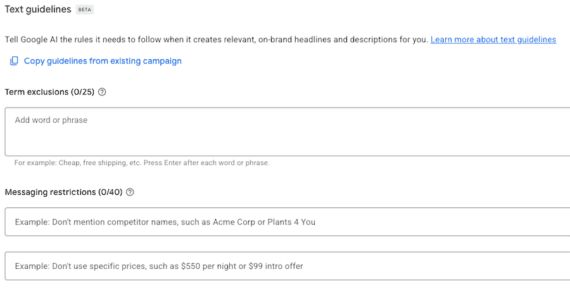
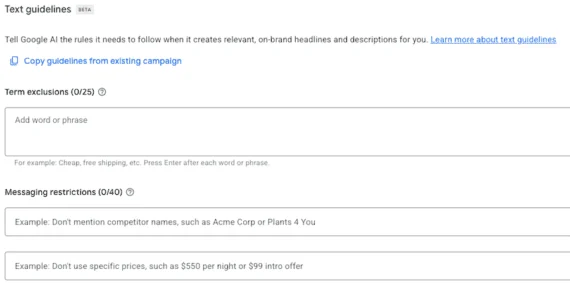
AI Brief will incorporate a "Text guideline" feature, which is expected to function similarly to the existing guidelines within AI Max campaigns. This interface, as previewed, allows advertisers to define terms for exclusion and set messaging restrictions. For instance, an advertiser might choose to exclude terms like "cheap" or "free shipping" if they are not aligned with their premium brand positioning. Messaging restrictions could include directives not to mention competitor names or specific price points. This granular control is crucial for maintaining brand integrity and ensuring that AI-generated ad copy remains consistent with overarching marketing strategies. The screenshot of the "Text guideline" interface demonstrates a clear and user-friendly design, with dedicated sections for "Term exclusions" and "Messaging restrictions," further indicating Google’s focus on making these advanced AI tools accessible to a broad range of advertisers. The inclusion of a "Copy guidelines from existing campaign" link suggests an effort to streamline the setup process for advertisers already familiar with Google Ads.
Text Disclaimers for Search: Enhancing Transparency and Compliance
The introduction of text disclaimers for Search ads represents a significant step towards greater transparency and compliance for advertisers. This feature will enable advertisers to directly incorporate crucial terms, conditions, and disclosures into their Search advertisements. For example, an advertiser selling products might add a disclaimer such as "Product is BPA-Free. Learn More." This text will be seamlessly integrated into the description line of Responsive Search Ads, without requiring the use of pinning, a method that has historically been used to ensure specific ad components remain visible but can negatively impact ad strength scores.
A notable advantage of text disclaimers is that they do not affect ad strength scores. Ad strength, while often considered a vanity metric, is an indicator of how well-optimized an ad is, and ads with higher scores tend to benefit from increased visibility. By allowing disclaimers to exist independently of this score, Google is facilitating the inclusion of essential information without penalizing advertisers.
These text disclaimers will be configurable at the individual campaign level and will be accessible within the "Assets" section of the "Campaigns" tab in Google Ads. The disclaimers will occupy the first available description space and are limited to a maximum of 90 characters. Importantly, they can be used in conjunction with final URL expansion and customized ad text, offering advertisers flexibility in how they present this information. This feature is particularly valuable for industries with stringent regulatory requirements or for products with specific certifications or benefits that need to be communicated directly to the consumer at the point of search. The ability to add these disclaimers without impacting ad strength scores is a welcome development for advertisers aiming to maximize both their ad’s reach and its informative value.
The broader implications of these updates are substantial. The increased integration of AI across Google’s advertising platforms suggests a future where ad creation, optimization, and delivery are increasingly automated and intelligent. This can lead to improved efficiency and potentially higher conversion rates for advertisers. However, it also raises ongoing discussions about the balance between AI-driven automation and human oversight, as well as the need for robust transparency and control mechanisms. As Google continues to refine its AI capabilities, advertisers will need to adapt their strategies to harness these new tools effectively while ensuring their brand messaging remains authentic and aligned with consumer expectations. The upcoming Marketing Live event will undoubtedly provide further insights into Google’s vision for the future of advertising and the role of AI in shaping that future.