How to Add a Trust Badge to WooCommerce to Enhance Site Security and Customer Confidence

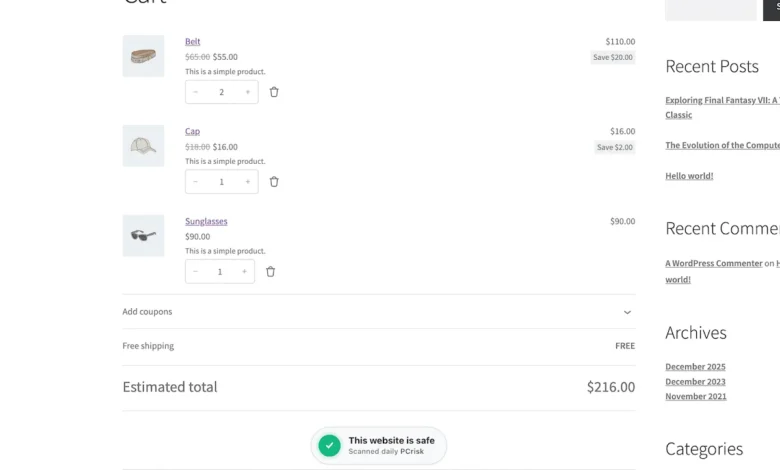
In an era of rising digital threats and sophisticated phishing campaigns, establishing consumer trust has become a fundamental pillar of e-commerce operations. For WooCommerce store owners, demonstrating that a website is secure, regularly monitored, and free of malicious activity is a critical conversion factor. The PCrisk Trust Badge, a dynamic security verification tool, has emerged as a solution for WordPress-based merchants seeking to provide real-time proof of their site’s safety. Integrating this tool into a WooCommerce environment can be achieved in approximately ten minutes, providing a transparent, third-party validation that potential customers can inspect before making a purchase.

The Mechanics of Digital Trust Verification
The PCrisk Trust Badge functions through a continuous, automated security audit of the host website. Unlike static trust seals—which may simply be images uploaded to a site’s footer without any underlying security verification—this badge is dynamic. The service conducts periodic scans of the domain to identify malware, malicious scripts, or blacklisted URLs.
The system operates on a trust-score threshold. If a site maintains a clean security profile and meets a high trust score, the badge remains visible to the public. If a scan detects vulnerabilities or security breaches, the badge is automatically suppressed, preventing the site from displaying false security credentials. It is important to note that while this tool provides a public-facing indicator of health, it is intended to supplement, not replace, robust security plugins and firewalls. The badge serves as a snapshot of the site’s status at the time of the most recent scan, reflecting a commitment to ongoing site hygiene.

Chronology of the Setup Process
The implementation process is streamlined to minimize technical overhead for store administrators. The initial phase involves the installation of the PCrisk Trust Badge plugin via the official WordPress Plugin Directory. Once activated, the plugin initiates an automated initial scan to establish a baseline security score.
Following the scan, administrators are presented with a selection of service tiers, including both free and premium options. Once the account is linked—a process that requires no manual API code injection—the user is directed to the PCrisk dashboard. This dashboard serves as the command center for site management, providing users with a comprehensive view of their scan history, active security alerts, and the current trust score.

After verifying the domain status in the PCrisk dashboard, administrators return to the WordPress interface to configure the visual presentation of the badge. This includes selecting the badge style (e.g., ribbon, minimal, or bubble) and determining its global or store-specific placement. The plugin is designed with intelligent logic that recognizes WooCommerce pages, allowing for granular placement options such as positioning the badge above or below the "Add to Cart" button, or in close proximity to the "Place Order" button at checkout.
Strategic Placement and User Experience
The effectiveness of a trust badge is heavily reliant on its placement within the customer journey. For WooCommerce users, the plugin provides specific placement configurations for shop pages, individual product pages, and the final checkout sequence.

Industry data suggests that trust seals placed near high-friction areas—such as the checkout button—can significantly reduce cart abandonment rates by alleviating "checkout anxiety." The PCrisk plugin offers specific "Near Checkout" and "Near Place Order" configurations, ensuring that the badge is visible at the precise moment a user might be reconsidering their purchase due to security concerns.
Furthermore, the plugin includes a "smart display" feature that handles the badge’s interaction with other page elements. By default, the floating badge is designed to fade out when a user scrolls over critical UI elements, such as buttons or navigation menus, to avoid interfering with functionality. Administrators have the option to override this behavior, though the default setting is generally recommended to maintain a clean and professional user interface. For more advanced users, the badge can also be deployed as a standard WordPress block, allowing for custom placement within the WordPress Site Editor.

The Public-Facing Security Report
A defining feature of the PCrisk system is the transparency of its public report. When a customer clicks the badge, they are directed to an external report hosted on PCrisk’s servers. This architecture ensures that the loading of the report does not negatively impact the host site’s performance or core web vitals.
The report provides a detailed breakdown of the site’s security profile, including:

- The Trust Score: A numerical value out of 100 that provides an immediate indicator of site reliability.
- Threat Engine Results: A summary of how many security databases have been queried, with a focus on identifying potential malicious links or scripts.
- Domain Metadata: Including WHOIS data and DNS details, which further verify the legitimacy of the domain.
- Tranco Ranking: For high-traffic sites, the report includes a ranking within the top one million websites, which serves as a metric of the site’s standing in the broader digital ecosystem.
By providing this level of detail, the tool moves beyond simple aesthetic assurance, allowing cautious shoppers to perform their own due diligence regarding the site’s infrastructure.
Broader Implications for E-commerce Security
The integration of dynamic trust indicators represents a shift in how e-commerce platforms approach security. Historically, security was considered an internal concern, managed by IT departments and visible only through browser-level indicators like HTTPS encryption. However, as consumers become more educated regarding online risks, the demand for proactive, visible security communication has increased.

The implementation of such badges has several key implications:
- Reduced Liability Perception: By showing that a site is actively monitored by a third party, merchants can mitigate the perception of risk, particularly for smaller, independent brands that may lack the established reputation of major retailers.
- Conversion Optimization: While the primary goal is security, the secondary impact is business growth. Studies on conversion optimization often highlight the "trust gap" as a primary reason for low conversion rates in new or mid-sized online stores. A visible, verified badge helps bridge this gap.
- Encouraging Good Hygiene: The requirement to maintain a high trust score to display the badge incentivizes store owners to keep their plugins updated and their security configurations active. It transforms site maintenance from a chore into a business asset.
Best Practices for Post-Installation
Once the PCrisk Trust Badge is active, the work is not necessarily complete. Savvy store owners should view the badge as a variable in their overall conversion rate optimization (CRO) strategy. Using A/B testing methodologies, merchants can test different badge placements to determine which configuration yields the highest conversion lift.

For instance, one might compare the impact of a "Floating" badge on the checkout page versus a static "Bottom" placement. By monitoring metrics such as the checkout completion rate and the time spent on page, administrators can refine the user experience to be both secure and seamless.
Finally, while the badge provides an automated layer of oversight, it should be integrated into a broader security protocol. This includes regular manual audits of the WordPress environment, the use of two-factor authentication for all administrative accounts, and consistent backups of the WooCommerce database. When combined with these standard practices, the PCrisk Trust Badge acts as a final, effective signal of professionalism and safety to the end consumer, helping to foster the long-term customer relationships that are essential for sustained e-commerce success.

By prioritizing these steps, store owners can transform their security infrastructure into a tangible competitive advantage, providing peace of mind to their customers while simultaneously optimizing their own sales funnels. The ease of the ten-minute setup process ensures that even those with limited technical expertise can effectively communicate their commitment to security in a professional, data-backed manner.