WordPress Site Migration to Pressable: An In-Depth Analysis of a Streamlined Hosting Solution

For businesses, agencies, and individual content creators relying on WordPress, the choice of a hosting provider is paramount to operational efficiency, security, and overall digital performance. With WordPress powering over 43% of all websites on the internet, the demand for specialized, high-performance hosting solutions has surged. Managed WordPress hosting, which offloads critical server maintenance, security updates, and technical troubleshooting to experts, has emerged as a preferred option for many seeking to minimize stress and maximize site reliability. Pressable, a managed WordPress hosting solution backed by Automattic (the creators of WordPress.com and WooCommerce), stands out as a robust contender for sites seeking a migration from non-managed or underperforming environments.
The decision to migrate a website is often driven by a need for enhanced speed, improved security, or more responsive support. While self-managed server setups can offer cost savings and granular control for highly technical users, they demand significant ongoing maintenance and expertise. Pressable positions itself for users who prioritize reliable performance and dedicated, WordPress-specific support without the complexities of server management. This analysis delves into Pressable’s offerings, its suitability for various WordPress projects, and a detailed chronology of the migration process, providing a comprehensive overview for potential users.
The Imperative for Managed WordPress Hosting
The digital landscape of 2026 places unprecedented demands on websites. User expectations for rapid load times, seamless navigation, and ironclad security are higher than ever. Google’s Core Web Vitals, which measure loading performance, interactivity, and visual stability, significantly influence search engine rankings, making site speed a critical SEO factor. Furthermore, with cyber threats continually evolving, robust security infrastructure is no longer a luxury but a necessity.
Managed WordPress hosting providers like Pressable address these challenges by offering environments specifically optimized for WordPress. This specialization translates into numerous benefits:

- Performance Optimization: Servers are fine-tuned for WordPress, often incorporating advanced caching, Content Delivery Networks (CDNs), and enterprise-grade hardware to ensure blazing-fast load times.
- Proactive Security: Comprehensive security measures, including malware scanning, firewalls, brute-force protection, and regular vulnerability assessments, are managed by the host, significantly reducing the burden on site owners.
- Automatic Updates and Backups: Core WordPress, theme, and plugin updates, along with daily backups, are often automated, safeguarding against data loss and compatibility issues.
- Expert Support: Access to a support team with deep knowledge of WordPress can quickly resolve complex technical issues, minimizing downtime.
- Scalability: Managed platforms are designed to handle traffic spikes and growth, allowing sites to scale resources as needed without major architectural changes.
Pressable’s Value Proposition: Who It Serves Best
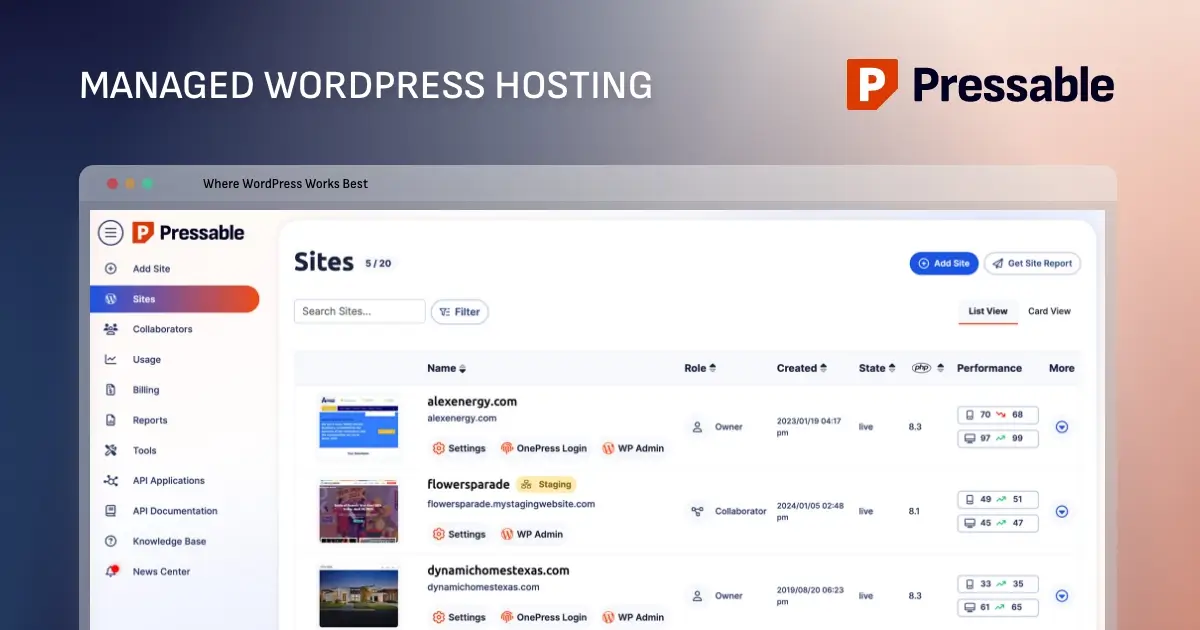
Pressable’s exclusive focus on self-hosted WordPress sites allows for deep optimization and tailored services. Its feature set typically includes automatic daily backups, a built-in CDN, staging environments for development, free SSL certificates, and a 100% uptime guarantee, among other offerings. This suite of features positions Pressable as an attractive option for a specific segment of the WordPress user base.
Industry analysts and user testimonials suggest that Pressable is particularly well-suited for small to medium-sized websites, encompassing business sites, professional blogs, and client projects managed by agencies or freelancers. Its managed infrastructure alleviates the technical burden of server maintenance, enabling site owners and developers to concentrate on content creation, design refinement, and business growth. This makes it an ideal choice for non-technical bloggers seeking a reliable platform, as well as agencies and freelancers managing a portfolio of client sites where efficiency and consistent performance are crucial.
However, Pressable is not a universal solution. Its specialization means it exclusively hosts WordPress sites and does not provide email hosting, custom server configurations, or dedicated servers – features that larger, resource-intensive enterprises or highly customized applications might require. Plans are structured with visitor and storage limits, necessitating potential upgrades as a site expands. Furthermore, Pressable does not support low-level server customizations such as ionCube, bespoke firewall rules, or direct editing of NGINX configurations, which could be a limiting factor for highly specialized technical requirements. For organizations with legacy systems or niche server-side dependencies, these limitations warrant careful consideration.
Choosing the Right Pressable Plan
Prospective users considering a migration to Pressable must carefully evaluate the available plans to align with their specific needs. Key factors for plan selection include:
- Number of WordPress Installs: How many individual WordPress sites need hosting?
- Estimated Monthly Visitors: Anticipated traffic volumes directly impact resource allocation.
- Required Storage Space: The volume of content, media, and database size dictates storage needs.
Pressable’s Signature plans, ranging from Signature 1 (for a single site with up to 30,000 visitors) to Signature 8 (supporting 100 sites and 2 million visitors), offer consistent features across the board, differing primarily in capacity. For "mission-critical sites" demanding superior resources and performance, Pressable offers Premium Site Plans. These plans, while pricier, provide higher CPU allocations, vertical scaling capabilities, and custom storage options tailored for sites with millions of monthly visitors, though the per-site signup structure for these plans may require direct consultation with Pressable’s sales team for clarity.
It is noteworthy that Pressable offers a Seamless White Glove Migrations service free of charge. This means users can simply sign up and engage their support team to handle the entire migration process, a significant advantage for those without the technical inclination or time to manage it themselves.
Navigating the Migration Process: A Comprehensive Chronology
For users opting for a self-managed migration, the process, while requiring attention to detail, is designed to be straightforward. The following steps outline a typical migration journey, incorporating best practices for a smooth transition:
Phase 1: Pre-Migration Preparations – Ensuring a Stable Foundation
Before initiating any transfer, a critical preparatory phase is essential. This involves:
- Site Updates: Ensure the live WordPress site, including core, themes, and all plugins, is fully updated. Outdated components can introduce compatibility issues with newer PHP versions on Pressable, potentially leading to a broken site post-migration.
- Comprehensive Backup: This is the most crucial step. A full backup of all site files (via SFTP/cPanel) and the database (via phpMyAdmin or a plugin) provides a safety net against unforeseen issues. Plugins like UpdraftPlus, Duplicator, or WP Migrate DB Pro are popular choices for creating easily restorable backups. Storing this backup securely off-site, on a local computer or cloud storage (e.g., Dropbox), is highly recommended.
Phase 2: Initiating the Transfer within Pressable
Once preparations are complete, the migration begins within the Pressable dashboard:
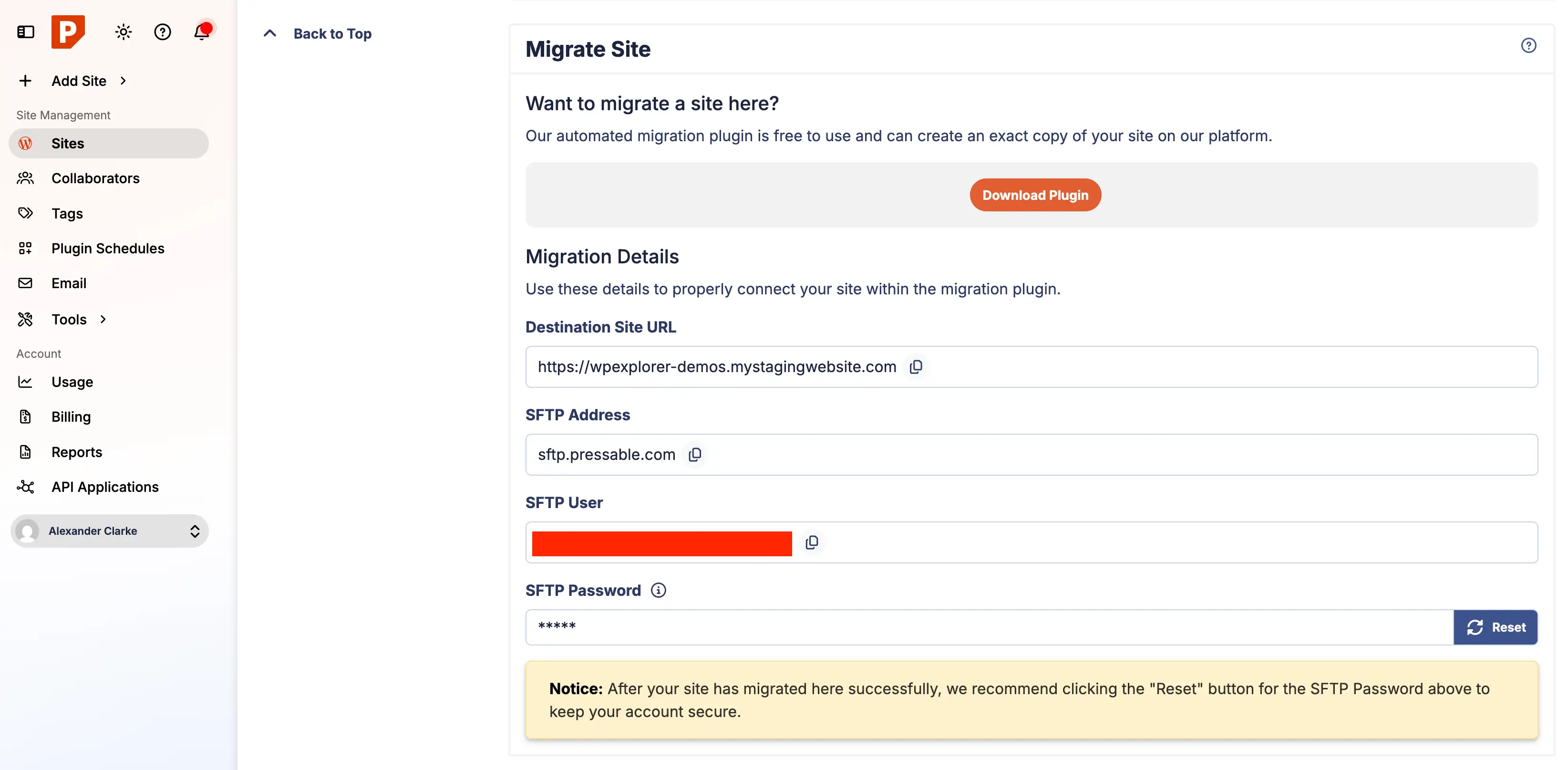
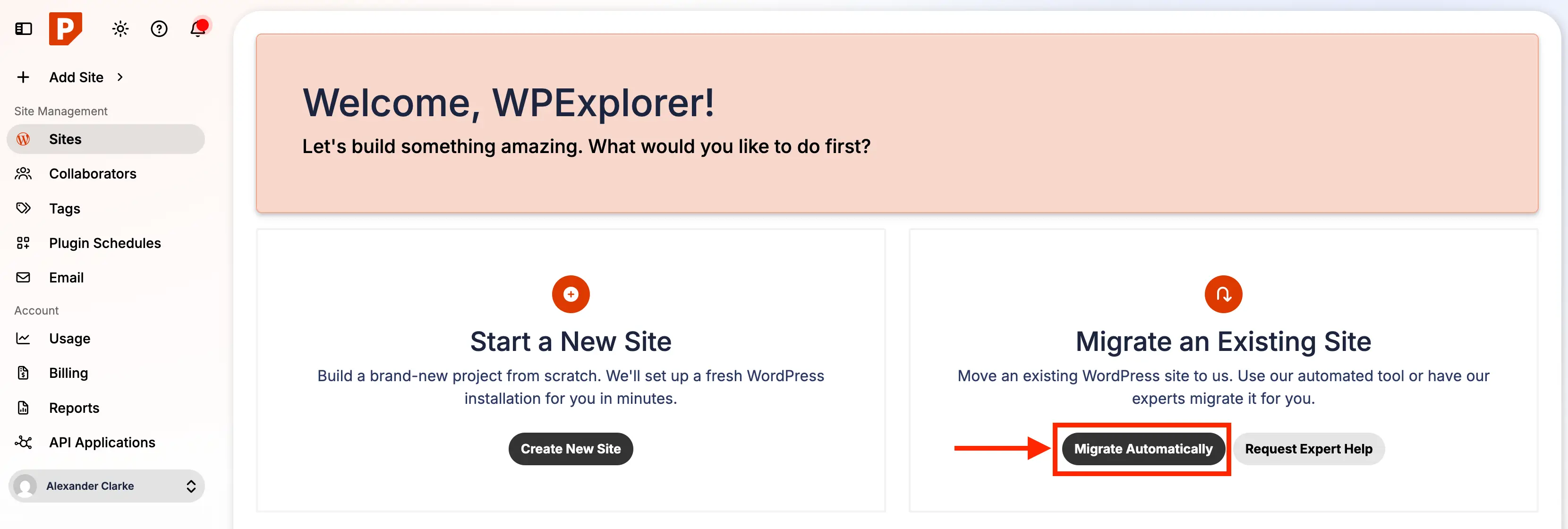
- Access Migration Tool: Log into the Pressable account and locate the "Migrate Automatic" button on the main dashboard.
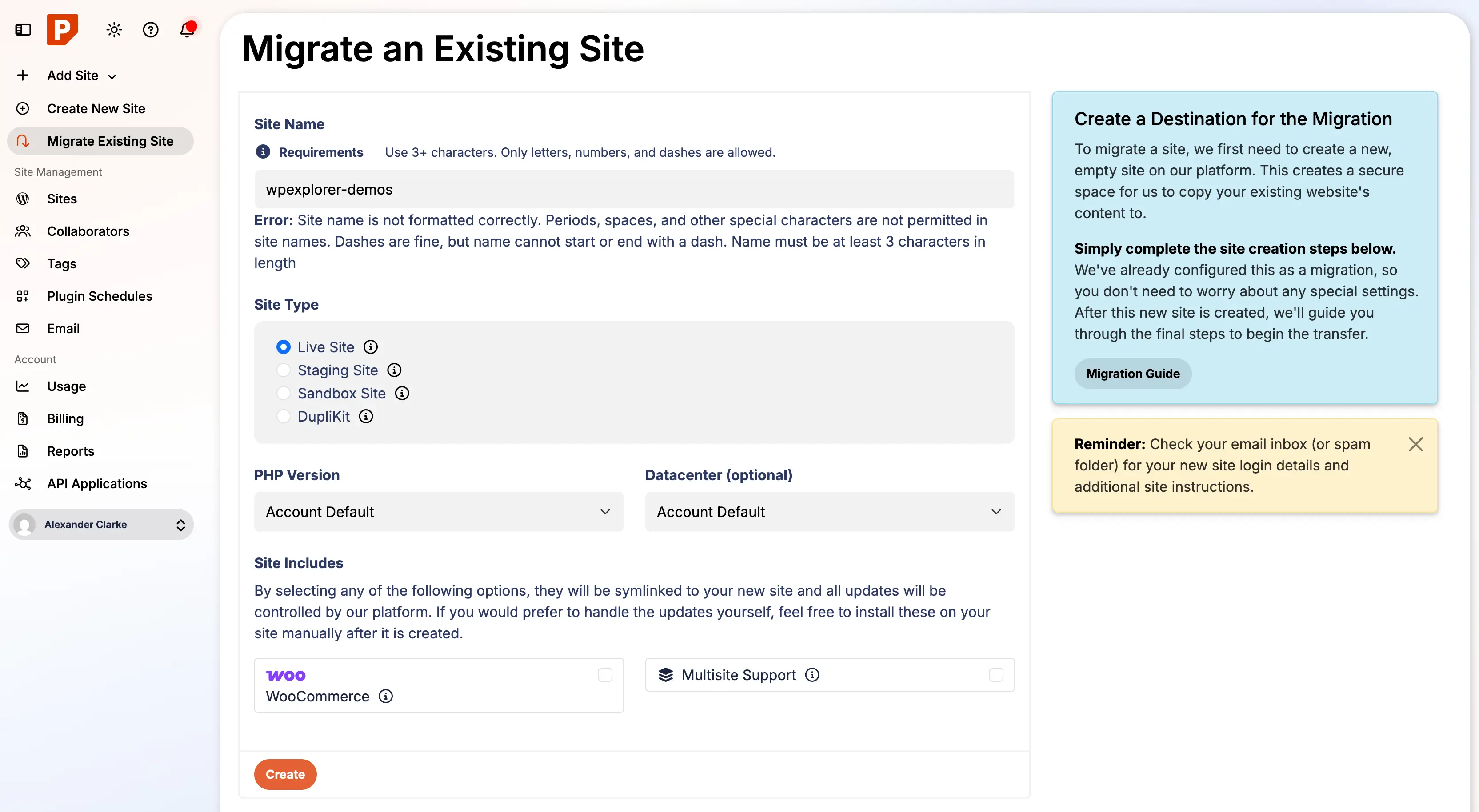
- Configure New Site: The platform will prompt for configuration details for the site being migrated. This includes choosing a unique temporary URL (e.g.,
yoursite.pressable.site), selecting a data center (for optimal geographic proximity to the target audience), and assigning the site to a specific plan.
Phase 3: Automated Migration Execution via Plugin
Pressable leverages an automated plugin, powered by BlogVault, to handle the heavy lifting of data transfer:
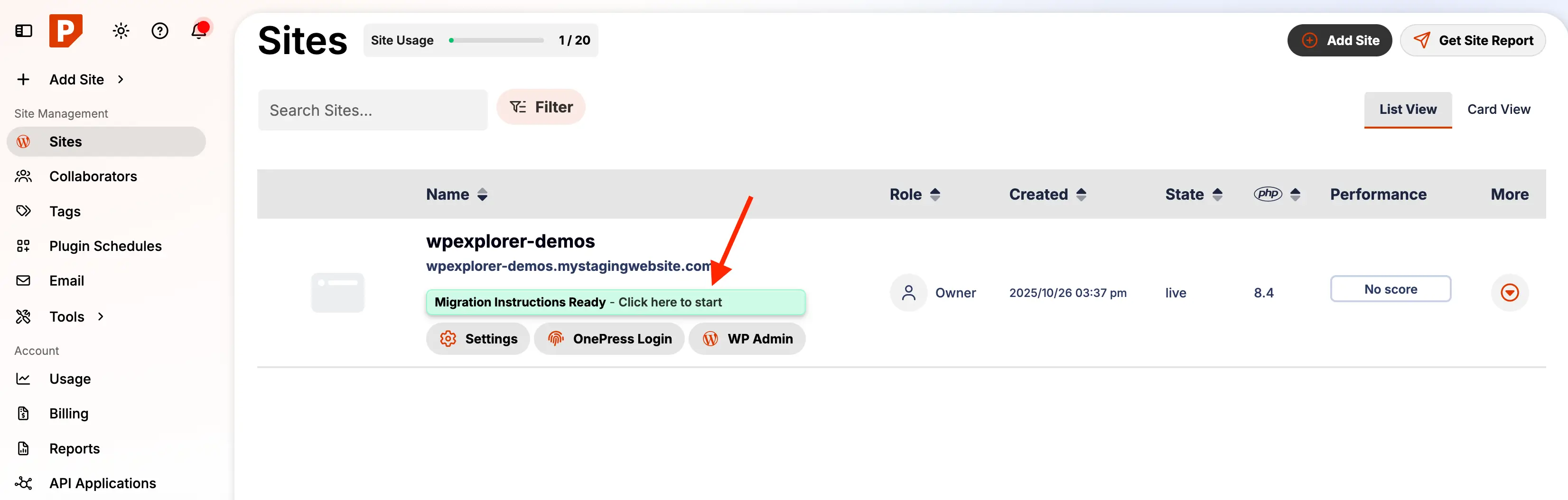
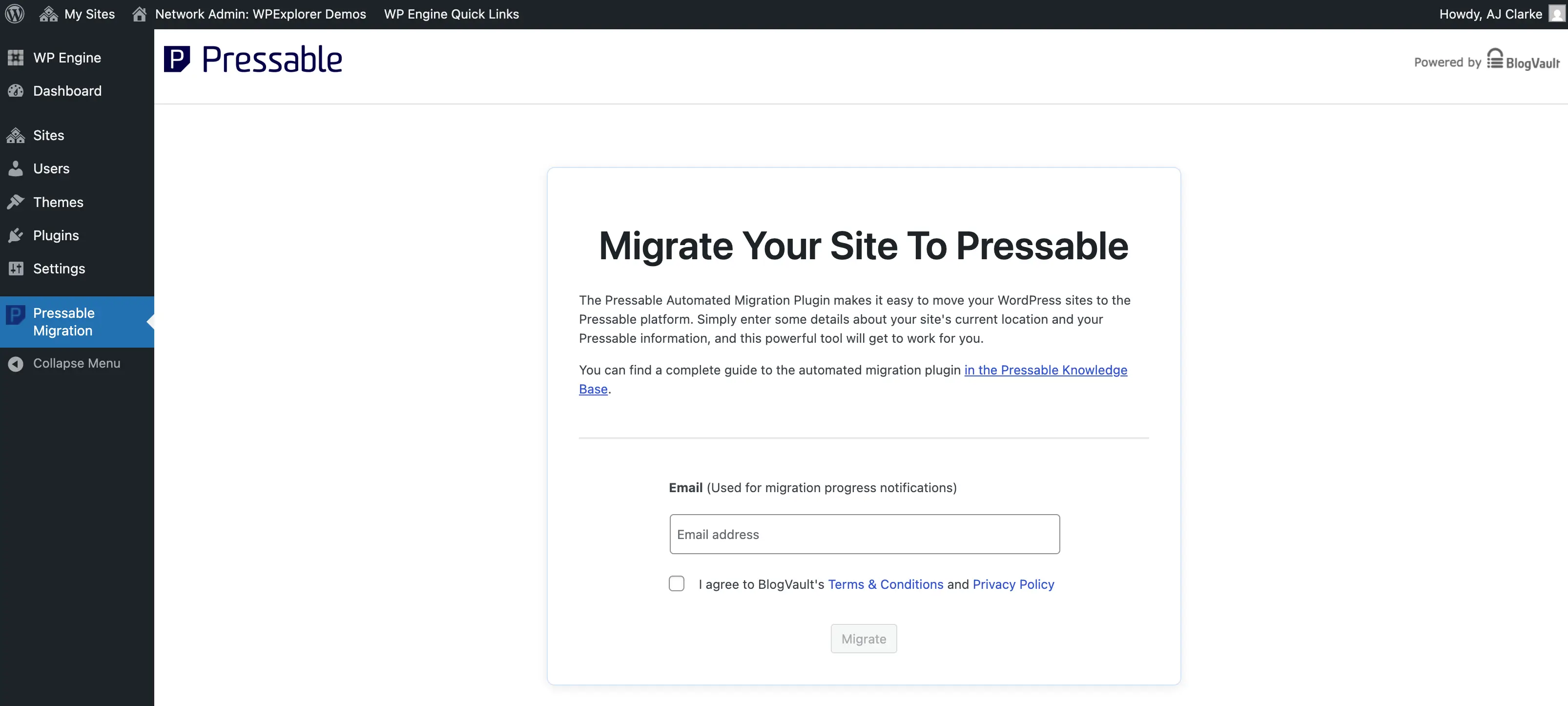
- Plugin Installation: On the original WordPress site, navigate to
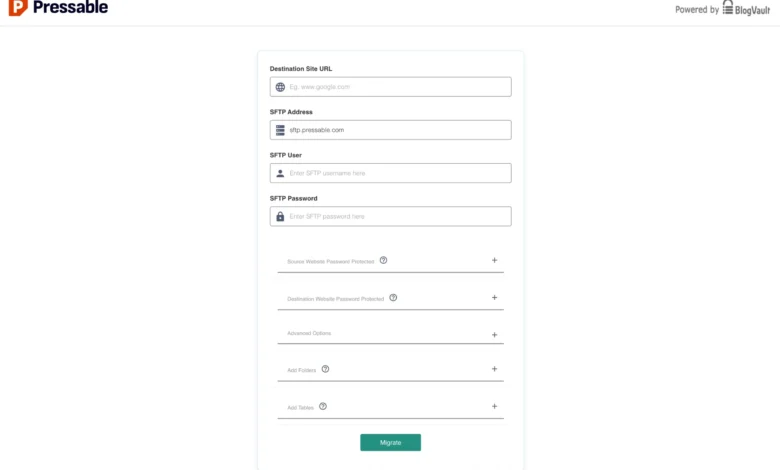
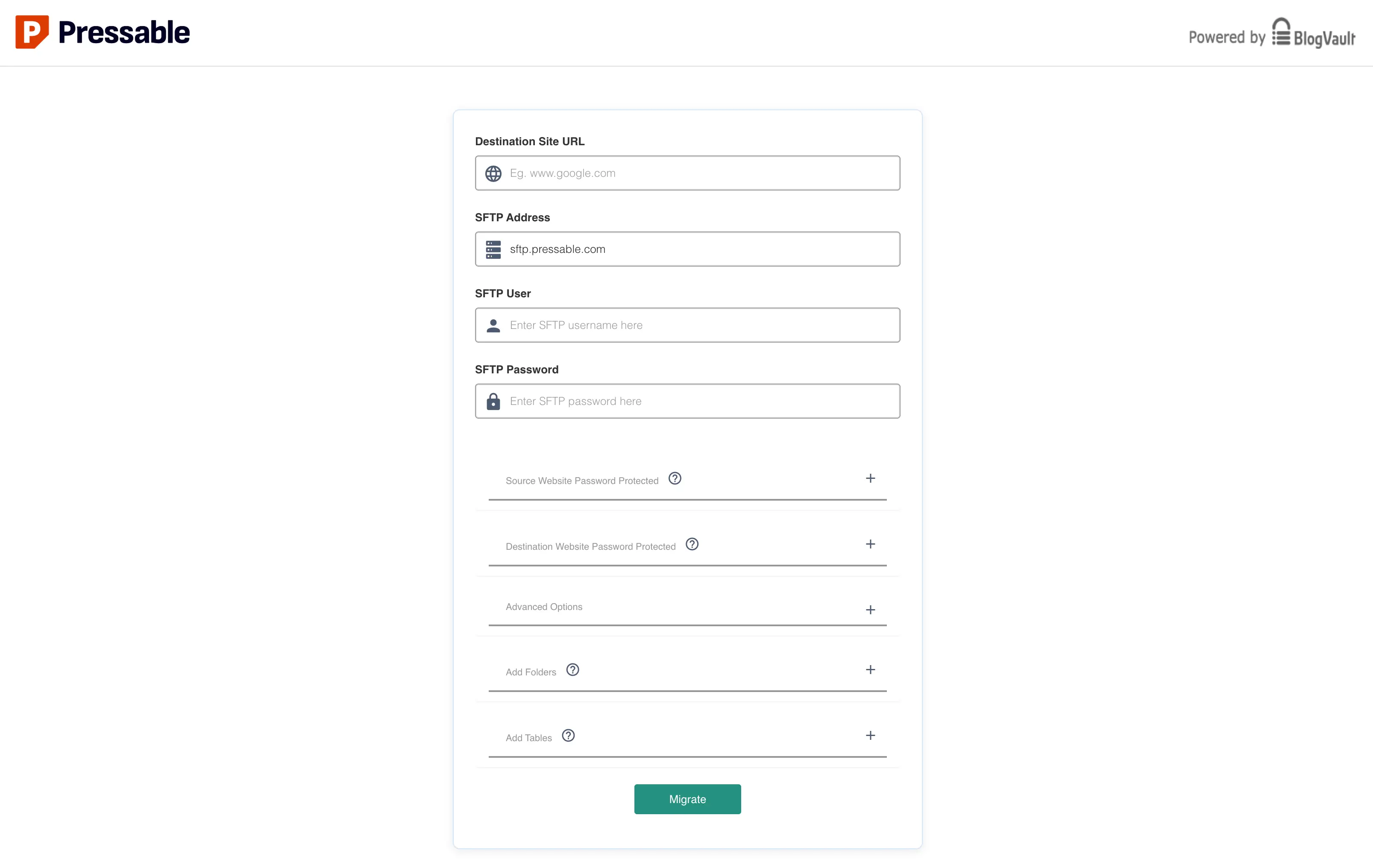
Plugins > Add New, search for "Pressable Automated Migration," and install and activate it. - Enter Migration Details: Upon activation, the plugin redirects to a setup page. Users enter their email for notifications and then input migration details copied directly from the Pressable dashboard. Crucially, the SFTP password for the new Pressable site must be reset within the Pressable dashboard to generate a new, secure credential for this transfer.
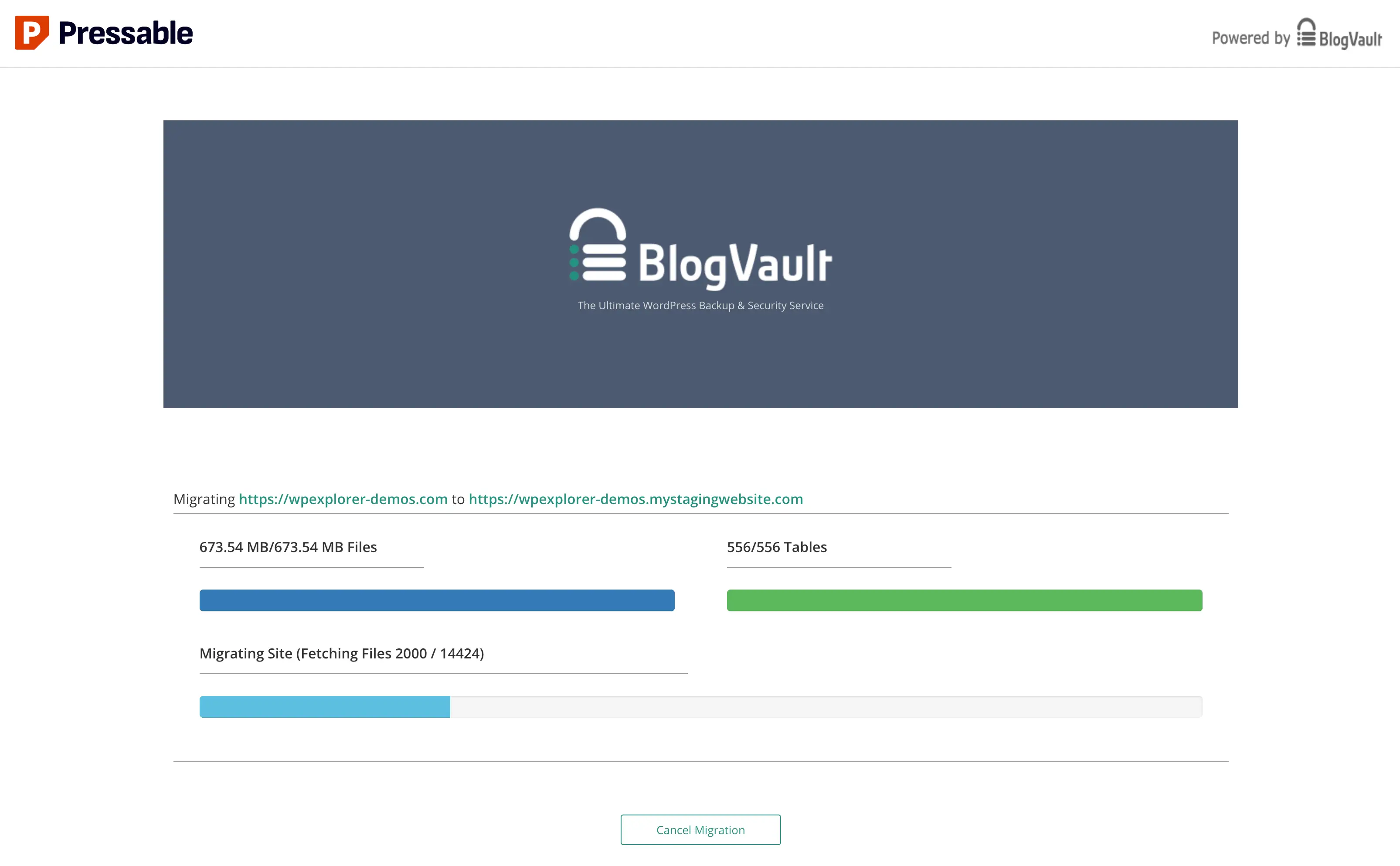
- Monitor Progress: Clicking "Migrate" initiates the transfer. The process is typically monitored on
migrate.blogvault.net. While the off-domain migration URL might raise minor security interface concerns for some, it represents a standard industry practice for specialized migration services. Users receive email notifications regarding progress and completion. It’s important to note that progress bars may sometimes appear frozen, especially for larger sites; patience is advised, as migrations can take up to an hour or more depending on site size and server load.
Phase 4: Post-Migration Validation and Optimization
After the migration completes, a series of critical post-migration steps ensure the new environment is clean, secure, and fully functional:
- Review "Files Not Migrated": The success screen may list files not transferred. These often include host-specific files (e.g., WPEngine’s
mu-pluginscomponents) that are unnecessary on Pressable and can be safely ignored or manually removed. - Delete Old Hosting Artifacts:
- Unnecessary Files: Conduct a thorough review of the root and
wp-contentfolders for any leftover files from the previous host. Removing these improves security and tidiness. - Cron Jobs: Review and transfer or delete custom cron jobs from the old hosting environment. Redundant cron jobs can cause conflicts or unnecessary resource consumption. Plugins like "Cron Jobs" can aid in managing WordPress-specific scheduled tasks.
- Old Hosting Admin Users: Audit user accounts on the old host. Delete any administrative or system accounts created by the previous host that are no longer needed.
- Unnecessary Files: Conduct a thorough review of the root and
- Reset SFTP Migration Password: As a security best practice, reset the SFTP migration user password in the Pressable dashboard immediately after migration.
- Transfer Custom Redirects and Server-Side Rules: Pressable utilizes NGINX and PHP-FPM, not Apache. Therefore,
.htaccessfiles are ineffective. Any custom redirects or server-side rules (e.g., from WPEngine’s dashboard) must be manually reconfigured on Pressable. This is typically done via thecustom-redirects.phpfile.- Implement Security Headers: A critical step is to add recommended security headers to the
custom-redirects.phpfile. Pressable advises headers such as:header( 'X-XSS-Protection: 1; mode=block' ); header( 'X-Content-Type-Options: nosniff' ); header( 'X-Frame-Options: SAMEORIGIN' ); header( 'Referrer-Policy: no-referrer-when-downgrade' );These headers provide crucial protection against Cross-Site Scripting (XSS), MIME-type sniffing attacks, Clickjacking, and enhance user privacy, significantly bolstering the site’s security posture.
- Implement Security Headers: A critical step is to add recommended security headers to the
Phase 5: Thorough Site Verification
Before going live, extensive testing on the Pressable staging domain is paramount:
- Frontend Check: Verify all pages, posts, images, and videos load correctly.
- Backend Access: Ensure WordPress admin panel is accessible and functional.
- Link Integrity: Check internal and external links for broken connections.
- Form Functionality: Test all contact forms, submission forms, and comment sections.
- E-commerce Flows: For online stores, test product pages, shopping cart, checkout process, and payment gateways.
- Plugin and Theme Functionality: Verify all active plugins and the theme work as expected.
- Responsiveness: Check site display across various devices and screen sizes.
- Speed Tests: Run performance tests (e.g., Google PageSpeed Insights, GTmetrix) to compare against old host.
- Search Engine Visibility: Ensure
robots.txtand search engine settings are correct (e.g., not blocking search engines).
Phase 6: Domain Redirection and DNS Propagation
Once the migrated site is fully validated on Pressable’s staging environment, the final step is to point the live domain to the new host.
- Access Domains Section: In the Pressable dashboard, navigate to the "Domains" section for the migrated site.
- Choose Redirection Method:
- Manual DNS Update: This involves updating the A record at the domain registrar to point to Pressable’s IP address. This method offers precise control.
- DNS Wizard: Pressable’s DNS Wizard automates the configuration of necessary DNS records, simplifying the process for less technical users. Regardless of the method, existing records pointing to the old host must be removed.
- Monitor DNS Propagation: After updating DNS, allow for propagation, which can take anywhere from a few minutes to 24-48 hours globally. Tools like
whatsmydns.netcan monitor progress. The Pressable dashboard’s "Health" indicator in the Domains section will signal successful connection (green) or remaining issues (yellow).
Enhancing Security and Performance with Jetpack
Pressable’s inclusion of a Jetpack Security subscription at no extra cost is a significant value add. Jetpack provides essential protections such as malware scanning, brute-force attack prevention, and downtime monitoring. While Jetpack can be perceived as bloated due to its extensive module set, strategic optimization is key. It is recommended to install and activate Jetpack, then review its modules, disabling non-essential features while retaining core security and backup functionalities (e.g., VaultPress backups, brute-force protection, malware scanning). For migrated sites, manually activating the included Jetpack Security license via Pressable’s official documentation is crucial to leverage its full benefits.
Strategic Implications for Digital Presence
The migration to a managed WordPress host like Pressable carries significant strategic implications for any digital presence. Improved site performance directly impacts user engagement, reducing bounce rates and fostering longer visit durations. Enhanced security safeguards against data breaches, reputational damage, and operational disruptions. The offloading of technical maintenance allows businesses to reallocate resources towards core competencies, content development, and marketing initiatives. For agencies, a reliable managed hosting partner translates to consistent client satisfaction and reduced support overhead. In an increasingly competitive online environment, investing in a robust and optimized hosting solution is a strategic decision that underpins long-term digital success.
Conclusion
Migrating a WordPress site, while a critical undertaking, need not be a daunting task. Pressable’s managed hosting platform streamlines this process, even for users without deep technical expertise, thanks to its automated migration tools and dedicated support. With its fully managed infrastructure, focus on performance, built-in security features, and expert WordPress-centric assistance, Pressable presents an excellent option for a broad spectrum of small to medium-sized websites, blogs, and client projects. For those currently operating on non-managed or underperforming hosting environments, transitioning to a specialized managed WordPress platform like Pressable represents a strategic move that can significantly enhance site reliability, bolster security, improve performance, and ultimately free up valuable resources for growth and innovation.