Decoding Digital Interfaces: New UX Research Reveals the Definitive Best Practices for Accordion Icons and Menu Design

User experience (UX) design is fundamentally about reducing cognitive load and aligning digital interfaces with human expectations. Recently, comprehensive usability research published by the Nielsen Norman Group (NN/g) has shed light on a persistent point of friction in web and mobile navigation: the design of accordion menus and the selection of expansion icons. The study evaluates how different visual indicators—such as carets, chevrons, arrows, plus-minus signs, and empty states—influence user behavior. Furthermore, the findings deliver a stark warning against the use of split menus, offering developers and designers a clear, empirical roadmap for creating more intuitive interfaces.
Background and Context of the Usability Study
Accordions have long been a staple of responsive web design. They allow interfaces to present dense information hierarchies compactly, expanding to reveal nested content only when requested by the user. However, despite their ubiquity, inconsistent implementation across the web has historically led to user hesitation. When users encounter a collapsible menu item, they must instantly deduce two critical pieces of information: whether tapping the element will navigate them to a completely new page, or simply reveal a dropdown list of sub-categories.

For years, designers have relied on personal preference, brand guidelines, or trendy aesthetics rather than hard data when selecting accordion icons. To resolve this ambiguity, recent usability investigations by the NN/g research team analyzed user interaction patterns across various icon styles. By tracking where users clicked and what outcomes they anticipated, the study mapped the psychological connection between visual symbols and navigational mechanics.
The Psychology of the Hit Area: Why Icon Choice Matters
One of the most revealing insights from the research is that users do not restrict their clicks strictly to the visual icon or the text label alone. Instead, user behavior demonstrates that people treat the entire row—inclusive of both the label and the associated icon—as a unified hit target.
When participants interacted with test menus, they clicked on the text label and the icon with roughly equal frequency across most designs. The sole exception occurred with the caret icon, which drew a slightly higher concentration of direct interactions on the symbol itself. Because users distribute their clicks across the entire component, the choice of icon dictates the perceived functionality of the entire interactive element. If an ambiguous icon is chosen, the entire row becomes a source of confusion.

No Icon Equals Page Navigation
The research confirmed a baseline user expectation that is vital for interface designers to understand: the complete absence of an icon signals direct page navigation. When a menu item features text without any accompanying graphic, users universally assume that tapping the element will transport them to a dedicated landing page for that category.
Conversely, when custom or non-standard icons are introduced, users frequently misinterpret their purpose. Because custom graphics lack universal design conventions, they fail to communicate expansion behavior effectively. Consequently, users are left guessing whether the element is a static link, a button, or a collapsible menu.
Evaluating Common Accordion Indicators: Carets, Arrows, and Plus Signs

Not all UI symbols are created equal. The research evaluated several standard icon choices, highlighting their strengths, weaknesses, and potential for misinterpretation.
The Caret: The Gold Standard
According to the empirical data, the downward-pointing caret (or triangle) emerges as the safest and most reliable icon choice for indicating collapsible content. By default, a downward caret clearly communicates that hidden content exists below and can be revealed upon interaction. Upon activation, transitioning the caret to point upward or sideways provides immediate visual feedback regarding the expanded state.
The Plus and Minus (+ / -) System
While plus and minus signs are generally understood to represent addition and subtraction—and by extension, expansion and collapse—they carry significant baggage. In digital product design, the plus sign is "overloaded" with multiple meanings. It can indicate adding an item to a shopping cart, zooming in on an image, saving content for later use, or expanding a data row. In complex multi-level navigation systems where multiple accordions are opened simultaneously, the plus-minus convention frequently breaks down, leading to user disorientation.
Arrows and Chevrons
Right-facing and downward-facing arrows present another common design pattern, yet they suffer from similar ambiguity. A right-facing arrow often implies progression or navigation to a sub-page, while a downward arrow does not consistently trigger the mental model of an accordion opening. Furthermore, arrows are frequently used across interfaces to signify scrolling, pagination, or directional movement, diluting their effectiveness as dedicated accordion markers.

The Danger of Split Menus
Perhaps the most critical takeaway from the recent UX findings is a stern indictment of split menus. A split menu pattern typically divides a single navigation row into two distinct actions: the text label is programmed to link directly to a category landing page, while the adjacent icon is designed to open or close the accordion menu.
Usability testing consistently demonstrates that split menus are harmful to the user experience. Users almost invariably fail to distinguish between the two micro-target areas. A user attempting to open the dropdown menu will accidentally trigger a page load by clicking slightly too close to the text, disrupting their browsing flow. Conversely, a user seeking the main category page may inadvertently trigger the accordion, leaving them stranded in a menu structure they did not wish to open.
Industry Best Practices and Real-World Implementations

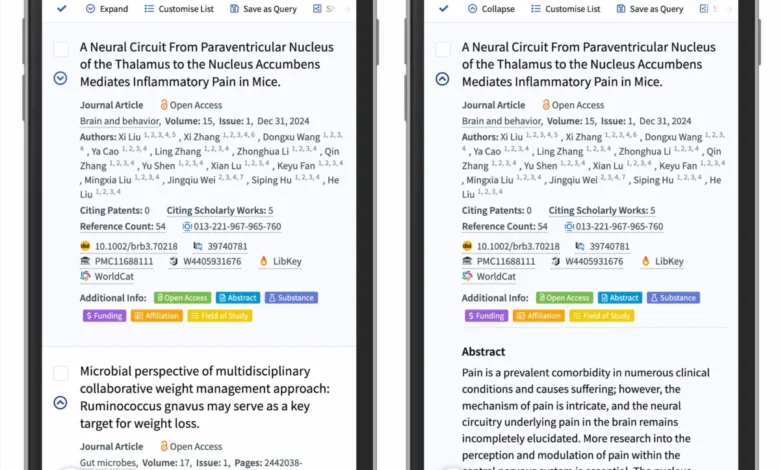
To eliminate friction, leading digital platforms are shifting toward simplified, unified interaction patterns. Major organizations—such as DHL and scholarly search platforms like Lens.org—have restructured their navigation menus to align with these empirical findings.
In modern, user-tested implementations, the architecture is streamlined:
- Unified Tapping: Tapping the main category row exclusively opens the accordion to expose sub-options. Unnecessary directional arrows outside the caret are removed.
- Dedicated Overview Links: To allow users to access the main category page without relying on split buttons, designers now include an explicit "Overview" or "All [Category Name]" link as the first item inside the expanded dropdown menu.
- Plain Text Links: If a menu item is intended solely to function as a hyperlink rather than an accordion, the best practice is remarkably simple: underline the text. Without relying on confusing carets or arrows, an underlined text link communicates its exact function universally, working flawlessly across demographics and devices.
Implications for the Future of Web Development
As digital interfaces continue to evolve across an expanding array of screen sizes—from smartwatches to ultra-wide desktop monitors—maintaining intuitive interaction models is paramount. The empirical research on accordion icons serves as a timely reminder that good design is frequently rooted in restraint rather than embellishment.

By abandoning overly complex icon systems, eliminating error-prone split menus, and embracing the humble caret as the standard for collapsible elements, developers and designers can significantly enhance digital accessibility and user satisfaction. Ultimately, the data proves a timeless rule of interface design: when it comes to user navigation, clarity always outperforms complexity.