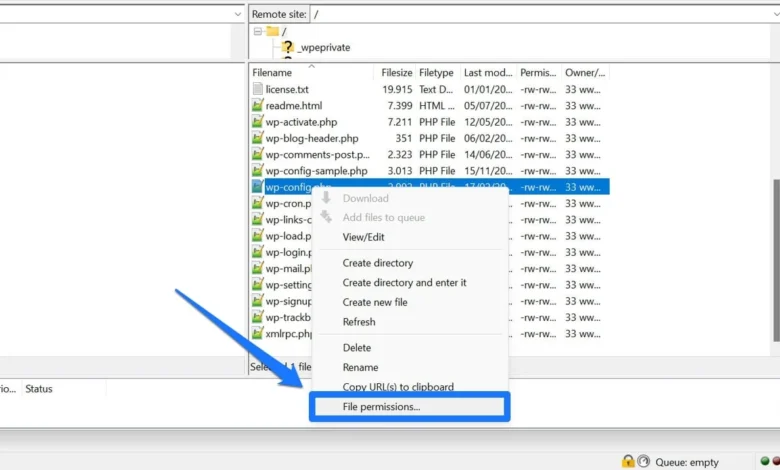
WordPress file permissions represent a critical, yet frequently overlooked, pillar of web server security. For administrators and developers, understanding these granular control mechanisms is essential for maintaining site integrity, ensuring data privacy, and preventing unauthorized access. As cyber threats against Content Management Systems (CMS) continue to evolve, the ability to properly configure server-side permissions has shifted from a niche technical task to a core competency of website management.

The foundational logic of WordPress file permissions is derived from the Unix-based permission model. In a standard Linux server environment, every file and directory is assigned specific access rights for three distinct user groups: the User (the file owner), the Group (users who share access to the file), and Others (the general public). Each group is assigned three primary permission types: Read (r), which allows viewing the file contents; Write (w), which allows modification or deletion; and Execute (x), which allows the file to run as a program.
Historical Context and Technical Foundations
The necessity for these controls stems from the multi-user nature of Linux environments. When WordPress was first introduced in 2003, it relied on the existing Apache web server architecture to handle file requests. Over the last two decades, as the web transitioned toward more complex server architectures—including NGINX and various containerized environments—the core principles of file permissions have remained remarkably stable.

Historically, security breaches in the WordPress ecosystem have often been traced back to "world-writable" directories. When a directory is set to a 777 permission level, it grants full read, write, and execute access to every user on the server. Data security firms have long categorized this as a critical vulnerability. Industry analysis indicates that if a malicious actor gains access to a server, directories with 777 permissions become immediate targets for the injection of PHP backdoors, web shells, and malicious scripts, which can then be used to scrape sensitive user data or deploy phishing campaigns.
The Mathematics of Permissions: Numeric vs. Symbolic
File permissions are communicated through two primary systems: symbolic notation and numeric (octal) notation. In symbolic notation, permissions are represented as strings like rwxr-xr-x. In numeric notation, values are assigned: 4 for Read, 2 for Write, and 1 for Execute. By summing these values, administrators can define the access level for each group. For instance, a value of 7 (4+2+1) provides full control, while 5 (4+0+1) allows only reading and executing.
The industry-standard recommendation for a secure WordPress installation is to set all directories to 755 and all files to 644. These settings ensure that the web server can read and serve the files to the public, while simultaneously preventing unauthorized users from modifying the core codebase.
The Principle of Least Privilege
In the context of cybersecurity, the Principle of Least Privilege (PoLP) serves as the guiding framework for server administration. PoLP dictates that any module, user, or process should only possess the minimum set of permissions necessary to perform its intended function.
In a production WordPress environment, the web server user (commonly www-data or nginx) requires sufficient access to write to the /wp-content/uploads/ directory to facilitate media uploads. However, this same user does not require write access to the /wp-admin/ or /wp-includes/ directories. Allowing the web server process unnecessary write access to the entire directory tree effectively increases the "attack surface" of the installation. If a vulnerability exists in a plugin, an attacker could potentially leverage the web server’s own elevated permissions to overwrite core WordPress files, leading to a total site compromise.
Chronology of Permission-Related Vulnerabilities
- Early Web Era (2000s): Initial adoption of web hosting saw widespread use of 777 permissions due to ease of configuration, leading to rampant automated malware injection.
- Increased Scrutiny (2010–2015): As WordPress gained significant market share, hosting providers began implementing stricter server-side restrictions by default, standardizing the 755/644 model.
- Rise of Managed Hosting (2016–Present): The growth of managed WordPress hosting has largely abstracted these concerns away from end-users, with hosts like WP Engine or Kinsta automatically enforcing correct permissions.
- Modern Security Standards: Current security plugins now routinely audit file systems for "permission drift," where files inadvertently change status due to server migrations or erroneous administrative actions.
Implications of Improper Configuration
The implications of misconfigured permissions are bifurcated into two categories: security risks and operational failures.
Security Risks: Over-permissive settings act as a welcome mat for attackers. When directories are writable by the public, an attacker can upload a malicious file (often disguised as a .jpg or .php file) and execute it through a browser request. This is the primary vector for site defacement and spam injection.
Operational Failures: Conversely, overly restrictive settings lead to immediate site breakage. If the WordPress core lacks the ability to read necessary configuration files or write to temporary storage, the site will encounter a "500 Internal Server Error" or, in more severe cases, a "White Screen of Death." These errors often trigger a cascade of issues, including failed plugin updates, broken media library functionality, and the inability to save site settings.
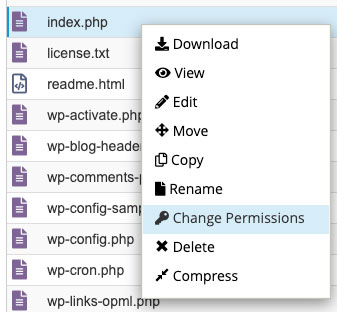
Best Practices for Maintenance
To maintain a secure and stable environment, administrators should adhere to a strict maintenance protocol:
- Avoid Manual Changes: Unless a specific error dictates a change, leave permissions at the default settings established by your hosting provider.
- Utilize Official Documentation: When troubleshooting, refer to the WordPress Codex. The directory
wp-config.phpshould typically be set to 440 or 400 to prevent other users on the server from reading your database credentials. - Audit Regularly: Use security plugins that provide a one-click scan of your directory structure. These tools can identify insecure permissions before they are exploited.
- Backup Before Modification: Before performing any recursive
chmod(change mode) command on a server via command line, perform a full server backup. A recursive command that erroneously targets the wrong directory can render a site inaccessible within seconds.
Official Stance and Expert Analysis
Security professionals within the WordPress community consistently emphasize that permissions are not a "set-and-forget" feature. While the core WordPress software is designed to be secure out of the box, the ecosystem of third-party themes and plugins often complicates the permission landscape. Some poorly coded plugins may request 777 permissions to function—a red flag that should prompt users to seek more secure alternatives.
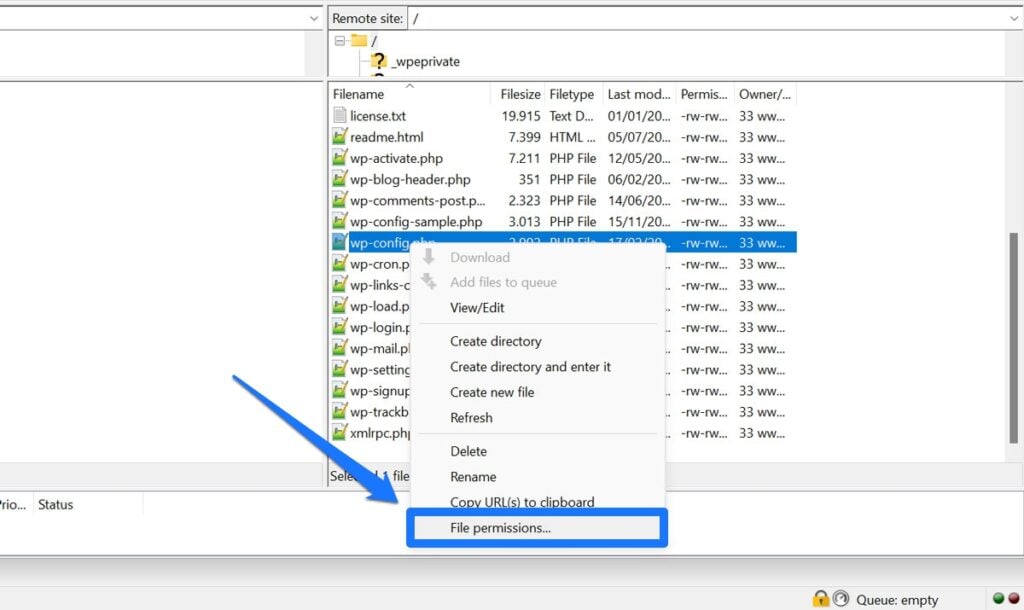
Ultimately, the goal of file permission management is to achieve a state of balance. The server must be capable of executing its duties without providing a roadmap for unauthorized entry. By adhering to the Principle of Least Privilege and maintaining an audit-heavy approach to server maintenance, site administrators can significantly reduce the risk of compromise and ensure the long-term viability of their digital assets. While these technical configurations may seem daunting to the casual user, they remain the bedrock upon which a secure and professional web presence is built.
Related posts: