WordPress 6.8 Introduces Speculative Loading: A Deep Dive into Enhanced Performance and Its Implications

The latest iteration of the world’s most popular content management system, WordPress 6.8, has rolled out a significant feature designed to dramatically improve perceived website speed: Speculative Loading. This technique, integrated specifically for WordPress environments, aims to make websites feel nearly instantaneous by intelligently predicting which pages a visitor is likely to navigate to next and preloading those resources in the background. While promising substantial gains in user experience, its default activation and underlying mechanics warrant a comprehensive understanding for all site administrators and developers.
The Evolution of Web Performance Optimization
The pursuit of faster web experiences has been a continuous journey, driven by user expectations and search engine algorithms. Early efforts focused on foundational elements like optimized images, minified code, and efficient caching. Over time, techniques evolved to include browser hints such as dns-prefetch and preconnect, which instruct browsers to resolve DNS or establish connections to external domains before resources are explicitly requested. These resource hints, present in WordPress core for years via the wp_resource_hints() function, represent an earlier form of speculative loading, preparing the ground for faster asset delivery. For instance, a common implementation involves a <link rel='dns-prefetch' href='//fonts.googleapis.com' /> tag, prompting the browser to perform an early DNS lookup for Google Fonts, thereby reducing latency when the font is eventually loaded.
WordPress 6.8 marks a substantial leap in this evolution by adopting the more advanced Speculation Rules API. This API moves beyond merely hinting at individual assets; it empowers websites to proactively prefetch or even prerender entire URLs. This strategic shift acknowledges that while optimizing individual assets is crucial, the ultimate goal is to make full page navigations feel seamless. The decision by WordPress core developers to integrate this feature reflects a broader industry trend towards proactive performance enhancements, particularly as user patience for slow-loading pages continues to dwindle, with studies consistently showing that even a one-second delay can significantly impact conversion rates and bounce rates.
Understanding the Speculation Rules API
At its core, speculative loading, as implemented through the Speculation Rules API, allows developers to provide explicit instructions to the browser regarding future navigation. Rather than relying solely on the browser’s heuristics, website owners can define a set of rules, typically in JSON format, that guide the preloading process. This JSON snippet is embedded within the HTML, informing supporting browsers about which links to prepare speculatively.
The Speculation Rules API offers two primary strategies:
-
Prefetch: This strategy involves fetching resources for a page, such as HTML, CSS, JavaScript, and images, and storing them in the browser’s cache. When the user eventually navigates to that page, the browser can retrieve these resources from the cache, resulting in a much faster load time. The page is not rendered until the user clicks the link.
-
Prerender: A more aggressive approach, prerendering goes a step further by not only fetching all resources but also rendering the entire page in a hidden background tab. When the user clicks the link, the prerendered page is instantly swapped into view, offering an almost zero-latency experience. This creates the illusion of instantaneous navigation.
The API resides within the browser itself, meaning it doesn’t require additional server-side processing or JavaScript libraries to be loaded by the site for its fundamental operation. Developers simply provide the rules, and the browser handles the speculative actions. This design principle aligns with progressive enhancement, where unsupported browsers gracefully ignore the rules without causing errors, ensuring that the feature is a bonus for compatible users rather than a dependency for all.
Browser Support and the Road Ahead
As of early 2025, the Speculation Rules API enjoys robust support primarily within Chromium-based browsers, including Google Chrome, Microsoft Edge, and Opera. This means a significant portion of internet users can benefit from this technology. However, major browsers like Mozilla Firefox and Apple Safari have yet to fully implement the API. While this limits the immediate universal impact of speculative loading, its adoption by a dominant browser engine often signals future integration across the ecosystem. Developers and site administrators can monitor the progress of browser support via resources like caniuse.com to stay informed on wider compatibility. The progressive enhancement nature ensures that its absence in certain browsers does not degrade the experience for those users; it simply means they won’t receive the accelerated page loads.
WordPress 6.8’s Default Speculation Rules

Upon upgrading to WordPress 6.8, sites automatically deploy a default set of speculation rules for logged-out users. This conservative approach is a deliberate choice by the WordPress core team, aiming to provide a performance boost while minimizing potential negative impacts. The default rules utilize the ‘prefetch’ strategy with ‘conservative’ eagerness, meaning the browser will only prefetch internal links when it’s reasonably certain the user will click them (e.g., on hover or based on a very strong prediction).
The JSON structure injected into the HTML typically includes directives like:
  "prefetch": [

      "source": "document",
      "where":
        "and": [

            "href_matches": "/*"
          ,

            "not":
              "href_matches": [
                "/wp-*.php",
                "/wp-admin/*",
                "/wp-content/uploads/*",
                "/wp-content/*",
                "/wp-content/plugins/*",
                "/wp-content/themes/twentytwentyfive/*",
                "/*\?(.+)"
              ]

          ,

            "not":
              "selector_matches": "a[rel~="nofollow"]"

          ,

            "not":
              "selector_matches": ".no-prefetch, .no-prefetch a"


        ]
      ,
      "eagerness": "conservative"

  ]
This configuration instructs the browser to scan the current document for links and prefetch eligible internal URLs. Crucially, it includes a robust set of exclusions:
- *`href_matches: "/"`**: Targets all internal links.
not: "href_matches": [...]: Excludes WordPress core files (wp-*.php), administrative areas (wp-admin/*), and common content directories likewp-content/uploads/,wp-content/plugins/, and specific theme directories (e.g.,twentytwentyfive). This prevents preloading of potentially dynamic or sensitive backend resources. It also excludes URLs containing query strings (/*\?(.+)), as these often represent search results, filtered views, or temporary states that may not be stable for preloading.not: "selector_matches": "a[rel~="nofollow"]": Prevents prefetching of links marked withrel="nofollow", commonly used for external or user-generated content where preloading might be unnecessary or undesirable.not: "selector_matches": ".no-prefetch, .no-prefetch a": Allows developers to manually exclude specific links or sections of a page from speculative loading by applying the.no-prefetchclass.eagerness: "conservative": Dictates a cautious approach, prefetching only when there’s a high probability of user navigation.
These default rules provide a sensible baseline, offering performance benefits for typical content pages while avoiding common pitfalls like preloading admin screens or dynamic content that might lead to stale data or unnecessary server load.
Customizing Speculative Loading in WordPress
While the default rules are generally effective, WordPress offers several hooks for developers to fine-tune the speculative loading behavior to their specific site’s needs. These customization options are vital for optimizing performance further or mitigating potential conflicts.
-
Modifying the Configuration: The
wp_speculation_rules_configurationfilter allows alteration of the core settings, such as changing the preloading strategy from ‘prefetch’ to ‘prerender’ or adjusting the ‘eagerness’ from ‘conservative’ to ‘moderate’ or ‘eager’. This is also the hook to completely disable the feature by returningnull. For instance, a snippet to switch to ‘prerender’ with ‘moderate’ eagerness would look like:add_filter( 'wp_speculation_rules_configuration', function( $config ) if ( is_array( $config ) ) $config['mode'] = 'prerender'; $config['eagerness'] = 'moderate'; return $config; ); -
Excluding Specific URLs: The
wp_speculation_rules_href_exclude_pathsfilter enables developers to add additional URL patterns to the exclusion list. This is particularly useful for custom post types, specific landing pages, or sections of a site that should not be speculatively loaded. For example, to exclude a custom post type with/products/in its slug:add_filter( 'wp_speculation_rules_href_exclude_paths', function( $exclude_paths ) $exclude_paths[] = '/products/.*'; return $exclude_paths; ); -
Adding New Rules: The
wp_load_speculation_rulesaction hook provides access to theWP_Speculation_Rulesclass, allowing for the addition of entirely new, custom rules. This is powerful for highly optimized scenarios, such as aggressively prerendering a critical sales page during a promotional event.add_action( 'wp_load_speculation_rules', function( $speculation_rules ) if ( ! is_a( $speculation_rules, 'WP_Speculation_Rules' ) ) return; $speculation_rules->add_rule( 'prerender', 'black-friday-offer', [ 'source' => 'list', 'urls' => [ '/black-friday-sale/' ], 'eagerness' => 'eager', 'priority' => 1, ] ); );This example demonstrates how to explicitly prerender a specific URL with high eagerness, anticipating a high click-through rate.
While these hooks offer considerable flexibility, the current implementation of the WP_Speculation_Rules class does not provide direct methods to remove or modify the default exclusions. For complete control over the rules, the alternative is to disable WordPress’s default rules entirely (by returning null from wp_speculation_rules_configuration) and then manually insert a custom JSON script with all desired rules.
Verifying Speculative Loading Functionality
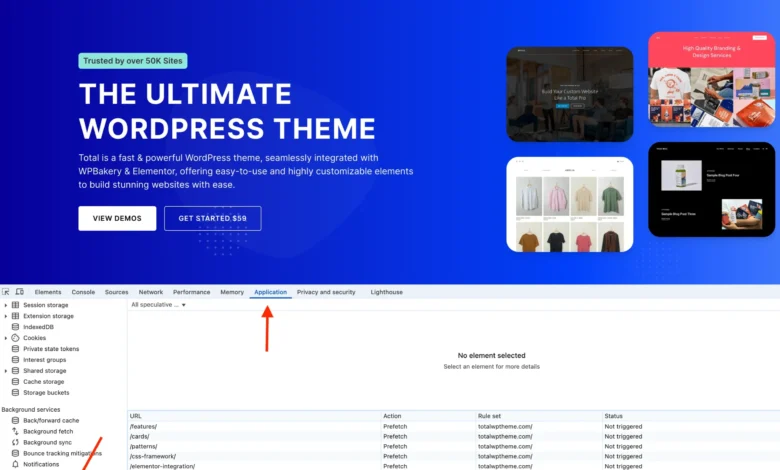
To confirm that speculative loading is active and functioning correctly on a WordPress site, developers can utilize browser developer tools, specifically in Chromium-based browsers. In Chrome, for instance:
- Open Developer Tools (F12 or right-click -> Inspect).
- Navigate to the "Application" tab.
- In the left sidebar, expand "Background Services."
- Click on "Speculative Loads."
This section displays the active speculation rules for the current page. The "Speculations" tab within this panel will list URLs that have been prefetched or prerendered, along with their current status (e.g., "Ready," "Running," "Failed"). While simple hovering over links might not always trigger prefetching with the default ‘conservative’ eagerness, actively clicking an internal link and then using the browser’s back button can often demonstrate the effect, as the status of the previously clicked page will change to reflect its preloaded state. For testing purposes, temporarily setting the eagerness to ‘eager’ can make the effects more immediately observable.

Implications and Concerns: A Balanced Perspective
While speculative loading offers significant performance advantages, its default implementation in WordPress 6.8 raises several considerations for site owners.
1. Unnecessary Server Load and Resource Usage: The most prominent concern is the potential for increased server requests. Speculative loading, by its nature, fetches pages that users might not ultimately visit. On high-traffic websites, this could translate into a substantial increase in resource consumption, potentially impacting server performance, increasing hosting costs, and even contributing to higher energy consumption in data centers. While the ‘conservative’ eagerness helps mitigate this, it remains a valid concern for resource-constrained environments or sites with highly variable traffic patterns.
2. Potential for Stale Content: Websites that frequently update their content, such as real-time news portals or e-commerce sites with dynamic pricing, face a risk of serving outdated information. If a page is prerendered and its content changes before the user navigates to it, the user might see the old version. While browser caches have mechanisms to handle this, the proactive nature of prerendering makes this a more pertinent consideration.
3. Browser Compatibility Limitations: As previously noted, the lack of universal browser support means that a significant segment of users (Safari and Firefox users) will not benefit from this feature. While this doesn’t create errors, it means the perceived performance gains are not uniformly distributed across the user base.
4. Plugin and Theme Conflicts: Many WordPress plugins and themes rely on JavaScript that executes only upon a full page load, or they initiate server-side actions like session management, cookie checks, or redirects. Speculative loading, particularly prerendering, can interfere with these processes by initiating requests or rendering pages in a background context that may not fully replicate a user-initiated navigation. This could lead to broken functionality, incorrect data, or unexpected behaviors. WordPress core developers anticipate that plugin and theme authors will adapt their code to account for speculative loading, but this transition period may introduce compatibility challenges for site owners. Developers should ensure their scripts and server-side logic are robust enough to handle speculative requests without adverse effects.
5. Data Analytics Accuracy: Speculative requests might affect analytics tracking if not properly filtered. A page being prefetched or prerendered could potentially register as a pageview before the user actually engages with it, leading to inflated or inaccurate metrics regarding user behavior. Analytics platforms need to be configured to differentiate between speculative loads and genuine user interactions.
Disabling Speculative Loading
Given these potential drawbacks, site owners may decide that speculative loading is not suitable for their specific environment. WordPress, while enabling it by default, does not offer a simple toggle in the administrative interface. However, it can be entirely disabled with a single line of code:
add_filter( 'wp_speculation_rules_configuration', '__return_null' );This snippet, typically placed in a child theme’s functions.php file or managed via a code snippets plugin, instructs WordPress to return null for the speculative rules configuration, effectively preventing the JSON script from being embedded in the HTML and thereby disabling the feature.
Should You Use Speculative Loading? A Concluding Analysis
Speculative loading, through the Speculation Rules API in WordPress 6.8, represents a powerful advancement in web performance. For many websites, especially those with static or semi-static content and a user base primarily on Chromium browsers, it offers a tangible improvement in perceived speed and user experience, potentially positively influencing metrics like bounce rate and conversion rates, which in turn can indirectly benefit SEO (as faster sites tend to rank better in Google’s Core Web Vitals assessment).
However, its default activation without an easily accessible admin control places a burden on non-technical site owners to understand and manage its implications. High-traffic sites, those with frequently updated content, or those heavily reliant on complex plugins, must carefully evaluate the trade-offs. The potential for increased server load, stale content, and plugin conflicts necessitates a thoughtful approach.
Ultimately, the decision to keep, customize, or disable speculative loading should be based on a site-specific assessment. Monitoring server resources, testing for compatibility issues, and understanding the typical user browser distribution are crucial steps. As the web continues its relentless march towards instantaneous experiences, features like speculative loading will become increasingly prevalent, pushing developers and administrators to embrace proactive performance management as a core responsibility.