The Comprehensive Guide to Eliminating Elementor Upsells for a Streamlined WordPress Experience

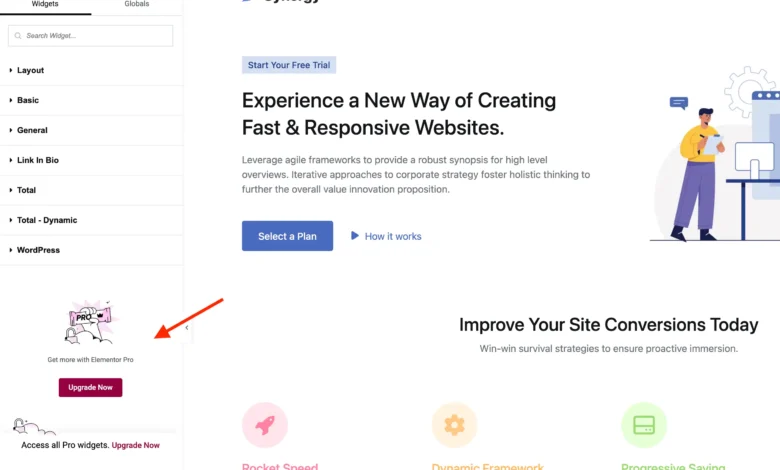
Elementor, a prominent page builder for WordPress, provides an intuitive platform for website creation, yet its free version often presents a cluttered dashboard and editor interface laden with promotional content and prompts for premium features. This guide details a comprehensive approach to remove these Elementor upsells, aiming to deliver a cleaner, more focused user experience for those who prefer to utilize the free version without constant solicitations for upgrades. The methods described herein involve custom PHP and CSS modifications, which can be implemented directly into a custom theme or via a dedicated plugin.

The Freemium Model and Elementor’s Strategic Monetization
Elementor stands as one of the most widely adopted page builders in the WordPress ecosystem, boasting over 5 million active installations. Its popularity stems from its drag-and-drop interface, extensive widget library, and real-time editing capabilities. Like many successful software products, Elementor operates on a freemium business model. This strategy offers a robust free version to attract a broad user base while simultaneously showcasing advanced functionalities available only in the paid "Pro" version. The upsells – including banners, locked features, and promotional menu items – are integral to this model, designed to convert free users into paying subscribers by highlighting the benefits of an upgrade.

From Elementor’s perspective, these promotional elements serve a dual purpose: they educate users about the extensive capabilities of Elementor Pro, such as the Theme Builder, WooCommerce integration, and dynamic content features, and they generate essential revenue to support ongoing development, maintenance, and customer service. This approach is common across the WordPress plugin landscape, where developers must balance providing valuable free tools with sustaining their operations.
User Experience, Open-Source Principles, and the Right to Modify
While financially prudent for developers, the prevalence of upsells can significantly detract from the user experience. Many users, particularly those managing client sites or personal projects with specific budget constraints, find the constant promotions distracting and cumbersome. The clutter can impede workflow, make the interface feel less professional, and obscure genuinely useful free features amidst a sea of "Pro" locks. This sentiment is particularly strong within the open-source community, where the GNU General Public License (GPL) governing WordPress and its derivatives emphasizes user freedom to run, study, share, and modify the software. From this perspective, modifying a GPL-licensed product to suit individual needs, including the removal of promotional elements, is seen as an inherent right.
The debate between developers’ need for revenue and users’ desire for an unencumbered experience is ongoing. This guide does not advocate against supporting Elementor Pro, which offers substantial value and is highly recommended for users requiring its advanced features and dedicated support. Instead, it provides a technical pathway for users who, for various reasons, opt to stick with the free version and desire a streamlined interface. The objective is to enhance usability without compromising the core functionality of the free plugin.
Deconstructing the Clutter: A Technical Overview of the Solution
The core of this solution involves a custom PHP class, WPEX_Remove_Elementor_Upsells, designed to centralize all modifications. This class intelligently checks for the presence of Elementor Pro; if detected, it gracefully bails out, ensuring that Pro users’ experiences remain unaffected. This conditional execution is crucial for maintaining compatibility and avoiding conflicts should a user decide to upgrade in the future. The modifications leverage WordPress action and filter hooks, alongside targeted CSS, to hide or remove unwanted elements.
The register_actions method within the class serves as the central hub for hooking into Elementor’s lifecycle, ensuring that removal functions are executed at appropriate stages. The combination of PHP for removing admin pages and menu items, and CSS for hiding elements within the editor or admin bar, provides a robust and flexible solution.
Targeted Cleanup: Admin Panels and Navigation
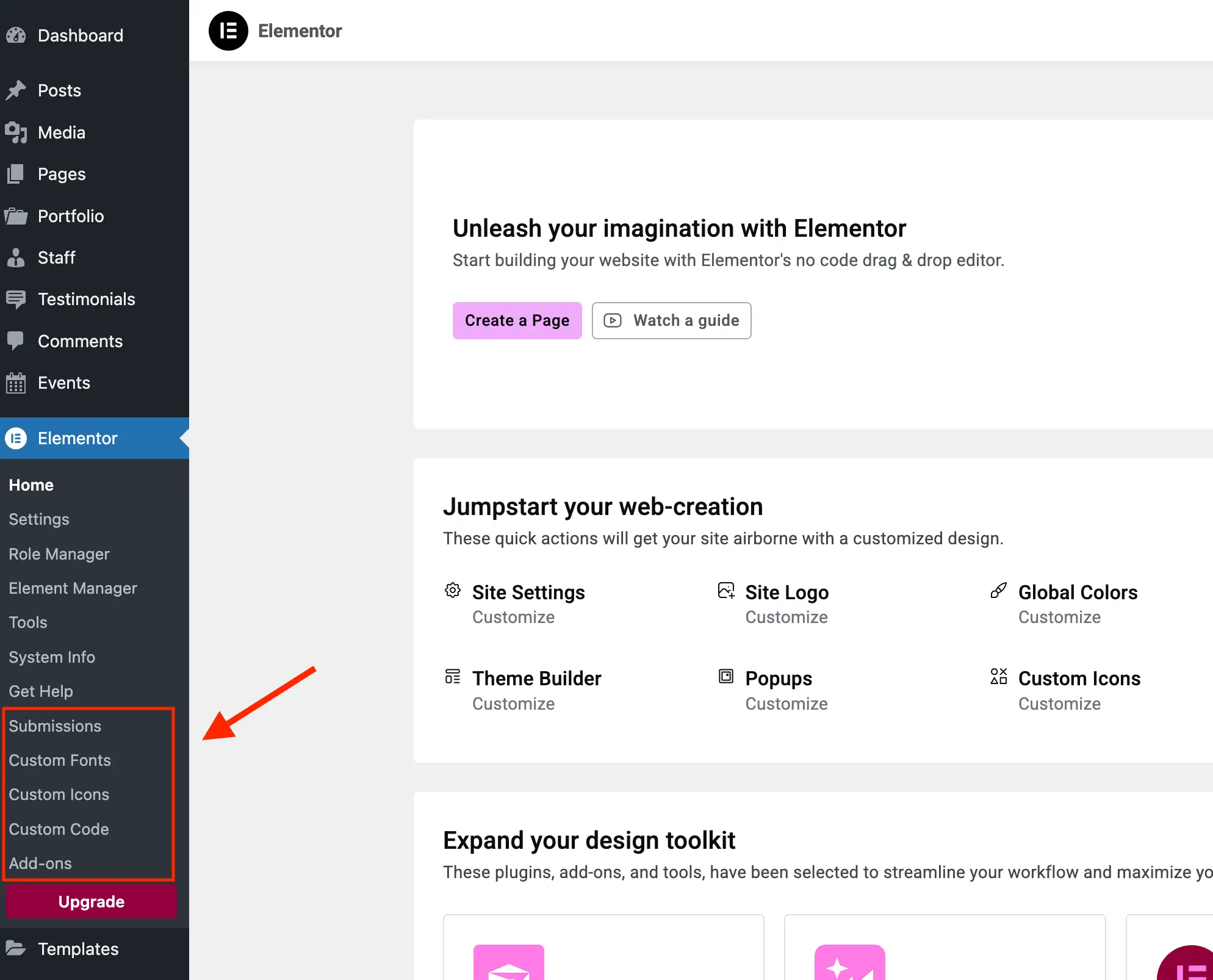
One of the most immediate areas of clutter resides within the WordPress administration menu. Elementor registers several pages and sub-menu items that, for free users, primarily serve as promotional landing pages for the Pro version. These include:
- Promotional Admin Pages: Elementor dynamically registers various admin pages that simply display an upgrade prompt. The PHP class identifies these by checking if menu items are subclasses of
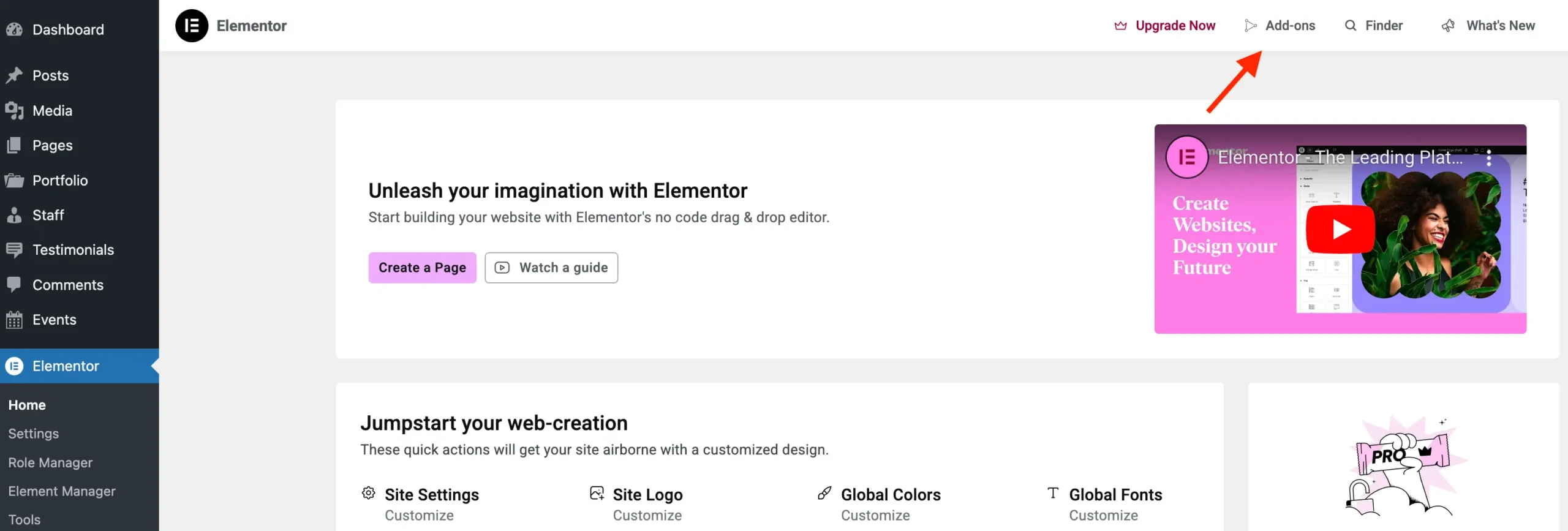
ElementorModulesPromotionsAdminMenuItemsBase_Promotion_ItemorElementorModulesPromotionsAdminMenuItemsBase_Promotion_Template. These are then systematically removed usingremove_menu_pageorremove_submenu_page. - The "Add-ons" Page: While potentially useful for discovering compatible plugins, the "Add-ons" page often showcases premium tools, functioning as an advertisement hub. This page is removed by specifically targeting its slug,
'elementor-apps'. This also addresses a broader concern about cloaked referral links, which, as of this article’s publication, Elementor has utilized, potentially violating certain WordPress plugin guidelines regarding user tracking without consent and advertising within the dashboard. The guidelines explicitly state that advertising within the dashboard should be avoided and tracking referrals via such ads is not permitted. - "Get Help" Link: This link, typically leading to Elementor’s knowledge base, can also be removed if a user prefers to manage support avenues independently. This is achieved by removing the
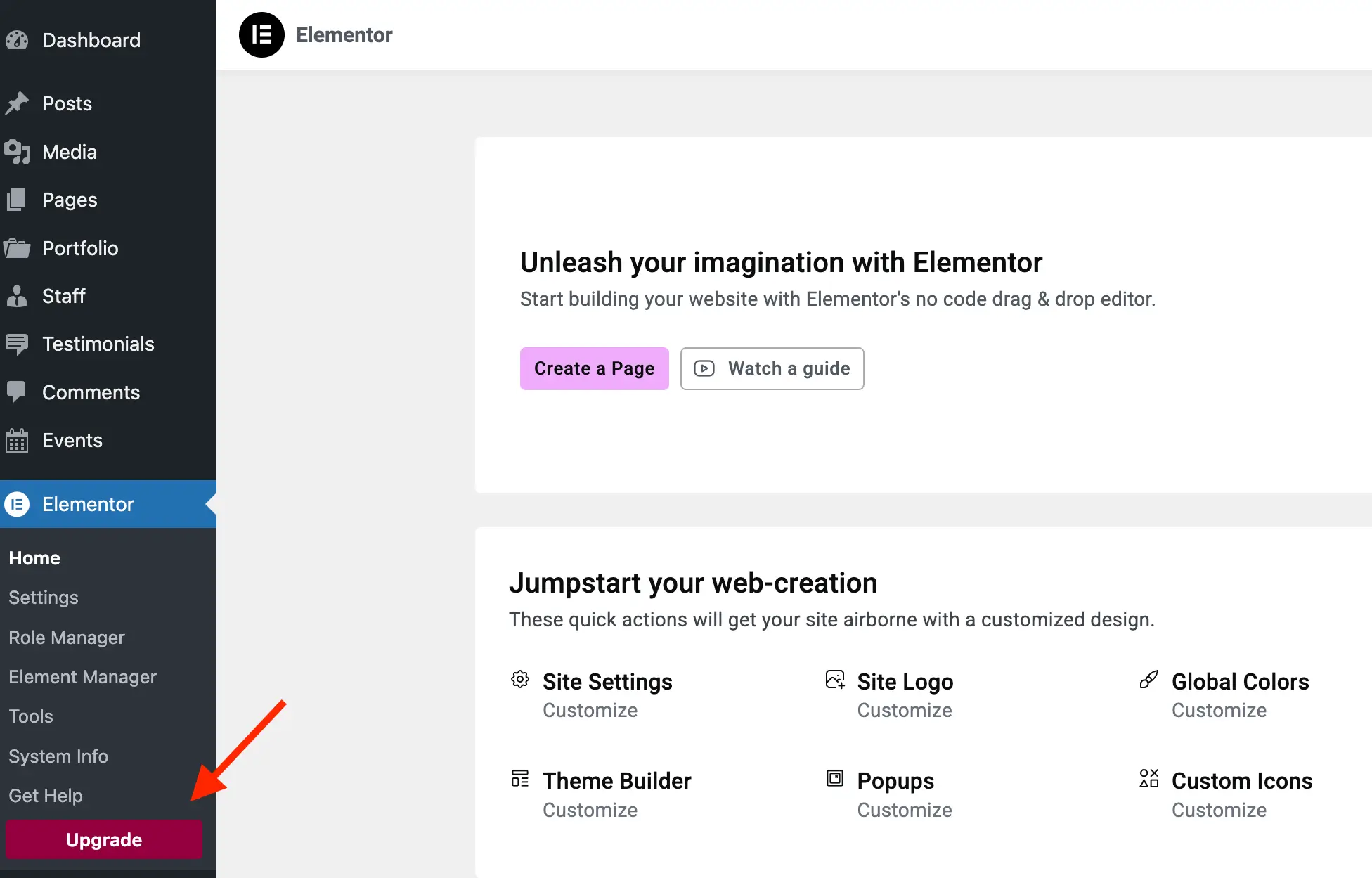
go_knowledge_base_sitesubmenu page from the main Elementor menu. - Pink "Upgrade" Button: A prominent visual element in the admin sidebar, this button redirects to the Elementor Pro purchase page. Its removal is straightforward using
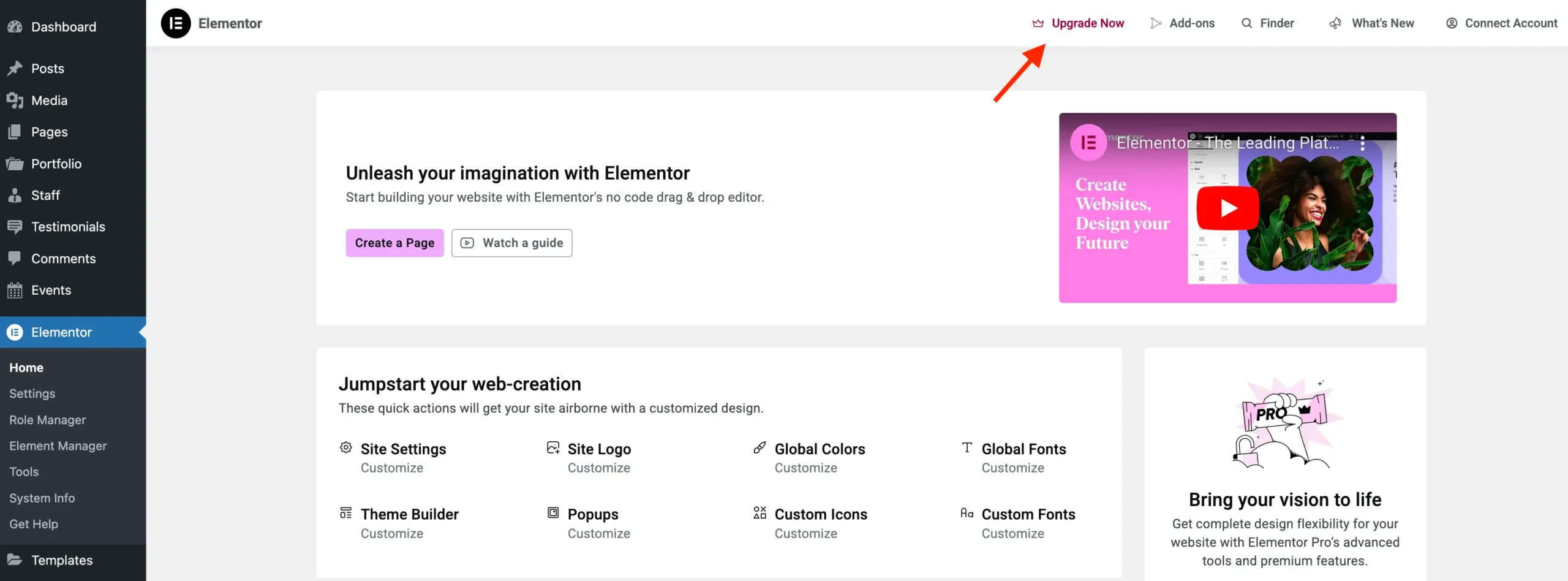
remove_submenu_page('elementor', 'go_elementor_pro'). - "Upgrade Now" Link in the Admin Bar: Located at the top of Elementor pages, this link is a less intrusive but persistent upsell. It is hidden using custom CSS injected into the admin top bar, targeting elements with specific Elementor icon classes (e.g.,
.eicon-upgrade-crown). - Theme Builder Links: The Theme Builder is a flagship Pro feature. For free users, its presence in the admin menu (
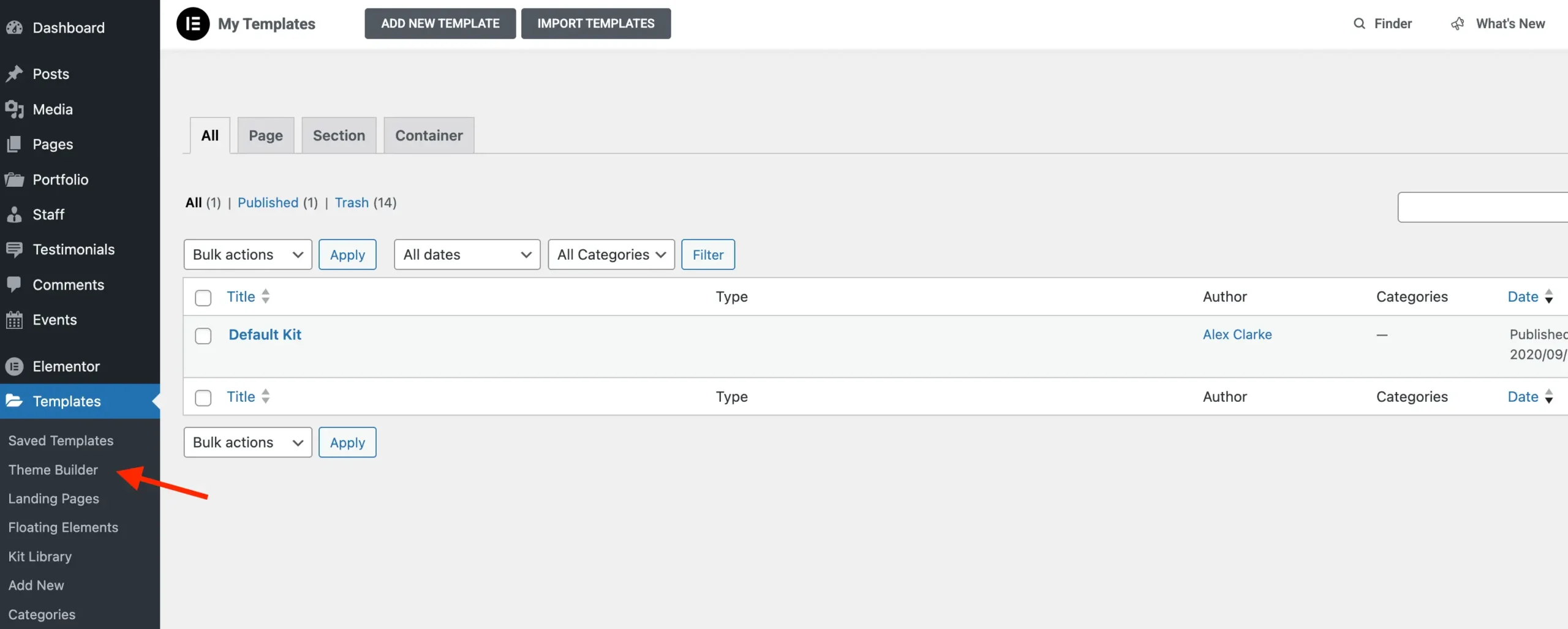
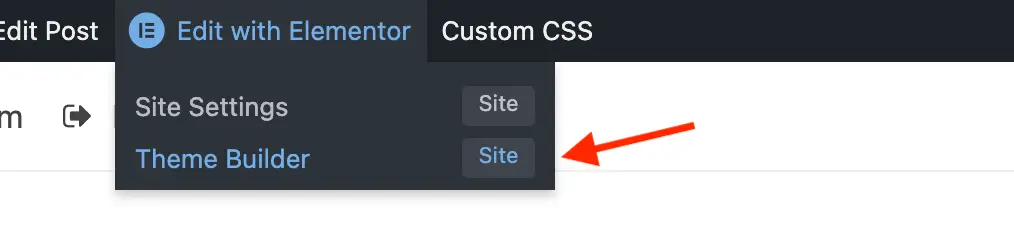
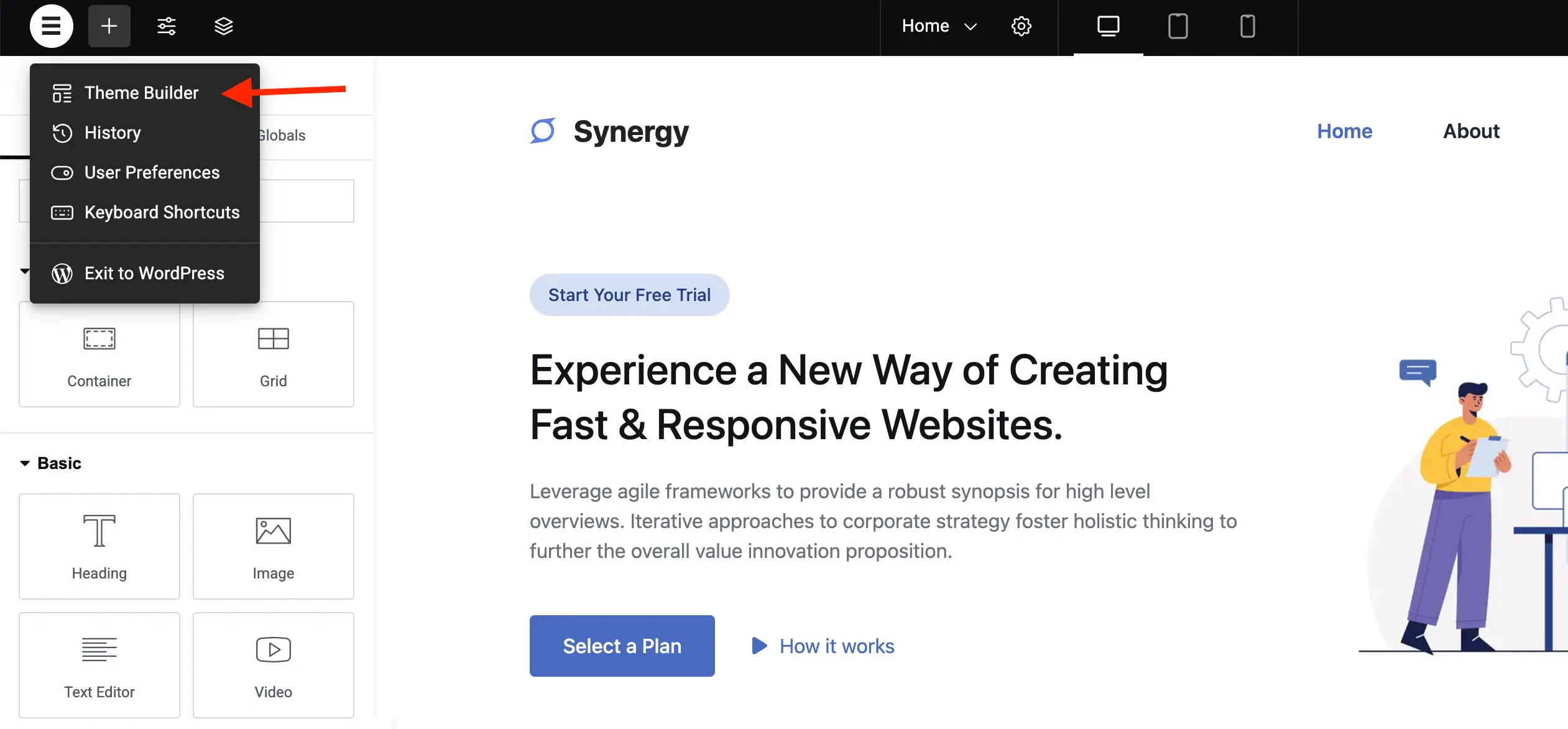
edit.php?post_type=elementor_librarysubmenuelementor-app), the WordPress admin bar (elementor_app_site_editor), and even the Elementor builder’s dropdown menu (though this last one is more complex due to JavaScript generation) is redundant. PHP hooks are used to remove the admin menu and admin bar links. The Elementor bar link, being JavaScript-generated, presents a greater challenge for removal without introducing "bloat" or potential issues, as it would require overriding JavaScript objects or usingMutationObserver, which is deemed excessive for this guide’s scope.
Streamlining the Editor Interface
The Elementor editor itself is another focal point for promotional content. A clean editor interface is paramount for efficient page building. The strategy here primarily relies on injecting custom CSS into the editor’s styles.
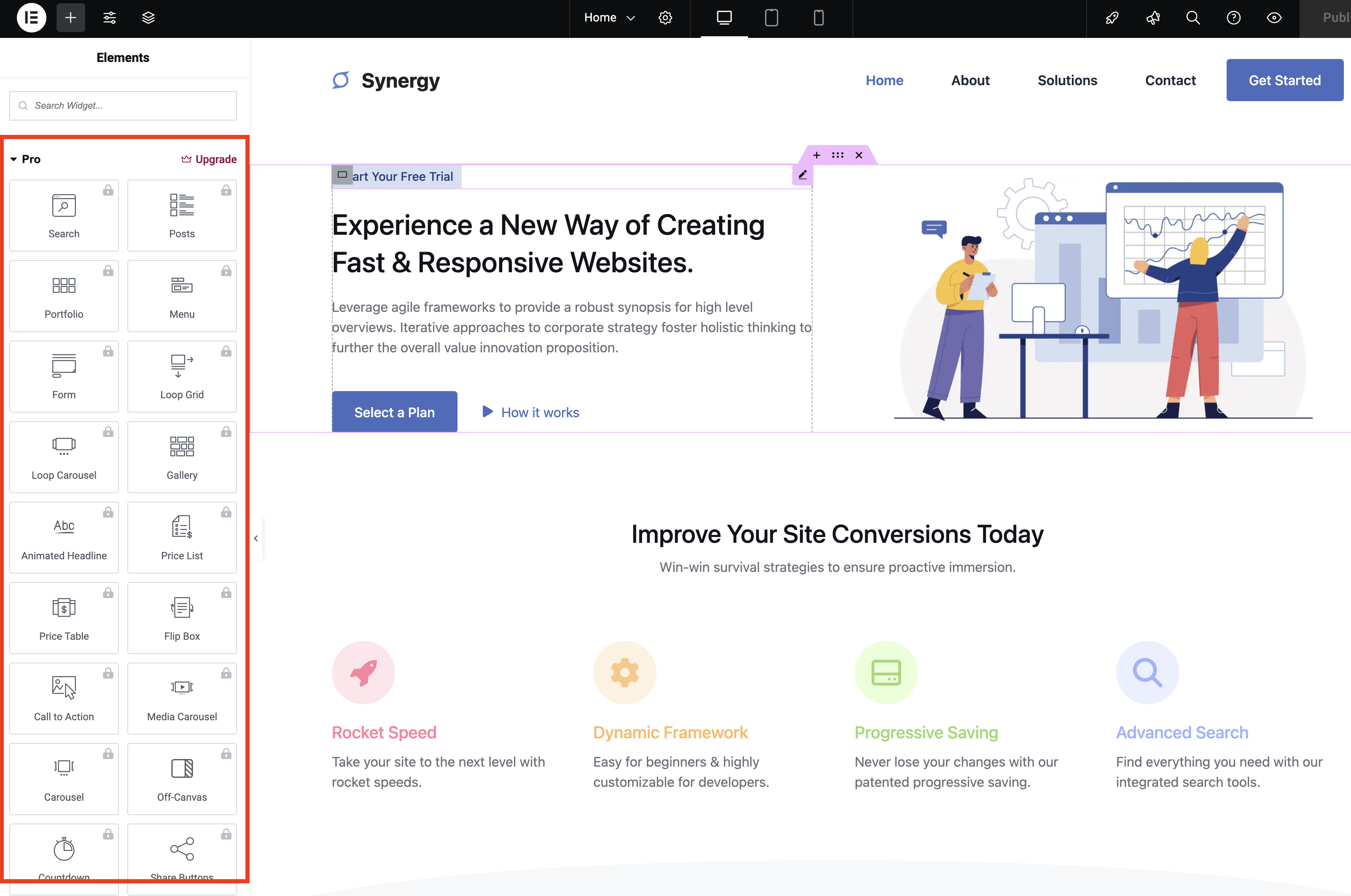
- Premium Widgets and Categories: Elementor displays all Pro widgets in the widget selector, often frustrating users searching for specific free widgets or those from third-party add-ons. While not physically "removed" to save memory, they are hidden using CSS selectors like
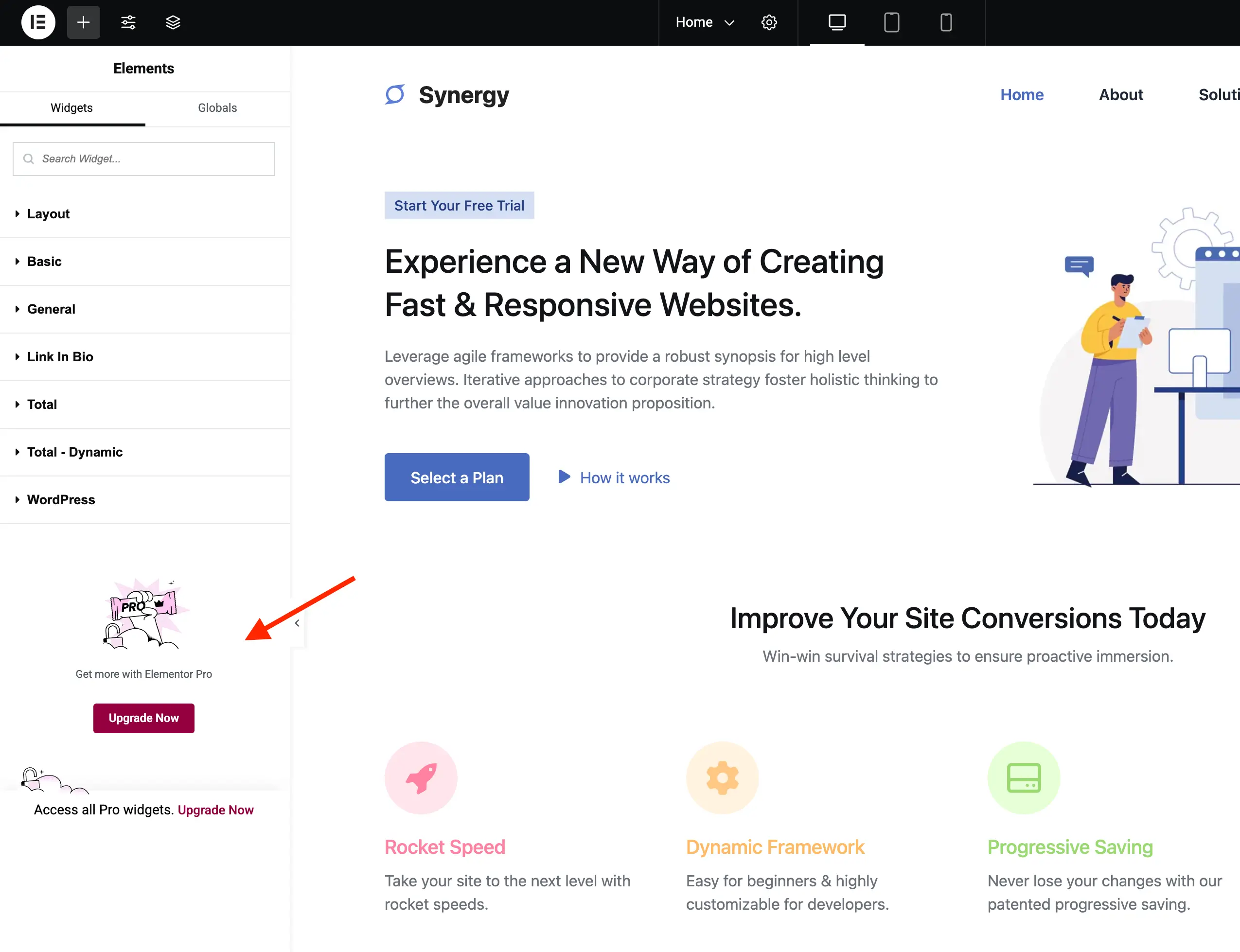
.elementor-element-wrapper.elementor-element--promotionand category-specific IDs (#elementor-panel-category-pro-elements,#elementor-panel-category-theme-elements, etc.). This creates a more focused widget panel. - Sidebar Banners: Elementor often includes large promotional banners within the sidebar. These are also targeted and hidden using CSS selectors such as
#elementor-panel-get-pro-elementsand#elementor-panel-get-pro-elements-sticky. - "Globals" Tab: This tab in the Elementor sidebar is a Pro-only feature. Hiding it (
.elementor-panel-navigation-tab[data-tab=global]) simplifies the navigation within the editor. A minor CSS adjustment also removes the active border color from the remaining "Widgets" tab, improving aesthetics. - Structure Window Promo: The structure popup, a useful tool for navigating page elements, includes a promotional notice at its footer. This is hidden by adding
#elementor-navigator__footer__promotionto the CSS stylesheet. - Editor Notice Bar: A sticky notice bar often appears at the bottom of the editor, prompting users to upgrade. While dismissible, it reappears periodically. Hiding it with
.e-notice-barensures a permanently clean canvas. - Dynamic Content Button: Dynamic Tags are a powerful Pro feature. The button to access these tags (
.elementor-control-dynamic-switcher) is hidden for free users, as its functionality is inaccessible. - Locked Widget Settings: Many individual widget settings are locked in the free version, displaying a small lock icon and triggering a popover banner upon click. These are hidden using a CSS selector that targets controls containing the lock wrapper (
.elementor-control:has([class*="promotion__lock-wrapper"])). - Custom CSS Section: Found under the "Advanced" tab of various widgets, the "Custom CSS" section is a Pro feature. It is hidden using
.elementor-control-section_custom_css_pro. - Attributes Section: Similarly, the "Attributes" section in the "Advanced" tab, another Pro feature, is hidden with
elementor-control-section_custom_attributes_pro.
WordPress Dashboard Integration
Beyond the Elementor interface, a custom widget is typically added to the main WordPress dashboard, displaying blog feeds and further upsell links. This widget, identified by e-dashboard-overview, is removed using remove_meta_box('e-dashboard-overview', 'dashboard', 'normal'), ensuring a cleaner default login experience.
Advanced Considerations: Elementor AI Functionality
Elementor also introduced AI features, with an "Enable Elementor AI functionality" field on user profile pages. While the AI features are generally free, some users may wish to hide this field for client sites or personal preference. Removing this field presents a unique challenge because Elementor wraps its class methods in anonymous functions, making direct unhooking difficult. A practical solution involves injecting a small JavaScript snippet into the user profile pages (admin_head-user-edit.php, admin_head-profile.php) to hide the relevant table row. Additionally, to prevent Elementor from automatically enabling the AI feature upon profile save, specific filters (get_user_option_elementor_enable_ai and update_user_metadata) are used to ensure the setting remains disabled by default and prevent it from being saved. This specific code for AI functionality is not included in the main final snippet, due to its more complex nature and the potential for Elementor to change its implementation.
Implementation and Accessibility: The Final Code and Plugin
For users wishing to implement these modifications, the collected PHP and CSS code is integrated into a single, cohesive WPEX_Remove_Elementor_Upsells class. This class can be added to a custom WordPress parent or child theme’s functions.php file, or, as recommended for better maintainability and portability, placed in a separate .php file within a custom plugin. A complete, ready-to-use plugin containing all the code mentioned (excluding the Elementor AI bonus code for reasons stated) is available for download on GitHub, providing an accessible solution for all skill levels. Users are advised that if they use the GitHub plugin, manual updates will be required, as it will not be hosted on the official WordPress repository.
/**
 * Remove Elementor Upsells.
 */
class WPEX_Remove_Elementor_Upsells

    /**
     * Constructor.
     */
    public function __construct()
        if ( did_action( 'elementor/loaded' ) )
            $this->register_actions();
         else
            add_action( 'elementor/loaded', [ $this, 'register_actions' ] );


    /**
     * Register our main class actions.
     */
    public function register_actions(): void
        if ( is_callable( 'ElementorUtils::has_pro' ) && ElementorUtils::has_pro() )
            return; // bail early if we are using Elementor Pro.


        add_action( 'elementor/admin/menu/after_register', [ $this, 'remove_admin_pages' ], PHP_INT_MAX, 2 );
        add_action( 'elementor/admin_top_bar/before_enqueue_scripts', [ $this, 'admin_top_bar_css' ] );
        add_filter( 'elementor/frontend/admin_bar/settings', [ $this, 'modify_admin_bar' ], PHP_INT_MAX );
        add_action( 'elementor/editor/after_enqueue_styles', [ $this, 'editor_css' ] );
        add_action( 'wp_dashboard_setup', [ $this, 'remove_dashboard_widget' ], PHP_INT_MAX );


    /**
     * Remove admin pages.
     */
    public function remove_admin_pages( $menu_manager, $hooks ): void
        $pages_to_remove = [];
        $subpages_to_remove = [];
        if ( is_callable( [ $menu_manager, 'get_all' ] ) )
            foreach ( (array) $menu_manager->get_all() as $item_slug => $item )

        foreach ( $pages_to_remove as $menu_slug )
            remove_menu_page( $menu_slug );

        foreach ( $subpages_to_remove as $subpage )
            remove_submenu_page( $subpage[0], $subpage[1] );

        remove_submenu_page( 'elementor', 'go_knowledge_base_site' );
        remove_submenu_page( 'elementor', 'go_elementor_pro' );
        if ( ! isset( $_GET['page'] )

    /**
     * Add inline CSS to modify the Elementor admin top bar.
     */
    public function admin_top_bar_css(): void
        $target_icon_classes = [
            '.eicon-integration', // Add-ons
            '.eicon-upgrade-crown', // Upgrade now
        ];
        wp_add_inline_style(
            'elementor-admin-top-bar',
            '.e-admin-top-bar__bar-button:has(' . implode( ',', $target_icon_classes ) . ')display:none!important;'
        );


    /**
     * Modify the admin bar links.
     */
    public function modify_admin_bar( $admin_bar_config )
        if ( isset( $admin_bar_config['elementor_edit_page']['children'] )
            && is_array( $admin_bar_config['elementor_edit_page']['children'] )
        )
            foreach ( $admin_bar_config['elementor_edit_page']['children'] as $k => $item )
                if ( isset( $item['id'] ) && 'elementor_app_site_editor' === $item['id'] )
                    unset( $admin_bar_config['elementor_edit_page']['children'][ $k ] );
                    break;


        return $admin_bar_config;


    /**
     * Hide elements in the editor.
     */
    public function editor_css(): void
        wp_add_inline_style(
            'elementor-editor',
            '.elementor-element-wrapper.elementor-element--promotion,#elementor-panel-category-pro-elements,#elementor-panel-category-theme-elements,#elementor-panel-category-theme-elements-single,#elementor-panel-category-woocommerce-elements,#elementor-panel-get-pro-elements,#elementor-panel-get-pro-elements-sticky,.elementor-panel-navigation-tab[data-tab=global],#elementor-navigator__footer__promotion,.e-notice-bar,.elementor-control-dynamic-switcher,.elementor-control:has([class*="promotion__lock-wrapper"]),.elementor-control-section_custom_css_pro,elementor-control-section_custom_attributes_prodisplay:none!important;.elementor-control-type-wysiwyg .tmce-active .switch-htmlborder-inline-end:0;'
        );


    /**
     * Remove dashboard widget.
     */
    public function remove_dashboard_widget(): void
        remove_meta_box( 'e-dashboard-overview', 'dashboard', 'normal' );


new WPEX_Remove_Elementor_Upsells;
Balancing Act: The Ethics of Modification and Broader Implications
The ability to modify open-source software like Elementor highlights the inherent flexibility of the WordPress ecosystem. While some may view the removal of upsells as detrimental to Elementor’s revenue streams, it also empowers users to tailor their tools to precise needs. This customization can lead to more efficient workflows, particularly for web professionals who manage numerous sites for clients. A cleaner interface reduces cognitive load and allows designers and developers to focus on creativity and functionality rather than navigating promotional content.
Ultimately, the decision to remove Elementor’s upsells rests with the individual user. For those who can benefit from its advanced features and wish to support its continued development, Elementor Pro remains a highly recommended investment. However, for users committed to the free version, these methods offer a pathway to a more focused and professional working environment, affirming the principles of user control and modification inherent in the open-source philosophy. This approach contributes to a broader discussion within the WordPress community about plugin monetization practices and the balance between business objectives and optimal user experience.