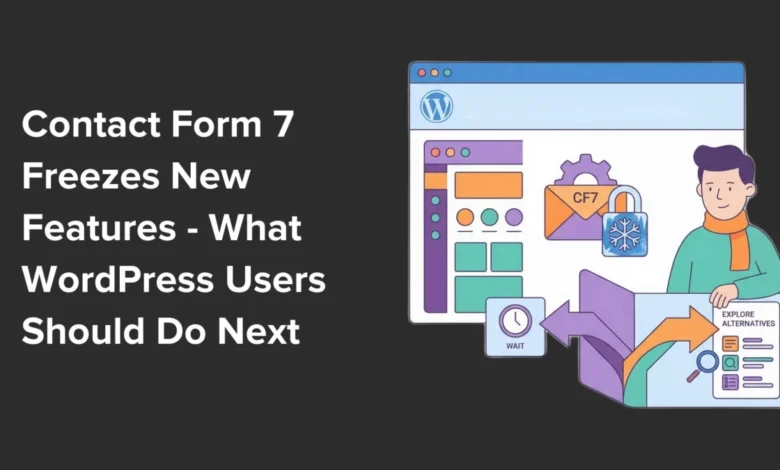
For nearly two decades, Contact Form 7 has stood as a ubiquitous and reliable solution for millions of WordPress website owners seeking to integrate simple contact forms into their digital presence. Its widespread adoption made it a go-to choice, a testament to its straightforward functionality and accessibility. However, a significant shift in its development trajectory has now been officially confirmed, prompting a re-evaluation for its extensive user base.
A Landmark Announcement at WordCamp Asia 2026
The pivotal news emerged from WordCamp Asia 2026, where Takayuki Miyoshi, the esteemed creator behind Contact Form 7, publicly announced a major change in the plugin’s future. During his on-stage address, Miyoshi confirmed that Contact Form 7 would cease to receive new feature updates after its version 6.2 release. This decision marks a strategic pivot for Miyoshi, whose focus is now shifting towards a distinct and ambitious new project, Contactable.io, which is currently slated for a 2028 launch.
This announcement, while not signaling an immediate discontinuation, places Contact Form 7 into what developers refer to as a "feature freeze." This status implies that while the plugin will continue to receive crucial bug fixes and security patches, it will no longer evolve with new functionalities, user interface enhancements, or integrations vital for modern web development. For a plugin that has been a cornerstone for countless websites, this development carries profound implications for its long-term viability and the strategic decisions WordPress users must now consider.
Understanding the Implications of a Feature Freeze
The term "feature freeze" often evokes concern, and rightly so, within a rapidly evolving digital landscape like WordPress. It’s imperative for website owners to grasp the full scope of what this means beyond merely the absence of new features.
Firstly, security remains a paramount concern. While critical security patches will still be issued, the absence of proactive development means the plugin may become more susceptible to emerging vulnerabilities over time, especially as underlying WordPress core functionalities or web standards advance. Modern security practices often involve continuous integration of new protective measures, a process that will largely halt for Contact Form 7.
Secondly, compatibility with future WordPress core updates, themes, and other plugins is a significant risk. WordPress itself undergoes continuous development, introducing new APIs, block editor features, and performance optimizations. A plugin in feature freeze might struggle to maintain seamless compatibility, potentially leading to conflicts, broken functionalities, or diminished performance on newer WordPress versions.
Thirdly, the innovation gap will widen. User expectations for contact forms have grown significantly. Modern forms are often expected to include advanced conditional logic, seamless CRM integrations, multi-step layouts, payment processing capabilities, and sophisticated spam protection. Contact Form 7, in its frozen state, will inevitably fall behind competitors who are actively innovating to meet these demands. This can impact lead generation, customer service efficiency, and overall website professionalism.
Finally, user experience (UX) and maintainability will suffer. As web design trends evolve, an outdated form interface can detract from a site’s aesthetic and usability. For developers and site administrators, working with a static, older codebase can become increasingly challenging, especially when troubleshooting issues or attempting custom modifications that require modern approaches.
While existing forms will not "break overnight," the gradual erosion of security, compatibility, and functionality makes continued reliance on a feature-frozen plugin an increasingly risky proposition. Proactive migration to an actively developed alternative is not merely a recommendation but a strategic imperative to safeguard website integrity and future-proof digital operations.
The Imperative for Proactive Migration
Given the implications of the feature freeze, the present moment is opportune for WordPress users to consider migrating their forms to a more robust, actively maintained solution. Delaying this transition can exacerbate future challenges. As websites grow and their interactive forms become more intricate – perhaps incorporating additional fields, complex email routing rules, or integrations with sophisticated customer relationship management (CRM) systems – the migration process will inevitably become more arduous and time-consuming.
What might constitute a straightforward, minutes-long migration today could easily transform into a multi-day, frustrating project as forms accumulate complexity and dependencies. The smart, forward-thinking approach is to act now, while Contact Form 7 forms are still stable and relatively simple. This allows for a smoother transition, minimizing potential disruption and ensuring that valuable data and configurations are preserved without undue effort. By embracing a modern form builder, website owners can preempt future compatibility issues, leverage contemporary features, and enhance their site’s overall functionality and user experience.
WPForms: A Leading Alternative for Seamless Migration
In the landscape of WordPress contact form plugins, WPForms has consistently emerged as a highly recommended alternative, particularly for users transitioning from Contact Form 7. Its appeal lies in striking an optimal balance between user-friendliness for beginners and the provision of advanced features required by growing websites. This blend makes it an ideal successor for those accustomed to Contact Form 7’s simplicity but now seeking greater capabilities and ongoing development.
WPForms is renowned for its intuitive drag-and-drop builder, which empowers users to create professional and responsive forms in minutes, entirely without coding. This ease of use is a significant advantage, reducing the learning curve for new users. Beyond basic forms, the premium version of WPForms unlocks a powerful suite of features, including over 2,100 ready-made form templates, smart conditional logic for dynamic forms, seamless integration with various payment gateways, and connections to popular email marketing services like Mailchimp. It also supports advanced functionalities such as multi-page forms to improve conversion rates and comprehensive form abandonment tracking.
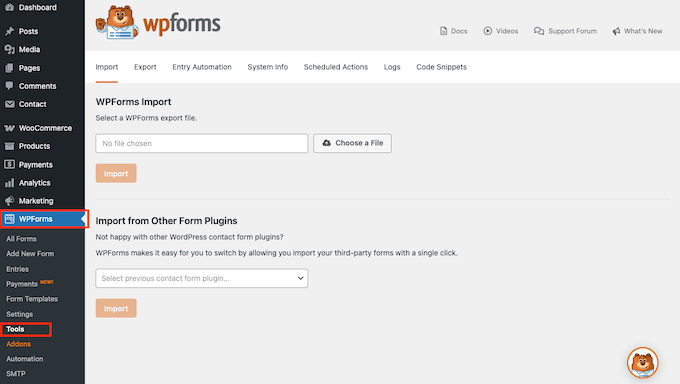
Crucially, WPForms addresses the immediate need of Contact Form 7 users by offering a built-in import tool. This specialized utility allows for the migration of existing Contact Form 7 forms with just a few clicks. The tool intelligently reads and recreates old forms within WPForms’ modern interface, preserving field labels, notification settings, and other critical data. This eliminates the need to rebuild forms from scratch, providing a smooth and efficient transition to a secure, evolving form builder. For those seeking a deeper comparison, detailed analyses of "Contact Form 7 vs. WPForms" consistently highlight WPForms’ superior feature set, active development, and robust support.
A Step-by-Step Pathway to Migration: Replacing Contact Form 7 with WPForms
Migrating from Contact Form 7 to WPForms is a streamlined process, designed to minimize disruption and preserve existing form data. The following steps outline a journalistic walkthrough of this transition, emphasizing the rationale behind each action.
1. Installation and Activation of WPForms:
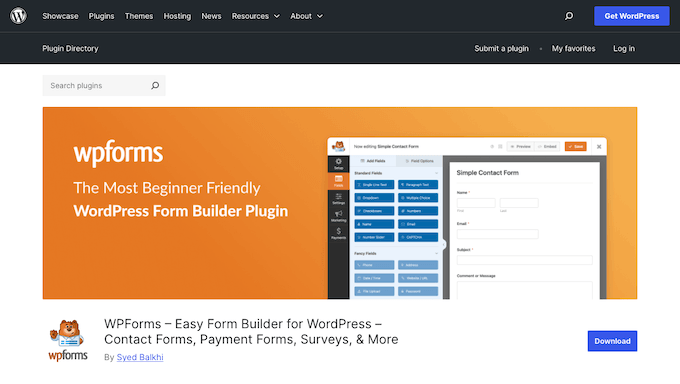
The initial step involves installing the WPForms plugin on the WordPress website. The free "WPForms Lite" version, available directly from WordPress.org, includes the essential Contact Form 7 importer and a robust drag-and-drop builder, making it accessible regardless of budget. For businesses requiring advanced functionalities like online payments, conversational forms, or sophisticated email marketing integrations, an upgrade to the premium version is a seamless process at any point, allowing for scaling as needs evolve. Upon successful installation and activation, the site is prepared for the migration.
2. Executing the WPForms Setup Wizard:
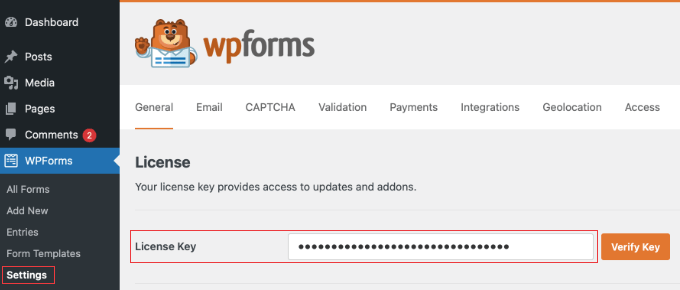
Immediately following activation, WPForms initiates a quick setup wizard. This guided process is designed to configure the plugin efficiently, ensuring optimal performance and readiness. It is highly advisable to complete this wizard, as it streamlines the initial configuration, laying a solid foundation. For premium users, this stage also includes the entry of a license key, obtained from the WPForms account dashboard or purchase confirmation email, unlocking the full suite of features. The wizard typically offers to create a first form; this step should be skipped, as the objective is to import existing forms.
3. Accessing the WPForms Import Tool:
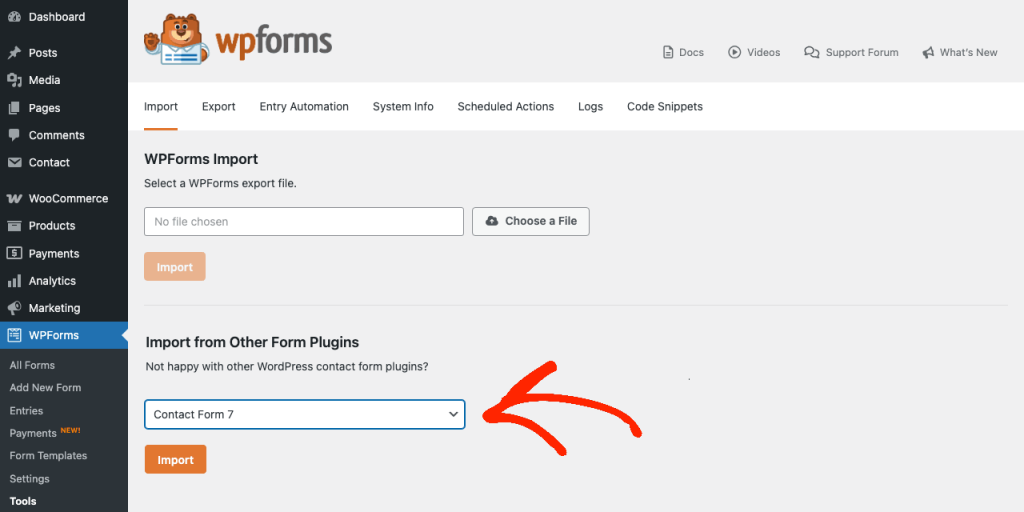
The core of the migration process resides within the WPForms Tools section. To access this, navigate to WPForms » Tools in the WordPress dashboard. Within this interface, the "Import" tab should be selected. From the "Import from Other Form Plugins" dropdown menu, "Contact Form 7" is chosen. Clicking the "Import" button then initiates a scan of the website, identifying all existing Contact Form 7 forms. This scan provides a clear overview of the forms available for migration.
4. Strategic Selection of Forms for Import:
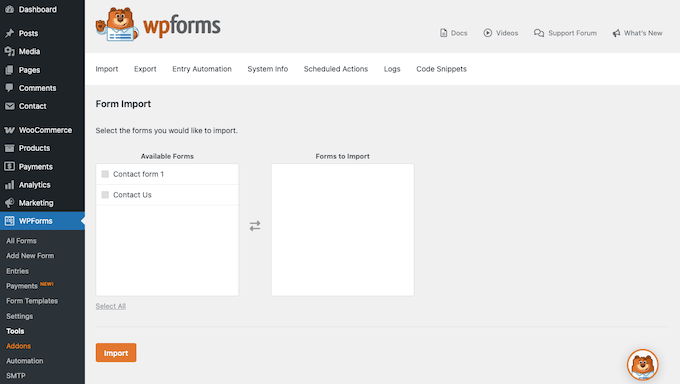
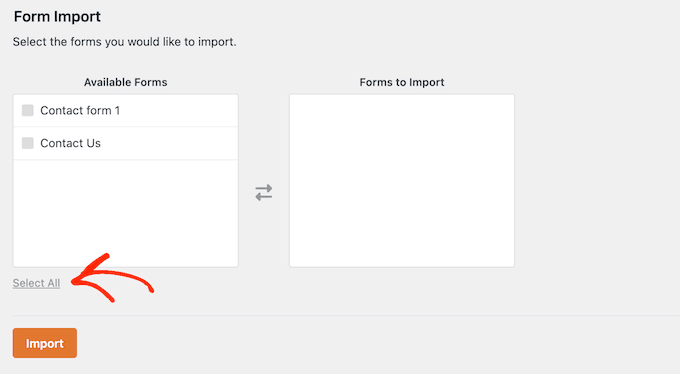
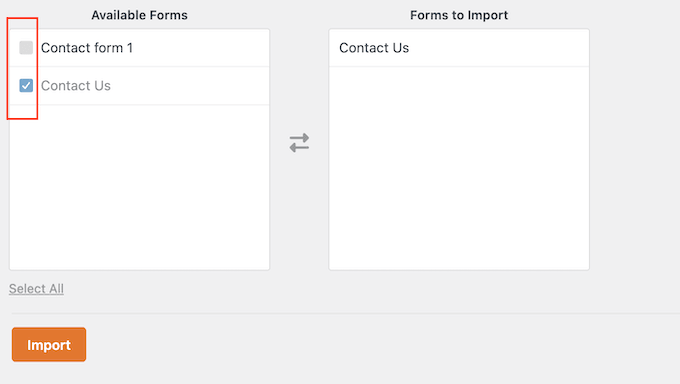
Upon completion of the scan, WPForms presents two columns: "Available Forms" and "Forms to Import." This stage allows for precise control over which forms are migrated. Users can opt to migrate all Contact Form 7 forms by selecting "Select All," or they can individually check boxes next to specific forms. This selective import feature offers a valuable opportunity to declutter the website by excluding outdated, test, or duplicate forms that are no longer necessary, contributing to a cleaner and more efficient site. Once the desired forms are chosen, clicking "Import" initiates their recreation within the WPForms environment.
5. Reviewing the Import Results:
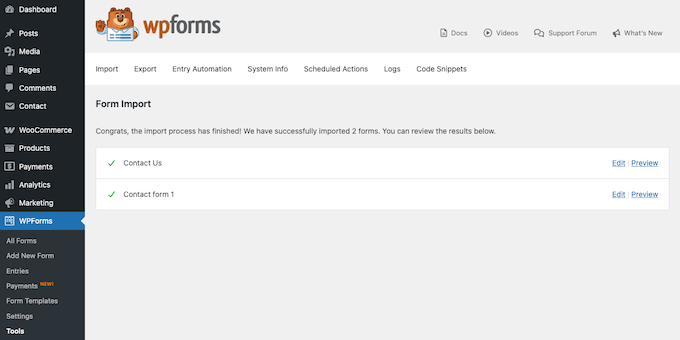
Following the import, WPForms displays a "Congrats, the import process has finished!" message along with a detailed results screen. This report is crucial and warrants careful review. Successfully imported forms are marked with a green checkmark and provided with direct "Edit" and "Preview" links. WPForms is proficient in migrating standard fields such as text inputs, email fields, dropdowns, checkboxes, and file uploads. However, Contact Form 7’s flexibility allowed for custom fields or unique shortcodes that may not have direct equivalents in WPForms. In such instances, these forms will be flagged for manual review, ensuring that any discrepancies are addressed before deployment.
6. Refining and Polishing Newly Imported Forms:
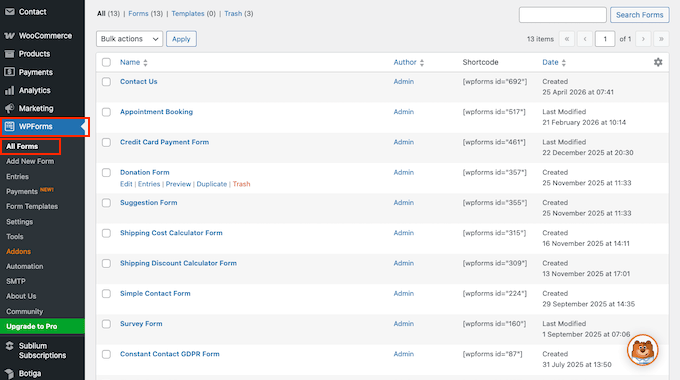
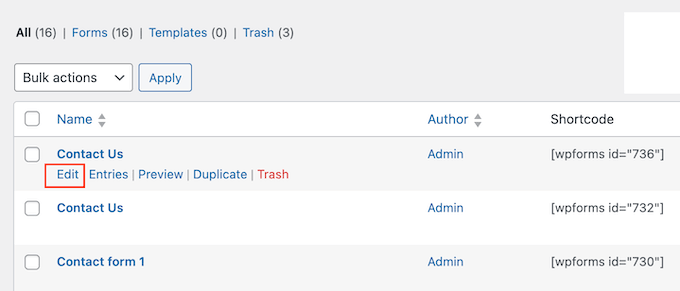
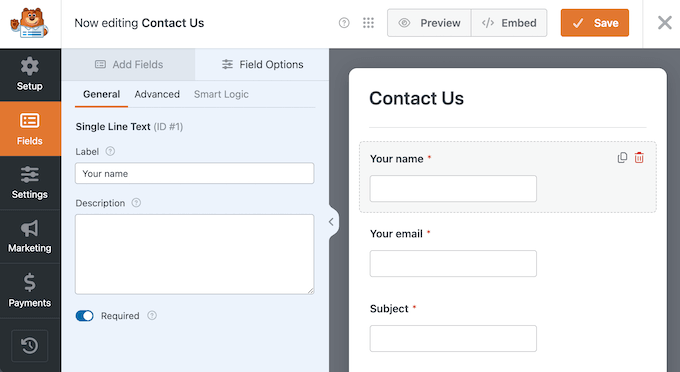
Post-import, it is essential to meticulously review and fine-tune each migrated form. This step ensures accuracy and optimal functionality. Navigating to WPForms » All Forms displays a list of all imported forms. Hovering over a specific form and clicking "Edit" opens it in the intuitive WPForms drag-and-drop editor. Here, each field should be examined to confirm it aligns with the original Contact Form 7 setup, paying particular attention to required fields, dropdown options, and custom field labels.
Furthermore, the "Settings" tab on the left side of the builder must be checked, especially the "Notifications" sub-tab, to verify that email addresses for form submissions are correctly configured. While WPForms imports existing settings, a manual confirmation ensures that submissions are routed to the intended inboxes. For advanced routing needs, such as directing different submissions to various team members, WPForms offers sophisticated options. After all adjustments are made, clicking the "Save" button in the top-right corner commits these changes.
7. Integrating New Forms and Replacing Old Ones:
With the forms refined in WPForms, the next critical step is to replace the old Contact Form 7 instances on the website. This involves opening the page or post containing the legacy form, selecting the existing Contact Form 7 block, and deleting it. Subsequently, a new block is added to the page by clicking the "+" button and searching for "WPForms." Once the WPForms block is inserted, a dropdown menu within the block allows selection of the newly migrated form. A significant advantage here is that WPForms forms load directly within the editor, providing a real-time preview of how they will appear to visitors. WPForms is designed to automatically inherit the WordPress theme’s styles, ensuring a cohesive look. After confirming the appearance, the page or post is published or updated, making the new form live.
8. Thorough Testing of New Forms:
Before concluding the migration, rigorous testing of the new forms is indispensable. At least one test submission should be performed on every migrated form to verify proper data collection and correct notification firing. This involves opening the live page in a standard browser tab (outside the WordPress editor), completing the form as a typical visitor would, and clicking "Submit." Subsequently, the configured email inbox should be checked to confirm safe receipt of the notification. Should email notifications fail to arrive, it often indicates pre-existing email deliverability issues on the site. In such cases, installing a WordPress SMTP plugin like WP Mail SMTP is recommended to ensure reliable email delivery, circumventing common web host-related spam flagging. Premium WPForms users can also verify submissions directly within the WordPress dashboard under WPForms » Entries. Once successful end-to-end functionality is confirmed, the site is ready to retire Contact Form 7.
9. Deactivation and Deletion of Contact Form 7:
The final stage is the complete removal of Contact Form 7. This step should only be undertaken once absolute certainty is achieved that all forms across the entire website have been successfully migrated to WPForms and are functioning correctly. As a precautionary measure, creating a full website backup using a plugin like Duplicator before deletion is highly advisable. To deactivate, navigate to Plugins » Installed Plugins, locate Contact Form 7, and click its "Deactivate" link. Post-deactivation, a final site-wide check is recommended, loading every page that previously hosted a Contact Form 7 form to ensure no [contact-form-7] shortcodes remain visible. Any overlooked instances should be rectified by replacing the shortcode with the appropriate WPForms block. Once confirmed clean, Contact Form 7 can be definitively removed from the site by clicking "Delete" on the Plugins screen, thereby completing the transition to a modern, actively supported form builder.
Maximizing Potential with WPForms Post-Migration
The successful migration to WPForms opens up a new realm of possibilities for website owners. Beyond basic contact forms, WPForms, especially its premium version, offers advanced functionalities that simply were not part of Contact Form 7’s ecosystem. Users can now explore features such as:
- Payment Forms: Easily accept online payments for products, services, or donations through integrations with PayPal, Stripe, and Authorize.Net.
- Survey and Poll Forms: Create engaging surveys and polls with advanced reporting features to gather valuable user feedback and insights.
- Registration Forms: Build custom user registration forms, allowing for more controlled and personalized user onboarding.
- Post Submission Forms: Empower users to submit content (e.g., guest posts, directory listings) directly from the front-end of the website.
- Geolocation: Automatically capture user’s geographic location upon form submission for better lead qualification and personalization.
- Signature Addon: Allow users to sign forms digitally, useful for agreements, waivers, or applications.
- Zapier Integration: Connect forms to thousands of other web applications for seamless automation workflows.
These features enable websites to move beyond simple communication tools, transforming forms into powerful instruments for business growth, data collection, and enhanced user interaction.
Addressing Common User Concerns Regarding the Feature Freeze
Since the announcement at WordCamp Asia 2026, many WordPress users have naturally raised questions about the long-term implications of Contact Form 7’s feature freeze. Clarifying these points is essential for informed decision-making.
Is Contact Form 7 truly abandoned, or merely frozen?
Technically, it’s a feature freeze. Takayuki Miyoshi explicitly stated that version 6.2 marks the final major feature release. While critical bug fixes and security patches will continue, the plugin will no longer receive new functionalities, modern integrations, or user experience improvements. In the dynamic WordPress environment, a plugin that ceases to evolve is effectively falling into obsolescence, even if not officially "abandoned." This lack of ongoing development can quickly lead to compatibility issues and a security disadvantage compared to actively maintained alternatives.
Will existing Contact Form 7 forms suddenly cease to function?
No, an immediate breakdown is not anticipated. Miyoshi’s commitment to critical bug fixes and security patches suggests forms should remain compatible with WordPress core updates for the foreseeable future. However, the risk is gradual. As the web and WordPress ecosystem advance, a feature-frozen plugin will inevitably lag. Users will find themselves unable to implement modern features, and their forms may appear dated. This gradual decline in functionality and aesthetics makes proactive migration a prudent choice.
Should users await Contactable.io instead of migrating now?
Waiting for Contactable.io is generally not advisable. While Miyoshi outlined a vision for this new project, its projected launch in 2028 is several years away. Upon release, Contactable.io will be a nascent plugin, lacking the extensive testing, community support, and robust ecosystem of integrations that established solutions like WPForms already offer. Migrating to a stable, actively developed plugin today provides immediate access to essential tools and features, ensuring continuous functionality and growth. The landscape can always be re-evaluated if Contactable.io proves revolutionary upon its eventual release.
Is a paid version of WPForms necessary for migration?
No, the free "WPForms Lite" plugin includes the full Contact Form 7 importer and the drag-and-drop builder. Most former Contact Form 7 users find the Lite version sufficient for their initial needs, with the option to upgrade to premium at any time should their business requirements expand to include advanced features.
What happens to past Contact Form 7 entries during migration?
Previous form submissions from Contact Form 7 do not migrate. This is because Contact Form 7, by default, does not store entries in the WordPress database; it primarily emails them. Consequently, there are no entries for the importer to transfer. Users needing historical submission data should consult their email archives. If the companion Flamingo plugin was used, entries can be exported as a CSV file for record-keeping.
The Dawn of a New Era for WordPress Forms
The Contact Form 7 era, spanning nearly two decades, was undeniably a significant chapter in WordPress history, serving millions of websites effectively. However, as the web continues its relentless evolution, having a form builder that keeps pace with technological advancements, security standards, and user expectations is no longer a mere convenience but an absolute necessity.
By following a systematic migration process to a modern, actively supported plugin like WPForms, website owners are not just replacing a component; they are future-proofing their digital presence. This strategic move ensures continued security, compatibility, and access to the innovative features required to thrive in the contemporary online environment. The transition signifies a proactive commitment to maintaining a dynamic, secure, and user-friendly website, ready to leverage the full potential of modern web interactions.