Streamlining Content Collaboration: A Comprehensive Guide to WordPress In-Editor Notes

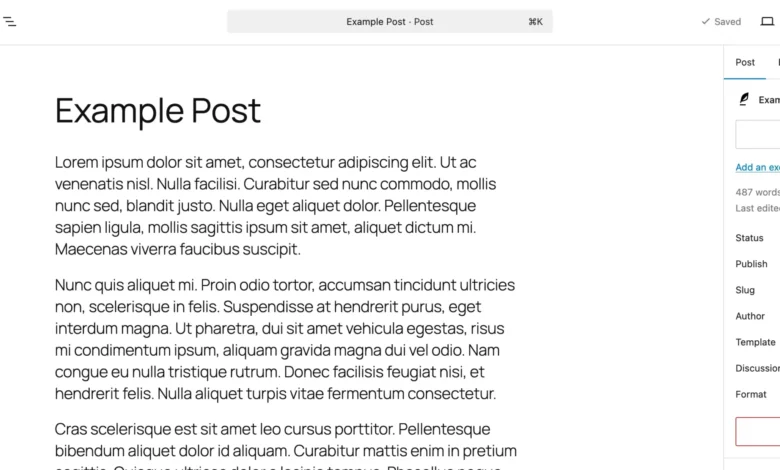
The modern digital publishing landscape has long been hampered by a fragmented review process. For years, content teams, web designers, and clients working within WordPress have been forced to rely on a patchwork of external applications—such as Google Docs, Figma, lengthy email chains, and dedicated project management boards—to review drafts and propose revisions. While this multi-tool workflow achieved the ultimate goal of publication, it introduced significant operational friction. Stakeholders were regularly required to copy and paste text back and forth, capture and annotate screenshots to explain design changes, and navigate the inevitable loss of context that occurs when feedback is decoupled from the actual content management system.

This operational silo is rapidly dismantling thanks to a native innovation within the WordPress ecosystem: in-editor feedback notes. By integrating a commenting and annotation infrastructure directly into the Gutenberg block editor, the platform now allows users to attach contextual feedback to specific content blocks. Whether an editor is reviewing a paragraph, an image alignment, or a complex layout structure, the feedback lives directly adjacent to the asset in question. This shift promises to redefine how editorial teams collaborate, eliminating third-party dependencies and creating a centralized, streamlined pipeline from draft to publication.
Evolution of the WordPress Editing Experience
To understand the significance of the Notes feature, one must examine the trajectory of the WordPress content editing experience. Since the introduction of the Gutenberg block editor in late 2018, the core development team has systematically worked to transform WordPress from a traditional blogging platform into a robust, full-site editing content management system. The overarching vision has consistently been to reduce reliance on external plugins and third-party software for native content creation tasks.

Historically, collaborative writing platforms like Google Docs excelled in environments requiring multiple authors and editors because of their granular, inline commenting capabilities. WordPress, by contrast, offered robust revision histories and user roles, but lacked a native mechanism for real-time editorial dialogue at the micro-level. Agencies managing complex client builds frequently installed heavy third-party review plugins or resorted to external tools to secure client sign-off. The introduction of native Notes directly addresses this historical limitation, aligning WordPress with the collaborative standards established by modern cloud-based office suites and design platforms.
Core Mechanics: How WordPress Notes Function
At its technical core, the Notes feature functions as an interactive annotation layer built natively into the Gutenberg architecture. When a user creates a note, it binds programmatically to a specific block identifier within the post or page data structure.
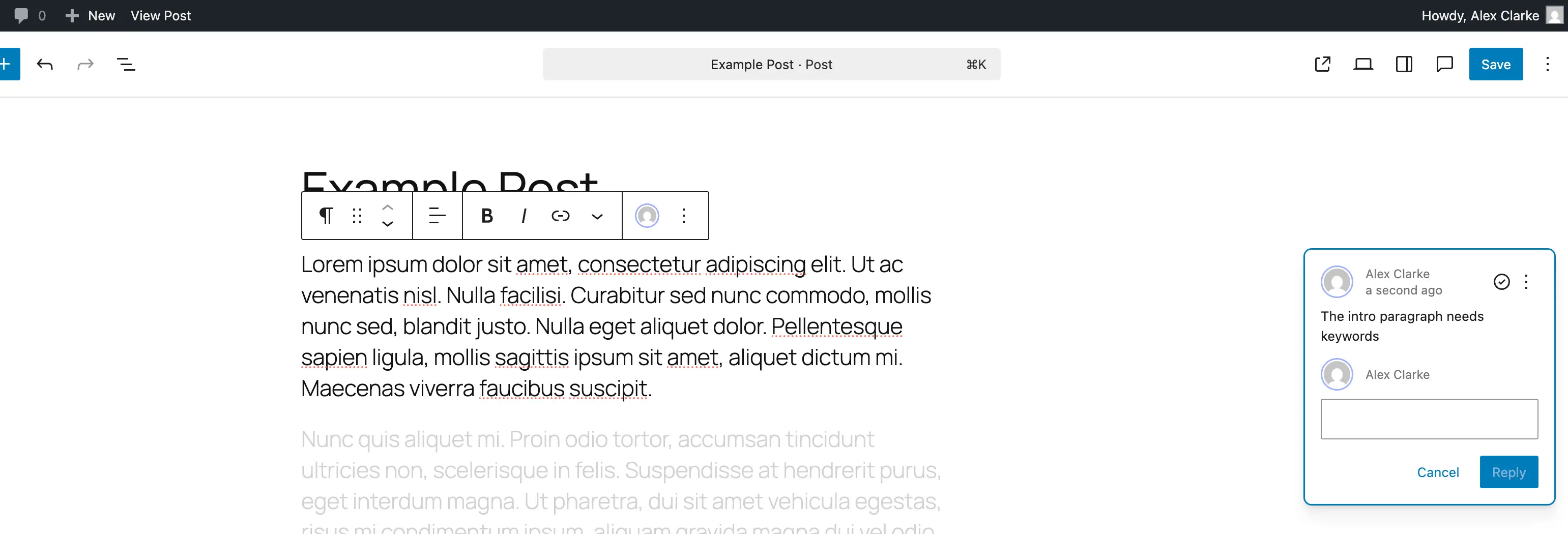
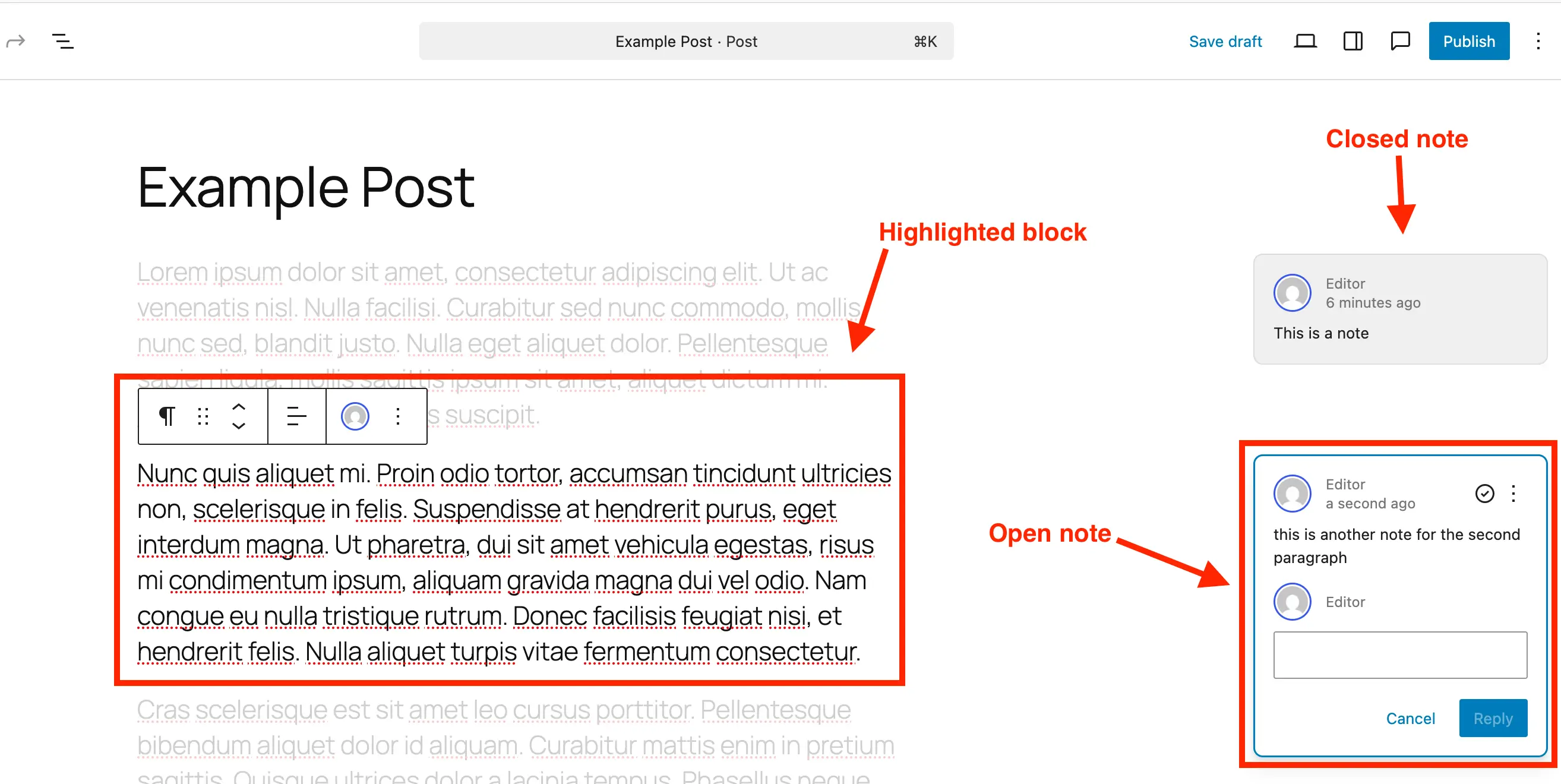
When a note is active, the user interface transforms to prioritize focus. The relevant block is dynamically highlighted, while the surrounding content seamlessly fades into the background. This visual isolation ensures that reviewers can concentrate entirely on the targeted element without cognitive overload from the broader page layout.
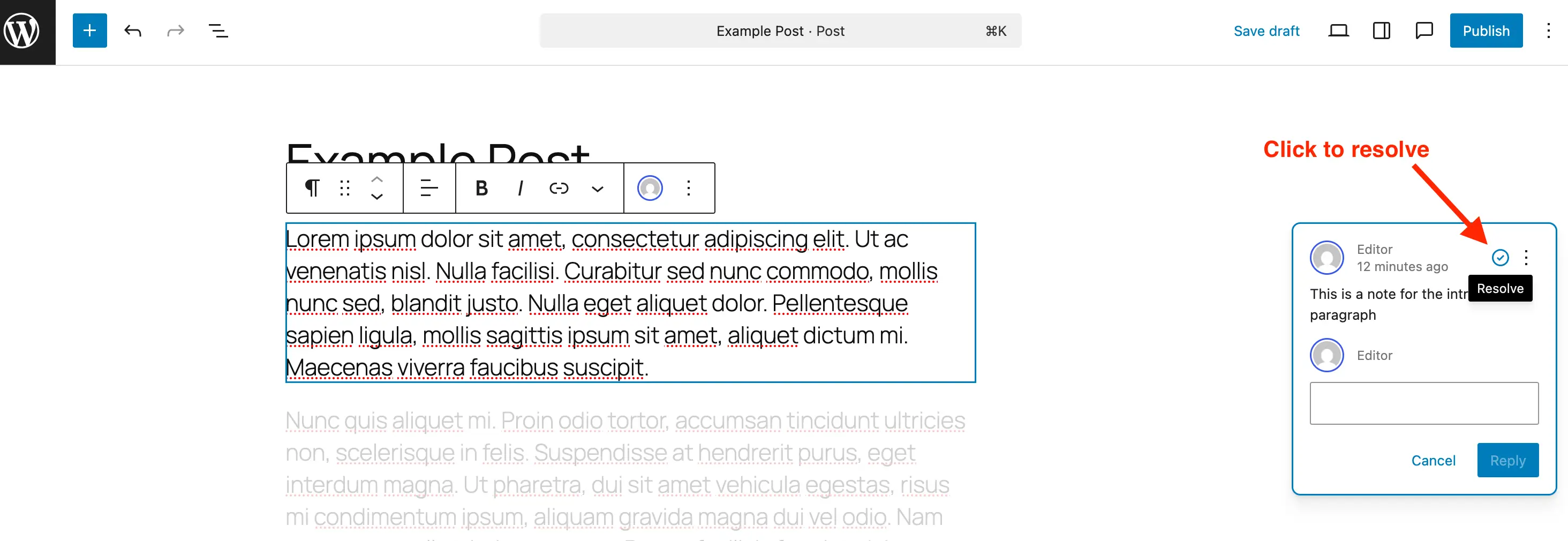
The user interface for managing these notes mirrors standard collaborative applications. Notes appear as structured comment cards along the right-hand margin of the workspace, displaying the author’s credentials, a timestamp, and an interactive reply field. When a piece of feedback is addressed, users can click a resolve icon. Resolved notes are archived within the central Notes panel, ensuring a permanent audit trail of editorial decisions while decluttering the active workspace. For administrators concerned about database bloat—particularly on high-traffic enterprise sites maintaining millions of posts—notes can also be permanently deleted once their utility has expired.
Step-by-Step Implementation and Workflow Management
Integrating notes into a daily publishing workflow requires minimal technical onboarding. For content creators and editorial teams, the process is straightforward:
- Navigation and Selection: Open any standard post or page within the block editor, and select the specific target block—such as a heading, paragraph, or media element—that requires critique.
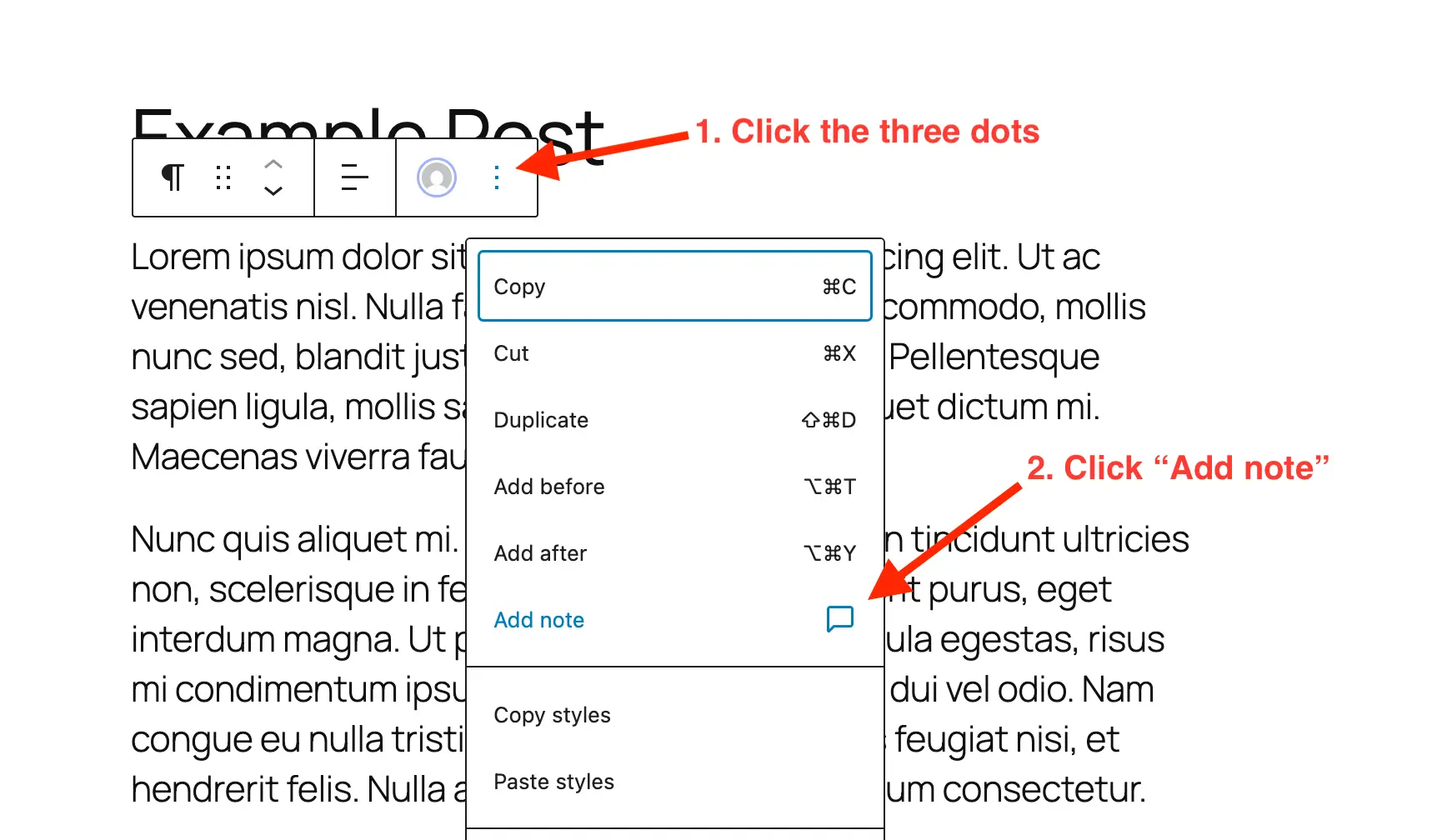
- Invocation: Access the block’s specific contextual options via the inline toolbar’s three-dot menu, and select the "Add Note" command.
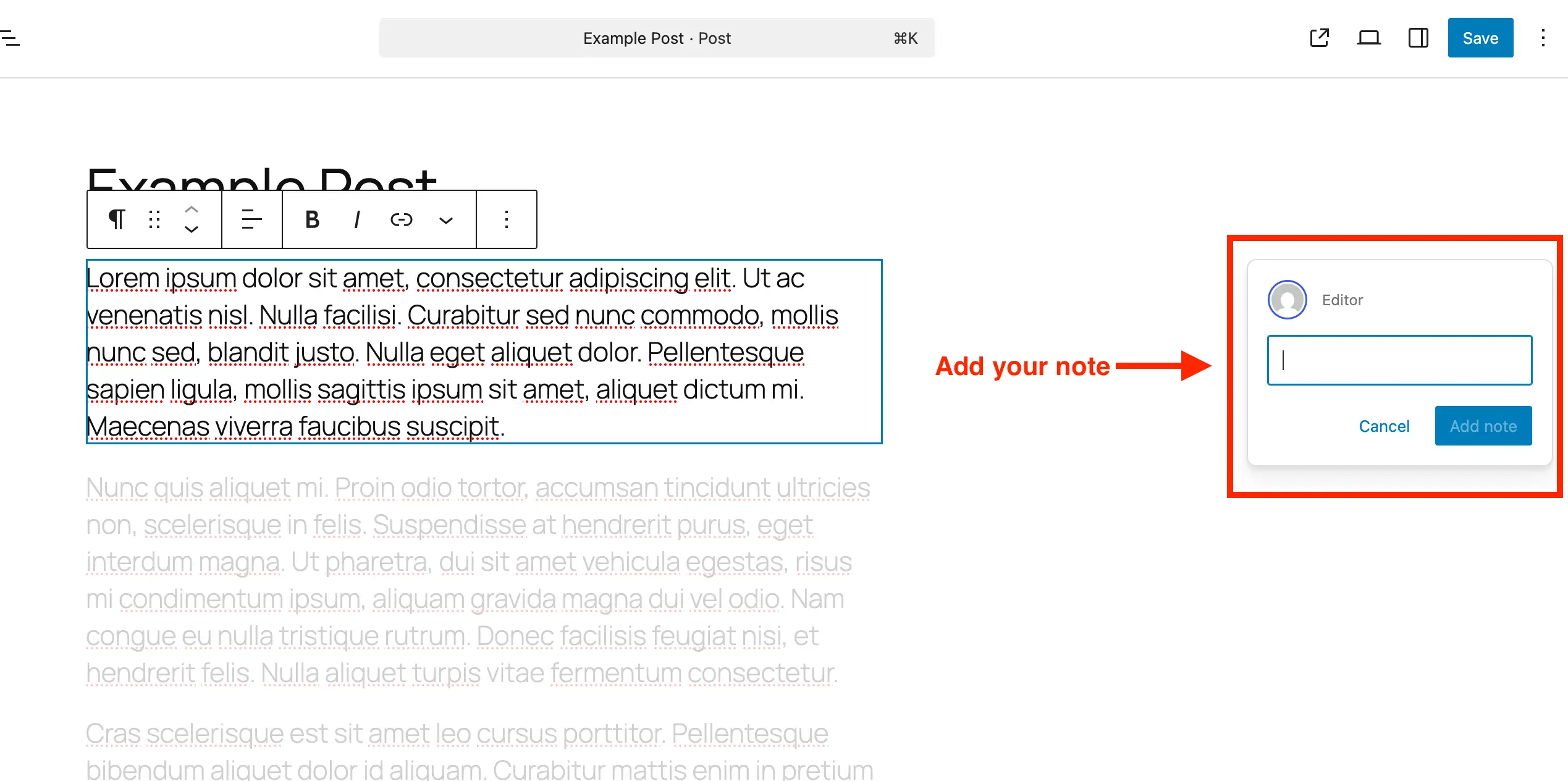
- Drafting Feedback: A designated input field opens in the right-hand sidebar. As the reviewer types, the text box automatically expands to accommodate multi-line commentary.
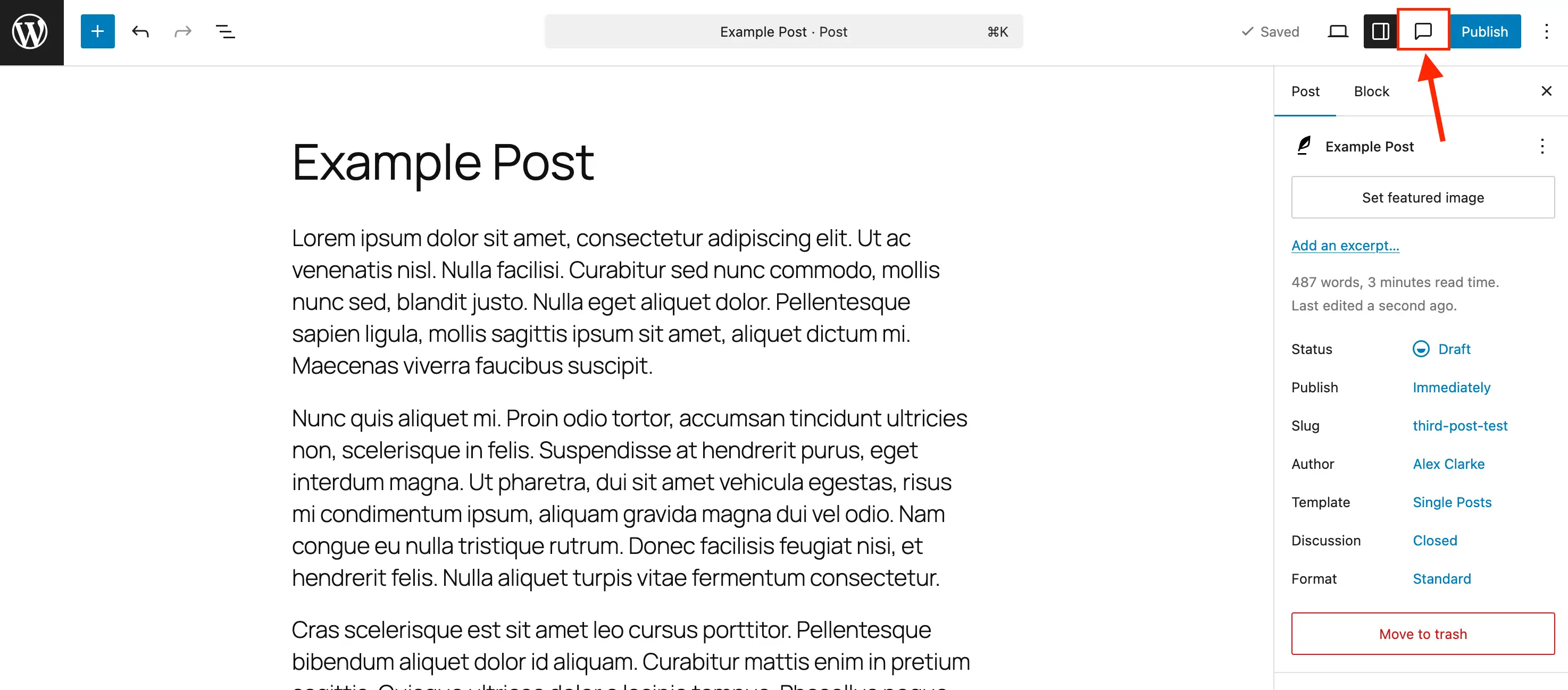
- Review and Resolution: Editors can open the centralized Notes panel via the toolbar’s comment-bubble icon to view all active annotations in a consolidated list. Once revisions are complete, selecting the checkmark icon marks the note as resolved, while the three-dot menu offers options for complete deletion or reopening the thread if subsequent adjustments are required.
Technical Configuration for Custom Post Types
While Notes are enabled by default for standard WordPress posts and pages, developers managing bespoke digital architectures often utilize custom post types (CPTs) for portfolios, products, directories, and specialized content hubs. By default, these custom structures do not automatically inherit editor enhancements unless explicitly declared during registration or modified via programmatic hooks.
For developers registering custom post types manually, support for notes must be explicitly defined within the editor arguments. This is achieved by passing the parameter 'notes' => true inside the supports array, as demonstrated in the following implementation:
register_post_type( 'book', [
    'label' => 'Books',
    'public' => true,
    'show_in_rest' => true,
    'supports' => [
        'title',
        'editor' => [ 'notes' => true ],
        'author',
    ],
] );
For legacy systems where custom post types are already established, developers can programmatically inject Notes support without disrupting existing configurations. By hooking into the initialization sequence, administrators can merge the notes argument into current editor supports across an array of designated post types:
/**
 * Enable editor notes for custom post types.
 */
add_action( 'init', function()
    $post_types = [ 'MY_POST_TYPE_1', 'MY_POST_TYPE_2' ];
    foreach ( $post_types as $post_type )
        $supports = get_all_post_type_supports( $post_type );
        $editor_supports = array( 'notes' => true );
        if ( is_array( $supports['editor'] ) && isset( $supports['editor'][0] ) && is_array( $supports['editor'][0] ) )
            $editor_supports = array_merge( $editor_supports, $supports['editor'][0] );

        add_post_type_support( $post_type, 'editor', $editor_supports );

 );
Conversely, organizations that prefer a pristine, unencumbered editing environment—or those concerned about unauthorized client tampering—can disable the feature entirely for specific post types. By utilizing a simple filter on the post type arguments, administrators can strip the notes capability from default pages or posts:
/**
 * Disable Notes via post type args filter.
 */
add_filter( 'register_post_type_args', function( $args, $post_type )
    $post_types = [ 'post', 'page' ];
    if ( in_array( $post_type, $post_types, true ) && isset( $args['supports']['editor']['notes'] ) )
        unset( $args['supports']['editor']['notes'] );

    return $args;
, 10, 2 );
Industry Implications and Broader Impact on Agency Workflows
The operational implications of native in-editor notes extend far beyond simple convenience; they signal a fundamental evolution in how digital agencies, corporate marketing departments, and independent publishers interact with the world’s most popular content management system.
For web development and digital marketing agencies, client onboarding and revision cycles have long represented a major source of billable friction. Clients reviewing staging sites frequently struggled to articulate layout changes accurately, leading to misinterpreted directives, elongated project timelines, and strained client-agency relationships. By keeping clients within the native WordPress dashboard—where feedback is tethered permanently to the exact UI component in dispute—agencies can drastically reduce ambiguity.
Furthermore, data privacy and security compliance officers will likely welcome this development. Utilizing third-party collaboration tools often required exporting sensitive drafts, proprietary copy, or pre-released product imagery to external SaaS platforms governed by separate terms of service. Keeping the entire review cycle internal to a securely hosted WordPress installation ensures that confidential enterprise data remains protected behind corporate firewalls and standard server-side security protocols.
Ultimately, WordPress Notes represent a mature step forward in content operations. By bridging the historical gap between content creation and editorial oversight, the platform removes unnecessary operational hurdles, empowering teams to produce polished, high-quality digital experiences with unprecedented efficiency.