Bot Traffic Now a Critical Infrastructure Challenge for WordPress, Kinsta Report Reveals.

Automated traffic, once considered a peripheral concern for website administrators, has escalated into a fundamental infrastructure challenge for WordPress site owners, according to a recent report by Kinsta. The "AI & Bot Traffic Report," which analyzed over 10 billion requests across Kinsta’s managed infrastructure, highlights that this pervasive bot activity is no longer merely a security footnote or an analytics anomaly but a systemic issue demanding strategic attention. This shift underscores a broader industry trend where sophisticated automation is increasingly impacting web performance, resource consumption, and data integrity.
The report details how malicious and inefficient crawlers are increasingly targeting dynamic endpoints, becoming ensnared in query-string loops, effectively bypassing caching mechanisms, and generating traffic patterns that deviate significantly from conventional indexing behaviors. This emergent landscape presents itself more as widespread, broken automation rather than benign web crawling. Consequently, robust bot protection has transitioned from an optional add-on to an indispensable component of maintaining a healthy and efficient WordPress presence.
In response to this evolving threat, Kinsta has introduced its proprietary bot protection solution, a built-in tool designed to empower WordPress site owners to identify, manage, and mitigate unwanted automated traffic directly through the MyKinsta dashboard. This development, however, has naturally prompted questions from users already leveraging Cloudflare for their web security and performance needs, particularly regarding the interplay between Kinsta’s offering and Cloudflare’s various bot management tools. A recent "Bot Traffic Reality Check" webinar hosted by Kinsta, featuring insights from Director of Engineering Laszlo Farkas and CTO Daniel Pataki, addressed these crucial distinctions and provided clarity on optimal deployment strategies.

The Escalating Bot Threat to WordPress
The digital ecosystem has witnessed a dramatic surge in automated traffic over the past decade. While beneficial bots, such as legitimate search engine crawlers, contribute to the web’s functionality, a significant portion consists of malicious or resource-intensive bots. These include scrapers harvesting content or pricing data, spambots attempting to post unsolicited comments, credential stuffing bots aiming to compromise user accounts, and sophisticated AI crawlers that, while not inherently malicious, can consume excessive server resources. Industry reports frequently indicate that automated traffic can constitute anywhere from 30% to over 50% of all internet traffic, a substantial portion of which can be detrimental.
WordPress, as the world’s most popular Content Management System (CMS) powering over 40% of all websites, presents a particularly attractive target for bot operators. Its extensive ecosystem of themes and plugins, while offering unparalleled flexibility, also introduces a larger attack surface. Bots can exploit known vulnerabilities in outdated software, attempt brute-force attacks on login pages, or simply overwhelm server resources by relentlessly requesting uncached or dynamic content. The Kinsta report’s finding that bots are bypassing cache and getting stuck in query-string loops directly points to these resource-draining activities, which translate into higher hosting costs, slower site performance for legitimate users, and skewed analytics data.
Kinsta’s Strategic Response: A WordPress-Centric Bot Protection
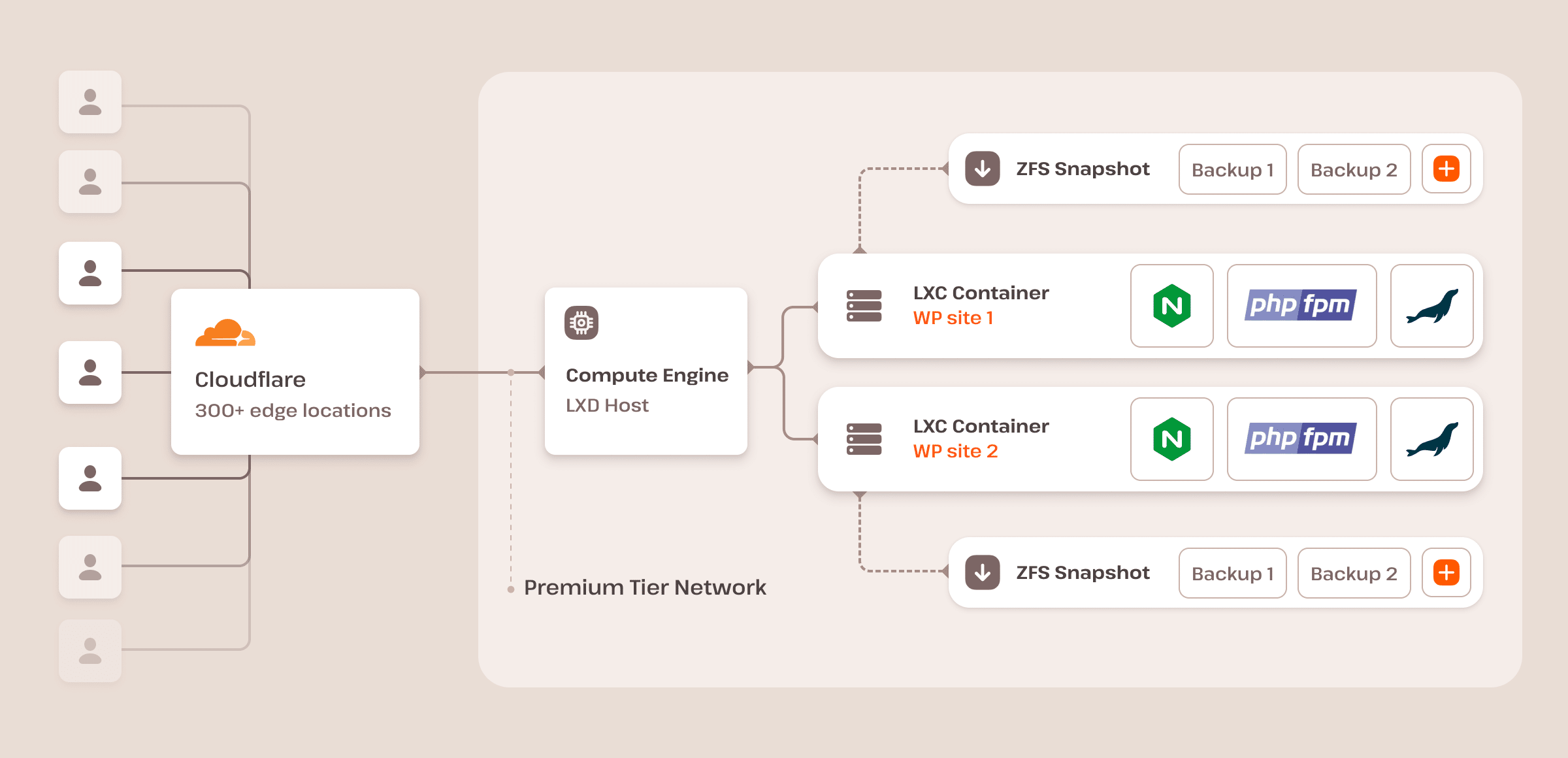
Understanding the unique challenges faced by WordPress users, Kinsta developed its bot protection as a specialized solution. While Kinsta’s underlying hosting infrastructure, including its CDN, WAF (Web Application Firewall), and DDoS mitigation, leverages Cloudflare’s robust global network, its bot protection layer introduces WordPress-specific intelligence. As Laszlo Farkas, Kinsta’s Director of Engineering, elucidated, "We use the same infrastructure as Cloudflare. We have the same knowledge and same options as Cloudflare, but we have the deep expertise to have a better default sets we can give our customers to handle WordPress traffic." This distinction is critical: Kinsta’s solution is not merely a re-badged Cloudflare product but an intelligently layered service optimized for the intricacies of the WordPress environment.
Kinsta’s bot protection enhances Cloudflare’s foundational bot detection engine by applying its own classification rules. For instance, while Cloudflare assigns a machine learning-based bot score (1-99), Kinsta can reclassify an AI crawler making an unusually high volume of requests as an "excessive-rate AI crawler" and challenge it, even if Cloudflare initially identifies it as a verified bot. This granular, WordPress-aware approach allows Kinsta to tailor its defenses to common WordPress traffic patterns, specific endpoints, and known automation or integration behaviors, offering a more precise and effective defense than a general-purpose solution.
Navigating Cloudflare’s Bot Protection Landscape
To fully appreciate Kinsta’s offering, it’s essential to understand the varying tiers of bot protection provided by Cloudflare itself:
-
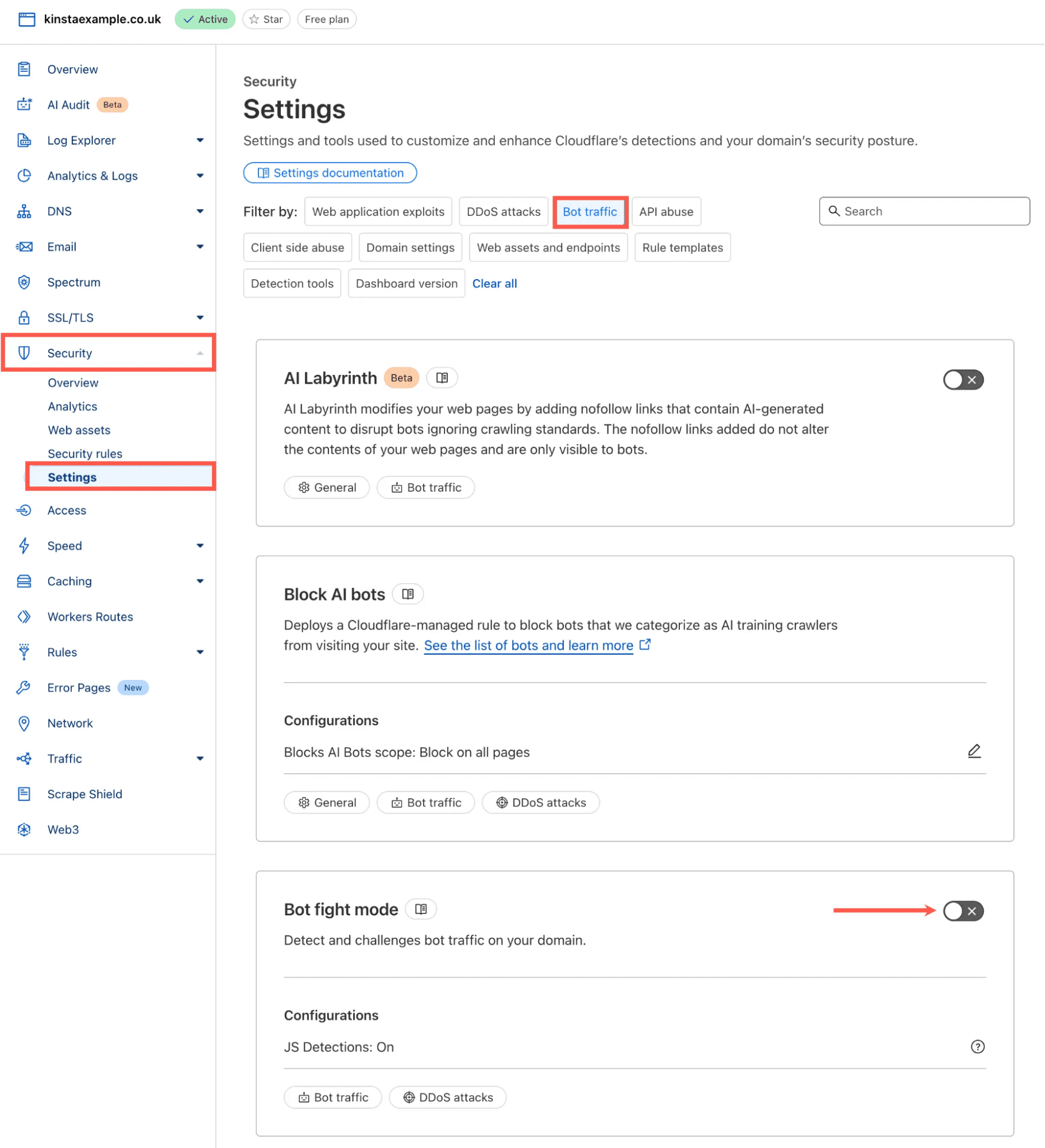
Cloudflare Bot Fight Mode: This is Cloudflare’s most basic bot mitigation, available across all plans, including the Free tier. It operates as a simple on/off toggle, offering broad protection without requiring complex configuration. Its primary advantage is ease of use. However, its significant limitation lies in its lack of granular control. Bot Fight Mode applies to entire domains and cannot be selectively bypassed or customized using WAF custom rules or Page Rules, as it does not integrate with Cloudflare’s Ruleset Engine. This inflexibility can be problematic for WordPress sites that rely on legitimate automated traffic, such as API clients, monitoring tools, or specific plugin integrations. If Bot Fight Mode inadvertently challenges essential traffic, the only recourse is often to disable it entirely or upgrade to a more advanced plan.
-
Cloudflare Super Bot Fight Mode: Available on Pro, Business, and Enterprise plans (without the dedicated Bot Management add-on), Super Bot Fight Mode offers a greater degree of control. Users can define actions (allow, challenge, or block) for broader traffic categories like "definitely automated," "likely automated," and "verified bots." Crucially, unlike its simpler counterpart, Super Bot Fight Mode runs on Cloudflare’s Ruleset Engine, allowing for the creation of WAF custom rules with "Skip" actions to carve out specific exceptions. While offering more flexibility than Bot Fight Mode, it still operates at a broad domain level and lacks the per-endpoint targeting or granular, per-request bot scoring capabilities of Cloudflare’s most advanced solution.
-
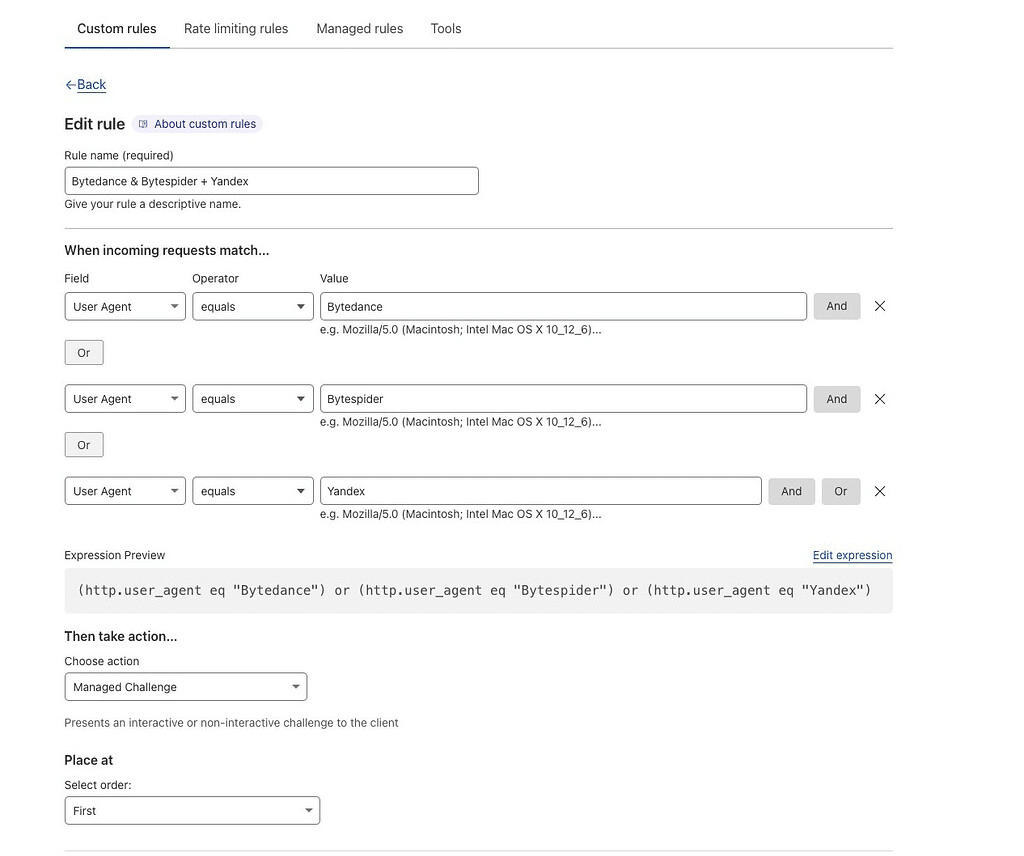
Cloudflare Bot Management and Custom Rules: This is Cloudflare’s most sophisticated and flexible bot protection offering, typically available as an Enterprise add-on. It provides a granular bot score (1-99) for every incoming request, enabling users to implement highly customized actions via WAF custom rules or Workers. These rules can leverage a wide array of signals, including bot score, URI path, country, ASN, IP range, headers, and user agent. This level of control allows for highly specific scenarios, such as challenging low-scoring requests on a login page while leaving a public blog section entirely untouched. However, this immense flexibility comes with significant operational responsibility. Users are required to deeply understand their traffic patterns, meticulously build and test rules, monitor for false positives, and continuously fine-tune the configuration as bot behaviors evolve. It demands ongoing expertise and dedicated resources.
The Kinsta Advantage: Bridging Simplicity and Sophistication for WordPress
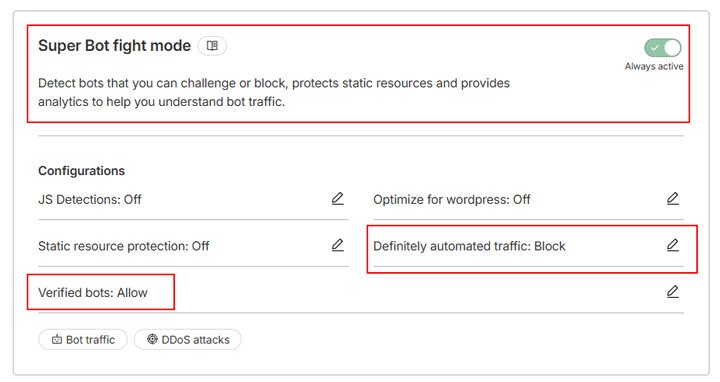
Kinsta bot protection strategically positions itself between Cloudflare’s basic Bot Fight Mode and the highly complex Bot Management with custom rules. It offers a managed, WordPress-specific protection layer that provides more intelligence than a simple toggle without demanding the user to develop and maintain an entire custom bot management strategy.
Key features and advantages of Kinsta’s approach include:
-
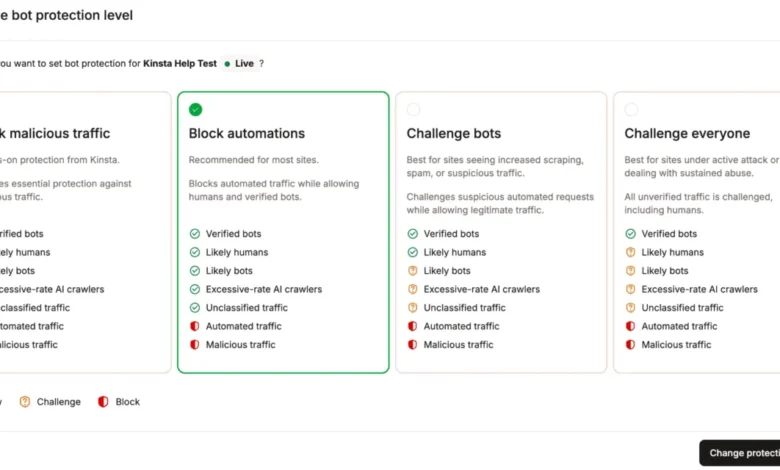
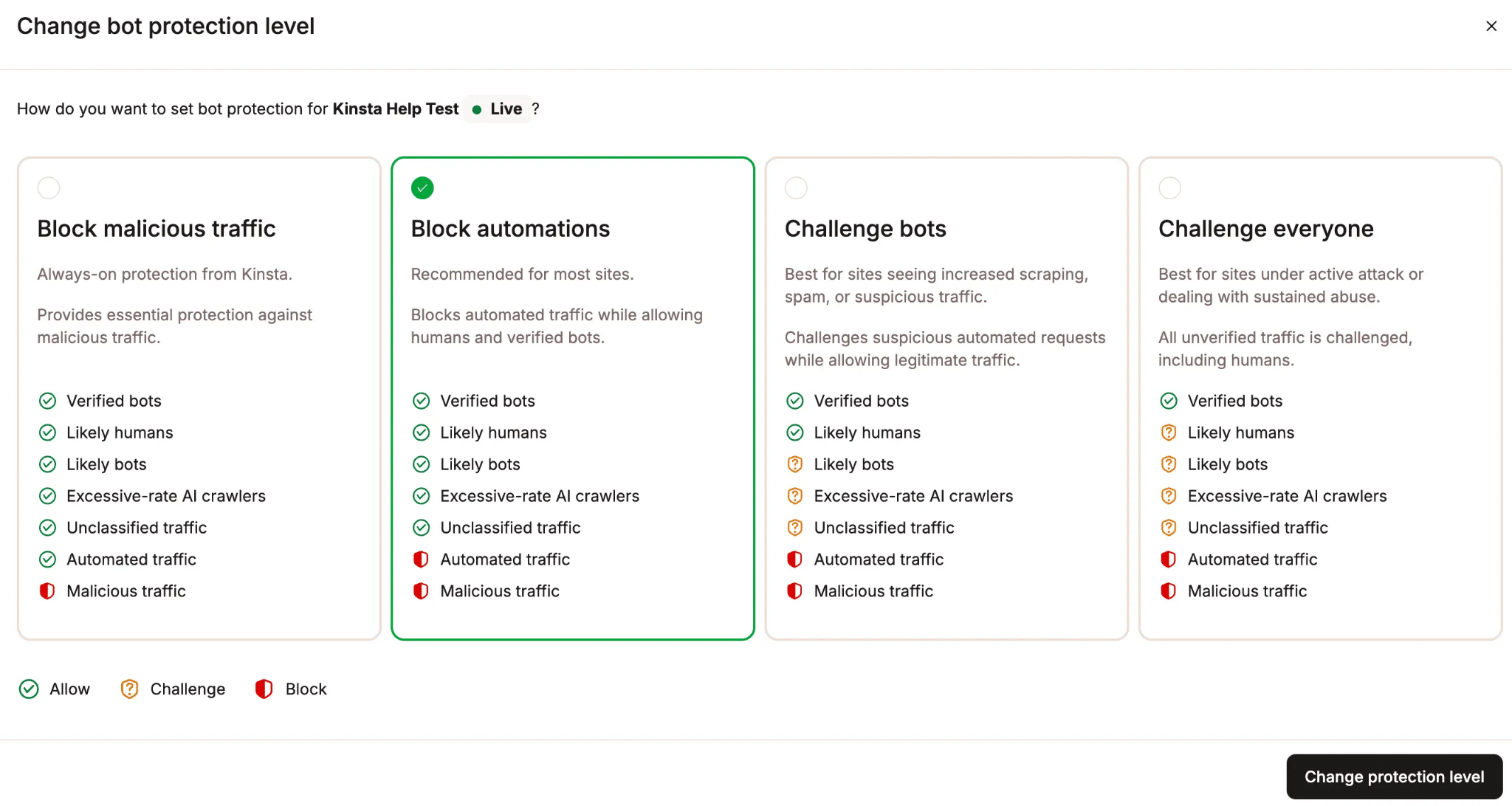
Four Protection Levels: Kinsta offers four distinct, preset protection levels that can be applied per environment:
- Off: No bot protection applied.
- Low: Challenges only the most malicious and obviously broken bots.
- Medium: Challenges a broader range of suspicious automated traffic, balancing protection with minimal human impact.
- High: The strictest setting, challenging almost all automated traffic not explicitly whitelisted, ideal for sites experiencing severe bot attacks.
This per-environment configuration allows for flexible deployment, such as running a stricter setting on a production site while maintaining a more permissive setting on a staging environment. Challenges are designed to be largely invisible to legitimate human visitors, often involving browser-based checks or background validation, with a successful clearance typically lasting for at least 10 days for the same browser and IP.
-
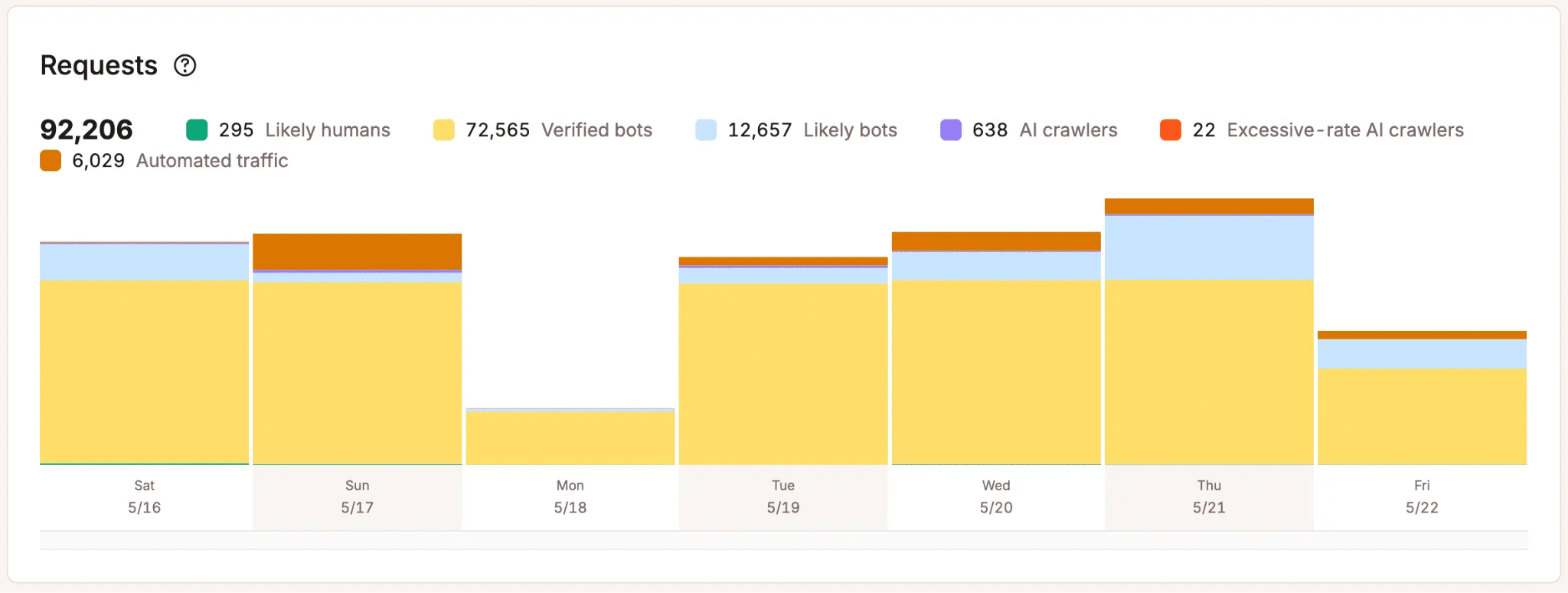
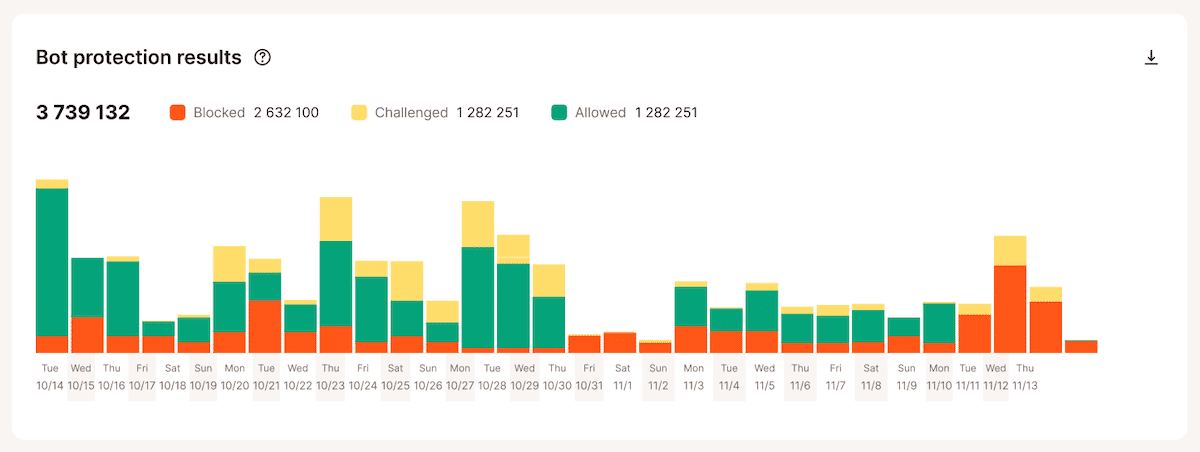
Detailed Traffic Classification: MyKinsta Analytics provides comprehensive insights into how every request is classified and handled. Users can view metrics on "likely humans," "verified bots," "likely bots," "unclassified traffic," "automated traffic," "malicious traffic," and "excessive-rate AI crawlers." Crucially, it also reports on how each request was ultimately handled: allowed, challenged, or blocked. This granular distinction is vital because not all automated traffic is unwanted; legitimate tools, API integrations, or uptime monitors are automated but necessary. Kinsta’s system avoids the blunt "allow or block" dichotomy, offering a more nuanced approach essential for complex WordPress sites.
-
Managed Allow List for WordPress: Recognizing that WordPress sites rely heavily on legitimate automated activities (REST API requests, scheduled tasks, plugin integrations, e-commerce workflows, SEO tools), Kinsta provides a "Allow typical WordPress automations" toggle. This activates a managed allowlist of trusted WordPress endpoints and services, preventing stricter bot protection from interfering with essential site functionality. Users can also add specific exceptions via IP address, path, or user agent under "Always Allow" for custom integrations. This managed approach relieves customers from the burden of independently identifying and whitelisting necessary services.
-
Dedicated AI Crawler Control: Kinsta deliberately separates AI crawler management from general bot protection. While some AI crawlers are respectful, others can be aggressive or hit resource-intensive paths. A dedicated "Block AI crawlers" toggle allows users to block all AI crawlers, including verified ones, without affecting legitimate search engine crawlers like Googlebot or Bing. This separate control acknowledges that AI crawler traffic often requires different management decisions than general malicious bot traffic.
-
Bulk Controls for Agencies: For agencies managing multiple WordPress sites, Kinsta offers bulk actions directly from the WordPress sites list. This enables users to adjust protection levels, block AI crawlers, or update the WordPress automation allowlist across numerous environments simultaneously, streamlining management tasks.
-
Integrated WordPress Hosting Support: Bot traffic issues are rarely isolated; they can often be intertwined with other aspects of the WordPress stack, such as plugin conflicts, misconfigured integrations, or legitimate marketing campaigns. With Kinsta bot protection, support is provided by the same team that already understands the user’s hosting environment. This integrated support eliminates the need for customers to correlate data from disparate dashboards and communicate with separate vendors, offering a more efficient resolution process.
Addressing Concurrent Use: Cloudflare and Kinsta Bot Protection
One of the most frequently asked questions revolves around running Cloudflare’s own bot features alongside Kinsta bot protection. While technically feasible, Kinsta strongly advises against it. Laszlo Farkas highlighted the potential for "unnecessary friction," explaining that "a visitor could end up seeing multiple managed challenges instead of just one at their first visit." Daniel Pataki reinforced this during the webinar, stating, "You can use both, but there’s no real reason to. It’s much safer just to use one or the other." The primary downside is redundancy and a degraded user experience due to repeated challenges, not a broken setup.
Furthermore, Kinsta explicitly cautions against placing another CDN, reverse proxy, or WAF (including a self-managed Cloudflare account actively proxying traffic with its WAF or bot features) in front of a Kinsta site while Kinsta bot protection is enabled. When an external service intercepts and processes traffic first, Kinsta loses visibility into the true origin of each request. This obfuscation makes it impossible for Kinsta’s Bot Protection to reliably differentiate between automated and human traffic, rendering its protection ineffective. If users are unsure about their current Cloudflare setup’s compatibility, Kinsta Support is the recommended first point of contact before making any changes.
Monitoring and Analytics: A Tale of Two Dashboards
When it comes to monitoring bot traffic, both Cloudflare and Kinsta offer valuable, yet distinct, analytical capabilities:
-
Cloudflare’s Forensic Depth: Cloudflare provides extensive flexibility for investigation, allowing users to drill into individual requests with custom filters and search on nearly any request attribute. This makes it an excellent tool for identifying patterns and conducting deep forensic analysis during specific incidents. However, Cloudflare’s bot analytics are often based on sampled data, meaning they may not represent a full count of every single request. This makes it less reliable for precise, aggregate traffic numbers.
-
Kinsta’s Accurate Platform Metrics: Kinsta, conversely, reports on 100% of all requests hitting a site, presenting aggregated hourly and daily statistics within MyKinsta. This comprehensive, unsampled data makes Kinsta the superior source for accurate, platform-level counts and long-term traffic trends. While it may not offer Cloudflare’s ad-hoc, drill-down filtering for granular forensic investigation, its accuracy for overall metrics provides a trustworthy foundation for understanding site performance and bot impact over time.
Strategic Recommendations for WordPress Site Owners
The choice between Kinsta bot protection and Cloudflare’s advanced bot tools ultimately depends on an organization’s specific needs, internal expertise, and willingness to manage security configurations:
-
Managed WordPress Protection (Kinsta): For the vast majority of WordPress sites hosted on Kinsta, especially agencies managing multiple clients, teams without dedicated security personnel, or businesses prioritizing core operations over security configuration, Kinsta bot protection is the optimal default. It offers robust, WordPress-aware defense with minimal ongoing management effort.
-
Full Control and Customization (Cloudflare Advanced): Cloudflare’s advanced bot controls (Super Bot Fight Mode with custom WAF rules or full Bot Management) are better suited for organizations with in-depth knowledge of their traffic, specific requirements for per-endpoint handling, and the dedicated resources and expertise to build, test, monitor, and continuously maintain custom rule sets. This path is for those who require absolute precision and are prepared for the ongoing operational commitment. As Laszlo Farkas summarized, "If you have the expertise and the time to fine-tune this yourself, that’s probably the better choice for you. If you don’t, and you want to focus on your business rather than the nitty-gritty traffic control details, Kinsta’s solution is the better option because it’s managed, fine-tuned for WordPress, and maintained for you."
-
Avoid Redundant Solutions: In nearly all scenarios, selecting one primary bot protection layer is advisable. Running both Kinsta bot protection and Cloudflare’s bot features concurrently typically introduces unnecessary complexity and potential friction for legitimate users without providing commensurate additional security benefits.

The Future of WordPress Security: Operationalizing Bot Management
The landscape of web traffic is irrevocably altered by the proliferation of automated systems. As Daniel Pataki noted during the webinar, bots are a double-edged sword: they are essential for the web’s utility but also pose significant performance, cost, and security challenges. The era where bot protection could be treated as a static, one-time security setting is over.
For WordPress teams, the imperative is to implement solutions that effectively manage non-human traffic without transforming every site into a custom rule-building project. Kinsta bot protection is designed precisely for this role, offering a managed starting point with configurable protection levels, dedicated AI crawler controls, WordPress-aware defaults, and transparent visibility within MyKinsta. This approach signifies a broader industry shift towards operationalizing bot management as an integral, ongoing aspect of web operations, moving beyond reactive security measures to proactive, intelligent traffic control. The Kinsta AI & Bot Traffic Report and the subsequent introduction of its bot protection solution highlight a critical evolution in how hosting providers are addressing the complex and ever-growing challenge of automated web traffic.