WordPress 7.0 Introduces Groundbreaking Native AI Integration, Revolutionizing Plugin Development and Site Management


In a significant advancement for the world’s most popular content management system, WordPress 7.0 has rolled out a native AI integration that fundamentally alters how artificial intelligence features are incorporated into websites. This update, released recently, marks a pivotal shift from a fragmented, developer-heavy approach to a streamlined, centralized architecture, promising substantial benefits for both site administrators and plugin developers. The move positions WordPress at the forefront of AI-powered web development, enabling a new era of intelligent content creation and site functionality.
The Fragmented Past: AI Integration Before WordPress 7.0
Prior to the advent of WordPress 7.0, integrating artificial intelligence capabilities into a WordPress site was a cumbersome and technically demanding endeavor. Plugin developers seeking to add AI features were faced with a complex array of challenges. Each AI-powered plugin typically had to implement its own bespoke system for requesting and managing API keys, which are essential for communicating with external AI providers like OpenAI, Google Gemini, or Anthropic. This often necessitated the bundling of heavy, proprietary Software Development Kits (SDKs) directly into plugins.

The consequences of this fragmented scenario were manifold. Developers were forced to write provider-specific cURL requests, leading to increased code weight, reduced maintainability, and significant technical debt. Every time an AI provider updated its API or a developer wished to support multiple providers, substantial portions of a plugin’s network architecture might require a complete rewrite. Moreover, the independent handling of sensitive API keys by numerous plugins introduced potential security vulnerabilities, as the robustness of security measures varied widely across different third-party solutions. For site administrators, this translated into a chaotic management experience, where API keys had to be configured repeatedly across various plugins, making monitoring usage, switching models, or revoking access an arduous, multi-step process. This "wild west" approach, while innovative in its early stages, was ultimately unsustainable for the long-term scalability and security of AI within the WordPress ecosystem.
A New Paradigm: WordPress 7.0’s Native AI Architecture
WordPress 7.0 ushers in a new era with its native AI integration, establishing a unified and robust foundation for building AI-powered websites. This groundbreaking architecture features a centralized interface for configuring credentials for diverse AI providers, complemented by a powerful new PHP API. This strategic overhaul allows developers to send commands, instructions, media files, and complex data structures seamlessly, with the WordPress Core now handling the intricate details of external requests. The immediate outcome is a drastic reduction in the complexity and technical overhead previously associated with AI integration.
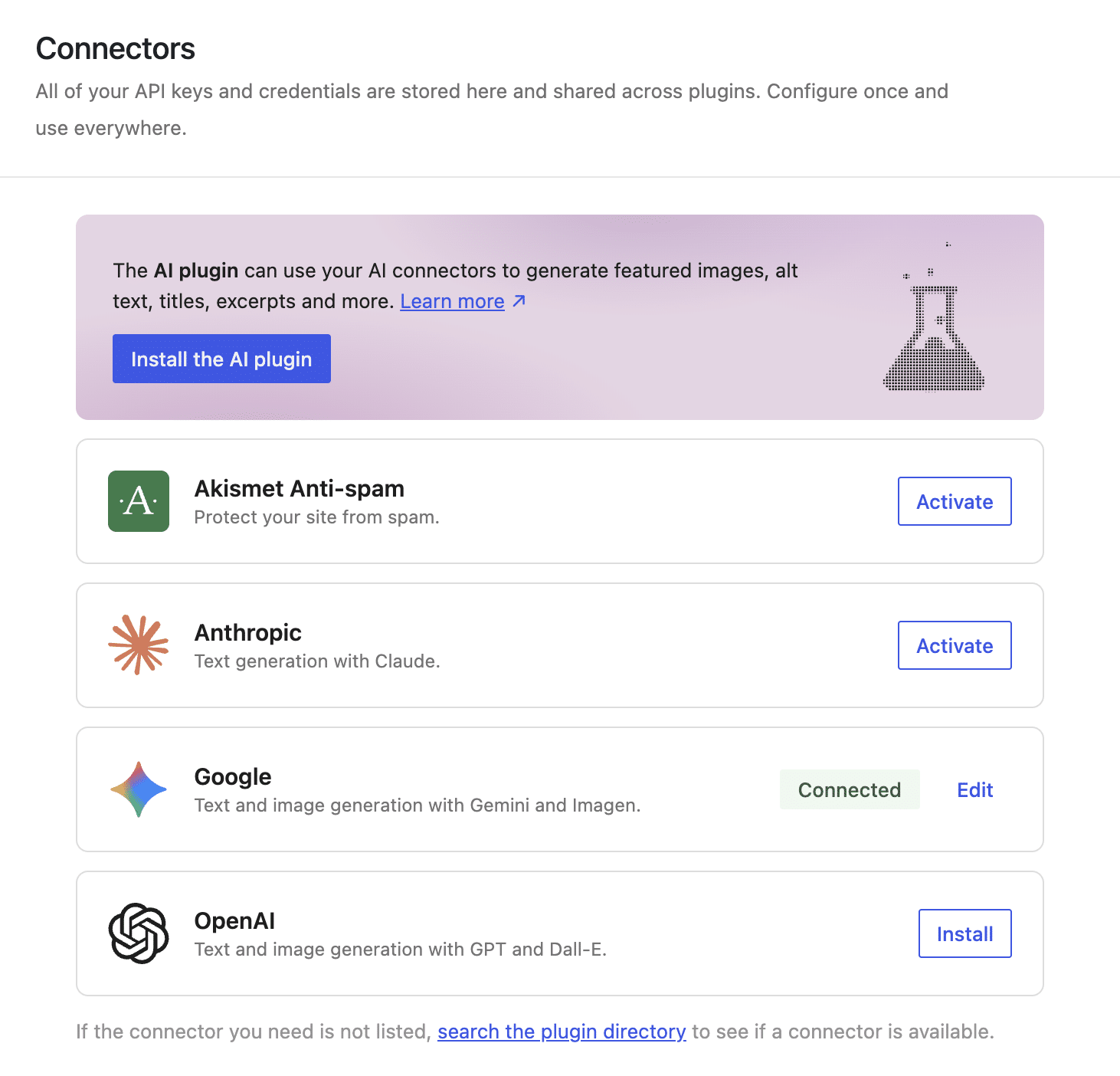
The benefits of this new architecture are profound and far-reaching. For site administrators, the days of configuring AI settings across multiple plugins are over. With WordPress 7.0, the process is dramatically simplified: install and enable plugin connectors, input API keys into the unified Connectors interface, and these AI capabilities instantly become available to all compatible AI-powered plugins across the site. Administrators gain unprecedented control, able to easily monitor AI usage, switch between preferred models, or revoke a provider’s access for all plugins with a single click, enhancing both efficiency and security.
For plugin developers, the advantages are even more transformative. The new architecture significantly enhances data security by centralizing credential management, thereby mitigating the risk of sensitive data exposure. It champions code portability, allowing plugins to function irrespective of the underlying AI provider chosen by the administrator. Most critically, it leads to a drastic reduction in technical debt. Developers no longer need to bundle heavy SDKs or write vendor-specific network logic, freeing them to focus on core plugin functionality and innovation. This abstraction layers away complexity, making AI feature development more accessible, secure, and maintainable than ever before.
The Three Pillars of the New AI Architecture
The native AI integration in WordPress 7.0 is meticulously structured across three distinct, yet interconnected, layers: the AI Connector, the AI Client, and the AI Provider. This layered approach ensures modularity, security, and flexibility.
AI Connector: Centralized Intelligence Management
The AI Connector layer represents a fundamental shift in how AI service credentials are managed within WordPress. Historically, each AI plugin developed its own system for storing and managing API keys, often involving hardcoding credentials or creating custom, isolated settings pages. This not only posed significant security risks due to dispersed sensitive data but also created a cumbersome experience for administrators.
WordPress 7.0 addresses this with a unified AI Connectors interface, a central hub within the WordPress admin dashboard for configuring all AI service providers. This centralization offers several critical benefits:
- Enhanced Security: By consolidating API key storage, the risk of exposing sensitive data through potentially poorly coded or untrustworthy third-party plugins is substantially mitigated. WordPress Core handles the secure storage and transmission of these credentials.
- Streamlined Management: Administrators only need to set up their AI providers once. If API keys need to be updated or changed, it can be done universally from a single screen, eliminating the need to reconfigure multiple plugins individually.
- Unprecedented Portability: The new architecture decouples authentication from plugin logic. This means plugins no longer need to "know" which specific AI provider is being used. Should an administrator switch providers, the plugin continues to function seamlessly without requiring a single line of code change, provided the new provider offers compatible models.
- Intelligent Provider Selection: A key breakthrough in portability is the ability for site admins to configure multiple connectors simultaneously. When a plugin triggers an AI request, WordPress intelligently selects the most suitable AI Provider and model. This selection is based on the specific configuration preferences declared by the plugin (e.g., preferred models) and the capabilities of the currently active and available models from configured providers. This ensures optimal performance and resilience.
AI Client: The Developer’s Operational Gateway
While the Connectors screen provides the configuration user interface for AI providers, the AI Client serves as the operational tool for developers, standardizing communication with AI models. It is a native software interface, primarily exposed through the global wp_ai_client_prompt() function and a unified set of PHP methods, designed to abstract away the complexities of AI model interaction.
- Drastic Reduction in Technical Debt: This is arguably the most significant advantage for developers. Before WordPress 7.0, integrating AI meant grappling with heavy, proprietary SDK libraries (e.g., OpenAI’s or Anthropic’s official libraries). Developers had to constantly monitor library versions, manage dependencies, and write extensive boilerplate code for network logic and response parsing. This vendor-specific code meant that switching AI providers required rewriting large portions of a plugin’s architecture. The AI Client solves this by transferring all this "heavy lifting" to the WordPress Core. Developers write their instructions once, and WordPress handles the translation into the model’s specific "dialect," making the plugin code entirely AI provider-agnostic.
- Standardized Interaction: The
wp_ai_client_prompt()function returns an instance of theWP_AI_Client_Prompt_Builderclass, offering a fluent interface of chainable methods. This design promotes highly readable and easy-to-write code, allowing developers to construct complex AI prompts with various content types and model configurations without dealing with raw HTTP requests or external SDKs. - Intelligent Model Preference and Fallback: The AI Client’s fluent interface includes methods like
using_model_preference(), which allows developers to declare an ordered list of preferred models for a specific task. WordPress then checks the site’s configured Connectors and selects the first available model from the plugin’s preference list. Crucially, if none of the preferred models are active, WordPress automatically falls back to the first compatible model configured on the site, ensuring the plugin remains functional even if administrator preferences change or a specific model becomes unavailable. This mechanism guarantees plugin resilience and a consistent user experience.
AI Provider: The Engines of Intelligence
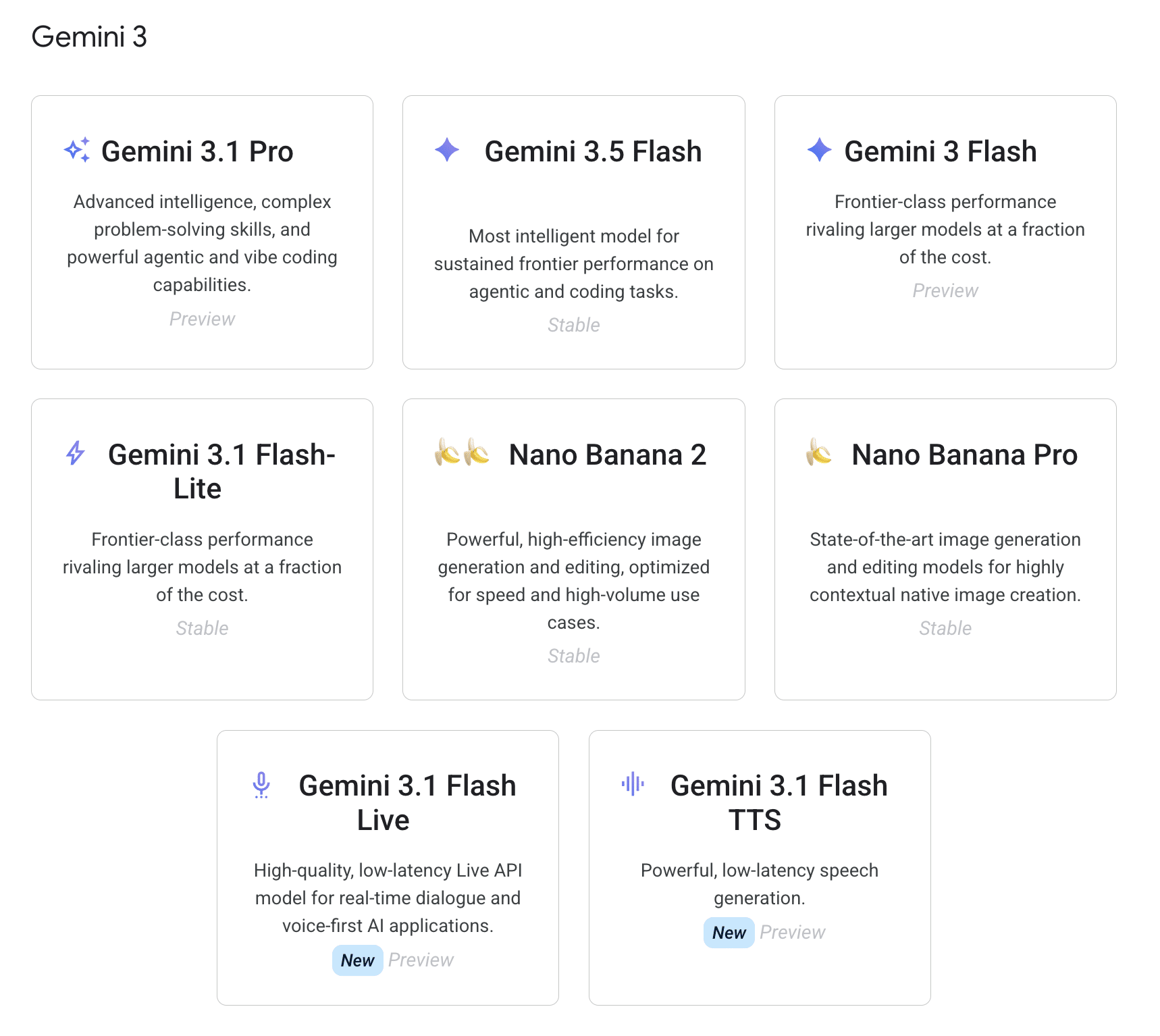
The AI Provider layer refers to the external companies that own, train, and host the Large Language Models (LLMs) that power AI capabilities. Prominent examples natively supported in WordPress 7.0 via dedicated connectors include OpenAI, Google Gemini, and Anthropic. However, the architecture is extensible, allowing developers to register additional custom AI Providers.
When a plugin’s code invokes a generation method (e.g., generate_text()) via the AI Client, WordPress compiles and sends a data payload to the chosen AI Provider through the endpoint established by the Connector. This interaction occurs behind the scenes, abstracting the complex communication protocols from the plugin.
- Diverse Model Ecosystem: Each provider offers a wide array of models, varying in capabilities, speed, and pricing. These range from text-specialized models to multimodal models that can process audio, images, and video alongside text prompts, as well as models engineered for highly specific tasks like image generation or speech-to-text conversion.
- Decoupled Selection: The models available to a WordPress site are entirely dependent on the AI providers configured by the user in the Connectors screen, not dictated by individual plugins. This reinforces the principle of flexibility and user control, allowing administrators to choose their preferred AI ecosystem without impacting plugin compatibility.
A Deep Dive into the wp_ai_client_prompt() Function
The wp_ai_client_prompt() function stands as the cornerstone of the new AI architecture, serving as the standardized interface for plugins to communicate with AI models. It eliminates the need for external libraries, provider-specific configurations, or manual HTTP requests. Instead, it acts as a universal translator, allowing developers to write their AI interaction code once, with WordPress handling the intricate "dialect" translation for each specific model.
This function does not immediately initiate an HTTP request. Instead, it instantiates and returns a WP_AI_Client_Prompt_Builder object. This object leverages a fluent interface, a design pattern that allows for method chaining, making the code highly readable and intuitive. The WP_AI_Client_Prompt_Builder class provides over 50 configuration methods to customize prompts, including:
with_file( $file_data, $mime_type ): Attaches a file (e.g., audio, image) to the prompt.using_temperature( $temperature ): Controls the randomness/creativity of the AI’s response (0.0 for deterministic, higher for more creative).using_top_p( $top_p ): Another parameter for controlling response diversity.using_system_instruction( $instruction ): Provides context or persona to the AI, guiding its behavior.as_json_response( $schema ): Instructs the AI to return a response structured according to a defined JSON schema.generate_text(): Triggers text generation.generate_image(): Triggers image generation.is_supported_for_text_generation(): Checks if the current prompt configuration is supported by any active provider.
Consider the example of transcribing an audio file and then structuring its content.
First, to accurately transcribe an audio file:
$transcription_builder = wp_ai_client_prompt(
    "Transcribe this voice note accurately into English. Return plain text only."
)
    ->with_file( $audio_base64, $mime_type )
    ->using_temperature( 0.1 ); // Low temperature for deterministic transcription

if ( ! $transcription_builder->is_supported_for_text_generation() )
    return new WP_Error(
        'no_supported_model',
        'No configured AI model can process this request. Configure a provider in Settings > Connectors.',
        array( 'status' => 400 )
    );


$transcript = $transcription_builder->generate_text();
This code snippet first prepares a text prompt, attaches the Base64-encoded audio file with its MIME type, and sets a low temperature for high accuracy. It then verifies that an active AI provider supports text generation for the given configuration before executing the transcription.
Next, to convert this raw transcript into a structured JSON object suitable for a blog post:
$schema = [
    'type'       => 'object',
    'properties' => [
        'title'    => [ 'type' => 'string' ],
        'sections' => [
            'type'  => 'array',
            'items' => [
                'type'       => 'object',
                'properties' => [
                    'heading'    => [ 'type' => 'string' ],
                    'level'      => [ 'type' => 'integer' ],
                    'paragraphs' => [ 'type' => 'array', 'items' => [ 'type' => 'string' ] ],
                    'bullet_points' => [ 'type' => 'array', 'items' => [ 'type' => 'string' ] ],
                ],
                'required'   => [ 'heading', 'level', 'paragraphs' ],
            ],
        ],
    ],
    'required'   => [ 'title', 'sections' ],
];

$structured_json = wp_ai_client_prompt(
    "Convert the following transcript into a concise, blog-ready draft in American English.n" .
    "Return JSON with a post title and body sections.n" .
    "Each section must have: heading, level (2 or 3), and paragraphs (array).n" .
    "If useful, include bullet_points (array) for short actionable lists.n" .
    "Use short, clear headings and readable paragraph text.nn" .
    "Transcript:n" . $transcript
)
    ->using_system_instruction( "You are a professional WordPress content editor. Always write in American English (use appropriate spelling, grammar, and conventions for that language variant)." )
    ->using_temperature( 0.4 ) // Slightly higher temperature for creativity in drafting
    ->as_json_response( $schema )
    ->generate_text();
Here, the developer defines a JSON schema to guide the AI’s output structure. A system instruction provides the AI with a persona ("professional WordPress content editor"), a slightly higher temperature allows for creative drafting, and as_json_response() ensures the output adheres to the defined schema. This structured JSON can then be easily parsed and mapped into native Gutenberg blocks programmatically, illustrating the power and flexibility of the new API.
Real-World Application: Generating Gutenberg-Ready Content from Audio
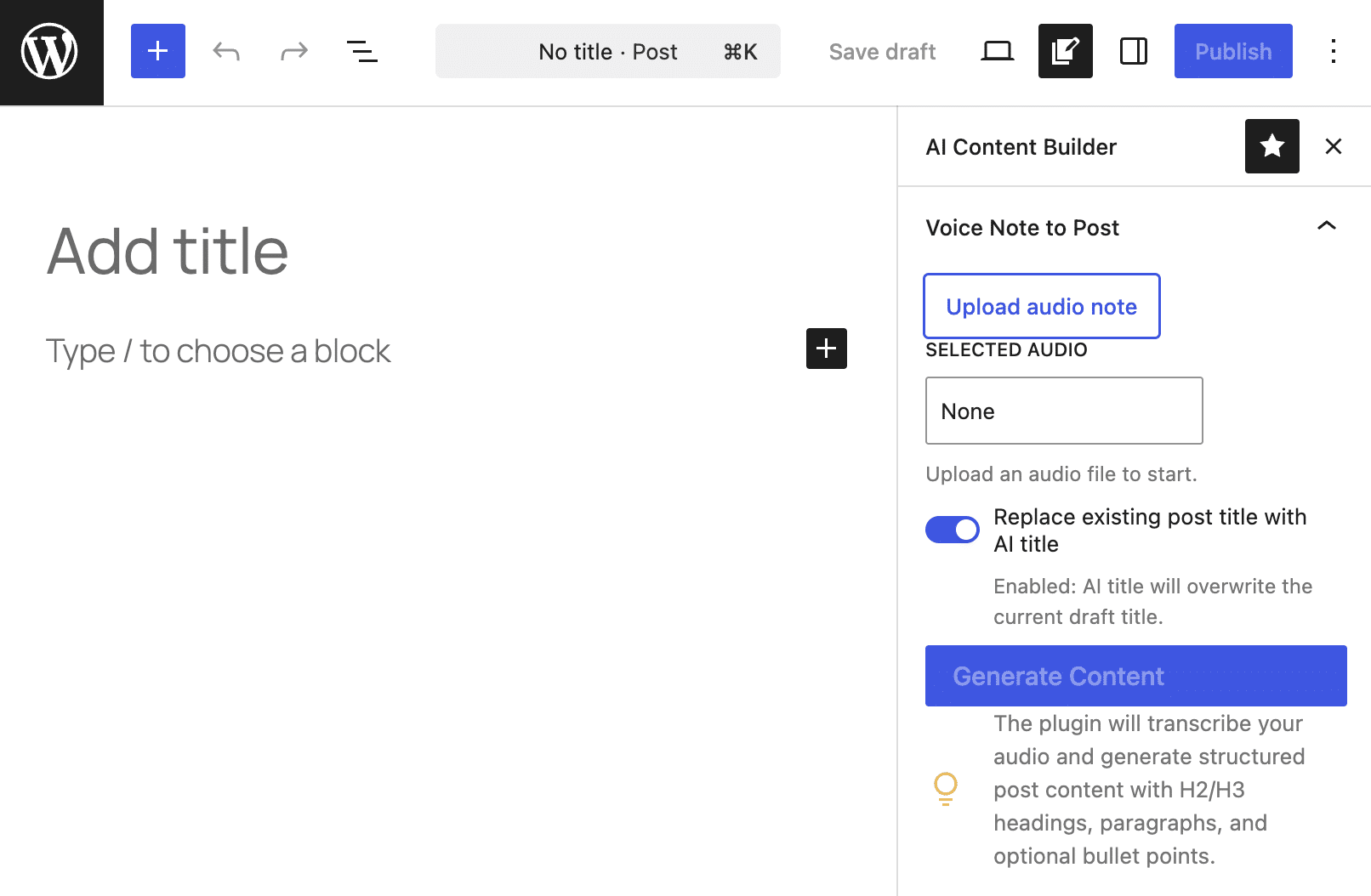
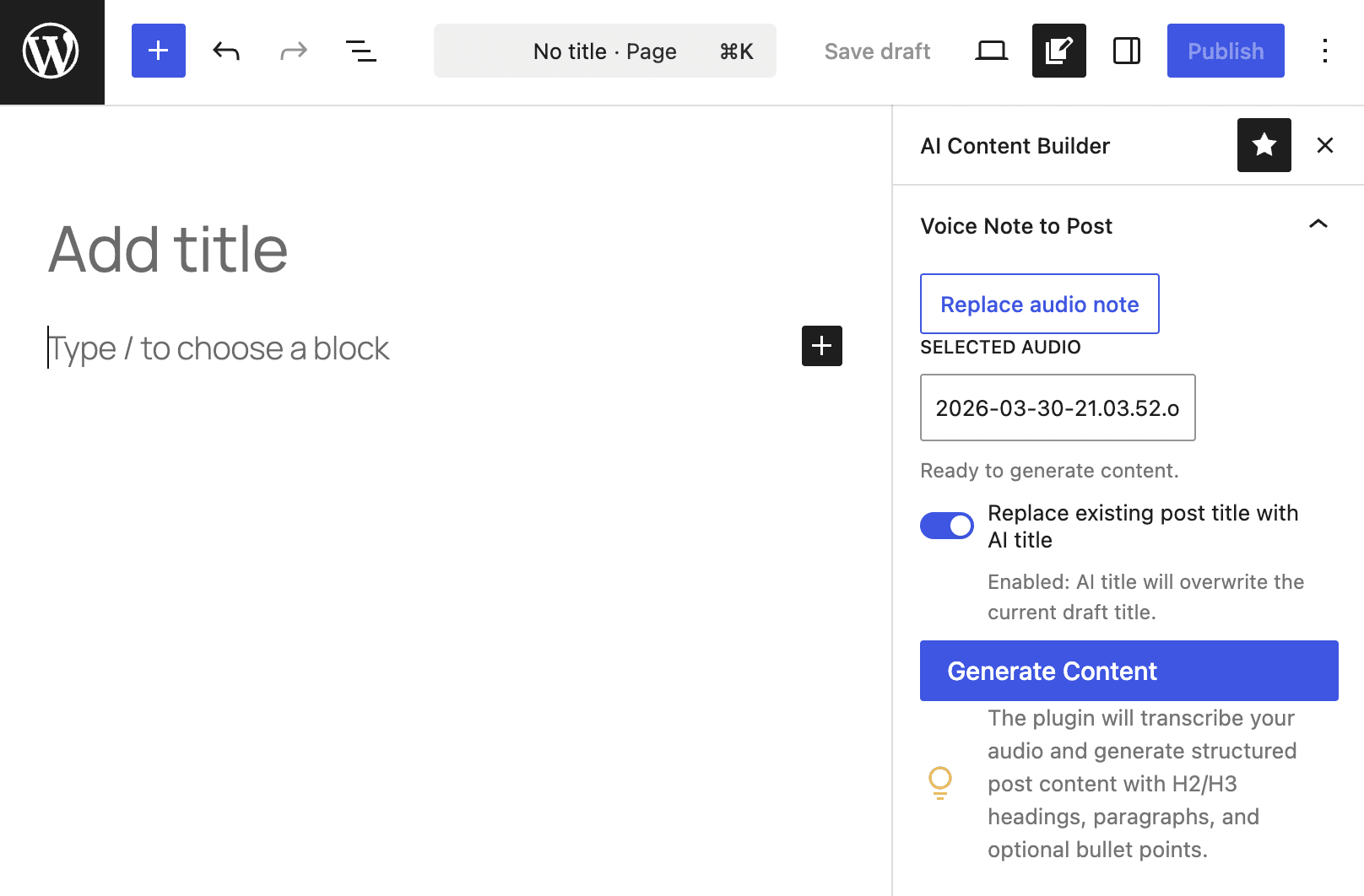
To illustrate the practical capabilities of WordPress 7.0’s AI architecture, consider an "AI Content Builder" plugin designed to generate a fully formatted blog post draft directly from an audio file. This functionality has vast applications, from turning quick voice notes into comprehensive articles to transcribing interviews into structured content.
The plugin, available on GitHub, demonstrates a lean, secure approach to AI integration, relying entirely on native WordPress Core APIs, eliminating the need for Node.js, complex build processes, or external libraries.
The core data flow of such a plugin unfolds in four distinct phases:
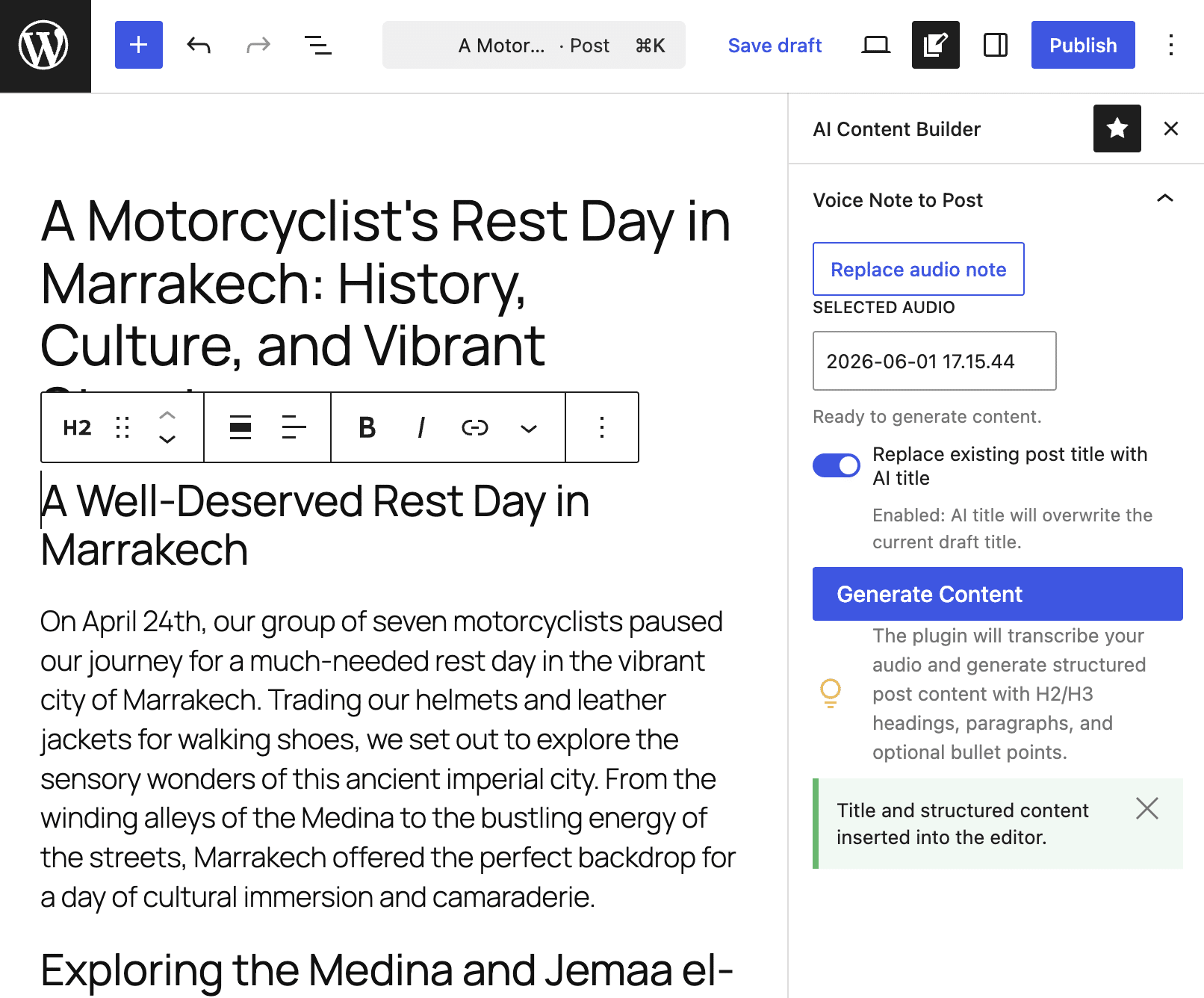
- From Browser to Server: Asynchronous REST Call: The plugin’s Gutenberg sidebar, written in JavaScript, sends the audio file ID to a custom REST API endpoint. This asynchronous call is crucial, as AI processing can take several seconds or minutes, preventing the user interface from freezing. The endpoint is secured using WordPress’s native authentication system and nonces, ensuring only authorized requests are processed.
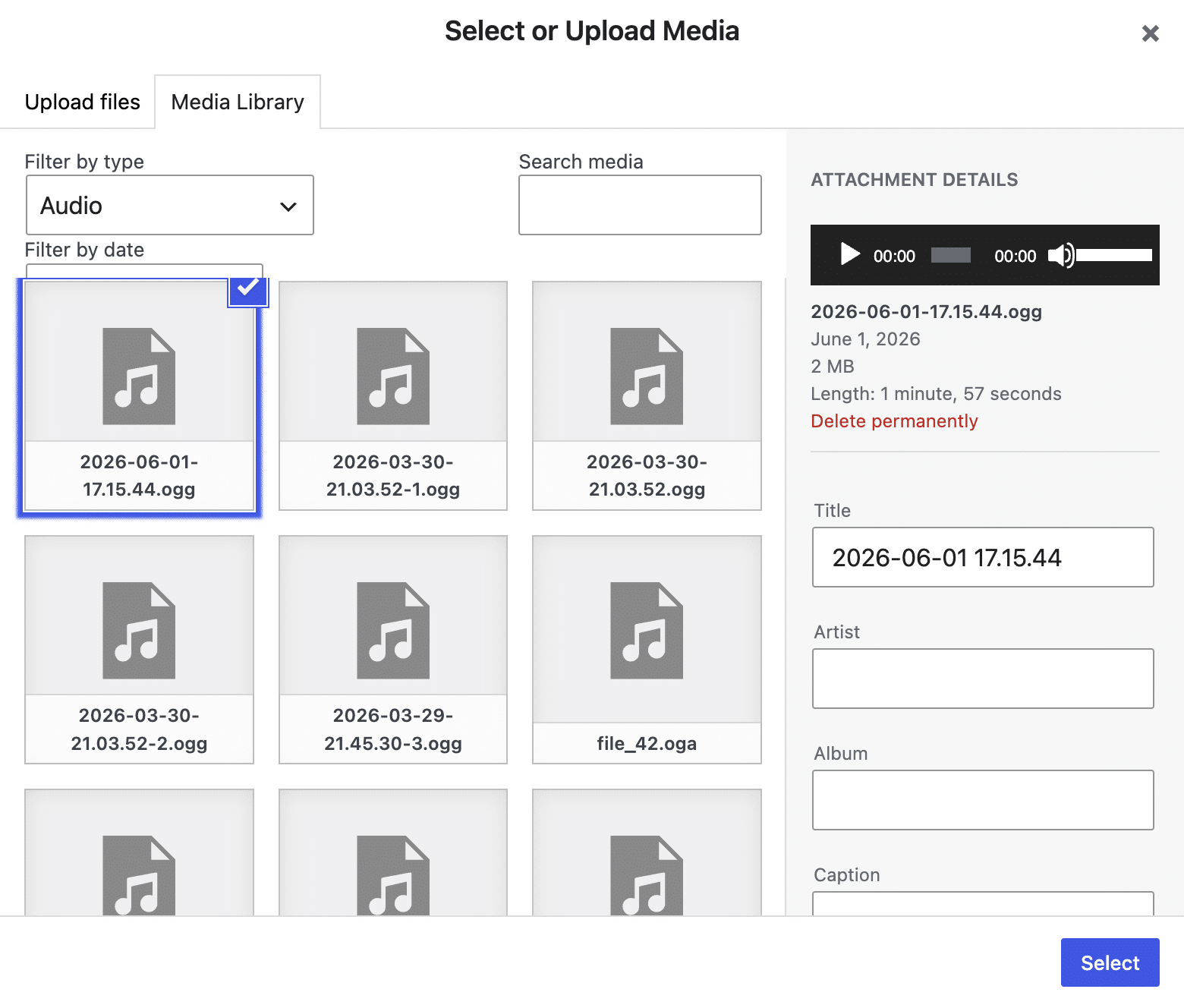
- First AI Pass: Speech-to-Text Transcription: Upon receiving the request, the PHP server retrieves the audio file from the WordPress media library. It then utilizes the
wp_ai_client_prompt()function withwith_file()andgenerate_text()to query the AI Client, extracting a raw text transcription of the audio. Robust error handling is in place to validate the audio file type and ensure AI client availability. - Second AI Pass: Content Structuring: With the raw transcript in hand, the server makes a second call to the AI Client. This time, it uses a detailed JSON schema,
using_system_instruction(), andusing_temperature()to instruct the AI to format the transcript into a structured JSON object. This object defines elements like a post title, headings, paragraphs, and bullet points, ensuring the output is immediately usable. - Data Hydration and Block Generation: The structured JSON response is sent back to the client-side JavaScript. The script then normalizes this data and programmatically maps the extracted fields (title, headings, paragraphs, lists) to native Gutenberg blocks using WordPress’s
createBlock()function. This seamless conversion transforms raw audio into a fully editable, well-structured blog post within the Gutenberg editor.
This real-world example vividly demonstrates how the new AI architecture simplifies complex tasks, making advanced AI capabilities accessible and manageable within the WordPress environment.
Broader Implications and the Future of WordPress with AI
The introduction of native AI integration in WordPress 7.0 is more than just a feature update; it’s a strategic move that redefines the platform’s future. This development is anticipated to trigger a massive wave of innovation within the WordPress ecosystem, empowering both developers and content creators.
- Accelerated Innovation in Plugin Development: By abstracting away the complexities of AI interaction, WordPress 7.0 significantly lowers the barrier to entry for developers. This is expected to lead to an explosion of new AI-powered plugins that are more secure, more performant, and easier to maintain. Developers can now focus on creative problem-solving and unique features rather than infrastructure. This reduction in technical debt (estimated by industry experts to be a significant drag on development cycles) will free up considerable resources.
- Revolutionized Content Creation: For content creators, the implications are profound. Tools that can instantly transcribe audio, generate structured drafts, summarize lengthy texts, or even create images based on simple prompts will drastically enhance productivity. The ability to transform diverse media types into ready-to-publish content will open new avenues for engaging audiences and streamlining editorial workflows, helping content producers keep pace with the ever-increasing demand for digital content.
- Enhanced Site Management and Personalization: Beyond content, the centralized AI management promises smarter site administration. Imagine AI-powered tools for SEO optimization, user engagement analysis, personalized content delivery, or even automated site maintenance, all managed from a single, intuitive interface. This could lead to more dynamic, responsive, and user-centric websites.
- Strategic Positioning of WordPress: In an increasingly AI-driven digital landscape, this native integration solidifies WordPress’s position as a robust, forward-thinking platform. It allows WordPress to compete effectively with newer, AI-centric platforms by providing core AI capabilities while maintaining its unparalleled flexibility and open-source ethos. This move is crucial for WordPress to retain its market dominance (currently powering over 40% of the web) and attract a new generation of developers and users.
- Industry Reactions: The developer community is expected to largely welcome this integration, especially those who have struggled with the complexities of AI APIs previously. Early reactions from core contributors and lead developers suggest an optimistic outlook on the long-term potential for innovation and stability. Site administrators, particularly those managing multiple AI-powered tools, will appreciate the newfound ease of management and enhanced security.
While this is merely the beginning of the AI journey for WordPress, the foundation laid in version 7.0 is robust and extensible. The continuous evolution of artificial intelligence will undoubtedly drive further integrations and capabilities, making WordPress an increasingly intelligent and indispensable platform for the digital age. The future promises a WordPress that is not just AI-ready, but AI-native, offering endless possibilities for innovation and digital transformation.