Google has officially announced a series of significant updates to Google Analytics 4 (GA4), aimed at unifying the measurement experience between its analytics and advertising platforms while reinforcing its commitment to a privacy-centric digital ecosystem. The core of this evolution involves a strategic realignment of how user actions are tracked and reported, most notably through the introduction of "key events" and a synchronized definition of "conversions" across Google Ads and Google Analytics. This update addresses a long-standing point of friction for digital marketers: the discrepancy in reporting between different Google tools. By harmonizing these metrics, Google aims to provide a "single source of truth" for campaign performance, allowing businesses to make more informed decisions in an increasingly complex regulatory and technological environment.
The Shift to Unified Measurement: From Conversions to Key Events
For years, marketers have grappled with the fact that a "conversion" in Google Analytics often did not match a "conversion" in Google Ads. These discrepancies stemmed from different attribution models, counting methodologies, and reporting latencies. To resolve this, Google is introducing a fundamental change in terminology and functionality. Under the new framework, the behavioral milestones previously labeled as conversions within Google Analytics will now be known as "key events."
Key events represent the most important actions a user takes on a website or app—such as signing up for a newsletter, downloading a whitepaper, or adding an item to a cart—that are used to measure user experience and behavioral trends. However, the term "conversion" will now be reserved specifically for those key events that are shared with Google Ads to measure and optimize campaign performance. This alignment ensures that when an advertiser looks at a conversion report in Google Ads and a corresponding report in the Google Analytics Advertising Workspace, the figures will finally match.
This terminology shift is more than just a rebranding; it creates a clear hierarchy of data. Site and app owners can define key events to understand general user behavior and product health. When these key events are deemed vital for advertising ROI, they are designated as conversions, triggering a consistent flow of data into the Google Ads ecosystem. This streamlined approach allows for cross-channel conversion reporting that extends beyond Google Ads, providing a holistic view of how various marketing efforts contribute to business goals.

A Chronology of Measurement Evolution
The transition to this unified system is the latest step in a multi-year journey for Google. The timeline of this evolution reflects the broader shift in the digital industry toward privacy and automation:
- October 2020: Google officially launches Google Analytics 4 (formerly App + Web), signaling a shift away from the session-based tracking of Universal Analytics (UA) toward an event-based model.
- March 2022: Google announces the sunset of Universal Analytics, giving marketers a deadline to transition to GA4.
- July 2023: Standard Universal Analytics properties stop processing new data, making GA4 the primary measurement tool for millions of businesses worldwide.
- Late 2023: Google begins ramping up AI-powered insights within GA4, including predictive metrics like churn probability and purchase probability.
- March 2024: The current update rolls out, introducing key events and aligning conversion definitions with Google Ads, while simultaneously expanding support for the Chrome Privacy Sandbox.
This chronology demonstrates Google’s proactive approach to a "future that is now here," as described by Kamal Janardhan, Senior Director of Product Management for Measurement at Google. The move acknowledges that the industry can no longer rely on the persistent tracking methods of the past.
Privacy-First Solutions and the Deprecation of Third-Party Cookies
The updates to Google Analytics 4 are inextricably linked to the broader industry shift away from third-party cookies. With Chrome beginning the process of phasing out third-party cookies for 100% of users by late 2024, Google is integrating durable measurement technologies directly into GA4.
A primary component of this strategy is the integration of the Chrome Privacy Sandbox’s Protected Audience API. This API allows advertisers to reach custom audiences and run remarketing campaigns without tracking individual users across the web. By supporting this API, GA4 ensures that advertisers can still achieve their reach and frequency goals while adhering to new privacy standards.
Furthermore, Google has expanded support for "enhanced conversions" in GA4. This feature allows businesses to use hashed, consented first-party data—such as email addresses provided during a sign-up—to supplement existing conversion tags. This process uses the SHA256 hashing algorithm to ensure user data remains anonymous while still providing a highly accurate view of performance. By closing the gaps left by missing cookies or browser restrictions, enhanced conversions provide a more resilient foundation for attribution.

Supporting Data: The Economic and Regulatory Landscape
The necessity for these updates is underscored by the current state of the digital advertising market. According to data from Statista, global digital advertising spend is projected to reach approximately $667 billion in 2024. As the volume of investment grows, so does the scrutiny from regulators and the demand for privacy from consumers.
Surveys by Cisco and McKinsey consistently show that over 80% of consumers are concerned about their data privacy, and a significant portion have switched providers over data-sharing practices. Simultaneously, the implementation of the General Data Protection Regulation (GDPR) in Europe and the California Consumer Privacy Act (CCPA) in the United States has made compliance a top priority for CMOs.
Google’s response has been the implementation of "Consent Mode." This feature allows GA4 to adjust its data collection behavior based on the consent status of the user. For users who decline cookies, GA4 employs AI-powered behavioral modeling to fill in the data gaps. By analyzing the behavior of consenting users, the platform can accurately estimate the actions of non-consenting users, ensuring that marketers do not lose visibility into their campaign performance while remaining fully compliant with legal requirements.
Industry Reactions and Implications for Marketers
The reaction from the digital marketing community has been largely positive, albeit cautious regarding the learning curve. The resolution of the Google Ads versus Google Analytics data discrepancy is a "long-standing request" that many analysts believe will save hundreds of hours of manual reconciliation work annually for large agencies.
Industry analysts suggest that these changes represent a pivot from "deterministic" tracking (where every action is linked to a specific user) to "probabilistic" modeling (where AI determines the likely outcome). While this requires a shift in mindset, it offers a more sustainable path forward. For small and medium-sized businesses (SMBs), the simplified "key events" framework is expected to make GA4 more accessible, reducing the technical barrier to entry for effective measurement.

The implications for the broader ecosystem are profound:
- Increased Reliance on First-Party Data: Brands must now prioritize building direct relationships with customers to gather consented data.
- AI as a Core Pillar: Measurement is no longer just about counting; it is about modeling. AI is now essential for understanding the customer journey.
- Unified Ecosystems: The tighter integration between Ads and Analytics suggests that Google is moving toward a more "walled garden" approach to measurement, where staying within the Google stack provides the most seamless experience.
Strategic Analysis and Future Outlook
The evolution of Google Analytics 4 reflects a strategic pivot by Google to safeguard its advertising revenue in a world where data is harder to collect. By making measurement "easier" and "more insightful," Google is incentivizing advertisers to remain within its ecosystem despite the loss of traditional tracking methods.
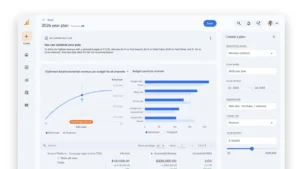
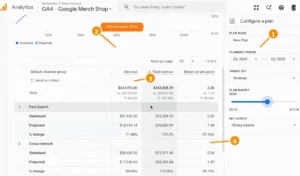
The introduction of the Advertising Workspace within GA4 is a clear signal that the platform is being bifurcated: one side for product owners and UX researchers (behavioral analytics through key events) and one side for performance marketers (conversion reporting and campaign optimization). This dual-purpose structure allows GA4 to serve as a comprehensive business intelligence tool.
Looking ahead, Google has signaled that more features will be added to the Advertising Workspace, including advanced conversion reporting tools and deeper integrations with other parts of the Google Marketing Platform. As the industry moves past the "cookie era," the success of GA4 will be measured by its ability to provide actionable insights without compromising the trust of the end-user. For now, the alignment of conversions and the rollout of privacy-durable tools represent a major milestone in the stabilization of the digital measurement landscape.
Related posts: