Six Leading WordPress Media Offload Plugins Compared for Optimized Website Performance and Scalability

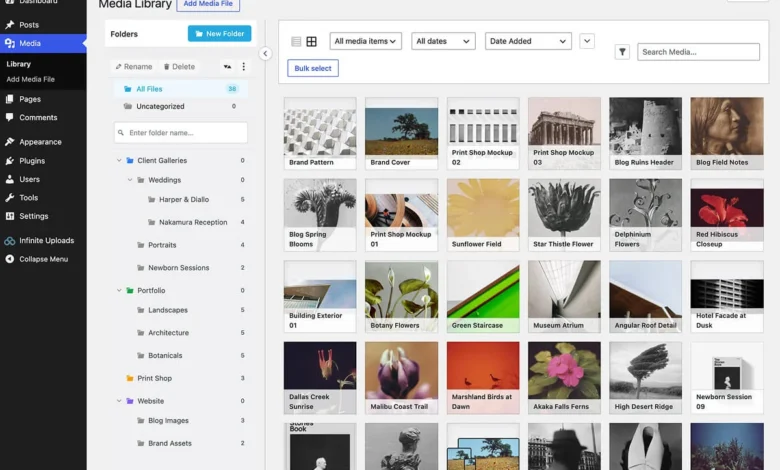
Managing a website’s media architecture has evolved from a secondary administrative task into a critical component of modern web performance. As WordPress sites expand, their Media Libraries often grow exponentially, leading to bloated server storage, increased hosting costs, and diminished page load speeds. For high-traffic platforms, these challenges frequently intersect with Core Web Vitals—the metrics Google uses to evaluate user experience—making efficient media management an essential operational requirement rather than an optional enhancement.

The Evolution of Media Offloading in the WordPress Ecosystem
The practice of offloading media involves moving files—images, videos, and documents—from the local web server to a dedicated cloud storage environment. Historically, this required complex manual configurations involving Amazon S3 buckets and custom API integrations. However, the rise of specialized WordPress plugins has democratized this process, allowing site administrators to leverage Content Delivery Networks (CDNs) and cloud storage with minimal technical friction.
The need for these solutions is underscored by shifting digital consumption habits. According to industry data, video content now accounts for the majority of global internet traffic. As businesses increasingly deploy 4K video and high-resolution imagery to maintain competitive engagement, traditional shared hosting environments often struggle to keep pace. Storing these assets off-site alleviates the burden on the primary server, effectively creating a distributed infrastructure that improves both speed and security.

A Comparative Analysis of Top-Tier Media Offload Solutions
The current market offers a variety of plugins that, while sharing the goal of offloading media, utilize vastly different pricing models and technical frameworks. These models generally fall into three categories: storage-based, visit-based, or per-file billing. Selecting the appropriate tool requires an understanding of a site’s specific traffic patterns and storage needs.
1. Infinite Uploads: The Integrated Approach
Infinite Uploads has positioned itself as an all-in-one solution, bundling cloud storage, CDN delivery, and automatic image optimization. Unlike legacy solutions that require the user to configure individual cloud accounts, this plugin provides a proprietary architecture. Its primary advantage lies in its simplicity; it facilitates a transition to cloud storage within minutes. From an architectural standpoint, it is particularly suited for agencies managing multiple client sites, as it offers a centralized dashboard for analytics and organization. Its pricing is tiered based on combined storage and bandwidth, which provides a predictable cost structure for organizations experiencing steady growth.

2. WP Offload Media: The Developer-Centric Standard
For users seeking deep integration with major cloud providers such as Amazon S3, Google Cloud Storage, or DigitalOcean Spaces, WP Offload Media remains a industry benchmark. Developed by Delicious Brains, the plugin is designed for environments requiring high levels of granularity. It allows administrators to maintain control over their cloud infrastructure while automating the syncing process. While the setup is more technically demanding—often requiring modifications to the site’s wp-config.php file—the trade-off is superior control over file naming conventions and delivery paths.
3. Next3 Offload: Broad Provider Support
Next3 Offload, by ThemeDev, serves as a versatile alternative for those who wish to avoid vendor lock-in. It boasts compatibility with over 20 S3-compatible storage providers, including Bunny, Cloudflare R2, and Wasabi. This plugin is designed to accommodate a migration path for users transitioning away from other offload services. Its pricing model differentiates itself by offering unlimited file offloading across all tiers, with costs scaling based on the number of sites managed. This makes it an attractive option for developers who prefer to manage their own cloud storage accounts directly with their provider of choice.

4. Advanced Media Offloader: The Open-Source Alternative
Advanced Media Offloader serves a niche demographic: users who prefer a free, open-source approach without the constraints of proprietary cloud services. By leveraging existing S3-compatible buckets, it acts as a functional bridge between WordPress and the cloud. While it lacks the automated CDN management features found in premium alternatives, its adherence to developer-friendly hooks makes it a highly customizable foundation. It is an ideal solution for technical teams who prefer building a bespoke media architecture rather than relying on a managed service.
5. Cloudflare Images: Performance Through Ecosystem
The "Offload, AI, and Optimize with Cloudflare Images" plugin is a specialized tool tailored for the Cloudflare ecosystem. It simplifies the delivery of assets through Cloudflare’s global edge network. A significant feature of this plugin is its use of AI-driven tools for auto-tagging and captioning, which assists in SEO and accessibility. Because the plugin is purpose-built for the Cloudflare infrastructure, it offers high-performance optimization, particularly in environments where low latency is a critical success factor.

6. Optimole: Prioritizing Image Optimization
Optimole approaches the challenge from the perspective of front-end performance. It is less a storage solution and more an image optimization service that includes cloud offloading. By utilizing machine learning to scale images in real-time based on the user’s device and connection speed, it excels at improving Core Web Vitals. However, it is important to note that Optimole is limited to image assets and does not provide comprehensive support for video or large non-image files, making it a specialized rather than a general-purpose tool.
Economic and Operational Implications
The financial implications of choosing an offload plugin are as significant as the technical ones. When evaluating these services, administrators must distinguish between "plugin costs" and "cloud infrastructure costs."

Plugins like Infinite Uploads charge a flat subscription fee that includes storage, whereas services like WP Offload Media or Next3 Offload require the user to pay the cloud provider (e.g., AWS or DigitalOcean) for storage and bandwidth independently. For a high-traffic site with minimal storage needs, a visit-based model—such as the one utilized by Optimole—may be cost-effective. Conversely, for a site with massive, infrequently accessed media libraries, a storage-based model is generally more economical.
Security and Data Sovereignty Considerations
Offloading media introduces a new layer to a site’s security profile. While reputable plugins include security features and ensure compliance with standard data protection regulations, the act of transferring media off-site increases the "attack surface" if not configured correctly.

Data sovereignty is a growing concern for many enterprises. Using plugins that allow for custom S3 buckets provides the benefit of choosing the geographic region where the data is stored—a critical requirement for companies operating under strict GDPR or CCPA guidelines. In contrast, all-in-one solutions that use proprietary infrastructure may limit the user’s ability to specify data residency, a factor that should be evaluated during the due diligence phase of selection.
Conclusion and Strategic Recommendations
The selection of a media offload strategy should be dictated by the specific technical debt of the WordPress instance. For agencies and developers who prioritize ease of use and consolidated management, all-in-one solutions like Infinite Uploads provide the highest ROI. For organizations that already maintain a sophisticated DevOps pipeline and require strict control over their cloud bucket configurations, WP Offload Media or Next3 Offload are the industry-standard choices.

Ultimately, the goal of media offloading is to provide a seamless, performant experience for the end-user while reducing the maintenance burden on the server. As the digital landscape continues to demand higher fidelity media, the integration of these tools will likely transition from a "best practice" to a mandatory standard for all professional WordPress deployments. Administrators are encouraged to conduct a cost-benefit analysis based on their specific growth trajectory, storage consumption, and the technical expertise available within their team.