Navigating the WordPress Automation Landscape: WP-CLI, REST API, and the Emergence of the Abilities API for AI Integration

For developers and site administrators deeply entrenched in the WordPress ecosystem, the landscape of automation tools often presents a perplexing choice between WP-CLI, the REST API, and the recently introduced Abilities API. Far from being competing technologies, these three interfaces represent distinct layers of interaction with a WordPress installation, each optimized for different callers and operational contexts. A fundamental understanding of their individual strengths and synergistic relationship is crucial for architecting efficient, scalable, and secure WordPress solutions in the modern web environment. Misinterpreting them as rivals often leads to redundant development efforts and suboptimal system designs, overlooking the inherent power of their complementary nature.
The Evolution of WordPress Interactivity: A Chronological Overview
WordPress, since its inception, has evolved from a simple blogging platform into a robust content management system (CMS) capable of powering a vast array of websites. Early interactions were primarily through the graphical user interface (GUI) of the WordPress admin panel (wp-admin) and direct database manipulation. As the platform matured and its adoption grew, the need for more programmatic and efficient interaction methods became apparent, particularly for larger sites, development workflows, and integration with external systems. This necessity paved the way for the development and integration of the command-line interface, the robust RESTful API, and most recently, a specialized layer for artificial intelligence.
WP-CLI: The Command Line on the Server – Power and Precision
WP-CLI (WordPress Command Line Interface) stands as the foundational layer for server-side interaction, offering direct access to the core functionalities of a WordPress site via the command line. Its origins trace back to independent development efforts before gaining official support and widespread adoption within the WordPress community. WP-CLI operates by executing PHP scripts directly against the WordPress installation, bypassing the HTTP request-response cycle. This direct execution model makes it exceptionally fast and efficient for tasks requiring deep manipulation of the site’s internals.
Typical use cases for WP-CLI include bulk operations, migrations, deployments, and routine maintenance. Consider scenarios such as migrating thousands of posts between databases, performing a global search-and-replace operation across all content, updating plugins and themes en masse, or exporting the database for backup purposes. Commands like wp post create, wp plugin update, wp search-replace, and wp db export exemplify its raw power. The absence of an HTTP round trip and the need for external authentication tokens – given that the user or script already possesses shell access to the server – significantly streamline these processes.

This unparalleled speed and direct access, however, come with a specific prerequisite: shell access to the server where WordPress is hosted. WP-CLI is not designed for interaction from a browser, a mobile application, or a remote external service that lacks direct server access. It is the tool of choice for administrators, developers, and automated scripts operating within the server environment. For many modern development workflows, particularly those embracing a "terminal-first" approach or continuous integration/continuous deployment (CI/CD) pipelines, WP-CLI is indispensable. Developers can manage their entire WordPress stack, from provisioning new sites to deploying updates and running diagnostic checks, almost entirely from the command line, integrating seamlessly with version control systems and automated deployment scripts.
The REST API: WordPress Over HTTP – Bridging the Digital Divide
The WordPress REST API (Representational State Transfer Application Programming Interface) marked a pivotal moment in WordPress’s evolution, transforming the CMS into a robust data provider accessible via standard HTTP requests. Fully integrated into WordPress core since version 4.7 (though development began earlier), the REST API exposes site content, users, taxonomies, settings, and more as JSON data through a structured set of endpoints, typically found under /wp-json/wp/v2/. This capability allows any HTTP client, whether a web browser, a mobile application, or an external service, to read from and write to a WordPress site from anywhere on the internet.
The introduction of the REST API fundamentally shifted how developers could interact with WordPress, catalyzing the rise of "headless" or "decoupled" WordPress architectures. In such setups, WordPress functions purely as a backend content repository, while a separate frontend application (built with frameworks like React, Vue, Next.js, or Astro) consumes content via the REST API and renders the user interface. This separation offers significant advantages in terms of performance, scalability, security, and developer flexibility, allowing frontend and backend development to proceed independently. Mobile applications leverage the REST API to power native experiences, and third-party integrations (e.g., CRM systems, marketing automation platforms) use it to sync data or trigger actions within WordPress. Authentication for REST API interactions can be managed through various methods, including application passwords, cookie-based authentication (for logged-in users), and OAuth for more complex integrations.
While immensely powerful for enabling remote interaction and content syndication, the REST API operates on a resource-centric model. It describes what your data is (e.g., a post, a user, a category) and how to interact with these resources (GET, POST, PUT, DELETE). However, it does not inherently describe what an agent is allowed to do with these resources in terms of high-level actions or capabilities. This distinction becomes critical when considering increasingly autonomous systems, particularly Artificial Intelligence agents, which require a more explicit and constrained vocabulary of actions to operate safely and effectively. For a human developer referencing documentation, inferring actions from resource endpoints is manageable. For an AI agent, this can be an inefficient and potentially insecure process, requiring extensive pre-programming or complex inferential capabilities.
The Abilities API: A Capability Layer for AI Agents – Intelligent and Secure Automation
The Abilities API, introduced in WordPress core with WP 6.9 (with a plugin available for earlier versions), directly addresses the limitations of the REST API when it comes to intelligent automation. It provides a dedicated layer designed to define and expose discrete, described capabilities or "abilities" that AI agents can understand and execute safely. Instead of exposing raw resources and leaving it to the agent to interpret how to manipulate them, the Abilities API allows plugins and themes to register named actions, each with a stable ID, a human-readable label, a detailed description, input and output schemas (often using JSON Schema), and a robust permission check.

The core concept is to shift from a resource-oriented interaction model to an action-oriented one. An ability explicitly states, "this is a specific thing you can do," outlining its requirements, expected outcomes, and the permissions necessary for its execution. This structure is critical for AI agents, which thrive on clearly defined tasks and constraints. Developers register ability categories using the wp_abilities_api_categories_init hook and then individual abilities using wp_abilities_api_init. For example, an ability might be my-plugin/publish-draft, with associated metadata defining its input (e.g., a post ID), output (e.g., success/failure message), and a permission_callback to ensure the agent is authorized to perform the action.
add_action( 'wp_abilities_api_init', function ()
    wp_register_ability( 'my-plugin/publish-draft', [
        'label'             => __( 'Publish a draft', 'my-plugin' ),
        'description'       => __( 'Publishes an existing draft post by ID.', 'my-plugin' ),
        'category'          => 'my-plugin',
        'input_schema'      => [ /* JSON Schema for the expected input */ ],
        'output_schema'     => [ /* JSON Schema for the result */ ],
        'permission_callback' => 'my_plugin_can_publish',
        'execute_callback'  => 'my_plugin_publish_draft',
        'meta'              => [ 'show_in_rest' => true ],
    ] );
 );
By setting meta.show_in_rest to true, these abilities can be discovered and consumed via a dedicated REST endpoint, /wp-json/wp-abilities/v1/abilities. On the JavaScript side, the @wordpress/abilities package facilitates consumption. This design provides AI agents with a standardized, trustworthy vocabulary of actions, significantly simplifying the integration of AI into WordPress workflows. It prevents agents from needing to reverse-engineer complex API interactions or from attempting unauthorized operations. The Abilities API is rapidly becoming the backbone for multi-agent setups on WordPress, where multiple AI entities need to collaborate and execute tasks within clearly defined boundaries.
The Synergy: A Layered Architecture for Comprehensive Automation
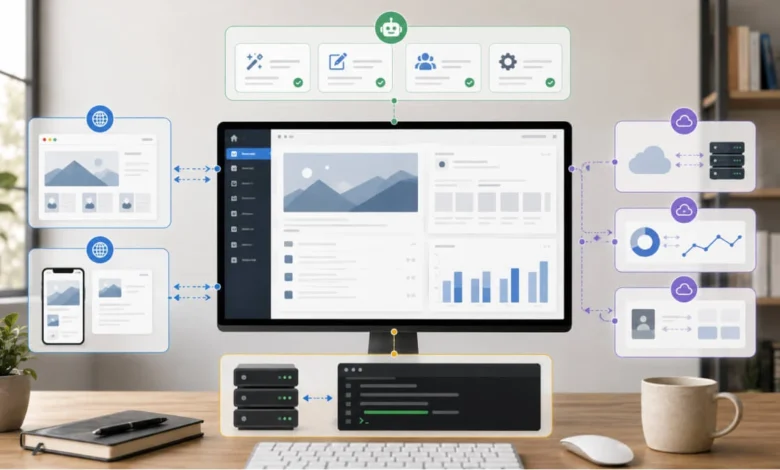
The true power of WP-CLI, the REST API, and the Abilities API lies in their complementary nature, forming a robust, multi-layered stack for WordPress interaction. They are not alternatives but rather specialized tools operating at different distances from the WordPress core and catering to distinct types of callers.
-
WP-CLI (Innermost Layer): Operates directly on the server, leveraging PHP execution. It is the fastest and most powerful for direct, server-side manipulation by trusted entities (humans with shell access, local scripts, CI/CD pipelines). It assumes maximum trust and minimal overhead.
-
REST API (Mid-Layer): Exposes WordPress functionalities over HTTP. It acts as the primary conduit for remote, off-server clients (browsers, mobile apps, external services) to interact with WordPress resources. It provides a flexible, standardized way to fetch and modify content but requires clients to understand resource structures and infer actions.
-
Abilities API (Outermost Layer): Sits conceptually atop the REST API (often exposing abilities via REST endpoints) and provides an action-oriented interface specifically tailored for AI agents. It explicitly defines capabilities, their requirements, and permissions, enabling safe and intelligent automation. It assumes a higher level of autonomy for the caller (AI) but with strict operational boundaries.

Underneath all three interfaces lies the same WordPress core, the same database, and the same fundamental PHP functions. The choice of which interface to use hinges on two primary factors: how far the caller is from the WordPress site and how much explicit instruction or constraint the caller requires. The closer and more trusted the caller, the lower down the stack (WP-CLI) one can go for maximum efficiency. The more autonomous, remote, or less trusted the caller (like an AI agent), the higher up the stack (Abilities API via REST) one should climb to ensure security and clarity of action.
Practical Implementations: Real-World Architectures
Consider a sophisticated WordPress setup that leverages all three layers:
- Development and Operations (WP-CLI): A development team uses WP-CLI extensively for local development, staging environment management, and production deployments. Tasks like database synchronization, plugin/theme updates, cache flushing, and server diagnostics are scripted and executed via WP-CLI over SSH. This ensures rapid, consistent, and automated operational procedures. For instance, a nightly cron job might use WP-CLI to optimize the database and generate sitemaps.
- Headless Frontend (REST API): The public-facing website is a headless application built with a modern JavaScript framework (e.g., Next.js, Gatsby). This frontend pulls all its content – posts, pages, custom post types, media – from the WordPress backend exclusively through the REST API. User interactions, such as submitting comments or creating accounts, are also routed back to WordPress via secure REST API endpoints. This architecture provides superior performance and user experience, decoupling the presentation layer from the content management system.
- Intelligent Content Management (Abilities API): To enhance content creation and management, an AI assistant is integrated. This AI agent, instead of having raw REST access, interacts with WordPress through the Abilities API. For example, a "Summarize Post" ability might be registered, allowing the AI to generate a concise summary of a given post ID. Another ability, "Suggest Related Content," could empower the AI to recommend relevant articles based on the current post’s context. Each ability comes with precise permission checks, ensuring the AI operates only within its designated scope, such as generating content suggestions but not directly publishing without human oversight.
This layered approach ensures that each component performs the job it is genuinely best at. Attempting to force WP-CLI to serve a remote mobile app or asking an AI agent to infer complex actions from raw REST endpoints would introduce unnecessary complexity, security risks, and performance bottlenecks.
Broader Impact and Implications for the WordPress Ecosystem
The emergence and distinct roles of WP-CLI, the REST API, and the Abilities API underscore WordPress’s adaptability and commitment to remaining a relevant and powerful platform in an ever-evolving technological landscape.
- Developer Skillsets: This evolution necessitates that WordPress developers cultivate a diverse skillset, moving beyond traditional theme and plugin development to embrace command-line tools, API integrations, and an understanding of AI interaction paradigms.
- Security: Each layer introduces its own security considerations. WP-CLI relies on server-level access controls. The REST API demands robust authentication and authorization mechanisms (e.g., application passwords, OAuth, proper nonce validation). The Abilities API, with its explicit permission callbacks and schema validation, offers a highly secure framework for granting limited, defined capabilities to automated agents, significantly reducing the attack surface compared to granting broad API access.
- Future of WordPress: By providing specialized interfaces for different interaction models, WordPress solidifies its position as a versatile content platform capable of powering not only traditional websites but also headless applications, mobile experiences, and intelligent, AI-driven content workflows. The Abilities API, in particular, positions WordPress at the forefront of AI integration, enabling the platform to seamlessly interact with large language models (LLMs) and other AI technologies for tasks like automated content generation, moderation, SEO optimization, and personalized user experiences.
In conclusion, the discourse around WP-CLI, the REST API, and the Abilities API should shift from "which one is superior?" to "which layer is appropriate for this specific task and caller?" Recognizing them as integral parts of a cohesive, layered architecture allows developers to harness the full power of WordPress, building robust, performant, and future-proof digital experiences. The decision-making process becomes streamlined: the closer and more trusted the caller, the lower the layer; the more autonomous and remote, the higher. Embracing this integrated perspective is key to unlocking the full potential of WordPress in the age of intelligent automation.