WordPress 6.8 has introduced a significant new feature: Speculative Loading, a technique designed to make websites feel dramatically faster by intelligently preloading content. This advancement marks a pivotal step in WordPress’s ongoing commitment to enhancing user experience and aligning with modern web performance standards. By predicting a visitor’s next likely action and pre-emptively loading the corresponding pages or resources, speculative loading aims to deliver near-instantaneous navigation, transforming how users interact with WordPress-powered sites.
The Evolution of Web Performance and Speculative Loading
The quest for faster web experiences is not new; it has been a continuous driving force in web development for decades. In an increasingly interconnected and impatient digital world, page load speed is no longer just a technical metric but a critical component of user satisfaction, engagement, and even search engine ranking. Studies consistently show that even a slight delay in page load time can lead to a significant drop in user retention and conversion rates. Major search engines, notably Google, have underscored this by integrating page speed into their ranking algorithms, most prominently through initiatives like Core Web Vitals, which prioritize metrics such as Largest Contentful Paint (LCP), First Input Delay (FID), and Cumulative Layout Shift (CLS).
Speculative loading is a sophisticated evolution of earlier performance optimization techniques. Historically, developers have employed various methods to speed up perceived loading times. These include DNS prefetching (<link rel="dns-prefetch">), which resolves domain names in advance, and preconnecting (<link rel="preconnect">), which establishes early connections to critical third-party origins. These "resource hints" instruct the browser to perform low-level network tasks ahead of time, reducing latency when the actual resources are requested. WordPress itself has long incorporated such hints, automatically adding dns-prefetch or preconnect tags for external assets like Google Fonts when detected.
However, speculative loading, particularly as implemented via the Speculation Rules API, takes this concept much further. Instead of just pre-resolving a domain or pre-establishing a connection, it can prefetch or even prerender entire web pages in the background. This proactive approach anticipates user behavior, creating an illusion of speed by having content ready before it’s explicitly requested. The underlying principle is simple: if a user is likely to click a specific link, why wait for them to click it before starting to load the destination page?
WordPress 6.8 and the Speculation Rules API
The introduction of speculative loading in WordPress 6.8 signifies the platform’s embrace of cutting-edge web performance standards. While previous versions utilized basic resource hints, WordPress 6.8 now integrates the more powerful Speculation Rules API. This API, developed by the W3C and primarily adopted by Chromium-based browsers, provides a standardized, declarative way for websites to inform browsers about content that might be needed soon.
Rather than relying solely on browser heuristics to guess what a user might do next, the Speculation Rules API allows developers – and, by extension, WordPress core – to explicitly define a set of rules in a JSON format. These rules guide the browser on which URLs to prefetch or prerender. For instance, if a user lands on a blog’s homepage, WordPress might, based on these rules, start preloading the blog’s latest post or category page in anticipation of a click. When the user eventually navigates to that page, it loads almost instantaneously because the heavy lifting has already been done in the background. This is a game-changer for perceived performance, making interactions feel fluid and responsive.
Understanding the Speculation Rules API: Prefetch vs. Prerender
The Speculation Rules API offers two primary strategies for speculative loading, each with distinct implications for performance and resource usage:
-
Prefetch: This strategy involves fetching the resources (HTML, CSS, JavaScript, images) for a target page and storing them in the browser’s cache. When the user navigates to the prefetched page, the browser can retrieve these resources from the cache rather than requesting them from the server, resulting in a faster load time. Prefetching is less resource-intensive than prerendering and is generally a safer default. It fetches the page’s data but does not execute its JavaScript or render it.
-
Prerender: This is a more aggressive and impactful strategy. Prerendering goes beyond mere fetching; it loads the entire target page in a hidden tab or background process, executes its JavaScript, fetches all its subresources, and renders it fully. When the user clicks the link to the prerendered page, the browser can instantly swap the hidden page into the visible viewport, making the navigation appear instantaneous. While offering the ultimate speed improvement, prerendering consumes more client-side resources (CPU, memory, network) and carries a higher risk of triggering unwanted side effects (e.g., analytics pings, ad impressions, or complex JavaScript execution for pages the user never visits).
WordPress’s default implementation in version 6.8 primarily leverages the prefetch strategy, reflecting a cautious and balanced approach to ensure broad compatibility and minimize potential downsides. The API itself is embedded directly in the browser, meaning site owners do not need to install additional plugins or scripts to enable the core functionality; they only need to provide the JSON rules.
Browser Support and Progressive Enhancement
As of early 2026, the Speculation Rules API enjoys robust support primarily in Chromium-based browsers, which include Google Chrome, Microsoft Edge, and Opera. This covers a significant portion of the global internet user base, with Chromium accounting for over 60% of desktop browser market share. However, it is not yet supported in other major browsers like Mozilla Firefox or Apple Safari.
This disparity in browser support means that while WordPress sites will emit the necessary JSON rules, only users on supported browsers will benefit from speculative loading. This characteristic makes the Speculation Rules API a prime example of progressive enhancement. For unsupported browsers, the rules are simply ignored, causing no errors or adverse effects. This ensures that the feature degrades gracefully, providing an improved experience for those with capable browsers without breaking functionality for others. Site administrators must consider their audience’s browser usage statistics when assessing the overall impact and value of this feature.

Default Speculation Rules in WordPress 6.8
WordPress 6.8 implements a set of default speculation rules specifically for logged-out users, focusing on the prefetch strategy with a conservative eagerness level. This configuration is designed to be broadly applicable and minimize unnecessary server load while still providing a noticeable performance boost for typical website visitors.
The default JSON configuration added by WordPress core resembles the following:
<script type="speculationrules">

  "prefetch": [

      "source": "document",
      "where":
        "and": [

            "href_matches": "/*"
          ,

            "not":
              "href_matches": [
                "/wp-*.php",
                "/wp-admin/*",
                "/wp-content/uploads/*",
                "/wp-content/*",
                "/wp-content/plugins/*",
                "/wp-content/themes/twentytwentyfive/*",
                "/*\?(.+)"
              ]

          ,

            "not":
              "selector_matches": "a[rel~="nofollow"]"

          ,

            "not":
              "selector_matches": ".no-prefetch, .no-prefetch a"


        ]
      ,
      "eagerness": "conservative"

  ]

</script>
A breakdown of these rules reveals WordPress’s cautious approach:
"source": "document": This instructs the browser to scan the current document for links that match the specified criteria.- *`"href_matches": "/"`**: This is a broad rule, initially targeting all internal links on the site.
"not": "href_matches": [...]: This crucial exclusion list prevents speculative loading for various administrative, content, and dynamic URLs:/wp-*.php: Excludes core WordPress PHP files./wp-admin/*: Prevents prefetching of the WordPress administration area./wp-content/uploads/*,/wp-content/*,/wp-content/plugins/*,/wp-content/themes/twentytwentyfive/*: Excludes content within thewp-contentdirectory, including media uploads, plugin files, and theme assets. This is particularly important to avoid preloading large files or executing scripts from plugins that might have unintended side effects./*\?(.+): Excludes URLs containing query strings (e.g.,?p=123), which often indicate dynamic content or search results that are less suitable for prefetching.
"not": "selector_matches": "a[rel~="nofollow"]": Excludes links marked withrel="nofollow", typically used for external or untrusted links."not": "selector_matches": ".no-prefetch, .no-prefetch a": Provides a mechanism for developers to explicitly opt out specific links or entire sections from speculative loading by adding the.no-prefetchclass."eagerness": "conservative": This setting indicates that the browser should only prefetch links when it is highly confident the user will navigate to them, typically triggered by a user hovering over a link or other strong behavioral cues. This reduces the likelihood of wasting server resources on unvisited pages.
This default configuration provides a solid baseline for many WordPress sites, offering performance improvements without requiring manual intervention.
Customizing Speculative Loading in WordPress
While the default rules are designed for general applicability, WordPress provides several action hooks and filters for developers to customize or extend the speculative loading behavior. This flexibility is crucial for sites with unique content structures, specific performance requirements, or known plugin conflicts.
-
wp_speculation_rules_configurationFilter: This filter allows modification of the core configuration parameters, such as changing themodefromprefetchtoprerenderor adjusting theeagernesslevel (conservative,moderate, oreager). It also serves as the primary mechanism to completely disable speculative loading by returningnull.add_filter( 'wp_speculation_rules_configuration', function( $config ) if ( is_array( $config ) ) $config['mode'] = 'prerender'; // Switch to prerender for higher impact $config['eagerness'] = 'eager'; // Be more aggressive in preloading return $config; );This example illustrates how a site administrator might opt for a more aggressive prerender strategy for maximum speed, though with increased resource consumption risk.
-
wp_speculation_rules_href_exclude_pathsFilter: This filter allows the addition of new URL path patterns to the exclusion list. For instance, a site running a custom post type with a/events/slug might want to exclude these dynamic event pages from prefetching if their content changes frequently.add_filter( 'wp_speculation_rules_href_exclude_paths', function( $exclude_paths ) $exclude_paths[] = '/events/.*'; // Exclude all URLs under /events/ return $exclude_paths; );It’s important to note that this filter currently only allows adding to the exclusion list, not removing default exclusions.
-
wp_load_speculation_rulesAction Hook: This powerful action hook provides access to theWP_Speculation_Rulesclass, enabling developers to add entirely new, custom speculation rules. This is particularly useful for targeted optimizations, such as aggressively preloading a critical landing page or a time-sensitive promotional offer.add_action( 'wp_load_speculation_rules', function( $speculation_rules ) if ( ! is_a( $speculation_rules, 'WP_Speculation_Rules' ) ) return; $speculation_rules->add_rule( 'prerender', 'promo-page-prerender', [ 'source' => 'list', 'urls' => ['/special-offer/', '/seasonal-sale/'], 'eagerness' => 'eager', 'priority' => 1, // Higher priority ] ); );This example demonstrates how a marketing campaign page could be aggressively prerendered to ensure an instant loading experience for potential customers.
For scenarios requiring absolute control, where default exclusions need to be overridden or more complex logic is involved, disabling WordPress’s built-in rules and manually injecting custom JSON scripts might be necessary.
Verifying Speculative Loading Functionality
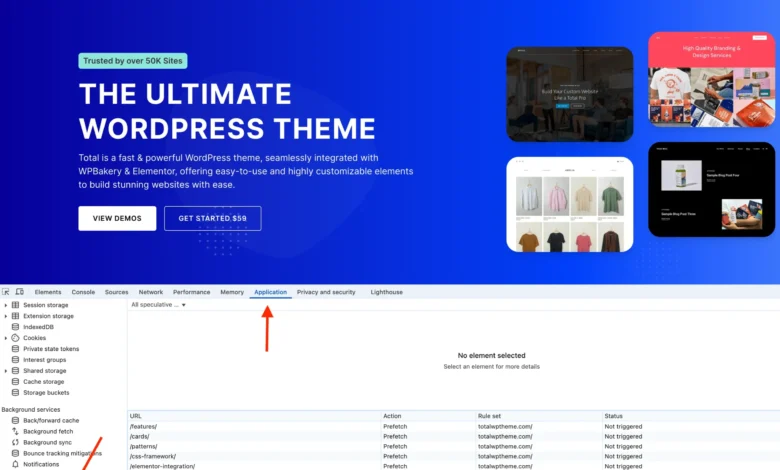
To confirm that speculative loading is active and functioning correctly, site administrators and developers can leverage their browser’s developer tools. In Google Chrome, for example:
- Open Developer Tools (F12 or right-click -> Inspect).
- Navigate to the "Application" tab.
- In the left sidebar, under "Background Services," select "Speculative loads."
- The "Rules" sub-tab will display the JSON
speculationrulesscript detected on the page. - The "Speculations" sub-tab will list all URLs that the browser is considering for prefetching or prerendering, along with their current status (e.g., "Not triggered," "Prefetching," "Prerendering," "Prefetched," "Failed").
Observing the status changes typically requires user interaction. Hovering over links may trigger conservative prefetching, while clicking and then using the back button can reveal a "Prefetched" status for the previously navigated page. For more aggressive testing, temporarily setting the eagerness to eager can make it easier to see speculative loading in action.

Challenges and Considerations for Speculative Loading
While promising significant performance gains, speculative loading is not without its trade-offs and potential concerns:
-
Increased Server Resource Usage: This is arguably the most significant concern. By prefetching or prerendering pages a user might visit, servers may process requests for content that is ultimately never viewed. For high-traffic websites, shared hosting environments, or sites with limited server resources, this could lead to increased CPU, bandwidth, and database load, potentially impacting server stability and incurring higher hosting costs. A conservative approach, like WordPress’s default
prefetchwithconservativeeagerness, mitigates this, but aggressiveprerenderstrategies could amplify the issue. -
Potential for Outdated Content and Cache Invalidation: Websites with frequently updated content, such as news portals, stock tickers, or e-commerce sites with real-time inventory, face a risk of serving stale content. If a page is prefetched or prerendered and then updated on the server before the user navigates to it, the user might see the old version. While browsers typically handle cache validation, the speculative nature introduces a window where content can become outdated. Careful cache management and strategic exclusions are vital for such sites.
-
Plugin and Theme Conflicts: Many WordPress plugins and themes rely on JavaScript to execute specific actions only when a page is actively loaded in the foreground. This could include analytics tracking, A/B testing scripts, session management, ad impressions, or dynamic content generation. If a page is prerendered in the background, these scripts might execute prematurely or incorrectly, leading to inaccurate data, broken functionality, or unintended side effects. For example, a prerendered page might trigger an analytics event even if the user never truly "visited" it, skewing metrics. While WordPress core developers encourage plugin authors to adapt, it will take time for the ecosystem to fully adjust.
-
Browser Fragmentation: As mentioned, the feature is currently limited to Chromium-based browsers. This means a substantial portion of internet users (Firefox, Safari, and others) will not benefit. While progressive enhancement is a sound principle, it implies that not all users will experience the advertised speed boost, potentially leading to inconsistent performance across different user agents.
-
Debugging Complexity: Identifying and resolving issues related to speculative loading can be challenging. Conflicts might be intermittent or difficult to reproduce, requiring developers to understand the nuances of the Speculation Rules API and browser behavior.
Disabling Speculative Loading in WordPress
Given these potential concerns, some site owners may decide that speculative loading is not suitable for their specific environment. While WordPress does not offer a simple toggle in the administration dashboard, disabling the feature is straightforward:
// Disable Speculative Loading Completely
add_filter( 'wp_speculation_rules_configuration', '__return_null' );
This snippet, placed in a child theme’s functions.php file or via a code snippets plugin, instructs WordPress to return null for the speculative rules configuration, effectively preventing the JSON script from being added to the site’s frontend.
Strategic Considerations: To Use or Not to Use?
The decision to keep, customize, or disable speculative loading hinges on a balanced assessment of a website’s specific characteristics, audience, and resource constraints.
Keep Enabled (Default): For most standard blogs, informational websites, and portfolios, WordPress’s default conservative prefetching offers a clear performance benefit with minimal risk. The exclusions built into the default rules effectively mitigate common pitfalls.
Customize: Sites with specific high-value landing pages, e-commerce promotions, or frequently visited content paths might benefit significantly from custom rules that leverage prerender or eager prefetching for those particular URLs. Conversely, sites with dynamic content, real-time updates, or known plugin conflicts may need to add more aggressive exclusions.
Disable: High-traffic websites on resource-constrained hosting, news sites with rapidly changing content, or those experiencing critical plugin conflicts where no immediate fix is available, might find it safer to disable speculative loading entirely. The potential for unnecessary server load or serving outdated content could outweigh the perceived performance gains.
Ultimately, speculative loading in WordPress 6.8 represents a significant leap forward in web performance, showcasing the platform’s commitment to modern web standards and user experience. While it offers exciting possibilities for faster navigation, it necessitates informed decision-making by site administrators and developers. Understanding its mechanics, benefits, and potential drawbacks is key to leveraging this powerful feature effectively and ensuring a seamless, high-performance experience for all users. The ongoing evolution of this API and its broader browser adoption will continue to shape the future of perceived web speed.