The transition to a new computing environment, particularly when migrating to the latest Apple silicon hardware, is often characterized by an increase in system performance and the removal of legacy software bloat. However, users frequently encounter unforeseen compatibility hurdles as they reconfigure their digital workspaces. A prevalent issue emerging among new MacBook users is the specific error message, "This video format is not supported," which appears when attempting to access the YouTube TV live streaming interface. This technical barrier prevents the successful initialization of protected content streams, creating a significant disruption for users relying on the service for broadcast consumption. The root of this issue lies not in a hardware defect, but in the browser-level handling of Digital Rights Management (DRM) protocols, specifically the Google Widevine Content Decryption Module (CDM).
The Mechanics of Content Protection and Widevine
At the heart of the "This video format is not supported" error is the integration of Digital Rights Management (DRM) technologies. Content providers such as YouTube TV utilize Widevine, a proprietary DRM technology developed by Google, to secure high-definition and live-streamed media against unauthorized redistribution or piracy. Widevine operates by verifying the integrity of the user’s browser environment and the security of the hardware platform before granting the decryption keys necessary to render the video signal.

When a browser lacks the necessary Widevine components, or when these components are disabled in the browser’s security settings, the handshake between the server and the client fails. The server determines that the client cannot provide the required level of security for the copyrighted stream and subsequently blocks access, triggering the error message. This mechanism is standard across modern streaming platforms, including Netflix, Hulu, and Disney+, which rely on Encrypted Media Extensions (EME) to facilitate this process.
Chronology of the Compatibility Conflict
The emergence of this issue correlates with the increased adoption of ARM-based macOS hardware. While the Widevine CDM has been a staple of web browsing for over a decade, its implementation varies significantly across different browser architectures—namely Chromium-based browsers (Google Chrome, Microsoft Edge, Brave) and Safari.
- Initial Deployment: Following the release of new MacBook models, users reported a sudden cessation of streaming services upon attempting to log in to YouTube TV.
- Identification of the Barrier: Preliminary diagnostics revealed that the issue was not network-related or account-specific, but rather a failure of the browser’s media player to negotiate a secure connection with Google’s content servers.
- The DRM Handshake Failure: Technical analysis of browser logs during the failure event shows a timeout during the "License Request" phase of the DRM negotiation, where the browser fails to present a valid Widevine certificate.
- Resolution Path: As of late 2024 and early 2025, browser developers have shifted toward more granular security controls, often defaulting to "disabled" or "ask-to-activate" for third-party DRM modules to enhance user privacy, which inadvertently triggers the error for users who have not manually authorized the content module.
Data and Technical Context
Widevine is categorized into three security levels, with Widevine L1 being the most secure, requiring hardware-backed protection. Modern Apple silicon devices are fully capable of supporting Widevine L1, ensuring that the hardware is not the limiting factor. According to data from the Web Standards Project, nearly 85% of modern streaming platforms rely on some iteration of Widevine to manage their content libraries.

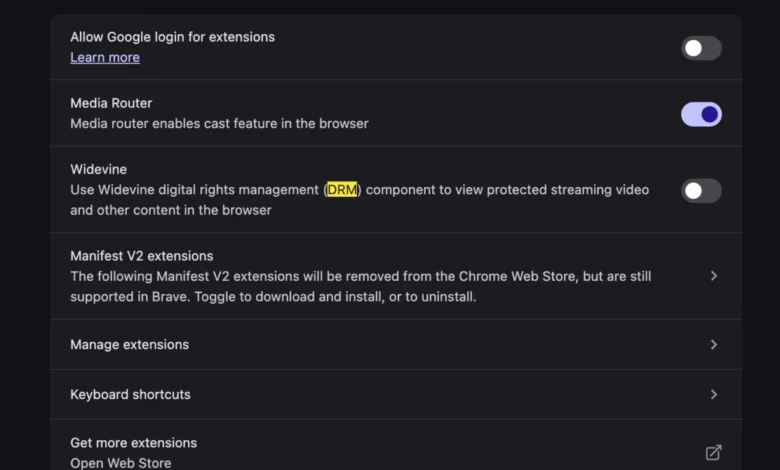
The shift toward restrictive DRM defaults is part of a broader industry trend toward "privacy-by-default" browsing. Browser vendors have come under increasing scrutiny regarding how they handle persistent cookies and background processes. By requiring users to explicitly enable Widevine, browsers like Brave or custom-configured versions of Chrome protect users from potential fingerprinting techniques that can sometimes be exploited via DRM modules. However, this shift creates a "user experience gap" where the security settings intended to protect the user inadvertently break the functionality of mainstream subscription services.
Official Perspectives and Industry Standards
While Google, the developer of both YouTube TV and Widevine, has not issued a formal "bug" report regarding this specific error, the company’s documentation emphasizes that DRM modules are an essential component of the modern web. Industry observers suggest that the current state of DRM on the web is a compromise between the necessity of content protection and the browser’s need to maintain a sandbox environment.
Representatives from the World Wide Web Consortium (W3C), which oversees Encrypted Media Extensions, have maintained that DRM is a necessary evil for the existence of high-quality streaming services on the open web. Without these extensions, premium content providers would be forced to retreat into closed, proprietary applications, thereby fragmenting the web ecosystem. The current error, while frustrating, is technically functioning as intended: it is identifying an unauthenticated environment and refusing to serve protected content.

Broader Implications for Web Architecture
The prevalence of this error underscores the growing complexity of the browser’s role as a mediator between hardware and content delivery. As browsers move toward stricter sandboxing, the "plugin" model of the early 2000s—which relied on Flash or Silverlight—has been replaced by a more integrated, yet equally fragile, system of CDMs.
The implications of this are twofold:
- Platform Fragility: As hardware architectures evolve, the software layers (like Widevine) must be updated in lockstep. A failure to update these modules results in immediate service outages, as seen with the YouTube TV error.
- User Autonomy vs. Content Security: There is an ongoing tension between the user’s desire for a "clean" browser with no background processes and the content industry’s requirement for hardware-level security. The necessity of manually enabling Widevine in browser settings serves as a microcosm of this tension. Users are forced to choose between heightened privacy settings and the functionality of their paid subscriptions.
Steps Toward Remediation
To resolve the "This video format is not supported" error on a new macOS device, users must ensure that their browser is configured to allow the Widevine CDM to operate. While steps vary slightly by browser, the general process involves:

- Accessing Browser Settings: Navigate to the "Privacy and Security" or "Site Settings" section of the browser.
- Locating Protected Content: Search for settings related to "Protected Content" or "Widevine."
- Enabling the Module: Toggle the switch to "Allow sites to play protected content." In some instances, it may be necessary to restart the browser to force the module to download the latest security updates.
- Clearing Cache: In some persistent cases, the browser may have cached an outdated security token. Clearing the "Cookies and Site Data" for the YouTube TV domain forces a fresh handshake with the Widevine server, which often clears the error.
The Future of Web Streaming
As web standards continue to evolve, the industry is looking toward more seamless ways to handle content protection without requiring user intervention. Projects such as WebAuthn and improved sandbox APIs may eventually allow for more transparent DRM negotiations. However, in the near term, the reliance on Widevine as a gatekeeper for live television remains absolute.
The MacBook user’s experience of this error serves as a reminder that the modern computing experience is a fragile chain of dependencies. From the proprietary hardware of the M-series chips to the browser’s DRM implementation and the content provider’s licensing server, each link must remain synchronized. For the average user, the resolution is simple, but the underlying infrastructure remains one of the most complex and contentious aspects of contemporary web development. As streaming services continue to dominate the media landscape, the reliability of these DRM modules will become an increasingly critical factor in the overall health of the digital ecosystem. The "This video format is not supported" message is not merely a technical error; it is a signal of the ongoing evolution of digital rights management in a browser-first world.