How to Highlight Sponsored and Nofollow Links in the WordPress Editor for Better SEO Compliance

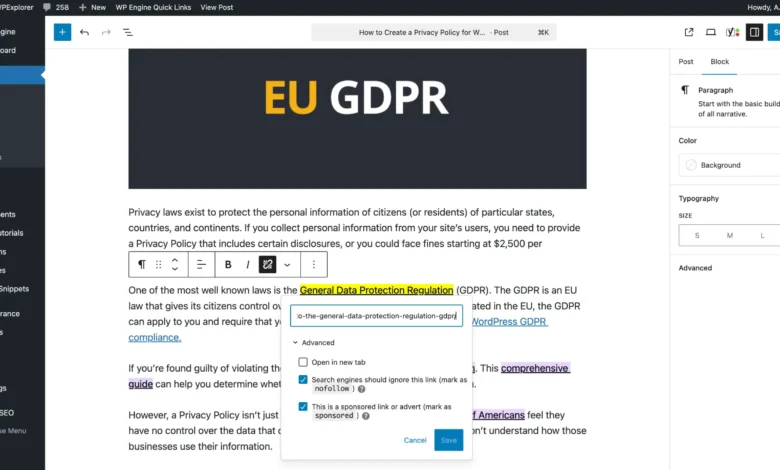
Managing a large-scale content library requires rigorous technical oversight, particularly when maintaining compliance with search engine guidelines regarding affiliate marketing and outbound links. As digital publishers increasingly audit their historical archives to adhere to evolving search engine optimization (SEO) standards, efficient content auditing tools have become essential. A recently developed developer workflow addresses this administrative hurdle by introducing an automated method to visually highlight sponsored and nofollow links directly within the WordPress block editor.
This technical enhancement allows site administrators, editors, and content managers to instantly audit posts for link attributes at a glance. By leveraging CSS attribute selectors alongside WordPress hooks, publishers can streamline editorial workflows, ensure accurate disclosure practices, and maintain adherence to algorithmic requirements without manually inspecting the HTML code of every individual article.
The Evolution of Link Compliance and Affiliate Disclosure
For decades, digital publishers monetized their platforms through affiliate marketing, a practice where content creators earn commissions by recommending products or services via tracking links. Historically, search engines required webmasters to apply a rel="nofollow" attribute to these commercial links. This directive instructed web crawlers not to pass PageRank—the algorithm used by search engines to determine the importance of a webpage—to the destination URL, thereby preventing artificial manipulation of search results.
In September 2019, Google introduced two new link attributes to provide more granular context about the nature of outbound links: rel="sponsored" and rel="ugc" (User Generated Content). The sponsored attribute was specifically designated for commercial relationships, advertisements, and compensated placements. While search engines have historically treated sponsored and nofollow similarly for ranking purposes, using the correct attribute has become a best practice for transparent web architecture.
For established websites with thousands of archived pages, transitioning older links from nofollow to sponsored—while ensuring proper disclosures are placed adjacent to affiliate text—is a resource-intensive endeavor. Manual inspection of legacy posts is prone to human error, often resulting in missed compliance updates or an over-saturation of monetized links within a single piece of content.
Technical Implementation: Injecting CSS into the Gutenberg Editor
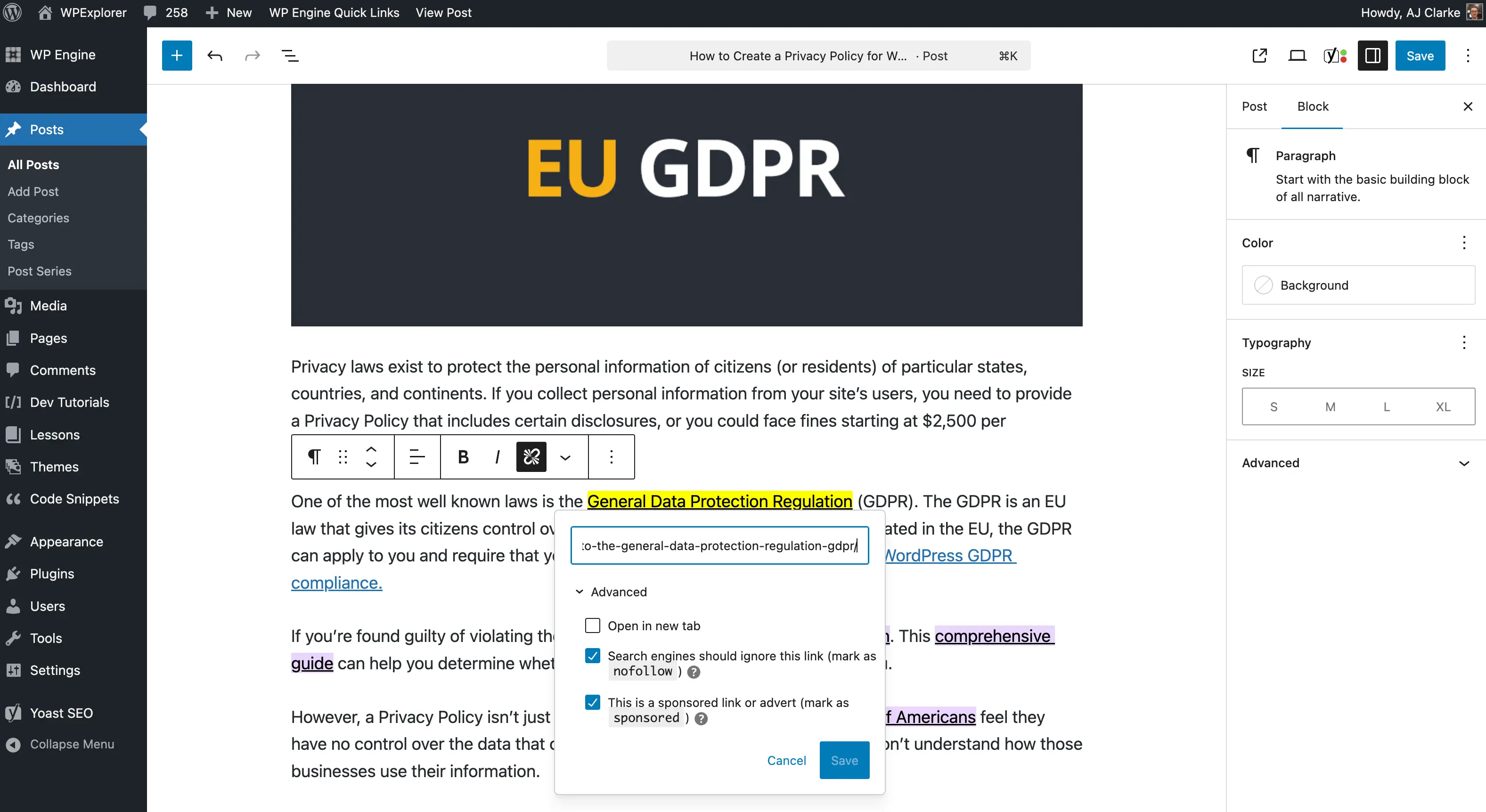
To solve the visibility challenge during the editing process, developers can inject custom Cascading Style Sheets (CSS) into the WordPress block editor, commonly known as Gutenberg. By targeting specific HTML attribute selectors, the editor interface can visually alter the presentation of links possessing designated rel values.
There are two primary methods for integrating custom styles into the WordPress editing environment: utilizing an external editor stylesheet via a child theme or programmatically inserting inline CSS via the enqueue_block_editor_assets hook. For modular deployments—such as custom-built site functionality plugins—the inline approach offers superior portability, allowing administrators to enable or disable the feature globally without modifying theme files.
The mechanism relies on CSS attribute selectors, specifically the tilde attribute selector ([attribute~=value]), which matches elements whose attribute contains a specific word separated by spaces. By applying this logic to anchor tags, developers can target links containing either the sponsored or nofollow parameter:
.editor-styles-wrapper a:is([rel~=sponsored],[rel~=nofollow])
    background: #FFFF00;
    color: #000;
When integrated into a WordPress function using the appropriate editor hook, this script ensures that any block editor instance automatically applies a high-contrast yellow background and dark text to qualifying links:
/**
 * Adds inline CSS to the Gutenberg Editor to highlight compliance attributes.
 */
add_action( 'enqueue_block_editor_assets', function()
    wp_register_style( 'wpexplorer-editor-highlight-rel-sponsored-nofollow', false );
    wp_add_inline_style(
        'wpexplorer-editor-highlight-rel-sponsored-nofollow',
        '.editor-styles-wrapper a:is([rel~=sponsored],[rel~=nofollow])background:#FFFF00;color: #000;'
    );
    wp_enqueue_style( 'wpexplorer-editor-highlight-rel-sponsored-nofollow' );
 );
Broader Implications for Content Auditing and Editorial Workflow
The implementation of visual cues within the content management system (CMS) interface introduces several operational efficiencies for publishing teams. Primarily, it shifts compliance auditing from a post-publication review phase to the active writing and editing stage.
By identifying commercial links visually, editorial staff can evaluate link density in real time. Excessive monetization within a single article can degrade user experience and trigger quality evaluations from search engine algorithms. Immediate visual feedback ensures that content creators maintain a healthy balance between editorial independence and commercial partnerships.

Furthermore, the technique highlights orphaned or improperly configured links—those lacking any rel attribute entirely. Editors can quickly determine whether an outbound link requires a nofollow, sponsored, or dofollow designation based on the site’s internal linking strategy and editorial guidelines.
Open-Source Availability and Community Response
To facilitate adoption without requiring developers to manually write and test code snippets, lightweight implementations have been packaged into open-source utility plugins. Developers seeking to deploy this functionality can access modular source code repositories via platforms like GitHub.
The preference among independent developers for hosting lightweight utility tools on version-control platforms rather than the official WordPress.org plugin directory has highlighted ongoing discussions within the open-source community regarding review timelines and resource allocation. While the official repository remains the primary distribution channel for mainstream software, independent developers frequently cite administrative bottlenecks and review delays as catalysts for direct-download distribution models.
Ultimately, tools that enhance content visibility and technical compliance empower publishers to maintain high standards of site architecture. As search engine guidelines continue to evolve, integrating automated visual indicators directly into the editorial workflow represents a proactive step toward sustainable, transparent digital publishing.