Securing a WordPress website has evolved from a simple task of installing a plugin into a sophisticated discipline of risk management, continuous monitoring, and proactive vulnerability patching. With WordPress powering over 43% of all websites on the internet, it remains a primary target for automated bots, sophisticated hacking collectives, and malicious actors looking to exploit vulnerabilities for financial gain or data exfiltration. Recent industry reports indicate that cross-site scripting (XSS) and broken access control remain the leading vectors for site compromises, often stemming from outdated third-party plugins rather than the core software itself.

The Evolving Landscape of Digital Threats
The nature of WordPress security incidents has shifted significantly over the past five years. While early cyberattacks primarily focused on brute-forcing administrative login credentials, modern threats are more nuanced. Today, attackers frequently utilize automated scanners to identify outdated plugins with known Common Vulnerabilities and Exposures (CVEs). Once a vulnerability is identified, a site can be compromised in a matter of minutes.
A prime example of this reality occurred during a recent carding attack against the WordPress publication site wpmayor.com. In this incident, attackers bypassed traditional perimeter defenses to hammer the site’s WooCommerce checkout page with stolen credit card numbers. This attack demonstrated that security is not a "set it and forget it" configuration; it requires site owners to defend specific application layers, such as checkout portals, against highly targeted bot traffic.

The Three Pillars of Essential WordPress Defense
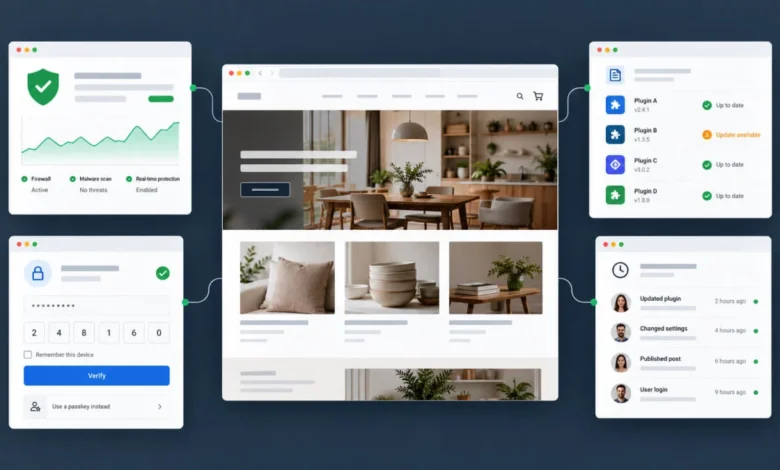
For any site owner, the baseline for security should consist of three non-negotiable elements: a robust firewall, automated vulnerability monitoring, and multi-factor authentication (MFA).
- Firewall and Malware Scanning: A firewall acts as the first line of defense, filtering out malicious traffic before it reaches your site’s database. Tools like Wordfence Security remain the industry standard for endpoint protection, providing a comprehensive suite of rules and signatures that actively block suspicious activity.
- Vulnerability Intelligence: Services like Patchstack have fundamentally changed how administrators respond to threats. By monitoring the specific ecosystem of plugins and themes on your site, these services alert you the moment a developer releases a patch for a vulnerability. In high-risk environments, "virtual patching"—a technology that blocks an exploit attempt at the firewall level even before the user applies the software update—is becoming standard practice.
- Authentication Security: The rise of credential stuffing attacks has made simple passwords insufficient. Implementing two-factor authentication (2FA) through plugins like Sigil or Kadence Security is no longer optional for sites handling user data. Modern implementations now support passkeys—using biometric data like Touch ID or Face ID—which provide higher security with less friction than traditional passwords.
Comparative Analysis of Top-Tier Security Solutions
To maintain a secure environment, site owners must select tools that align with their specific operational scale. Below is an overview of the current market leaders categorized by their primary function.

| Plugin | Primary Security Focus | Best For |
|---|---|---|
| Wordfence | Firewall & Malware Scanning | General-purpose, full-suite security |
| Patchstack | Vulnerability Monitoring | Proactive patching and CVE alerts |
| MalCare | Off-site Scanning | Large sites requiring low server load |
| Kadence Security | Hardening & Login | Sites focused on robust access control |
| All-In-One Security | Comprehensive All-Rounder | Beginners seeking a unified dashboard |
| Sucuri | Cloud-based Protection | Sites requiring high-availability firewalls |
| Sigil 2FA | Identity Management | Passwordless and MFA implementation |
| WP Activity Log | Audit Trails | Compliance and multi-user accountability |
| Security Ninja | Security Audits | Small businesses seeking to learn site health |
| PCrisk Trust Badge | Reputation Management | eCommerce sites needing user trust |
Deep Dive: Specialized Security Functions
While an all-in-one plugin may suffice for a personal blog, complex environments require specialized tools. For instance, MalCare distinguishes itself by shifting the scanning load from the local server to the cloud. This ensures that even if a site is heavily infected or compromised, the scanning process remains operational and accurate. This is a critical distinction for mission-critical applications where downtime equates to significant revenue loss.
Similarly, WP Activity Log serves a different but equally vital purpose: accountability. In an agency environment where multiple developers and administrators may access a site, maintaining a granular log of every change—from core file modifications to individual content edits—is essential for forensic analysis if a breach occurs.

PCrisk Trust Badge offers a unique approach by focusing on user-facing transparency. By displaying a dynamic badge that links to a real-time safety report, e-commerce stores can reduce cart abandonment rates by reassuring customers that the platform is regularly audited for malicious code and phishing vectors.
Strategic Deployment: Building Your Security Stack
A common error made by site administrators is the "plugin overload" fallacy—the belief that installing a dozen security plugins creates a "fortress" effect. In reality, this often leads to performance degradation and software conflicts. A more professional approach involves categorizing your security strategy based on your site’s business model.

- For Content-Driven Sites (Blogs/Brochures): A lightweight setup utilizing the free version of Wordfence for firewalls, combined with Patchstack’s community-tier alerts, provides sufficient coverage. The primary focus here is keeping software updated and ensuring administrators are using 2FA.
- For E-commerce (WooCommerce): The stakes are higher. These sites require proactive virtual patching to block exploits against the checkout process. Integrating a service like Sucuri or MalCare, which includes professional cleanup services, is recommended. The "cleanup" aspect is vital; should a site be compromised, the cost of professional remediation often exceeds the annual subscription fee of these services.
- For Professional Agencies: Agency portfolios demand the highest level of accountability. Using WP Activity Log ensures that all changes are documented, while standardized 2FA policies across all client sites are necessary to prevent the agency from becoming a single point of failure.
Addressing Common Myths and FAQs
Does hosting-level security replace the need for plugins?
No. While hosting providers often implement server-level firewalls, they lack visibility into the WordPress application layer. A host might block a server-wide DDoS attack, but it cannot detect if a specific plugin contains a malicious backdoor that is injecting scripts into your posts.
Can multiple security plugins conflict?
Yes. Running two firewalls simultaneously can lead to "false positives," where legitimate traffic is blocked, or significant latency issues. Always select one primary firewall and complement it with specialized tools like audit logs or vulnerability monitors, which do not interfere with firewall logic.

What is the role of the "30-day delay" in free security versions?
Several security vendors provide free versions of their software with a "delayed" signature update. This means if a new, zero-day exploit is discovered, premium users receive the defense signature immediately, while free users may wait up to 30 days. For high-traffic or high-risk sites, this gap is a significant security liability.
Future Outlook and Recommendations
The trajectory of WordPress security is moving toward "security by design." Developers are increasingly incorporating automated testing into their workflows, and the WordPress core team continues to harden the platform against common injection attacks. However, the human element—weak passwords, neglected updates, and improperly configured user roles—remains the weakest link.

To maintain a secure posture in the coming years, administrators should adopt a policy of "least privilege," ensuring that users only have the access necessary to perform their roles. Furthermore, the shift toward passkeys and passwordless authentication should be embraced as the standard, as it effectively neutralizes the threat of phishing and credential harvesting.
Ultimately, the most secure site is one that is audited regularly. Whether you choose to use an automated plugin like Security Ninja to run periodic checks or rely on an external service like PCrisk to monitor your reputation, consistency is the key. By combining proactive patching, rigorous access controls, and reliable off-site backups, you can mitigate the vast majority of risks that WordPress sites face today. Security is not a product to be bought; it is a process to be maintained. By implementing these strategies, site owners can ensure their platforms remain resilient against an ever-changing landscape of digital threats.