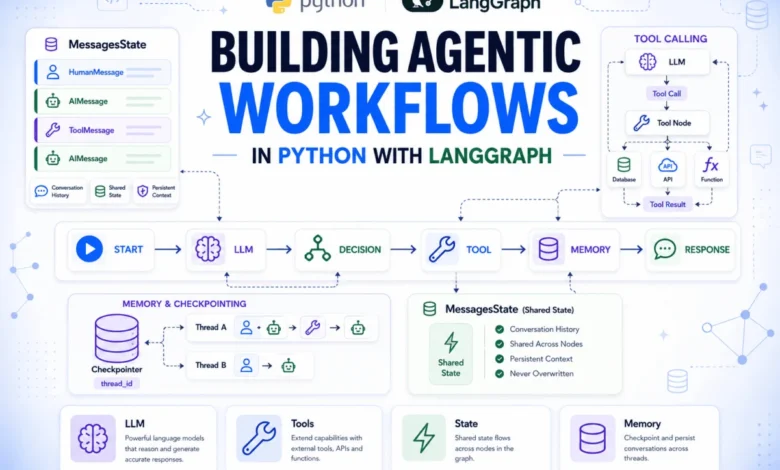
This comprehensive guide details the construction of a sophisticated agentic workflow in Python utilizing LangGraph, demonstrating the progression from a single model call to a fully functional tool-using agent with persistent conversational memory. The article navigates through the core components of LangGraph, illustrating how to manage state, define nodes and edges, integrate language models and tools, and implement robust conversation persistence mechanisms.
The Challenge of Advanced AI Agents
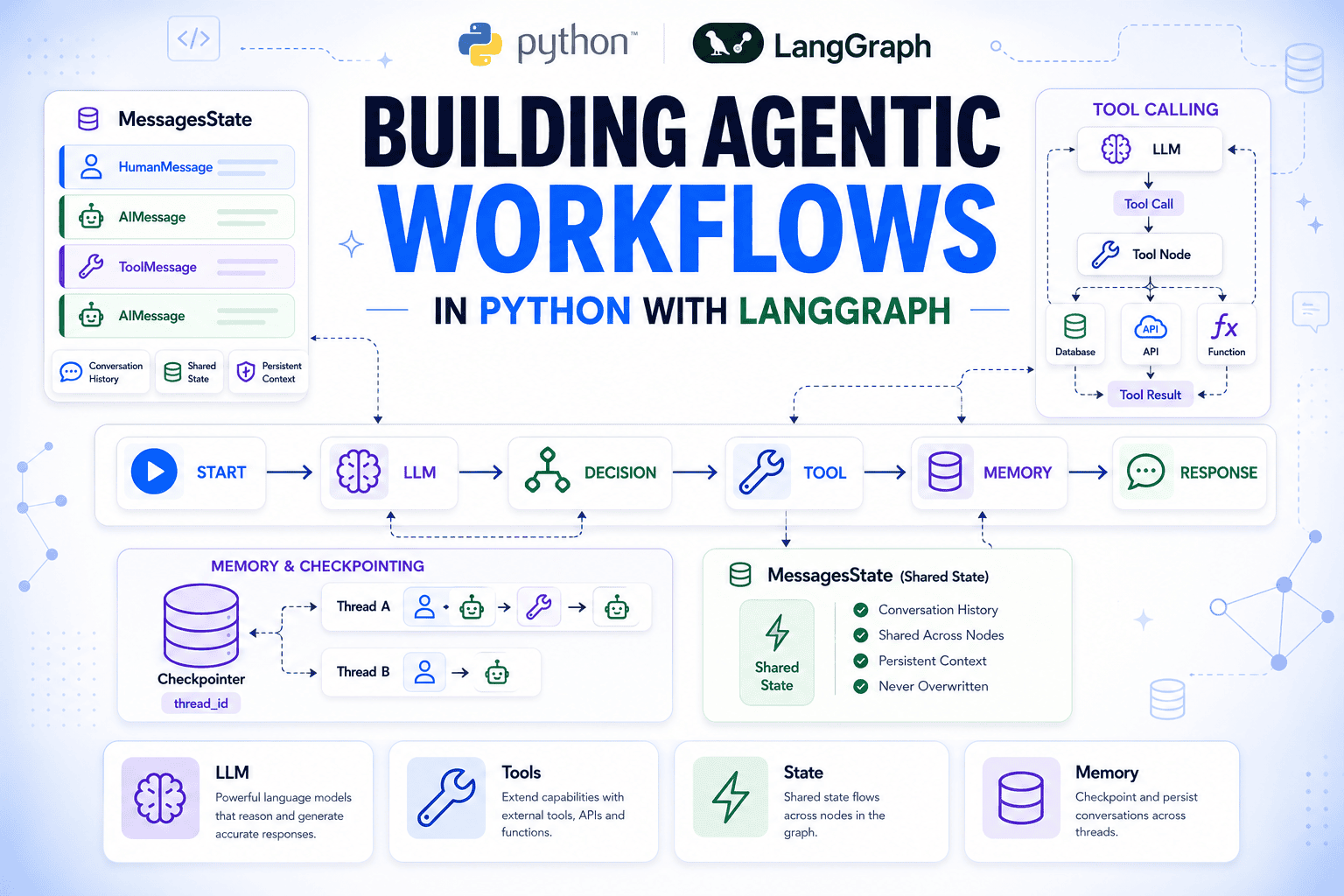
While many AI agent frameworks excel at handling straightforward, single-turn interactions—receiving a query, processing it through a language model, and returning a response—real-world applications often demand far greater complexity. Agents may need to interact with external databases, retain context from extended dialogues, or provide transparent insights into their decision-making processes. Building custom infrastructure for each of these advanced functionalities can quickly lead to unwieldy and difficult-to-maintain codebases. This is precisely the gap that LangGraph aims to fill, offering a structured and scalable approach to developing advanced agentic systems.
LangGraph addresses these challenges by representing an agent as a directed graph. In this paradigm, individual units of work are encapsulated as nodes, the flow of execution is determined by edges, and a shared state object serves as the central repository for all information, including the complete message history. Crucially, model interactions, tool invocations, and reasoning steps are all integrated as nodes within this graph. Consequently, every operation becomes part of the graph’s state, rendering the entire execution flow transparent, inspectable, and accessible to subsequent nodes. This article will systematically guide readers through understanding LangGraph’s fundamental primitives: state, nodes, and edges. It will cover automatic management of conversation history via MessagesState, integrating language model calls within nodes, registering and routing tool calls, tracing the entire message sequence for granular analysis, and implementing persistent conversations across independent invocations using a checkpointer. The construction will proceed from basic installation steps to a fully realized agent.
Setting Up Your Development Environment
To embark on building your LangGraph agent, begin by installing the necessary Python packages. This foundational step ensures you have access to the core libraries required for agent development.
pip install langgraph langchain-openai python-dotenvFollowing the package installation, it is essential to configure your environment with the necessary API credentials. Create a .env file in the root directory of your project and include your OpenAI API key. This file will be used to securely manage sensitive information.
OPENAI_API_KEY="your_key_here"To ensure these credentials are accessible within your Python script, load them using the dotenv library at the very beginning of your script, before any other LangChain or LangGraph imports.
from dotenv import load_dotenv
load_dotenv()
The python-dotenv library facilitates the loading of environment variables from a .env file, making your API key available as an environment variable for your application to use.
Understanding the Core Components: State, Nodes, and Edges
LangGraph’s architecture is built upon three fundamental concepts: State, Nodes, and Edges. A solid understanding of these primitives is crucial for building complex and maintainable agentic graphs.
State: The Centralized Memory
The State in LangGraph is a TypedDict that serves as the unified memory for the entire graph. All nodes within the graph read from this state and write their updates back to it. No data is passed directly between nodes; all communication occurs through the shared state object. Fields within the state that are not explicitly updated by a node remain unchanged.
Nodes: The Units of Work
Nodes are implemented as standard Python functions. Each node accepts the current state as an input argument and returns a dictionary containing the fields it intends to modify. Registering a function with the add_node method of the StateGraph builder makes it an integral part of the graph, eliminating the need for specialized decorators or base classes. If a function is passed without an explicit name string, LangGraph automatically assigns the function’s name as its identifier within the graph.
Edges: Defining the Execution Flow
Edges dictate the order in which nodes are executed. An add_edge(A, B) command signifies that after node A completes its execution, node B should be run next. For more dynamic control flow, add_conditional_edges allows for routing based on the output of a routing function. Every LangGraph execution must begin with a START node and conclude with a path leading to an END node.
A key feature for managing accumulating data, such as logs or message histories, is the use of reducers. By default, when a node returns a value for a state field, that value replaces the existing content. However, for fields intended to grow over time, a reducer function can be annotated. For instance, using operator.add on a list field enables appending new items rather than overwriting the entire list.
Consider the following example demonstrating the use of reducers for logging:
from typing import Annotated
import operator
from typing_extensions import TypedDict
from langgraph.graph import StateGraph, START, END

class TicketState(TypedDict):
    customer_message: str
    log: Annotated[list, operator.add]

def log_received(state: TicketState) -> dict:
    return "log": [f"Received: state['customer_message']"]

def log_assigned(state: TicketState) -> dict:
    return "log": ["Assigned to support queue"]

builder = StateGraph(TicketState)
builder.add_node("log_received", log_received)
builder.add_node("log_assigned", log_assigned)

builder.add_edge(START, "log_received")
builder.add_edge("log_received", "log_assigned")
builder.add_edge("log_assigned", END)

graph = builder.compile()

result = graph.invoke(
    "customer_message": "My invoice looks wrong", "log": []
)
print(result)
This execution yields:
'customer_message': 'My invoice looks wrong', 'log': ['Received: My invoice looks wrong', 'Assigned to support queue']As demonstrated, both nodes contributed to the log list, and both entries are preserved. The customer_message remained unchanged as neither node returned it. This mechanism is fundamentally how MessagesState manages its message history, employing a specialized reducer called add_messages that handles deduplication and chronological ordering of message objects.
Seamless Conversation History Management with MessagesState
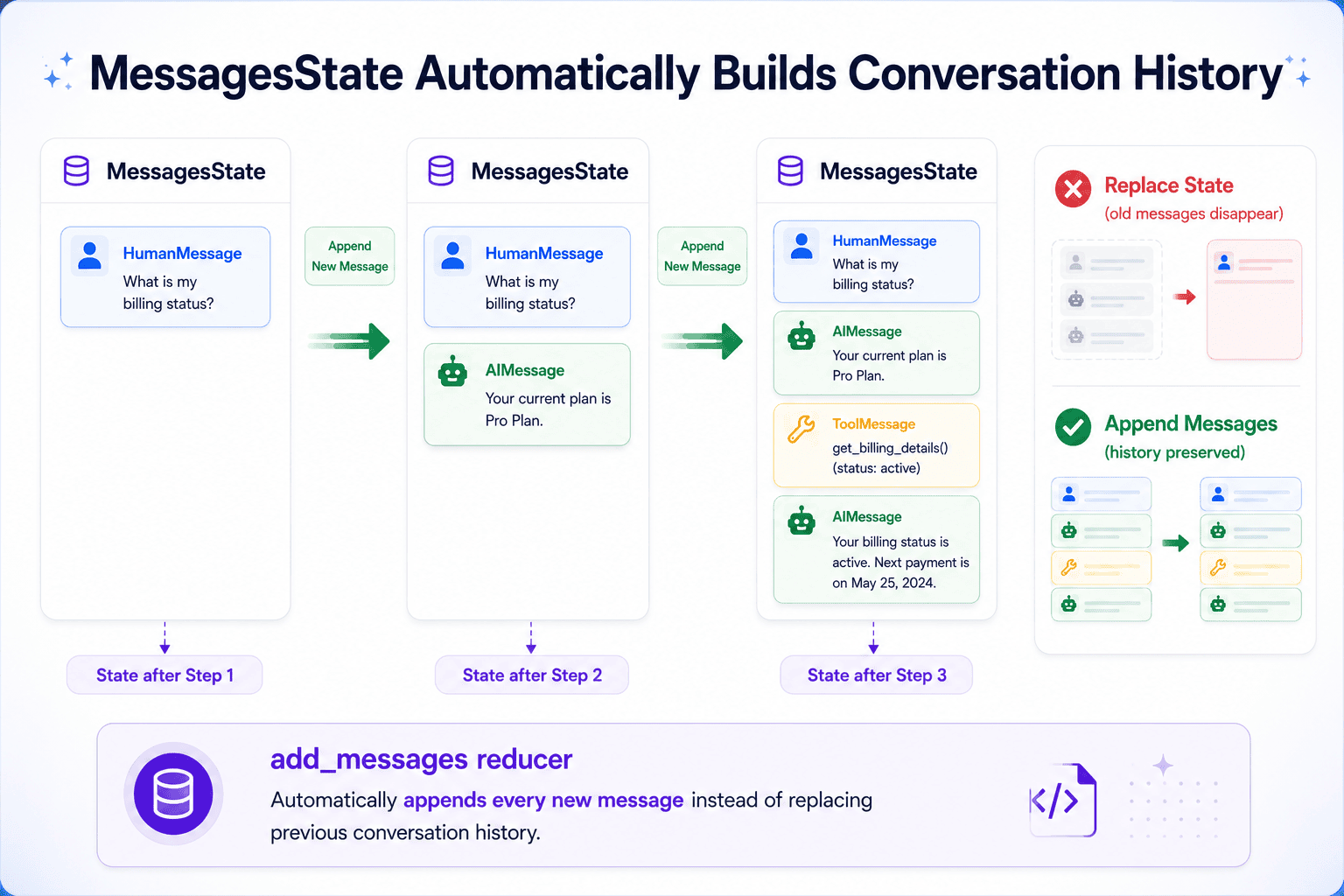
For conversational agents, maintaining the full history of interactions—user inputs, model responses, and tool outputs—is paramount. This history provides the necessary context for the model to make informed decisions in subsequent turns. LangGraph provides a built-in solution for this requirement: MessagesState.
MessagesState is a TypedDict designed specifically for managing conversational sequences. It features a single messages field that utilizes the add_messages reducer. This ensures that new messages are appended to the existing history rather than overwriting it, eliminating the need for manual concatenation of conversation logs.
from langgraph.graph import MessagesStateThis MessagesState definition is sufficient for most single-agent graph configurations. It can be extended with additional fields, such as a customer_id or a priority flag, to accommodate specific application needs. The messages field, however, is pre-configured for cumulative accumulation.
Integrating Language Model Calls within Nodes
The core of any LangGraph agent involves a node dedicated to invoking a language model. This node takes the current message list from the state, passes it to the model, and appends the model’s response back to the state. The model’s output, an AIMessage, is then returned within a dictionary keyed to "messages" to be incorporated into the graph’s state.
from langchain_openai import ChatOpenAI
from langchain_core.messages import SystemMessage

llm = ChatOpenAI(model="gpt-4o-mini")

def run_model(state: MessagesState) -> dict:
    system = SystemMessage("You are a support agent for a SaaS product. "
                           "Be concise and helpful.")
    response = llm.invoke([system] + state["messages"])
    return "messages": [response]
The ChatOpenAI class provides a convenient wrapper for the OpenAI API, adhering to LangChain’s standard chat model interface. This modular design allows for easy substitution of different LLM providers, such as Anthropic, Google, or local models via Ollama, by simply modifying the import statement and the model string. The SystemMessage is embedded within each model call without being stored in the persistent history, ensuring a clean and focused conversational context.
This node can then be integrated into a graph and executed:
from langgraph.graph import StateGraph, START, END
from langchain_core.messages import HumanMessage

builder = StateGraph(MessagesState)
builder.add_node("run_model", run_model)

builder.add_edge(START, "run_model")
builder.add_edge("run_model", END)

graph = builder.compile()

result = graph.invoke(
    "messages": [HumanMessage("My dashboard isn't loading. What should I try?")]
)
print(result["messages"][-1].content)
The result["messages"] variable contains the complete sequence of messages, including the initial HumanMessage and the subsequent AIMessage generated by the model. Accessing [-1] retrieves the most recent message.
Incorporating Tools and Routing Tool Calls
While language models can address general queries, accessing specific data—such as account details, subscription tiers, or historical records—necessitates the use of tools. The model determines when a tool is required, and your code defines the functionality of these tools.
Tools are defined using the @tool decorator:
from langchain_core.tools import tool

@tool
def get_customer_tier(customer_id: str) -> str:
    """Look up the subscription tier for a customer by their ID.
    Returns 'free', 'pro', or 'enterprise'."""
    tiers =
        "cust_1001": "enterprise",
        "cust_2002": "pro",
        "cust_3003": "free",

    return tiers.get(customer_id, "not found")
The docstring of a tool is critical as it serves as the instruction manual for the language model, guiding its decision-making process regarding tool invocation and argument assignment. Precision in these docstrings is paramount to prevent misinterpretations or incorrect argument passing.
To enable the model to utilize these tools, they must be bound to the language model instance. This informs the model about the available tools and their schemas.
tools = [get_customer_tier]
llm_with_tools = llm.bind_tools(tools)

def run_model(state: MessagesState) -> dict:
    system = SystemMessage("You are a support agent for a SaaS product. "
                           "Use available tools when you need account-specific information.")
    response = llm_with_tools.invoke([system] + state["messages"])
    return "messages": [response]
The bind_tools method injects the schema of the provided tools into the model’s context for every request. When the model decides to invoke a tool, its response is structured as an AIMessage with a populated tool_calls field, rather than directly providing text content.
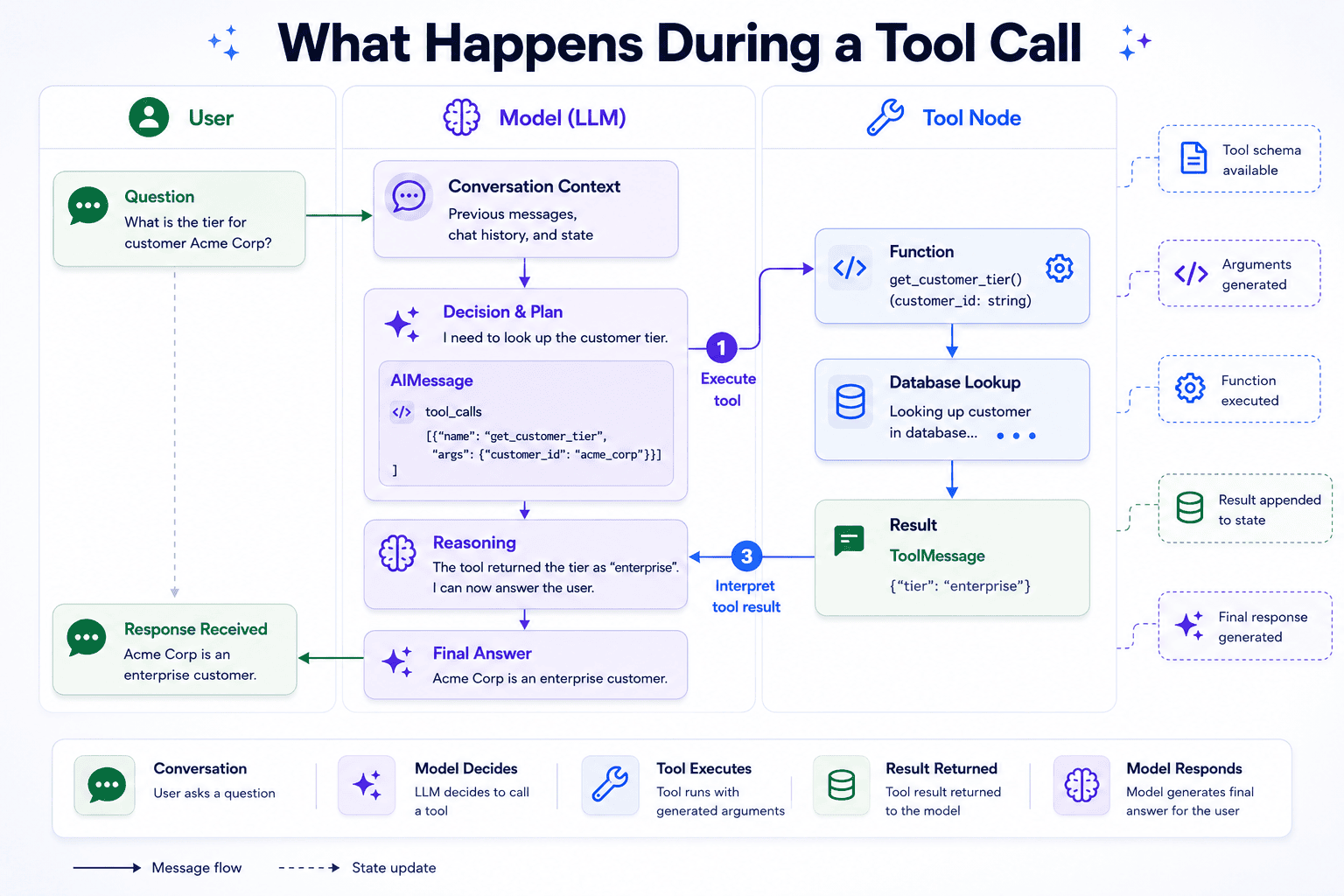
To manage the execution of these tool calls, LangGraph provides the ToolNode and routing utilities.
from langgraph.prebuilt import ToolNode, tools_condition

tool_node = ToolNode(tools)

builder = StateGraph(MessagesState)
builder.add_node("run_model", run_model)
builder.add_node("tools", tool_node)

builder.add_edge(START, "run_model")
builder.add_conditional_edges("run_model", tools_condition)
builder.add_edge("tools", "run_model")

graph = builder.compile()
The ToolNode inspects the tool_calls from the last AIMessage, executes the corresponding function with the arguments specified by the model, and encapsulates the result in a ToolMessage that is appended to the state. The tools_condition function evaluates the last AIMessage after each model invocation. If tool_calls is present, it routes execution to the "tools" node; otherwise, it directs the flow to the END state. The edge from "tools" back to "run_model" creates a crucial loop, feeding the tool’s output back to the model to generate a final, informed response.
Tracing the Reasoning Loop: A Deeper Dive
Understanding the internal mechanics of the graph, particularly when tools are involved, is essential for debugging and optimization. The ReAct (Reasoning and Acting) pattern is commonly employed, involving a cycle of model calls and tool executions.
result = graph.invoke(
    "messages": [
        HumanMessage("Can you check what plan customer cust_1001 is on?")
    ]
)
for msg in result["messages"]:
    print(type(msg).__name__, ":", msg.content or msg.tool_calls)
The output reveals a multi-step process:
HumanMessage : Can you check what plan customer cust_1001 is on?
AIMessage : ['name': 'get_customer_tier', 'args': 'customer_id': 'cust_1001', 'id': 'call_Rx7kLmNpQ2wJtA3s', 'type': 'tool_call']
ToolMessage : enterprise
AIMessage : Customer cust_1001 is on the enterprise plan.
This output demonstrates four distinct messages and two model invocations. Initially, the model generates an AIMessage indicating a desire to use the get_customer_tier tool with the argument cust_1001. The tools_condition routes this to the ToolNode, which executes the tool. The result, "enterprise", is returned as a ToolMessage. Subsequently, the graph loops back to run_model. With the tool’s output now part of the context, the model generates a final AIMessage containing the coherent answer. The tools_condition then identifies no further tool calls, terminating the graph execution.
Each tool invocation typically requires two model calls: one to determine what information is needed and another to interpret the retrieved data. This understanding is vital when considering the latency and cost implications of integrating multiple tools into an agent.
Persisting Conversations Across Multiple Invocations
By default, each invocation of graph.invoke() initializes a new graph state, meaning the agent has no memory of previous interactions. To enable persistent conversations, LangGraph offers checkpointer functionality.
State persistence is achieved by attaching a checkpointer during the graph compilation process:
from langgraph.checkpoint.memory import InMemorySaver

checkpointer = InMemorySaver()
graph = builder.compile(checkpointer=checkpointer)
To maintain continuity across invocations, the same thread_id must be provided in the configuration dictionary for each subsequent call.
config = "configurable": "thread_id": "ticket-7741"

# First invocation
graph.invoke(
    "messages": [HumanMessage("Hi, I can't access my account.")],
    config,
)

# Second invocation
result = graph.invoke(
    "messages": [HumanMessage("My ID is cust_2002, can you check my plan?")],
    config,
)
print(result["messages"][-1].content)
The sample output from the second invocation shows a combined response, reflecting the agent’s awareness of the prior conversation:
You're on the pro plan, cust_2002. Since you're having trouble accessing your account, I'd recommend resetting your password first. Pro accounts also have priority support available if the issue continues.The InMemorySaver stores checkpoints in the process’s memory, making it suitable for development and testing. For production environments, it’s advisable to replace it with a more robust solution, such as a database-backed persistent checkpointer, without altering the core graph logic.
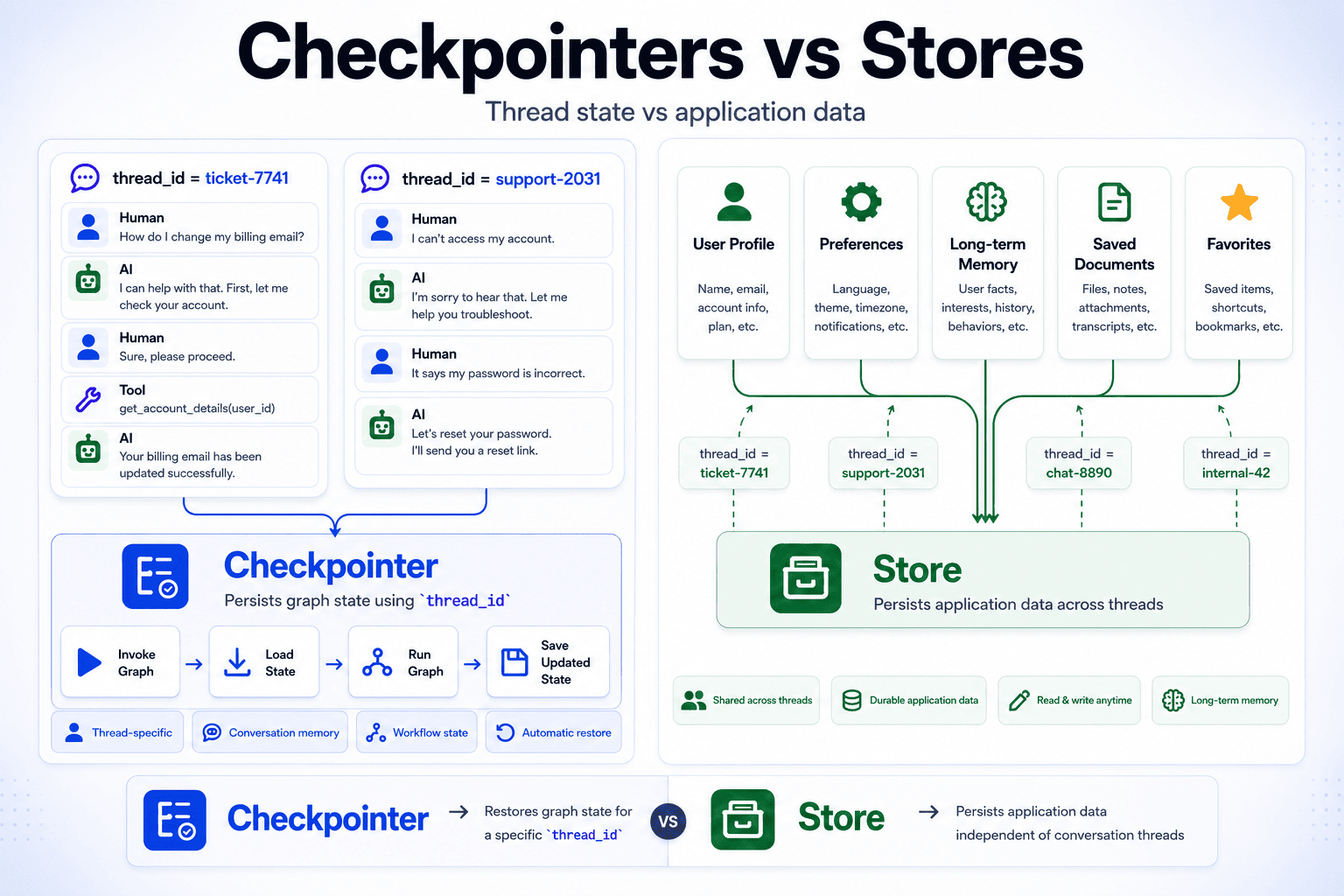
Checkpointers are specifically designed to persist graph state for a given thread. For application-level data that needs to be stored independently of any single conversation, such as user profiles or preferences shared across multiple threads, Stores can be employed. Stores complement checkpointers by providing durable storage that graphs can access during their execution.
Conclusion: Building Scalable Agentic Architectures
This detailed exploration has guided the construction of a complete LangGraph agent, from initial setup to advanced features like tool integration and conversation persistence. The core principles of state flow, node execution, tool integration within the execution loop, and the mechanics of checkpointers for maintaining conversational context have been thoroughly examined. These fundamental building blocks are highly scalable, enabling the development of sophisticated agent workflows ranging from simple chatbots to complex, multi-agent systems.
A significant advantage of LangGraph lies in the modularity of its components. Language models can be swapped, new tools can be registered, and persistence strategies can be altered without necessitating a complete redesign of the graph architecture. The unified state mechanism ensures predictable interactions and facilitates effortless extension.
The same architectural principles extend seamlessly to the development of multi-agent systems. A coordinating agent that directs tasks to specialized agents can itself be modeled as a graph, maintaining its state, nodes, and conditional edges. While the scale of the architecture increases, the underlying primitives remain consistent.
For those seeking to delve deeper into the capabilities of LangGraph and agent development, further exploration of the official documentation and community resources is highly recommended. This foundational knowledge empowers developers to construct increasingly intelligent and adaptable AI agents for a wide array of applications.