A Comprehensive Guide to WordPress Notes: How the New In-Editor Feedback Feature Streamlines Content Collaboration and Editorial Workflows

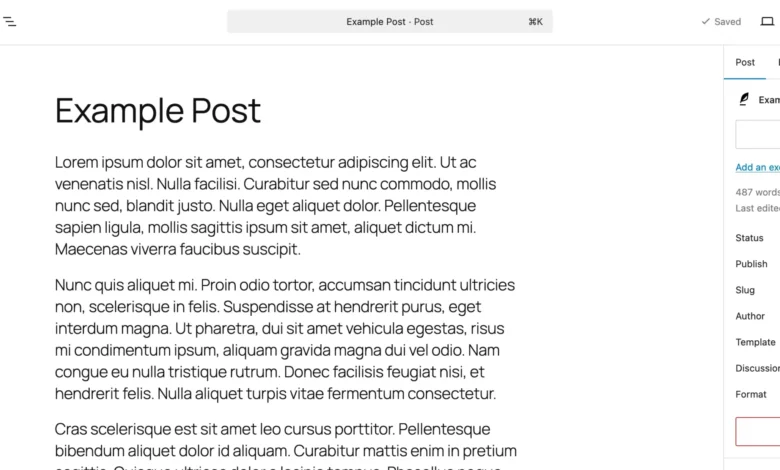
Collaborating on digital content has historically required navigating a fragmented ecosystem of external applications, ranging from shared documents and visual design platforms to sprawling electronic mail threads. For years, editorial teams, web designers, and site administrators working within the WordPress publishing environment faced a distinct friction point: while the content itself lived inside the Gutenberg block editor, the discussions, revisions, and approvals surrounding that content took place elsewhere. This separation forced teams to juggle multiple windows, manually copy and paste textual drafts, and frequently lose vital context along the way.
The introduction of WordPress Notes fundamentally alters this dynamic. By embedding a native, block-specific feedback mechanism directly into the core editor, the platform bridges the gap between content creation and editorial review. Instead of dispatching full-page screenshots or lengthy itemized lists via third-party communication channels, stakeholders can now attach contextual comments to individual paragraphs, headings, images, and layout elements right where they reside on the page.

Background Context and the Evolution of WordPress Collaboration
To understand the significance of the Notes feature, one must examine the trajectory of the WordPress Gutenberg project since its inception. Launched to modernize the publishing experience through a modular, block-based architecture, Gutenberg steadily transformed WordPress from a traditional blogging tool into a comprehensive Content Management System (CMS) and full-site editing engine. However, as agencies, large enterprises, and multi-author publications adopted WordPress for complex digital publishing operations, the absence of a unified review system became glaringly apparent.
Third-party plugins and enterprise-grade publishing workflows previously attempted to fill this void, yet they often introduced performance overhead or complicated user interfaces. Recognizing the demand for a seamless review process that could rival dedicated publishing suites, core contributors prioritized in-editor collaboration tools. The deployment of Notes represents a mature step forward for the Gutenberg editor, aligning WordPress with modern cloud-based document editors where contextual, inline feedback is considered an absolute baseline expectation for productivity.
Mechanics of the Feature: How WordPress Notes Operate
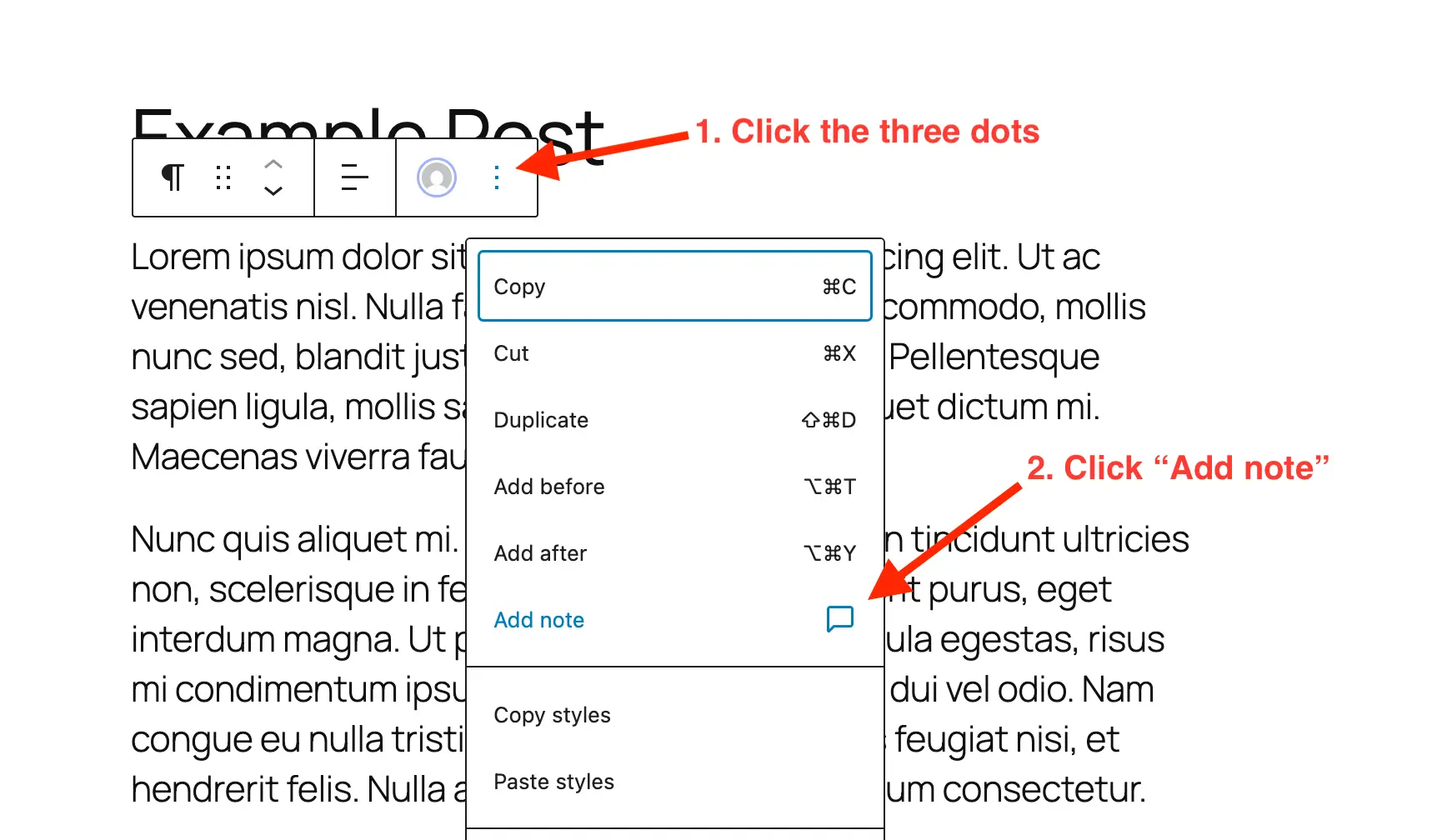
At its core, the Notes feature functions as a sophisticated annotation layer overlaid on the block editor. When an authorized user interacts with a content block, they can invoke the option to add a note via the block’s specific settings menu.

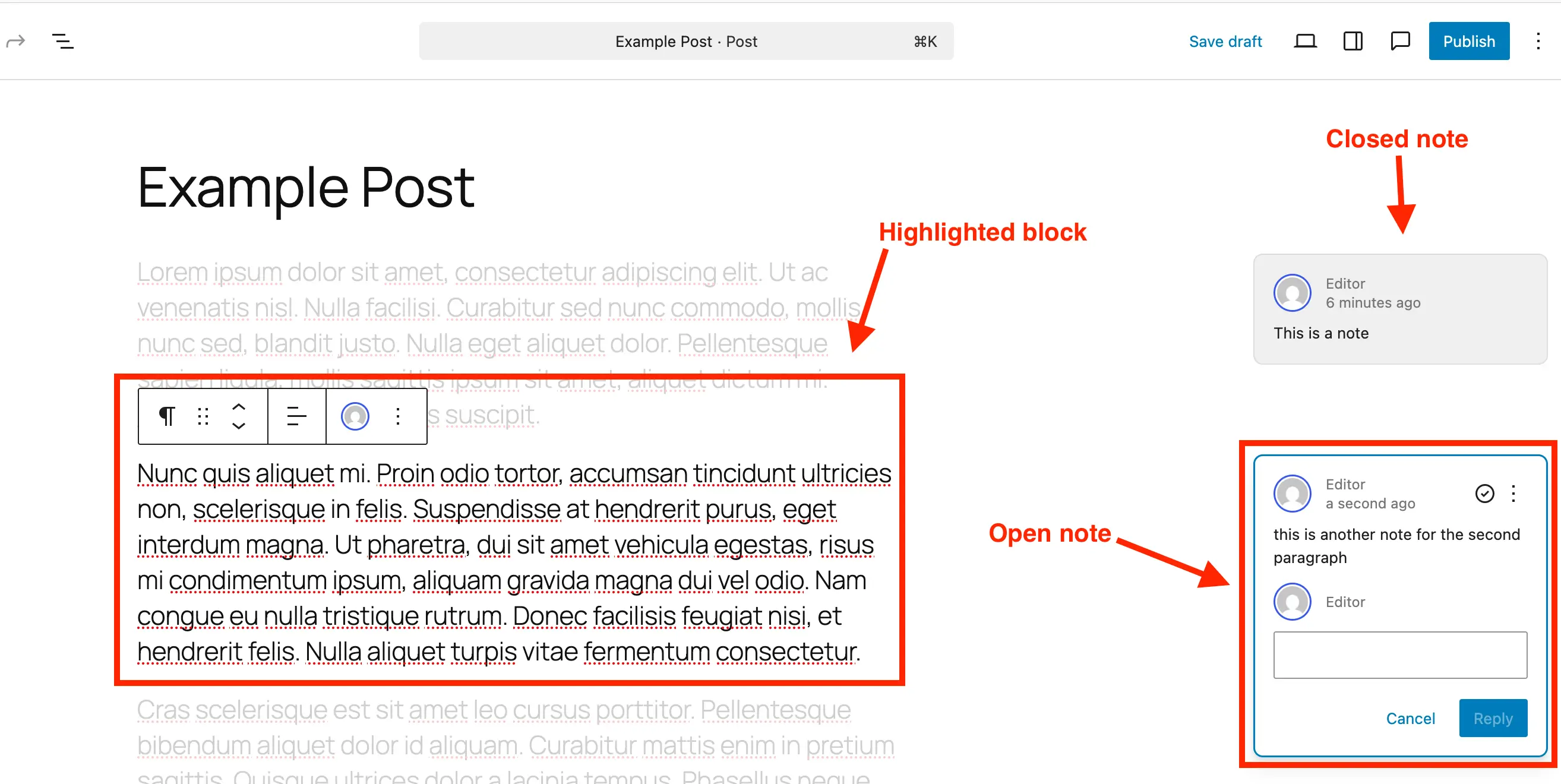
Once generated, the interface adapts to prioritize focus. A dedicated comment bubble appears within a side panel or alongside the active block. Selecting a note triggers a visual shift in the editor: the specific block under discussion remains brightly highlighted, while the surrounding layout fades into the background. This targeted isolation ensures that reviewers and content creators can address granular design adjustments or phrasing changes without being distracted by the broader page structure.
The lifecycle of a note is designed to mirror standard project management protocols. Users can reply directly to existing threads to debate revisions, mark items as resolved once the requested modifications are implemented, or reopen discussions if subsequent changes introduce new issues. Furthermore, administrators maintain the granular control to delete obsolete notes entirely, preventing unnecessary database bloat—a critical consideration for high-traffic websites managing thousands of pages and extensive revision histories.
Step-by-Step Implementation: Adding and Managing Notes
Deploying Notes within an active WordPress environment requires minimal technical overhead, functioning intuitively for both seasoned developers and casual content managers.
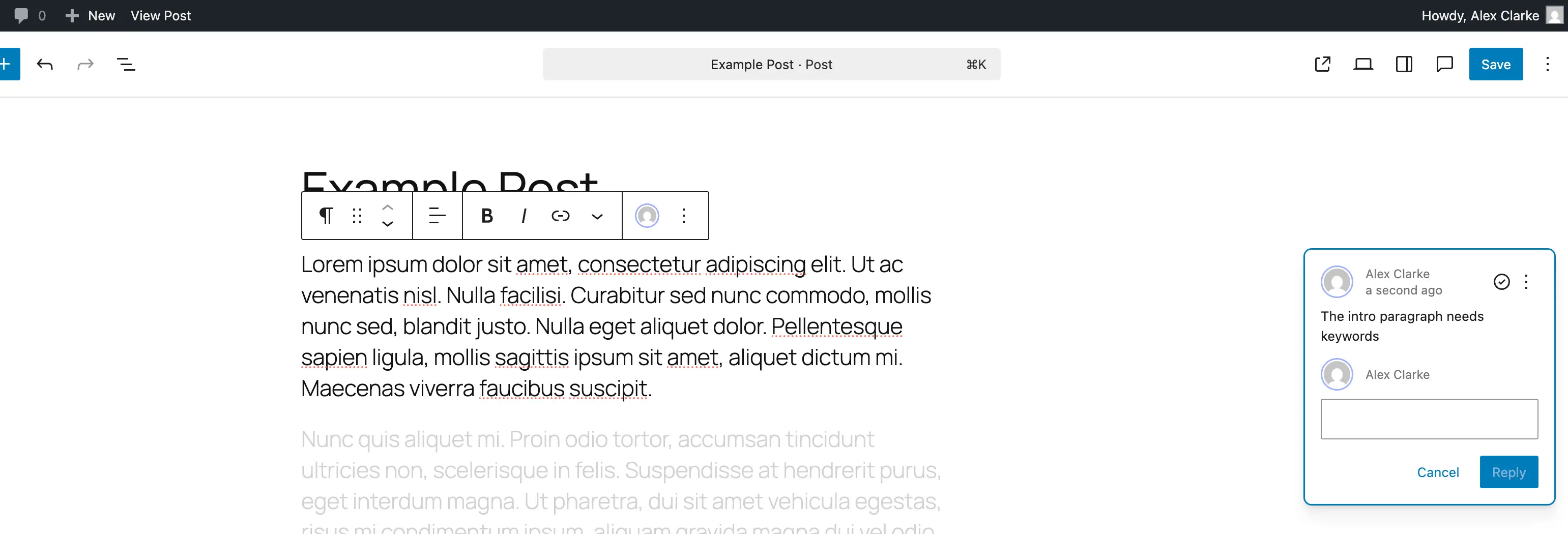
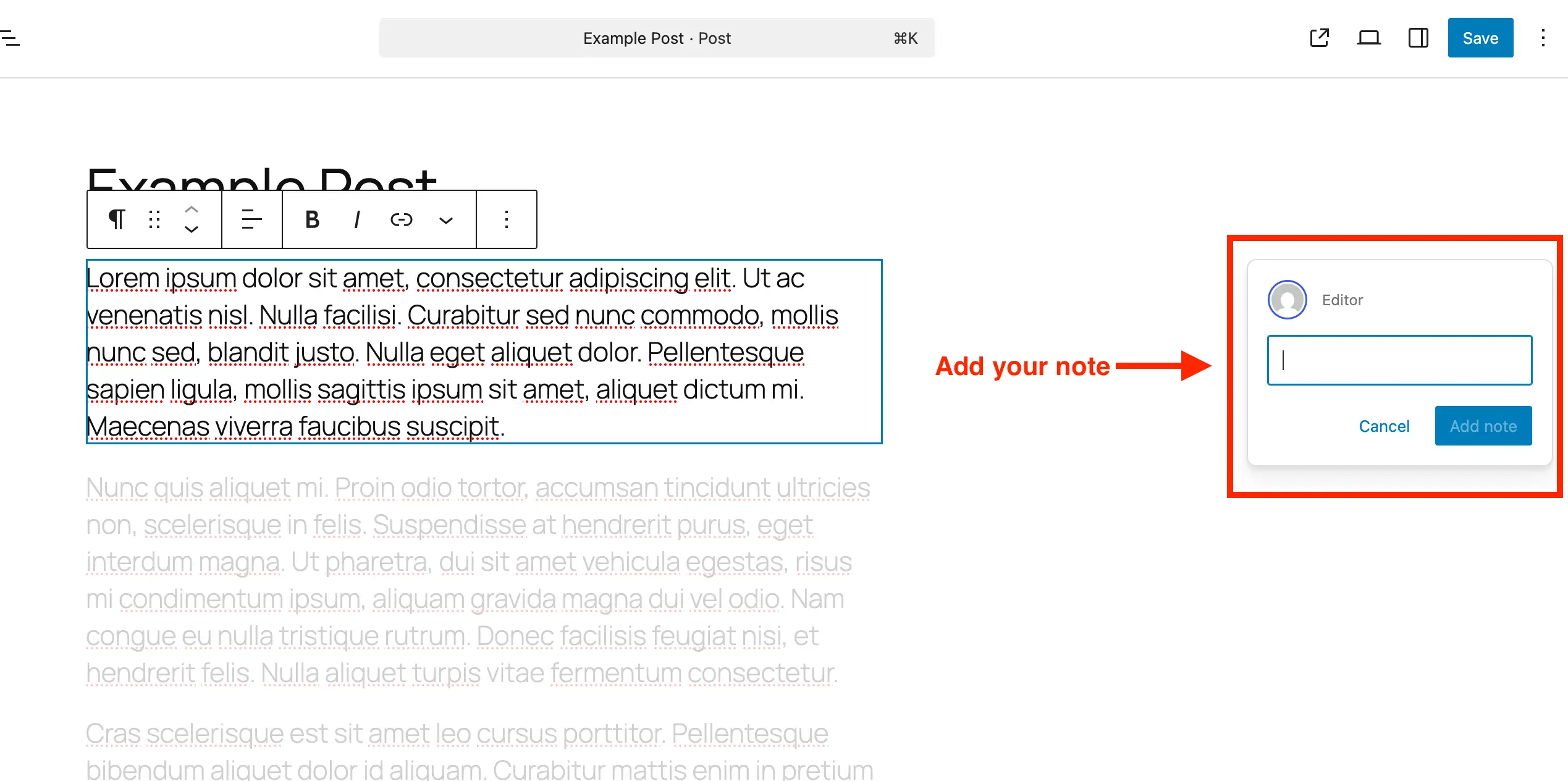
To initiate feedback on a specific post or page, a user navigates to the desired document within the block editor. By selecting an individual block—whether it is a standard text paragraph, a media element, or a complex structural container—the user accesses the block options menu, typically represented by a three-dot icon, and selects the "Add Note" command. This action spawns an input box on the right-hand side of the screen. As the reviewer types, the text box automatically expands to accommodate longer instructions or stylistic critiques, supporting line breaks via the enter key.
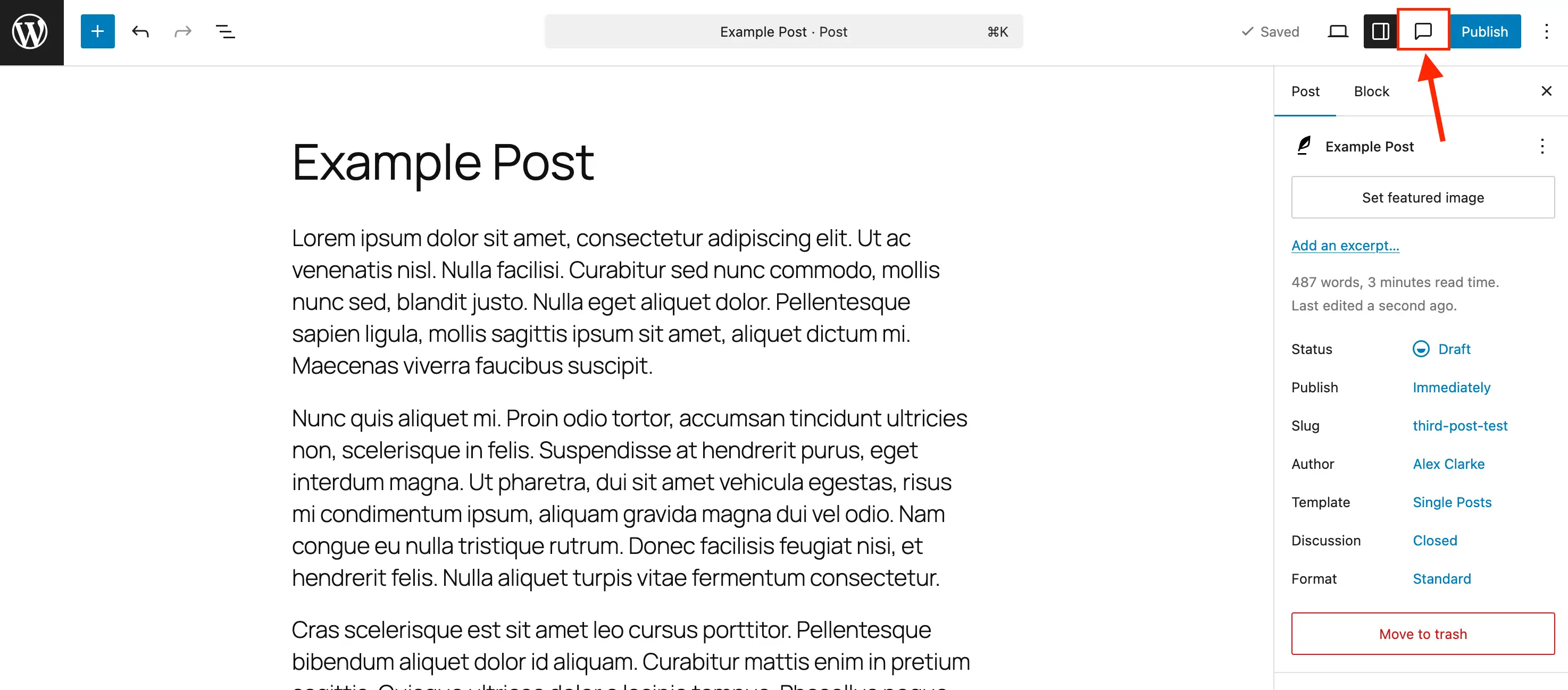
Reviewing accumulated feedback is managed through the primary editor toolbar. By toggling the Notes icon, which resembles a standardized comment bubble, editors can open a comprehensive sidebar that aggregates all active and resolved notes across the document. Clicking any entry in this panel automatically scrolls and focuses the editor on the corresponding block.
Once an edit is executed, clicking the check-icon resolves the note. Resolved notes vanish from the immediate inline view when standard sidebars are closed, but remain accessible within the master panel for auditing purposes. For fully completed reviews, deleting the note via its individual menu maintains database efficiency, while the "Reopen" command provides a safety net for feedback that requires iterative refinement.
Extending Capabilities: Enabling Notes for Custom Post Types
While core WordPress installations automatically activate the Notes feature for standard posts and pages, advanced website architectures frequently rely on custom post types (CPTs) to structure unique content such as portfolios, products, real estate listings, or event schedules. To ensure that the collaborative benefits of Notes extend across these specialized environments, developers must explicitly declare support for the feature during registration.
For administrators utilizing administrative management plugins such as Post Types Unlimited, this integration is streamlined into a graphical interface where checking a designated "Notes" box within the editor support settings instantly activates the functionality.
For developers managing custom post types programmatically via custom themes or site-specific plugins, integration requires a direct update to the post type registration arguments. Specifically, the "notes" parameter must be added as a boolean value within the editor support array:
register_post_type( 'book', [
    'label' => 'Books',
    'public' => true,
    'show_in_rest' => true,
    'supports' => [
        'title',
        'editor' => [ 'notes' => true ],
        'author',
    ],
] );
For existing custom post types already deployed within a live environment, developers can leverage an initialization action hook to safely merge Notes support into current configurations without disrupting other established editor parameters:
/**
 * Enable editor notes for custom post types.
 */
add_action( 'init', function()
    $post_types = [ 'portfolio_item', 'press_release' ];
    foreach ( $post_types as $post_type )
        $supports = get_all_post_type_supports( $post_type );
        $editor_supports = array( 'notes' => true );
        if ( is_array( $supports['editor'] ) && isset( $supports['editor'][0] ) && is_array( $supports['editor'][0] ) )
            $editor_supports = array_merge( $editor_supports, $supports['editor'][0] );

        add_post_type_support( $post_type, 'editor', $editor_supports );

 );
Streamlining Environments: Disabling Notes When Unnecessary
Conversely, certain publishing models or minimalist editorial teams may find inline annotations superfluous for specific content sections, preferring a clean, uninterrupted interface. While WordPress does not currently feature a single global toggle to disable the Notes subsystem entirely across an entire installation, administrators can selectively strip the capability from targeted post types using standard filter hooks.
Implementing a programmatic restriction prevents the feature from rendering on designated content types, thereby reducing visual clutter in the administrative dashboard:
/**
 * Disable Notes via post type args filter.
 */
add_filter( 'register_post_type_args', function( $args, $post_type )
    $post_types = [ 'post', 'page' ];
    if ( in_array( $post_type, $post_types, true ) && isset( $args['supports']['editor']['notes'] ) )
        unset( $args['supports']['editor']['notes'] );

    return $args;
, 10, 2 );
By adjusting the array parameters within this filter, site administrators retain absolute authority over where and when collaborative reviews can be initiated.
Strategic Implications for Agencies and Enterprise Publishing
The introduction of native in-editor notes carries profound implications for web development agencies, corporate marketing departments, and multi-author digital publications. Historically, client handoffs represented a notorious bottleneck in web projects. Clients would review staging sites, capture erratic screen grabs, and compile confusing email chains referencing ambiguous page locations. Translating this disjointed feedback into actionable code or content revisions consumed countless billable hours and introduced numerous opportunities for miscommunication.
By centralizing the review process directly within the WordPress dashboard, agencies can mandate a standardized, highly accountable review protocol. Clients interact with the actual block markup, leaving precise instructions tied explicitly to the structural components they wish to alter. This transparency drastically curtails revision cycles, minimizes administrative overhead, and accelerates time-to-publish metrics across commercial projects.
Ultimately, the maturation of WordPress Notes underscores the platform’s ongoing evolution from a simple blogging utility into a robust, enterprise-grade publishing ecosystem. By bridging the historical divide between content creation and editorial collaboration, WordPress provides teams with the modern tools necessary to produce polished, high-integrity digital experiences with unprecedented efficiency.