Yoast SEO remains one of the most widely deployed optimization tools within the global WordPress ecosystem, active on millions of websites ranging from small personal blogs to high-traffic enterprise networks. Even in its free iteration, the plugin offers robust foundational capabilities, including advanced sitemap generation, comprehensive readability analysis, and core search engine optimization configurations. However, the widespread integration of promotional elements—commonly referred to as upsells—has long been a point of friction for web developers, agency administrators, and site owners seeking a minimalist, distraction-free administrative dashboard.
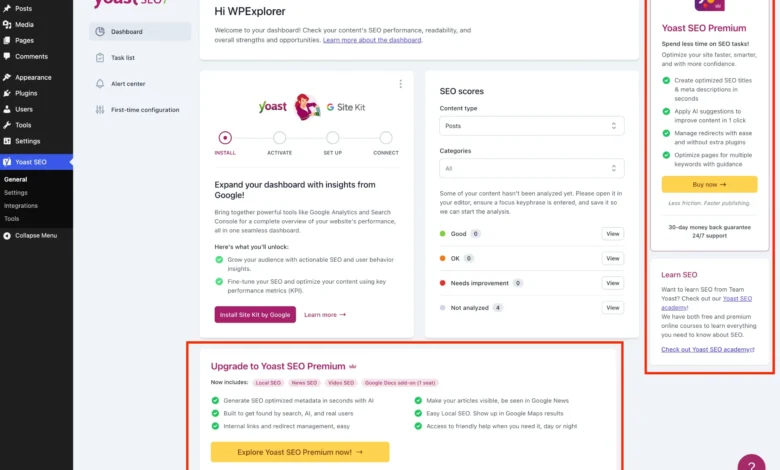
The administrative interface for the free tier features a persistent array of promotional banners, secondary upgrade pages, dashboard widgets, and sidebar notifications designed to encourage users to transition to Yoast SEO Premium. While these design choices align with commercial software-as-a-service (SaaS) growth models, they frequently introduce visual clutter and operational distractions, particularly for professionals managing multiple client-facing environments.
Understanding the Commercial and Administrative Impact
The inclusion of promotional prompts within open-source or freemium software infrastructure is a standard industry practice. Developers utilize free plugin installations as a primary conversion funnel, leveraging high-traffic administrative real estate to showcase premium capabilities such as AI-driven metadata generation, automated redirect management, and multiple focus keyword tracking. For budget-conscious users or administrators who manage sites with strict functional requirements, purchasing the premium license may not always be practical or necessary. Consequently, web professionals have increasingly sought programmatic solutions to streamline the user interface without compromising the core technical performance of the optimization engine.
Background context indicates that user interface (UI) fatigue in content management systems directly impacts administrative efficiency. When site editors and technical maintainers are continually exposed to non-essential upgrade prompts, the cognitive load required to perform routine publishing tasks increases. Eliminating this extraneous noise helps maintain a focused operational environment, reduces misclicks, and ensures that the WordPress dashboard remains tailored strictly to the needs of the publisher.
Establishing a Programmatic Framework via Custom PHP
To systematically eliminate promotional elements from the Yoast SEO interface without altering core plugin files—which would create maintenance vulnerabilities during regular updates—developers rely on custom PHP snippets. These functions can be integrated securely into a child theme’s functions.php file, deployed via a dedicated code snippet management plugin, or executed as a Must-Use (MU) plugin for system-wide enforcement.

The foundational approach involves initializing a dedicated PHP class to encapsulate all removal logic. This prevents global namespace pollution and ensures strict conditional execution.
if ( ! class_exists( 'WPEX_Remove_Yoast_SEO_Upsells' ) )

    class WPEX_Remove_Yoast_SEO_Upsells

        public function __construct()  defined( 'WPSEO_PREMIUM_VERSION' ) )
                return;


    new WPEX_Remove_Yoast_SEO_Upsells;
This structural safeguard verifies both the presence of the core plugin via the WPSEO_VERSION constant and ensures the script terminates immediately if the premium version is already active, thereby preventing redundant resource execution.
Systematically Removing Premium and Redundant Submenu Pages
Yoast SEO automatically registers several administrative submenu pages intended exclusively for premium subscribers. Pages such as "Redirects," "Workouts," "Plan Comparison," "Academy," and "Support" often serve as navigational funnels rather than functional management tools within a free installation.
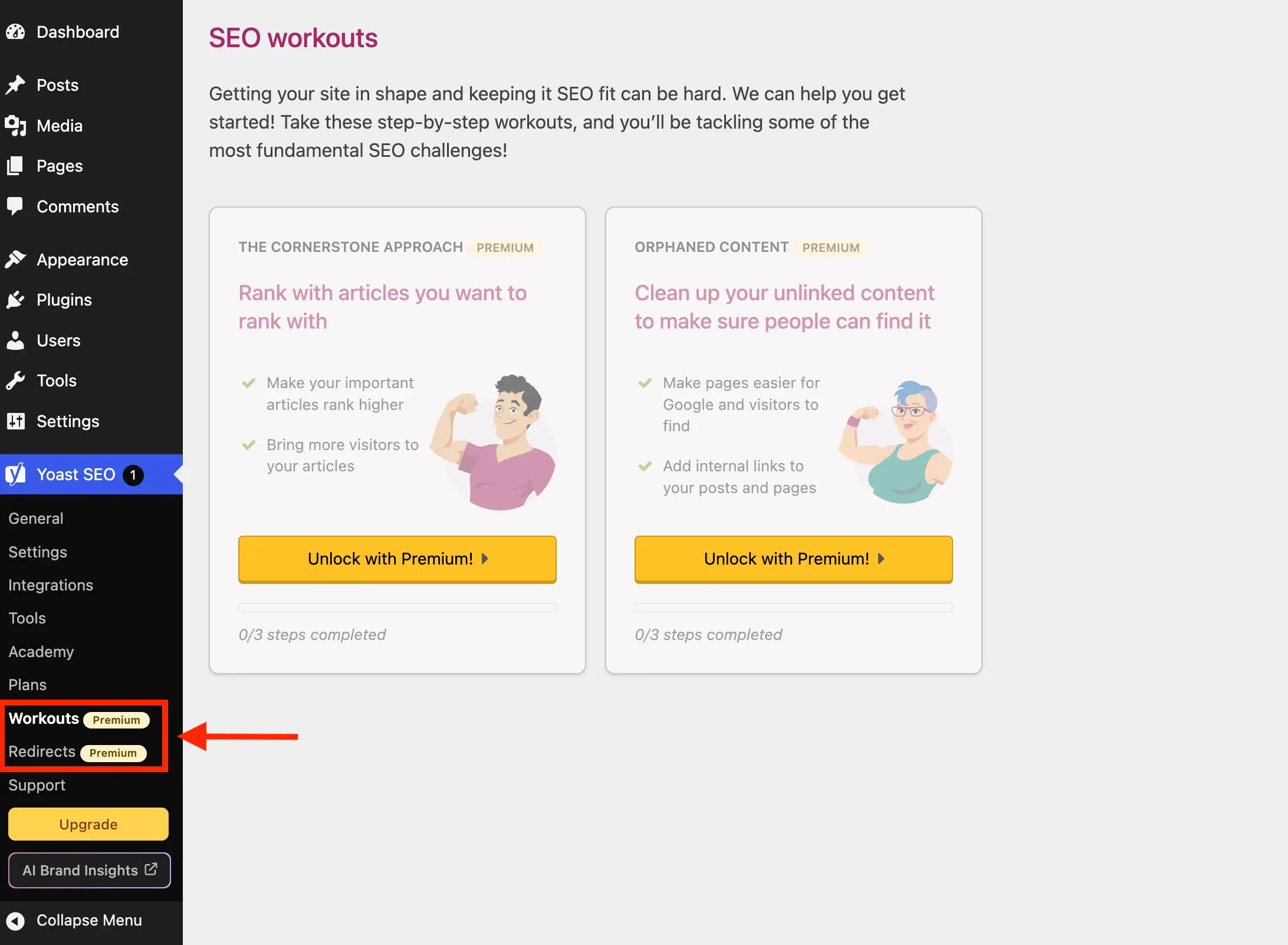
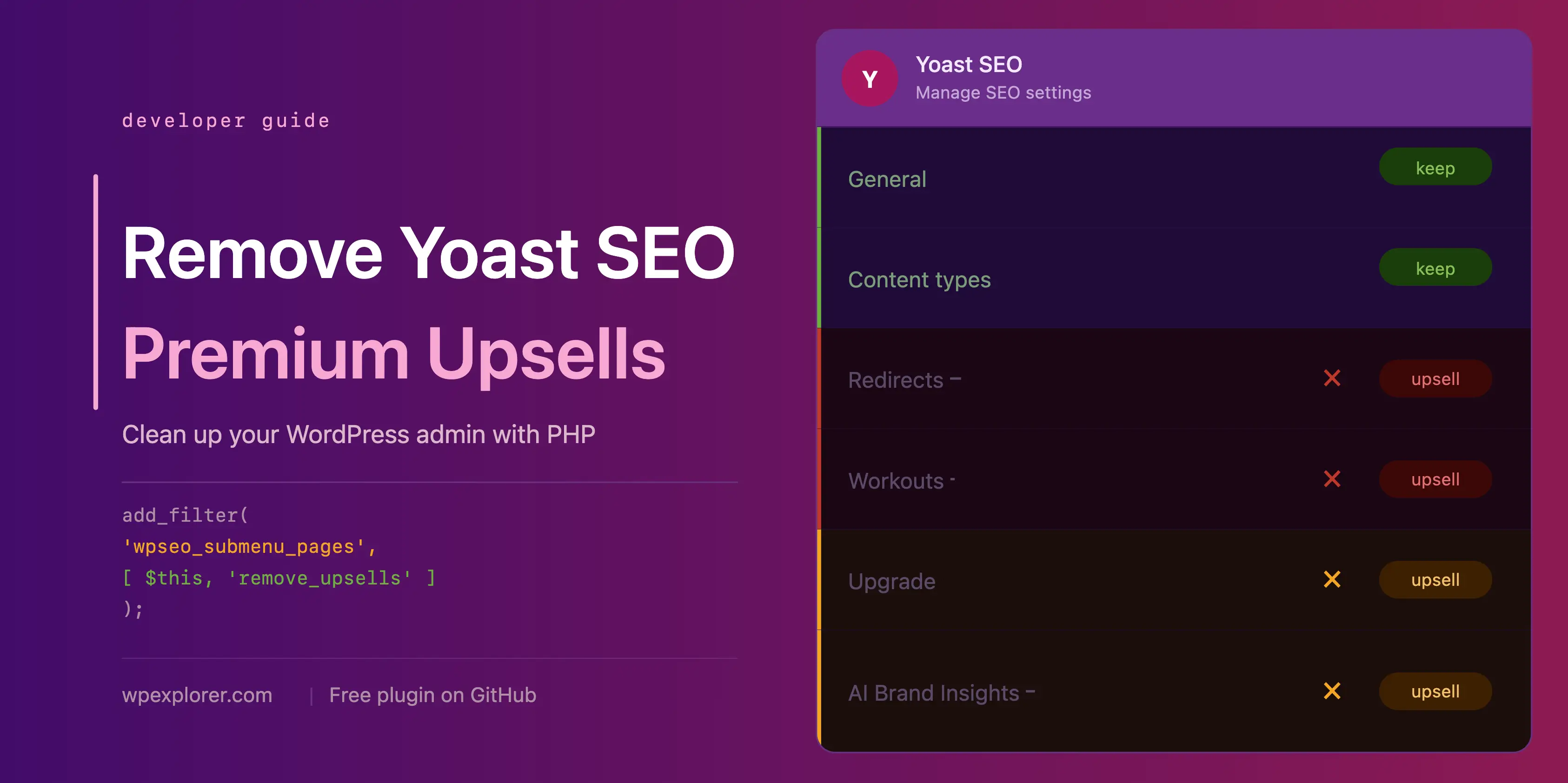
By hooking into the wpseo_submenu_pages and wpseo_network_submenu_pages filters, administrators can intercept the menu array and programmatically filter out pages containing specific premium indicators or targeted administrative slugs.
add_filter( 'wpseo_submenu_pages', [ $this, 'remove_premium_admin_pages' ], PHP_INT_MAX );
add_filter( 'wpseo_network_submenu_pages', [ $this, 'remove_premium_admin_pages' ], PHP_INT_MAX );
The corresponding method processes the array by evaluating menu attributes, specifically checking for the presence of the internal premium badge HTML class or cross-referencing targeted slugs against an exclusion array:
public function remove_premium_admin_pages( array $pages ): array
    $pages_to_remove = [
        'wpseo_upgrade_sidebar',
        'wpseo_licenses',
        'wpseo_page_academy',
        'wpseo_page_support',
        'wpseo_redirects',
        'wpseo_workouts',
    ];
    return array_filter( $pages, function( $page ) use ( $pages_to_remove )
        if ( isset( $page[2] ) && str_contains( $page[2], 'yoast-premium-badge' ) )
            return false;

        if ( isset( $page[4] ) && in_array( $page[4], $pages_to_remove, true ) )
            return false;

        return true;
     );
This method ensures that non-functional links, upgrade sidebars, and external educational funnels are completely excised from the primary navigation menu.

Neutralizing Toolbar Links and Sidebar Elements
Beyond the standard menu configuration, promotional buttons frequently appear within the top administrative toolbar and the primary sidebar navigation. Elements such as the "Upgrade" button and the "AI Brand Insights" trigger require specific hooks due to the priority order in which Yoast registers its interface components.
The AI Brand Insights button, for example, is registered at the maximum integer priority (PHP_INT_MAX), necessitating direct removal via WordPress’s native remove_submenu_page function during the admin_menu action hook:
add_action( 'admin_menu', [ $this, 'remove_upsell_submenu_pages' ], PHP_INT_MAX );

public function remove_upsell_submenu_pages(): void
    remove_submenu_page( 'wpseo_dashboard', 'wpseo_brand_insights' );
Similarly, administrative toolbar nodes can be precisely targeted and excised using the admin_bar_menu action hook:

add_action( 'admin_bar_menu', [ $this, 'remove_admin_bar_links' ], PHP_INT_MAX );

public function remove_admin_bar_links( WP_Admin_Bar $wp_admin_bar ): void
    $wp_admin_bar->remove_node( 'wpseo-get-premium' );
    $wp_admin_bar->remove_node( 'wpseo_brand_insights' );
Optimizing Dashboard Performance by Removing Promotional Widgets
The default Yoast SEO dashboard widget serves a dual purpose: displaying core search optimization metrics while pulling the latest informational feed updates directly from external servers.
From a performance and data privacy perspective, this widget generates an uncached external HTTP request to yoast.com on every administrative dashboard load. These requests transmit environmental telemetry, including specific WordPress and PHP version identifiers, with every page view. For security-conscious administrators and performance optimization specialists, removing this widget eliminates unnecessary external dependencies and reduces server overhead.
add_action( 'wp_dashboard_setup', [ $this, 'remove_dashboard_widget' ], PHP_INT_MAX );
add_action( 'admin_enqueue_scripts', [ $this, 'remove_dashboard_widget_assets' ], PHP_INT_MAX );

public function remove_dashboard_widget(): void
    remove_meta_box( 'wpseo-dashboard-overview', 'dashboard', 'normal' );


public function remove_dashboard_widget_assets(): void
    $current_screen = get_current_screen();
    if ( ! ( $current_screen instanceof WP_Screen && $current_screen->id === 'dashboard' ) )
        return;

    wp_dequeue_script( 'yoast-seo-dashboard-widget' );
    wp_dequeue_style( 'yoast-seo-wp-dashboard' );
    wp_dequeue_style( 'yoast-seo-monorepo' );
Targeted CSS Styling for Dynamic JavaScript Components
Many modern elements within the Yoast SEO interface—including promotional banners, sticky sidebars, integration upsell cards, and locked settings fields—are rendered dynamically via JavaScript frameworks. Because these elements lack static server-side hooks or unique permanent identifiers, PHP functions alone cannot suppress them.

To address this, administrators can inject precisely scoped inline stylesheets that target specific DOM structures and attribute selectors across settings screens and the post editor interface.
add_action( 'admin_enqueue_scripts', [ $this, 'remove_upsells_from_admin_pages' ], PHP_INT_MAX );

public function remove_upsells_from_admin_pages(): void
    $current_screen = get_current_screen();
    if ( ! ( $current_screen instanceof WP_Screen && str_contains( $current_screen->id, 'wpseo' ) ) )
        return;

    $css = '
        #yoast-seo-general .yst-@container > div:last-child:has([data-action=load-nfd-ctb]),
        #yoast-seo-general .yst-min-w-[16rem]:has(>.yst-sticky),
        #yoast-seo-settings main + div:has([data-action=load-nfd-ctb]),
        #yoast-seo-settings .yst-root div[class*=yst-fixed],
        #yoast-seo-settings main section .yst-feature-upsell,
        #wpseo-integrations .yst-root section > .yst-grid > div:has([data-action=load-nfd-ctb]),
        .yst-root .yst-table-row:has(.yst-button--upsell),
        .seo_page_wpseo_tools .wpseo_content_cell .yoast_premium_upsell  display: none !important;
    ';
    wp_register_style( 'wpex-remove-yoast-upsells', false );
    wp_enqueue_style( 'wpex-remove-yoast-upsells' );
    wp_add_inline_style( 'wpex-remove-yoast-upsells', $css );
A similar methodology applies to the Gutenberg block editor sidebar and classic metaboxes, ensuring that content editors are not repeatedly exposed to upgrade prompts during daily content creation workflows:
add_action( 'admin_enqueue_scripts', [ $this, 'remove_upsells_from_metaboxes' ], PHP_INT_MAX );

public function remove_upsells_from_metaboxes(): void
    $current_screen = get_current_screen();
    if ( ! ( $current_screen instanceof WP_Screen && in_array( $current_screen->base, [ 'post', 'term' ], true ) ) )
        return;

    $css = '
        .wpseo-metabox-content div:has(> button > .yst-badge--upsell),
        :is(.wpseo-metabox-content,#yoast-seo:seo-sidebar) .yst-root > div > button[data-id*=AIFixes],
        #yoast-seo:seo-sidebar .components-panel > div:has(.yst-badge--upsell),
        #premium-seo-analysis-upsell-ad-sidebar,
        #premium-seo-analysis-upsell-ad-metabox  display: none !important;
    ';
    wp_register_style( 'wpex-remove-yoast-metabox-upsells', false );
    wp_enqueue_style( 'wpex-remove-yoast-metabox-upsells' );
    wp_enqueue_style( 'wpex-remove-yoast-metabox-upsells' );
    wp_add_inline_style( 'wpex-remove-yoast-metabox-upsells', $css );
Comprehensive Source Implementation
Combining all modular components into a unified architecture provides a complete and maintainable solution for enterprise-level deployments. Below is the full implementation class ready for deployment via a custom plugin or child theme configuration:

if ( ! class_exists( 'WPEX_Remove_Yoast_SEO_Upsells' ) )

    class WPEX_Remove_Yoast_SEO_Upsells

        public function __construct()
            if ( ! defined( 'WPSEO_VERSION' )

        public function remove_premium_admin_pages( array $pages ): array
            $pages_to_remove = [
                'wpseo_upgrade_sidebar',
                'wpseo_licenses',
                'wpseo_page_academy',
                'wpseo_page_support',
                'wpseo_redirects',
                'wpseo_workouts',
            ];
            return array_filter( $pages, function( $page ) use ( $pages_to_remove )
                if ( isset( $page[2] ) && str_contains( $page[2], 'yoast-premium-badge' ) )
                    return false;

                if ( isset( $page[4] ) && in_array( $page[4], $pages_to_remove, true ) )
                    return false;

                return true;
             );


        public function remove_admin_bar_links( WP_Admin_Bar $wp_admin_bar ): void
            $wp_admin_bar->remove_node( 'wpseo-get-premium' );
            $wp_admin_bar->remove_node( 'wpseo_brand_insights' );


        public function remove_upsell_submenu_pages(): void
            remove_submenu_page( 'wpseo_dashboard', 'wpseo_brand_insights' );


        public function remove_dashboard_widget(): void
            remove_meta_box( 'wpseo-dashboard-overview', 'dashboard', 'normal' );


        public function remove_dashboard_widget_assets(): void
            $current_screen = get_current_screen();
            if ( ! ( $current_screen instanceof WP_Screen && $current_screen->id === 'dashboard' ) )
                return;

            wp_dequeue_script( 'yoast-seo-dashboard-widget' );
            wp_dequeue_style( 'yoast-seo-wp-dashboard' );
            wp_dequeue_style( 'yoast-seo-monorepo' );


        public function remove_upsells_from_admin_pages(): void
            $current_screen = get_current_screen();
            if ( ! ( $current_screen instanceof WP_Screen && str_contains( $current_screen->id, 'wpseo_' ) ) )
                return;

            $css = '
                #yoast-seo-general .yst-@container > div:last-child:has([data-action=load-nfd-ctb]),
                #yoast-seo-general .yst-min-w-[16rem]:has(>.yst-sticky),
                #yoast-seo-settings main + div:has([data-action=load-nfd-ctb]),
                #yoast-seo-settings .yst-root div[class*=yst-fixed],
                #yoast-seo-settings main section .yst-feature-upsell,
                #wpseo-integrations .yst-root section > .yst-grid > div:has([data-action=load-nfd-ctb]),
                .yst-root .yst-table-row:has(.yst-button--upsell),
                .seo_page_wpseo_tools .wpseo_content_cell .yoast_premium_upsell  display: none !important;
            ';
            wp_register_style( 'wpex-remove-yoast-upsells', false );
            wp_enqueue_style( 'wpex-remove-yoast-upsells' );
            wp_add_inline_style( 'wpex-remove-yoast-upsells', $css );


        public function remove_upsells_from_metaboxes(): void
            $current_screen = get_current_screen();
            if ( ! ( $current_screen instanceof WP_Screen && in_array( $current_screen->base, [ 'post', 'term' ], true ) ) )
                return;

            $css = '
                .wpseo-metabox-content div:has(> button > .yst-badge--upsell),
                #yoast-seo:seo-sidebar .components-panel > div:has(.yst-badge--upsell),
                #premium-seo-analysis-upsell-ad-sidebar,
                #premium-seo-analysis-upsell-ad-metabox  display: none !important;
            ';
            wp_register_style( 'wpex-remove-yoast-metabox-upsells', false );
            wp_enqueue_style( 'wpex-remove-yoast-metabox-upsells' );
            wp_add_inline_style( 'wpex-remove-yoast-metabox-upsells', $css );


    new WPEX_Remove_Yoast_SEO_Upsells;
Broader Implications and Maintenance Considerations
Implementing custom code modifications to alter third-party plugin interfaces requires ongoing oversight. Because freemium plugin developers frequently update their front-end frameworks, class naming conventions, and administrative markup structures, CSS-based selectors may occasionally require adjustment following major software releases.
Webmasters are strongly encouraged to test these scripts within staging environments prior to pushing updates to production networks. Ensuring compatibility across different versions of WordPress and Yoast SEO safeguards administrative stability and prevents unforeseen visual regressions. Ultimately, streamlining the administrative dashboard allows content teams and technical supervisors to operate with maximum clarity, reinforcing an efficient, highly focused digital publishing workflow.