A Comprehensive Guide to WordPress Editor Notes: Streamlining Collaboration Within the Gutenberg CMS

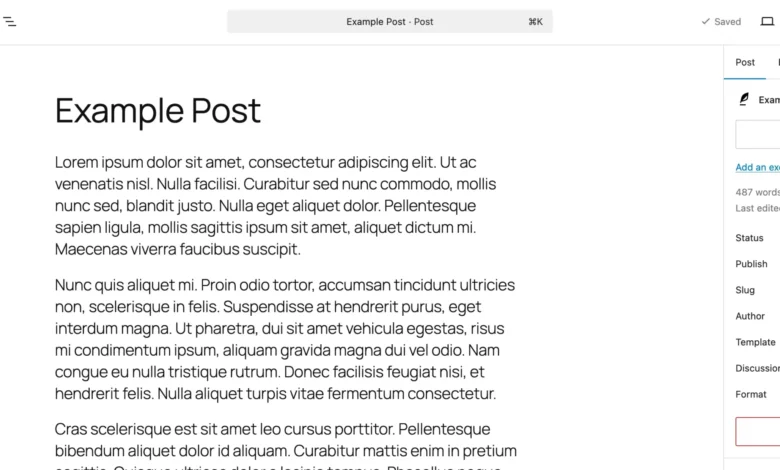
Collaborative web publishing has historically required a fragmented digital ecosystem. For years, marketing agencies, content teams, corporate communications departments, and independent site owners have relied on external productivity suites—ranging from Google Docs and Figma to lengthy email threads and external project management tools—to review, critique, and finalize website drafts before deployment. While these auxiliary workflows are functional, they introduce systemic inefficiencies. Teams are forced to continuously export and import text, context is frequently lost when translating external feedback into the Content Management System (CMS), and administrative friction slows down overall production cycles.
To address these persistent workflow bottlenecks, the WordPress core development team introduced a native, in-editor feedback mechanism known simply as Notes. Designed directly into the Gutenberg block editor, this feature allows stakeholders to attach comments, revision requests, and design critiques directly to individual content blocks. By eliminating the necessity for third-party applications during the copy-editing and design-review phases, WordPress Notes represents a major structural shift toward unified, self-contained digital publishing workflows.

Understanding WordPress In-Editor Feedback Notes
At its core, the WordPress Notes feature functions similarly to collaborative commenting systems found in modern word processors, but with deep, native integration into the Gutenberg block architecture. Each individual note is bound directly to a specific block—whether that element is a standard text paragraph, a media image, a complex layout container, or a dynamic heading.
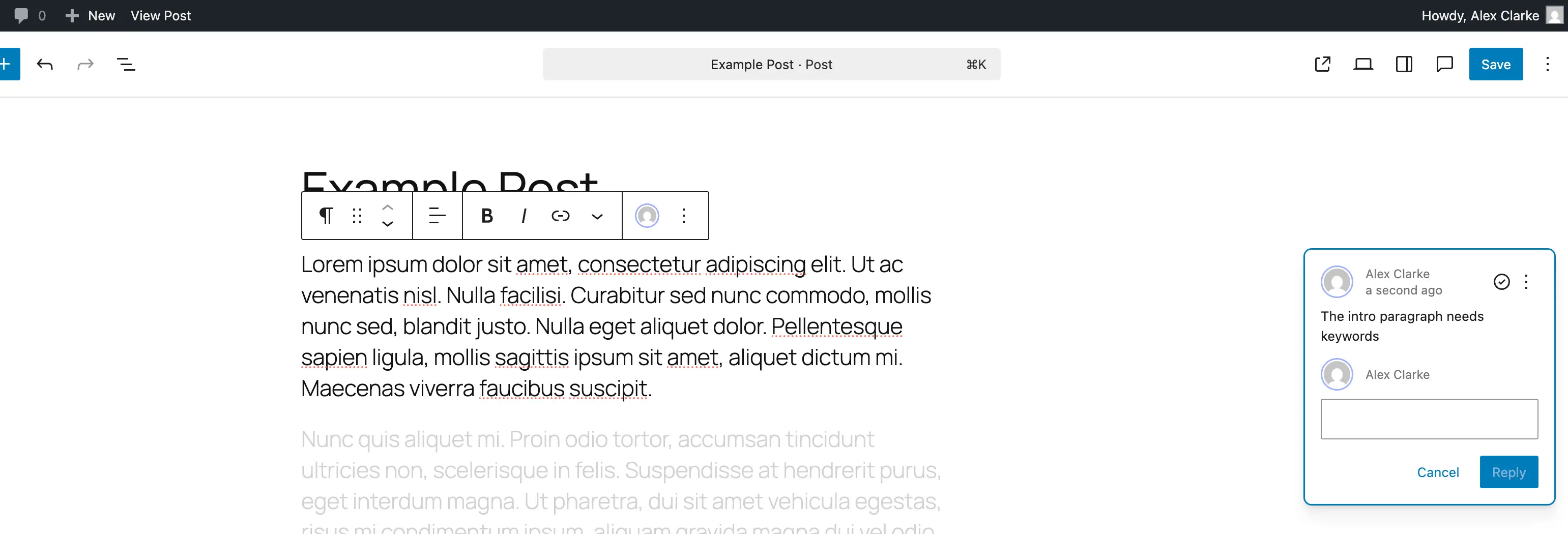
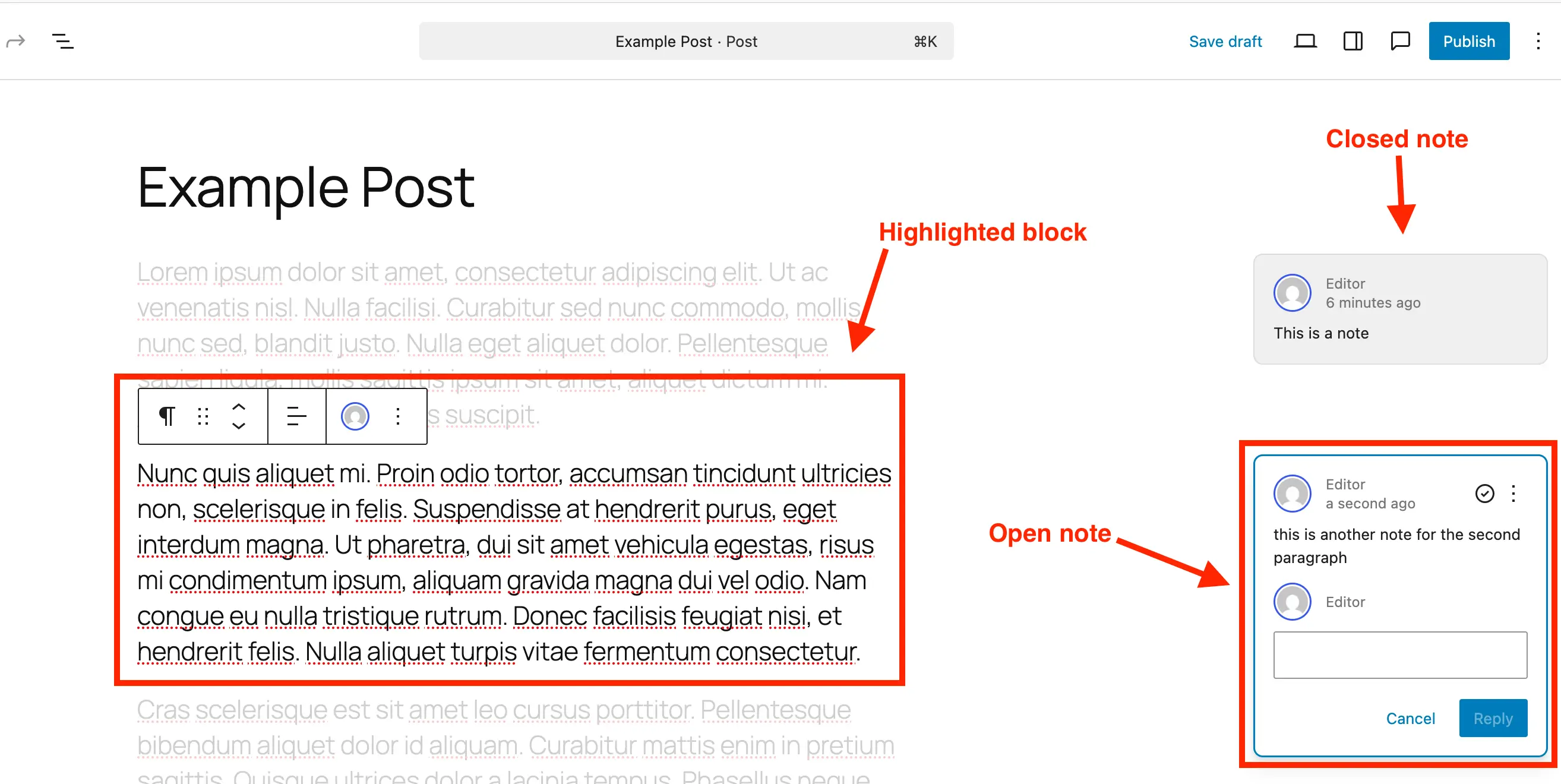
When a user interacts with a note in the editing interface, the user experience is optimized for focused review. Notes are prominently displayed within a dedicated side panel located on the right-hand side of the screen, mimicking the familiar comment-thread format. Key metadata, including the author’s identity and the timestamp of submission, are clearly visible alongside direct reply capabilities. Furthermore, clicking on a specific note triggers an interactive visual response: the editor dynamically highlights the corresponding block while subtly fading out the remainder of the page content. This visual isolation ensures that reviewers and content creators can concentrate exclusively on the precise element under discussion, eliminating peripheral distractions.
By anchoring editorial feedback directly to the code and layout architecture of the post or page, WordPress removes the traditional disconnect between external review documents and the live environment. The implications for agency-client relationships and large editorial teams are profound, drastically shortening the feedback loop.

Step-by-Step Implementation: Adding Notes in the Gutenberg Editor
Integrating feedback notes into a WordPress post or page requires no specialized technical knowledge or plugin installation for standard post types. The interface has been engineered for intuitive adoption across technical and non-technical users alike.
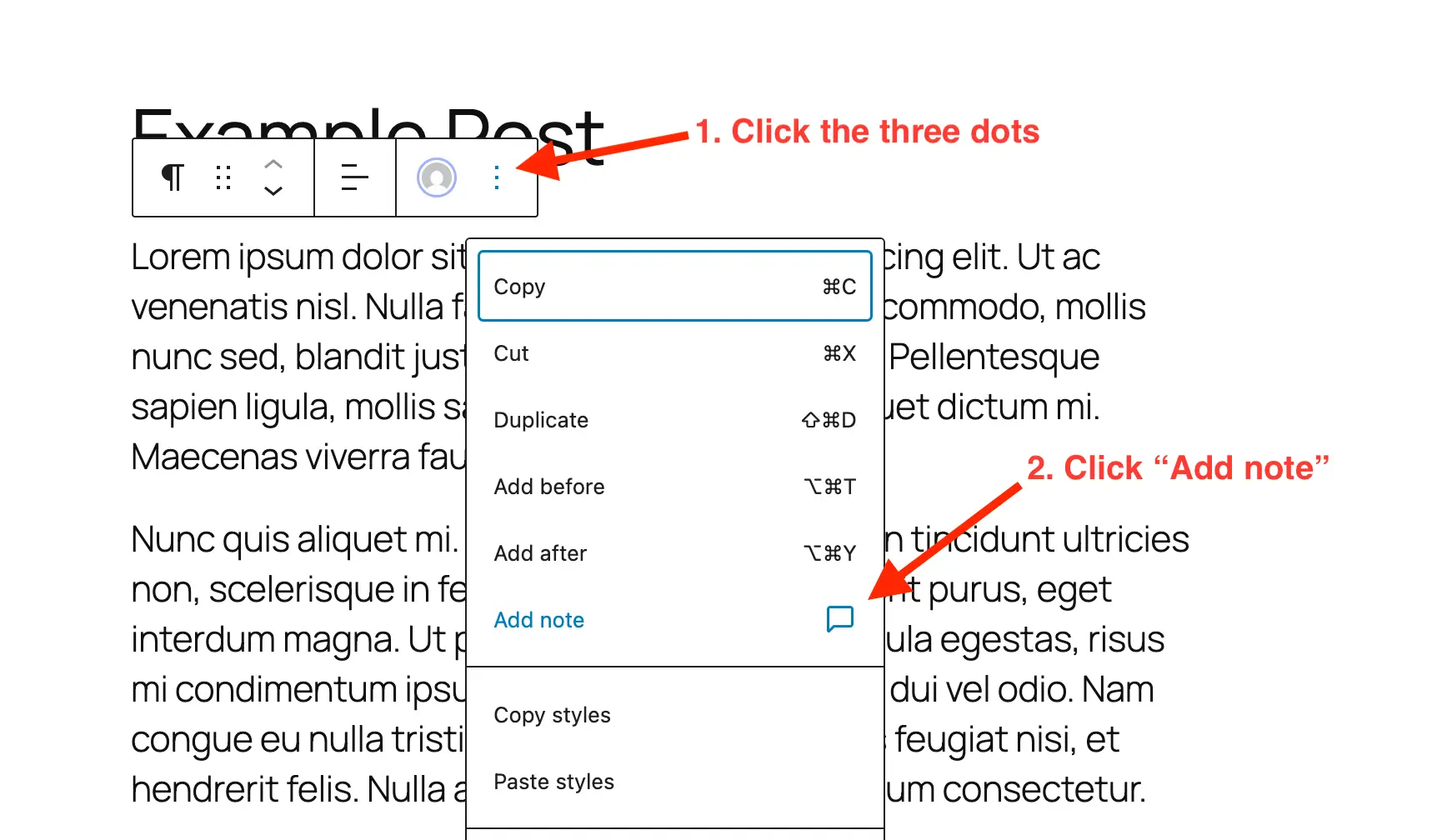
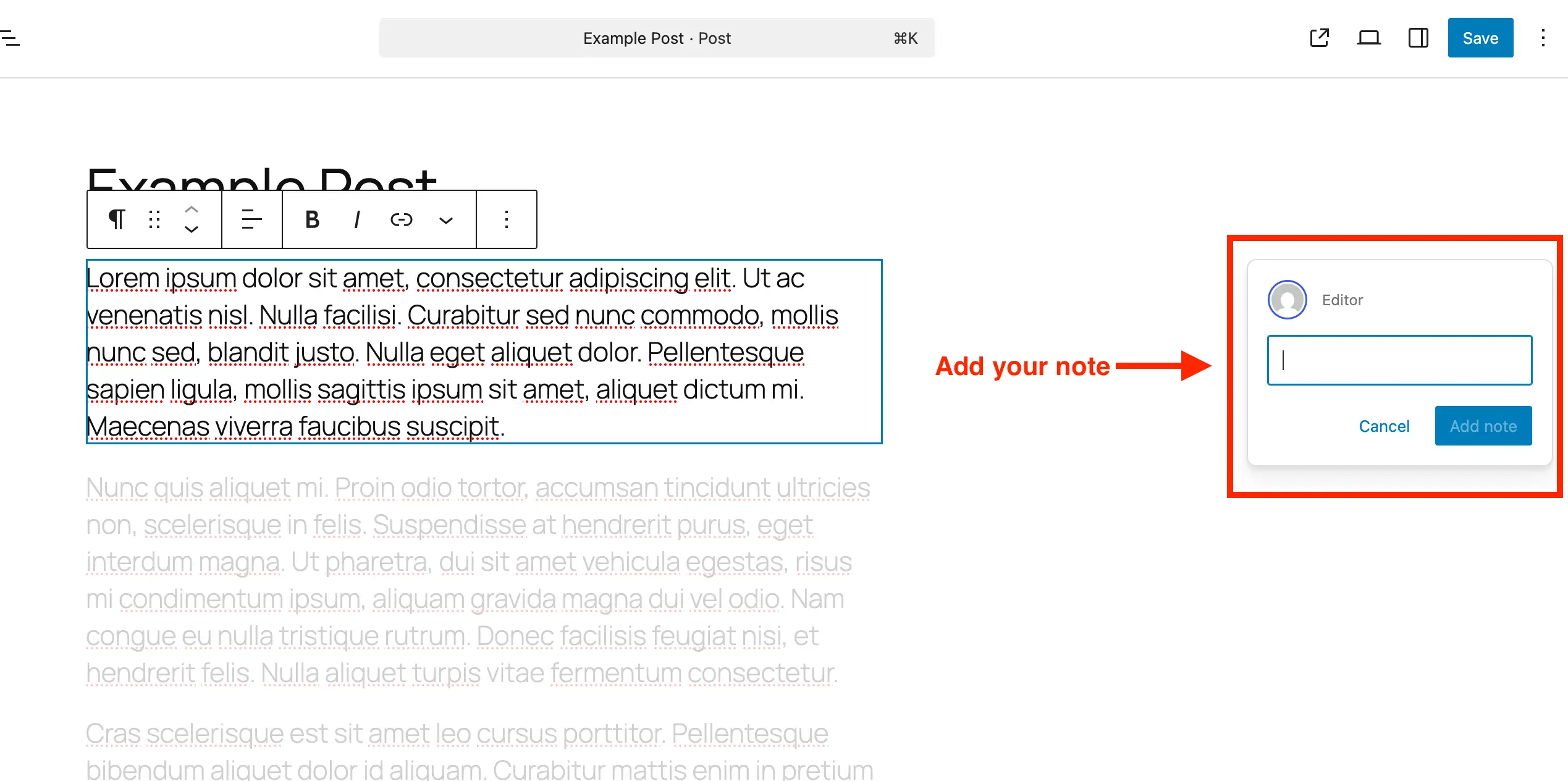
The process begins by navigating to the WordPress administration dashboard, opening the desired post or page within the block editor, and identifying the precise element requiring modification. Users must then select the target block—such as a paragraph, heading, gallery, or button—and access the block’s contextual menu by clicking the traditional three-dot options icon. From this menu, selecting the "Add Note" option prompts a designated text entry panel to appear on the right side of the screen.
Initially, the input box presents as a compact, single-line text field designed to maintain a clean workspace. However, the field dynamically expands as the user types, accommodating longer, more detailed critiques. Users can utilize standard keyboard inputs, including line breaks via the Enter key, to structure complex multi-part feedback before submitting the note to the project timeline.
Managing, Reviewing, and Resolving Editorial Feedback
Once notes have been successfully integrated into a document, managing the lifecycle of that feedback becomes central to maintaining editorial velocity. WordPress provides robust administrative controls to reply to comments, resolve completed tasks, reopen discussions, and permanently purge obsolete data.
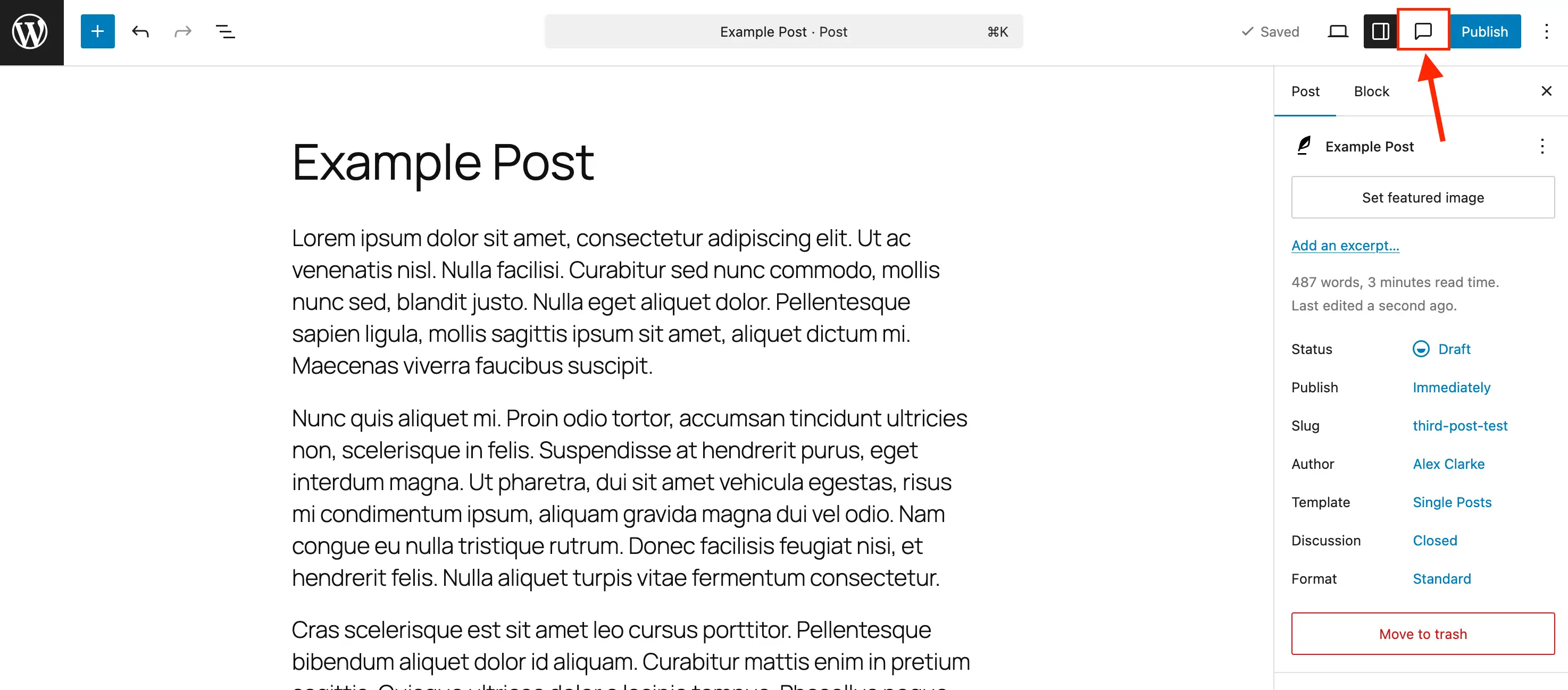
To efficiently review multiple feedback points across a comprehensive document, administrators are advised to utilize the dedicated Notes icon—stylized as a comment bubble—located within the primary top toolbar of the editor. Clicking this icon opens a centralized Notes sidebar that aggregates all active and resolved notes in sequential order.
When an individual note is selected from this panel, the editor automatically scrolls to and highlights the corresponding block while dimming the surrounding layout. Reviewers can then type replies directly into the thread to maintain a continuous, context-aware dialogue. Once a requested change has been successfully executed, team members can click the resolve icon (typically represented by a checkmark). Resolved notes are automatically hidden from the primary active sidebar when default panel configurations are applied, though they remain accessible within the broader history log for auditing purposes.
To maintain database optimization—particularly on high-traffic enterprise websites publishing thousands of pages—system administrators recommend permanently deleting resolved notes rather than leaving them archived indefinitely. This can be accomplished by accessing the three-dot menu on any specific note and selecting the "Delete" function. Conversely, if a previously resolved issue requires further attention, the same menu allows users to "Reopen" the comment thread instantly, ensuring complete flexibility throughout the revision cycle.
Extending Functionality: Enabling Notes for Custom Post Types
Out of the box, WordPress restricts native editor notes to standard native posts and pages. However, modern web architectures frequently rely heavily on Custom Post Types (CPTs)—such as portfolios, products, real estate listings, or knowledge base articles—to structure diverse data sets. To maintain a consistent collaborative workflow across an entire digital property, developers must explicitly declare support for editor notes within their custom post type registrations.
For developers utilizing comprehensive administrative plugins such as Post Types Unlimited, enabling this feature requires a simple user-interface interaction: navigating to the plugin’s registration settings and checking the designated box next to "Notes" within the broader "Supports" parameter configuration.
For developers managing custom post types via direct code implementation, support must be added explicitly to the post type registration arguments. When registering a new post type from scratch, developers should integrate the notes parameter directly into the editor argument array:
register_post_type( 'book', [
    'label' => 'Books',
    'public' => true,
    'show_in_rest' => true,
    'supports' => [
        'title',
        'editor' => [ 'notes' => true ],
        'author',
    ],
] );
For pre-existing custom post types deployed across legacy environments, developers can dynamically merge the notes support parameter into active configurations without disrupting existing functionality by hooking into the WordPress initialization sequence:
/**
 * Enable editor notes for custom post types.
 */
add_action( 'init', function()
    $post_types = [ 'MY_POST_TYPE_1', 'MY_POST_TYPE_2' ];
    foreach ( $post_types as $post_type )
        $supports = get_all_post_type_supports( $post_type );
        $editor_supports = array( 'notes' => true );
        if ( is_array( $supports['editor'] ) && isset( $supports['editor'][0] ) && is_array( $supports['editor'][0] ) )
            $editor_supports = array_merge( $editor_supports, $supports['editor'][0] );

        add_post_type_support( $post_type, 'editor', $editor_supports );

 );
System Optimization: Disabling Notes for Specific Content Structures
While native in-editor notes provide significant advantages for collaborative review environments, certain publishing models or lightweight administrative setups may benefit from removing the feature to reduce visual clutter and maintain strict interface minimalism. Because WordPress does not currently feature a single, global toggle switch to disable Notes across an entire multi-site network, site administrators can utilize targeted code snippets to strip note support from specific foundational post types.
To completely remove native note capabilities from standard posts and pages, administrators can implement a filter targeting the register_post_type_args hook:
/**
 * Disable Notes via post type args filter.
 */
add_filter( 'register_post_type_args', function( $args, $post_type )
    $post_types = [ 'post', 'page' ];
    if ( in_array( $post_type, $post_types, true ) && isset( $args['supports']['editor']['notes'] ) )
        unset( $args['supports']['editor']['notes'] );

    return $args;
, 10, 2 );
By modifying the array parameters within this snippet, site owners retain granular control over where collaborative tools appear within their administrative dashboards, tailoring the CMS environment precisely to their operational requirements.
Broader Industry Implications and Future Outlook
The introduction and maturation of native in-editor notes mark a significant evolution in how content management systems approach enterprise-grade collaboration. Historically, specialized third-party solutions dominated the content review niche, requiring separate software subscriptions, complex user permissions management, and external API integrations. By internalizing these collaborative workflows, WordPress continues to blur the line between basic publishing platforms and sophisticated enterprise digital experience platforms (DXPs).
For digital agencies, the financial and operational implications are substantial. Client onboarding becomes significantly more streamlined when review cycles occur inside the actual staging environment rather than through static PDF mockups or fragmented cloud documents. Writers, editors, and web designers operate within a single source of truth, drastically reducing the potential for miscommunication, version control errors, and missed deployment deadlines.
As open-source development continues to prioritize user experience and native ecosystem self-sufficiency, features like WordPress Notes establish a new benchmark for CMS usability. By removing friction from the content review process, the platform empowers organizations of all scales to produce polished, high-integrity digital content with unprecedented efficiency.