How to Resolve YouTube TV Video Format Support Issues Through Browser Widevine Configuration

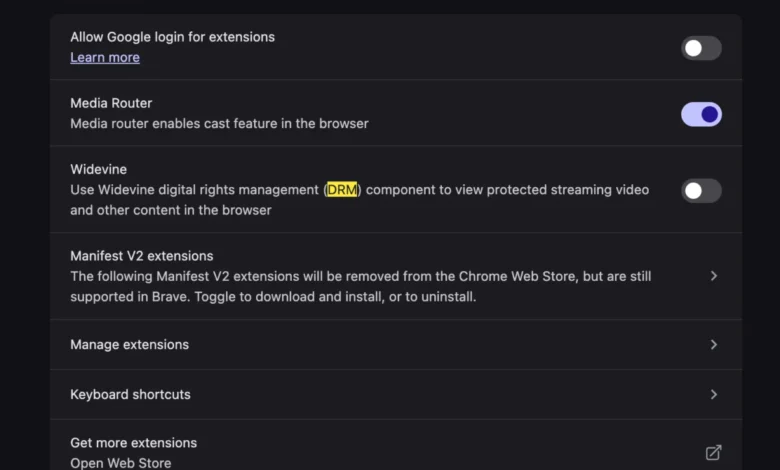
The transition to new computing hardware is traditionally viewed as a seamless upgrade in performance and efficiency; however, users frequently encounter unforeseen technical hurdles during the initial setup phase. One increasingly prevalent issue reported by owners of modern hardware, particularly those utilizing the latest MacBook models and other high-performance workstations, is a specific playback failure on YouTube TV. This error manifests as a "This video format is not supported" message, preventing access to live broadcasts and recorded content. While the error implies a lack of hardware capability or a missing video codec, the root cause is frequently found within the Digital Rights Management (DRM) settings of the web browser. The resolution involves the activation of Widevine, a proprietary content protection system that is essential for the delivery of encrypted high-definition video streams.
The Technical Context of Streaming Errors on New Hardware
When a user initiates a fresh installation of an operating system or migrates to a new hardware architecture, such as Apple’s M-series silicon or the latest Intel and AMD chipsets, browser configurations often revert to default security postures. In many instances, these default settings may disable or fail to prompt for the activation of third-party DRM modules. YouTube TV, like many premium streaming services including Netflix, Amazon Prime Video, and Disney+, utilizes encrypted streams to protect intellectual property and comply with licensing agreements with major broadcast networks.
The "This video format is not supported" error is a generic fallback message. It occurs when the YouTube TV web application attempts to initialize a secure playback session but fails to find the necessary decryption handshake from the browser. This is not a failure of the video card or the monitor’s resolution capabilities, but rather a software-level gatekeeper issue. For users accustomed to the "plug-and-play" nature of modern web applications, this friction point represents a significant interruption in the user experience, particularly given the premium nature of live television subscription services.

Understanding Widevine and the Role of DRM in Modern Browsers
Widevine is a Google-owned DRM technology that is integrated into most major web browsers, including Google Chrome, Mozilla Firefox, Microsoft Edge, and Brave. It operates by creating a secure environment for the decryption of video data before it reaches the screen. Widevine is categorized into different security levels—L1, L2, and L3—based on the hardware’s ability to process data in a Trusted Execution Environment (TEE).
Most high-definition (HD) and Ultra-High-Definition (4K) content requires Widevine L1, which mandates that the cryptography and video processing occur entirely within the hardware’s secure zone. If a browser’s Widevine module is disabled or outdated, the streaming service cannot verify the security of the path, leading to the "format not supported" error. Unlike the early era of the internet, where users were required to manually install third-party codecs like DivX or Xvid, modern DRM is typically bundled within the browser but may require explicit user permission or a toggle activation to function on a new machine.
Chronology of the Troubleshooting and Resolution Process
The identification and resolution of this issue typically follow a specific timeline as users troubleshoot their new hardware environments.
- Hardware Initialization: The user sets up a new computer, performs a clean installation of a browser, and attempts to log into YouTube TV.
- Error Encounter: Upon selecting a live channel, the video player fails to load, displaying the "This video format is not supported" warning.
- Initial Diagnosis: Users often check internet connectivity and hardware drivers, assuming the issue lies with the network or the GPU.
- Configuration Identification: Technical analysis reveals that the browser is blocking the execution of the Widevine Content Decryption Module (CDM).
- Resolution: The user navigates to the browser’s site settings or privacy menu to enable "Protected Content" or "Widevine DRM."
- Verification: Upon refreshing the page, the browser successfully performs the DRM handshake, and the video stream resumes in the highest available quality.
Step-by-Step Resolution for Major Browsers
To resolve the YouTube TV error, users must ensure that their browser is configured to allow sites to play protected content. While the interface varies slightly between browsers, the underlying mechanism remains consistent.

Google Chrome and Chromium-Based Browsers
In Google Chrome, which serves as the primary platform for many YouTube TV users, the setting is located within the "Privacy and Security" section. Users must navigate to Settings > Privacy and Security > Site Settings. Under the "Additional Content Settings" section, there is a tab for "Protected Content IDs." Ensuring that "Sites can play protected content" is selected generally resolves the issue. In some cases, a secondary toggle for "Identifiers" may also need to be enabled to allow the service to recognize the specific device.
Mozilla Firefox
Firefox users may encounter a bar at the top of the browser asking for permission to play DRM-controlled content. If this prompt does not appear, the setting can be found in Settings > General. Under the "Digital Rights Management (DRM) Content" header, the box for "Play DRM-controlled content" must be checked. Firefox will then automatically download the Widevine CDM provided by Google.
Microsoft Edge
As Edge is built on the Chromium engine, the process mirrors that of Chrome. Users navigate to Settings > Cookies and site permissions > Protected content and ensure the "Allow sites to play protected content" toggle is switched to the "On" position.
Supporting Data: The Growth of YouTube TV and vMVPDs
The importance of resolving these technical issues is underscored by the massive growth of the Virtual Multichannel Video Programming Distributor (vMVPD) market. According to recent industry reports, YouTube TV has surpassed 8 million subscribers, making it the largest live-streaming television service in the United States. This growth is part of a broader trend of "cord-cutting," where consumers abandon traditional cable and satellite providers in favor of internet-based platforms.

Data from Leichtman Research Group indicates that the top vMVPDs added over 1.3 million subscribers in 2023 alone, even as traditional pay-TV lost millions. As more consumers transition to these services, the reliance on browser-based playback increases. Consequently, small configuration errors like disabled DRM modules have a wider impact on the general consumer base than they did in previous years when streaming was primarily a secondary viewing option.
Official Responses and Industry Standards
While Google and other browser developers do not typically issue press releases for individual setting configurations, the industry-wide move toward "Secure Frames" and encrypted media extensions (EME) is well-documented by the World Wide Web Consortium (W3C). The W3C’s recommendation of EME as a standard was a pivotal moment in web history, moving the internet away from insecure plugins like Adobe Flash and Microsoft Silverlight.
Technical support documentation from Google for YouTube TV explicitly lists "supported browsers" and emphasizes the need for the latest version of Chrome, Firefox, or Safari. However, these documents often assume that DRM modules are active by default. The friction occurs when privacy-focused updates or new hardware security protocols inadvertently disable these modules to protect the user’s "device fingerprint," a side effect of modern anti-tracking efforts.
Broader Impact and Implications for the Future of Streaming
The necessity of Widevine and similar DRM systems highlights a persistent tension in the digital age: the balance between user privacy, hardware performance, and copyright protection. For the average consumer, the "This video format is not supported" error is a minor annoyance, but for the technical community, it represents the "black box" nature of modern web standards.

The Shift to AV1 and High-Efficiency Codecs
As streaming services move toward the AV1 codec—a royalty-free, high-efficiency video coding format—the interaction between hardware and software will become even more complex. AV1 offers better compression than the current H.264 or HEVC standards, but it requires specific hardware acceleration found in the latest chips from Apple, Intel, and Nvidia. If the browser’s DRM layer cannot communicate effectively with this new hardware acceleration, users may see a return of "unsupported format" errors, even if their machine is technically capable of the task.
Security and Privacy Concerns
The activation of Widevine involves the use of unique identifiers that can, in theory, be used for device fingerprinting. This has led some privacy advocates to criticize the mandatory nature of DRM for basic web services. However, for services like YouTube TV, which must satisfy the rigorous security demands of content owners like Disney, NBCUniversal, and Warner Bros. Discovery, DRM is non-negotiable. Without it, the service would be unable to provide access to high-value live sports and premium cinema.
Conclusion
The "This video format is not supported" error on YouTube TV is a quintessential example of the complexities inherent in modern computing. What appears to be a hardware failure is, in fact, a sophisticated security handshake failing at the software level. By understanding the role of Widevine and ensuring that browser settings are optimized for protected content, users can fully utilize the power of their new hardware. As the streaming industry continues to expand and the technology governing video delivery evolves, the synergy between browser configuration and hardware capability will remain a critical component of the digital consumer experience. Ensuring that these systems are correctly aligned is the final, essential step in transitioning to a modern high-performance computing environment.