A Narrative of Educational Defiance
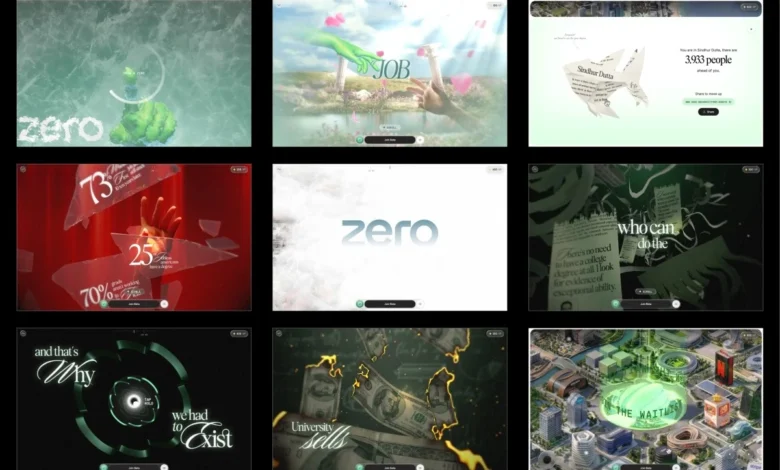
The core of the ZERO experience is a six-stage narrative journey that critiques the "traditional degree path" and its promise of guaranteed success. The story begins with the familiar aspirational imagery of academic achievement: the promise that hard work and high grades lead directly to prestigious corporate roles. However, as the user scrolls, this narrative is systematically dismantled. The experience is structured around five "interactive gates" that require user participation to progress.
At the first gate, the imagery of the traditional degree literally shatters, transitioning into the second stage where real-world unemployment statistics are scattered across shards of broken glass. This stage grounds the abstract narrative in data, highlighting the disconnect between academic credentials and economic reality. The third stage depicts the symbolic destruction of the traditional path; money burns, and certificates are shredded into ribbons. This leads the user through a tunnel shaped like the ZERO logo—a transitional space representing a shift in perspective. Stage four elevates the user above the clouds, revealing a futuristic city constructed from the headquarters of global corporations. The journey concludes in stage five, an interactive, open-world map where users can pan and zoom to explore specific career scenarios and "join the beta" for the ZERO platform.

The Virtual Scroll Architecture
A significant architectural departure in the development of ZERO was the decision to bypass the browser’s native scrolling mechanism. Traditional libraries like ScrollTrigger often rely on an oversized DOM to track scroll positions, which can lead to performance bottlenecks in graphics-heavy environments. Instead, the team implemented a "virtual scroll" system. In this model, wheel and touch inputs update a single numerical value that represents the user’s progress through the narrative.
This single value drives every element of the site, from asset loading and shader timing to text overlays and animations. Each of the nine segments (including the stages and gates) is a self-contained unit with its own lifecycle, defined by "enter," "scrub," "update," and "teardown" functions. This modular approach allowed for easier debugging and maintenance. By jumping to a specific stage, the system replays the lifecycle of all preceding segments in sequence, ensuring that the global state remains consistent without the need for manual "teleportation" logic.
The 1GB Asset Compression Pipeline
One of the primary challenges of the project was the sheer volume of source data. The initial Blender scenes provided by the creative team, led by Atul Khola, contained uncompressed geometry, 8K textures, and baked animations totaling over one gigabyte. To make this viable for the web, the development team focused heavily on asset preparation during the first month of production.

All 3D geometry was processed using DRACO compression. Crucially, the team chose to self-host the Draco and KTX2/Basis transcoders within the project’s local directory rather than relying on external Content Delivery Networks (CDNs). This decision was prompted by previous experiences where latency on third-party servers caused asset decoding failures, demonstrating that a local pipeline is essential for reliability.
Texture management proved to be the most impactful area for performance. While standard PNG files may appear small on disk, they occupy significant Video RAM (VRAM) once decompressed on the GPU—a 2048×2048 texture consumes approximately 16MB of VRAM. To mitigate this, the team utilized KTX2 with ETC1S compression, which allows textures to remain compressed even within the GPU memory. To manage the lossy nature of this format, they built a custom internal dashboard that allowed for side-by-side comparisons of compressed and uncompressed assets, enabling them to fine-tune settings for each texture individually.
Shader Engineering and Visual Effects
The visual fidelity of ZERO is largely driven by custom GLSL shaders, many of which were prototyped with the assistance of Artificial Intelligence before being manually refined. The "frost unlock" effect at the start of the site uses a ping-pong buffer with four passes (horizontal, vertical, and two diagonals). This propagates the user’s drawn stroke into an octagonal growth pattern, modulated by the brightness of a frost texture to create a crystalline appearance.

For the "burning money" effect, a noise-driven distance field was used to dissolve currency bills. As the burn progresses, a thin, high-dynamic-range (HDR) ember rim appears at the edge of the dissolve, followed by a charred texture. To optimize performance, the shader discards fragments as early as possible if they have not yet reached the burn threshold, reducing the computational load of the Fractal Brownian Motion (FBM) noise.
Lighting presented another technical hurdle. Real-time lighting on skinned meshes is computationally expensive for mobile devices. The team opted to bake lighting into textures and blend between them. By using two texture slots and crossfading between them during keyframes, they achieved the look of dynamic lighting without the associated GPU cost. These textures were packed into shared atlases—reducing over fifty individual images to approximately twelve—to minimize draw calls.
Overcoming Mobile Performance Bottlenecks
The final month of development was dedicated almost exclusively to profiling and optimization for mobile devices, specifically budget Android hardware. A common issue in WebGL development is "stuttering" caused by texture uploads. Even if a site is fully loaded, the first time a texture is rendered, the browser must upload it to the GPU, which can block the main thread for 50ms or more, causing visible frame drops.

To solve this, the ZERO team implemented an idle-time upload queue. Using the requestIdleCallback API, the renderer uploads queued textures only when there is spare processing time. Furthermore, whenever a user transitions between stages, the system synchronously flushes the queue to ensure all necessary assets are on the GPU before they are needed on screen.
An "Adaptive Quality Manager" was also integrated to ensure a smooth experience across varying hardware. The system monitors frame times using a rolling buffer; if the average frame time exceeds 22ms (dropping below 45fps), the renderer automatically downgrades visual settings, such as pixel ratio, blur samples, and geometry complexity. Conversely, if performance remains stable under 12ms, the quality scales back up. This ensures that the narrative remains intact regardless of whether the user is on a flagship smartphone or an entry-level device.
The Role of AI in Rapid Prototyping
The development team noted that AI significantly altered their workflow. Rather than spending weeks on the initial version of an idea, AI allowed them to generate functional prototypes within hours. This shifted the developer’s role from "writing the first version" to "evaluating and refining." The "draw a zero" interaction, for instance, was built as a working prototype in just 48 hours to win the project pitch. This rapid iteration cycle allowed the team to experiment with multiple versions of complex effects—such as the glass shattering and the paper shredding—before committing to a final technical path.

Implications for Digital Storytelling
The successful deployment of ZERO demonstrates the evolving capabilities of web-based interactive media. By prioritizing asset optimization and GPU management as much as visual design, the project proves that high-fidelity 3D narratives are no longer restricted to high-end PCs or native applications.
The project also highlights a shift in how educational and corporate entities might approach recruitment and branding. By replacing a traditional landing page with a defiant, interactive narrative, the "ZERO" platform engages users through a "show, don’t tell" philosophy. The technical rigor required to deliver such an experience—reducing a 1GB production environment into a 10MB web-ready format—sets a new benchmark for performance in the WebGL ecosystem. As web technologies continue to advance, the integration of AI-assisted prototyping and sophisticated compression techniques like KTX2 will likely become standard practice for developers seeking to push the boundaries of the browser.