How to Resolve the Video Format Not Supported Error on YouTube TV Through Widevine Activation

The transition to a new computing environment often promises an optimized user experience characterized by the absence of legacy software clutter and the enhanced processing power of modern hardware architectures. However, for many users migrating to the latest macOS ecosystem, particularly those utilizing Apple Silicon, this transition is frequently met with unforeseen technical hurdles related to digital rights management (DRM). One of the most prevalent issues identified by new MacBook owners involves the "This video format is not supported" error message encountered when attempting to access YouTube TV via web browsers. While the error message suggests a missing codec or an incompatible file type, the root cause is typically linked to the status of the Widevine Content Decryption Module (CDM), a proprietary component essential for the playback of encrypted high-definition content.
Understanding the Technical Architecture of Modern Streaming
The modern streaming landscape relies heavily on the interaction between a user’s hardware, their browser, and the streaming provider’s content delivery network. For platforms like YouTube TV, which distribute copyrighted broadcast and cable television content, protecting that data from unauthorized distribution is a legal and technical requirement. This protection is facilitated through Encrypted Media Extensions (EME), a World Wide Web Consortium (W3C) standard that allows browsers to communicate with DRM software.
Widevine, a DRM technology owned by Google, serves as the industry standard for securing content across various platforms, including Android, Chrome, and various smart televisions. When a user navigates to YouTube TV, the browser must initialize the Widevine CDM to decrypt the incoming stream. If this module is disabled, outdated, or blocked by privacy settings, the browser fails to negotiate the handshake with the streaming server, resulting in the generic and often misleading "format not supported" error. This specific issue has become more pronounced as browsers move toward more aggressive "privacy by default" stances, which occasionally treat proprietary DRM modules as optional components that require explicit user consent.

Identifying the "Video Format Not Supported" Error
The appearance of the "This video format is not supported" message on a brand-new MacBook can be particularly jarring for users who expect seamless out-of-the-box performance. Unlike traditional codec errors of the early 2000s, which required the manual installation of DivX or Xvid packages, modern playback issues are almost exclusively related to the software’s permission to access decryption keys.
In the context of the David Walsh report, the issue manifested during the setup of a new MacBook. This suggests that during the migration process or the initial setup of the browser environment—whether using Safari, Chrome, or a Chromium-based browser like Brave—the Widevine component was either not triggered to download or was restricted by the operating system’s security layers. Because YouTube TV requires a high level of security (typically Widevine L1 or L3) to stream live content, the absence of an active CDM prevents the video player from even attempting to load the stream, triggering the fallback error message.
The Role of Widevine in Digital Rights Management
To understand why this fix is necessary, one must examine the role of Widevine in the global media ecosystem. Widevine provides three levels of security: L1, L2, and L3. L1 is the most secure, requiring hardware-level integration for decryption, which is necessary for 4K and HDR content. L3 is a software-based implementation used for lower-resolution streams or on devices where hardware-backed DRM is unavailable.
On macOS, browsers like Google Chrome and Brave utilize the Widevine CDM to manage these permissions. In many instances, especially in browsers that prioritize user privacy and open-source components, Widevine is not enabled by default because it is a proprietary binary provided by Google. When a user first visits a site requiring DRM, the browser should ideally prompt the user to "Enable Widevine." If this prompt is missed or if the browser’s internal settings default to blocking such modules, the user is left with a non-functional video player and little indication of how to rectify the situation.

Chronology of Browser-Based Content Decryption
The evolution of how we watch video in a browser has undergone several seismic shifts over the last two decades. Understanding this timeline clarifies why current errors are handled via module activation rather than software installation.
- The Flash and Silverlight Era (2005–2015): During this period, video playback was handled by third-party plugins like Adobe Flash or Microsoft Silverlight. These were notorious for security vulnerabilities and high CPU usage.
- The Rise of HTML5 (2010–2012): Led by companies like Apple and Google, the industry moved toward native
<video>tags in HTML5, reducing the need for external plugins for standard video. - Introduction of EME (2013): To support high-value Hollywood content without Flash, the W3C introduced Encrypted Media Extensions. This allowed browsers to interface with DRM systems like Widevine (Google), PlayReady (Microsoft), and FairPlay (Apple) natively.
- The Deprecation of Legacy Plugins (2017–2020): Major browsers officially phased out support for Flash, making EME and CDMs the sole method for secure streaming.
- Modern Implementation (2021–Present): With the shift to ARM-based processors (Apple Silicon), browser developers had to recompile CDMs to run natively on new architectures, occasionally leading to synchronization issues during new device setups.
Step-by-Step Resolution and Technical Implementation
For users encountering the YouTube TV error, the solution involves a straightforward toggle within the browser settings. While the interface may vary slightly between browsers, the logic remains consistent.
For Chromium-Based Browsers (Chrome, Brave, Edge):
- Navigate to Settings: Open the browser menu and select ‘Settings’.
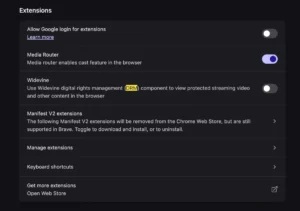
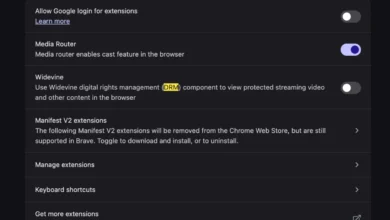
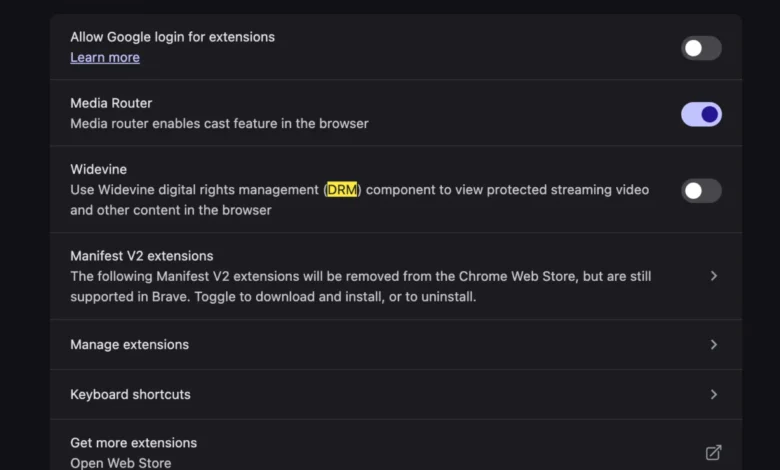
- Access Extensions or Privacy: In browsers like Brave, navigate specifically to the ‘Extensions’ tab. In Chrome, this may be located under ‘Privacy and Security’ and then ‘Site Settings’.
- Locate Widevine: Find the toggle labeled "Widevine" or "Google Widevine."
- Enable the Module: Switch the toggle to the ‘On’ position.
- Restart the Browser: For the changes to take effect and for the CDM to initialize within the macOS environment, a full restart of the application is typically required.
By enabling this module, the browser downloads the necessary binary (if not already present) and creates a secure path for the YouTube TV stream to be decrypted. This process is significantly more efficient than the "good old days" of manual codec installation, as it maintains the integrity of the browser’s sandbox while still allowing for secure content consumption.
Market Context: The Growth of YouTube TV and Streaming Demand
The necessity of resolving these technical friction points is highlighted by the massive growth of the streaming industry. As of early 2024, YouTube TV reported over 8 million subscribers, making it one of the largest virtual multichannel video programming distributors (vMVPDs) in the United States. This growth has placed YouTube TV in direct competition with traditional cable providers like Comcast and Spectrum.

As more users shift from hardware-specific cable boxes to browser-based viewing on laptops and desktops, the reliability of web-based DRM becomes a critical component of customer satisfaction. For Google, ensuring that YouTube TV works seamlessly on macOS—a platform favored by a significant portion of its target demographic—is essential for reducing churn and maintaining its market lead. Data suggests that technical errors during the "onboarding" phase of a new device are a leading cause of customer support inquiries, making simple fixes like Widevine activation a vital piece of troubleshooting knowledge.
Industry Reactions and the Debate Over DRM
The requirement for proprietary modules like Widevine has not been without controversy. Organizations like the Free Software Foundation and the Electronic Frontier Foundation (EFF) have historically criticized the integration of DRM into web standards, arguing that it compromises user privacy and limits the freedom of open-source browser development.
However, from the perspective of content creators and distributors, DRM is a non-negotiable requirement. Major sports leagues (NFL, NBA) and film studios require strict adherence to DRM standards to prevent high-quality piracy. Consequently, browser developers have reached a middle ground: including the capability for DRM but often requiring a manual opt-in or a clear permission prompt to satisfy both security requirements and privacy-conscious users.
In the case of the MacBook error, the "reaction" from the browser environment is effectively a silent failure. The browser prioritizes the security of not running unverified code over the functionality of the video stream until the user provides explicit authorization.

Broader Implications and the Future of Web Standards
The resolution of the YouTube TV error on new hardware points to a broader trend in computing: the move toward modular, permission-based software. As operating systems like macOS become more locked down to protect against malware, the "handshake" between hardware, browser, and third-party modules will likely become more complex.
Future iterations of web standards may seek to make these CDMs even more transparent, potentially integrating them deeper into the OS level (similar to how Apple’s FairPlay works with Safari) to avoid the need for manual toggles. For now, however, the responsibility often falls on the user to understand the underlying architecture of their tools.
The shift from "missing codecs" to "disabled DRM modules" represents a maturation of the web. While it introduces new types of errors, it also provides a more secure and standardized way to consume media. For the user, the "bliss" of a new computer remains intact, provided they know which toggle to flip to bring their favorite live shows back to the screen. By understanding the role of Widevine and the mechanics of modern browsers, users can quickly overcome the hurdles of new hardware and return to the high-performance experience they expected.