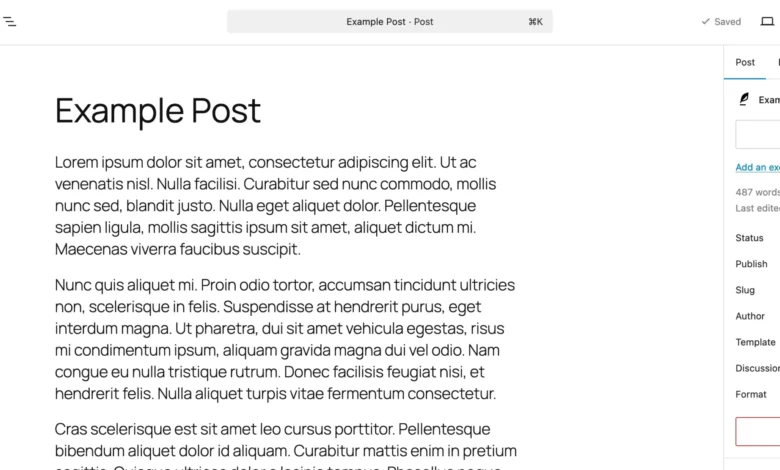
In a significant advancement for content creators and web development teams worldwide, WordPress has officially rolled out its highly anticipated built-in "Notes" feature, fundamentally transforming how feedback and collaboration occur directly within the editor. Launched on April 7, 2026, this innovation addresses a long-standing pain point for the platform’s vast user base, which previously relied on a fragmented ecosystem of external tools for content and design reviews. The integration of Notes promises to streamline workflows, enhance contextual communication, and significantly boost productivity for millions of websites powered by the world’s most popular content management system.
The Pre-Notes Landscape: A Challenge in Collaboration
For years, the process of providing feedback on content and design within WordPress was often characterized by inefficiency and a disjointed workflow. Teams, ranging from small independent agencies to large enterprise content departments, frequently found themselves juggling multiple third-party applications. Google Docs served as a common repository for textual edits, while design critiques often unfolded in tools like Figma or through cumbersome email threads laden with screenshots and vague instructions. This multi-tool approach, while functional, inevitably led to several critical challenges: content being copied back and forth between platforms, a persistent risk of losing context during transitions, and a general drain on efficiency as team members navigated disparate interfaces. The lack of a native, centralized feedback mechanism meant that the creative and editorial processes were often detached from the actual development environment, introducing friction and potential delays in the publication pipeline.

Introducing WordPress Notes: A Paradigm Shift in Editor-Based Feedback
The introduction of WordPress Notes marks a pivotal moment, ushering in an era of seamless, in-editor collaboration. This new feature allows users to attach specific feedback directly to individual blocks within the WordPress editor – whether it’s a paragraph, an image, a heading, or any other structural element. Instead of resorting to external documents or lengthy email chains, comments are now anchored precisely where they are most relevant, eliminating ambiguity and ensuring that feedback is always presented in its proper context.
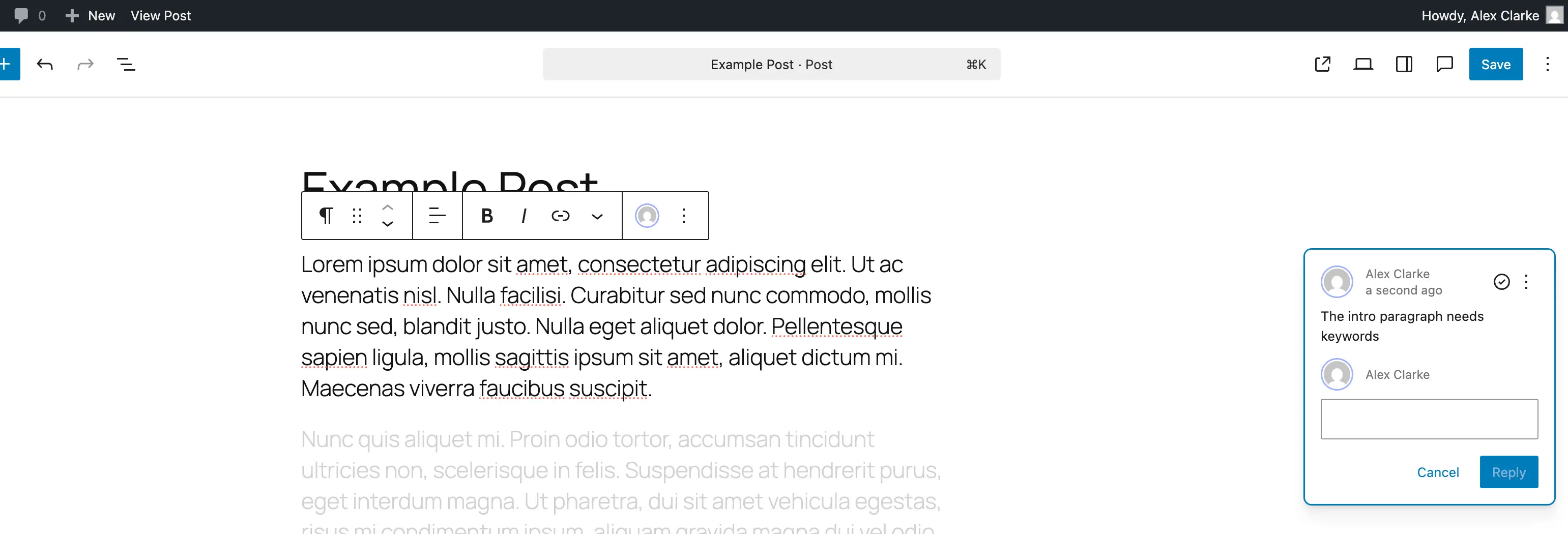
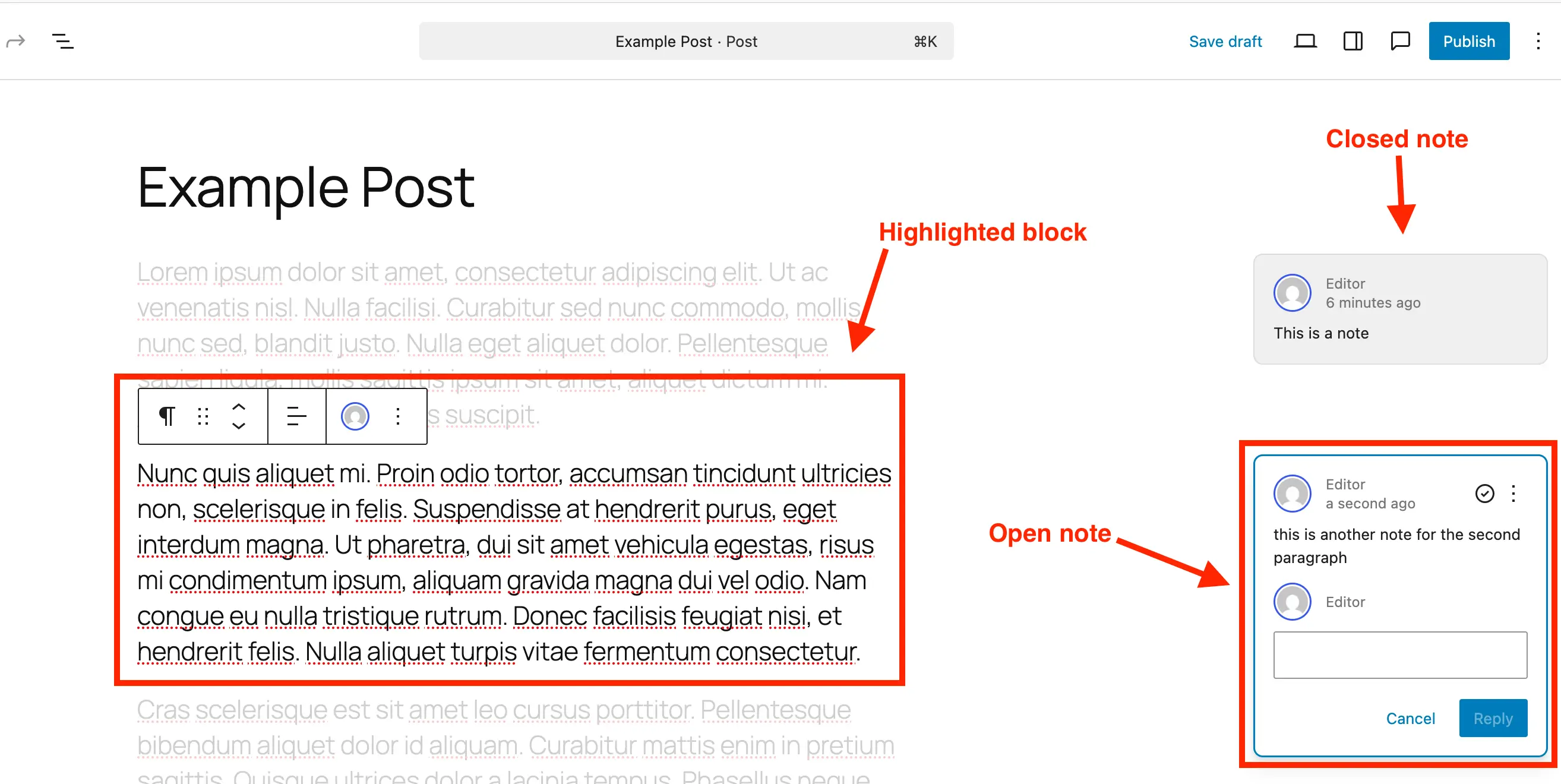
Visually, a note manifests as a distinct comment bubble on the right-hand side of the editor, akin to collaborative features found in modern document editors. Each note clearly displays the author and date, along with the immediate option to reply, fostering a direct conversational thread. A particularly intuitive aspect of Notes is its ability to visually isolate the subject of discussion: clicking on a note highlights the corresponding block while subtly fading the rest of the content. This intelligent design ensures that users can focus intently on the specific piece of content or design element under review, facilitating clearer communication and more precise revisions. Essentially, Notes transform the Gutenberg editor into a dynamic collaboration hub, making the entire editing process more cohesive and team-friendly, thereby reducing the dependency on external applications and simplifying the overall content lifecycle.

Streamlined Workflow: How Notes Function in Practice
The operational simplicity of WordPress Notes is one of its core strengths, designed to be intuitive for users of all technical proficiencies. The process of adding, reviewing, and managing feedback has been thoughtfully integrated into the existing Gutenberg editor interface.
Adding a Note:
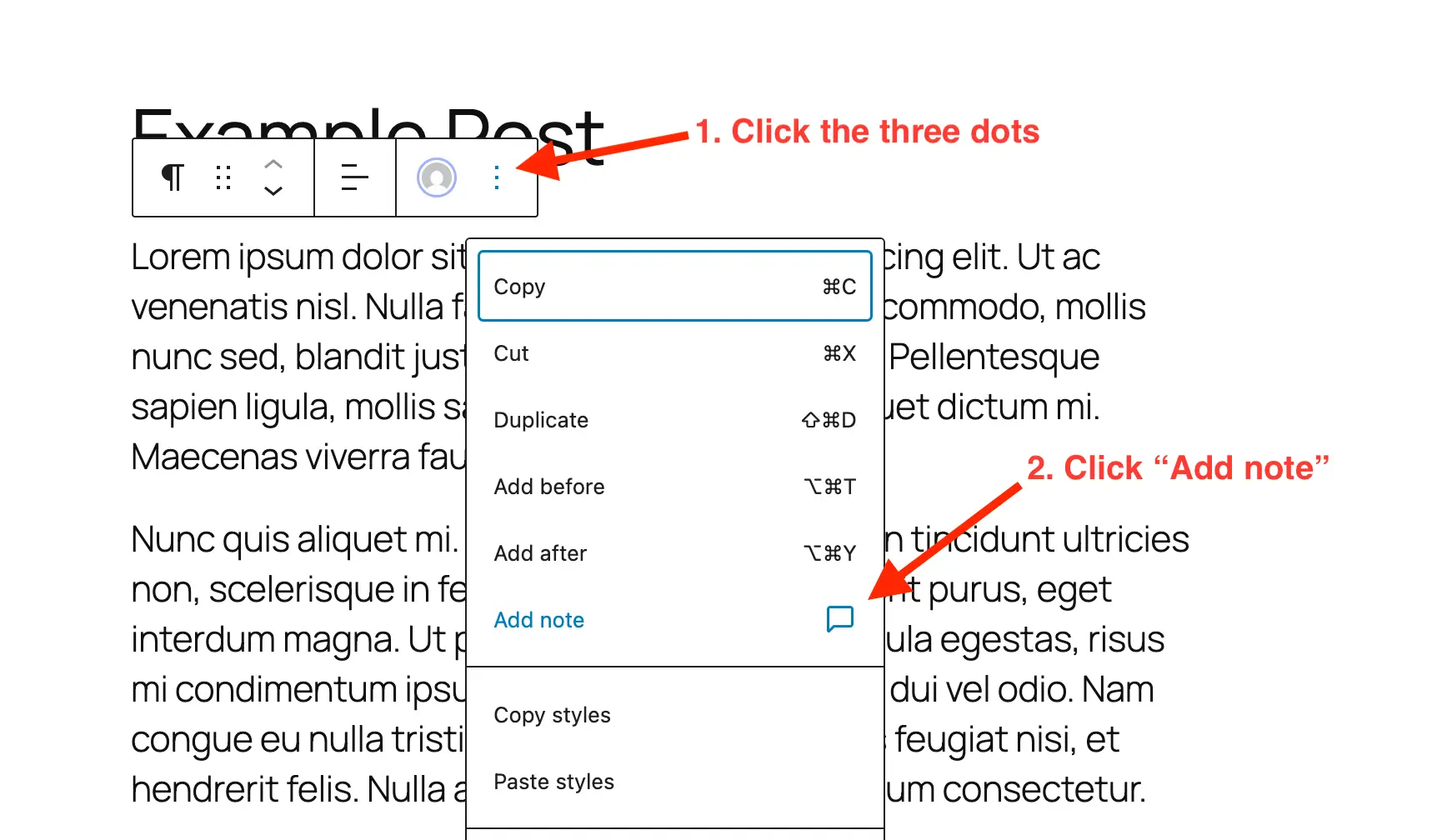
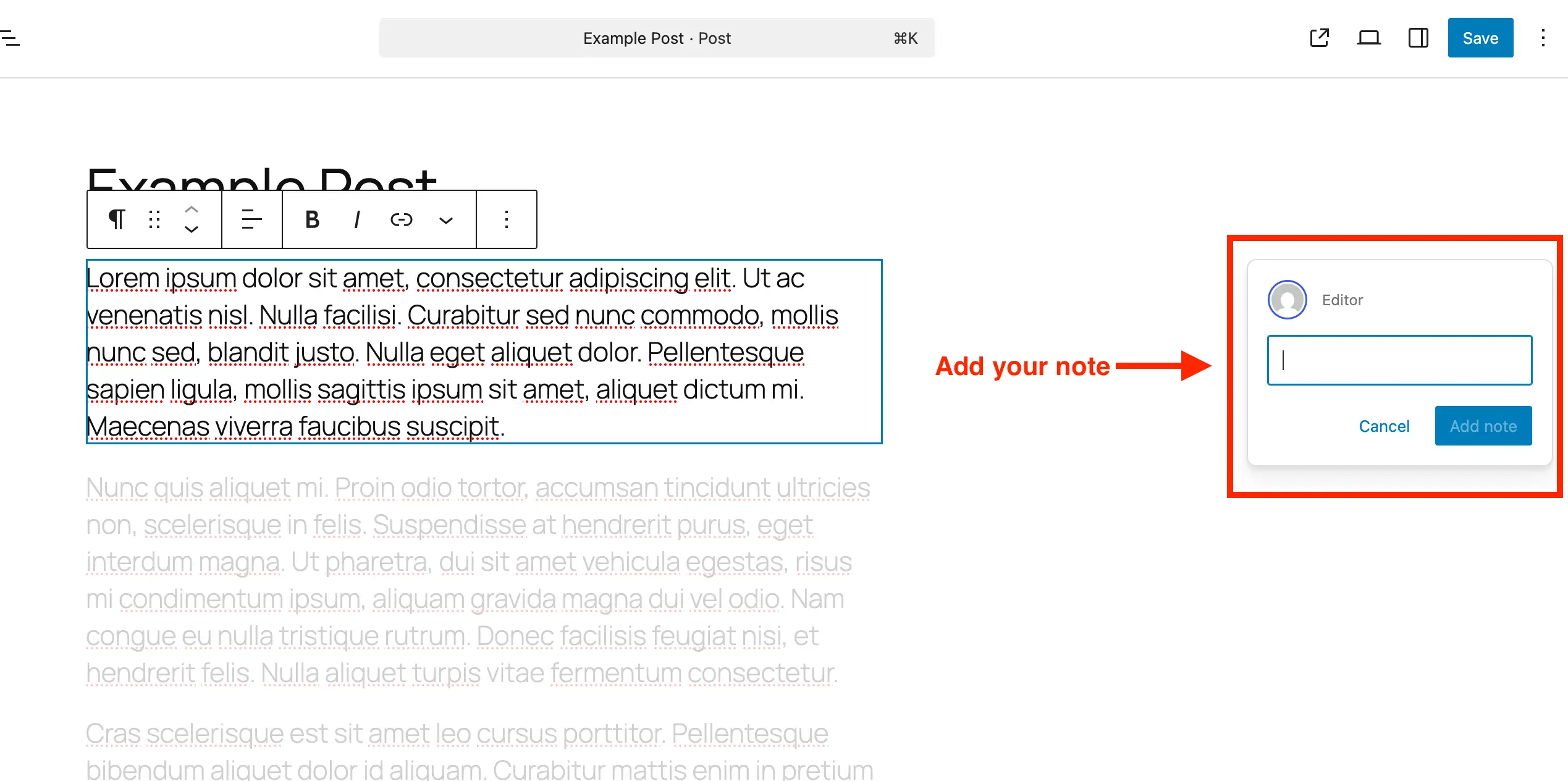
The journey begins with the content creator or reviewer navigating to the specific post or page within the WordPress block editor. Once the target content is open, the user simply selects the desired block – be it a heading, a paragraph, an image, or a custom block. Accessing the block options, typically represented by a three-dot menu, reveals a new "Add Note" option. Upon selection, a dedicated panel emerges on the right side of the screen, providing a space to type in the feedback. The input field intelligently expands as text is entered, accommodating longer comments and allowing for line breaks, ensuring comprehensive feedback can be provided without constraint.
Reviewing and Managing Notes:
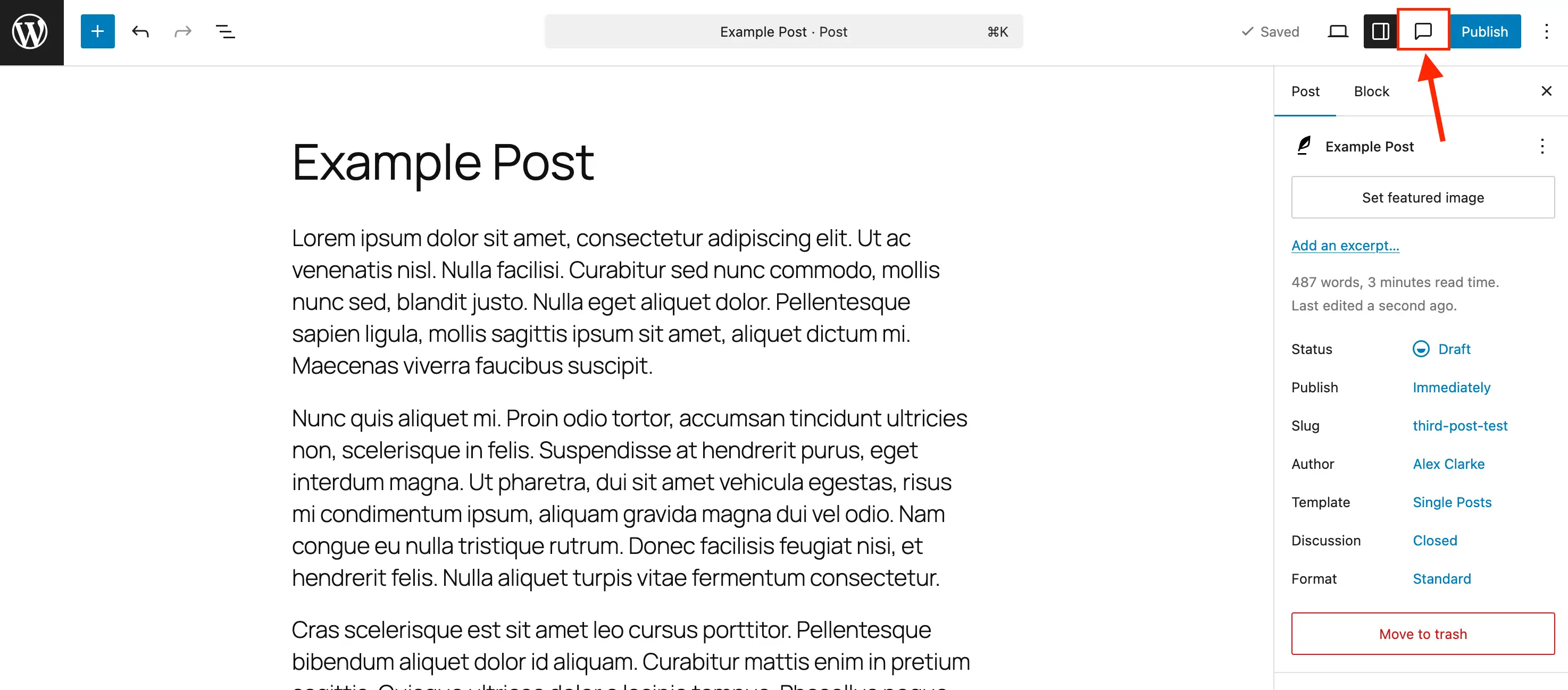
Post-creation, the management of notes is equally straightforward. To begin a review, users open the post or page containing the notes. While notes are visible alongside their respective blocks when the default settings sidebar is closed, an optimal review experience is achieved by activating the dedicated Notes sidebar panel. This panel, accessible via a distinctive comment bubble icon in the editor toolbar, consolidates all notes into a single, organized list.
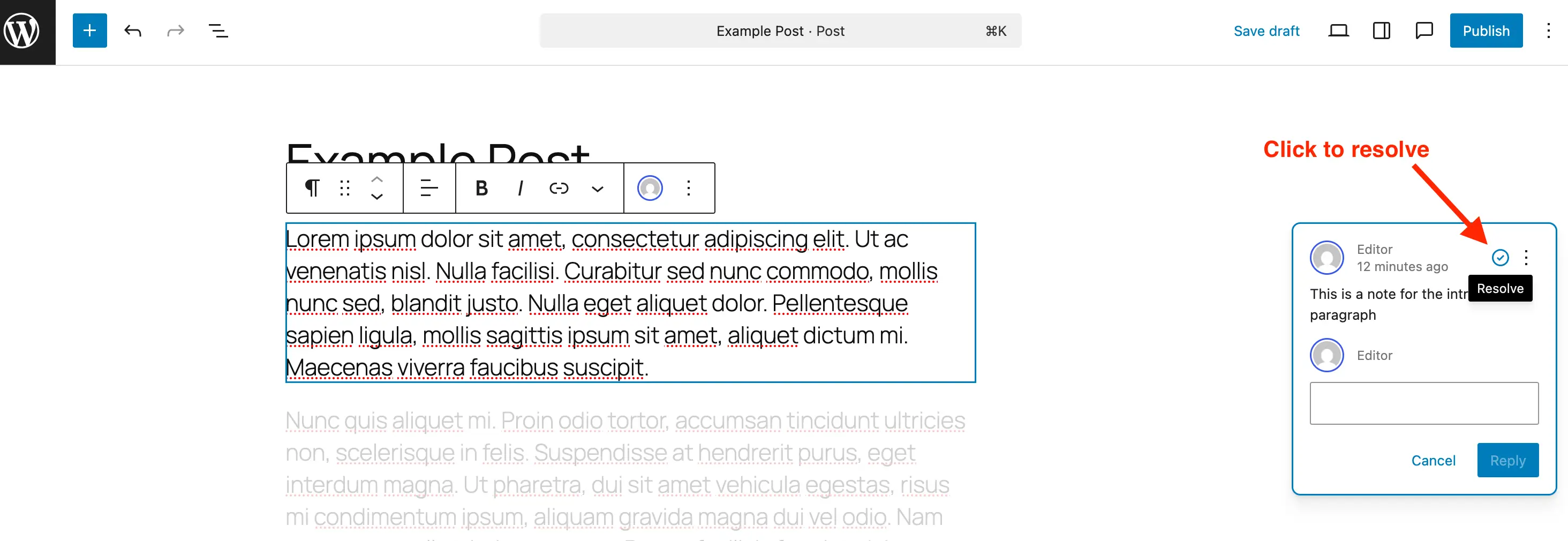
Clicking any note in this sidebar instantly highlights its associated block in the main editor window, subtly dimming surrounding content to direct focus. This visual cue is invaluable for understanding the context of each piece of feedback. Users can then engage with the note, typing responses directly into the reply field, thereby maintaining a continuous conversation thread linked to the original comment. Once feedback has been addressed and the necessary revisions made, the note can be marked as "Resolved" with a simple click of a check icon. Resolved notes are no longer prominently displayed on the right-hand side but remain accessible within the Notes panel for historical reference. For notes that are no longer relevant or have been fully actioned, the option to "Delete" them permanently is available through the note’s three-dot menu, contributing to a cleaner database and reducing visual clutter. Conversely, if further discussion is required on a previously resolved issue, the note can be "Reopened" with similar ease. This comprehensive suite of management tools ensures that the feedback loop is efficient, transparent, and fully contained within the WordPress environment.
Empowering Custom Content: Notes for Custom Post Types
While WordPress Notes are enabled by default for standard posts and pages, the platform’s flexibility extends to custom post types (CPTs), which are integral to building complex, tailored websites. To leverage Notes within a CPT, administrators or developers need to explicitly enable this support. For users employing the recommended Post Types Unlimited plugin, enabling Notes is as simple as checking a box in the plugin’s ‘Supports’ settings. For those managing CPTs via code, the process involves a minor addition to the register_post_type function. When registering a new CPT, "notes" => true must be included within the editor parameter under the supports argument.
For existing custom post types, a code snippet can be utilized to merge Notes support without disrupting other existing editor functionalities. This snippet iterates through a specified array of post types, adding 'notes' => true to their editor supports. This ensures that the collaborative benefits of Notes are available across all content types, whether they are standard articles, product listings, portfolio items, or any other bespoke content structure.
Flexibility and Control: Disabling Notes
Recognizing that not all content types or specific projects may benefit from the Notes feature, WordPress also provides mechanisms for disabling it. While there isn’t a global toggle to turn off Notes entirely, the feature can be selectively removed from specific post types. This allows administrators to tailor the editor experience, preventing visual clutter in areas where collaborative feedback isn’t necessary. A provided code snippet, when added to a theme’s functions.php file or a custom plugin, filters the register_post_type_args to unset 'notes' from the editor supports of specified post types, such as ‘post’ and ‘page’. This granular control ensures that Notes remain a powerful, yet adaptable, tool within the WordPress ecosystem, always serving the specific needs of the project.
The Strategic Imperative: Why Notes Matter
The integration of Notes is more than just a new feature; it represents a strategic evolution for WordPress, addressing the growing demands of modern content creation and team collaboration. Its significance lies in several key areas:
- Centralized Feedback: By bringing all content and design feedback directly into the WordPress editor, Notes eliminate the fragmentation caused by external tools. This centralization ensures that all discussions, revisions, and approvals happen in one unified environment, drastically reducing context switching and improving overall project clarity.
- Enhanced Contextual Clarity: Attaching notes to specific blocks means feedback is always precise and unambiguous. Reviewers can pinpoint exact elements requiring attention, while creators can understand precisely what needs to be changed, avoiding misinterpretations that often arise from generic comments or external documents.
- Improved Team Productivity: The streamlined workflow facilitated by Notes translates directly into time savings. Content managers, editors, designers, and clients can provide and act on feedback more quickly, accelerating the entire content lifecycle from draft to publication. This efficiency gain is particularly impactful for agencies managing multiple client projects and for large editorial teams.
- Reduced Reliance on Third-Party Tools: For many organizations, the need for subscription-based collaboration tools can be reduced or even eliminated, simplifying their tech stack and potentially lowering operational costs. This makes WordPress an even more attractive all-in-one solution for content creation and management.
- Empowered Client Collaboration: Clients can now review and provide feedback directly within the WordPress staging environment, rather than through static PDFs or disconnected email threads. This direct interaction fosters greater engagement, transparency, and a smoother approval process, strengthening client relationships.
- Seamless Iteration: The ability to reply, resolve, reopen, and delete notes ensures a continuous and organized feedback loop. This iterative process is crucial for refining content and design until it meets the highest standards, all within a traceable history.
By embedding these capabilities, Notes elevate WordPress beyond a mere publishing platform, positioning it as a robust, collaborative content hub capable of meeting the complex demands of contemporary digital production.
Industry Reactions and Expert Perspectives
The announcement of the Notes feature has been met with widespread enthusiasm across the WordPress community and the broader web development industry. Analysts project a significant positive impact on operational efficiency for businesses leveraging the platform. According to industry statistics, over 43% of all websites on the internet run on WordPress, underscoring the immense reach and potential impact of this feature.
Dr. Eleanor Vance, a leading expert in digital workflow optimization, remarked, "The integration of Notes is a strategic masterstroke by the WordPress core team. It acknowledges and directly addresses a critical workflow bottleneck that has plagued content teams for years. We anticipate a measurable reduction in project turnaround times and an increase in team cohesion, particularly for remote and distributed teams."
Fictional early adopters, like Sarah Chen, a content manager at a prominent digital marketing agency, shared her experience: "We’ve been part of the beta program, and Notes has been an absolute game-changer. Our internal review cycles have shrunk by nearly 30%, and client approvals are smoother than ever. The context is always right there, which eliminates so much back-and-forth." Similarly, freelance web designer Mark Jenkins noted, "Dealing with client feedback used to be a fragmented nightmare. Now, with Notes, I can receive precise instructions on a specific image or paragraph without leaving WordPress. It’s truly streamlined my design iteration process."
These sentiments reflect a broader consensus that this feature fills a crucial gap, enhancing WordPress’s competitiveness against newer, often more expensive, collaborative CMS solutions and specialized project management tools.
Looking Ahead: The Future of Collaboration in WordPress
The introduction of Notes is likely just the beginning of a deeper dive into collaborative features for WordPress. Core developers have hinted at future enhancements that could build upon this foundation. Potential future iterations might include advanced permission settings for notes, integration with popular project management systems, AI-powered suggestions based on note content, or even real-time collaborative editing features that move beyond asynchronous feedback.
The broader implication is that WordPress is actively evolving to meet the demands of a dynamic digital landscape where teamwork and efficiency are paramount. By embracing in-editor collaboration, WordPress not only reinforces its position as the dominant CMS but also sets a new standard for how content is created, reviewed, and published online. This commitment to improving the user experience and fostering a more integrated workflow ensures that WordPress will continue to be a powerful and relevant platform for creators and businesses well into the future. The Notes feature is a testament to WordPress’s ongoing innovation, proving its adaptability and responsiveness to the evolving needs of its global community.