How to Audit Any Webpage in Three Minutes Using the SEOquake Chrome Extension

Website performance optimization often demands immediate answers, especially when digital marketers, e-commerce managers, and search engine optimization (SEO) professionals encounter sudden ranking drops or underperforming conversion funnels. Historically, diagnosing these issues required comprehensive site-wide crawls that consumed valuable time and resources before identifying even the most basic technical flaws. However, recent advancements in browser-based diagnostic tools have streamlined this preliminary investigative phase. The SEOquake Chrome extension, developed by digital marketing software provider Semrush, offers a streamlined method for evaluating individual web pages without necessitating a full site inspection.

Understanding the Core Functionality of SEOquake

SEOquake is a complimentary browser extension designed to audit technical signals, on-page optimization, linking strategies, and core metrics associated with Semrush databases directly from the browser interface. Upon installation, users can navigate to any public web page and activate the extension icon to initiate immediate research and analytical workflows.

The extension structures its diagnostic capabilities primarily around two distinct modes: a rapid Quick View pop-up designed for immediate triage, and an exhaustive Full Report panel intended for deeper investigative work. Throughout these interfaces, findings are communicated through a color-coded reporting system. Green indicators typically signify healthy performance and adherence to established best practices, orange indicators denote warnings or elements requiring professional judgment, and red highlights alert users to critical errors that could severely hinder search engine visibility or user experience.

Minute One: Triage Using the Quick View Pop-Up

The initial stage of a rapid three-minute audit focuses entirely on triage, utilizing the Quick View pop-up to answer a fundamental question: Is there an obvious, high-priority obstruction preventing the page from performing optimally? The Quick View interface is organized into five distinct tabs, with three holding the greatest immediate value for a fast assessment: Page Info, Audit, and Content. Spending approximately 20 seconds on each of these three tabs allows an auditor to quickly establish a baseline assessment of a page’s health.

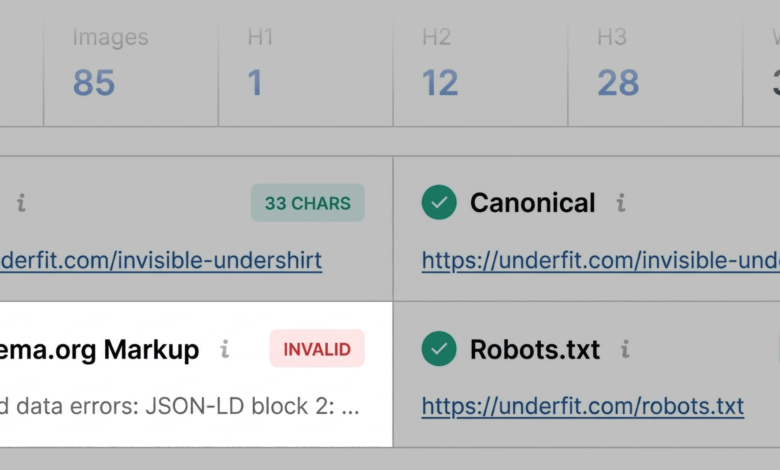
The Page Info tab serves as an initial entry point by summarizing foundational SEO elements, including the page title, meta description, URL structure, and canonical tags. A rapid scan in this section aims to spot critical red flags, such as broken Schema.org structured data. For e-commerce and product pages, invalid JSON-LD structured data is a severe concern. When search engines cannot properly parse structured data, pages may become ineligible for rich results—such as prominent price listings, stock availability updates, and star ratings—directly impacting click-through rates from search engine result pages. Additionally, auditors check for metadata length issues, ensuring that title tags and meta descriptions align with current display standards to prevent truncation in search results.

Transitioning to the Audit tab within the first minute provides insight into broader technical health factors. This section evaluates crawlability, indexation rules, mobile device compliance, and XML sitemap integration. While green and orange indicators dominate many preliminary scans, orange warnings require a nuanced risk assessment. For instance, warnings regarding missing or misconfigured hreflang tags demand contextual evaluation, especially if the target domain operates internationally or manages localized regional subfolders.

Reviewing Content Structure and Asset Optimization

The final segment of the initial three-minute triage involves the Content tab, which evaluates structural hierarchy and keyword presence. Heading tags (H1 through H6) dictate how both human readers and automated systems interpret topical architecture. A disorganized heading hierarchy—such as placing the primary H1 header deep within the page content or skipping logical increments by jumping directly from an H1 to an H4—can degrade both readability and accessibility compliance.

Furthermore, the Content tab evaluates image optimization metrics, specifically tracking the presence of descriptive alternative (alt) text. On image-heavy commercial pages, missing alt text not only diminishes accessibility for visually impaired users via screen readers but also deprives search engines of contextual clues necessary for indexing visual assets effectively.

Minutes Two and Three: Diagnosing Root Causes via the Full Report

Once the initial 60-second triage highlights potential vulnerabilities, the subsequent two minutes are dedicated to diagnosing the underlying causes through the Full Report interface. Accessing the "View Full Report" link opens a comprehensive dashboard divided into six panels: Overview, Diagnostics, Internal Links, External Links, Keyword Density, and Semrush.

Within the full Audit panel, auditors can systematically drill down into specific technical categories. Utilizing built-in testing integrations—such as linking directly to the Google Rich Results Test from the schema section—allows professionals to validate structured data errors instantly. Testing tools frequently confirm whether JSON-LD implementation lacks required properties, providing exact error codes that developers can address at the template level.

Similarly, examining the Links panel uncovers potential navigation flaws. By analyzing internal and external links, auditors can isolate broken URLs (often returning 404 status codes) or excessive reliance on JavaScript-driven hyperlinks that may impede efficient crawler navigation. Identifying these patterns allows technical teams to differentiate between isolated glitches and systemic architectural flaws.

Evaluating Keyword Density and Topic Coverage

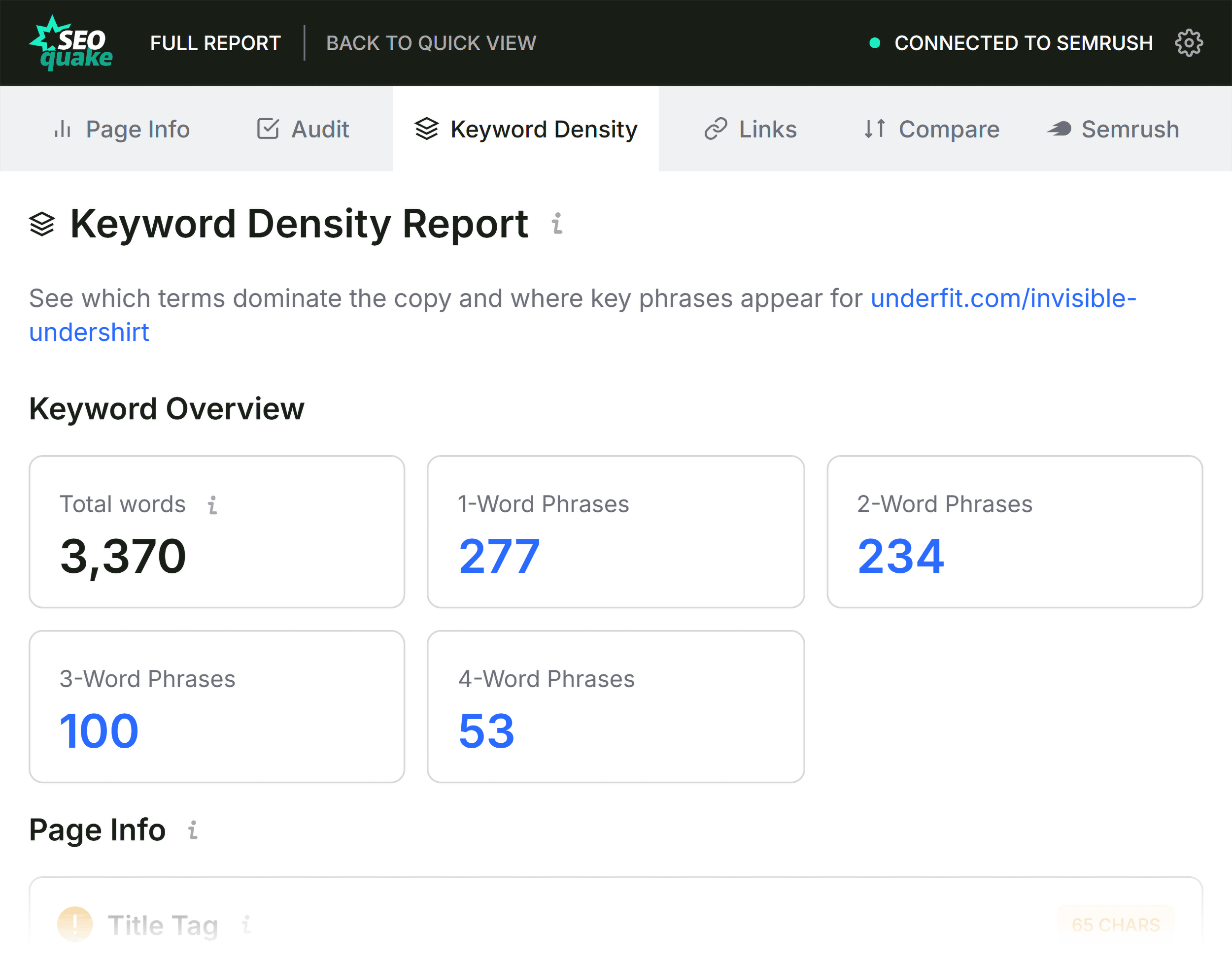
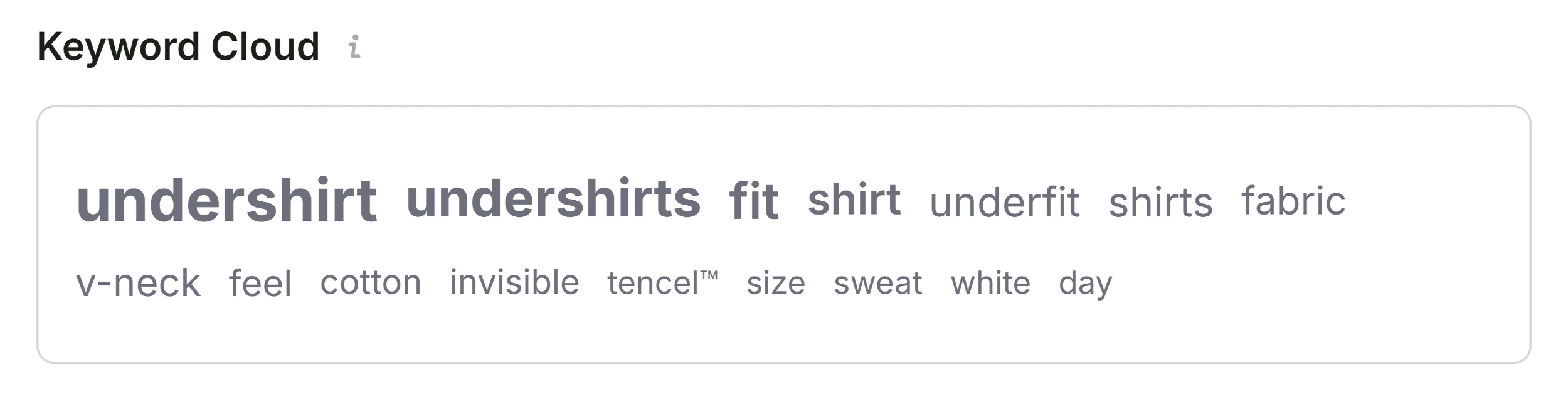
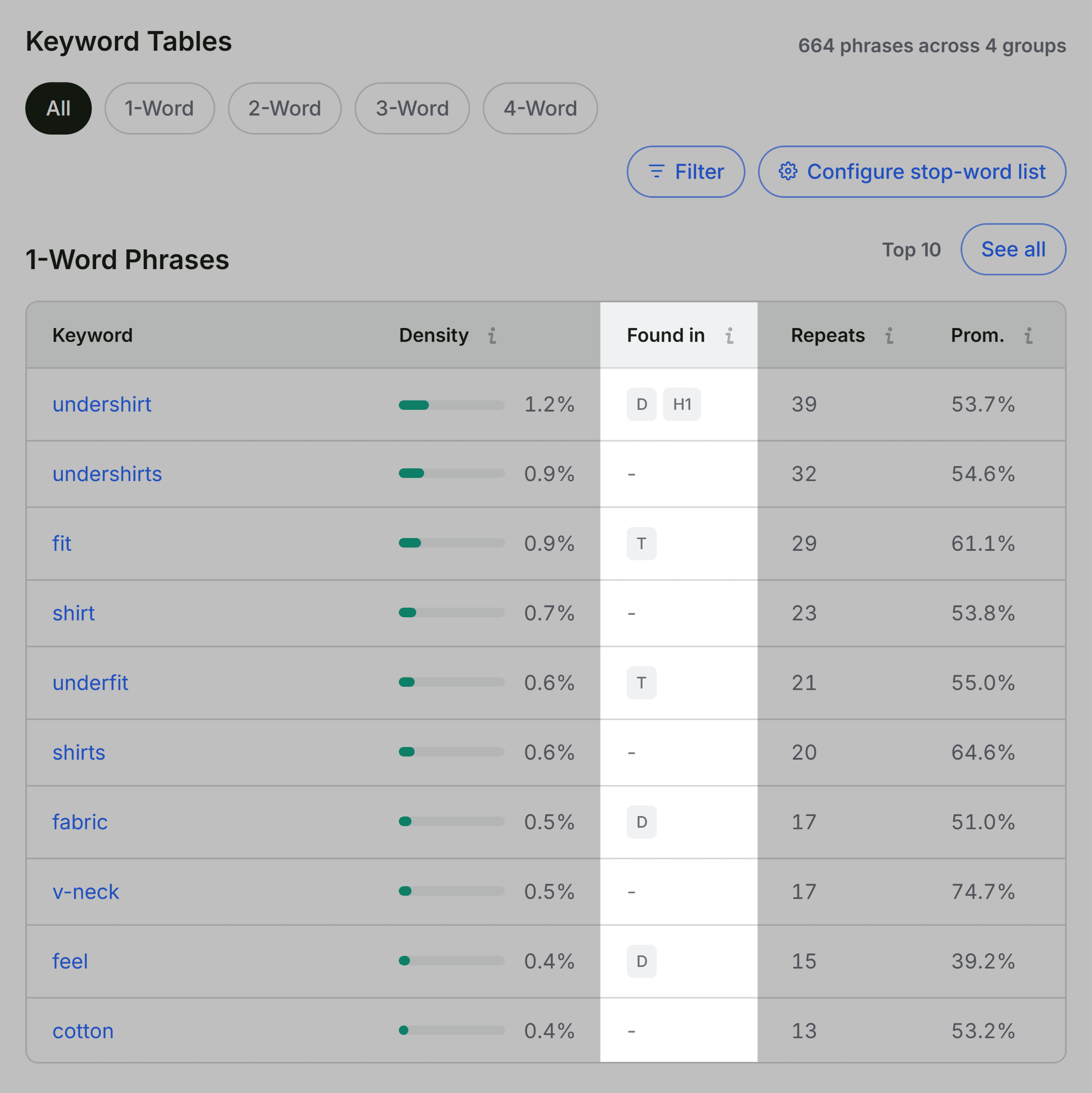
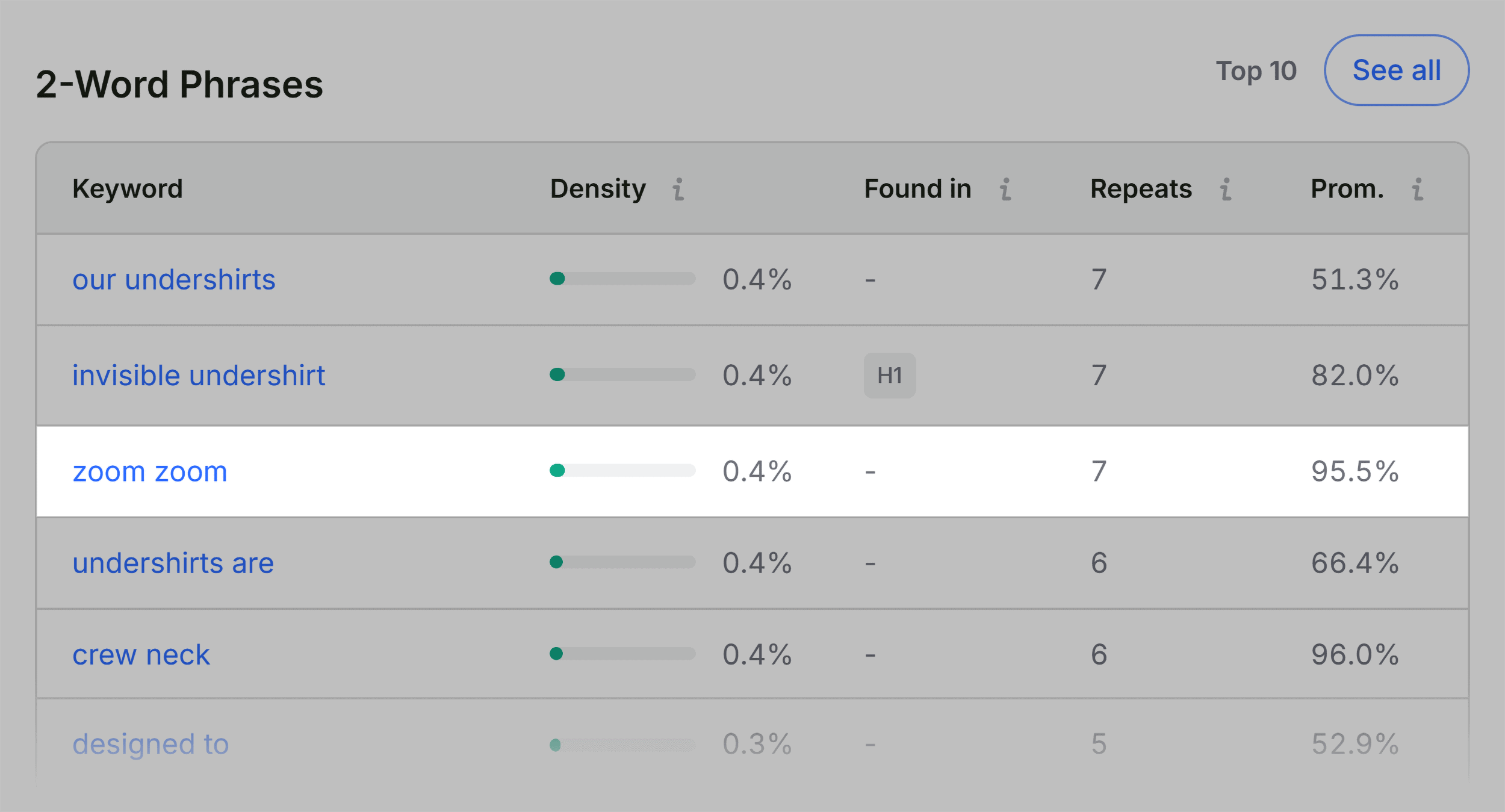
Analyzing keyword density offers a quantitative method for assessing topic coverage and contextual relevance. The Keyword Density panel breaks down single-word and multi-word phrases, displaying their frequency of occurrence and precise locations within the document—such as title tags, meta descriptions, or heading structures.

During this diagnostic phase, auditors look for two main phenomena: keyword cannibalization risks caused by over-optimization, and topic gaps where essential semantic terms are missing from the copy. While automated tools frequently register interface text, button labels, and interactive widget strings within multi-word phrase counts, a careful review ensures that primary product or service themes remain prominent where search engines expect to find them.

Contextualizing Findings Through Domain-Level Metrics

A critical decision point in any page-level audit is determining whether an identified issue is isolated to a single URL or indicative of a site-wide engineering problem. The Semrush panel within the Full Report provides the necessary macro-level context by displaying domain authority indicators, organic search traffic estimates, keyword rankings, and historical backlink profiles.
When a historically strong domain with substantial organic visibility houses an underperforming page, the root cause is frequently confined to page-level content, metadata, or on-page structural errors. Conversely, technical anomalies such as missing XML sitemap declarations, site-wide canonicalization misconfigurations, or widespread template-level Schema errors require coordinated intervention across the entire digital architecture. In such scenarios, transitioning from a browser extension audit to a comprehensive site crawler—such as the Semrush Site Audit tool—becomes necessary to map out and prioritize technical debt across thousands of URLs simultaneously.
Implications and Best Practices for Rapid SEO Auditing
The integration of browser-based diagnostic tools into daily workflows represents a significant shift in how digital marketing teams approach website maintenance. By compressing initial triage and diagnostic phases into a standardized three-minute procedure, professionals can rapidly evaluate competitor properties, client portals, and internal assets with unprecedented efficiency.
Ultimately, while lightweight browser extensions cannot replace the depth of full-scale technical crawls for enterprise-level websites, they provide an indispensable first line of defense. Standardizing a rapid audit framework ensures that critical on-page errors, broken structured data, and foundational optimization oversights are identified and prioritized before they can inflict prolonged damage on organic search performance and digital revenue streams.