WordPress 6.8 Unveils Speculative Loading: A Deep Dive into Instant Page Experiences and Performance Considerations

WordPress 6.8 has introduced a significant new feature: Speculative Loading, a technique poised to revolutionize how users perceive website speed by proactively preloading anticipated next pages. This advancement, integrated into the core of the world’s most popular content management system, aims to deliver a near-instantaneous browsing experience, fundamentally altering user interaction with WordPress-powered websites. The default activation of this feature underscores WordPress’s ongoing commitment to performance and user experience, yet it also introduces a new set of considerations for site administrators and developers.
The Dawn of Instant Experiences: Understanding Speculative Loading
Speculative loading is a sophisticated web performance optimization technique where a browser initiates the loading of resources – such as images, scripts, fonts, and even entire web pages – before a user explicitly requests them. This pre-emptive action is based on predictions or explicit hints about which content the user is most likely to access next. The goal is to eliminate the latency typically associated with navigation, making pages appear to load almost instantaneously.
Historically, web performance enhancements have evolved from basic caching mechanisms to more advanced techniques like DNS prefetching, preconnecting, and preloading individual resources. DNS prefetching, for instance, instructs the browser to resolve the domain name of external resources (like Google Fonts) in advance, shaving off crucial milliseconds from the total load time. WordPress has long utilized such resource hints through its wp_resource_hints() function, automatically adding <link rel='dns-prefetch'> or <link rel='preconnect'> tags for detected external assets. This foundational approach laid the groundwork for the more ambitious speculative loading now integrated into the platform.
The rationale behind these continuous advancements in web performance stems from extensive research highlighting the critical impact of page load speed on user engagement, conversion rates, and search engine rankings. Studies, including those by Google, consistently show that even a one-second delay in mobile page load can lead to a significant drop in conversions and a higher bounce rate. Users expect fast, seamless experiences, and speculative loading is a direct response to this expectation, pushing the boundaries of perceived performance.
WordPress’s Leap Forward: Speculative Loading in Version 6.8
While resource hints have been part of WordPress for some time, the functionality introduced in WordPress 6.8 represents a substantial escalation. This new implementation leverages the modern Speculation Rules API, enabling the platform to prefetch or even prerender entire URLs. This means that if a user is browsing a site’s homepage, WordPress, through its configured rules, might anticipate a click on the "Blog" link. Consequently, it begins loading the blog page in the background before the user clicks, resulting in an almost instant transition once the click occurs.
The integration of the Speculation Rules API into WordPress 6.8, as announced by core contributors, is a strategic move to align the CMS with cutting-edge browser capabilities. This decision reflects a broader trend in web development towards proactive performance optimization, shifting from reactive loading to anticipatory rendering. WordPress core developers have indicated that the primary objective is to enhance the end-user experience by making navigation feel fluid and immediate, especially on well-optimized sites. This move positions WordPress at the forefront of adopting advanced web performance standards, building upon earlier initiatives such as block editor performance improvements and native WebP image support.
The Speculation Rules API: Under the Hood
The Speculation Rules API is a flexible, declarative syntax that allows web developers to explicitly define which outgoing links the browser should speculatively prepare for navigation. Instead of relying solely on browser heuristics, developers can now embed JSON code directly into their HTML, dictating a precise set of rules for prefetching or prerendering. This API exists within the browser itself and does not require additional client-side libraries to be loaded by the website, ensuring efficient operation.

There are two primary strategies supported by the Speculation Rules API:
- Prefetch: This strategy involves fetching resources for a future navigation without executing them. It downloads the necessary HTML, CSS, and JavaScript, but does not render the page. This is a less aggressive approach, consuming fewer resources and suitable for pages that are likely but not certain to be visited.
- Prerender: This is a more aggressive strategy where the browser not only fetches all resources but also renders the entire page in a hidden background tab. When the user navigates to the prerendered page, it can be instantly swapped into view, offering the most seamless experience. However, prerendering consumes more client-side resources (CPU, memory, network) and should be used judiciously for highly confident predictions.
As of early 2025, the Speculation Rules API enjoys robust support across Chromium-based browsers, including Google Chrome, Microsoft Edge, and Opera. However, it is not yet natively supported in Firefox or Safari. This disparity in browser support means that while the JSON rules will be present on a WordPress site, only users of Chromium-based browsers will benefit from the feature. This limitation is a crucial consideration for site administrators, especially if their primary audience predominantly uses non-Chromium browsers. Nevertheless, the API is designed as a progressive enhancement; its presence will not cause errors in unsupported browsers, which will simply ignore the rules. The expectation within the web development community is that other browser vendors will eventually adopt the API as it matures and proves its efficacy.
Default Configuration and Customization in WordPress
WordPress 6.8 implements a set of default speculation rules specifically for logged-out users, employing the prefetch strategy with a conservative eagerness level. These rules are embedded as a <script type="speculationrules"> block in the HTML output. The default configuration includes several crucial exclusions to prevent unintended behavior or excessive resource consumption:
- *`href_matches: "/"`:** This general rule indicates that all internal links are potential candidates for prefetching.
- Exclusions: The rules explicitly exclude WordPress administrative pages (
/wp-*.php,/wp-admin/*), content directories (/wp-content/*,/wp-content/uploads/*,/wp-content/plugins/*), theme-specific paths (e.g.,/wp-content/themes/twentytwentyfive/*), and URLs containing query strings (/*?(.+)). These exclusions are vital to prevent prefetching dynamic content, sensitive admin areas, or large media files unnecessarily. nofollowlinks: Links marked withrel="nofollow"are also excluded, respecting their semantic intention..no-prefetchclass: Any link or its parent element with the.no-prefetchclass is excluded, offering a simple opt-out mechanism for specific elements.eagerness: "conservative": This setting instructs the browser to prefetch only when it is highly confident the user will navigate to the page, typically after a significant interaction like a mouse hover or a specific scroll event, rather than immediately on page load.
While these default rules provide a sensible baseline for most WordPress sites, they are generic. WordPress, recognizing the diverse nature of websites, offers several action hooks and filters for developers to customize this behavior:
wp_speculation_rules_configuration: This filter allows modification of the overall configuration, including changing themode(fromprefetchtoprerender) andeagerness(tomoderateoreager). It also serves as the primary hook to completely disable the feature by returningnull.wp_speculation_rules_href_exclude_paths: This filter enables developers to add custom URL path patterns to the exclusion list. For instance, a site owner might want to exclude a custom post type or a specific section of their site that involves complex, dynamic interactions.wp_load_speculation_rules: This action hook provides access to theWP_Speculation_Rulesclass, allowing developers to add entirely new, custom rules. This is particularly useful for targeted optimizations, such as aggressively prerendering a critical landing page for a marketing campaign or a popular product page in an e-commerce store.
For example, an e-commerce site running a flash sale might use the wp_load_speculation_rules hook to prerender their /black-friday-sale/ page with eager eagerness and a high priority. This ensures that visitors arriving on the homepage who are likely to click on the sale banner experience an instant load of the promotion, maximizing engagement during a critical sales period. Such granular control allows site owners to tailor speculative loading to their specific business objectives and user flows.
Verifying Implementation: A Developer’s Guide
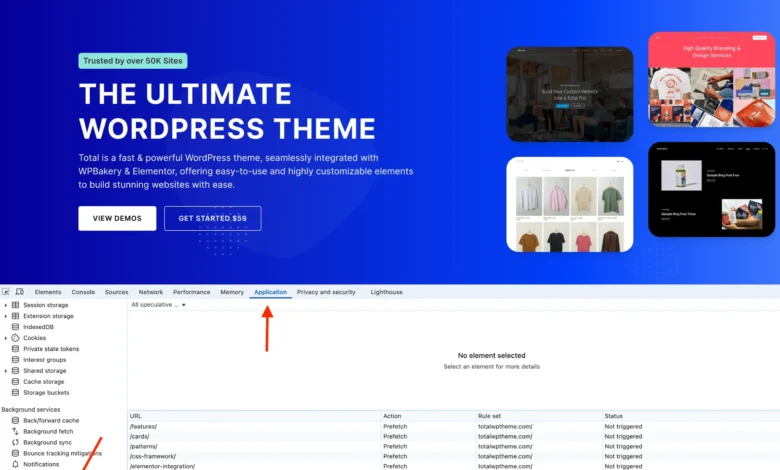
To confirm that speculative loading is correctly implemented and functioning on a WordPress site, developers can utilize the browser’s built-in developer tools, particularly in Chromium-based browsers like Chrome.
The process involves:
- Opening Chrome DevTools (F12 or right-click -> Inspect).
- Navigating to the "Application" tab.
- Selecting the "Speculative loads" section in the left sidebar.
- Within this section, the "Rules" tab should display the JSON rules that WordPress has injected into the page. This confirms that the rules are present and recognized by the browser.
- Clicking on the "Speculations" tab will list the URLs that have been identified for speculative loading, along with their current status (e.g., "Not Loaded," "Prefetched," "Prerendered").
It’s important to note that the "Speculations" tab might not immediately show a change in status upon simple hovering over links, especially with the default "conservative" eagerness. Often, a click on a listed link, followed by navigating back, will trigger the status update, indicating that the prefetching or prerendering indeed occurred. For more aggressive testing, temporarily setting the eagerness to eager via the wp_speculation_rules_configuration filter can help developers observe the feature’s behavior more readily. This diagnostic capability is crucial for troubleshooting and fine-tuning the speculative loading configuration to achieve optimal performance without unintended side effects.
Navigating the Trade-offs: Concerns and Challenges

While the promise of instant page loads is compelling, speculative loading, particularly its default activation in WordPress 6.8, introduces several significant trade-offs and concerns that site administrators must carefully consider.
- Unnecessary Server Usage and Hosting Costs: This is arguably the most substantial concern. Speculative loading, by its very nature, generates requests for pages that users may never actually visit. On high-traffic WordPress sites, this can lead to a considerable increase in server load, bandwidth consumption, and database queries. A site with thousands or millions of monthly visitors could see a noticeable uptick in resource utilization, potentially impacting server performance for actual user requests and leading to higher hosting costs, especially for providers that charge based on bandwidth or resource usage. Hosting providers may need to adjust their infrastructure and monitoring tools to account for this new pattern of "speculative" traffic.
- Potential for Serving Outdated Content: Websites that feature highly dynamic or real-time content, such as news portals, live blogs, or e-commerce sites with rapidly changing inventory or prices, face a unique challenge. If a page is prefetched or prerendered, and its content updates before the user actually clicks the link, the user might be presented with an outdated version. While caching strategies can mitigate this to an extent, ensuring absolute freshness for speculative content requires careful implementation and potentially more aggressive cache invalidation, which can, in turn, increase server load.
- Browser Ecosystem Disparity: As previously noted, the Speculation Rules API is currently supported only in Chromium-based browsers. This means a significant portion of internet users, those on Firefox or Safari, will not benefit from this feature. While it’s a progressive enhancement and won’t break unsupported browsers, it means the "instant experience" is not universal. Site administrators need to weigh the benefits for a segment of their audience against the resource expenditure for all users.
- Plugin Compatibility and Developer Adaptation: The WordPress ecosystem is vast and complex, relying on tens of thousands of plugins. Many plugins implement functionality that depends on a page fully loading and executing its scripts, such as session management, cookie consent banners, analytics tracking, or custom redirects. Speculative loading, by pre-executing or partially loading pages in the background, can potentially conflict with these plugins, leading to unexpected behavior, broken functionality, or inaccurate data. For instance, an analytics plugin might register a "page view" for a prerendered page even if the user never truly navigates to it, skewing metrics. While WordPress core developers expect plugin authors to adapt, this transition period could see compatibility issues, requiring site owners to temporarily disable speculative loading until plugin updates are released.
- Security Considerations (Minor): While the Speculation Rules API is designed with security in mind, any technique that involves pre-fetching or pre-executing content carries inherent, albeit minor, security considerations. Malicious scripts or content on a preloaded page could theoretically be exposed or processed in ways unintended if not handled carefully, though current browser implementations are robust in isolating speculative loads.
Controlling the Feature: Disabling Speculative Loading
Given the potential concerns, particularly around server resource usage and plugin compatibility, many site administrators may decide that speculative loading is not suitable for their specific environment. Unfortunately, WordPress 6.8 does not provide a simple toggle within the administrative interface to disable this feature. This decision by core developers has been a point of discussion, as it requires a code-based solution, which might be challenging for less technically proficient users.
To completely disable speculative loading in WordPress, the following code snippet can be added to a child theme’s functions.php file or managed via a plugin like Code Snippets:
// Disable Speculative Loading Completely
add_filter( 'wp_speculation_rules_configuration', '__return_null' );
This filter effectively tells WordPress to return null for the speculative rules configuration, preventing the JSON script from being outputted and thus disabling the feature entirely. This provides site owners with the necessary control to mitigate potential issues until they can thoroughly test the feature or address any conflicts.
The Broader Implications: A Strategic Decision for Webmasters
Speculative loading in WordPress 6.8 represents a significant technological leap forward, offering the tantalizing prospect of "instant" web experiences. For many websites, particularly those with static content, clear navigation paths, and a user base primarily on Chromium browsers, it will likely deliver tangible benefits in perceived speed and user satisfaction. The enhancement aligns with the ongoing industry push towards faster, more responsive web interfaces, ultimately contributing to better user retention and conversion rates.
However, its default activation without an easy admin toggle means that it’s not a set-and-forget feature for all. Webmasters, especially those managing high-traffic sites, e-commerce platforms, or dynamic content hubs, must approach this feature strategically. A careful assessment of their server infrastructure, content update frequency, plugin ecosystem, and target audience’s browser preferences is essential. Testing the feature’s impact on server load, analytics, and existing functionalities is highly recommended.
WordPress core contributors, in rolling out this feature, have emphasized its potential to elevate the user experience across millions of websites. Yet, the responsibility now falls on individual site administrators and developers to determine if these benefits outweigh the potential drawbacks in their unique operational contexts. The introduction of speculative loading is not just a performance upgrade; it’s an invitation for the WordPress community to engage with advanced web technologies and make informed decisions about their deployment, further solidifying WordPress’s role at the forefront of web innovation. The future will likely see further refinements to the API, broader browser adoption, and more user-friendly controls, but for now, it’s a powerful tool requiring thoughtful consideration.