The Top Six WordPress Media Offload Plugins for Optimized Website Performance and Scalability

Managing the digital assets of a growing WordPress website is a critical operational task that often dictates the difference between a high-performing site and one plagued by latency. As a website scales, its Media Library expands, directly impacting server response times, bandwidth consumption, and escalating hosting overheads. Industry data indicates that media files, particularly high-resolution imagery and video, now account for over 80% of a typical web page’s weight. Consequently, offloading these assets to specialized cloud storage solutions has become a standard best practice for developers aiming to improve Core Web Vitals and overall user experience.

The Evolution of Media Management in WordPress
Historically, WordPress stored all media files locally on the hosting server. While this was sufficient for small blogs or brochure-style websites, the shift toward media-rich content—driven by the rise of high-definition video advertising and mobile-first consumption—has rendered local storage unsustainable. In recent years, the market for WordPress media offload plugins has matured, transitioning from simple file-syncing tools to sophisticated, all-in-one infrastructure solutions.
The evolution of these tools follows a clear trajectory: initial solutions focused solely on offloading files to Amazon S3 buckets. Today, the sector includes services that integrate AI-driven image optimization, automated Content Delivery Network (CDN) distribution, and specialized video hosting. This fragmentation means that selecting the right plugin is no longer a one-size-fits-all decision; it requires an audit of a site’s specific traffic patterns, storage volume, and budgetary constraints.

The Technical Case for Offloading
The primary driver for implementing an offload solution is the mitigation of server resource depletion. When a visitor requests a page, a server burdened with heavy media must process both the database queries and the retrieval of large files. By offloading media to a cloud-based object storage provider, the primary web server is freed to handle dynamic processing, significantly reducing the Time to First Byte (TTFB).
Furthermore, the integration of a CDN is an implicit advantage of most offload solutions. By caching assets across a global network of servers, the distance between the data and the user is minimized, which is essential for maintaining consistent performance across diverse geographic regions. Beyond speed, there are security and compliance benefits; offloading services often provide redundant backups and improved data governance, mitigating the risks associated with hardware failure or localized server breaches.

Comparative Analysis of Leading Solutions
The current landscape of WordPress media management is defined by six prominent plugins, each catering to distinct user segments.
1. Infinite Uploads
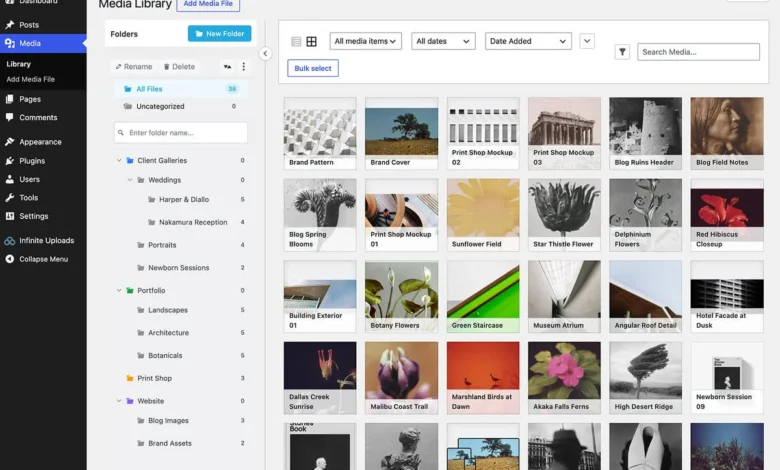
Infinite Uploads has emerged as a comprehensive, "all-in-one" ecosystem. Unlike traditional plugins that require users to manage their own cloud storage buckets, Infinite Uploads provides an integrated package of storage, CDN, and media optimization.

- Key Features: Automated image optimization, media library folder organization, and a built-in video player.
- Market Positioning: Ideal for agencies managing multiple sites who prefer a centralized, unified billing model.
- Performance Impact: The plugin significantly reduces server overhead by abstracting the entire media delivery process.
2. WP Offload Media
Widely regarded as the industry standard for power users, WP Offload Media is a product of Delicious Brains. It focuses on deep integration with major cloud providers such as Amazon S3, DigitalOcean Spaces, and Google Cloud Storage.
- Key Features: Provides granular control over file paths, S3 integration, and the ability to pull assets from existing setups.
- Target Audience: Developers who require high levels of customization and direct ownership of their storage buckets.
- Implementation: Requires more technical proficiency, including potential modifications to the
wp-config.phpfile.
3. Next3 Offload
Developed by ThemeDev, Next3 Offload serves as a robust competitor in the multi-provider space. It supports a vast array of S3-compatible services, including Wasabi, Cloudflare R2, and Linode.

- Key Features: Unlimited offloading on all tiers and a seamless migration path from legacy systems.
- Strategic Advantage: It offers a "future-proof" approach by ensuring that if a user changes cloud providers, the plugin remains compatible with the new infrastructure.
4. Advanced Media Offloader
For users seeking a lightweight, free solution without the overhead of premium subscriptions, Advanced Media Offloader provides a straightforward interface for moving media to S3.
- Core Functionality: It serves as a foundational tool. While it lacks the automated CDN and image-processing features of paid alternatives, it provides an open-source, highly transparent way to manage assets.
- Developer Focus: The inclusion of extensive hooks allows developers to create custom workflows, making it a favorite for lean, bespoke installations.
5. Offload, AI, and Optimize with Cloudflare Images
This plugin represents the convergence of cloud infrastructure and edge computing. It is purpose-built for users already embedded within the Cloudflare ecosystem.

- Innovative Edge: The plugin leverages Cloudflare’s AI for automated image tagging and captioning, significantly reducing administrative labor for large content libraries.
- Deployment: It simplifies the process by utilizing Cloudflare’s global edge network as both the storage and delivery layer.
6. Optimole
Optimole takes a distinct approach by prioritizing image processing over raw storage. It is an image optimization service that includes a cloud-based delivery layer.
- Differentiation: Rather than offloading every file in the media library, it uses real-time image scaling based on the visitor’s device, browser, and connection speed.
- Caveat: Users must be mindful of its cleanup protocols; failure to manage account status can result in the loss of original assets, necessitating a robust backup strategy.
Economic and Operational Implications
The cost structures of these plugins vary drastically, reflecting the underlying business models. Providers like Infinite Uploads and Next3 Offload charge based on infrastructure usage, while others, like Optimole, base their pricing on site traffic. This creates a complex decision-making environment for site owners.

For instance, a high-traffic site with a small library of static images would likely benefit from Optimole’s traffic-based pricing. Conversely, a media-heavy portal—such as a photography blog or a video-focused news site—would find more value in a storage-and-bandwidth-based model like Infinite Uploads.
Strategic Recommendations
When evaluating these solutions, site administrators should perform a "media audit" to determine their primary bottleneck. If the bottleneck is server disk space, a standard S3-based offloader like WP Offload Media or Next3 is appropriate. If the bottleneck is page load speed and Core Web Vitals, an image-processing solution like Optimole or a CDN-heavy provider like Infinite Uploads is superior.

Ultimately, the choice of a media offload plugin is a long-term commitment. Migrating tens of thousands of assets between providers is an intensive process that can lead to broken links and SEO degradation if not handled correctly. Therefore, selecting a platform that aligns with the site’s long-term growth trajectory—balancing ease of use against the need for granular technical control—is essential. As the WordPress ecosystem continues to prioritize performance, these tools will remain the critical infrastructure supporting the next generation of web content.