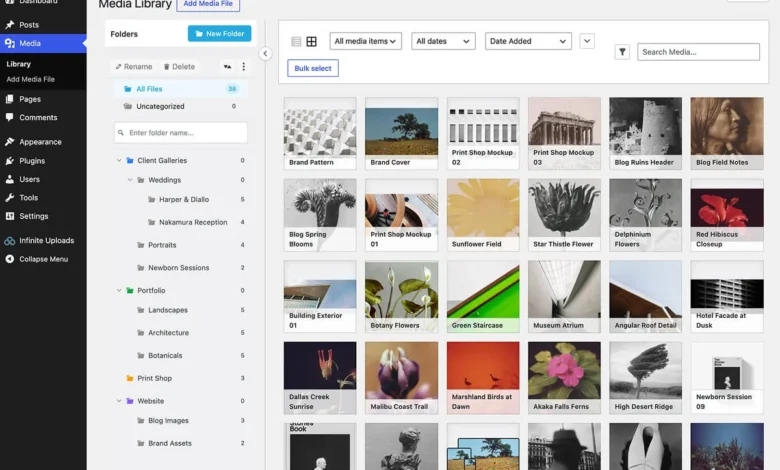
Managing the digital assets of a growing WordPress website is a critical operational task that often goes overlooked until performance degrades. As a site scales, the Media Library expands, leading to increased server storage requirements, slower load times, and rising hosting costs. Offloading media files—moving them from the primary hosting server to dedicated cloud storage—has become a standard practice for enterprise-level WordPress management. By utilizing a Content Delivery Network (CDN) in conjunction with offloading, administrators can ensure that heavy assets like 4K video and high-resolution imagery are served from edge locations closest to the end-user, significantly improving Core Web Vitals and user experience.

The Evolution of Media Management in WordPress
Historically, WordPress stored all media files directly on the local web server. While this was sufficient for small blogs, the modern digital landscape—dominated by high-definition video and image-heavy e-commerce platforms—has rendered this model obsolete. Industry data indicates that the global digital video advertising market is expanding rapidly, with ad spending projected to continue its upward trajectory. For a standard WordPress site, every uploaded asset occupies precious disk space. When a user requests a page, the server must process the request and pull those files from its own storage. If the site receives a sudden surge in traffic, this local storage approach can lead to server bottlenecking, where the database and the media server compete for resources.
The migration toward cloud storage and CDN-backed media delivery began gaining traction in the mid-2010s as developers sought to decouple static assets from dynamic application code. By the early 2020s, the ecosystem matured, moving from manual S3 bucket configurations to comprehensive, user-friendly plugins that automate the entire synchronization process.

Strategic Benefits of Offloading Assets
Offloading media provides three primary strategic advantages: infrastructure efficiency, performance optimization, and security.
- Resource Allocation: By offloading media, the primary web server is relieved of the burden of serving static files. This allows the CPU and RAM of the host server to focus exclusively on PHP execution and database queries, which are essential for site responsiveness.
- Global Latency Reduction: CDNs operate by caching content across a global network of servers. When a user in London visits a site hosted on a server in New York, the CDN serves the images from a London-based edge node, drastically reducing the time-to-first-byte (TTFB).
- Security and Compliance: Storing media on dedicated cloud providers like Amazon S3 or Google Cloud Storage often comes with enterprise-grade security features, including encryption at rest, granular access controls, and automated compliance auditing, which are frequently more robust than standard shared hosting environments.
Comparative Analysis of Leading Media Offload Solutions
The market for WordPress media offload plugins is diverse, with each solution targeting different user profiles, ranging from developers requiring granular control to site owners seeking "set-and-forget" simplicity.

1. Infinite Uploads: The All-in-One Ecosystem
Infinite Uploads has emerged as a comprehensive solution for users who prefer an integrated approach. Unlike plugins that merely move files, it provides an all-in-one suite including cloud storage, CDN, image optimization, and even specialized video players. The primary advantage of this model is its pricing structure; it bills based on actual storage and bandwidth consumption rather than the number of sites or files, which is particularly attractive for agencies managing large client portfolios.
2. WP Offload Media: The Developer Standard
Long considered the industry benchmark, WP Offload Media remains the preferred choice for developers. Its integration with major cloud providers is seamless, and it allows for a highly customized delivery architecture. It is particularly noted for its ability to handle "Assets Pull," a feature that ensures static files are handled with high efficiency. However, the plugin requires a higher degree of technical proficiency, often necessitating edits to the wp-config.php file to manage security credentials correctly.

3. Next3 Offload: Broad Compatibility
For organizations that have already committed to a specific cloud infrastructure—such as Bunny, Cloudflare R2, or Wasabi—Next3 Offload offers the most extensive support for third-party storage providers. It positions itself as a flexible alternative to proprietary ecosystems. Its tiered pricing model allows for scalability, though users must account for the fact that they are essentially paying for a bridge between WordPress and their own external storage contracts.
4. Advanced Media Offloader: The Lean Alternative
Advanced Media Offloader is a testament to the power of open-source development. It offers a no-frills, lightweight approach to media management. By focusing strictly on the synchronization of the WordPress Media Library to S3-compatible storage, it avoids the "bloat" associated with feature-heavy plugins. It is highly favored by developers who prefer to write their own custom hooks to manage media workflows.

5. Offload, AI, and Optimize with Cloudflare Images
This plugin represents the intersection of infrastructure and artificial intelligence. By leveraging the Cloudflare ecosystem, it offers automated tagging and captioning of media, which is a significant time-saver for large-scale media libraries. Its interface is designed for simplicity, utilizing toggle-based controls that allow for rapid deployment of complex CDN configurations.
6. Optimole: The Optimization-First Approach
Optimole differentiates itself by prioritizing image weight over simple storage offloading. Its machine-learning scaler dynamically adjusts image sizes based on the specific device and connection speed of the visiting user. While it does not offer the same "full-library offload" capabilities as others in this list, it is arguably the most effective tool for improving Core Web Vitals on image-heavy websites.

Financial Implications and Market Trends
The pricing models for these tools reveal a broader trend in the WordPress ecosystem: the transition from perpetual licenses to usage-based billing.
- Usage-Based (Infinite Uploads, Optimole): This model is often more equitable for growing businesses, as costs scale in direct proportion to the success of the website.
- Feature-Gated (WP Offload Media, Next3): This traditional model provides predictable annual costs but can result in "feature-lock," where critical functionality is hidden behind higher-tier subscription walls.
- Open-Source/Free (Advanced Media Offloader): These tools rely on community support and provide an excellent entry point for developers, though they lack the dedicated customer support found in commercial offerings.
Strategic Recommendations
The choice of a media offload plugin should be dictated by the specific technical needs of the site rather than marketing claims. For an agency managing hundreds of client sites, an all-inclusive, usage-based solution like Infinite Uploads minimizes administrative overhead. Conversely, for a high-traffic, custom-coded enterprise site, the granular control provided by WP Offload Media or a custom implementation using Advanced Media Offloader is preferable.

Site owners should conduct a thorough audit of their current media consumption. If the bottleneck is primarily image weight, Optimole provides the most immediate performance return. If the issue is disk space and high-resolution video hosting, a more robust offload solution is required. Regardless of the choice, the migration to offloaded media is a necessary step in the lifecycle of any professional-grade WordPress application, ensuring that as the content grows, the site remains fast, secure, and cost-efficient. As web standards evolve, these plugins will likely continue to integrate more AI-driven features, further automating the complex task of maintaining high-performance digital libraries.