Analyzing Data Distortions: How Media Representation Shapes Public Perception of the COVID-19 Pandemic

The global COVID-19 pandemic has served as a profound reminder of the power and peril of data visualization. In an era where public health decisions and political accountability rest on the interpretation of complex statistics, the clarity with which information is presented to the public is of paramount importance. However, even established and respected news organizations can fall into the trap of misleading data representation. A notable instance of this occurred in August 2020, when National Public Radio (NPR) published an analysis of United States COVID-19 mortality rates that sparked significant debate among data scientists and epidemiologists regarding the "curse of the top ten" and the selective omission of relevant comparative data.
The controversy centers on how the United States’ performance was ranked against international peers during a critical juncture of the pandemic. While the intent of such reporting is typically to provide context to political claims, the resulting visualizations often inadvertently obscure the broader reality of the crisis. By examining the intersection of political rhetoric, journalistic interpretation, and statistical methodology, one can discern the challenges inherent in communicating public health data during a polarized global emergency.
The Catalyst: The Swan-Trump Axios Interview
The discourse regarding U.S. COVID-19 data reached a fever pitch following an interview between then-President Donald Trump and Axios journalist Jonathan Swan, which aired on HBO on August 3, 2020. During the exchange, a fundamental disagreement arose regarding which metrics accurately reflected the severity of the pandemic in America. President Trump asserted that the United States was "doing better than any other country," presenting printed charts that highlighted the "case fatality ratio" (CFR)—the number of deaths relative to the number of confirmed infections.
Swan countered this perspective by pointing to the "deaths per capita" metric—the number of deaths relative to the total population. This distinction is not merely semantic; it represents two different ways of measuring the impact of a disease. Case fatality ratios are heavily influenced by a country’s testing capacity; if a nation tests more people and identifies more mild cases, its CFR will naturally decrease, even if the total death toll remains high. Conversely, per capita mortality provides a clearer picture of the disease’s overall burden on the society at large.
The President’s dismissal of the per capita metric with the phrase "You can’t do that" set the stage for a wave of media responses aimed at fact-checking these claims. Among these responses was an NPR article titled "Charts: How the U.S. Ranks On COVID-19 Deaths Per Capita – And By Case Count," published on August 5, 2020, by Jessica Craig.
Deconstructing the NPR Visualization Strategy
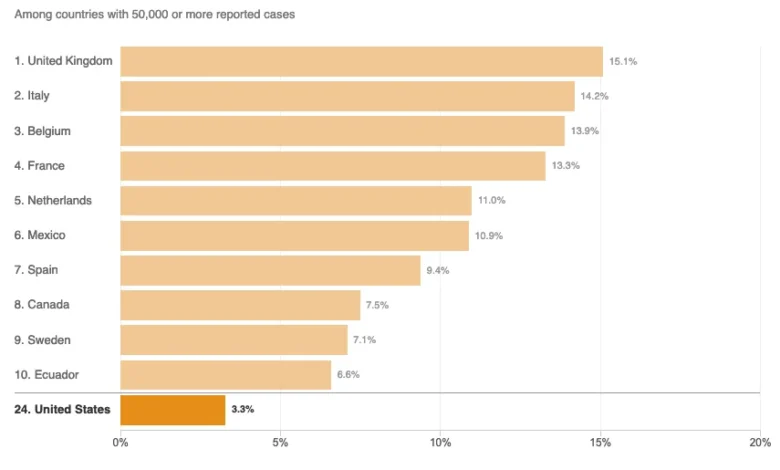
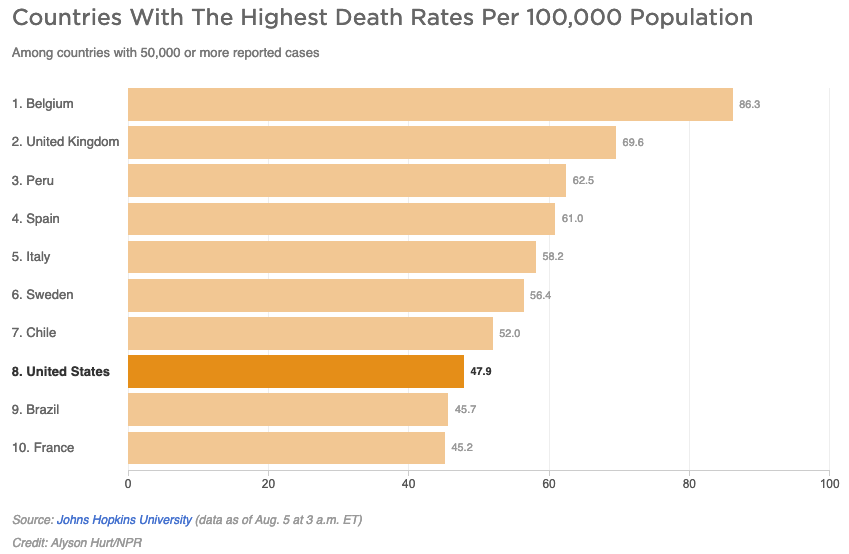
The NPR article was designed to provide a balanced look at both metrics mentioned in the Axios interview. However, analysts quickly identified significant flaws in the charts provided. The primary issue was the decision to limit the comparison to only ten countries, specifically those with 50,000 or more reported cases.
In the first chart, which displayed deaths per capita, the U.S. appeared to be performing relatively well, with only Brazil and France showing "better" (lower) mortality rates among the selected group. This presentation, however, was a result of the "curse of the top 10." By arbitrarily selecting only ten nations for the visualization, the chart omitted dozens of other countries that met the "50,000 cases" criteria but had significantly lower death rates than the United States.
As of early August 2020, approximately 45 countries had reported more than 50,000 COVID-19 cases. Data from the Johns Hopkins University Coronavirus Resource Center indicated that out of those 45 nations, 37 were actually performing better than the U.S. in terms of per capita mortality. By showing only a fraction of the relevant data, the visualization created a false sense of security and a misleading narrative of American success that was not supported by the full dataset.
The Mathematical Implications of Selective Ranking
The second chart in the NPR report focused on the case fatality ratio (CFR). In this visualization, the United States was positioned at the bottom of the list, which in a ranking of mortality, usually indicates the most favorable outcome. While it is true that the U.S. had a lower CFR than several European nations at that time—partly due to a younger demographic of infected individuals and more robust testing protocols—the "Top 10" format again skewed the perception of reality.
When all 45 countries with over 50,000 cases were considered, the United States sat in the middle of the pack rather than at the top of the leaderboard. The decision to limit the chart to ten entries effectively filtered out the majority of countries that were managing the virus more effectively. This type of data "cherry-picking," whether intentional or accidental, can be weaponized in political discourse to support claims that are factually incomplete.
Furthermore, the choice of 50,000 cases as a threshold, while seemingly objective, excluded many smaller nations or those with highly successful containment strategies (such as New Zealand or South Korea) that had far lower mortality rates. Including these nations would have further highlighted the disparity between the U.S. response and global best practices.
Defining "Disease Burden" and Mortality Metrics
The NPR report also faced criticism for its use of epidemiological terminology. The article quoted Justin Lessler, an associate professor of epidemiology at Johns Hopkins University, stating that the per capita death rate is an indication of the "overall disease burden" in a country.
Epidemiologists point out a nuance here: per capita death rates indicate the proportional disease burden rather than the overall burden. The overall burden is typically understood through total case counts and the absolute number of fatalities. Furthermore, the article provided a technical definition of "disease burden" as the "impact of a particular disease in terms of years of life lost and years lived with disability."
Statistical experts noted that the per capita death rate alone is insufficient to calculate this specific metric. To determine "years of life lost," one must account for the age of the deceased and their life expectancy, data which is not captured in a simple per capita mortality rate. This highlights the difficulty of translating complex scientific concepts into mainstream news without losing essential accuracy.
Chronology of the August 2020 Data Controversy
To understand the impact of this reporting, it is necessary to view it within the timeline of the summer 2020 COVID-19 surge in the United States:
- June – July 2020: The U.S. experiences a massive "second wave" or summer surge, particularly in the Sun Belt states (Arizona, Florida, Texas). Daily case counts reach record highs.
- August 3, 2020: The Axios on HBO interview airs. The exchange between Swan and Trump regarding mortality metrics goes viral, sparking a national debate on how to measure pandemic success.
- August 5, 2020: NPR publishes its "Charts" article. While intended to clarify the Swan-Trump debate, the article’s limited data sets begin to draw scrutiny from data visualization experts.
- August 6-10, 2020: Independent analysts and blogs (such as Stephen Few’s Perceptual Edge) publish critiques of the NPR visualizations, arguing that the charts unintentionally validated misleading political claims by omitting 80% of the relevant comparative data.
- Late August 2020: The U.S. surpasses 170,000 total deaths. The debate shifts toward the "excess mortality" metric as a more accurate way to bypass the limitations of both CFR and reported per capita rates.
Official Responses and Contextual Factors
While NPR did not issue a formal retraction, the discourse surrounding the article prompted a broader conversation about journalistic responsibility in data science. Media critics argued that in an attempt to appear "even-handed" or to avoid the appearance of bias against the administration, the outlet may have over-corrected, resulting in a presentation that lacked necessary rigor.
Contextual factors mentioned in the original report—such as the median age of a population and access to ICU care—remain vital for a full understanding of mortality. For instance, Italy and France had higher initial CFRs in part because their populations are significantly older than that of the United States. Conversely, the U.S. benefitted from a robust supply of ventilators by mid-summer 2020, which helped lower the CFR compared to the early spring peak in New York City.
However, these nuances do not negate the fundamental requirement for accurate ranking. When a news outlet presents a comparative list, the inclusion and exclusion criteria must be robust enough to prevent a distorted view of the subject.
Broader Impact and Implications for Media Literacy
The NPR data controversy serves as a case study for the importance of media literacy in the digital age. For the average consumer, a chart from a reputable source like NPR carries the weight of objective truth. When that chart is structured in a way that suggests the U.S. is "near the best" in the world, it can influence public behavior, policy support, and trust in scientific institutions.
The primary takeaway for data communicators is the necessity of providing the "full picture." In the context of a global pandemic, this means:
- Avoiding Arbitrary Limits: If 45 countries meet a criteria, showing only 10 is a form of data suppression.
- Contextualizing Metrics: Explaining why a country might have a low CFR (e.g., high testing volume) while simultaneously having a high per capita death rate.
- Standardizing Comparisons: Comparing nations with similar economic development or healthcare infrastructure to ensure the comparisons are "apples to apples."
As the world continues to navigate public health crises, the clarity of information will remain as vital as the medical interventions themselves. The August 2020 debate reminds us that data is not just a collection of numbers; it is a narrative tool. When that tool is used incorrectly, it can obscure the very realities it was intended to illuminate, making it harder for society to reach an informed consensus on the path forward.