Streamlining Collaboration: How WordPress Editor Notes Transform Content Workflows

Editorial and design workflows within the WordPress content management system have historically required external collaboration tools to achieve final publication standards. For years, digital marketing teams, multi-author editorial rooms, and web development agencies relied on third-party platforms such as Google Docs, Figma, and lengthy email threads to review drafts, leave comments, and finalize page layouts. While these patchwork systems facilitated communication, they introduced significant friction. Contributors were forced to constantly juggle multiple software applications, manually copy and paste text back and forth, and risk losing vital contextual information as revisions moved between design mockups and live code environments.

Recognizing these persistent productivity bottlenecks, the core WordPress development team introduced a native, built-in feedback mechanism known as Notes. Integrated directly within the Gutenberg block editor, this feature allows users to attach contextual feedback to specific content blocks—ranging from standard paragraphs and headings to complex media and layout components—without ever leaving the administrative dashboard. This comprehensive overview examines the mechanics of WordPress Notes, deployment strategies for custom post types, code-level configuration options, and the broader implications for modern web publishing.
Background Context and Evolution of WordPress Collaboration
The introduction of WordPress Notes represents a major milestone in the platform’s multi-year transition toward a fully integrated, modular editing experience. Ever since the Gutenberg project launched block-based editing, the overarching vision has been to transform WordPress from a basic blogging platform into an all-inclusive digital experience platform (DXP). However, collaborative editing lagged behind competing software-as-a-service (SaaS) website builders, which have long featured native, real-time co-authoring and commenting tools.

Historically, WordPress site administrators had to install third-party plugins—such as Editorial Flow, Multicollab, or various guest-author feedback extensions—to enable inline commenting. These solutions often introduced compatibility issues, security vulnerabilities, or database bloat. By embedding native commenting functionality directly into core architecture, WordPress provides a standardized, secure, and performant alternative. This architectural shift addresses the demands of enterprise-level marketing teams and client-facing web agencies that require seamless review cycles prior to publishing.
Core Mechanics: What Are WordPress In-Editor Notes?
WordPress Notes function as localized comment threads anchored directly to individual blocks within the Gutenberg editor. When a reviewer leaves a note, the system attaches it to the specific paragraph, image, quote, or heading where it was created.
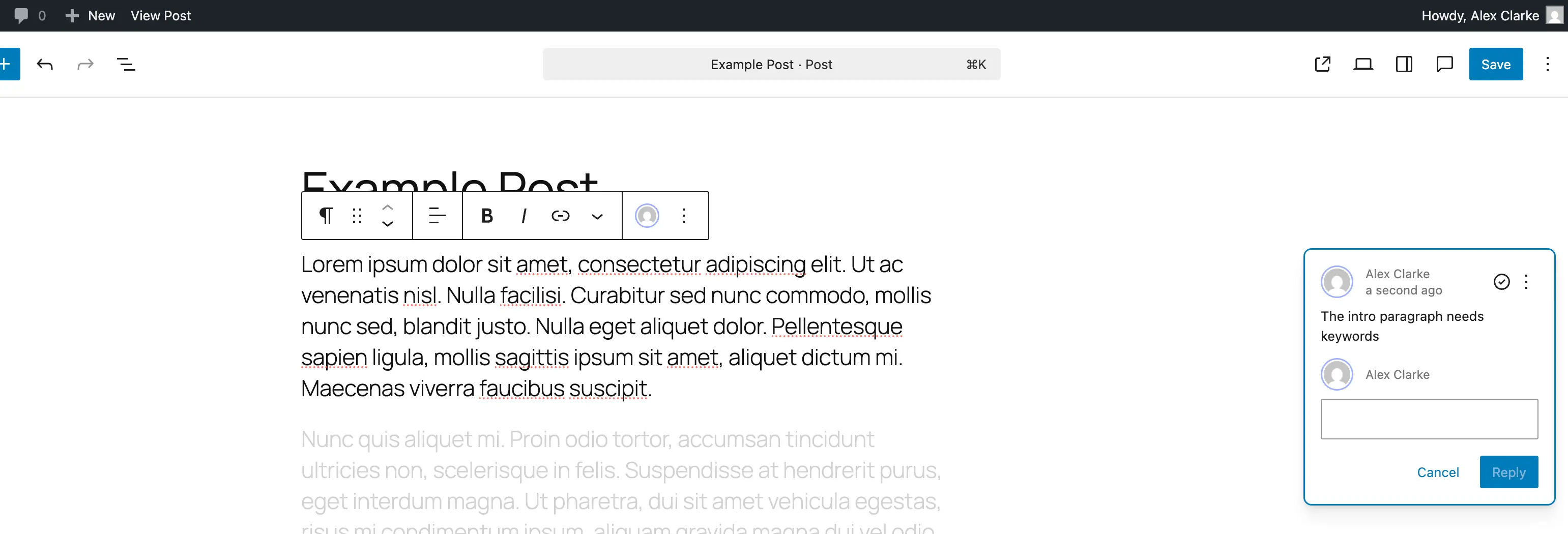
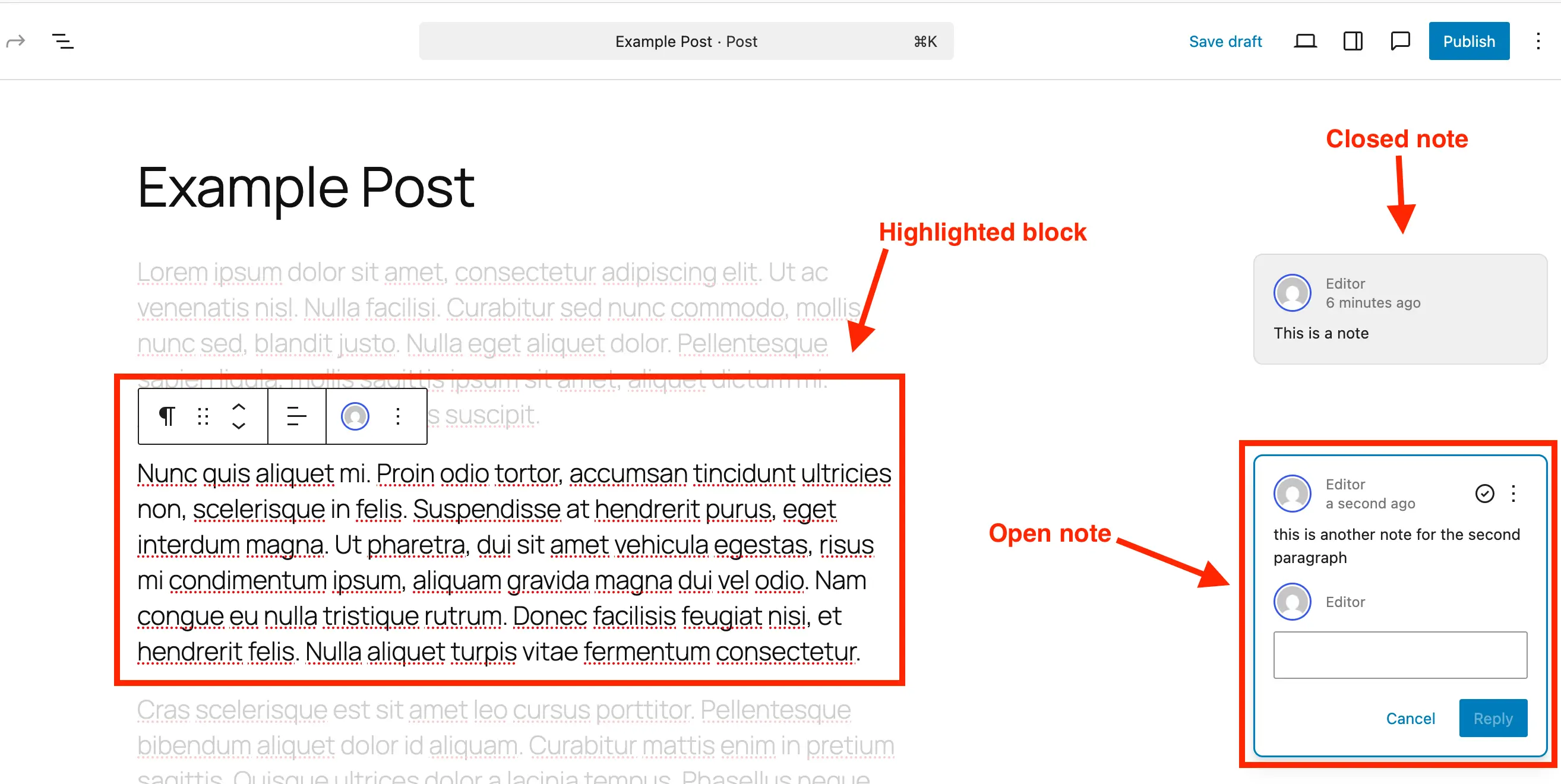
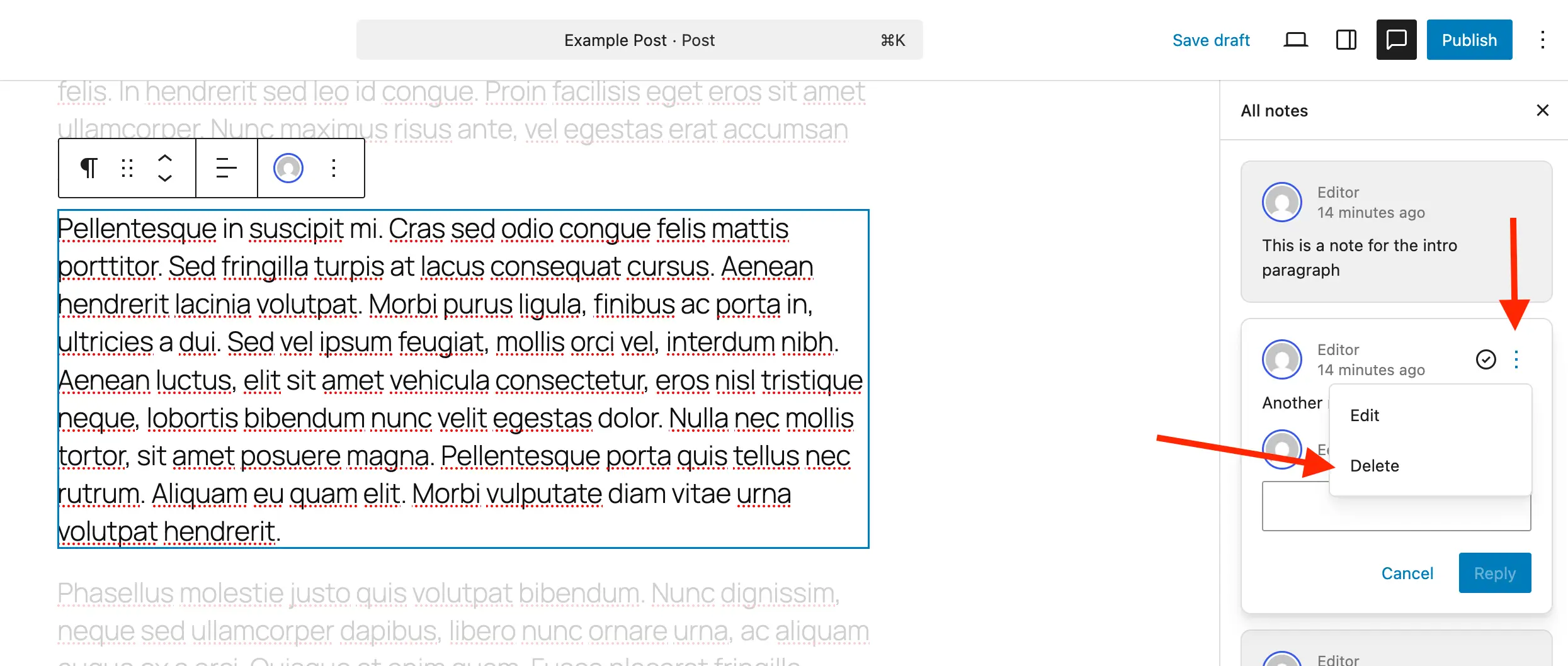
The user interface is designed for minimal distraction. Notes appear discreetly along the right-hand side of the screen, mimicking familiar comment bubbles found in modern word processors. Each entry displays essential metadata, including the author’s identity, the timestamp of the comment, and direct reply capabilities.
Furthermore, clicking on an individual note triggers a visual isolation mode: the related block remains illuminated while the rest of the document fades into the background. This targeted contrast ensures reviewers and editors maintain absolute focus on the specific design or copy element under discussion, effectively eliminating ambiguity and streamlining revision tasks.
Step-by-Step Implementation: Adding and Managing Notes
Deploying and utilizing Notes within the standard WordPress post or page editor requires no specialized training, operating via an intuitive interface that integrates seamlessly with existing block controls.
Creating a New Note
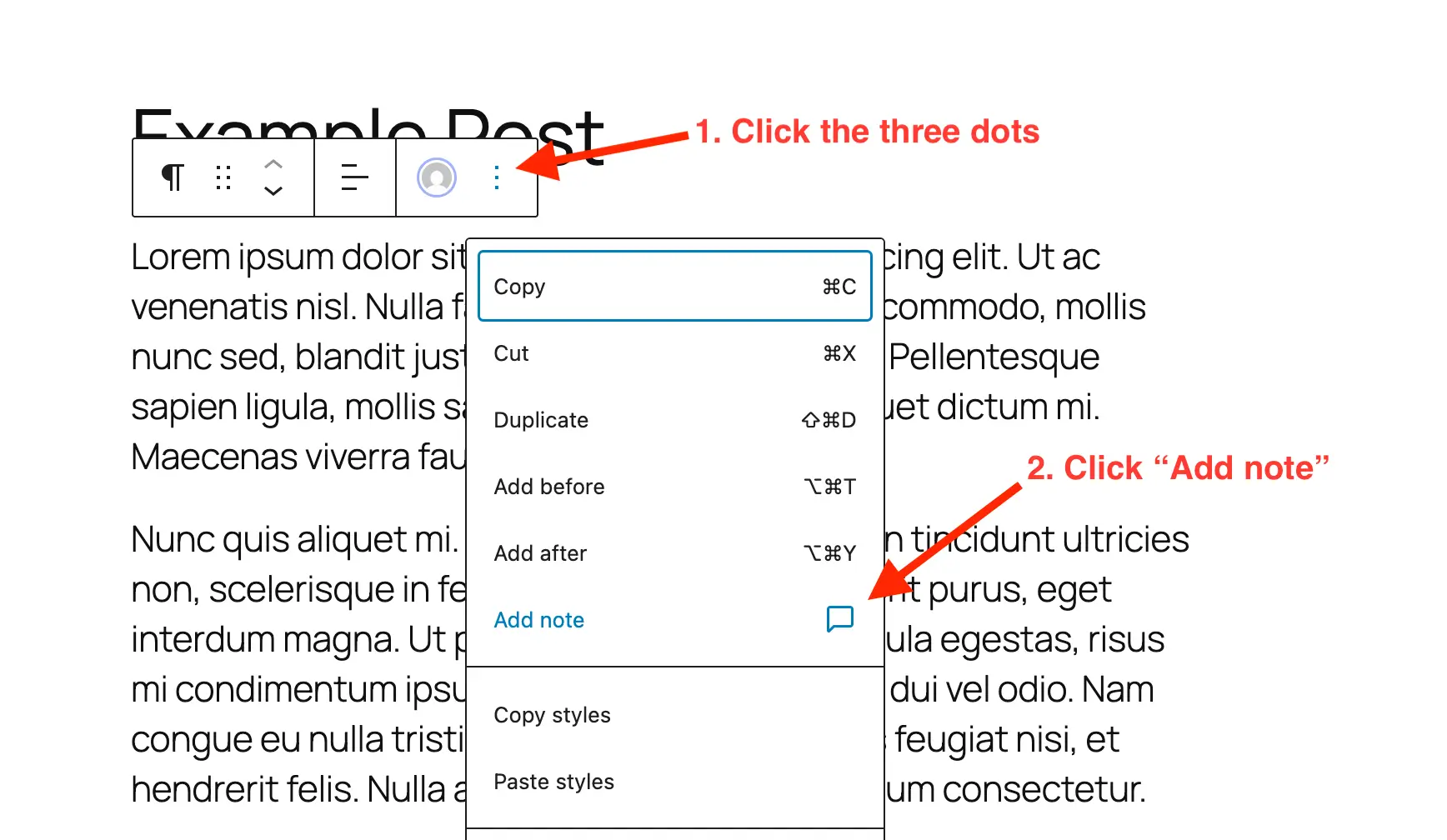
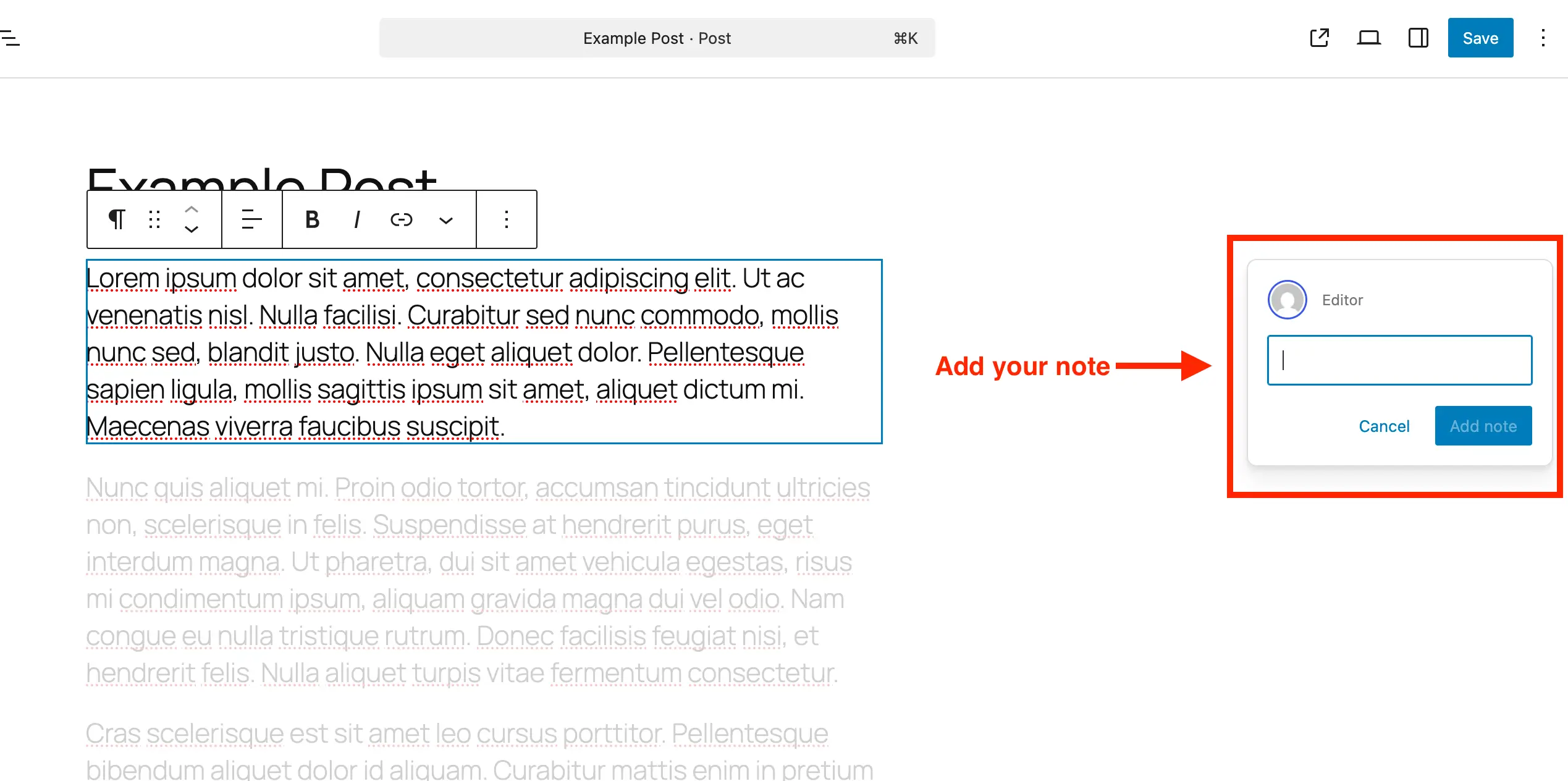
To initiate feedback on any piece of content, users begin by opening the targeted post or page within the block editor. Next, the reviewer selects the specific block—such as a headline, paragraph, or gallery—where intervention is required. By accessing the block’s options menu (represented by the standard three-dot icon), the user selects the "Add Note" parameter. A designated input field automatically manifests on the right-hand side of the interface. As the user types, the input box dynamically expands, supporting multi-line feedback and standard text formatting to ensure comprehensive instructions can be communicated effectively.
Reviewing, Resolving, and Deleting Feedback
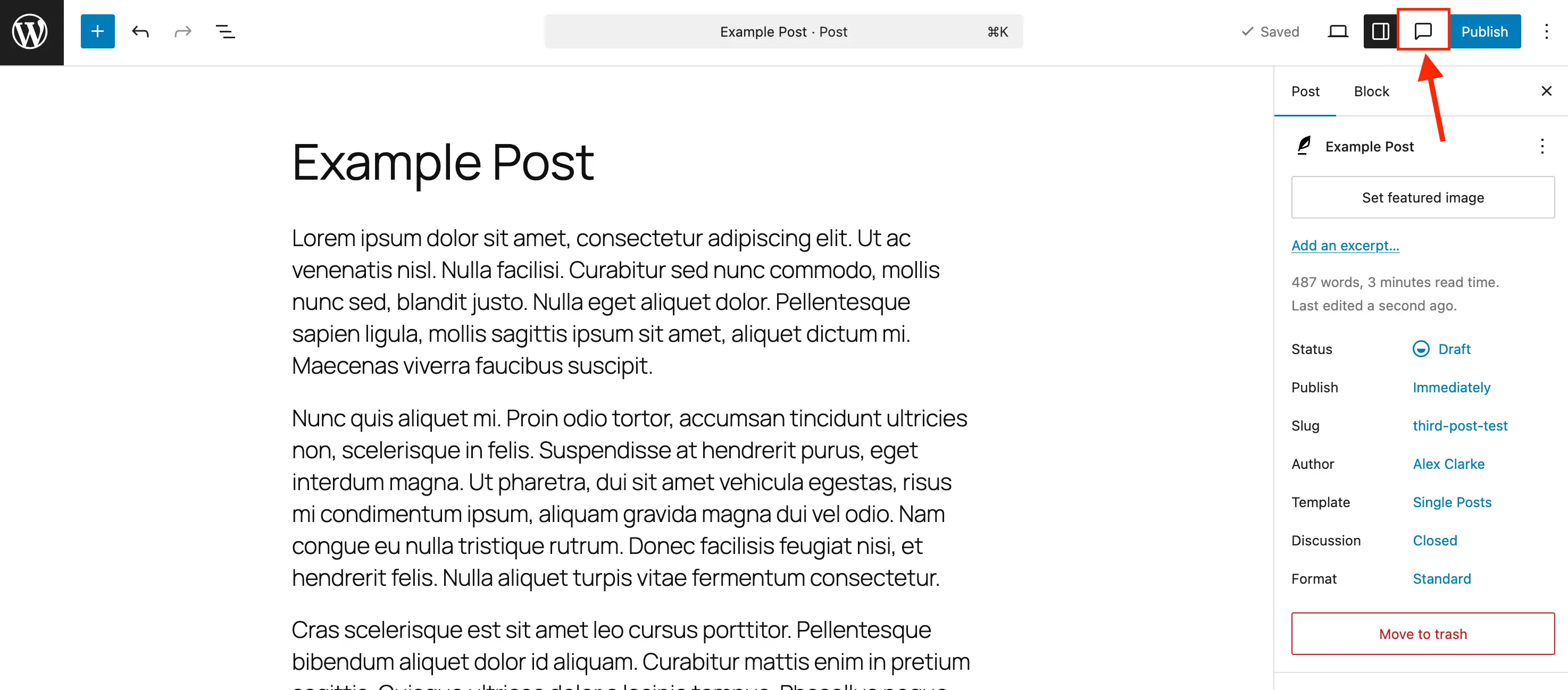
Managing an accumulation of editorial feedback is handled via the dedicated Notes sidebar panel. Clicking the comment bubble icon situated in the primary editor toolbar consolidates all active, pending, and resolved notes into a unified chronological list.
- Replying: Contributors can engage in threaded discussions directly beneath the initial feedback item, preserving the historical context of the revision.
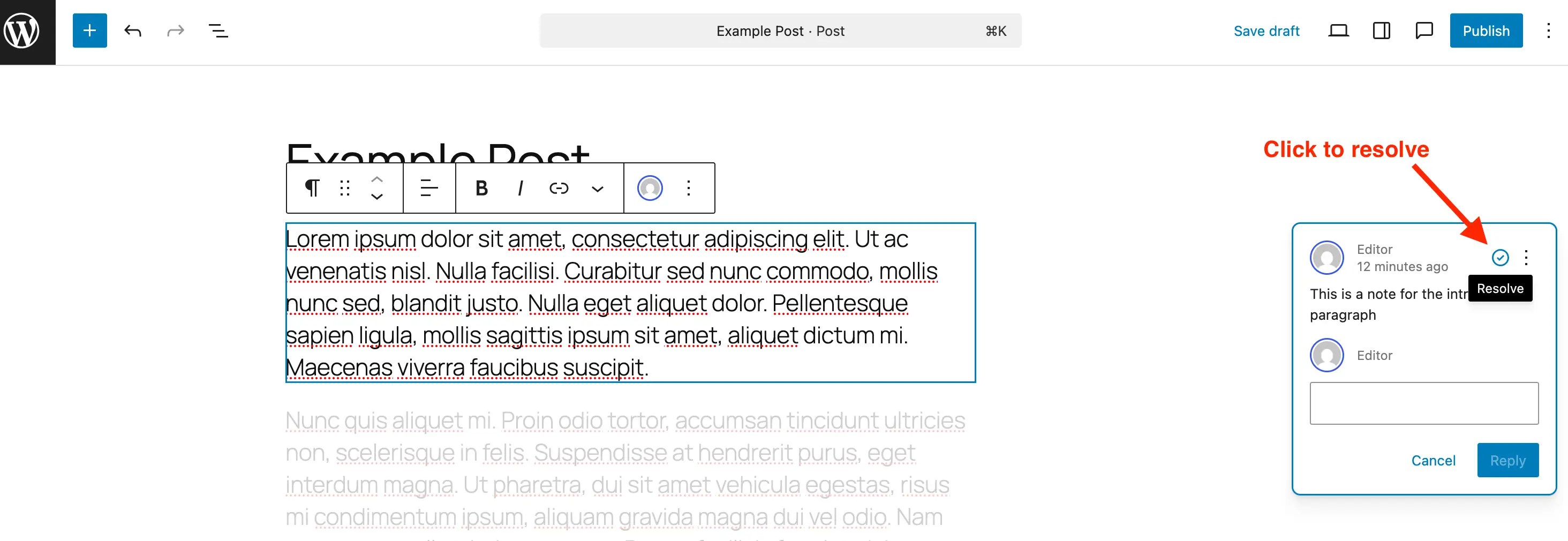
- Resolving: Once an editor or developer implements the requested change, clicking the checkmark icon marks the note as resolved. Resolved notes disappear from the active contextual sidebar when default panels are closed but remain accessible within the comprehensive Notes ledger.
- Deleting: To maintain optimal database hygiene—particularly on high-volume enterprise websites—administrators can permanently delete outdated notes via the item’s individual menu options.
- Reopening: If subsequent reviews indicate that a previously addressed issue requires further attention, resolved notes can be effortlessly reinstated via the menu settings.
Expanding Functionality: Enabling Notes for Custom Post Types
Out of the box, core WordPress configures Notes exclusively for standard posts and pages. However, modern web architectures frequently rely heavily on Custom Post Types (CPTs) to manage portfolios, product listings, real estate inventories, and event calendars. To extend the utility of the Notes feature to these bespoke content structures, developers must explicitly declare editor support.
For administrators utilizing management tools such as the Post Types Unlimited plugin, enabling this feature requires simply locating the CPT configuration settings and checking the designated box for "Notes" within the editor support parameters.
Alternatively, developers managing custom post types via custom code can integrate support manually during the registration phase by updating the supports argument within the register_post_type function:
register_post_type( 'book', [
    'label' => 'Books',
    'public' => true,
    'show_in_rest' => true,
    'supports' => [
        'title',
        'editor' => [ 'notes' => true ], // Enables native editor notes
        'author',
    ],
] );
For existing custom post types already deployed within a production environment, developers can programmatically merge Notes support into current configurations via a concise initialization hook without disrupting existing editor parameters:
/**
 * Programmatically enable editor notes for specified custom post types.
 */
add_action( 'init', function()
    $post_types = [ 'portfolio_item', 'event_listing' ];
    foreach ( $post_types as $post_type )
        $supports = get_all_post_type_supports( $post_type );
        $editor_supports = [ 'notes' => true ];

        if ( is_array( $supports['editor'] ) && isset( $supports['editor'][0] ) && is_array( $supports['editor'][0] ) )
            $editor_supports = array_merge( $editor_supports, $supports['editor'][0] );


        add_post_type_support( $post_type, 'editor', $editor_supports );

 );
System Administration: Disabling Notes to Reduce Clutter
While Notes offer powerful collaborative advantages, certain publishing environments or minimalist editorial workflows may require the complete removal of the feature to preserve interface simplicity. Because WordPress does not feature a single global toggle switch to deactivate Notes across the entire installation, administrators can utilize programmatic filters to strip the feature from specific post architectures.
By leveraging the register_post_type_args filter, site engineers can systematically unregister the notes parameter from designated post formats, such as standard pages or posts:
/**
 * Remove native Notes support from default posts and pages.
 */
add_filter( 'register_post_type_args', function( $args, $post_type )
    $target_post_types = [ 'post', 'page' ];

    if ( in_array( $post_type, $target_post_types, true ) && isset( $args['supports']['editor']['notes'] ) )
        unset( $args['supports']['editor']['notes'] );


    return $args;
, 10, 2 );
Fact-Based Analysis: Broader Implications and Industry Impact
The integration of native in-editor notes marks a structural evolution in how organizations approach content governance within open-source ecosystems. From an operational standpoint, consolidating editorial communication directly inside the CMS offers distinct quantitative and qualitative advantages:
- Reduction in Tool Switching: Industry productivity studies consistently demonstrate that frequent context-switching between auxiliary communication apps (such as Slack, email, or external document editors) and production environments degrades focus and introduces administrative latency. Native notes keep all revisions centralized.
- Enhanced Client Relations: For web development agencies delivering custom WordPress builds to corporate clients, the ability to review designs block-by-block within the actual production theme eliminates misunderstandings caused by static PDF mockups or disjointed screenshot annotations.
- Data Integrity and Security: Relying on third-party collaboration extensions often exposes site owners to external API dependencies, potential data privacy liabilities, and performance degradation. A core-supported feature ensures long-term software stability and adherence to WordPress coding standards.
Ultimately, WordPress Notes bridges the historical gap between standalone content authoring tools and collaborative enterprise software. By eliminating external friction points, maintaining absolute contextual clarity, and offering robust developer-level customization, the feature empowers teams of all sizes to produce high-quality digital content with unprecedented efficiency.