Optimizing WordPress Reliability: The Critical Role of Enterprise Change Management Beyond Infrastructure Speed


While high-performance infrastructure is a foundational requirement for any enterprise WordPress site, determining how quickly pages load, it alone does not guarantee reliability. The true determinant of a site’s continuous operation, especially after critical updates, redesigns, or PHP version upgrades, lies within the organization’s ‘change management process.’ This critical distinction highlights why enterprises increasingly prioritize robust change control mechanisms when evaluating hosting platforms, often above raw speed metrics. Studies from sources like the Uptime Institute consistently show that human error and change-related issues account for a significant percentage of IT outages, underscoring the profound impact of inadequate change management. For enterprises, where downtime can cost thousands of dollars per minute and severely impact brand reputation, predictable deployment and rapid recovery are paramount.
The Pervasive Nature of Change Risk in Enterprise WordPress Environments
The operational lifecycle of an enterprise WordPress environment is characterized by a continuous stream of modifications, far broader and more intricate than often initially perceived. These changes encompass a wide spectrum, from routine maintenance to strategic overhauls:
- Plugin and Theme Updates: Regular security patches, feature enhancements, and compatibility updates are constant.
- WordPress Core Upgrades: Essential for security and performance, these often involve significant underlying changes.
- PHP Version Upgrades: Crucial for performance and security, but can introduce compatibility issues with older code or plugins.
- Custom Code Deployments: New features, integrations, and bug fixes developed in-house.
- Content and Design Deployments: Major site redesigns, new content sections, or significant structural changes.
- Third-Party Integrations: Connecting WordPress with CRM, ERP, e-commerce, or marketing automation systems.
- Database Migrations: Changes to data structures or moving data between systems.
- Security Patches: Addressing vulnerabilities, often requiring immediate deployment.
Within large organizations, WordPress frequently powers mission-critical applications such as customer portals, compliance-sensitive content workflows, or high-revenue e-commerce platforms. Each of these changes, regardless of its apparent simplicity, interacts with a myriad of dependencies—plugins, themes, custom code, external APIs, and server configurations—many of which may not be fully documented. When failures occur, the root cause is disproportionately linked to deployments executed without a reliable testing path, rather than inherent infrastructure limitations. The absence of formalized staging environments, clear rollback procedures, or stringent access controls within a hosting provider forces enterprise teams to expend significant resources building their own makeshift controls. This often leads to manual pre-update backups shared informally, ad-hoc approval processes, and reactive "firefighting" post-deployment, diverting valuable engineering talent from strategic project work.

This paradigm shift emphasizes that the primary criteria for enterprise teams evaluating hosting platforms are no longer solely about server specifications or bandwidth. Instead, the focus has sharpened on whether the platform facilitates predictable deployments and ensures rapid recovery from any unforeseen issues. Industry consensus, echoed by leading IT research firms, highlights that the ability to control, test, approve, and swiftly recover from changes to a production environment is a non-negotiable requirement for digital resilience.
Establishing a Secure Testing Ground: The Role of Staging Environments
A cornerstone of any robust change management strategy is the staging environment. This isolated replica of the live production site allows developers and QA teams to test changes thoroughly without any risk to the live user experience. This includes validating plugin updates, theme modifications, core upgrades, and custom code deployments. The process mandates running the update, meticulously verifying every integration point and user journey it could potentially affect, gathering formal sign-off from relevant stakeholders (including legal, marketing, and security teams), and only then preparing for a push to production. The simplicity of enforcing this discipline when staging and production are distinct, fully isolated environments is invaluable.
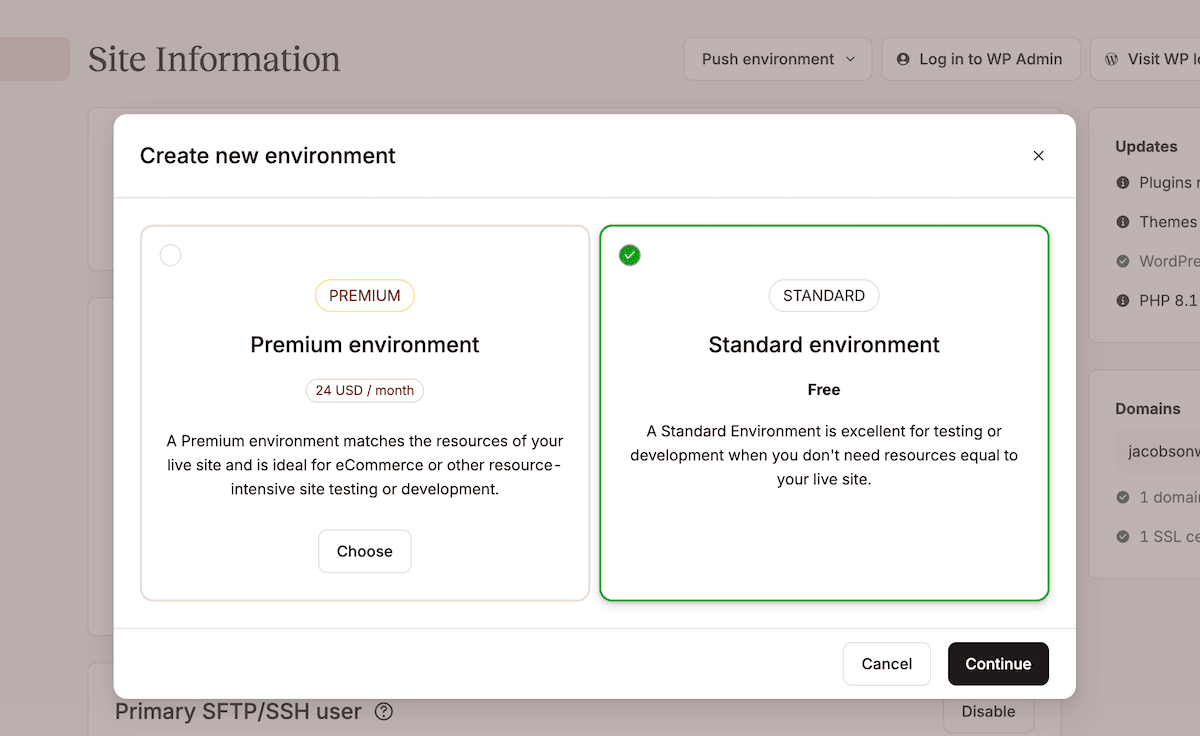
Kinsta’s hosting platform directly addresses this need by providing comprehensive staging environment tools. Every Kinsta plan includes one free, containerized standard staging environment per site. To initiate a new staging environment, users navigate to the ‘Sites’ section within the MyKinsta dashboard, select the desired site, click the environment selector (e.g., ‘Live’), and choose ‘Create new environment.’ Options include cloning the existing live environment, installing a fresh WordPress instance, or creating an empty environment for a custom setup. This flexibility allows teams to tailor their staging setup to specific project requirements.
For enterprises with more complex development workflows, Kinsta offers a premium staging add-on, expanding capacity to up to five premium staging environments per site, in addition to the standard free environment. This enhanced capability is particularly beneficial for organizations running parallel development streams, needing to validate resource-intensive functionality, or requiring staging conditions that precisely mirror production specifications for critical testing. The differentiation between standard and premium environments is crucial for workflow scoping, with premium options often offering more dedicated resources and advanced configurations.
The benefits of formalized staging environments are widely acknowledged across the industry. They significantly reduce the likelihood of introducing bugs or regressions into the live site, accelerate the development and deployment cycle by catching issues earlier, and empower development teams to experiment more freely. As Itineris, a Kinsta customer specializing in enterprise client solutions, attests, "Staging environments, automated backups, and a robust infrastructure were essential for streamlining our workflows and enhancing site performance." This statement underscores how integral Kinsta’s staging infrastructure becomes to the overall operational efficiency and reliability of complex enterprise projects.
Precision Deployment: The Strategic Advantage of Selective Pushes
While staging environments effectively mitigate risks during the testing phase, the act of deploying changes to production introduces its own set of challenges. A common pitfall in many workflows is the "rip and replace" approach, where the entire staging environment is pushed to production. This method inherently carries a different kind of risk: the wholesale replacement of every file and database table, including changes not intended for immediate deployment, such as test content, temporary user accounts, or development-specific configurations. Such an indiscriminate deployment can lead to data inconsistencies, unintended feature releases, or even security vulnerabilities.
Kinsta’s selective push functionality directly addresses this by providing granular control over what moves from staging to production. Within MyKinsta, users select their staging environment, click ‘Push environment,’ and choose a deployment scope. This crucial feature allows enterprise teams to precisely define the elements being transferred, thereby minimizing the risk of unintended consequences. The options typically include:
- Files only: Deploying only theme, plugin, or custom code files.
- Database only: Pushing only database changes, useful for content updates or schema modifications.
- Both Files and Database: For comprehensive updates where both code and data are affected.
Further refinement is available through drop-down menus, enabling selection of specific files, folders, or even individual database tables. This level of control is invaluable for agile development methodologies, where small, iterative changes need to be deployed frequently without disrupting other parts of the site.
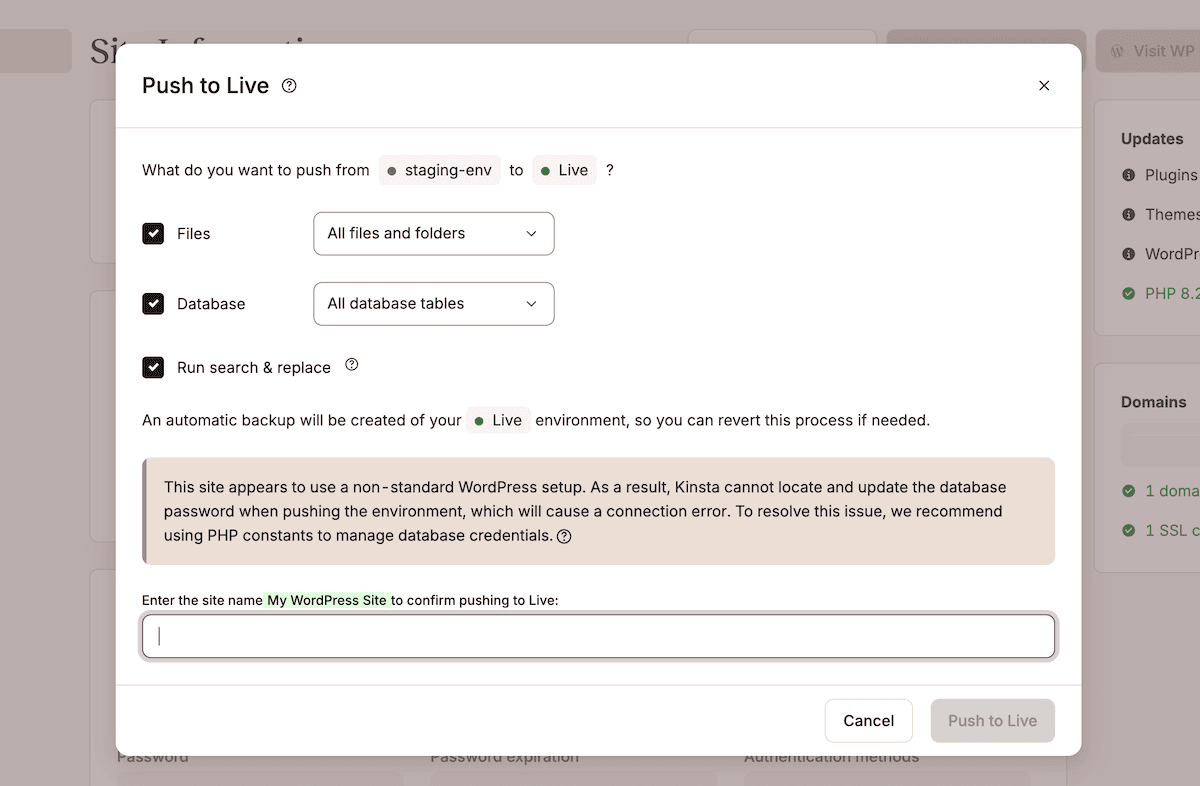
A critical safety measure integrated into Kinsta’s deployment process is the automatic creation of a system-generated backup of the production environment immediately prior to every push to a live site. This pre-deployment backup captures the exact state of the site, serving as an instant restore point should the deployment produce an unexpected outcome. In the event of a post-deployment issue, reverting to the previous stable state is a single, streamlined operation within MyKinsta, eliminating the need for time-consuming and complex manual reconstructions from generic backups.
Ensuring Data Consistency: The Search and Replace Mechanism
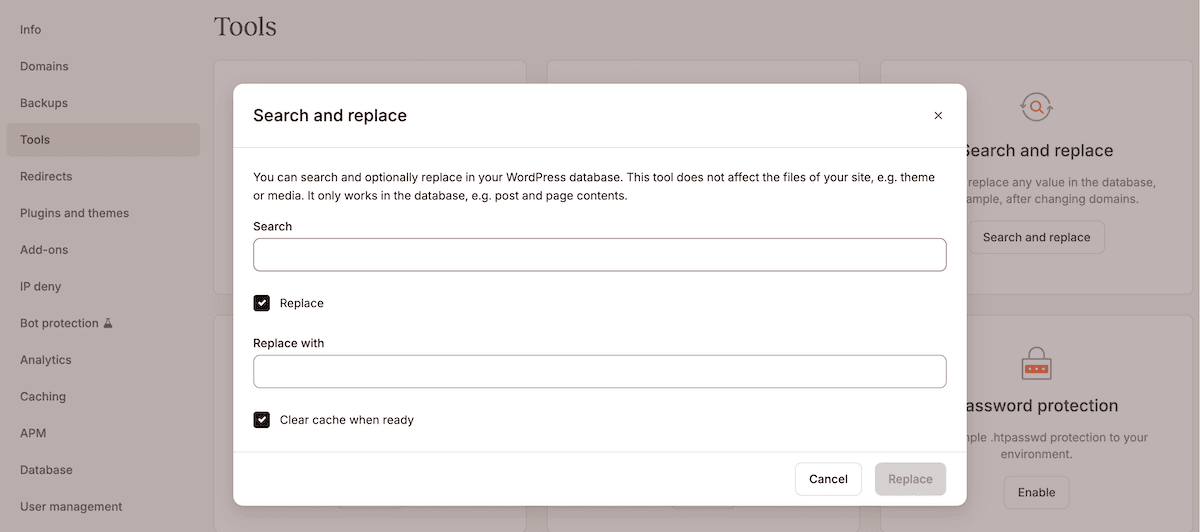
A common challenge during deployments, particularly those involving URL structure changes, domain swaps, or environment migrations, is the presence of hard-coded references to the staging URL within the WordPress database. Without a robust mechanism to update these references, the live site can suffer from broken links, incorrect asset loading, or functional failures.
MyKinsta’s integrated search and replace tool is specifically designed to address this. While the ‘Run search and replace’ option within the ‘Push to Live’ dialog primarily targets database entries, the comprehensive tool accessible via the ‘Tools’ screen in MyKinsta extends this capability. Here, administrators can input the staging URL in the ‘Search’ field and the production URL in the ‘Replace with’ field. Upon execution, MyKinsta automatically generates a system backup before performing the search and replace operation, providing an additional layer of safety. This dedicated step ensures that all database entries are accurately updated to reflect the production environment, maintaining data integrity and site functionality. Together, selective push, pre-push backups, and a dedicated search and replace step transform staging into a process with enforced checkpoints at every critical juncture, significantly enhancing deployment reliability.
The Ultimate Safety Net: Layered Backup Systems
Even with meticulously implemented staging environments and precise selective push workflows, some changes can still lead to unpredictable failures. Such issues might arise from subtle differences in third-party API behavior between staging and production environments, unforeseen interactions with live user traffic, or rare edge cases that were not triggered during testing. In these scenarios, a comprehensive and easily accessible backup system becomes the ultimate line of defense, significantly limiting the fallout from any failed change.
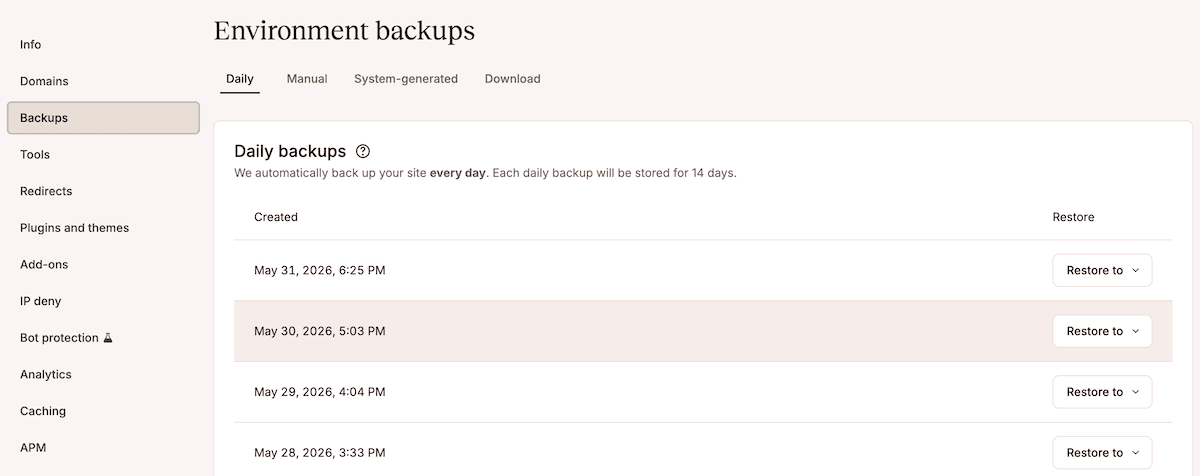
Kinsta offers a multi-layered backup strategy designed to cover every stage of the deployment cycle and provide maximum resilience. Within the MyKinsta dashboard, the ‘Backups’ screen provides access to four distinct backup types:
- Daily Backups: Automatically generated on a daily basis, providing a consistent recovery point.
- Hourly Backups: An optional add-on for mission-critical sites requiring even finer-grained recovery capabilities.
- Manual Backups: Users can initiate these at any time, typically before major changes or updates, offering immediate control over recovery points.
- System-Generated Backups: Created automatically before significant actions like pushing staging to live or initiating a restore operation, ensuring an immediate rollback option.
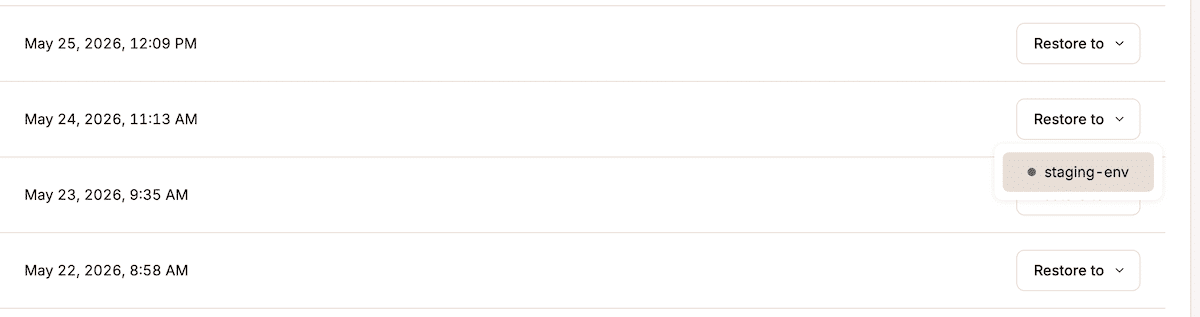
This layered approach ensures that organizations always have multiple restore points spanning various timeframes. The process of reverting to a specific backup is streamlined: users simply click the ‘Restore to’ button for a chosen backup entry and select the target environment (live or staging). Upon completion of the restore, MyKinsta intelligently generates a new system backup, capturing the site’s state just before the restore operation ran. This creates an auditable trail and another immediate recovery option.
For enterprises, building a change management process around this kind of sophisticated backup functionality dramatically reduces the impact of unforeseen issues. What might traditionally involve lengthy scheduled maintenance windows and complex formal rollbacks is condensed into a single, executable workflow within MyKinsta. This capability was instrumental for Konica Minolta, a Kinsta customer, which successfully replatformed its marketing site to WordPress on Kinsta in just three months. They identified deployment reliability as the bedrock of the project, noting, "Our biggest concern was downtime and losing performance during the migration, but Kinsta’s team handled everything smoothly with zero disruptions." This testimonial underscores the direct business impact of reliable backup and recovery systems on critical projects.
Enforcing Process and Security: Role-Based Access Controls and SAML SSO
Enterprise deployment workflows are inherently collaborative, involving a diverse array of stakeholders—developers, QA engineers, project managers, content editors, and client-side reviewers—each with distinct responsibilities and access requirements at various stages of the change process. Uncontrolled or overly broad access can introduce significant security risks and process inefficiencies, making robust user management a critical component of enterprise change management.
Kinsta’s access model and user management system are engineered to define and enforce granular roles, thereby ensuring that individuals only have access commensurate with their responsibilities. While Kinsta offers six different user roles, three are particularly relevant for enterprise change management:
- Company Owner: Full administrative control over all sites and company settings, typically reserved for top-level management.
- Company Administrator: Extensive control over all sites and most company settings, ideal for IT managers or lead developers.
- Site Developer: Specific access to develop and test changes on designated sites, often limited to staging environments and deployment actions.
MyKinsta simplifies user invitation and management through the ‘Company settings > Users’ page, allowing administrators to invite users via email and assign either company-level or site-level access. This fine-grained control prevents unauthorized deployments, ensures data integrity, and maintains the security posture of the WordPress environment.
For enterprises managing user access across numerous tools from a centralized identity provider, Kinsta provides robust support for SAML SSO (Single Sign-On). This integration works seamlessly with any Identity Provider (IdP) that utilizes the SAML standard, including Microsoft Entra ID, Okta, and Google Workspace, among others. Enabling SAML SSO is a straightforward process within MyKinsta, typically involving configuration steps within both MyKinsta and the enterprise’s IdP. This includes exchanging connection details, SSO URLs, Entity IDs, and public certificates.
Once active, SAML SSO centralizes user authentication, requiring users to authenticate through their organization’s IdP using existing company credentials. Critically, enabling mandatory SSO prevents users from bypassing the IdP with a direct login, enforcing a single, secure authentication path. This not only enhances security by consolidating identity management but also streamlines administrative overhead. When an employee leaves the organization, revoking their access in the IdP simultaneously removes their access from MyKinsta, through the same established process used for every other tool in the enterprise’s technology stack. This automation significantly reduces the risk of orphaned accounts and improves compliance.
Furthermore, Two-Factor Authentication (2FA) is mandated by default for all accounts not covered by SAML SSO, providing an essential baseline security layer. Company Owners can monitor each user’s 2FA method from the ‘Company settings > Users > 2FA’ screen, ensuring comprehensive security coverage across the platform. These integrated security and access control features are indispensable for enterprises operating under strict compliance regulations and managing large, diverse teams.
Change Management: The Cornerstone of Scalable and Secure Enterprise WordPress
In the complex landscape of enterprise digital operations, the hosting platform transcends its traditional role as mere infrastructure. It fundamentally dictates the safety and efficiency with which a WordPress environment can evolve and adapt. What truly distinguishes managed hosting providers at the enterprise tier is their capacity to empower teams to deploy WordPress updates, new features, or critical security patches with an inherent, reliable recovery path in place should any unforeseen issues arise. This capability moves beyond simply ensuring fast page loads; it underpins business continuity, brand reputation, and the ability to innovate without debilitating risk.
Kinsta’s comprehensive suite of features—including containerized staging environments, granular selective push capabilities, a multi-layered backup system with one-click restore options, and sophisticated role-based access controls complemented by SAML SSO—provides enterprise teams with the tools necessary to implement and maintain a disciplined change workflow. These integrated solutions eliminate the burden on internal teams to build and maintain these critical controls themselves, allowing them to focus on strategic development and business growth.
For organizations navigating the complexities of enterprise-scale WordPress, understanding and optimizing the change management process is not just an operational necessity, but a strategic imperative. Choosing a hosting partner that prioritizes and facilitates this disciplined approach is paramount to scaling safely and sustaining a robust, high-performing digital presence in an ever-evolving online environment. Enterprises seeking to fortify their digital resilience are encouraged to explore Kinsta’s enterprise WordPress hosting options and critically review their current change management strategies to ensure they meet the demands of modern digital operations.