The transition to a new computing environment often promises increased efficiency, faster processing speeds, and a streamlined software ecosystem free from the digital clutter of legacy applications. However, migrating to modern hardware—particularly high-performance machines like the latest iteration of the Apple MacBook—can occasionally introduce unexpected compatibility challenges. Among the most frequent issues reported by users in recent months is the persistent "This video format is not supported" error when attempting to stream content via YouTube TV. This technical barrier prevents users from accessing live broadcasts and on-demand media, effectively rendering the service inaccessible on hardware that should, theoretically, provide an optimal viewing experience.
Understanding the Mechanism: Digital Rights Management and Widevine
The "video format not supported" error is rarely a reflection of the hardware’s inability to decode video data. Instead, it is almost exclusively a manifestation of a breakdown in Digital Rights Management (DRM) handshake protocols. YouTube TV, like most premium streaming platforms, utilizes encrypted content delivery systems to prevent unauthorized recording and piracy. The primary technology facilitating this secure playback in web browsers is Google’s Widevine DRM.

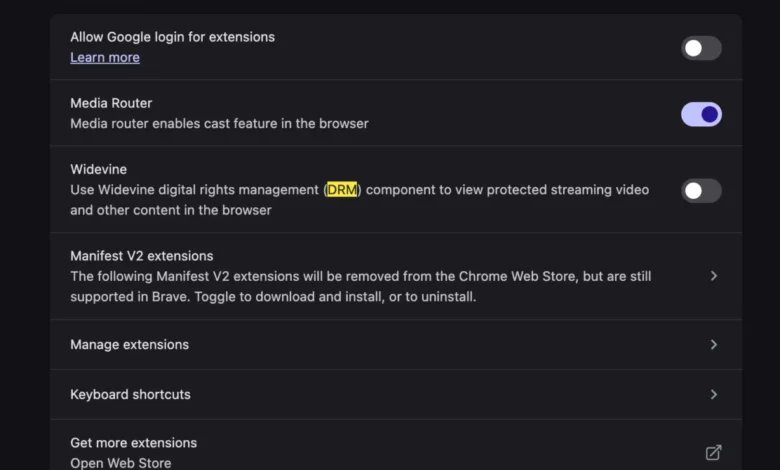
Widevine is a proprietary DRM technology that acts as a secure intermediary between the content provider and the user’s browser. When a user navigates to YouTube TV, the browser must identify itself to the streaming server, verify its capability to decrypt protected media, and confirm that it is running in a secure environment. If the Widevine component—specifically the Widevine Content Decryption Module (CDM)—is disabled, outdated, or blocked by local security settings, the browser cannot complete the handshake. Consequently, the server denies the video feed, resulting in the generic and often confusing error message encountered by the user.
A Chronology of Streaming Compatibility Issues
The rise of DRM-related errors on desktop platforms coincides with the industry-wide shift toward stricter browser security policies. Over the last three years, browser developers—including those behind Google Chrome, Microsoft Edge, and Brave—have implemented more aggressive sandboxing techniques. While these updates improve privacy, they have created a fragmented landscape for media playback.
- 2021-2022: Browser manufacturers begin prioritizing privacy by restricting third-party tracking. This led to accidental disabling of necessary media plugins, including DRM modules, as part of "hardened" privacy settings.
- 2023: YouTube TV updates its infrastructure to support higher bitrates and 4K resolution, requiring more robust DRM verification protocols. Users on Linux and certain macOS configurations began reporting an uptick in "unsupported format" errors.
- 2024-2025: As modern hardware, such as Apple Silicon (M-series) Macs, gained wider adoption, the integration between hardware-level security (Secure Enclave) and software-level DRM became more complex. Users migrating data to new machines frequently found that their previous configuration profiles carried over settings that explicitly blocked Widevine, triggering the error upon the first attempt to load the streaming service.
Technical Analysis: Why Modern Browsers Block Widevine
Modern web browsers are increasingly designed to minimize the footprint of background processes. Chrome-based browsers, which dominate the market share, include a toggle specifically for "Protected Content ID." When this setting is toggled off, or when a user employs a browser extension designed to strip tracking headers, the browser inadvertently strips the Widevine identification string.

From a data security standpoint, this is a trade-off. By allowing Widevine, the user grants the browser permission to uniquely identify the machine to ensure content integrity. When the user initiates a session, the browser sends a request to the Widevine server. If that server does not receive a valid "hardware-backed" certificate, it assumes the browser is a potential bot or a compromised environment. In the context of new hardware setups, the most common reason for the failure is that the browser has not been granted explicit permission to access "protected content" in the new OS environment, or that the migration process failed to migrate the specific Widevine plugin permissions.
Steps for Remediation and System Restoration
To restore service, users must ensure that their browser settings permit the execution of protected media components. The solution is rarely found in updating drivers or reinstalling the operating system, as the issue is purely configuration-based within the browser’s application layer.
- Accessing Browser Settings: Navigate to the browser’s settings menu (often found via the three-dot menu in the upper right corner of the interface).
- Navigating to Security and Privacy: Within the settings hierarchy, look for "Privacy and Security" or "Site Settings."
- Locating Protected Content: Search for an option labeled "Protected Content" or "Additional Content Settings."
- Verifying Widevine Integration: Ensure that the toggle for "Allow sites to play protected content" is set to "On."
- Session Reset: After modifying these settings, it is essential to clear the browser’s cache and cookies related to YouTube TV and restart the application. This forces the browser to re-negotiate the handshake with the YouTube TV servers, establishing a fresh DRM token.
Broader Implications for the Streaming Industry
The prevalence of these errors highlights a significant tension between consumer privacy expectations and the requirements of content creators. Major media conglomerates demand strict DRM compliance to protect their intellectual property, yet the complexity of these systems frequently degrades the user experience for legitimate customers.

Industry analysts note that as more services move to "High-Bandwidth Digital Content Protection" (HDCP) standards, the reliance on third-party modules like Widevine will only increase. This creates a reliance on "walled garden" browsers. For instance, streaming services often perform optimally on browsers that are fully integrated into the operating system’s native media stack—such as Safari on macOS or Edge on Windows—because these browsers are pre-provisioned with the necessary DRM certificates at the kernel level.
The frustration expressed by users encountering the "video format not supported" error is a microcosm of the "technical debt" inherent in modern streaming. As services continue to iterate on security, the burden of troubleshooting increasingly falls on the consumer.
Industry Response and Future Outlook
While Google and other browser developers have not released official statements specifically addressing the frequency of this error message, documentation updates within the Chromium project suggest that developers are working on more transparent error messaging. Future versions of browsers are expected to provide more descriptive feedback, such as "DRM module disabled" rather than the vague "format not supported," which currently misleads users into thinking their hardware or file codecs are the issue.

For the average consumer, the lesson remains: digital transitions are rarely seamless. As operating systems and browsers prioritize security, users should expect to encounter more instances where they must manually verify their permissions for media playback. By understanding the role of Widevine and the necessity of protected content settings, users can resolve these issues efficiently without the need for extensive troubleshooting or hardware repair.
Ultimately, the shift toward a more secure web is a net positive, but it requires a baseline level of digital literacy regarding how browsers interact with the content they display. The era of "installing a codec" is largely behind us, replaced by a sophisticated but often temperamental landscape of digital keys and permissions. By keeping browser settings updated and ensuring that DRM components are correctly authorized, users can maintain access to their digital libraries even when upgrading to the most modern hardware platforms.
Related posts: